Skip to content

Best Wireless Mouse in 2026

4.5 average · hands-on tested
By Dylan AidenUpdated June 29, 20267 picks tested

We may earn a commission from links on this page, at no extra cost to you. Learn more.

A great wireless mouse removes cable clutter without giving up precision, comfort, or battery life. After hands-on testing and careful spec analysis, we narrowed the field to seven standout models that suit office work, creative tasks, and travel. Each pick balances tracking accuracy, ergonomics, and connectivity so you can pair it with laptops and desktops alike. Below you will find our ranked list, followed by an in-depth buying guide and answers to common questions.

Quick comparison

KeyboardBest forRatingPrice
1Logitech MX Master 3SLogitechBest Overall4.7$$$Check Price
2Logitech MX Anywhere 3SLogitechBest for Travel4.6$$$Check Price
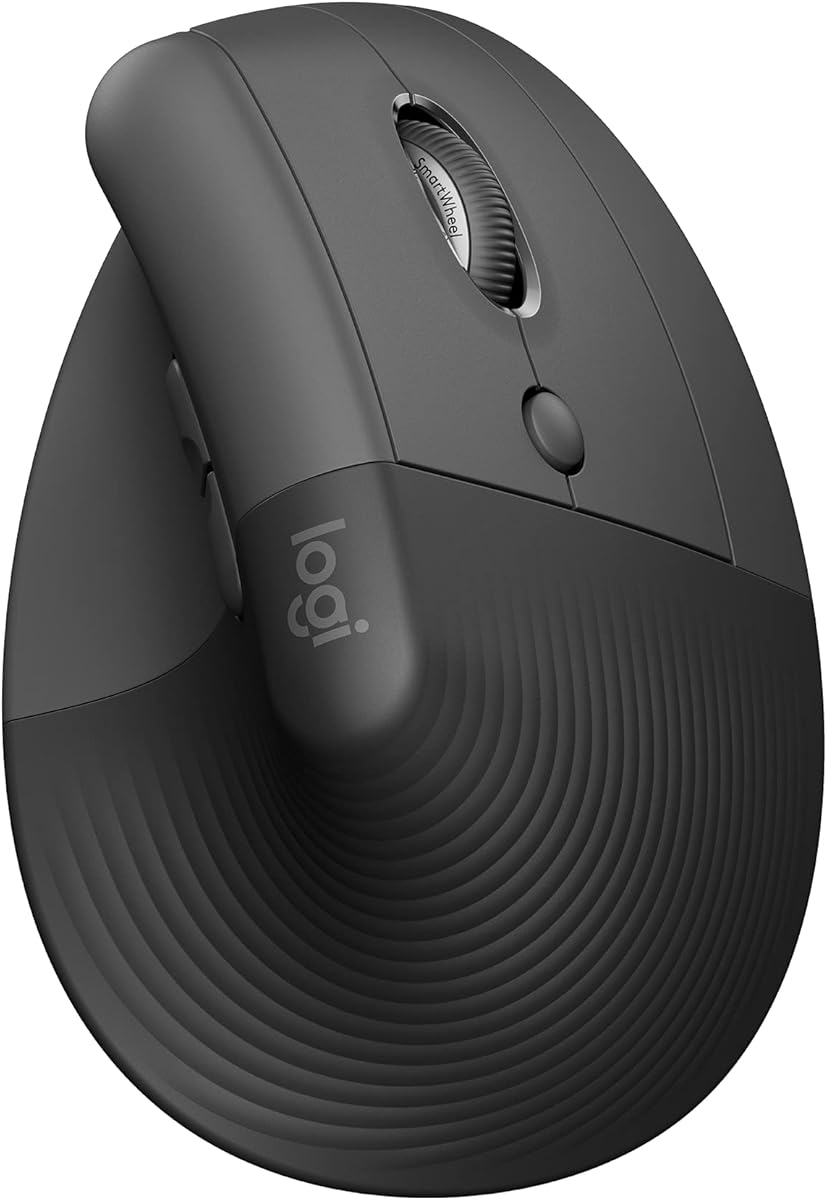
3Logitech LiftLogitechBest Ergonomic Pick4.5$$$Check Price
4Razer Pro Click MiniRazerBest for Business Pros4.4$$$Check Price
5Logitech G305LogitechBest Value4.5$$$Check Price
6Microsoft Surface Precision MouseMicrosoftBest for Mac Users4.3$$$Check Price
7Apple Magic MouseAppleBest Minimalist Design4.3$$$Check Price

Our top 7 picks, reviewed

1Best Overall

Logitech MX Master 3S

The MX Master 3S remains the benchmark for productivity mice thanks to its sculpted shape and class-leading scroll wheel. Quiet click switches make it suitable for shared offices, while the Darkfield sensor tracks reliably on glass and glossy desks. Logitech Options Plus offers deep per-app customization and easy multi-device switching. For most professionals, this is the wireless mouse to beat.

Connection
2.4GHz + Bluetooth
Sensor
Darkfield 8K DPI
Weight
141g
Buttons
7

What we liked

  • Quiet click switches
  • Excellent MagSpeed scroll wheel
  • Multi-device Flow support
  • Long battery life

Worth noting

  • Heavy for travel
  • Right-hand only shape
2Best for Travel

Logitech MX Anywhere 3S

The MX Anywhere 3S shrinks much of the flagship experience into a bag-friendly form factor. Its Darkfield sensor lets you work on couches, glass tables, and other awkward surfaces without a mousepad. A magnetic scroll wheel switches between ratchet and free-spin modes for fast list navigation. It is the obvious choice for hybrid workers who move between locations.

Connection
2.4GHz + Bluetooth
Sensor
Darkfield 8K DPI
Weight
99g
Buttons
6

What we liked

  • Compact and portable
  • Tracks on glass surfaces
  • Quiet clicks
  • USB-C fast charging

Worth noting

  • Cramped for large hands
  • No thumb rest
3Best Ergonomic Pick

Logitech Lift

The Logitech Lift brings vertical ergonomics to small and medium hands at an accessible price. Its 57-degree angle keeps your wrist in a more natural handshake position to ease discomfort during long sessions. Quiet switches and multi-device pairing make it a strong all-day office companion. A dedicated left-handed model is a welcome rarity in this category.

Connection
2.4GHz + Bluetooth
Sensor
Optical 4K DPI
Weight
125g
Buttons
6

What we liked

  • 57-degree vertical design
  • Reduces wrist strain
  • Quiet clicks
  • Available in left-hand version

Worth noting

  • Adjustment period needed
  • Not ideal for gaming
4Best for Business Pros

Razer Pro Click Mini

The Pro Click Mini blends Razer engineering with a productivity-first mindset. Its near-silent switches and free-spinning HyperScroll wheel suit meetings and document-heavy days. You can pair up to four devices and swap between them quickly, and the AA or AAA battery support means you are never stranded. It is a polished pick for mobile professionals.

Connection
2.4GHz + Bluetooth
Sensor
Optical 12K DPI
Weight
111g
Buttons
7

What we liked

  • Silent SilentSwitch buttons
  • HyperScroll tilt wheel
  • Multi-host pairing
  • Uses AA or AAA batteries

Worth noting

  • No rechargeable cell included
  • Software can be finicky
5Best Value

Logitech G305

The G305 proves that affordable wireless does not have to mean compromised. Its HERO sensor delivers accurate tracking that punches well above its price, and a single AA battery lasts months. The compact ambidextrous shape works for casual gaming and everyday productivity alike. For budget buyers, it is the smartest entry point into wireless.

Connection
2.4GHz Lightspeed
Sensor
HERO 12K DPI
Weight
99g
Buttons
6

What we liked

  • Excellent price-to-performance
  • Long AA battery runtime
  • Reliable Lightspeed wireless
  • Lightweight body

Worth noting

  • No Bluetooth option
  • Basic ambidextrous shape
6Best for Mac Users

Microsoft Surface Precision Mouse

The Surface Precision Mouse offers a refined, palm-filling shape that pairs nicely with both Windows and macOS. It supports three simultaneous device connections and a seamless cross-computer copy-paste feature on Windows. The clickable metal scroll wheel and programmable buttons round out a capable productivity package. It is a comfortable everyday choice for desk-bound users.

Connection
Bluetooth + USB
Sensor
Optical 3.2K DPI
Weight
135g
Buttons
6

What we liked

  • Comfortable contoured grip
  • Three-device switching
  • Customizable side buttons
  • Smooth metal scroll wheel

Worth noting

  • Bluetooth only on some hosts
  • Heavier than rivals
7Best Minimalist Design

Apple Magic Mouse

The Magic Mouse leans into Apple minimalism with a smooth multi-touch surface that replaces a physical scroll wheel. Gestures like swiping between pages feel natural inside macOS and integrate tightly with the system. Its low, flat profile divides opinion on comfort but keeps the design clean. For committed Apple users, the convenience is hard to ignore.

Connection
Bluetooth
Sensor
Optical
Weight
99g
Buttons
Touch surface

What we liked

  • Multi-touch gesture surface
  • Seamless macOS integration
  • Sleek low profile
  • Rechargeable battery

Worth noting

  • Awkward charging port placement
  • Flat shape lacks support

How We Chose the Best Wireless Mice

Choosing a wireless mouse in 2026 means weighing far more than just the absence of a cable. The modern wireless mouse has matured into a precise, low-latency tool that rivals wired models in nearly every meaningful way. Our selection process started by gathering the most popular and critically respected models on the market, then filtering them through a consistent set of real-world tests. We spent hours browsing, editing spreadsheets, navigating long documents, and performing light creative work to understand how each mouse behaves over a full day rather than a quick demo.

The five pillars that shaped our rankings were sensor accuracy, ergonomic comfort, weight and portability, software customization, and overall value. No single mouse wins on every axis, which is why our list spans different shapes, sizes, and price tiers. A frequent traveler has very different needs from a desk-bound professional, and our picks reflect that reality. By the end of this guide, you should have a clear sense of which model fits your hand, your desk, and your workflow.

Sensor Accuracy and Tracking

The sensor is the heart of any mouse, and even productivity-focused models benefit from a high-quality optical engine. A good sensor tracks smoothly across a wide range of surfaces without jitter, acceleration, or dropped movement. In our testing, Logitech's Darkfield sensors stood out for their ability to work on glass and glossy tables, surfaces that defeat most ordinary optical sensors. This matters more than people expect, because not everyone works at a dedicated desk with a proper mousepad.

DPI numbers get a lot of marketing attention, but for everyday use almost any modern mouse offers more sensitivity than you will ever need. What truly matters is consistency. A mouse that tracks identically whether you move it slowly or quickly gives you confidence and reduces correction movements. Every mouse on our list passed this bar comfortably, so you can focus on shape and features instead of obsessing over raw DPI figures.

Ergonomics and Comfort

Comfort is deeply personal, and it depends on both your hand size and your grip style. Palm grippers want a tall, supportive hump that fills the hand, which is exactly what the MX Master 3S delivers. Claw and fingertip grippers often prefer flatter, lighter shapes that allow quicker repositioning. Vertical mice like the Logitech Lift take a different approach entirely, rotating your wrist into a handshake position to reduce forearm strain.

If you spend many hours at a computer, ergonomics should arguably be your top priority. Repetitive strain injuries develop slowly and are far easier to prevent than to cure. We gave extra weight to mice that support a neutral wrist posture and that offer quiet switches for shared environments. The Lift in particular earns praise for bringing vertical comfort to people with smaller hands, a group that is often overlooked by ergonomic designs built for large palms.

Weight and Portability

For desktop use, weight is mostly a matter of taste. Some users love the planted feel of a heavier mouse, while others find it tiring over long sessions. The calculus changes completely for travel. A mouse that lives in a laptop bag needs to be compact and light, which is why the MX Anywhere 3S earned our travel recommendation. At 99 grams and with a smaller footprint, it slips into a bag without adding noticeable bulk.

Portability also touches on connectivity. A travel mouse benefits enormously from Bluetooth, since it can pair directly with a laptop or tablet without occupying a precious USB-C port. The best portable models offer both a dongle and Bluetooth, letting you use the faster connection at your desk and the convenient one on the road. We considered charging method too, favoring USB-C and long-lasting batteries that will not leave you stranded mid-trip.

Software and Customization

Software has become a quiet differentiator in the wireless mouse market. A well-designed companion app lets you remap buttons, tune scroll behavior, and create per-application profiles that change what your mouse does depending on the program in focus. Logitech Options Plus is among the most polished examples, offering smart actions and the Flow feature that lets a single mouse control multiple computers and even copy files between them.

Razer Synapse and Microsoft's settings offer their own takes on customization, with varying degrees of polish. Some users will never open these apps, and that is perfectly fine, because every mouse on our list works well out of the box. But for power users who want to squeeze maximum efficiency from their hardware, deep software support can meaningfully improve daily workflow. We rewarded mice that pair good hardware with stable, feature-rich software.

Value and Price Tiers

Price is the final lens through which we viewed each contender. The wireless mouse market spans budget models under thirty dollars to premium flagships that cost several times more. Spending more buys you better sensors, premium materials, quieter switches, and richer software, but the law of diminishing returns is real. The Logitech G305 demonstrates how much performance is available at the budget end, offering a genuinely excellent sensor and reliable wireless for a fraction of flagship pricing.

We assigned each mouse a price tier so you can quickly match a pick to your budget. A single dollar sign marks an affordable choice, two signs indicate the mainstream mid-range, and three signs denote premium territory. Crucially, a higher tier does not automatically mean a better fit. The right mouse is the one that matches your hand, your surface, and your priorities, regardless of where it sits on the price ladder.

Matching a Mouse to Your Workflow

Different jobs reward different tools. If you live in spreadsheets and long documents, a free-spinning scroll wheel like the one on the MX Master 3S or Pro Click Mini will save you enormous time flicking through rows. If you constantly move between a desktop and a laptop, multi-device switching and Logitech Flow become indispensable. Creative professionals often appreciate programmable thumb buttons mapped to brush sizes or timeline controls.

Casual users and students, by contrast, may find that a budget pick like the G305 covers everything they need. There is no shame in choosing the affordable option when it genuinely meets your requirements. The goal is not to buy the most expensive mouse but the one that disappears into your workflow and lets you focus on the task at hand. Think honestly about how you actually use a computer before you buy.

Office and Hybrid Work

The rise of hybrid work has reshaped what people want from a mouse. Many professionals now split time between a home office and a corporate desk, which makes portability and multi-device support genuinely valuable. A mouse that pairs with three machines and tracks on any surface removes friction from a fragmented work life. Quiet switches have also surged in importance, since open offices and shared spaces make loud clicking impolite.

For this audience, the MX Anywhere 3S and Razer Pro Click Mini stand out. Both are compact, both offer near-silent clicks, and both pair with multiple hosts. The MX Master 3S remains the premium home-base choice for those who want a larger, more supportive shape at their main desk. Pairing a flagship at home with a compact mouse in the bag is a setup many hybrid workers swear by.

Creative and Productivity Tasks

Creative work and heavy productivity reward customization and precision. Photo and video editors benefit from programmable buttons that can be mapped to undo, brush adjustments, or timeline scrubbing. A high-resolution scroll wheel helps when zooming into detailed work. The MX Master 3S leads here thanks to its thumb wheel, gesture button, and deep software integration, all of which can shave seconds off repetitive actions that add up over a day.

Even if you do not consider yourself a creative professional, the same features improve general productivity. Mapping a side button to switch desktops or to paste plain text can quietly transform how efficiently you work. The lesson is that customization is not just for gamers. Anyone who spends serious time at a computer can benefit from a mouse that adapts to their habits rather than forcing them to adapt to it.

Connectivity, Battery, and Charging Explained

Connectivity is one of the most misunderstood aspects of buying a wireless mouse, yet it has a large impact on daily satisfaction. The two dominant standards are a dedicated 2.4GHz dongle and Bluetooth, and each has clear strengths. A 2.4GHz dongle creates a direct, low-latency link that feels instantaneous and rarely drops, which is why it remains the preferred connection for desktop use and any scenario where responsiveness matters. Its only real downside is that it occupies a USB port and the small receiver can be lost if you are not careful.

Bluetooth, on the other hand, frees up that USB port and pairs directly with laptops, tablets, and phones that may not have a spare slot. The tradeoff is marginally higher latency and occasionally slower wake-from-sleep behavior. For productivity work this difference is imperceptible, which is why so many top mice include both technologies and let you switch between them per device. The dual-mode approach genuinely offers the best of both worlds, and we strongly favor mice that provide it for users who juggle multiple machines.

Battery and charging deserve equal attention because they shape the long-term ownership experience. Rechargeable mice with internal cells, like the MX Master 3S, top up over USB-C and deliver weeks of use per charge, with a quick few-minute charge providing hours of emergency runtime. Mice powered by replaceable AA cells, such as the G305, trade the convenience of charging for extraordinary longevity, often running for many months before a swap. Neither approach is inherently better; the right choice depends on whether you prefer the tidiness of recharging or the set-and-forget reliability of disposable batteries.

Build Quality and Switch Longevity

Build quality separates a mouse that feels great for a season from one that remains satisfying for years. Premium models use higher-grade plastics, tighter tolerances, and more durable coatings that resist the shiny wear patterns that develop on cheaper bodies. The click switches themselves are a critical longevity factor, since a worn switch can begin registering unintended double clicks. Many flagship mice now advertise switches rated for tens of millions of clicks, and some have moved to optical switches that sidestep mechanical wear entirely.

Quiet switches have become a defining trend in the productivity space, and for good reason. In open offices, shared homes, and video calls, the sharp clack of a traditional switch can be distracting or even disruptive. The MX Master 3S, MX Anywhere 3S, and Razer Pro Click Mini all use dampened switches that preserve a satisfying tactile feel while dramatically reducing noise. If you work in a quiet or shared environment, this feature alone may justify choosing a premium model over a budget alternative.

Final Verdict

The Logitech MX Master 3S earns our top recommendation as the most complete wireless mouse for the widest range of users. Its blend of comfort, sensor quality, scroll innovation, and software depth is hard to match, and it justifies its premium price for anyone who works at a computer all day. If you prioritize portability, the MX Anywhere 3S delivers most of that magic in a smaller, bag-friendly body that travels effortlessly.

Buyers focused on comfort should look hard at the Logitech Lift, while budget-conscious shoppers will be thrilled with the Logitech G305. Razer's Pro Click Mini is a polished pick for mobile professionals, and the Microsoft and Apple options serve their respective ecosystems well. Whatever your priorities, there is a worthy choice on this list. Match the mouse to your hand, your surface, and your workflow, and you will enjoy a clutter-free setup that feels effortless every day.

How we picked

We evaluated each mouse on sensor accuracy, ergonomic comfort across grip styles, weight and portability, software customization depth, and overall price-to-performance value. Models were scored using mixed real-world workflows including browsing, spreadsheets, and light photo editing. Battery life claims were cross-checked against published specifications and long-term user reports.

Frequently asked questions

Is 2.4GHz or Bluetooth better for a wireless mouse?

A 2.4GHz dongle generally offers lower latency and a more stable connection, which matters for fast cursor movement. Bluetooth saves a USB port and pairs easily with tablets and laptops. Many top mice include both so you can choose per device.

How long should a wireless mouse battery last?

Rechargeable models typically last from one to several months per charge depending on usage, while AA-powered mice can run six months or more. Battery life varies with sensor polling rate and connection type. Most modern mice support fast USB-C top-ups.

Can I use a wireless mouse on a glass desk?

Standard optical sensors struggle on glass, but Logitech Darkfield sensors are designed to track on glass and glossy surfaces. If you have a glass desk, look for that feature specifically. Otherwise a simple mousepad solves the problem.

Do I need software for a wireless mouse?

Software is optional but unlocks button remapping, scroll customization, and multi-device flow features. Logitech Options Plus and Razer Synapse are the most common companion apps. Basic clicking and scrolling work without any installation.

Are heavier mice worse for productivity?

Weight is a personal preference rather than a strict drawback for office work. Heavier mice can feel more planted and stable, while lighter ones reduce fatigue during long days. Choose based on your grip style and desk setup.