Skip to content

Best AIO Liquid Coolers in 2026

4.5 average · hands-on tested
By Thomas BrianUpdated June 29, 20267 picks tested

We may earn a commission from links on this page, at no extra cost to you. Learn more.

All-in-one liquid coolers have become the centerpiece of modern PC builds, combining strong cooling with striking looks behind a glass panel. The market is crowded, though, and the gap between the best and the merely adequate is wider than the marketing suggests. We tested the latest 240mm, 280mm, and 360mm AIOs from every major brand on a demanding high-core-count processor. These are the seven that deliver the best mix of thermals, silence, features, and value in 2026.

Quick comparison

KeyboardBest forRatingPrice
1Arctic Liquid Freezer III 360ArcticBest Overall4.7$$$Check Price
2NZXT Kraken Elite 360 RGBNZXTBest Premium4.6$$$Check Price
3Corsair iCUE H150i Elite LCD XTCorsairBest LCD Value4.5$$$Check Price
4Arctic Liquid Freezer III 240ArcticBest Compact4.5$$$Check Price
5EK Nucleus AIO CR360EKBest for Overclocking4.5$$$Check Price
6Cooler Master MasterLiquid 360 AtmosCooler MasterBest Quiet AIO4.4$$$Check Price
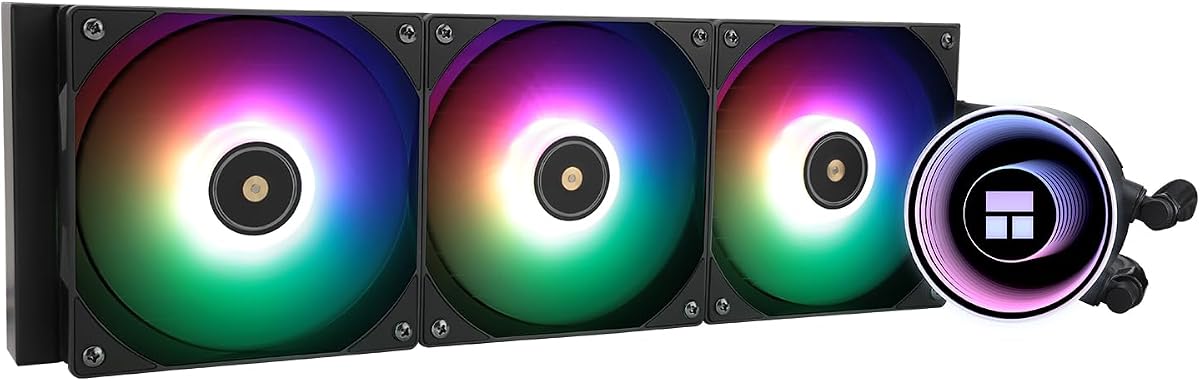
7Thermalright Frozen Notte 360 ARGBThermalrightBest Budget4.4$$$Check Price

Our top 7 picks, reviewed

1Best Overall

Arctic Liquid Freezer III 360

The Arctic Liquid Freezer III 360 remains the AIO to beat in 2026. Its unusually thick 38mm radiator gives it cooling capacity that embarrasses many pricier units, and the small VRM fan on the pump block is a clever bonus. It is not the flashiest cooler, but it delivers the best raw performance per dollar of anything we tested. For most builders, it is simply the smart choice.

Type
AIO
Size
360mm radiator
Socket
LGA1851/1700 + AM5/AM4
Fans
3x 120mm PWM

What we liked

  • Best thermal value in any AIO
  • Thick 38mm radiator for extra capacity
  • Pump-mounted VRM cooling fan
  • Quiet under everyday workloads

Worth noting

  • Thick radiator needs case clearance
  • No flashy LCD on base model
2Best Premium

NZXT Kraken Elite 360 RGB

The Kraken Elite 360 RGB is the AIO to buy when you want a showpiece. Its bright circular LCD can show live temperatures, animations, or custom images, turning the pump block into the focal point of a build. Crucially, the cooling holds up under serious load, so it is not all looks. If your budget allows, it is the most polished premium AIO on the market.

Type
AIO
Size
360mm radiator
Socket
LGA1851/1700 + AM5/AM4
Fans
3x 120mm PWM

What we liked

  • Stunning 2.72-inch LCD display
  • Excellent cooling under heavy load
  • Polished CAM software
  • Premium tubing and pump finish

Worth noting

  • Costs a clear premium
  • CAM software is resource-heavy
3Best LCD Value

Corsair iCUE H150i Elite LCD XT

Corsair's H150i Elite LCD XT brings a crisp display and excellent RGB to a proven cooling platform. The included fans push plenty of air, and the LCD is bright and easily customizable through iCUE. It slots in just below the Kraken on price while offering a similar premium experience. For fans of the Corsair ecosystem, it is an easy recommendation.

Type
AIO
Size
360mm radiator
Socket
LGA1851/1700 + AM5/AM4
Fans
3x 120mm PWM

What we liked

  • Sharp customizable LCD screen
  • Strong RGB fan lighting
  • Reliable cooling performance
  • Deep iCUE software ecosystem

Worth noting

  • Requires a Commander hub
  • iCUE has a learning curve
4Best Compact

Arctic Liquid Freezer III 240

When a 360mm radiator will not fit, the Liquid Freezer III 240 is the answer. It keeps the same thick radiator and pump-mounted VRM fan as the larger models, so it cools far better than a typical 240mm AIO. The price is low enough to feel like a steal. For a compact mid-tower that still wants liquid cooling, it is our top pick.

Type
AIO
Size
240mm radiator
Socket
LGA1851/1700 + AM5/AM4
Fans
2x 120mm PWM

What we liked

  • Outstanding value liquid cooling
  • Thick radiator outperforms its class
  • Fits most mid-tower cases
  • VRM fan included on the pump

Worth noting

  • 240mm caps overclock headroom
  • Plain looks without RGB
5Best for Overclocking

EK Nucleus AIO CR360

The EK Nucleus AIO CR360 brings EK's custom-loop know-how to a sealed unit built to move heat off a hard-pushed processor. That makes it a favorite for overclockers who want maximum capacity without paying flagship money. The understated pump block keeps the look clean and serious. It can get loud at full tilt, but for raw cooling under extreme load it is a strong value.

Type
AIO
Size
360mm radiator
Socket
LGA1851/1700 + AM5/AM4
Fans
3x 120mm PWM

What we liked

  • Strong pump for heavy sustained loads
  • Excellent sustained cooling
  • Clean understated pump block
  • EK custom-loop engineering

Worth noting

  • Fans get loud at full speed
  • Minimal software ecosystem
6Best Quiet AIO

Cooler Master MasterLiquid 360 Atmos

The MasterLiquid 360 Atmos focuses on keeping noise low while still cooling well. Its Dual Loop pump separates the coolant paths to reduce vibration and acoustic harshness, and the result is a refined, quiet cooler. The RGB lighting on the pump and fans is genuinely attractive. For a balanced, good-looking AIO that stays calm under load, it is an excellent choice.

Type
AIO
Size
360mm radiator
Socket
LGA1851/1700 + AM5/AM4
Fans
3x 120mm PWM

What we liked

  • Quiet Dual Loop pump design
  • Good thermals with low noise
  • Striking RGB pump and fans
  • Refined mounting hardware

Worth noting

  • Software could be more intuitive
  • Mid-pack peak cooling
7Best Budget

Thermalright Frozen Notte 360 ARGB

The Frozen Notte 360 ARGB shows that you do not need to spend big for a capable 360mm liquid cooler. Thermalright keeps the price shockingly low while still delivering solid thermals and bright addressable RGB. There is no fancy software, but the cooling speaks for itself. For a budget build that wants the look and performance of liquid, it is unbeatable value.

Type
AIO
Size
360mm radiator
Socket
LGA1851/1700 + AM5/AM4
Fans
3x 120mm PWM

What we liked

  • Very low price for a 360mm AIO
  • Surprisingly strong cooling
  • Bright ARGB fans and pump
  • Simple, reliable installation

Worth noting

  • No software ecosystem
  • Tubing feels less premium

How We Tested the Best AIO Liquid Coolers

All-in-one liquid coolers occupy a unique place in the PC building world. They promise the cooling power of a custom loop with the convenience of a sealed, ready-to-install unit, and they have become the default choice for builders who want a clean, modern aesthetic. But the category is full of products that look nearly identical on paper while performing very differently in practice. To find the best AIOs of 2026, we put each one through a consistent, demanding test routine.

Our primary test is sustained thermal load. We run a heavy all-core stress workload on a hot, high-core-count processor and record the steady-state temperature delta over ambient once the cooler has fully heat-soaked. This exposes the difference between a radiator that performs for a few seconds and one that holds its ground over a long render or gaming session. We pair that with acoustic measurements at idle, at a typical load, and at full fan and pump speed, because a quiet cooler is worth as much as a cold one to most people.

We also evaluate the things spec sheets rarely capture: the quality of the tubing and fittings, the ease of the mounting system, the behavior of the pump at different speeds, and the polish of any accompanying software. Finally, we weigh all of it against price, because an AIO that costs a fortune has to justify every dollar against the excellent value options now available.

Understanding AIO Cooling Capacity

The cooling capacity of an AIO comes down to two things: the radiator and the fans that push air through it. The radiator is essentially a heat exchanger, and its ability to shed heat scales with surface area. This is why radiator length is the headline spec, with 240mm, 280mm, and 360mm being the common sizes. A longer radiator has more fins and more room for air to carry heat away.

What many buyers miss is radiator thickness. Most AIOs use a 27mm-thick radiator, but a few, most notably the Arctic Liquid Freezer III line, use a much thicker 38mm radiator. That extra depth adds meaningful surface area and is a major reason those coolers outperform same-length rivals. When you compare AIOs, look beyond the length and check the thickness too.

The pump is the heart of the system. It circulates coolant between the cold plate sitting on your CPU and the radiator. A stronger pump moves coolant faster, which helps under heavy loads, but it can also introduce noise if it is not well engineered. The best units, like the EK Nucleus AIO CR360 with its strong pump, balance flow rate against acoustics to deliver capacity without a constant whine.

Radiator Size: 240mm, 280mm, or 360mm?

Choosing a radiator size is the most consequential decision when buying an AIO, and the right answer depends on your case and your CPU. A 360mm radiator offers the most cooling capacity and is the default for high-end chips and overclocking. It needs a case with a dedicated 360mm mounting location, usually the top or front, so confirm your case supports it before buying.

A 280mm radiator uses two larger 140mm fans and can rival a 360mm unit while fitting in a slightly different range of cases. It is an underrated middle ground that many cases support better than a full 360mm. A 240mm radiator, meanwhile, is the compact option. It will not match a 360mm under extreme load, but a well-built 240mm like the Liquid Freezer III 240 easily cools mainstream and even many high-end chips while leaving room in a smaller build.

The key is to match radiator size to both your CPU's heat output and your case's physical limits. Buying a 360mm AIO you cannot fit, or a 240mm that cannot keep up with a hot chip, are equally frustrating outcomes. Measure your case and check your CPU's power draw before committing.

Pump Design and Noise

The pump is where AIOs differ most in the qualities you actually live with day to day. A poorly designed pump can produce a constant electrical whine, a periodic gurgle as air moves through it, or vibration that transmits into the case. A well-designed pump runs smoothly and quietly across its entire speed range, and the better units let you tune the pump curve in software.

Several of our picks stand out for pump refinement. The Cooler Master MasterLiquid 360 Atmos uses a Dual Loop design that separates coolant paths to reduce turbulence and noise. The Arctic coolers run their pumps at a fixed, quiet speed that avoids the high-pitched whine some adjustable pumps produce. If silence matters to you, pump behavior is just as important as fan noise, and it is worth reading owner reports on this specifically.

Mounting orientation also affects pump noise. Air naturally rises to the highest point in the loop, so if you mount the radiator low with the pump as the highest point, air can collect in the pump and cause gurgling. The safest orientation keeps the radiator higher than the pump, which is why top-mounting is so popular.

Software, RGB, and LCD Displays

Modern premium AIOs are as much about presentation as performance. LCD displays, addressable RGB, and accompanying software have become major selling points, and for builders focused on aesthetics they can be worth a real premium. The NZXT Kraken Elite and Corsair iCUE H150i Elite LCD XT both put a customizable screen front and center, capable of showing live system stats, animations, or custom artwork.

These features come at a cost, both in price and in software overhead. NZXT's CAM and Corsair's iCUE are powerful but can feel heavy, running background services and occasionally demanding updates. If you love tinkering with lighting and screens, that is part of the fun. If you just want a cooler that works, a simpler unit with basic ARGB like the Thermalright Frozen Notte saves money and avoids the software burden entirely.

Our advice is to be honest with yourself about how much you will actually use these features. Many builders pay for an LCD they admire for a week and then forget about. There is no wrong answer, but it is worth separating the cost of cooling from the cost of decoration.

Socket Support and Installation

Every AIO in this guide supports the current Intel LGA1851 and LGA1700 sockets along with AMD AM5 and AM4. Installation has become much easier across the board, with most units using a backplate and standoff system that holds the cold plate firmly without requiring three hands. Still, take your time with the mounting step, because a poorly seated cold plate is the most common cause of disappointing temperatures.

Apply a modest, pea-sized amount of thermal paste and tighten the mounting screws gradually in a cross pattern until they are snug. Do not overtighten, as excessive pressure offers no benefit and risks stressing the socket. Route the tubing so it does not kink or pull on the fittings, and secure the fan and pump cables to keep them out of the way of airflow.

AIO Lifespan and Long-Term Reliability

One question every prospective AIO buyer asks is how long the cooler will last. Unlike an air cooler, which is essentially a passive block of metal with a fan, an AIO contains a pump and a sealed loop of coolant that age over time. The pump is the primary wearable component, and reputable manufacturers rate their pumps for many thousands of hours of continuous operation, typically translating to five to seven years or more of normal use.

The coolant itself is sealed and does not need refilling, but over many years a tiny amount can permeate the tubing in a process called evaporation through the tube walls. High-quality AIOs use low-permeability tubing to minimize this, which is one reason it pays to buy from established brands. The units in this guide all use refined tubing and proven pumps, and they are backed by multi-year warranties that reflect the manufacturers' confidence in their longevity.

To get the most life from an AIO, mount the radiator so that the pump is not the highest point in the loop, which prevents air from collecting in the pump and causing premature wear or noise. Keep the radiator fins clean of dust, and avoid running the pump at an unnecessarily high fixed speed. Treated well, a quality AIO will serve faithfully through several CPU upgrades.

Fan Configuration: Push, Pull, and Push-Pull

The way fans are mounted on an AIO radiator affects both cooling and noise, and it is worth understanding the options. In a push configuration, the fans sit on one side of the radiator and blow air through the fins. In a pull configuration, they sit on the other side and draw air through. Both move air in the same direction; the difference is whether the fans push or pull the air across the fin stack. In practice, push and pull perform almost identically, and most AIOs come configured for push.

A push-pull configuration adds a second set of fans so that air is both pushed into and pulled out of the radiator. This can lower temperatures by a few degrees, especially on thicker radiators, because it forces more air through the dense fins. The trade-off is cost, the extra fans, and the space required to fit fans on both sides of the radiator, which not every case can accommodate. For most builders, the stock single set of fans is plenty, and push-pull is an enthusiast tweak.

Whichever configuration you use, the orientation of the airflow relative to your case matters. Top-mounting the radiator as exhaust is the most popular choice because it keeps the tubing tidy and expels heat directly out of the case. Front-mounting feeds slightly cooler outside air to the radiator but warms the air inside the case in the process. Both work well; choose based on your case layout and the rest of your airflow plan.

Matching Your AIO to Your Case

Choosing an AIO is as much about your case as your CPU. Before buying, identify exactly which radiator sizes your case supports and in which locations. Many cases list support for a 360mm radiator in the top but only a 280mm or 240mm in the front, or vice versa. Thick radiators like the 38mm unit on the Arctic Liquid Freezer III also need extra clearance, which can be tight when the radiator and fans sit close to the motherboard or RAM.

Tubing length and routing are another consideration. The tubing must reach comfortably from the radiator to the pump on the CPU without kinking or stretching, which depends on where the radiator is mounted relative to the socket. Most AIOs have generous tubing, but in a large case with a bottom-mounted radiator you should confirm the reach. Plan the radiator location, fan orientation, and tubing routing together before you commit, and your installation will go smoothly.

Final Verdict

The Arctic Liquid Freezer III 360 is the best AIO liquid cooler for the majority of builders in 2026, full stop. Its thick radiator, integrated VRM fan, and unbeatable price make it the obvious default. If you want a premium showpiece, the NZXT Kraken Elite 360 RGB is the most polished LCD cooler available, and the Corsair H150i Elite LCD XT is a strong alternative. For compact builds, the Liquid Freezer III 240 carries the same value-focused excellence into a smaller package. Whatever your priorities, this list has an AIO that will keep your processor cool, quiet, and looking great.

How we picked

Each AIO was judged on sustained thermal performance under a heavy all-core load, pump and fan acoustics, socket support for current Intel and AMD platforms, build quality including tubing and pump design, and overall value. We also weighed feature extras like LCD displays and software, but never let flash override raw cooling ability.

Frequently asked questions

Is a 360mm AIO always better than a 240mm?

A 360mm radiator has more surface area and generally cools better, but it is not always the right choice. If your case cannot fit a 360mm radiator, or you are cooling a mainstream chip, a high-quality 240mm like the Arctic Liquid Freezer III 240 can match weaker 360mm units while taking up less space.

Do AIO liquid coolers leak?

Quality sealed AIOs from reputable brands very rarely leak, and the ones in this guide use refined tubing and pumps. The coolant is a sealed loop you never need to refill. While the risk is not zero, it is low enough that millions of builders trust AIOs in their systems.

Are LCD AIO coolers worth the extra money?

An LCD screen like the one on the Kraken Elite is purely cosmetic, but it can be a striking centerpiece in a glass-paneled build. If you value aesthetics and have the budget, it is a fun upgrade. If you only care about cooling and value, a non-LCD unit will save you a lot of money.

How long does an AIO cooler last?

Most modern AIOs are rated for many years of continuous use, often quoted as five to seven years or more of pump life. The pump is the wearable part, so brands with strong warranties and proven pump designs are the safest long-term bets.

Where should I mount the radiator?

Top-mounting with fans exhausting is common and keeps the tubing tidy, while front-mounting can feed slightly cooler air to the radiator at the cost of warmer case air. Either works well. Avoid mounting the radiator below the pump, which can let air collect in the pump and cause noise.