Best Wireless Gaming Mouse in 2026
We may earn a commission from links on this page, at no extra cost to you. Learn more.
Wireless gaming mice have eliminated the latency penalty that once held them back, and the best models now outperform their wired rivals. We tested the leading competitive and all-purpose mice to find the ones that combine flawless sensors, featherweight builds, and rock-solid wireless connections. Whether you chase headshots in shooters or grind through long MMO sessions, there is a pick here built for your hands and your genre. Below are our seven favorites, followed by a detailed buying guide and FAQ.
Quick comparison
| Keyboard | Best for | Rating | Price | |
|---|---|---|---|---|
| 1Logitech G Pro X Superlight 2Logitech | Best Overall | 4.8 | $$$ | Check Price |
| 2Razer Viper V3 ProRazer | Best for Esports | 4.8 | $$$ | Check Price |
| 3Razer DeathAdder V3 ProRazer | Best Ergonomic Gaming | 4.7 | $$$ | Check Price |
| 4Razer Basilisk V3 ProRazer | Best for MMO and MOBA | 4.6 | $$$ | Check Price |
| 5Glorious Model O 2Glorious | Best Lightweight Honeycomb | 4.5 | $$$ | Check Price |
| 6Pulsar X2V2Pulsar | Best Slim Lightweight | 4.6 | $$$ | Check Price |
| 7SteelSeries Aerox 5 WirelessSteelSeries | Best Lightweight Value | 4.4 | $$$ | Check Price |
Our top 7 picks, reviewed
Logitech G Pro X Superlight 2
The G Pro X Superlight 2 is the esports standard for a reason, pairing a 60-gram body with Logitech's top-tier HERO 2 sensor. Its simple, symmetrical shape suits a wide range of grips and the Lightspeed connection is essentially flawless. New optical hybrid switches add durability without changing the crisp click feel. For competitive players who want a proven, no-compromise tool, this is the one to beat.
- Connection
- Lightspeed 2.4GHz
- Sensor
- HERO 2 32K DPI
- Weight
- 60g
- Buttons
- 5
What we liked
- Featherweight 60g build
- Flawless HERO 2 sensor
- Optical hybrid switches
- Long battery life
Worth noting
- Premium price
- Minimal button count
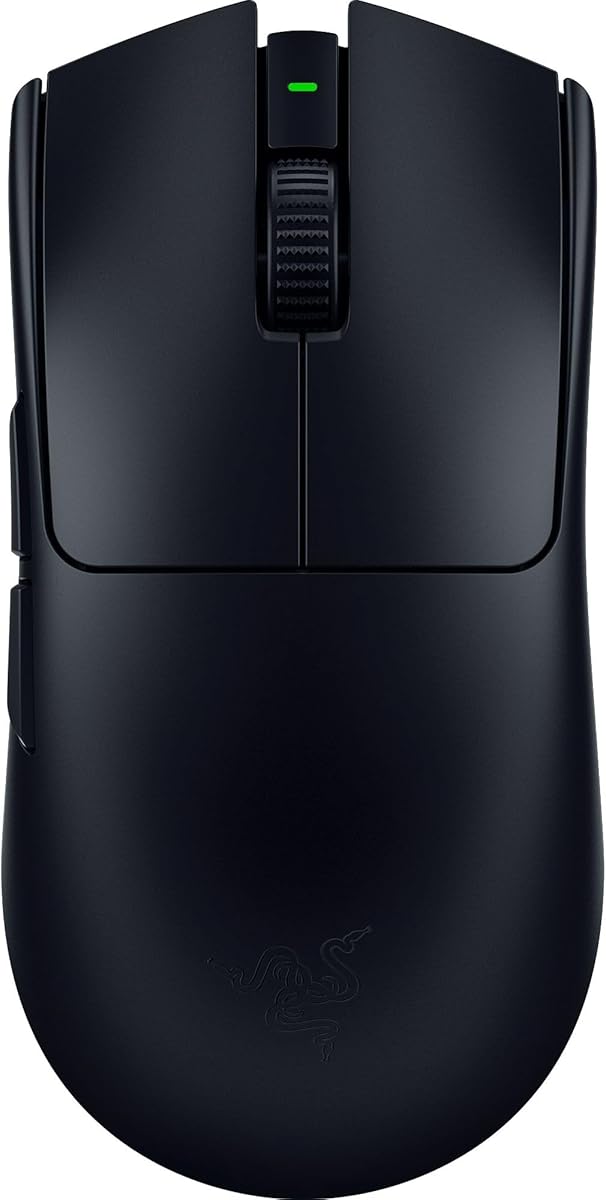
Razer Viper V3 Pro
The Viper V3 Pro is a pure competitive weapon, trimmed to 54 grams with a refined symmetrical shape. Its Focus Pro sensor and optional 8KHz polling deliver the kind of responsiveness pro players crave. Razer's optical switches feel snappy and resist double-click failures over time. If you play fast shooters and want every advantage, this is among the finest mice ever made.
- Connection
- HyperSpeed 8KHz
- Sensor
- Focus Pro 35K
- Weight
- 54g
- Buttons
- 5
What we liked
- Ultra-light 54g chassis
- 8KHz polling support
- Excellent Focus Pro sensor
- Crisp optical switches
Worth noting
- 8KHz needs separate dongle
- Bare-bones shape for some
Razer DeathAdder V3 Pro
The DeathAdder V3 Pro modernizes a legendary ergonomic shape and slims it to just 63 grams. Its tall right-hand contour fills the palm and supports long sessions without fatigue. The Focus Pro sensor tracks perfectly and the HyperSpeed wireless is dependable in competition. Palm grippers who found symmetrical mice uncomfortable will feel right at home here.
- Connection
- HyperSpeed 2.4GHz
- Sensor
- Focus Pro 30K
- Weight
- 63g
- Buttons
- 5
What we liked
- Iconic ergonomic shape
- Lightweight for its size
- Top-tier Focus Pro sensor
- Long battery runtime
Worth noting
- Right-hand only
- 8KHz dongle sold separately
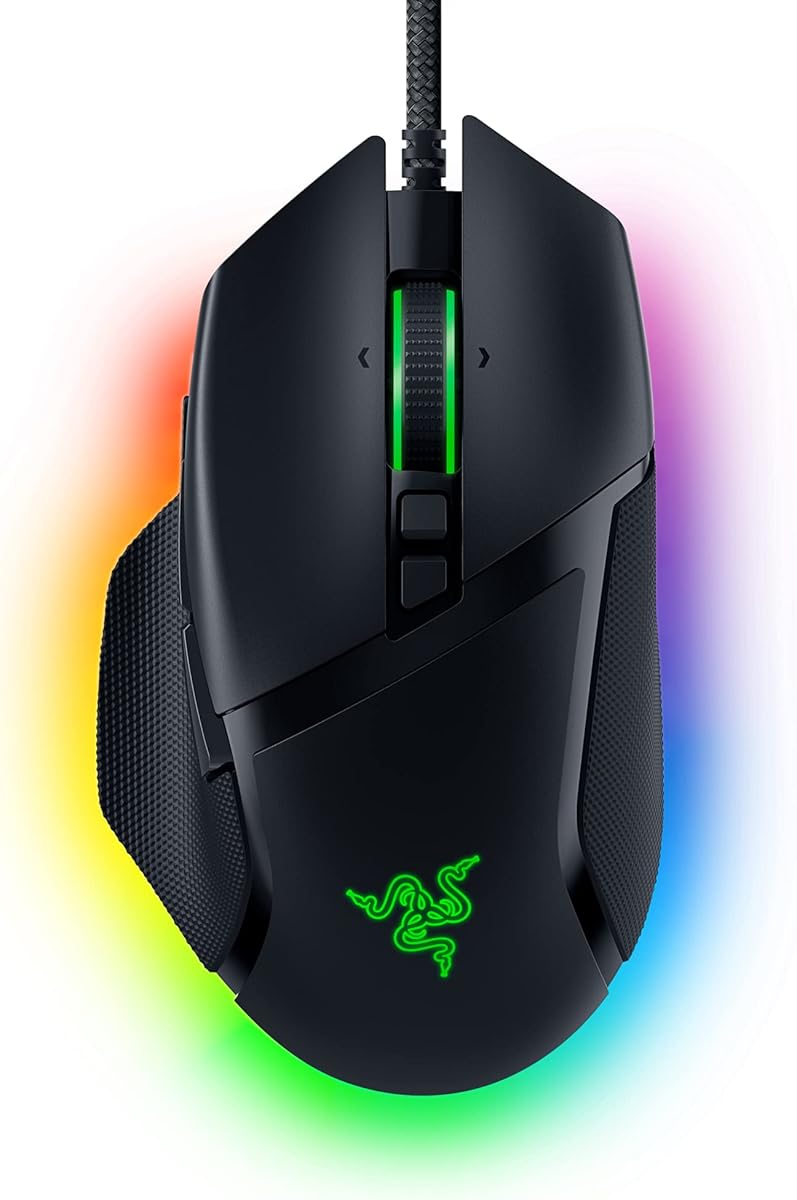
Razer Basilisk V3 Pro
The Basilisk V3 Pro is a feature-rich powerhouse built for players who want maximum control. Eleven programmable inputs and a tactile-or-free-spin scroll wheel make it ideal for MMOs and MOBAs. The Focus Pro sensor keeps things accurate even though the body is on the heavier side. It is the choice for gamers who value functionality and customization over featherweight speed.
- Connection
- HyperSpeed + Bluetooth
- Sensor
- Focus Pro 30K
- Weight
- 112g
- Buttons
- 11
What we liked
- Eleven programmable buttons
- Smart-reel scroll wheel
- RGB and dock support
- Comfortable palm shape
Worth noting
- Heavy for fast shooters
- Bulky for small hands
Glorious Model O 2
The Model O 2 carries forward Glorious's lightweight legacy with a refined 59-gram build and improved sensor. Its symmetrical shape and smooth glides make flick shots feel effortless. The price undercuts flagship rivals while still delivering strong competitive performance. For value-minded players who want a true featherweight, it is one of the best deals around.
- Connection
- 2.4GHz Wireless
- Sensor
- BAMF 2.0 26K
- Weight
- 59g
- Buttons
- 6
What we liked
- Very light 59g design
- Smooth PTFE feet
- Affordable for its class
- Solid BAMF 2.0 sensor
Worth noting
- Coating shows wear
- Simple software suite
Pulsar X2V2
The Pulsar X2V2 has become a community darling thanks to its 52-gram weight and excellent shape. The trusted PAW3395 sensor delivers flawless tracking that satisfies even demanding players. Its medium symmetrical body suits claw and fingertip grips especially well. Enthusiasts looking beyond the big brands will find it a remarkably refined option.
- Connection
- 2.4GHz Wireless
- Sensor
- PAW3395 26K
- Weight
- 52g
- Buttons
- 6
What we liked
- Exceptionally light 52g
- Proven PAW3395 sensor
- Comfortable symmetrical shape
- Strong build quality
Worth noting
- Software is basic
- Limited retail availability
SteelSeries Aerox 5 Wireless
The Aerox 5 Wireless blends a lightweight honeycomb shell with a versatile button layout. Nine inputs make it flexible across genres, bridging the gap between FPS and MMO designs. Its water-resistant AquaBarrier construction adds durability that rivals lack. For gamers who want extra buttons without much added weight, it strikes a smart balance.
- Connection
- 2.4GHz + Bluetooth
- Sensor
- TrueMove Air 18K
- Weight
- 74g
- Buttons
- 9
What we liked
- Nine programmable inputs
- Water-resistant design
- Dual wireless modes
- Light for its feature set
Worth noting
- Honeycomb collects dust
- Heavier than pure FPS mice
How We Ranked the Best Wireless Gaming Mice
The wireless gaming mouse has completed a remarkable transformation over the past several years. What was once considered a compromise for players unwilling to deal with cables is now the default choice at the highest levels of competition. The latency gap has closed entirely, batteries last for days, and the best models weigh less than many wired competitors. In 2026, choosing wireless is no longer a tradeoff but an upgrade for nearly every gamer.
To build this ranking, we gathered the most respected competitive and all-purpose mice and put them through a structured testing process. We played first-person shooters to evaluate flick accuracy and tracking, MOBAs and MMOs to stress button layouts, and long sessions to assess comfort and battery endurance. Five core criteria shaped our scores: sensor performance and polling stability, click latency and wireless reliability, weight, ergonomics, and the combined value of software and price. The result is a list that serves both the dedicated esports competitor and the versatile all-rounder.
Sensor Performance and Polling
At the top of the market, sensor quality has reached a point where differences are nearly impossible to perceive in normal play. Logitech's HERO 2, Razer's Focus Pro, and the widely licensed PixArt PAW3395 all deliver flawless tracking with no smoothing, acceleration, or spin-out at high speeds. This means you can largely stop worrying about raw sensor specs and focus on shape and weight, which have a far larger impact on your actual experience.
Polling rate has become the new specification battleground, with several mice now supporting 8000Hz reporting. A higher polling rate updates the cursor position more frequently, which can subtly smooth motion on high-refresh displays. In practice, the benefit is small and comes at the cost of significantly higher battery drain. We treated 8KHz support as a nice bonus rather than a requirement, since the vast majority of players will see no meaningful improvement over the standard 1000Hz.
Latency and Wireless Reliability
The single most important achievement of modern gaming mice is the elimination of perceptible wireless latency. Logitech Lightspeed and Razer HyperSpeed both use dedicated 2.4GHz protocols that match or exceed wired performance. Throughout our testing we encountered no stutters, disconnects, or input delays that would concern even a competitive player. This reliability is why professional esports athletes now overwhelmingly choose wireless mice for tournament play.
Bluetooth appears on some models as a secondary connection, useful for productivity or pairing with a laptop, but it is not suitable for gaming due to higher latency. When evaluating these mice, we always tested gaming performance over the dedicated dongle. We also considered connection stability in crowded wireless environments, since interference can be a real problem at events and in busy households. Every mouse on our list passed these tests without issue.
Weight and Shape
Weight is where personal preference and competitive theory collide. The trend toward ultra-light mice under 60 grams reflects the advantage they offer for fast, repeated flick movements and reduced hand fatigue. The Viper V3 Pro at 54 grams and the Pulsar X2V2 at 52 grams represent the cutting edge of this philosophy. For players who prize speed and precision in fast shooters, these featherweight designs feel liberating.
However, lighter is not universally better. Some players prefer a bit more mass for stability during slow, controlled tracking, and heavier feature-rich mice like the Basilisk V3 Pro serve a different purpose entirely. Shape matters just as much as weight. Symmetrical mice suit the widest range of grips, while the contoured DeathAdder shape is purpose-built for palm grip comfort. We made sure our list spans these different philosophies so every type of player can find a match.
Ergonomics Across Genres
Different game genres place different demands on a mouse. Fast-paced shooters reward minimal, lightweight designs that let you reposition quickly and aim precisely. MMOs and MOBAs, on the other hand, benefit enormously from a generous array of programmable buttons that put abilities and macros within thumb reach. A mouse optimized for one genre can feel awkward in another, which is why we did not crown a single universal winner.
The DeathAdder V3 Pro and G Pro X Superlight 2 anchor the FPS-focused end of our list, while the Basilisk V3 Pro and Aerox 5 Wireless cater to button-hungry players. If you split your time across genres, a versatile design with a moderate button count offers the best compromise. Consider which games consume most of your hours before committing, because the right shape and layout will quietly improve your performance and comfort over thousands of hours of play.
Software and Value
Companion software has grown into a meaningful differentiator. Logitech G Hub and Razer Synapse offer deep customization, letting you remap buttons, build per-game profiles, tune sensor settings, and adjust lighting. Smaller brands like Glorious and Pulsar provide leaner software that covers the essentials without the bloat. None of these apps are strictly necessary for basic play, but they unlock the full potential of a premium mouse.
Value is the lens that ties everything together. Flagship mice from Logitech and Razer command premium prices, but enthusiast brands like Pulsar and Glorious deliver remarkably similar performance for noticeably less money. The Model O 2 and X2V2 prove that you no longer need to spend top dollar to get a world-class competitive mouse. We weighed price heavily so that budget-conscious players can find genuine quality without overspending on brand prestige alone.
Choosing the Right Mouse for Your Style
The best gaming mouse is the one that matches how you actually play. If you are a competitive shooter player chasing every millisecond of advantage, the lightweight precision of the Superlight 2, Viper V3 Pro, or Pulsar X2V2 will serve you best. These mice are built to disappear in your hand and let pure aim take over. Their minimal button counts are a deliberate choice that keeps weight down and focus high.
If your library leans toward MMOs, MOBAs, or RPGs, the calculus shifts toward functionality. The Basilisk V3 Pro and Aerox 5 Wireless give you the extra inputs needed to manage complex ability rotations and quick-swap commands. The added weight is a fair trade for the control they provide. And if you want a single mouse that handles everything reasonably well, a moderate design like the DeathAdder V3 Pro bridges the gap between speed and versatility.
Grip Style Matters
Your grip style should heavily influence your choice. Palm grippers, who rest their whole hand on the mouse, will be most comfortable with a tall, contoured shape like the DeathAdder. Claw grippers, who arch their fingers, often prefer a shorter, more compact body that allows quick clicks. Fingertip grippers, who control the mouse with just their fingertips, gravitate toward the lightest possible designs for maximum agility.
There is no universally correct grip, and many players use a hybrid style. The key is to be honest about how your hand naturally rests and to choose a shape that supports rather than fights it. A mismatched shape can cause discomfort and inconsistency no matter how good the sensor is. When possible, consider hand size as well, since a mouse that is too large or too small will undermine even the best technique.
Understanding Switches, Feet, and Build
Beyond the headline sensor and weight figures, several finer details separate a good gaming mouse from a great one. Click switches are among the most important, because they determine how every input feels and how long the mouse remains reliable. Mechanical switches deliver a familiar tactile snap but can develop double-click issues as they wear, a frustrating failure that has plagued many gamers over the years. Optical switches, which register clicks by interrupting a beam of light, eliminate this wear mechanism entirely and tend to feel crisp and slightly faster. Most of our top picks, including the Superlight 2 and Viper V3 Pro, use optical or optical-hybrid switches for exactly this reason.
The feet, or skates, on the bottom of the mouse have an outsized effect on glide quality. High-grade PTFE feet allow the mouse to slide smoothly across a mousepad with minimal friction, which improves both control and comfort during long sessions. Enthusiast brands like Glorious and Pulsar pay particular attention to their stock feet, and many competitive players upgrade to aftermarket skates for an even smoother glide. Cable design matters for the few remaining wired or charging scenarios as well, with flexible paracord-style cables reducing drag noticeably compared to stiff rubber ones.
Build quality ties these elements together. A well-built gaming mouse has no rattle when shaken, no creak when squeezed, and consistent click tension on both main buttons. Lightweight mice in particular must achieve their low weight without feeling hollow or flimsy, a balance that the best designs strike through clever internal structure rather than cheap thin shells. We inspected each contender for these signs of quality, since a mouse that feels solid inspires the confidence needed for competitive play.
Battery Life and Real-World Endurance
Battery life is the one area where wireless gaming mice still ask for a small compromise, though modern endurance is impressive. Most flagship models deliver anywhere from several days to a few weeks of play on a single charge at standard 1000Hz polling. The catch is that enabling 8000Hz polling can slash that figure dramatically, sometimes to a fraction of the normal runtime, since the mouse is reporting its position eight times as often. This is one practical reason many players leave their mice at 1KHz unless they have a specific reason to push higher.
Charging convenience softens the impact of battery limitations. USB-C charging has become standard, and a brief top-up while you grab a snack can add hours of play. Some mice support charging while in use through a flexible cable, effectively turning into a wired mouse when the battery runs low so you never have to stop mid-match. A few models also offer wireless charging docks or compatibility with powered mousepads, which keep the battery topped up automatically. When evaluating endurance, we considered both raw runtime and how painless it is to recharge in the middle of a gaming session.
Final Verdict
The Logitech G Pro X Superlight 2 takes our top spot as the most complete and dependable wireless gaming mouse for the broadest audience. Its blend of featherweight design, flawless sensor, and proven wireless makes it a safe choice for anyone serious about competition. The Razer Viper V3 Pro is an equally elite alternative, especially for players who want the absolute lightest weight and 8KHz polling potential.
For palm-grip comfort, the DeathAdder V3 Pro is unbeatable, while the Basilisk V3 Pro reigns for button-heavy genres. Budget and enthusiast buyers should look closely at the Glorious Model O 2 and Pulsar X2V2, both of which deliver flagship-class performance for less. The SteelSeries Aerox 5 Wireless rounds out the list as a versatile, feature-rich option. Whatever your genre and grip, there is a winning choice here to elevate your play.
How we picked
Each gaming mouse was judged on sensor accuracy and polling stability, click latency and wireless reliability, weight relative to its size, ergonomic fit across grip styles, and software depth and value. We ran first-person shooter, MOBA, and MMO test sessions to surface real performance differences. Battery and polling-rate claims were verified against manufacturer specifications and community measurements.
Frequently asked questions
Is wireless gaming mouse latency noticeable in 2026?
No. Modern 2.4GHz technologies like Logitech Lightspeed and Razer HyperSpeed deliver latency that matches or beats wired connections. Competitive professionals now use wireless mice almost exclusively. The cable-free experience comes with no meaningful performance penalty.
Does an 8KHz polling rate make a difference?
An 8KHz polling rate can slightly smooth cursor motion and reduce input delay on high-refresh monitors. The benefit is subtle and most players will not notice it in normal play. It also drains the battery faster, so many gamers leave it at 1KHz.
How light should a gaming mouse be?
Lightweight mice between 50 and 65 grams help with quick flick aiming and reduce fatigue. However, weight is a preference rather than a rule, and some players favor heavier mice for stability. Choose a weight that feels controllable for your grip and genre.
Are optical switches worth it?
Optical switches use light to register clicks, which eliminates the double-click issues that plague mechanical switches over time. They also tend to feel crisp and respond slightly faster. For a long-lasting competitive mouse, they are a worthwhile feature.
Do I need different mice for FPS and MMO games?
Not necessarily, but the ideal shape differs. FPS players favor light, simple mice for fast aiming, while MMO and MOBA players benefit from extra programmable buttons. A versatile mouse like the Aerox 5 or Basilisk V3 Pro can cover both reasonably well.