Best USB Flash Drives in 2026
We may earn a commission from links on this page, at no extra cost to you. Learn more.
The humble USB flash drive remains one of the most convenient ways to carry files, move data between machines, and create portable backups. Today the best flash drives offer speeds that rival small external SSDs, capacities large enough for video projects, and rugged designs that survive daily abuse. This guide ranks the seven best USB flash drives in 2026 for every use, from blazing-fast professional transfers to affordable everyday carry. Whether you need raw speed, a USB-C connector for modern devices, or a tiny drive to leave plugged in, there is an ideal match below.
Top 7 Best USB Flash Drives
Our top 7 picks, reviewed
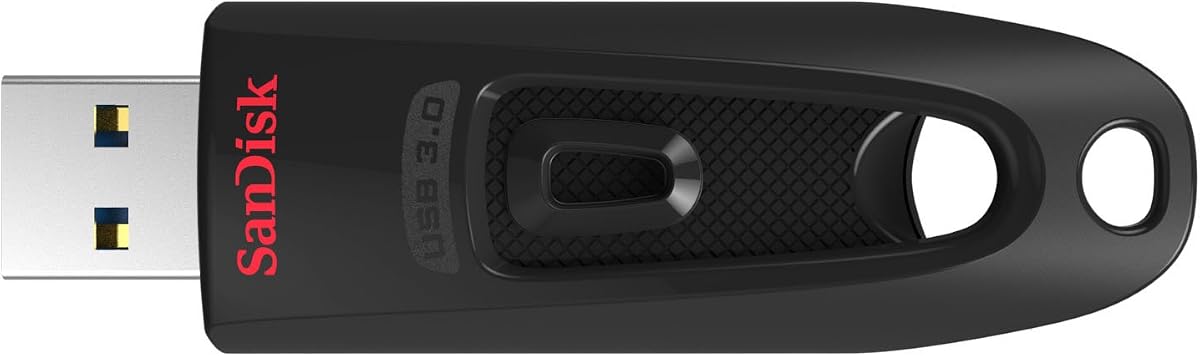
Extreme PRO USB 3.2
The SanDisk Extreme PRO is the best overall USB flash drive thanks to its blend of genuine SSD-class speed and rugged construction. Read and write speeds far exceed typical flash drives, making it a joy for moving large files or even running portable apps. The solid metal body shrugs off daily wear, and bundled recovery software adds value. While it costs more than a basic drive, the performance and durability justify the price for anyone who moves data regularly.
- Capacity
- Up to 512GB
- Interface
- USB 3.2 Gen 1 Type-A
- Read
- Up to 420 MB/s
- Form
- Solid metal body
What we liked
- Excellent read and write speeds
- Durable solid metal casing
- Includes recovery software
- Wide range of capacities
Worth noting
- Pricier than basic drives
- Cap can be misplaced
BAR Plus
The Samsung BAR Plus packs impressive speed into a tiny, tough metal shell that clips onto a keychain. Despite its small size, it delivers fast reads that make file transfers quick and painless. The rugged body resists water, shock, and temperature extremes, so it survives life in a pocket or bag. For users who want a fast, durable drive that is always with them, the BAR Plus is a standout pick at a friendly price.
- Capacity
- Up to 512GB
- Interface
- USB 3.1 Type-A
- Read
- Up to 400 MB/s
- Form
- Metal keychain body
What we liked
- Very fast for its small size
- Sturdy all-metal design
- Keychain loop for easy carry
- Water and shock resistant
Worth noting
- Type-A only, no USB-C
- Can run warm during big transfers
Ultra Dual Drive Go USB-C
The SanDisk Ultra Dual Drive Go solves the connector problem by offering both USB-C and USB-A in one compact swivel design. This makes it perfect for moving files between a phone, tablet, and laptop without adapters. The protective swivel keeps both plugs covered when not in use, and a keyring hole makes it easy to carry. With solid speeds and broad compatibility, it is the ideal flash drive for anyone juggling modern and older devices.
- Capacity
- Up to 512GB
- Interface
- USB-C and USB-A
- Read
- Up to 400 MB/s
- Form
- Swivel dual connector
What we liked
- Has both USB-C and USB-A plugs
- Works with phones and laptops
- Swivel design protects connectors
- Handy keyring hole
Worth noting
- Swivel feels slightly loose over time
- Slower writes than top drives
DataTraveler Max
The Kingston DataTraveler Max is the speed king of this list, delivering read speeds that approach a full external SSD over USB-C. With capacities reaching a full terabyte, it can hold and quickly move enormous files, making it ideal for video editors and power users. The sliding connector means no cap to lose, and the USB-C plug fits modern laptops and tablets. For those who demand the fastest possible flash drive, this is the one to beat.
- Capacity
- Up to 1TB
- Interface
- USB 3.2 Gen 2 Type-C
- Read
- Up to 1000 MB/s
- Form
- Sliding USB-C body
What we liked
- Blistering near-SSD speeds
- Up to 1TB capacity
- Modern USB-C connector
- Sliding cap-free design
Worth noting
- Premium price
- Type-C only limits older PCs
Flash Voyager GTX
The Corsair Flash Voyager GTX behaves more like a pocket SSD than a typical flash drive, with sustained speeds that hold up even during long transfers. Its premium metal housing and five-year warranty signal serious durability, and high capacity options suit demanding users. The trade-off is a larger, heavier body and a premium price. For professionals who need flash-drive convenience with near-SSD reliability and speed, the Voyager GTX delivers in spades.
- Capacity
- Up to 1TB
- Interface
- USB 3.1 Gen 1 Type-A
- Read
- Up to 440 MB/s
- Form
- Premium metal housing
What we liked
- SSD-grade sustained performance
- Premium durable construction
- Large capacity options
- Five-year warranty
Worth noting
- Bulky compared to rivals
- Higher price point
Pro Elite
The PNY Pro Elite punches above its weight, offering speeds approaching the more expensive drives at a noticeably lower price. With capacities up to a terabyte, it handles large files and backups without breaking the bank. The plastic body is less rugged than metal rivals, but it keeps weight and cost down. For value-focused buyers who still want genuinely fast transfers, the Pro Elite is a smart, wallet-friendly choice.
- Capacity
- Up to 1TB
- Interface
- USB 3.2 Gen 2 Type-A
- Read
- Up to 600 MB/s
- Form
- Compact plastic body
What we liked
- Fast speeds for the price
- Large capacity ceiling
- Compact and lightweight
- Good value per gigabyte
Worth noting
- Plastic build feels less premium
- Cap can be lost
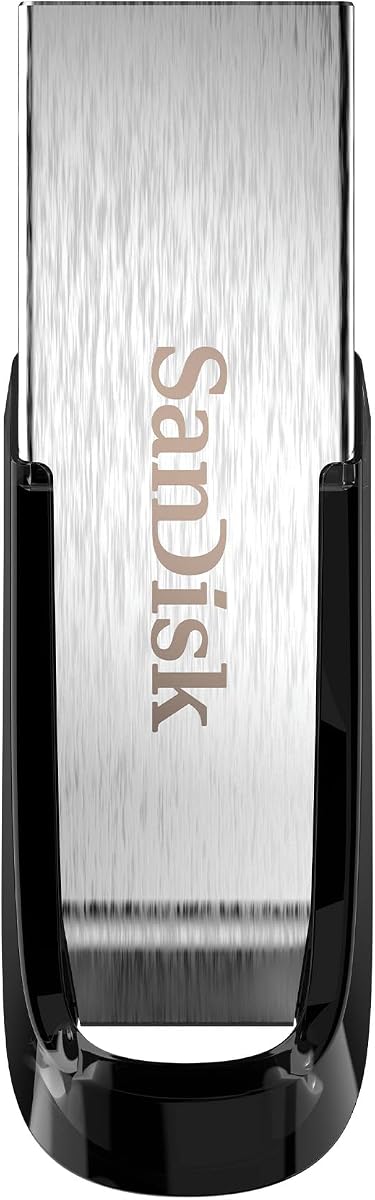
Ultra Flair
The SanDisk Ultra Flair is the perfect budget flash drive for everyday tasks like carrying documents, photos, and presentations. Its slim metal body looks and feels more premium than its price suggests, and the capless design means there is nothing to misplace. Speeds are modest compared with the top performers, but more than adequate for routine file transfer. For an affordable, reliable, good-looking drive for daily use, the Ultra Flair is hard to beat.
- Capacity
- Up to 256GB
- Interface
- USB 3.0 Type-A
- Read
- Up to 150 MB/s
- Form
- Slim metal body
What we liked
- Very affordable
- Sleek durable metal casing
- Capless design with no cap to lose
- Reliable for everyday use
Worth noting
- Slower than premium drives
- Modest capacity ceiling
How to Choose the Best USB Flash Drive

The USB flash drive may be one of the oldest computer accessories still in common use, but it has quietly transformed over the years. Today the best models offer speeds that were unthinkable a decade ago, capacities that rival external drives, and connectors that fit the latest phones and laptops. Yet with so many options, choosing the right one can be surprisingly tricky. The ideal flash drive depends on what you carry, how fast you need it, and which devices you use. This guide breaks down every consideration so you can confidently pick from the seven drives ranked above.
Before diving into specifications, it helps to define your primary use. Someone who occasionally hands off a document needs something very different from a video editor shuttling large project files. Once you know your main purpose, the right balance of speed, capacity, connector, and durability becomes clear.
Understanding Speed and Why It Matters
Speed is the single biggest differentiator among modern flash drives, and it dramatically affects your experience. Basic drives like the SanDisk Ultra Flair offer modest speeds that are perfectly fine for documents and photos but feel slow when copying large files. Premium drives like the Kingston DataTraveler Max and Corsair Flash Voyager GTX deliver speeds approaching those of a full external SSD, turning what used to be a long wait into a quick task.
Speed comes in two flavors: read and write. Read speed governs how fast you can copy files off the drive, while write speed determines how quickly you can put files onto it. Many cheaper drives advertise impressive read speeds but have much slower writes, which matters if you frequently save large files to the drive. The top picks on this list offer strong performance in both directions. If you regularly move big files, paying for a fast drive is one of the best upgrades you can make.
USB Standards Explained
The speed of a flash drive depends partly on its USB standard. Older USB 2.0 drives are now too slow to recommend for anything but the most basic use. USB 3.0, also called USB 3.2 Gen 1, is the practical minimum today and powers solid everyday drives. The fastest drives use USB 3.2 Gen 2, which roughly doubles the available bandwidth and enables those near-SSD speeds seen in our top performers.
Importantly, a fast drive only reaches its full speed when plugged into a matching fast port. If you connect a high-speed drive to an older USB 2.0 port, it will work but run far slower. Check that your computer has USB 3.0 or newer ports to take advantage of a quick drive. The good news is that nearly all modern computers do.
Choosing the Right Connector
The connector type is a crucial and often overlooked decision. Traditional flash drives use the rectangular USB-A plug found on most desktops, older laptops, and many accessories. Newer devices, including the latest laptops, tablets, and phones, increasingly use the smaller, reversible USB-C connector. If your main devices use USB-C, a drive with that plug, like the Kingston DataTraveler Max, saves you from fumbling with adapters.
The most flexible solution is a dual-connector drive such as the SanDisk Ultra Dual Drive Go, which features both USB-C and USB-A plugs in one body. This lets you move files seamlessly between a phone and a laptop, or between old and new computers, without any extra accessories. If you work across a mix of devices, a dual-connector drive removes a common source of frustration.
How Much Capacity You Need
Capacity needs vary enormously by use. For carrying documents, presentations, and a handful of photos, a modest drive of 64GB or 128GB is more than enough and keeps costs low. If you store large photo collections, video files, or full backups, step up to 256GB or 512GB. Power users handling video projects or large media libraries will appreciate the 1TB models now available, which were once the domain of external drives.
As with any storage, it is wise to buy a bit more capacity than you currently need to leave room for growth. The price difference between capacity tiers is often small relative to the convenience of not running out of space. That said, there is no need to overpay for capacity you will never use, so match the size to your realistic needs.
Build Quality and Durability
Flash drives live hard lives, jangling on keychains, rattling in bags, and getting plugged and unplugged constantly. Build quality determines how well a drive survives this abuse. Metal-bodied drives like the SanDisk Extreme PRO, Samsung BAR Plus, and SanDisk Ultra Flair resist bending and damage far better than plastic ones. Some drives add water, shock, and temperature resistance, which is valuable if your drive faces rough conditions.
The connector design also affects durability and convenience. Capped drives protect the plug but risk a lost cap. Capless and sliding designs, like those on the Ultra Flair and DataTraveler Max, eliminate that worry. Swivel designs such as the Ultra Dual Drive Go protect the connectors while folding out of the way. Consider how and where you carry your drive when weighing these design choices.
Features Beyond Storage
Some flash drives add value through bundled software. Recovery utilities, included with drives like the SanDisk Extreme PRO, can help retrieve accidentally deleted files. Some manufacturers offer encryption software to password-protect the drive, which is important if you carry sensitive data that could be lost. Warranty length is another signal of quality, with premium drives like the Corsair Flash Voyager GTX backed by longer coverage that reflects confidence in their durability.
While these extras are not essential for everyone, they can tip the balance between two otherwise similar drives. If you handle confidential information, prioritize a drive with encryption support. If your data is irreplaceable, recovery software offers welcome peace of mind.
Common Uses and Which Drive Fits Each
Thinking about your specific use case makes the choice far clearer. If you mainly carry documents, spreadsheets, and presentations between a home and an office computer, a modest, affordable drive like the SanDisk Ultra Flair handles the job perfectly without overspending. For students moving assignments and projects between devices, a dual-connector drive that works with both laptops and tablets adds welcome flexibility. Photographers and content creators offloading large image and video files will appreciate the speed and capacity of the high-performance drives, since waiting on slow transfers wastes valuable time.
Some people use flash drives to run portable applications or even boot an operating system, and these uses demand the fastest drives with strong sustained performance. Others simply want a reliable place to keep a copy of important files they can grab in an emergency. There is even value in keeping a small, cheap drive permanently plugged into a desktop or media device for extra storage. Whatever your scenario, identifying it first turns the decision from overwhelming to obvious, because each drive on this list was chosen to excel at a particular kind of use.
Matching a Drive to Your Needs
For the best all-around experience, the SanDisk Extreme PRO combines speed, durability, and value beautifully. If you want something tiny to keep on your keychain, the Samsung BAR Plus is fast and tough. Those juggling phones and laptops should grab the dual-connector SanDisk Ultra Dual Drive Go. Power users chasing maximum speed should look at the Kingston DataTraveler Max, while professionals needing rugged, sustained performance will love the Corsair Flash Voyager GTX.
Value seekers have two strong options: the PNY Pro Elite offers high speed for less money, and the SanDisk Ultra Flair covers everyday needs at the lowest price. Each of these serves a distinct purpose, so let your main use guide the decision.
Real-World Speed Versus Advertised Speed
It is worth understanding the gap that sometimes exists between the speeds printed on a flash drive package and what you actually experience. Manufacturers typically advertise peak read speeds achieved under ideal conditions, and real-world performance can be lower depending on the type of files you transfer, the health of your computer ports, and whether you are reading or writing. Transferring one enormous file generally hits speeds close to the advertised figure, while copying thousands of tiny files runs much slower because of the overhead involved in handling each one.
Write speeds in particular are often slower than the headline read speeds, and budget drives can have surprisingly sluggish writes even when their reads look impressive. This matters most if you frequently save large files to the drive rather than just reading from it. The premium drives on this list, such as the Kingston DataTraveler Max and Corsair Flash Voyager GTX, maintain strong performance in both directions, which is part of what justifies their higher prices. When comparing drives, look for both read and write figures, and treat advertised numbers as a best case rather than a guarantee.
Caring for Your Flash Drive
A few simple habits extend the life and reliability of any flash drive. Always eject the drive properly before unplugging it, since pulling it out mid-write can corrupt files or even damage the drive. Most operating systems provide a safe removal option, and using it consistently prevents the most common cause of flash drive data loss. Keep the connector clean and avoid forcing it into ports, as bent or dirty contacts cause connection problems over time.
Flash memory has a finite number of write cycles, though modern drives last far longer than most people will ever need for typical use. Still, this is one more reason not to rely on a single flash drive as your only copy of irreplaceable data. Treat flash drives as convenient, portable carriers and working copies rather than permanent archives. Store them somewhere they will not be crushed or exposed to extreme heat, and they will serve you reliably for years. A little care goes a long way toward keeping your files safe and your drive performing at its best.
Final Thoughts
USB flash drives have come a long way, and the seven models on this list represent the best options for every need and budget in 2026. The keys to a good choice are matching the speed to how often you move large files, picking the right connector for your devices, and choosing a capacity with room to grow. Pay attention to build quality if your drive will face rough handling, and consider bundled software if security or recovery matters to you. Remember that a flash drive is a convenient copy, not a sole backup, so always keep important data in more than one place. Whichever drive you choose here, you are getting a proven performer that makes carrying and sharing your files effortless.
How we picked
We compared flash drives on real read and write speeds, capacity options, connector type, build quality, and value for money. We considered everything from compact always-connected drives to high-performance models for power users. Final rankings reflect a blend of measured performance, durability, price, and how well each drive fits its intended purpose.
Frequently asked questions
What USB speed do I need in a flash drive?
For occasional document transfer, a basic USB 3.0 drive is fine. If you move large files, photos, or video regularly, choose a USB 3.2 drive with high read and write speeds to save significant time.
Should I get a USB-A or USB-C flash drive?
Choose USB-C if your devices, especially newer laptops, tablets, and phones, use that port. A dual-connector drive with both plugs offers the most flexibility if you have a mix of old and new devices.
How much capacity should a flash drive have?
For documents and photos, 64GB to 128GB is usually plenty. For video projects, large backups, or carrying a media library, look at 256GB, 512GB, or even 1TB models for ample room.
Are flash drives reliable for backups?
Flash drives are great for convenient, portable copies, but they should not be your only backup. Keep important data in at least two places, ideally with a second copy on a separate drive or in the cloud.
Why are some flash drives so much faster than others?
Faster drives use higher-quality flash memory and controllers, similar to those in solid state drives, along with newer USB standards. This combination lets them read and write data many times faster than basic drives, though at a higher price.