Best TKL Keyboards in 2026
We may earn a commission from links on this page, at no extra cost to you. Learn more.
The tenkeyless, or TKL, layout strikes a classic balance, dropping only the number pad while keeping full-size spacing, function keys, arrows, and a dedicated navigation cluster. In 2026 the best TKL keyboards range from premium aluminum boards to elite gaming models with magnetic switches and low-profile wireless designs. If you want a compact board that still feels like a full keyboard, TKL is the answer. We tested the current lineup and ranked the seven best by feel, build, and value. Every pick is a real, available product.
Quick comparison
| Keyboard | Best for | Rating | Price | |
|---|---|---|---|---|
| 1Keychron Q3Keychron | Best Overall | 4.7 | $$$ | Check Price |
| 2SteelSeries Apex Pro TKL Gen 3SteelSeries | Best for Gaming | 4.6 | $$$ | Check Price |
| 3Corsair K70 PRO TKLCorsair | Best Premium Gaming | 4.5 | $$$ | Check Price |
| 4Logitech G915 X TKLLogitech | Best Low-Profile | 4.5 | $$$ | Check Price |
| 5Razer Huntsman V3 ProRazer | Best Premium Typing | 4.5 | $$$ | Check Price |
| 6Ducky One 3 TKLDucky | Best for Typing | 4.5 | $$$ | Check Price |
| 7Keychron V3Keychron | Best Value | 4.5 | $$$ | Check Price |
Our top 7 picks, reviewed
Keychron Q3
The Keychron Q3 brings the acclaimed Q-series formula to the TKL layout, and it is our top overall pick. Its dense aluminum case and gasket mount deliver a deep, premium sound, while hot-swap sockets and full QMK and VIA support allow complete customization. The tenkeyless layout keeps full spacing and a dedicated nav cluster. For most people who want a compact yet refined board, the Q3 is the clear choice.
- Type
- Mechanical hot-swap
- Switches
- Gateron G Pro
- Layout
- TKL
- Connection
- USB-C wired
What we liked
- Premium CNC aluminum case
- Deep gasket-mounted sound
- Hot-swap PCB
- Full QMK and VIA support
Worth noting
- Heavy and desk-bound
- Wired only
SteelSeries Apex Pro TKL Gen 3
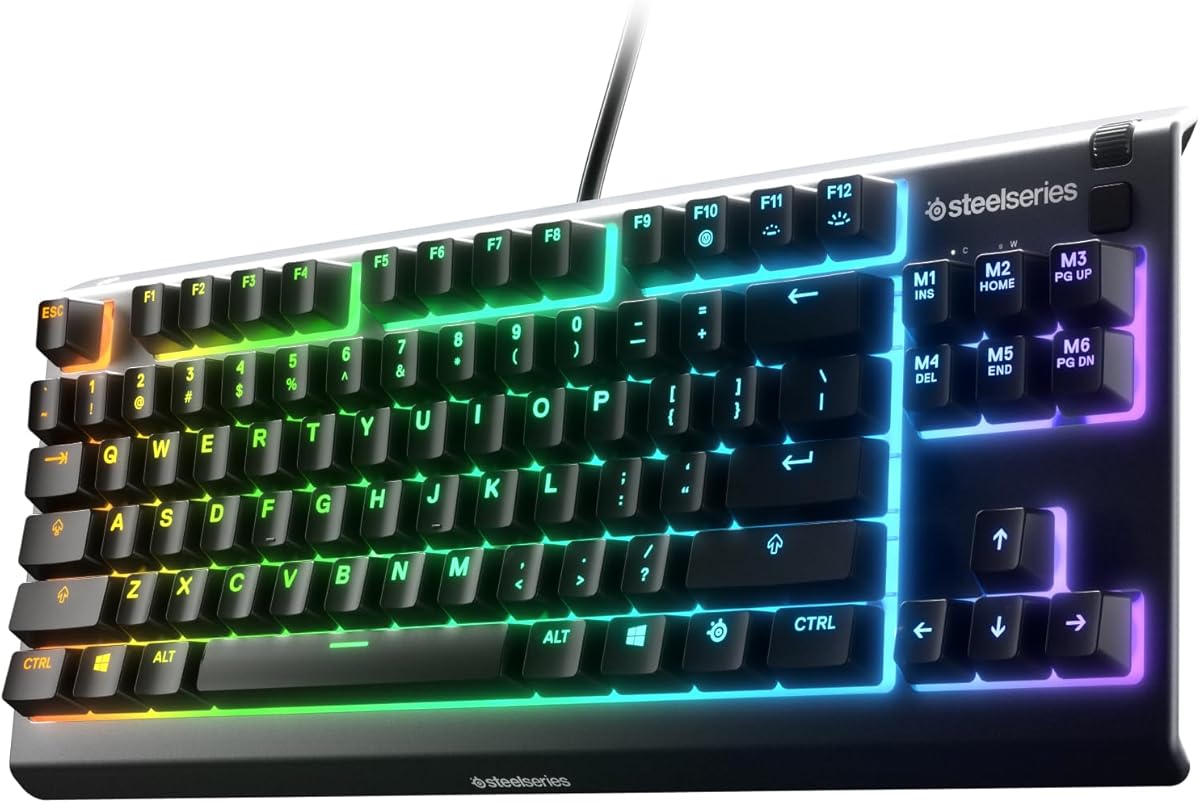
The Apex Pro TKL Gen 3 is the gaming TKL board to beat. Its magnetic OmniPoint switches let you tune actuation depth per key and enable rapid trigger for lightning-fast repeated inputs. The build is rock solid, the OLED display is genuinely useful, and wireless performance is lag-free. For competitive gamers who want the tenkeyless layout, it is the standout.
- Type
- Magnetic Hall effect
- Switches
- OmniPoint 3.0
- Layout
- TKL
- Connection
- Wireless + USB-C
What we liked
- Per-key adjustable actuation
- Rapid trigger for fast resets
- Bright OLED smart display
- Premium aluminum top plate
Worth noting
- High price
- Not hot-swappable
Corsair K70 PRO TKL
The Corsair K70 PRO TKL pairs fast magnetic switches with a premium build aimed squarely at competitive players. Adjustable actuation and rapid trigger keep your inputs sharp, and high polling rate support ensures responsiveness. The tenkeyless layout frees mouse space without sacrificing keys. For gamers in the Corsair ecosystem, it is a top-tier TKL option.
- Type
- Magnetic Hall effect
- Switches
- Corsair MGX
- Layout
- TKL
- Connection
- Wireless + USB-C
What we liked
- Fast magnetic switches
- Adjustable actuation and rapid trigger
- Sturdy premium build
- High polling rate support
Worth noting
- iCUE software is heavy
- Premium price point
Logitech G915 X TKL
The Logitech G915 X TKL is the best low-profile TKL board for those who prefer a slim, laptop-like feel. Its GL switches offer a satisfying short-travel typing experience, and Lightspeed wireless delivers reliable, low-latency performance. The aluminum top and clean design look great on any desk. For a premium low-profile tenkeyless, it is the top pick.
- Type
- Low-profile mechanical
- Switches
- GL tactile or linear
- Layout
- TKL
- Connection
- Wireless + USB-C
What we liked
- Slim, low-profile design
- Reliable Lightspeed wireless
- Premium aluminum top
- Long battery life
Worth noting
- Not hot-swappable
- Expensive for low-profile
Razer Huntsman V3 Pro
The Razer Huntsman V3 Pro uses second-generation analog optical switches to combine fast gaming response with a refined typing feel. Adjustable actuation and rapid trigger give competitive players precise control, while internal foam improves the sound. The sturdy build keeps everything stable during intense sessions. For gamers who also value typing feel, it is an excellent TKL choice.
- Type
- Optical analog
- Switches
- Gen-2 analog optical
- Layout
- TKL
- Connection
- USB-C wired
What we liked
- Adjustable analog actuation
- Rapid trigger support
- Solid, stable build
- Sound dampening foam
Worth noting
- Wired only
- Synapse software required for tuning
Ducky One 3 TKL
The Ducky One 3 TKL is a typist's favorite thanks to its excellent out-of-box sound and high-quality PBT keycaps. The hot-swap PCB lets you change switches without soldering, and the case is impressively stable. While it lacks software, on-board controls cover the essentials. For people who prioritize typing feel and sound, the One 3 TKL is a joy.
- Type
- Mechanical hot-swap
- Switches
- Cherry MX
- Layout
- TKL
- Connection
- USB-C wired
What we liked
- Excellent stock sound
- Hot-swap PCB
- High-quality PBT keycaps
- Stable, well-built case
Worth noting
- Wired only
- No companion software
Keychron V3
The Keychron V3 packs enthusiast features into an affordable TKL plastic body. You get a hot-swap PCB, QMK and VIA programmability, and solid sound dampening, all at a budget-friendly price. The tenkeyless layout saves space while keeping full spacing and a nav cluster. For value-focused buyers, it is the best entry point into serious TKL keyboards.
- Type
- Mechanical hot-swap
- Switches
- Keychron K Pro
- Layout
- TKL
- Connection
- USB-C wired
What we liked
- Great price for features
- Hot-swap PCB included
- QMK and VIA support
- Good stock sound dampening
Worth noting
- Plastic case
- Wired only
Why Choose a TKL Keyboard
The tenkeyless layout, almost always shortened to TKL, has been a favorite of gamers and typists for years, and it remains one of the smartest choices in 2026. By removing only the number pad, a TKL board keeps everything that matters most: full-size key spacing, a complete function row, dedicated arrow keys, and a proper navigation cluster with Home, End, Page Up, and Page Down. The result is a board that feels exactly like a full-size keyboard but takes up noticeably less space on your desk. The seven keyboards above are the best TKL options of 2026, chosen for typing feel, build quality, switches, features, and value.
For gamers, that extra desk space translates directly into wider mouse movement, which is why so many esports players use TKL boards. For typists, the familiar full-size spacing means zero adjustment period. This guide explains what makes TKL special and helps you find the right board for your needs.
Understanding the TKL Layout
A full-size keyboard has around 104 keys, including a number pad on the right side. A TKL board has roughly 87 keys, achieved simply by removing that number pad while leaving everything else untouched. Unlike more compact layouts, TKL does not compress or relocate any keys, so the typing experience is identical to a full-size board minus the numpad.
This makes TKL the most beginner-friendly compact layout. There are no key combinations to memorize, no relocated arrow keys, and no shrunken navigation cluster. You simply lose the number pad, which most people use rarely outside of heavy data entry. In exchange, you gain a board that is several inches narrower, freeing up significant desk space. For anyone who wants compactness without any learning curve, TKL is the natural choice.
Build Quality and Materials
The feel and sound of a TKL board depend heavily on its construction. Premium boards like the Keychron Q3 use dense CNC aluminum cases that dampen vibration and produce a deep, satisfying sound. Gaming boards like the Apex Pro TKL Gen 3 and Corsair K70 PRO TKL use aluminum top plates for rigidity and a premium feel. The Ducky One 3 TKL impresses with excellent stock sound and high-quality PBT keycaps, while the Keychron V3 keeps costs down with a well-built plastic case and good internal foam.
Mounting style matters too. The Keychron Q3 uses a gasket mount that suspends the plate for a gentle flex and softer sound, a big reason it feels so refined. Gaming boards often use stiffer mounts for stability during intense play. When you combine a quality case, good foam, and your preferred switches, a TKL board can sound and feel exceptional. The boards on our list all deliver strong build quality for their price points.
Switch Options and Gaming Features
TKL boards offer an especially wide range of switch technologies. Traditional mechanical switches come in linear, tactile, and clicky varieties, found in boards like the Keychron Q3, Ducky One 3 TKL, and Keychron V3. Linears glide smoothly for gaming and quiet typing, tactiles add a feedback bump, and clickies add an audible click.
The most exciting development for TKL gaming is the rise of magnetic and analog switches. The SteelSeries Apex Pro TKL Gen 3, Corsair K70 PRO TKL, and Razer Huntsman V3 Pro all use these technologies to offer adjustable actuation depth and rapid trigger. This lets you set exactly how far a key must travel to register and reset, giving competitive players a measurable advantage in fast-paced games. If gaming performance is your priority, these magnetic and analog TKL boards are worth the premium. For pure typing, a hot-swap board with quality mechanical switches remains ideal.
Wired Versus Wireless
The TKL boards on our list span the full connectivity range. Wired models like the Keychron Q3, Razer Huntsman V3 Pro, Ducky One 3 TKL, and Keychron V3 offer the lowest latency and never need charging, making them ideal for a permanent setup. Wireless boards like the Apex Pro TKL Gen 3, Corsair K70 PRO TKL, and Logitech G915 X TKL add desk-clearing freedom with gaming-grade low-latency wireless.
For competitive gaming, modern 2.4GHz wireless from SteelSeries, Corsair, and Logitech is fast enough that you will not notice a difference from wired. If you want a clean, cable-free desk, wireless is a genuine upgrade. If you prefer never to think about charging and want to save money, wired remains a great choice. Consider how you use your board and whether portability matters to you.
Customization and Software
Customization options vary across TKL boards. Hot-swap boards like the Keychron Q3, Ducky One 3 TKL, and Keychron V3 let you change switches in seconds without soldering, so you can refine your typing feel over time. Keycaps are an easy upgrade across all TKL boards, since the standard layout accepts the huge variety of aftermarket sets.
On the software side, boards with QMK and VIA support, like the Keychron Q3 and V3, let you remap keys and build macros entirely from your computer. Gaming boards rely on proprietary software like SteelSeries GG, Corsair iCUE, Logitech G HUB, and Razer Synapse to adjust actuation, lighting, and macros. These suites are polished and feature-rich, though they can be heavier than open-source alternatives. The Ducky One 3 TKL skips software entirely in favor of on-board controls, which some users prefer for simplicity.
Matching a TKL Board to Your Needs
For most people, the Keychron Q3 is the best all-around TKL board, combining premium build, great sound, and full customization. Competitive gamers should look at the SteelSeries Apex Pro TKL Gen 3 or Corsair K70 PRO TKL for their fast magnetic switches and adjustable actuation. Those who prefer a slim profile will love the low-profile Logitech G915 X TKL.
Gamers who also value typing feel should consider the Razer Huntsman V3 Pro, which blends analog speed with a refined sound. Pure typists will adore the Ducky One 3 TKL for its excellent stock sound and PBT keycaps. And anyone on a budget can start with the value-packed Keychron V3, which delivers enthusiast features for less. Whatever your priority, there is a TKL board here that fits.
TKL for Esports and Competitive Play
The TKL layout has become the de facto standard in competitive gaming, and the reasons go beyond simple preference. Removing the number pad shifts the board narrower, which lets players position their mouse closer to their body and use lower mouse sensitivities for more precise aim. Many esports professionals make wide, sweeping mouse movements, and a TKL board gives them the room to do so without their hand colliding with the keyboard. This practical advantage is why so many tournament setups feature tenkeyless boards.
The rise of magnetic and analog switches has further cemented TKL as the competitive choice. Boards like the SteelSeries Apex Pro TKL Gen 3, Corsair K70 PRO TKL, and Razer Huntsman V3 Pro offer adjustable actuation and rapid trigger, which let players reset keys faster than a traditional switch allows. In fast games where milliseconds matter, this responsiveness is a genuine edge. Combined with the desk-space benefit, it is easy to see why competitive players overwhelmingly favor the tenkeyless form factor.
Keycaps and Sound on TKL Boards
Because the TKL layout uses standard key sizing, it has the best keycap compatibility of any compact layout. Almost every aftermarket keycap set works on a TKL board without missing any sizes, which makes customization simple and rewarding. Swapping to a high-quality PBT set can improve the feel, reduce shine over time, and deepen the sound. The Ducky One 3 TKL already ships with excellent PBT keycaps, but on other boards a keycap upgrade is one of the easiest improvements you can make.
Sound quality on TKL boards varies with case material, mounting, and foam. The aluminum, gasket-mounted Keychron Q3 sounds deep and refined out of the box, while gaming boards prioritize stability and may sound slightly sharper. On hot-swap boards like the Q3, Ducky One 3 TKL, and Keychron V3, you can further tune the sound by swapping switches, lubing them, or adding foam. These small projects let you dial in exactly the sound profile you want, turning a good TKL board into a great one.
Building a Complete TKL Setup
A TKL keyboard pairs naturally with a thoughtful desk setup. Because the board is compact, you have room for a larger mousepad, which benefits both gaming and general productivity. Many people add a separate number pad to the left or right when they occasionally need it, getting the best of both worlds: the compactness of TKL most of the time and a numpad when spreadsheets demand it.
Consider a wrist rest to keep your hands comfortable during long sessions, and use the board's adjustable feet to find a typing angle that suits you. For wireless TKL boards like the Apex Pro TKL Gen 3 and Logitech G915 X TKL, keeping the firmware updated ensures stable connectivity and good battery life. With the right accessories around it, a TKL board anchors a clean, efficient, and comfortable workspace that works equally well for typing and gaming.
Comparing TKL to Other Layouts
Understanding where TKL sits among keyboard layouts makes the choice easier. Compared to a full-size board, TKL removes only the number pad while keeping everything else at full spacing, so it feels completely familiar with no learning curve. This is its biggest advantage over more compact layouts. Compared to a 75 percent board, TKL is larger because it keeps full spacing and a separate navigation cluster rather than compressing the keys together.
For people who want a smaller board but cannot tolerate any change to the typing experience, TKL is the natural answer. You get the desk-space savings of a compact board without learning new key positions or memorizing layers. The trade-off is that TKL is bigger than 75 percent or 65 percent boards, so if maximum compactness is your goal, you might look smaller. But for the largest group of users, who want full familiarity plus some space savings, TKL remains the ideal balance, which is exactly why it has stayed popular for so many years.
Final Thoughts
The TKL layout offers the easiest path to a more compact keyboard, since it removes only the number pad while keeping the familiar full-size feel everyone knows. It frees up desk space for gaming and keeps every key typists rely on. The seven keyboards above span every budget and use case, from the premium Keychron Q3 and Apex Pro TKL Gen 3 to the affordable Keychron V3. Choose the one that matches your priorities, and you will enjoy a compact, capable board for years to come.
How we picked
We selected these boards by weighing typing feel, build quality, switch options, standout features, and value, all within the tenkeyless layout. We focused on stable builds, good stock sound, and gaming features like fast actuation where relevant. Only current, widely available TKL models made the list.
Frequently asked questions
What is a TKL keyboard?
A TKL, or tenkeyless, keyboard removes the number pad from a full-size layout but keeps everything else, including full-size key spacing, the function row, arrow keys, and a dedicated navigation cluster. It is more compact than a full-size board while remaining familiar to type on.
Is a TKL keyboard good for gaming?
Yes, TKL is one of the most popular gaming layouts. Removing the number pad frees up desk space for wider mouse movement, and you still have all the keys needed for in-game commands. Models like the Apex Pro TKL add fast magnetic switches for a competitive edge.
What is the difference between TKL and 75 percent?
Both drop the number pad, but TKL keeps full key spacing and a separate navigation cluster, while 75 percent compresses everything closer together to save more space. A TKL board is larger and more traditional, while 75 percent is more compact.
Do TKL keyboards have arrow keys?
Yes, every TKL keyboard includes dedicated arrow keys and a full navigation cluster with keys like Home, End, Page Up, and Page Down. This is one of the main reasons people choose TKL over smaller layouts.
Should I get a wired or wireless TKL keyboard?
Wired boards like the Keychron Q3 offer the lowest latency and never need charging. Wireless models like the Apex Pro TKL add desk-clearing freedom with gaming-grade response. Choose based on whether you value a clean desk or the simplicity of a permanent cable.