Best SATA SSDs in 2026
We may earn a commission from links on this page, at no extra cost to you. Learn more.
SATA SSDs are not the fastest storage you can buy, but they remain one of the most useful upgrades in computing. For older laptops and desktops that lack an M.2 NVMe slot, a quality 2.5-inch SATA drive transforms a sluggish machine into a responsive one for very little money. The category has stabilized around a handful of proven models, and the differences come down to endurance, value, and reliability rather than raw speed. We tested the current lineup to find the seven SATA SSDs worth buying in 2026.
Top 7 Best SATA SSDs
Our top 7 picks, reviewed
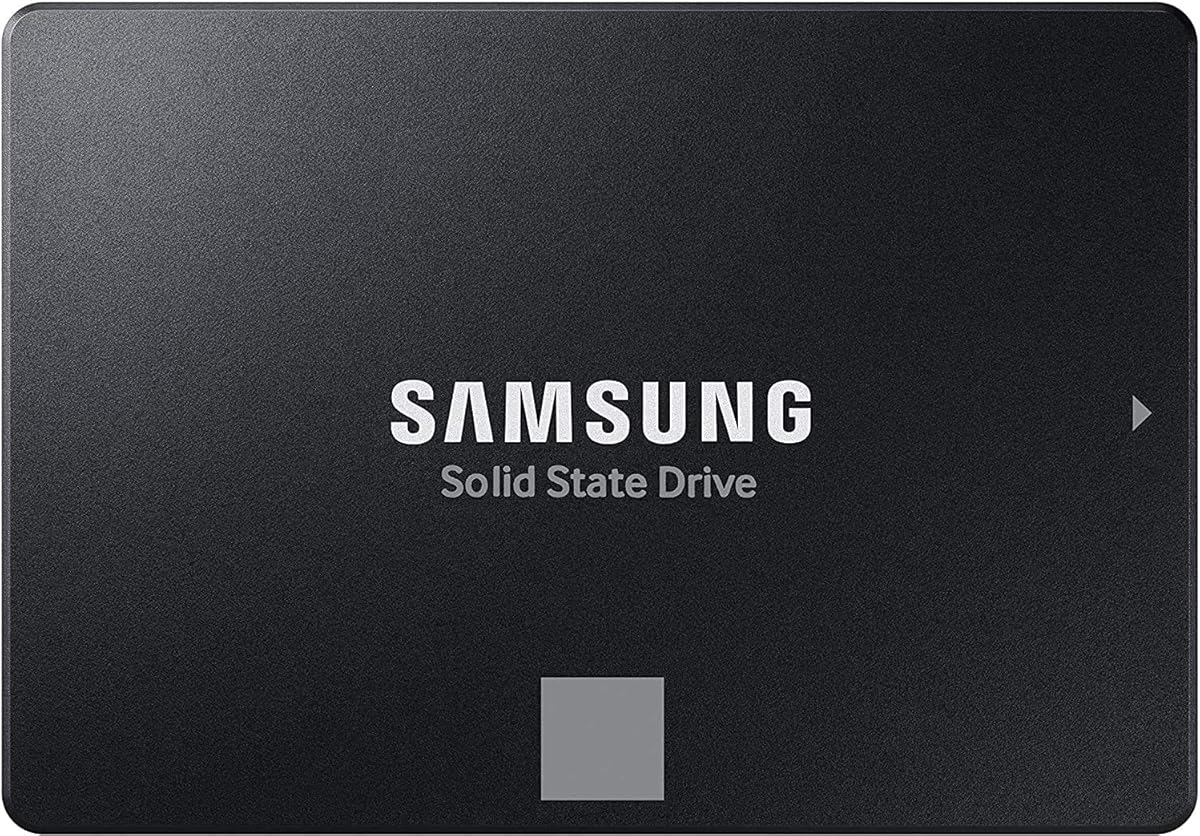
Samsung 870 EVO
The 870 EVO is the default SATA SSD recommendation and has been for years, for good reason. It saturates the SATA interface, holds its speed under sustained load better than competitors, and has an outstanding reliability reputation. Capacities run all the way to 4TB. If you want the best 2.5-inch SATA drive and do not mind paying a small premium, this is it.
- Capacity
- 250GB to 4TB
- Interface
- SATA III 6Gb/s
- Read
- Up to 560 MB/s
- Form
- 2.5-inch
What we liked
- Best sustained performance in the category
- Excellent reliability track record
- High endurance ratings
- Polished Magician software
Worth noting
- Costs a little more than rivals
- Maxes out the SATA interface like all drives
Crucial MX500
The MX500 is the value champion of SATA storage and a perennial best-seller. It performs within a hair of the 870 EVO in everyday use while costing noticeably less, and it includes thoughtful features like hardware encryption and partial power loss protection. Crucial's reliability is well established. For most upgraders watching their budget, the MX500 is the smart pick.
- Capacity
- 250GB to 4TB
- Interface
- SATA III 6Gb/s
- Read
- Up to 560 MB/s
- Form
- 2.5-inch
What we liked
- Excellent price for the performance
- Hardware encryption support
- Proven long-term reliability
- Power loss protection features
Worth noting
- Slightly lower endurance than the 870 EVO
- Software is less refined than Magician
SK Hynix Gold S31
SK Hynix builds the Gold S31 with its own NAND and controller, giving it a vertically integrated quality that shows in consistent performance. It is a no-drama drive that simply works, with solid endurance and reliable behavior over years of use. The catch is a narrower range of capacities and sparse software. For buyers who prize dependability and want something a little different from the usual suspects, it is excellent.
- Capacity
- 250GB to 1TB
- Interface
- SATA III 6Gb/s
- Read
- Up to 560 MB/s
- Form
- 2.5-inch
What we liked
- In-house NAND and controller
- Consistent, dependable performance
- Strong endurance for the tier
- Quiet, cool operation
Worth noting
- Limited capacity options
- Minimal bundled software
Samsung 870 QVO
When you need the most SATA capacity possible, the 870 QVO answers with options up to 8TB. It uses QLC NAND to hit that density affordably, which means sustained writes slow once the cache fills, but read speeds and everyday use feel fine. It is ideal as a large media or game library volume rather than a heavy write workhorse. For bulk SATA storage, nothing else offers this much room.
- Capacity
- 1TB to 8TB
- Interface
- SATA III 6Gb/s
- Read
- Up to 560 MB/s
- Form
- 2.5-inch
What we liked
- Capacities up to 8TB
- Low cost per terabyte at high capacity
- Good read performance
- Samsung reliability and software
Worth noting
- QLC NAND slows sustained writes
- Lower endurance than TLC drives
WD Blue SA510
The WD Blue SA510 is a fine, sensible drive that fits laptop upgrades especially well thanks to its low power draw and the included cloning software that simplifies migration. Performance is solid and squarely competitive without leading the field. WD's warranty and reputation provide reassurance. For an easy, affordable laptop or desktop revival, it is a dependable choice.
- Capacity
- 250GB to 4TB
- Interface
- SATA III 6Gb/s
- Read
- Up to 560 MB/s
- Form
- 2.5-inch
What we liked
- Low power draw suits laptops
- Competitive pricing
- WD reliability and warranty
- Includes Acronis cloning software
Worth noting
- Performance is middle of the pack
- Endurance trails the 870 EVO
Crucial BX500
The BX500 exists to make the cheapest possible SSD upgrade, and at that job it succeeds. It is DRAM-less and uses QLC NAND, so sustained writes are slow and endurance is modest, but it still feels enormously faster than the mechanical drive it replaces. For breathing life into an old machine on a shoestring, it delivers most of the SSD benefit for the least money. Just do not pick it for write-heavy work.
- Capacity
- 240GB to 2TB
- Interface
- SATA III 6Gb/s
- Read
- Up to 540 MB/s
- Form
- 2.5-inch
What we liked
- Very inexpensive
- Big leap over any hard drive
- Low power consumption
- Crucial name and support
Worth noting
- DRAM-less, slower sustained writes
- Lower endurance rating
Kingston A400
The Kingston A400 is the workhorse budget drive found in countless basic upgrades and prebuilt systems. It is not fast by SSD standards and uses a DRAM-less design, but it is reliable, cheap, and available everywhere. For a parent's laptop, an office machine, or any system where you just want to escape a hard drive without spending much, the A400 gets the job done.
- Capacity
- 240GB to 1.92TB
- Interface
- SATA III 6Gb/s
- Read
- Up to 500 MB/s
- Form
- 2.5-inch
What we liked
- Widely available and cheap
- Reliable for everyday tasks
- Low power use
- Great for reviving old systems
Worth noting
- Lower peak speeds than rivals
- DRAM-less with modest endurance
Why SATA SSDs Still Matter

In an era of blistering PCIe 5.0 drives, it is easy to dismiss the humble 2.5-inch SATA SSD as obsolete. That would be a mistake. Millions of perfectly capable laptops and desktops in active use lack an M.2 NVMe slot entirely, and for those machines a SATA SSD is not a compromise, it is the upgrade. Replacing a mechanical hard drive with even a budget SATA SSD is one of the most dramatic improvements you can make to an older computer. Boot times drop from a minute to a few seconds, applications launch instantly, and the constant clatter and lag of a spinning disk disappears.
The truth most enthusiasts overlook is that for everyday computing, the gap between a SATA SSD and a fast NVMe drive is far smaller than the raw bandwidth numbers imply. Opening a browser, loading a document, or booting the operating system involves countless small reads where the SATA interface ceiling rarely becomes the bottleneck. The enormous leap is from hard drive to any SSD; the step from SATA to NVMe is incremental by comparison. That is why a SATA SSD remains the smart, cost-effective choice for so many machines in 2026.
What to Look For in a SATA SSD
The Interface Ceiling
Every SATA III SSD shares the same maximum interface speed of roughly 560 MB/s. This is the most important thing to understand about the category: no SATA drive can be dramatically faster than another in sequential terms, because they all hit the same wall. As a result, manufacturers compete on reliability, endurance, capacity, software, and price rather than on peak speed. When you see one SATA drive advertised at 560 MB/s and another at 540, the difference is academic in real use. Focus your attention elsewhere.
Endurance and NAND Type
Where SATA drives genuinely differ is endurance, which is closely tied to NAND type. TLC drives like the Samsung 870 EVO and Crucial MX500 offer higher endurance ratings and better sustained write performance. QLC drives like the Samsung 870 QVO and budget options trade endurance and sustained write speed for lower cost and higher capacity. For typical use, browsing, office work, gaming, and media, even modest endurance ratings far exceed what you will ever write. The distinction matters most for write-heavy workloads, where a TLC drive is the safer long-term bet.
DRAM Versus DRAM-less
Like NVMe drives, SATA SSDs come in DRAM-equipped and DRAM-less varieties. A DRAM cache helps maintain consistent performance, particularly during sustained writes and random operations. The Samsung 870 EVO, Crucial MX500, and SK Hynix Gold S31 include DRAM, while budget drives like the BX500 and Kingston A400 do not. In light everyday use the difference is subtle, but DRAM-less drives slow more noticeably during long file copies. If you can stretch to a DRAM-equipped drive, it ages more gracefully.
Capacity and Value
SATA SSDs scale to impressive capacities, with the Samsung 870 QVO reaching 8TB. Because the interface is mature and the components inexpensive, SATA often offers the lowest cost per terabyte of any SSD type, making it attractive for bulk storage where speed is secondary. Decide how much space you need, then choose the drive that hits your capacity at the best price while meeting your endurance requirements.
How We Tested and Ranked
Because all SATA drives share the same interface ceiling, our testing emphasized the factors that actually differentiate them. We measured sustained write performance to expose how each drive behaves once its cache fills, ran random IOPS tests that reflect real responsiveness, and reviewed published endurance ratings and warranty terms. We weighed price per terabyte heavily, since value is the whole point of this category in 2026. Finally, we considered reliability track records and the quality of companion software. A drive earns a top spot by combining proven dependability, sensible endurance, and strong value rather than by winning a benchmark that the interface caps for everyone.
Choosing the Right SATA SSD for You
For the Best Experience
If you want the finest SATA drive and do not mind a small premium, the Samsung 870 EVO is the clear choice. It holds its speed under load better than anything else, has an exemplary reliability record, scales to 4TB, and pairs with the excellent Magician software. It is the drive to buy when you want the upgrade done right and forgotten about. The SK Hynix Gold S31 is a fine alternative for buyers who value its vertically integrated build and quiet dependability.
For the Best Value
Most upgraders are best served by the Crucial MX500. It performs within a whisker of the 870 EVO in daily use, costs less, and includes useful features like hardware encryption. It is the value sweet spot of the category. The WD Blue SA510 is another strong value pick, particularly for laptops, thanks to its low power draw and bundled cloning software that makes migrating from an old drive painless.
For Maximum Capacity
When you need a large, affordable SATA volume for media or game libraries, the Samsung 870 QVO and its capacities up to 8TB are unmatched. Its QLC NAND means sustained writes slow, so use it for read-heavy storage rather than constant heavy writing. The low cost per terabyte at high capacity makes it the obvious choice for bulk storage.
For the Tightest Budget
If your only goal is to escape a hard drive for as little money as possible, the Crucial BX500 and Kingston A400 deliver. They are DRAM-less and modest in endurance, but they still feel transformatively faster than any mechanical drive. These are the drives for reviving a relative's aging laptop or an office machine without spending much. Just avoid them for write-heavy tasks where their limitations show.
Installation and Migration Tips
Installing a 2.5-inch SATA SSD is among the easiest upgrades in computing. In a desktop, mount the drive in a bay or with an adapter, connect a SATA data cable to the motherboard and a SATA power cable from the supply, and you are done. In a laptop, locate the 2.5-inch bay, often behind a removable panel, slide out the old drive, and slot in the new one. Confirm your laptop actually has a 2.5-inch bay first, since many thin modern models use only M.2.
To migrate an existing operating system, use cloning software rather than reinstalling from scratch. WD bundles Acronis software with the Blue SA510, and Samsung and Crucial offer free cloning tools. Connect the new drive via a USB-to-SATA adapter, clone the old drive to it, then swap the new drive into place. After installation, install the vendor utility to confirm firmware is current and to monitor health over time. There is no need to fiddle with overprovisioning; consumer firmware handles that automatically.
SATA Versus NVMe: Choosing the Right Path
For anyone whose machine can accept either type, the SATA versus NVMe decision deserves a clear-eyed look. NVMe drives are unquestionably faster on paper, reaching thousands of megabytes per second against SATA's roughly 560 MB/s ceiling. In tasks that move large files, that gap is real and noticeable. But for the everyday rhythm of computing, booting, launching applications, browsing, and general productivity, the experience of a good SATA SSD is closer to NVMe than the raw numbers suggest, because those tasks depend on many small operations rather than sustained sequential throughput.
The practical guidance is straightforward. If your machine has an M.2 NVMe slot free, an NVMe drive is usually the better choice today, often at a similar price to a SATA drive. But if your computer lacks an M.2 slot, as countless older laptops and desktops do, do not let anyone convince you a SATA SSD is a waste. For those machines it is the correct upgrade, and the improvement over a hard drive is dramatic. SATA also remains valuable as a secondary bulk-storage drive in a desktop, where its low cost per terabyte and high available capacities shine. The two technologies are complementary, not competitors.
Common Mistakes When Buying a SATA SSD
The most common mistake is buying the wrong form factor or assuming compatibility. Many slim modern laptops have abandoned the 2.5-inch bay entirely in favor of M.2, so always confirm your machine actually has a SATA bay before purchasing. In desktops, ensure you have a free SATA data port on the motherboard and an available SATA power connector from the supply. Buying a drive that physically cannot connect is a frustrating and avoidable error.
A second mistake is overspending in a category defined by its value. Because every SATA drive shares the same interface ceiling, the performance differences between models are small in everyday use. Paying a large premium for a marginally higher rated speed rarely makes sense; the money is better spent on more capacity or simply saved. A third error is choosing a QLC drive for a write-heavy workload. QLC drives like the 870 QVO are superb for capacity and read-heavy use, but their slower sustained writes and lower endurance make them a poor fit for constant heavy writing, where a TLC drive serves better. Finally, remember to clone rather than reinstall when migrating, since free cloning tools save hours of setup.
Maximizing the Life of Your SATA SSD
A quality SATA SSD will easily outlast the typical lifespan of an older computer, but a few habits help ensure it. Keep some free space on the drive, ideally ten to fifteen percent, since SSDs use unallocated space for caching and garbage collection, both of which keep performance consistent. Avoid filling the drive to the brim and leaving it there. Modern operating systems handle the TRIM command automatically, which keeps the drive performing well over time, so there is no manual maintenance required for that.
Installing the manufacturer's utility, such as Samsung Magician or Crucial Storage Executive, lets you monitor drive health through its SMART data and apply firmware updates that occasionally fix bugs or improve performance. There is no need to manually adjust over-provisioning on a consumer drive, as the firmware reserves space automatically, though some utilities let you allocate extra if you wish. For the vast majority of users, a SATA SSD is genuinely set-and-forget hardware. Install it, keep a little headroom, run the occasional firmware update, and it will quietly serve you for many years.
Final Verdict
The SATA SSD remains one of the most worthwhile upgrades you can make, especially for the vast number of machines without an M.2 NVMe slot. Our overall pick, the Samsung 870 EVO, delivers the best blend of performance, reliability, and capacity in the category. The Crucial MX500 is the value champion that suits most upgraders, while the Samsung 870 QVO answers the call for sheer capacity. Budget options like the BX500 and Kingston A400 prove that even the cheapest SSD upgrade is a revelation compared to a hard drive. Whatever your budget, moving to a SATA SSD will make an older computer feel years younger.
How we picked
We assessed each drive on sustained read and write performance, random IOPS, endurance ratings, warranty length, and price per terabyte. We weighed real-world responsiveness for typical desktop and laptop tasks over synthetic peaks, since all SATA drives share the same interface ceiling. Rankings reflect mid 2026 pricing.
Frequently asked questions
Is a SATA SSD still worth buying in 2026?
Absolutely, if your machine lacks an M.2 NVMe slot. For older laptops and desktops, a SATA SSD is the single most impactful upgrade you can make, turning a sluggish system into a responsive one cheaply.
How much slower is SATA than NVMe?
On paper, far slower. SATA tops out near 560 MB/s while NVMe reaches thousands. In everyday tasks like booting and launching apps, the difference is smaller than the numbers suggest, but NVMe wins clearly for large transfers.
Should I avoid QLC SATA drives?
Not necessarily. QLC drives like the 870 QVO are great for capacity and read-heavy use such as media libraries. Avoid them only for sustained write-heavy workloads, where TLC drives like the 870 EVO hold up better.
Can I put a SATA SSD in any laptop?
If your laptop has a 2.5-inch drive bay, yes. Many thin modern laptops use only M.2 slots, so check your model first. Desktops with a free SATA port and power connector can always accept one.
Do SATA SSDs need special drivers?
No. They work out of the box with modern operating systems. Installing the vendor utility, such as Samsung Magician or Crucial Storage Executive, is optional but useful for firmware updates and health monitoring.