Skip to content

Best Mini-ITX Cases in 2026

4.5 average · hands-on tested
By Thomas BrianUpdated June 27, 20267 picks tested

We may earn a commission from links on this page, at no extra cost to you. Learn more.

Mini-ITX cases let you pack serious power into a tiny footprint, perfect for small desks, living rooms, or LAN parties. Building small comes with trade-offs in cooling and assembly complexity, but modern designs have made compact builds more capable than ever. In this guide we rank seven of the best Mini-ITX cases available in 2026 across console-sized, sandwich-layout, and showpiece designs. Each was tested with real hardware to gauge thermals, clearance, and how manageable the build process really is.

Quick comparison

KeyboardBest forRatingPrice
1Fractal Design TerraFractal DesignBest Overall4.6$$$Check Price
2Cooler Master NR200P MaxCooler MasterBest Value4.6$$$Check Price
3SSUPD Meshroom SSSUPDBest Showcase4.5$$$Check Price
4ASUS Prime AP201ASUSBest Budget4.4$$$Check Price
5Fractal Design RidgeFractal DesignBest Premium4.4$$$Check Price
6Jonsbo D31JonsboBest Compact4.3$$$Check Price
7Lian Li A3-mATXLian LiBest Airflow4.4$$$Check Price

Our top 7 picks, reviewed

1Best Overall

Fractal Design Terra

The Fractal Design Terra is the most refined small form factor case you can buy. Its anodized aluminum shell and walnut front panel look stunning on any desk. An adjustable internal spine lets you balance GPU and cooler clearance to suit your parts. It is the ideal blend of beauty and function for a compact build.

Form
Mini-ITX
Motherboard
Mini-ITX
GPU
322mm
Fans
None included

What we liked

  • Beautiful wood and aluminum finish
  • Clever adjustable internal spine
  • Compact yet flexible layout
  • Premium tactile build quality

Worth noting

  • No fans included
  • Tight on the largest GPUs
2Best Value

Cooler Master NR200P Max

The NR200P Max takes the excellent NR200 platform and adds a pre-installed 280mm AIO and an 850W SFX power supply. That bundle removes the hardest sourcing headaches of a small build. It cools well, fits large GPUs, and the included riser supports a vertical card. For a turnkey compact build, it is outstanding value.

Form
Mini-ITX
Motherboard
Mini-ITX
GPU
336mm
Fans
2x 120mm

What we liked

  • Bundled AIO and SFX power supply
  • Excellent value as a kit
  • Strong cooling for its size
  • Tool-less panels and PCIe riser included

Worth noting

  • Bundle raises upfront cost
  • Tight cable management space
3Best Showcase

SSUPD Meshroom S

The Meshroom S wraps a sandwich-layout interior in full mesh panels for excellent airflow in a small package. Its modular brackets let you configure storage, radiators, and GPU placement to fit your needs. It handles big graphics cards and 280mm radiators despite its size. For an airflow-first compact build, it is a top choice.

Form
Mini-ITX
Motherboard
Mini-ITX/mATX
GPU
336mm
Fans
None included

What we liked

  • Full mesh panels for great airflow
  • Surprisingly flexible internal layout
  • Supports large GPUs and AIOs
  • Modular bracket system

Worth noting

  • No fans included
  • Sandwich layout takes planning
4Best Budget

ASUS Prime AP201

The Prime AP201 is a budget-friendly way into compact building, with mesh panels on three sides and a surprisingly roomy interior. It supports standard ATX power supplies and tower coolers, easing the small form factor learning curve. While it is technically a microATX case, it stays compact and tidy. For value-focused small builds, it is hard to beat.

Form
MicroATX mini-tower
Motherboard
mATX/ITX
GPU
338mm
Fans
None included

What we liked

  • Mesh on three sides for airflow
  • Roomy interior for a compact case
  • Easy to build in for beginners
  • Affordable entry into small builds

Worth noting

  • No fans included
  • Larger than true ITX cases
5Best Premium

Fractal Design Ridge

The Ridge is a slim vertical case designed to stand discreetly on a desk or shelf. Its aluminum panels and clean lines give it a premium console-like look. An integrated PCIe riser keeps the GPU front and center. Thermals require thoughtful fan choices, but the design rewards a careful builder with a tidy, attractive system.

Form
Mini-ITX
Motherboard
Mini-ITX
GPU
325mm
Fans
None included

What we liked

  • Slim vertical console-style design
  • Premium aluminum side panels
  • Small desktop footprint
  • Integrated PCIe 4.0 riser

Worth noting

  • No fans included
  • Cooling needs careful planning
6Best Compact

Jonsbo D31

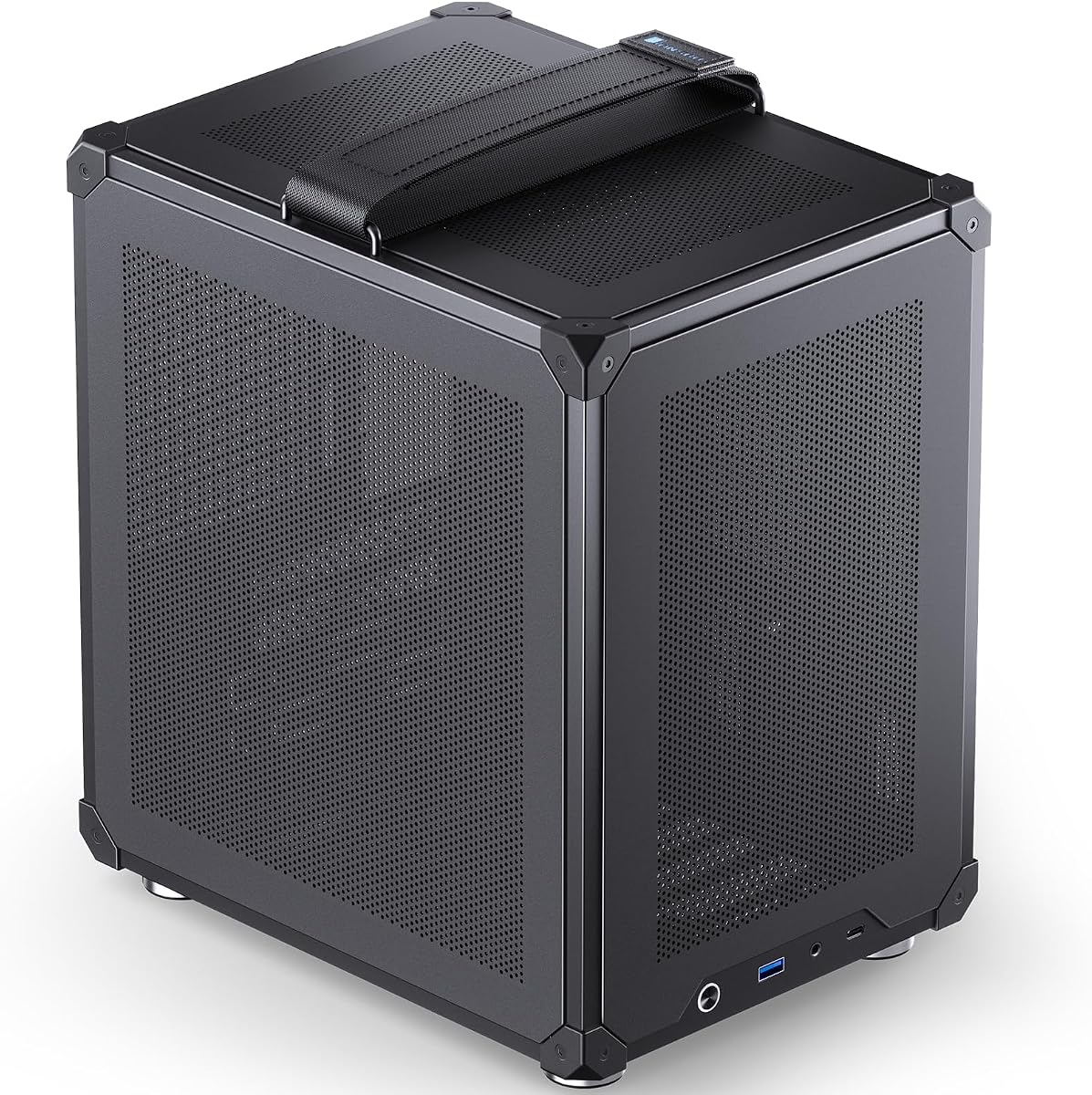
The Jonsbo D31 offers a lot of internal space in a tidy mini-tower footprint, with support for long GPUs and tall air coolers. An optional version adds a small integrated screen for system stats. The clean exterior fits both office and gaming setups. It is a versatile compact case at a friendly price.

Form
MicroATX mini-tower
Motherboard
mATX/ITX
GPU
360mm
Fans
None included

What we liked

  • Optional integrated screen variant
  • Roomy for its compact size
  • Supports long GPUs and tall coolers
  • Distinctive clean aesthetic

Worth noting

  • No fans included
  • Solid panels need good fan setup
7Best Airflow

Lian Li A3-mATX

The Lian Li A3-mATX brings airflow-first design to a compact mini-tower form. Its mesh panels and flexible mounting options keep components cool even under load. Despite the small size, it clears very long GPUs and supports solid radiator options. For a cool-running compact build, it punches well above its price.

Form
MicroATX mini-tower
Motherboard
mATX/ITX
GPU
392mm
Fans
None included

What we liked

  • Strong airflow-focused mesh design
  • Generous GPU clearance for its size
  • Flexible fan and radiator mounts
  • Affordable and well-built

Worth noting

  • No fans included
  • Footprint larger than true ITX

The Appeal of Mini-ITX Builds

There is something deeply satisfying about packing a powerful gaming PC into a case barely larger than a game console. Mini-ITX builds save desk space, travel easily to LAN parties, and blend seamlessly into living room setups. In 2026, small form factor building has matured into a genuinely accessible hobby, with cases that balance compact dimensions against the cooling and clearance needed for high-end hardware. You no longer have to sacrifice performance to build small.

That said, building Mini-ITX is not the same as building in a roomy mid-tower. Every millimeter matters, cable routing is tighter, and component compatibility requires careful planning. The cases in this roundup were chosen because they make the small form factor experience as smooth as possible, whether you want a refined desktop centerpiece or an airflow-focused performance machine. We tested each with real hardware to understand the actual building experience, not just the spec sheet.

What to Look For in a Mini-ITX Case

Footprint and Volume

The whole point of going small is the reduced footprint, so case volume is a primary consideration. Mini-ITX cases range from ultra-compact console-style designs to slightly larger boxes that ease the build process. The Fractal Design Terra and Ridge prioritize a small, elegant footprint, while the SSUPD Meshroom S and Lian Li A3-mATX trade a little size for better airflow and easier assembly.

Think about where the case will live. A slim vertical case like the Ridge sits neatly on a desk or shelf, while a sandwich-layout case like the Meshroom S works well standing upright next to a monitor. Smaller is not always better, since extreme compactness usually means harder builds and tighter cooling. Pick a volume that matches your tolerance for fiddly assembly.

Cooling and Thermals

Cooling is the biggest challenge in small builds. With less internal volume, heat has fewer paths to escape, so airflow design is critical. Mesh-panel cases like the Meshroom S, A3-mATX, and ASUS Prime AP201 excel here, letting fans breathe freely. Cases with solid panels, like the Fractal Ridge, demand more careful fan selection and placement.

Many small builders turn to compact liquid coolers to manage CPU temperatures in tight spaces. The Cooler Master NR200P Max even bundles a 280mm AIO, removing the guesswork. For air cooling, pay close attention to the maximum cooler height, since tall tower coolers will not fit many compact cases. A low-profile cooler or a slim AIO is often the safest bet.

GPU and CPU Clearance

Graphics card clearance varies widely among Mini-ITX cases. Some handle full-length flagship cards, while others limit you to shorter models. Several picks here clear over 320mm of GPU length, with the Lian Li A3-mATX reaching an impressive 392mm. Always verify both length and thickness, since thick triple-slot cards can be a tighter fit than the length spec alone suggests.

CPU cooler clearance is equally important. Sandwich-layout cases often constrain cooler height to make room for the GPU on the opposite side. Read the clearance specs carefully and plan your cooler choice around them. A case that fits a big GPU may force a compromise on the CPU cooler, and vice versa.

Power Supply Format

Many Mini-ITX cases require the smaller SFX or SFX-L power supply rather than a standard ATX unit. SFX units cost a bit more and offer fewer high-wattage options, but they are essential for the most compact builds. Some cases, like the ASUS Prime AP201, accept full ATX power supplies, which can save money and expand your options. Confirm the supported format before buying your power supply, since this is a common source of compatibility mistakes.

Choosing the Right Compact Case

For the Design-Conscious Builder

If you want a case that looks like a premium piece of furniture, the Fractal Design Terra is the standout. Its walnut front panel and anodized aluminum shell make it a genuine desktop centerpiece. The adjustable internal spine lets you tune the balance between GPU and cooler clearance, giving you flexibility despite the small size. The Fractal Ridge offers a similarly premium feel in a slim vertical form.

For the First-Time Small Builder

Newcomers to small form factor should consider the ASUS Prime AP201 or Cooler Master NR200P Max. The AP201 is roomy and forgiving, accepting standard ATX power supplies and tower coolers, which lowers the barrier to entry. The NR200P Max removes sourcing headaches entirely by bundling an AIO cooler and SFX power supply. Both make the compact building experience far less intimidating.

For Maximum Performance

If you want to push high-end hardware in a small case, prioritize airflow. The SSUPD Meshroom S and Lian Li A3-mATX both use mesh panels to keep components cool under sustained load. Pair them with quality fans and a capable cooler, and they can handle flagship CPUs and GPUs without throttling. These cases prove that small does not have to mean slow.

Understanding Small Form Factor Layouts

Mini-ITX cases come in several distinct layout styles, and understanding them helps you choose the right one for your goals. The most common is the sandwich layout, where the motherboard and graphics card sit back to back on either side of a central divider, connected by a PCIe riser cable. The SSUPD Meshroom S uses this design. Sandwich cases are compact and let you show off the GPU, but they often limit CPU cooler height since the card sits close to the cooler on the opposite side.

Traditional layouts place components in a more conventional arrangement, often allowing taller air coolers and standard power supplies. The ASUS Prime AP201 follows this approach, which is why it accepts full ATX power supplies and tall tower coolers. These cases are easier to build in and more forgiving for newcomers, at the cost of a slightly larger footprint than the most extreme sandwich designs. Console-style cases like the Fractal Ridge lay components flat in a slim horizontal or vertical orientation, prioritizing a small, attractive profile that fits on a shelf.

Each layout involves trade-offs between size, cooling, and ease of building. Sandwich cases pack the most power into the smallest volume but demand careful planning. Traditional layouts ease the build at a modest size penalty. Console designs prioritize aesthetics and compactness over raw thermal headroom. Match the layout to your priorities, whether that is the absolute smallest footprint, the easiest build, or the most attractive desktop presence.

Cable Management in Tight Spaces

Cable management is one of the biggest challenges in small form factor builds. With so little room, excess cable length quickly becomes a tangled mess that obstructs airflow and makes the build look cluttered. Modular power supplies are nearly essential, since they let you use only the cables you need rather than cramming unused leads into a tiny chassis. Many small builders go a step further and buy custom-length cables that eliminate excess slack entirely for a clean, tidy result.

The PCIe riser cable used in sandwich-layout cases adds another wrinkle. Riser quality matters, since a poor riser can cause stability issues or fail to run the GPU at full bandwidth. Cases like the Cooler Master NR200P Max include a quality riser, removing the guesswork. When planning a sandwich build, route the riser carefully and avoid sharp bends that could damage it. A little patience during cable routing pays off enormously in a small build, both for appearance and for the airflow your components depend on.

Take advantage of every tie-down point and hidden cavity the case offers. Tucking cables behind the motherboard tray, in the power supply shroud, or alongside the chassis frame keeps them out of the air path. In a case this small, even a single bundle of cables in the wrong place can disrupt cooling, so methodical routing is worth the extra time it takes.

Living With a Small Form Factor PC

A Mini-ITX build is not just a technical exercise; it changes how you live with your computer. The compact size means it fits places a full tower never could, from a tidy desk corner to an entertainment center beside a television. Many small builds are quiet enough and attractive enough to sit in a living room without looking out of place. If portability matters, a Mini-ITX system is light enough to carry to a friend's house or a LAN event without strain.

The trade-off is that small builds run a little warmer and demand more careful component selection. Once built, however, a well-planned Mini-ITX system performs nearly identically to its full-size counterpart while taking up a fraction of the space. The satisfaction of pulling that off, of packing flagship performance into a case the size of a console, is a big part of why so many enthusiasts are drawn to the form factor. With the right case and a thoughtful parts list, a small build can be every bit as capable as a tower.

Choosing the Right Power and Cooling Combination

The single most important planning decision in a Mini-ITX build is how the power supply and cooling fit together within the limited space. Because volume is so constrained, these two systems often compete for the same room, and getting the combination right determines whether your build runs cool and quiet or hot and loud. Start by deciding whether your chosen case requires an SFX, SFX-L, or full ATX power supply, then build your cooling plan around the space that remains.

For sandwich-layout cases, a slim all-in-one liquid cooler often makes the most sense, since it keeps the area around the CPU socket clear and routes heat out through a radiator at an intake position. For traditional-layout cases like the ASUS Prime AP201, a quality low-profile or compact tower air cooler can work well and avoids the complexity of liquid cooling. Always confirm the maximum cooler height and radiator support before buying, since these limits are far stricter in small cases than in full towers.

Power supply wattage also deserves attention. Compact builds with high-end components can draw substantial power, and SFX units offer fewer high-wattage options than standard ATX. Choose a unit with enough headroom for your hardware plus a margin for future upgrades, but avoid an unnecessarily large unit that wastes precious space. A well-matched power and cooling combination is the foundation of a successful small form factor build, so plan this part of the build carefully before purchasing components.

Final Thoughts

Mini-ITX building has never been more rewarding. The cases in this roundup span elegant desktop showpieces, airflow-focused performance boxes, and beginner-friendly compact towers. The Fractal Design Terra earns our overall recommendation for its blend of beauty and clever engineering, while the NR200P Max offers exceptional value as a complete kit. Whatever you choose, plan your parts carefully around clearance and cooling, and you will end up with a tiny but mighty machine that turns heads. Small form factor building rewards patience and planning, and these seven cases give you the best possible foundation for a compact build in 2026.

How we picked

We assembled a representative small form factor build in each case to evaluate airflow, component temperatures, and assembly difficulty. We scored build quality and panel fit, measured maximum GPU length and CPU cooler height, and checked radiator and fan support. Final rankings weigh cooling performance and ease of building against footprint and price.

Frequently asked questions

Are Mini-ITX builds harder than full-size builds?

Generally yes. Tight space makes cable routing and component installation trickier, and clearances are smaller. Choosing a well-designed case and planning your parts list carefully makes the process far smoother.

Do Mini-ITX cases run hotter than larger cases?

They can, since there is less room for airflow. However, modern mesh-panel designs and bundled liquid coolers, like the one in the NR200P Max, keep temperatures well in check when configured properly.

Can I fit a full-size GPU in a Mini-ITX case?

Many can. Several picks here clear over 320mm of GPU length, enough for most flagship cards. Always check the specific length and thickness limits before buying a graphics card.

Do I need an SFX power supply for Mini-ITX?

Often yes. Many compact cases require the smaller SFX or SFX-L power supply format. Some, like the ASUS Prime AP201, accept standard ATX power supplies, so confirm before purchasing.

What CPU cooler works best in a small case?

It depends on clearance. Low-profile air coolers fit slim cases, while sandwich-layout cases often pair best with a compact AIO liquid cooler. Check the maximum cooler height for your chosen case.