Best Lightweight Gaming Mouse in 2026
We may earn a commission from links on this page, at no extra cost to you. Learn more.
Lightweight gaming mice have taken over competitive play, and for good reason. Shaving off every spare gram lets you flick faster, aim more precisely, and play longer without fatigue. The best models now pair sub-60-gram bodies with flagship wireless sensors and battery life that lasts for days. We tested the top contenders across fast shooters and reflex-heavy games to find which ultralight mice truly deliver. This guide explains what makes a lightweight mouse great and ranks the seven we trust most.
Quick comparison
| Keyboard | Best for | Rating | Price | |
|---|---|---|---|---|
| 1Logitech G Pro X Superlight 2Logitech | Best Overall | 4.8 | $$$ | Check Price |
| 2Razer Viper V3 ProRazer | Best for Esports | 4.8 | $$$ | Check Price |
| 3Glorious Model O 2Glorious | Best Value | 4.5 | $$$ | Check Price |
| 4Pulsar X2V2Pulsar | Best for Claw Grip | 4.6 | $$$ | Check Price |
| 5Ninjutso SoraNinjutso | Best Ultralight | 4.5 | $$$ | |
| 6Endgame Gear OP1weEndgame Gear | Best Wired Option | 4.5 | $$$ | Check Price |
| 7Razer Viper MiniRazer | Best for Small Hands | 4.3 | $$$ | Check Price |
Our top 7 picks, reviewed
Logitech G Pro X Superlight 2
The G Pro X Superlight 2 remains the benchmark every other lightweight mouse is measured against. Its Hero 2 sensor tracks perfectly, the Lightspeed wireless connection is rock solid, and the universally liked egg shape suits most grips. At 60 grams it is light without feeling fragile, and battery life is among the best in class. It costs a lot, but for serious players it is the safest top-tier pick.
- Connection
- Lightspeed wireless
- Sensor
- Hero 2 up to 44000 DPI
- Weight
- 60 g
- Buttons
- 5
What we liked
- Flawless sensor tracking at any speed
- Excellent battery life around 95 hours
- Comfortable safe-shape design
- Improved optical switches feel crisp
Worth noting
- Premium price tag
- No onboard weight tuning
Razer Viper V3 Pro
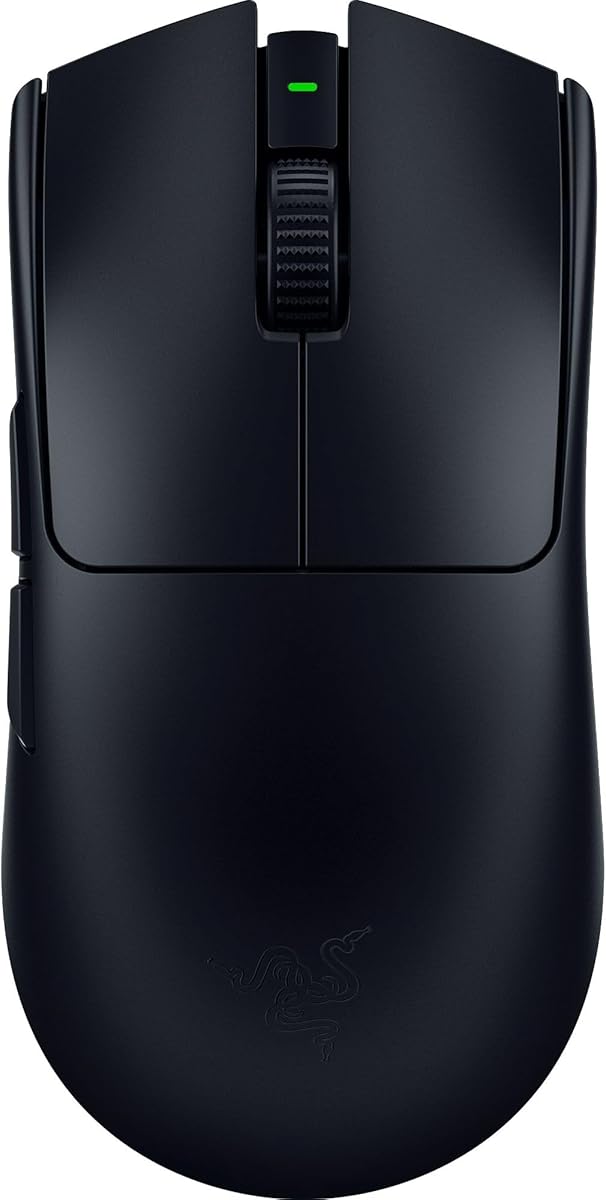
The Viper V3 Pro is the favorite of countless pro players, and it is easy to see why. At just 54 grams with an 8000 Hz polling rate available out of the box, it offers some of the lowest latency and fastest response you can buy. The Focus Pro sensor is excellent, and the wider symmetrical shape suits claw and fingertip grips. It is the go-to ultralight for competitive shooters.
- Connection
- HyperSpeed wireless
- Sensor
- Focus Pro 35K Gen 2
- Weight
- 54 g
- Buttons
- 6
What we liked
- Ultralight 54-gram body
- 8000 Hz polling support included
- Crisp optical switches with fast clicks
- Larger flatter shape suits claw grip
Worth noting
- Requires dongle for full 8K polling
- Side grips can wear over time
Glorious Model O 2
The Model O 2 brings genuinely competitive ultralight performance to a friendlier price. At 59 grams with a capable BAMF 2.0 sensor and reliable wireless, it covers the needs of most players without the flagship price. The honeycomb-free shell feels solid, and the stock feet glide nicely. The sensor stops just short of the very best, but for the money it is a fantastic value.
- Connection
- 2.4 GHz wireless
- Sensor
- BAMF 2.0 up to 26000 DPI
- Weight
- 59 g
- Buttons
- 6
What we liked
- Lightweight at an affordable price
- Smooth feet and gliding feel
- Comfortable ambidextrous shape
- Solid wireless performance
Worth noting
- Sensor not quite flagship tier
- Software can feel clunky
Pulsar X2V2
The Pulsar X2V2 has built a devoted following among enthusiasts who want a refined, lightweight symmetrical mouse. At 53 grams with the proven PAW3395 sensor, it delivers flagship-class tracking in a shape that claw and fingertip grippers love. Battery life is impressive given the low weight. It is less of a household name, but among hardcore players it is one of the most respected ultralights available.
- Connection
- 2.4 GHz wireless
- Sensor
- PAW3395 up to 26000 DPI
- Weight
- 53 g
- Buttons
- 6
What we liked
- Very light at 53 grams
- Symmetrical shape great for claw grip
- Reliable PAW3395 sensor
- Strong battery life for the weight
Worth noting
- Less mainstream support
- Coating can attract fingerprints
Ninjutso Sora

The Ninjutso Sora pushes the weight envelope to an almost unbelievable 39 grams while still using a top-tier PAW3395 sensor. The result is a mouse that practically floats, making fast flicks feel effortless. The medium shape is comfortable for most hands. Some players find such an ultralight body feels fragile, and stock can be hard to find, but for chasing the lightest possible aim it is a standout.
- Connection
- 2.4 GHz wireless
- Sensor
- PAW3395 up to 26000 DPI
- Weight
- 39 g
- Buttons
- 6
What we liked
- Astonishingly light at 39 grams
- Flagship PAW3395 sensor
- Effortless flick aiming
- Comfortable medium shape
Worth noting
- Feels delicate to some users
- Limited availability
Endgame Gear OP1we
The Endgame Gear OP1we is prized for its exceptionally crisp, responsive clicks and its low, flat profile. At 50 grams it is light and quick, and the PAW3395 sensor tracks reliably. The flat shape is a love-it-or-hate-it choice that fingertip players adore. Battery life is just average, but for those who want some of the best click feel in an ultralight, the OP1we earns its spot.
- Connection
- 2.4 GHz wireless
- Sensor
- PAW3395 up to 26000 DPI
- Weight
- 50 g
- Buttons
- 6
What we liked
- Excellent clicks with fast actuation
- Light 50-gram body
- Reliable PAW3395 sensor
- Flat shape favors fingertip grip
Worth noting
- Niche flat shape not for everyone
- Modest battery life
Razer Viper Mini
The Viper Mini is the budget pick for players with smaller hands or anyone who wants a lightweight mouse without spending much. Its compact shape fits petite grips that larger mice swamp, and at 61 grams wired it stays nimble. The optical switches click cleanly. It is wired and its sensor is a tier below the flagships, but as an inexpensive small ultralight it is hard to beat.
- Connection
- Wired USB
- Sensor
- Optical up to 8500 DPI
- Weight
- 61 g
- Buttons
- 6
What we liked
- Small shape ideal for tiny hands
- Very affordable price
- Light wired body
- Crisp optical switches
Worth noting
- Wired only at this price
- Lower DPI ceiling than flagships
Why Lightweight Gaming Mice Dominate in 2026
Walk into any competitive gaming setup today and you will almost certainly find an ultralight mouse on the desk. The shift toward lighter and lighter pointing devices has been one of the defining trends in PC gaming hardware, and in 2026 it has reached a kind of maturity. The wild early days of drilling honeycomb holes into shells to save a few grams have given way to refined, solid-bodied mice that weigh less than a slice of bread while packing flagship sensors and wireless connections indistinguishable from wired in real play. The result is a category where almost every top model is genuinely excellent, and the choice comes down to shape, price, and personal feel.
The appeal of a lightweight mouse is simple physics. A lighter object takes less force to accelerate and decelerate, so your hand and wrist do less work for every flick, swipe, and stop. Over a long match that reduced effort means less fatigue, and in the heat of a fast exchange it can mean reaching your target a fraction faster. For aim-intensive games like tactical shooters, that fraction matters. This guide breaks down what to look for in an ultralight, then ranks the seven mice that earned our confidence after extensive testing.
What Makes a Great Lightweight Mouse
Weight and weight distribution
Raw weight is the headline number, but how that weight is balanced matters just as much. A mouse that is light but front-heavy can feel awkward, while a well-balanced 55-gram body feels neutral and controllable. The best ultralights distribute mass evenly so the mouse never tips or drags toward one end. As you shop, treat the gram figure as a starting point and pay attention to reviews describing the balance and feel, because two mice of identical weight can handle very differently.
Sensor performance
A featherweight body means nothing if the sensor cannot keep up. The good news is that 2026's lightweight mice use outstanding sensors. Logitech's Hero 2 and Razer's Focus Pro lead the flagship tier, while the PAW3395 has become the workhorse for enthusiast brands like Pulsar, Ninjutso, and Endgame Gear. All of these track flawlessly across the speeds a gamer will ever reach, with no spinouts or acceleration. Extremely high DPI ceilings make for good marketing but matter little in practice, since most players use a fraction of the available DPI.
Click latency and switches
How quickly a click registers can decide a duel. Optical switches, now common in this category, actuate the moment a beam is broken, eliminating the debounce delay of mechanical switches and the double-click issues that plagued older mice. The Viper V3 Pro and OP1we are particularly praised for crisp, snappy clicks. Beyond raw speed, the tactile feel of the click matters for confidence, so look for switches described as light and responsive without being mushy or overly stiff.
Wireless reliability and polling
Wireless used to be a compromise for gamers, but no longer. The top proprietary wireless systems, Logitech Lightspeed and Razer HyperSpeed, deliver latency on par with wired connections and a connection stable enough for professional play. Some models add an 8000 Hz polling option that updates position eight times more frequently than the 1000 Hz standard. The smoothness benefit is real but subtle and only noticeable on high-refresh displays with powerful hardware, so consider it a bonus rather than a requirement.
Battery life
An ultralight has little room for a big battery, so efficiency matters. The Superlight 2 leads the pack with roughly 95 hours of use, while most enthusiast models land in the 50-to-90-hour range depending on settings. Enabling high polling rates drains the battery faster. For most players, charging once or twice a week is no burden, and quick-charge support means a few minutes on the cable buys hours of play. If you forget to charge often, prioritize a model with longer endurance.
Choosing the Right Shape for Your Grip
The single most important comfort factor is shape, and the best shape depends on how you hold the mouse. There are three common grips, and each pairs better with certain designs.
Palm grip
Palm grippers rest the whole hand on the mouse, fingers extended flat. This grip favors larger, more contoured shapes that fill the hand and support the palm. The G Pro X Superlight 2 and its safe, egg-like profile suit palm grip well, as do medium-to-large bodies that do not force the fingers to curl.
Claw grip
Claw grippers arch their fingers, contacting the mouse with fingertips and the rear palm while leaving a gap in the middle. This grip rewards mice with a higher rear hump and a shape that supports the back of the hand, like the Viper V3 Pro and Pulsar X2V2. Claw players often prefer slightly shorter mice that let them pivot quickly.
Fingertip grip
Fingertip grippers control the mouse entirely with their fingertips, the palm hovering above. This style demands the lightest, often flattest mice, since the fingers do all the work. The Endgame Gear OP1we, with its low flat profile, and ultralights like the Ninjutso Sora excel here. Smaller hands also tend to suit fingertip grip, making the compact Viper Mini a natural fit.
Matching a Mouse to Your Needs
For the player who wants the safest premium choice with no weak points, the Logitech G Pro X Superlight 2 is the easy recommendation. Its proven shape, flawless sensor, and class-leading battery make it the default for a reason. If your priority is pure competitive edge and you favor a wider claw-friendly shape, the Razer Viper V3 Pro and its 54-gram body with 8000 Hz polling is the esports favorite.
Budget-conscious players who still want real performance should look at the Glorious Model O 2, which delivers most of the flagship experience for noticeably less. Enthusiasts chasing refinement have superb options in the Pulsar X2V2 and the astonishingly light Ninjutso Sora, while click-feel obsessives will love the Endgame Gear OP1we. Finally, players with smaller hands or tighter budgets are well served by the compact, affordable Razer Viper Mini.
Tips to Get the Most From an Ultralight
When you first switch to a lighter mouse, your aim may feel twitchy because your hand is used to applying more force. Give it a few sessions to recalibrate, and consider lowering your in-game sensitivity slightly while you adjust. Replace the stock mouse feet with quality skates once they wear, since smooth glide is as important to the feel as the weight itself. Keep a charging cable within reach so a wireless model never dies mid-session, and enable high polling rates only if your monitor and PC can take advantage of them, since they shorten battery life for a subtle gain.
Wireless Versus Wired in 2026
A few years ago, recommending a wireless mouse for serious competitive play came with caveats. That is no longer the case. The leading proprietary wireless systems have been refined to the point where their latency is, for all practical purposes, identical to a wired connection, and professional players across every major shooter now compete on wireless mice without a second thought. The freedom from cable drag is a genuine performance factor in its own right, because a cable that snags or tugs introduces inconsistency into your aim that a wireless mouse simply does not have.
That said, wired ultralights still have a place. They are cheaper, since you are not paying for a battery and radio, and they never need charging, which suits players who would rather not think about power at all. A high-quality flexible paracord cable minimizes drag to the point where many players forget the cable is there. If your budget is tight or you dislike charging routines, a wired ultralight like the Razer Viper Mini delivers excellent performance for less. For most players who can afford it, though, wireless is now the default, and the convenience and consistency it brings are well worth the premium.
Sensor and Switch Technology Explained
The sensors in 2026's lightweight mice are so good that sensor quality is rarely a differentiator among top models. Flagship sensors from Logitech and Razer, along with the enthusiast-favorite PAW3395, all track perfectly across the entire range of speeds a human hand can produce. None of them exhibit the acceleration, smoothing, or spinouts that plagued older sensors. This means you can choose a mouse based on shape, weight, and price rather than worrying that one sensor will let you down in a clutch moment. The enormous DPI ceilings these sensors advertise are essentially marketing, since competitive players typically use a few hundred to a couple thousand DPI.
Switches deserve equal attention because they determine how your clicks feel and how the mouse ages. Optical switches have largely replaced mechanical ones in this category, and the change matters. An optical switch actuates the instant a light beam is broken, which removes the debounce delay mechanical switches require and, crucially, eliminates the double-click failures that historically killed gaming mice after a year or two of heavy use. The result is faster, more consistent clicks and a longer lifespan. When comparing models, pay attention to how reviewers describe the click feel, since a light, crisp, confident click contributes as much to a satisfying mouse as the weight does.
Coatings, Feet, and the Little Details
Beyond the headline specs, the small details of a lightweight mouse shape your day-to-day satisfaction. The shell coating determines how the mouse feels in sweaty palms during an intense match. Some players prefer a smooth matte finish, while others reach for grippy textured coatings or aftermarket grip tape to keep control when their hands warm up. The Pulsar X2V2 and similar enthusiast mice are often praised for coatings that balance comfort and grip, while glossier finishes can become slick over a long session. If you have sweaty hands, factor this in or budget for a few dollars of grip tape.
The mouse feet, or skates, are just as important as the weight to how a mouse glides. Stock feet vary in quality, and many enthusiasts swap them for premium PTFE skates that offer a smoother, faster glide across the pad. Because an ultralight mouse depends so heavily on effortless motion, good feet amplify the benefit of the low weight. They also wear over time, so knowing you can refresh them cheaply extends the life of a favorite mouse. Pairing quality feet with a consistent cloth or hybrid mousepad gives you the controlled, frictionless movement that makes a lightweight mouse feel its best, turning a great mouse into a great aiming system.
Final Verdict
Lightweight gaming mice are no longer a niche; they are the standard for competitive play, and 2026 offers an embarrassment of riches. The Logitech G Pro X Superlight 2 takes our top overall spot for its complete, no-compromise package, while the Razer Viper V3 Pro is the choice for esports players who want every possible edge. Value seekers should grab the Glorious Model O 2, enthusiasts have the excellent Pulsar X2V2 and ultralight Ninjutso Sora, click connoisseurs the Endgame Gear OP1we, and small-handed players the affordable Razer Viper Mini. Whichever you pick, the move to a lighter mouse is one of the most noticeable upgrades a competitive player can make, turning fatiguing marathons into effortless flicks.
How we picked
We judged each mouse on weight, sensor accuracy, click latency, wireless reliability, shape comfort, and battery life. Every model was used in competitive shooters and aim trainers across multiple play sessions. Scores prioritize tracking performance and click responsiveness, the factors that decide outcomes in fast-paced games.
Frequently asked questions
Does a lighter mouse actually improve aim?
A lighter mouse reduces the effort needed to start and stop movements, which can make flicks and micro-adjustments feel faster and reduce fatigue over long sessions. Many competitive players report tighter aim after switching to an ultralight. That said, weight is personal, and some players actually prefer a bit more heft for stability, so the gains depend on your style.
What weight counts as lightweight?
Most enthusiasts consider anything under about 70 grams lightweight, with sub-60-gram mice firmly in the ultralight category. The lightest competitive models now dip below 50 grams. There is a point of diminishing returns, and many players find the sweet spot around 50 to 60 grams, where the mouse feels nimble but still substantial enough to control.
Are honeycomb shells necessary to cut weight?
No. Early ultralights relied on honeycomb cutouts to remove material, but newer designs achieve very low weights with solid shells thanks to lighter internals and better engineering. Solid-shell mice like the Superlight 2 avoid the dust collection and flex some users dislike about honeycomb. Both approaches can produce excellent lightweight mice.
Is wireless or wired better for a gaming mouse?
Modern wireless gaming mice have closed the latency gap so thoroughly that top wireless models are as fast as wired ones in practice. Wireless adds the convenience of no cable drag, which many players prefer. Wired remains a cheaper option and never needs charging, so if budget matters or you dislike charging, a wired ultralight like the Viper Mini is still a solid choice.
Do I need an 8000 Hz polling rate?
An 8000 Hz polling rate sends position updates eight times more often than the standard 1000 Hz, which can slightly smooth cursor motion on high-refresh monitors. The benefit is subtle and demands a capable PC and display to notice. It is a nice extra rather than a necessity, so do not let it be the deciding factor unless you already have high-end hardware.