Best Overall
AULA F75 Wireless (White & Blue)

- Tri-mode wireless 75% with creamy Reaper switches
- Hot-swap 3/5-pin sockets for solder-free experiments
- Knob-controlled RGB and media on a foam-dampened board
Expert Review & Guide
Hot-swappable keyboards changed what “buying a mechanical keyboard” means. Instead of locking you into one switch forever, a hot-swap PCB lets you pull a switch and drop in another—linear for smooth gaming, tactile for coding feedback, or quieter options when roommates are sleeping—without a soldering iron. In 2026, that flexibility shows up across wireless 75% boards, compact 60% gaming decks, and creamy gasket-inspired layouts that already sound far more refined out of the box than the harsh plastic clack of older budget boards.
This ReviewConsensus roundup focuses only on current pack products that earn real attention for hot-swap buyers: AULA’s F75 family and F99, Kisnt’s retro beige KN85, creamy wired options from HUO JI and DIERYA, plus approachable Newmen, Geeky, and Redragon boards for different budgets and layouts. We weighed typing feel, layout practicality, wireless usefulness, customization headroom, and honest tradeoffs rather than chasing a single hype metric.
Use the top picks if you want a fast answer, then scan the comparison table and full reviews to match layout size, wired versus wireless needs, and how deep you want to go into macros and RGB. The goal is simple: help you choose a hot-swappable keyboard you will still enjoy after the first switch experiment.

As an Amazon Associate we earn from qualifying purchases. We may earn a commission at no additional cost to you.
The table below lines up every keyboard in this guide by layout focus, connection style, and the traits that matter when you plan to swap switches later. Ratings reflect aggregated customer feedback on each listing, while the three specs call out the practical differences you will feel on a desk—not marketing adjectives alone.
AULA F75 Wireless (White & Blue)
If you want one hot-swappable keyboard that covers gaming, writing, and multi-device life without sounding harsh, the AULA F75 in White and Blue is the clearest all-rounder in this pack. It pairs a compact 81-key 75% layout with Bluetooth 5.0, 2.4 GHz wireless, and USB-C wired mode, so you can park a receiver on a desktop PC, keep a phone or tablet on Bluetooth, and still plug in when latency or charging matters. The White and Blue colorway looks clean on a bright desk without tipping into sterile office beige, and the side-printed PBT aesthetic stays readable once RGB is on.
Hot-swap is the reason this category exists, and AULA executes the basics well. The PCB accepts 3-pin or 5-pin switches, so beginners can pull a keycap, extract a switch with the included tools mindset, and drop in a tactile or clicky alternative without melting solder. Stock Reaper switches arrive pre-lubed and favor a smooth, creamy stroke that matches the gasket-style structure and foam stack. That combination is what people mean when they say a board feels premium before any aftermarket mods: less hollow ping, more cushioned bottom-out, and stabilizers that do not scream on every Shift press.
The five-layer silence approach and PCB single-key slotting are not marketing fluff in daily use. Cavity noise is the enemy of cheap plastic boards, and this F75 keeps the plate-hit sound under control while preserving enough rebound that gaming inputs still feel lively. For competitive titles you still get N-key rollover and a Windows key lock, which is the practical pair of features that stop accidental Start-menu disasters mid-match. For creative work, the same soft landing makes long drafting sessions less fatiguing than a stiff membrane or an unlubed clicky board.
RGB here is generous without being mandatory. You get a wide color range, preset effects, and music-rhythm options through the driver if you want the desk to react to audio. Brightness and speed respond to the knob or FN combinations, and you can kill the lights entirely for a library-quiet evening. That flexibility matters because hot-swap buyers often care more about typing feel than rainbow cycles, yet many still want a single color wash for night coding.
Battery life is framed around a 4000 mAh cell, which is enough for mixed wireless days if you manage lighting. When the pack runs low, wired USB-C keeps you productive while charging. Multi-device switching with shortcuts or the side button is the daily quality-of-life win for anyone hopping between a work laptop and a home tower. Console and tablet compatibility widen the audience beyond pure PC gamers, though as always you should confirm mapping quirks for your specific console UI.
Tradeoffs are honest. There is no numpad, so accountants and CAD users who live on numeric entry may prefer the F99 or the wired HUO JI 99-key board instead. Software depth is strongest where AULA’s driver is supported, and Mac users may remap a few keys. Still, as a first hot-swap wireless 75% that already sounds and feels tuned, this White and Blue F75 is the pack’s safest recommendation for most people shopping the best hot swappable keyboards in 2026.
Choose this board if you want wireless freedom, creamy linear stock switches, and a 75% footprint that keeps arrows and function keys without eating mouse space. It is especially strong for hybrid workers who game after hours and do not want a second dedicated keyboard.
Skip it only if you need a permanent number row cluster for data entry or if you insist on a fully open-source QMK firmware ecosystem. For Amazon-ready plug-and-play customization, it remains the best overall pick here.
Start in 2.4 GHz for gaming, Bluetooth for tablets, and USB-C when you want zero battery anxiety. Change one or two switches first to learn puller technique before a full board swap, and keep stock switches labeled in a bag if you ever sell the keyboard.
Versus the White and Brown F75, this unit emphasizes Reaper switches and a cooler color story while sharing the same tri-mode skeleton. Versus the F75 Pro, you give up some Pro-specific refinements but keep the core creamy wireless experience that made the line popular.
We may earn a commission at no additional cost to you.

AULA F75 Wireless (White & Brown)
The AULA F75 in White and Brown is the pack’s calm, all-day typing champion. Where many gaming keyboards scream RGB-first, this colorway reads like a modern cream desk accessory that still happens to be a serious hot-swappable mechanical board. You still get Bluetooth, 2.4 GHz, and USB-C, a 4000 mAh battery narrative, gasket-style cushioning, and PCB slotting aimed at reducing empty plastic noise. It is the F75 you buy when the keyboard will be photographed next to a notebook, not only under a monitor arm covered in stickers.
Stock linear switches are pre-lubricated and tuned for creamy travel. That means less scratch on the way down, a muted bottom-out, and fast enough return for both FPS movement keys and long email threads. Hot-swap sockets remain the escape hatch: if you later want a light tactile for coding punctuation or a heavier linear for gaming, you can change individual keys without replacing the whole board. Beginners should treat the first swap as a slow, careful process—support the PCB, pull straight up, and seat the new switch evenly on all pins.
Structurally, AULA’s layered foam and silicone approach is what separates these boards from bare-bones hot-swap toys. Five layers of filling between PCB, plate, and case reduce the hollow ping that makes cheap boards sound unfinished. Combined with pre-lubed stabilizers on the F75 family, large keys like Enter and Shift feel more controlled. You are not getting a boutique hand-built custom, but you are getting the modern “pre-modded” experience that made gasket 75% boards mainstream.
Daily usability is strong. The multi-function knob handles volume and lighting quickly, which matters more than people admit until they live with it. Macro programmability through the F75 driver helps power users bind work shortcuts or game abilities. N-key rollover and Win-lock cover competitive needs. Multi-device pairing means a work MacBook and a Windows desktop can coexist if you accept platform remaps where necessary.
RGB remains fully capable with millions of colors and preset effects, including music rhythm modes when the driver is in play. Turning lights down or off preserves battery and keeps the White and Brown theme looking intentional rather than carnival-bright. Side lighting and legend clarity depend on keycap style, but PBT-focused construction helps legends survive longer than thin ABS shine magnets.
The main reason to pick Brown over Blue is aesthetic and switch flavor preference within the same product family. If you want a warmer desk presence and linear creaminess for writing-heavy weeks, this is the smarter sibling. If you prefer the Reaper-tuned White and Blue package as your default, that board remains our overall winner—but for many typists, White and Brown will feel like the keyboard they actually keep on the desk every weekday.
Writers, students, and hybrid workers who want wireless convenience and a soft acoustic profile will feel at home. Gamers who prefer linear switches for WASD strafing will also be happy, especially after a few personal switch swaps on modifiers.
The Kisnt leans harder into retro beige styling and a specific marbly thock marketing pitch, while this F75 sits in AULA’s broader ecosystem of drivers, knobs, and familiar 75% muscle memory. Choose Kisnt for vibe-first beige; choose this F75 for a proven wireless creamy formula with strong ratings momentum.
We may earn a commission at no additional cost to you.
AULA F75 Pro Wireless Mechanical Keyboard
The AULA F75 Pro is the pack’s feature-dense wireless 75% for buyers who want the creamy hot-swap experience with a clearer “Pro” checklist: Reaper switches, side-printed PBT keycaps, a substantial silence stack, and the same tri-mode connectivity that defines the F75 line. It is not a radically different layout from the standard F75 boards—it is a refinement pass aimed at people who notice keycap printing, stabilizer prep, and how the case sounds when you type at midnight.
Hot-swap support for 3-pin and 5-pin switches remains central. Pre-lubricated stabilizers and Reaper switches deliver the smooth, pleasant creamy mechanical character AULA markets across this family. That stock tune is good enough that many owners will wait months before swapping anything, which is exactly what a best hot swappable keyboard should do: invite customization without demanding it. When you do experiment, start with WASD or modifiers so you can feel differences without rebuilding the entire alpha cluster.
The advanced structure story—extended integrated silicone, PCB single-key slotting, and multi-layer silencers—targets resilience and a softer elastic hand feel. In practice, that means bottom-out is less sharp and the board feels planted rather than plasticky. Gamers still get fast response characteristics from linear-style Reaper switches, while typists get fewer harsh case resonances. It is the middle path between a bone-stock clacky board and a fully taped, filmed, and foam-modded custom.
Connectivity is a highlight. Bluetooth 5.0, 2.4 GHz, and USB-C cover nearly every modern device class listed in the product brief, including PC, laptop, tablet, phone, and console-oriented use cases. Connecting multiple devices and switching with shortcuts or a side button reduces the friction of a dual-computer desk. The 4000 mAh battery supports that wireless lifestyle, with the usual caveat that bright RGB shortens runtime compared with lights-off typing.
RGB with millions of colors, preset effects, and driver-based music modes gives streamers and RGB fans plenty to configure. The knob remains the tactile control surface for brightness, effects, and media. Macro programming through the F75 driver can consolidate awkward shortcuts into single keys—useful for editing timelines, repeating game abilities, or mapping awkward OS shortcuts onto friendlier positions.
Who should prioritize the Pro over a standard F75? Buyers who specifically want the Reaper and side-printed PBT combination, or who simply prefer shopping the Pro SKU for peace of mind on the feature list. Who might skip it? Shoppers who love the White and Brown everyday look, or who want a 96% board with a numpad. Within pure 75% wireless hot-swap options, the Pro is the strongest “max checklist” pick in this roundup.
Keep stock switches for creamy gaming and typing, then explore tactile switches on Esc and modifiers if you want clearer feedback without changing the whole board. Side-printed legends pair well with stronger side lighting if you like ambient glow without washing out the top of every keycap.
Pick the F75 Pro when mouse space and a tighter 75% cluster matter more than number keys. Pick the F99 when wireless convenience must coexist with frequent numeric entry and you value the larger 8000 mAh battery story.
Measure depth if you use a low monitor stand; 75% boards reclaim horizontal mouse space, which helps low-sens gamers and trackball users alike. Pair with a desk mat that softens case vibration if your tabletop is especially resonant.
We may earn a commission at no additional cost to you.
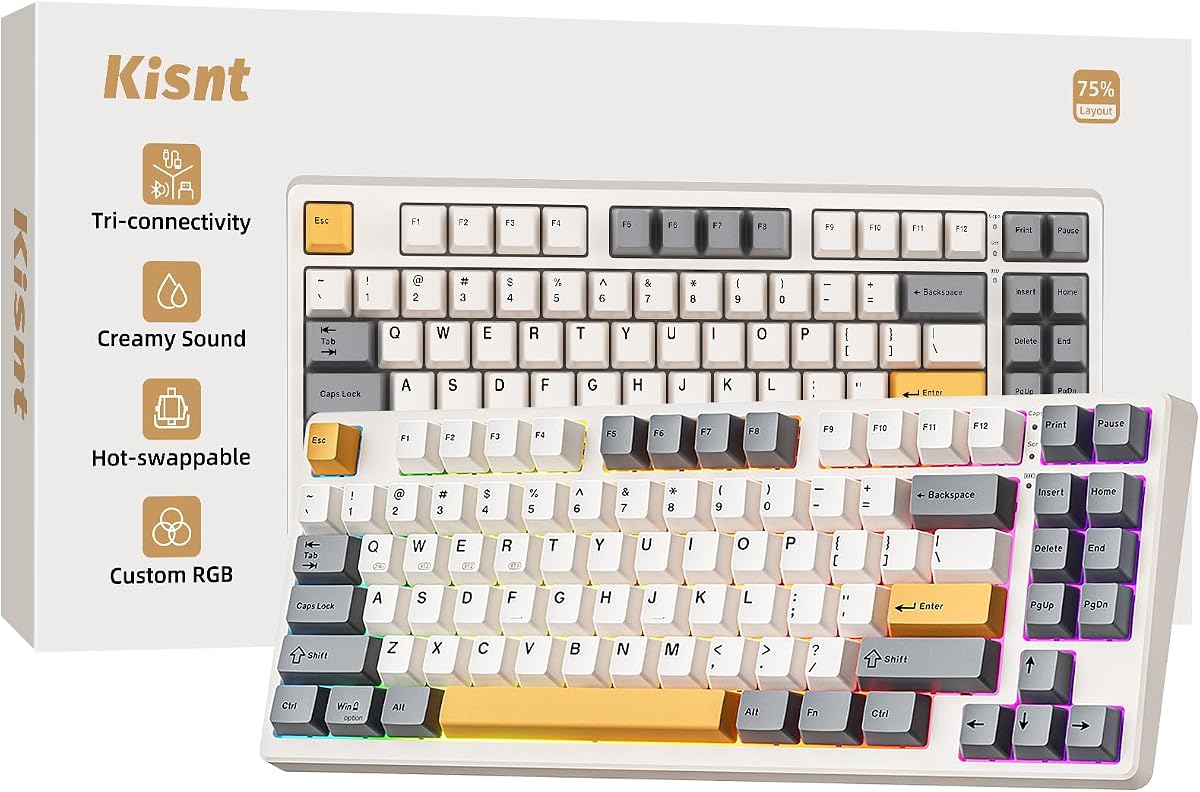
Kisnt KN85 Wireless Mechanical Keyboard
The Kisnt KN85 is the pack’s style-forward creamy wireless pick, finished in retro beige that looks closer to a boutique desk object than a discount arcade peripheral. The 85-key 75%-class layout keeps function keys and arrows while freeing roughly a quarter of the desk width a full-size board would claim. Dimensions stay compact enough for laptop-centric setups, yet the board still feels like a real mechanical instrument rather than a travel toy.
Connectivity is genuinely versatile: USB-C for reliable low latency, 2.4 GHz wireless for near-wired gaming feel, and Bluetooth 5.0 with multiple channels for phones and tablets. Quoted latency figures in the listing emphasize fast wired and 2.4 GHz paths, with Bluetooth slower as expected. Windows and Mac switching support hybrid workers, and you can keep typing in wired mode while the 4000 mAh battery recharges—important for long wireless weeks.
Hot-swap is implemented for real experimentation. Pre-lubed Bsun linear switches in a light actuation band feel buttery for RPG grinding, MMO ability spam, and long-form writing. Because sockets accept common 3-pin and 5-pin switches, you can migrate toward tactiles for coding or stay linear forever. Kisnt includes the customization narrative that beginners need: swap feel without soldering, and refine sound with the gasket and foam recipe already built in.
Acoustically, the KN85 leans into base dampening, silicone padding, and multiple foam layers to chase a deeper marbly thock. That is the opposite of the tinny click many first mechanical keyboards produce. If you are upgrading from a membrane laptop deck or a harsh barebones board, the creamy consistency is the main reason this model earns attention in best hot swappable keyboards conversations. Stabilizer quality and foam still vary unit to unit in any mass-market board, but the design intent is clearly enthusiast-inspired.
RGB offers numerous dynamic presets with adjustable color and brightness, controllable by software or shortcuts. South-facing or edge glow around PBT keycaps creates a halo effect that suits beige legends surprisingly well when you keep saturation modest. Full programming through the KN85 driver—on Windows, in wired or 2.4 G modes—covers remaps and macros for productivity and competitive edges.
Warranty and support messaging is unusually customer-friendly in the listing, including multi-year coverage language and return windows. That lowers risk for first-time hot-swap buyers who worry about a dud switch or shipping damage. The KN85 is not the highest-rated F75 twin in pure score terms, but it is the most distinctive everyday aesthetic choice and a top-tier creamy typer for beige desk builds.
Designers, students, and cozy-desk builders who want wireless hot-swap without a cyberpunk color story. Also excellent as a gift keyboard because it looks intentional even before RGB is configured.
Kisnt points buyers who need numbers toward a separate 17-key pad or a full-size sibling. That modular approach keeps the main board compact for gaming mouse space while restoring spreadsheet speed when required.
We may earn a commission at no additional cost to you.

HUO JI E-Yooso Creamy Mechanical Keyboard Wired
The HUO JI E-Yooso creamy mechanical keyboard is the pack’s best answer when you want hot-swap customization and a number cluster without dragging a full 104-key battleship onto the desk. Its 99-key 96% layout compresses the board while keeping the keys that spreadsheet, accounting, and certain strategy games still demand. A pluggable USB-C cable keeps the connection modern and replaceable, which is a quiet quality-of-life win for wired boards.
Because this model is wired, it skips battery anxiety and wireless pairing menus entirely. That is a feature for competitive players who want consistent polling behavior and for offices that restrict dongles. Latency is simply the cable’s job. The tradeoff is obvious: you cannot throw this keyboard on the couch with a tablet the way you can with an F75 or KN85. Choose it when the desk is the permanent home.
Hot-swap customization is first-class for the price tier. Switches and keycaps can be replaced, pullers ship in the box, and the PCB accepts 3-pin and 5-pin switches. Stock pre-lubed linears target smooth travel and pleasant sound for gaming and typing. That makes the E-Yooso a strong first custom platform: learn on stock creaminess, then explore heavier linears or tactiles later without buying a new board.
The gasket structure plus five layers of thicker sound-absorbing foam and a silicone dampener pad is the acoustic centerpiece. The listing’s noise-reduction claims translate, in enthusiast language, to less hollowness and a creamier signature. You still should not expect silent-library volume—mechanical switches make sound—but the board is tuned away from sharp plate ping. For shared apartments, that softer profile is easier to live with during evening sessions.
RGB includes multiple backlight effects and solid color options with adjustable speed and brightness. It is enough to theme a white desk build without needing a light show every night. Double-shot injection PBT keycaps help legends stay crisp, which matters on a bright board where worn legends look especially shabby. Full anti-ghosting across the 99 keys supports chord-heavy games and complex shortcuts.
In this roundup, the HUO JI sits as the pragmatic wired creamy 96% alternative to wireless AULA boards. If your priority list reads “numpad, hot-swap, gasket foam, no wireless tax,” it is the clearest match. Pair it with a clean cable route and a desk mat, and it becomes a long-term daily driver that can evolve switch-by-switch as your taste changes.
Office power users, finance folks, and gamers who still use the numpad constantly. Also a smart pick for dorm desks where wireless dongles get lost and outlets are already crowded with chargers.
Both chase compact layouts with numbers. The F99 adds tri-mode wireless and a very large battery narrative; the HUO JI focuses on wired simplicity and a creamy gasket foam package. Pick wireless freedom or wired certainty based on how you actually move between rooms.
We may earn a commission at no additional cost to you.
AULA F99 Wireless Mechanical Keyboard
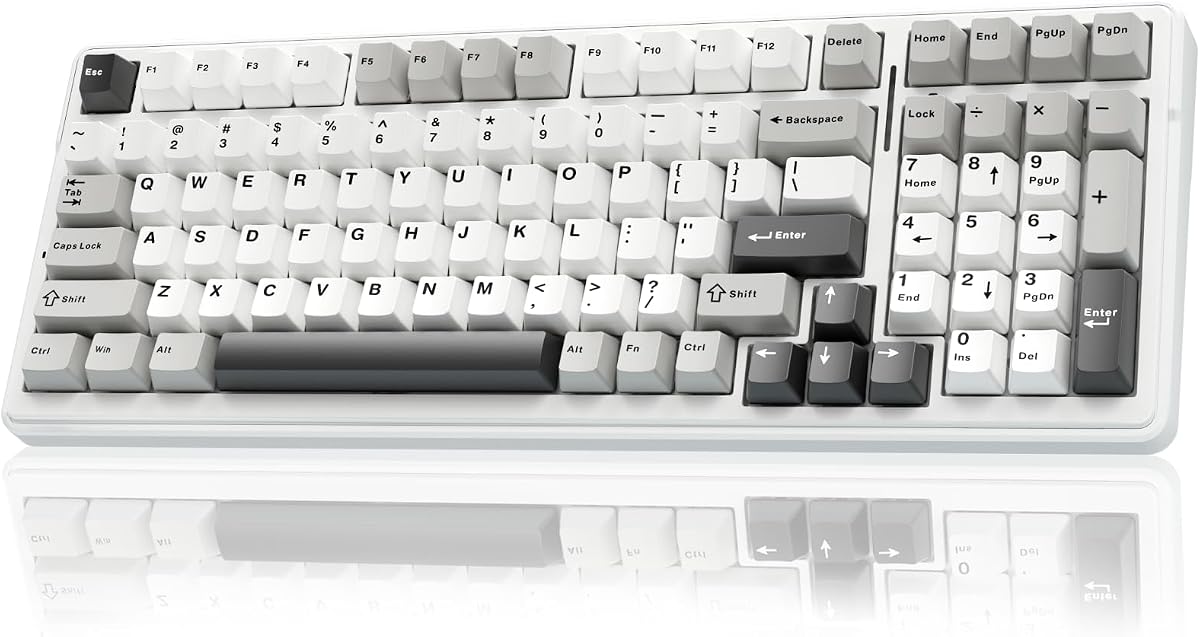
The AULA F99 is the wireless hot-swap pick for people who refuse to give up number keys. Its 99-key 96% layout keeps arrows and a numeric cluster while trimming unnecessary bulk from a true full-size board. That makes it a bridge between productivity keyboards and modern compact customs. If your week mixes Excel, Discord, and late-night games, the F99 avoids the constant FN-layer gymnastics a 60% demands.
Tri-mode connectivity mirrors the F75 family: Bluetooth 5.0, 2.4 GHz, and USB-C, with multi-device pairing and FN-based switching. The standout hardware claim is an 8000 mAh battery—double the familiar 4000 mAh class used on several 75% options here. In real life, battery happiness still depends on RGB brightness, but the larger cell is meaningful if you hate charging rituals. Wired mode remains available whenever you want to top up without stopping work.
Hot-swap customization includes pullers in the package and support for 3-pin and 5-pin switches. Pre-lubed linear switches provide smooth gaming-friendly travel and a pleasant stock sound. Combined with gasket structure language, extended silicone, PCB slotting, and multi-layer silencers, the F99 aims for the same creamy AULA acoustic identity as the F75 line, just with more keys to enjoy that feel on.
RGB offers numerous effects, deep color control, macros, and music rhythm modes through the driver. N-key rollover keeps chord-heavy games honest. Double-shot PBT keycaps resist fade better than cheap printed ABS, which matters on a board you will stare at for years of numeric entry. The overall package feels like a wireless productivity custom that still understands gaming RGB culture.
Desk fit is the main decision point. Compared with the F75 Pro or Kisnt KN85, you reclaim fewer inches for wide mouse pads. On a spacious desk, that is irrelevant. On a laptop riser with a cramped surface, a 75% may feel freer. The F99’s value proposition is specifically for users who need both wireless and numbers, not for users maximizing FPS mouse space above all else.
As a best hot swappable keyboards contender in 2026, the F99 earns its badge by solving a real layout conflict: compact culture versus numeric reality. It is less “tiny showpiece” and more “daily workstation that can still be customized.” If that is your life, skip the smaller boards without guilt.
Use 2.4 GHz for the main gaming PC, Bluetooth for a secondary laptop, and keep USB-C ready for BIOS screens or dead-battery days. Macro the numpad side for repetitive work actions if you rarely need raw numbers in a given app.
Because there are more switches, budget your first upgrade: change alphas first or change the numpad cluster to a different switch weight for data entry feedback. Hot-swap makes staged experiments cheap in time and reversible.
We may earn a commission at no additional cost to you.

DIERYA DK81E 75% Mechanical Gaming Keyboard
The DIERYA DK81E is the pack’s smartest wired 75% for people who care about gasket creaminess and hate traditional software installers. Its headline trick is browser-based key, macro, and RGB control through the DIERYA web driver on Windows, macOS, or Linux. That cross-platform angle matters for mixed OS households and for locked-down work machines where installing random keyboard utilities is painful or forbidden.
Typing feel starts with a cushioned gasket structure and six layers of sound-dampening material wrapped around factory-lubed linear switches. The goal is smoother keystrokes and a fuller, softer sound for gaming, coding, and writing. Hot-swap sockets let you replace compatible switches without soldering when you outgrow the stock linears. Rated longevity in the tens of millions of keystrokes is the usual mechanical promise; double-shot keycaps help legends survive the journey.
Performance is wired-first by design. A 1000 Hz polling rate and detachable USB-C cable prioritize consistent input without battery planning. For esports-minded players who already accept a cable, that is a virtue. The cable’s removability also helps with transport and replacement if a pet or backpack zipper eventually wins. You will not get the F75’s multi-device dance, but you also will not babysit a charge indicator mid-raid.
The volume knob is a daily delight: twist for level, press for play/pause style media control depending on mapping. Fifteen preset lighting effects and a full RGB color range let the white case light up a clean desktop without forcing rainbow chaos. Because customization lives in the browser, you can tweak macros and lighting in short sessions and return to work without leaving a permanently resident control panel eating resources.
Compared with the Newmen GM326, the DK81E talks more explicitly about gasket foam depth and modern web configurability. Compared with AULA wireless boards, it trades radios for simplicity and OS flexibility in software access. It is an excellent “desk permanent” hot-swap 75% for students and developers who want creamy linears today and the freedom to retune switches tomorrow.
Buy the DK81E if your checklist is wired reliability, gasket foam, knob control, and browser remaps. Look elsewhere if wireless is non-negotiable. Within those constraints, it is one of the more future-friendly customization stories in this Amazon pack.
Connect over USB-C, open the supported browser configurator, and start with a simple remap such as swapping Caps Lock and Escape if you are a Vim user. Save profiles intentionally so you do not lose a careful macro setup after a late-night RGB binge.
Six-layer foam aims for creamy, not silent. If you share a bedroom office, consider quieter switch swaps later; hot-swap exists precisely so acoustics can evolve with your living situation.
We may earn a commission at no additional cost to you.

Newmen GM326 Mechanical Keyboard
The Newmen GM326 is the pack’s practical budget on-ramp to hot-swappable 75% keyboards. It keeps the modern essentials—compact layout, detachable USB-C, a multi-function knob, and hot-swap linear red switches—without pretending to be a boutique custom. If you are testing whether you even like mechanical keyboards before investing in wireless gasket flagships, this is a sensible sandbox.
The 75% size saves desk space and remains portable for dorm rooms, offices, and light travel. Rainbow LED backlighting offers multiple colors and a wide mode list for players who want visible flair without diving into complex per-key software on day one. Lighting will not match the polish of 16.8-million-color ecosystems on AULA boards, but it is cheerful and configurable enough for a first RGB keyboard.
Hot-swap support focuses on 3-pin switches, which still covers a huge portion of the aftermarket. Stock red linears are smooth and low-resistance, suiting rapid taps in games and quick typing bursts. They are not as “pre-modded creamy” as the foam-heavy gasket options higher in this list, and that honesty matters: the GM326 teaches you the layout and the hot-swap ritual, then invites upgrades when your ear and fingers get pickier.
The upper-right knob is the usability hero, giving fast volume control without alt-tabbing to a mixer. Indicator lights for Caps Lock, Win-lock, and Windows/Mac switching reduce guesswork. Full-key anti-ghosting supports multi-key gameplay. Adjustable tilt legs help you find a wrist-friendly angle on different desks, which is underrated on budget boards that often feel flat and fatiguing.
ABS keycaps light up well but will shine sooner than PBT if you are an oily-fingered marathon typist. That is a known tradeoff at this tier and a natural future upgrade path—keycaps are one of the easiest visual refreshes once you own a hot-swap board. Software expectations should stay modest compared with browser-driven or deep macro suites on higher picks.
Choose the Newmen when budget and curiosity matter more than out-of-box thock. Choose an AULA, Kisnt, HUO JI, or DIERYA model when you already know you want foam-forward creaminess and richer materials. As a learning keyboard that still includes a knob and hot-swap, the GM326 earns a legitimate place in a best-of list rather than existing only as a footnote.
After a month, consider a PBT keycap set for legends and texture, then experiment with a few tactile switches on punctuation keys. Hot-swap means those experiments are reversible if you dislike the change.
If creamy acoustics are the entire reason you are shopping, start with Kisnt, DIERYA, or an AULA F75 instead. The Newmen is about accessible hot-swap utility, not winning a sound test against foam-stacked gasket boards.
We may earn a commission at no additional cost to you.

Geeky GK61 60% Hot Swappable Mechanical Gaming Keyboard
The Geeky GK61 is the pack’s compact specialist: a 60% hot-swappable mechanical keyboard for players and minimalists who want maximum mouse room. With 61 keys in an ANSI US layout, it strips the board down to alphas, modifiers, and a dense FN layer. That can feel like a superpower in FPS games and a chore in spreadsheet-heavy jobs. Be honest about your shortcuts before you fall in love with the lavender aesthetic.
Hot-swap is implemented the way beginners need it—change, lube, or upgrade switches with included tools and no soldering. Stock speed yellow linear switches emphasize fast, responsive gaming inputs. Pre-lubed stabilizers help larger keys feel less rattly than bare budget boards. Doubleshot OEM-profile keycaps keep legends sharper than cheap printed sets, which matters when RGB patterns get bright.
RGB supports a huge color space and numerous backlight patterns through software, so the small board can still put on a light show. A detachable USB-C cable aids portability to LAN events or campus desks. The 1 kHz polling rate targets a 1 ms response class for competitive scenarios where every millisecond of consistency helps. Mac and Windows compatibility is present, though some keys may need remaps depending on OS habits.
Living on a 60% means muscle memory work. Arrows, page navigation, and function keys typically live behind layers. Many enthusiasts prefer this after a week; many office users never do. If you are unsure, a 75% like the F75 or DK81E is a gentler compact step. If you already know you want a 60%, the GK61’s hot-swap path and included puller make it a better starting custom than a non-swappable toy keyboard.
Acoustically and structurally, this is not chasing the six-layer gasket cream narrative as hard as DIERYA or Kisnt. It is a compact gaming-focused hot-swap board with solid fundamentals: software macros, rebinds, RGB, and switch freedom. Treat foam and tape mods as optional future hobbies rather than expectations out of the box.
Buy the GK61 when desk space and mouse glide matter more than dedicated arrows. Skip it when your day job depends on F-row muscle memory without modifiers. In a roundup of the best hot swappable keyboards, it represents the portable competitive niche that larger creamy boards cannot replace.
Print a simple layer map for the first few days or use software to place arrows on more intuitive holds. Once the layer becomes reflex, the layout’s speed advantage appears in both gaming and clean typing posture.
Detachable USB-C and a tiny footprint make the GK61 easy to pack. Bring the keycap puller if you swap switches between events, and keep a backup switch or two in a small case for emergencies.
A 75% keeps dedicated arrows and F-keys while still saving space. Choose 60% only if you have already decided those dedicated keys are optional. Hot-swap quality can be excellent in both sizes; layout preference is the real fork in the road.
We may earn a commission at no additional cost to you.
Redragon Mechanical Gaming Keyboard Wired
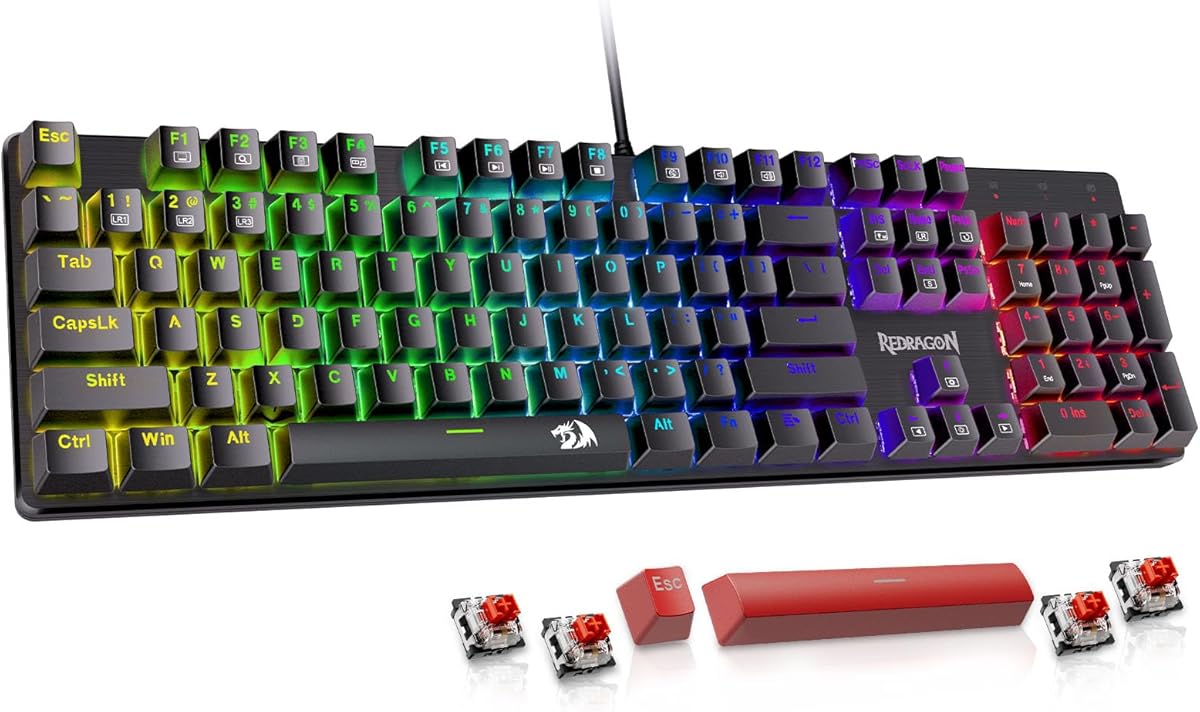
The Redragon wired mechanical gaming keyboard is the pack’s entry ticket: hot-swappable red switches, programmable backlighting modes, anti-ghosting, and macro editing without asking you to understand gasket mounts on day one. It is the board you buy when you want mechanical switches and future swap freedom but are not ready to optimize foam layers and thock playlists. That role is important in any honest best hot swappable keyboards guide.
Stock linear red switches need less force and feel smoother than many tactile or clicky options, which suits long RPG sessions and MMO rotation grind. Redragon includes spare switches and extra keycaps for emergency swaps, a practical touch when a single switch fails years later. Hot-swap means you can later try heavier linears or tactiles without discarding the whole keyboard—exactly the educational arc this category promises.
Illumination offers eleven unique backlight modes with adjustable speed and brightness across several levels. It is not the same as deep 16.8-million-color music-reactive suites on AULA boards, and the listing notes color limitations in software for some effects. Still, for night gaming and basic ambiance, the lighting package is serviceable. Double-injection keycap construction helps legends stay clearer under backlight than ultra-cheap printed sets.
Macro editing lets you remap keys, build shortcuts, or collapse multi-key actions into one press for work and games. Full-key anti-ghosting keeps simultaneous inputs trustworthy. Multimedia shortcuts cover calculator, media, volume, and email style actions that speed up everyday PC use. Compatibility messaging covers PC and Mac, which helps mixed homes even if advanced software features lean Windows.
Compared with Newmen, Redragon’s strength is brand familiarity and the spare-switch safety net more than knob-centric 75% design language. Compared with creamy gasket boards, it is simpler and less acoustic-obsessed. That is fine: not every buyer wants a marbly thock thesis. Some want a reliable wired board that can grow through hot-swap when curiosity hits.
Warranty and after-sales language in the listing emphasizes multi-year coverage and responsive support, which reduces anxiety for first mechanical purchases. If your budget ceiling is entry-level and you value that support story, Redragon is a rational starting point. When your ears later crave foam-tuned creaminess, the hot-swap skills you learn here transfer directly to an F75, KN85, or DK81E upgrade.
Install or explore the macro software, set a calm backlight mode for daytime work, and practice pulling a single keycap and switch on a non-critical key using the spare parts mindset. Confidence with tools matters more than perfect first acoustics.
Move up to a gasket foam wireless board when you care about sound signature, multi-device pairing, or richer RGB. Keep this Redragon as a secondary PC keyboard or a loaner for guests once you upgrade—hot-swap boards rarely become useless.
We may earn a commission at no additional cost to you.

Hot-swap sockets are wasted if the layout fights your daily workflow. A 60% board maximizes mouse space but hides arrows and function keys behind layers. A 75% keeps arrows and the F-row while staying compact—usually the sweet spot for mixed work and play. A 96% or 99-key board restores a numpad without the full bulk of a 104-key unit. Choose the smallest layout that does not slow your real tasks.
Wired USB-C is simplest for competitive consistency and zero charging. Dual-mode or tri-mode boards add 2.4 GHz for low-latency wireless gaming and Bluetooth for tablets and secondary laptops. If you hop between devices all day, tri-mode models like the AULA F75 line, F99, and Kisnt KN85 pay for themselves in convenience. If the keyboard never leaves one PC, a creamy wired hot-swap board can be the smarter buy.
Linear switches glide without a bump and suit many gamers and fast typists. Tactile switches add a feedback bump some programmers prefer. Clicky switches announce every press. Hot-swap means the stock switch is a chapter, not the whole book. Still, better factory lubrication and stabilizers save you from immediate mods, which is why foam-heavy creamy boards rank highly here.
Modern “creamy” marketing usually points to gasket-style mounting and multiple foam layers that reduce hollow case noise. That can make an affordable board feel surprisingly refined. It does not make a mechanical keyboard silent. If you need near-silent typing, plan for quieter switch types later rather than expecting foam alone to erase sound.
Macro and RGB software quality varies. Some boards prefer Windows installers; DIERYA’s browser approach is friendlier across operating systems. Mac users should expect occasional remaps for modifier keys. Console use can work on many tri-mode boards, but on-screen keyboards and game UIs may still prefer simple wired controllers for some menus.
Entry wired hot-swap boards teach the hobby. Mid wireless 75% creamy boards deliver the daily-driver experience most people want. Larger wireless 96% boards solve numpad needs. Spend for the features you will use weekly—wireless, layout, and stock typing feel—before spending for spectacle lighting you will disable at work.
Hot-swappable means the keyboard’s PCB has sockets that grip mechanical switch pins so you can remove and replace switches without soldering. You pull the keycap, use a switch puller to extract the switch straight upward, then press a new compatible switch into the socket until it seats evenly. That is what lets one board serve different preferences over time—smooth linears for gaming seasons, tactiles for writing-heavy months—without buying an entirely new keyboard.
Yes, especially if you want to learn by experimenting instead of committing forever to the first switch type you try. Beginners should still start slow: practice on one key, support the board so you do not flex the PCB, and avoid forcing pins at an angle. Boards that already include factory lubrication and foam, such as several AULA and Kisnt options in this guide, forgive beginner taste changes because the stock experience is already pleasant before any mods.
For most mixed work-and-play users, yes. A 75% keeps dedicated arrow keys and a function row, which preserves common shortcuts and navigation habits, while still freeing desk space versus full-size boards. A 60% is better when mouse space and minimalism are the top priorities and you are willing to learn layers. If you are unsure, choose 75% first; you can always go smaller later once you know which keys you truly never use.
Not necessarily. A wired hot-swap board can feel more consistent, never needs charging, and often costs less for similar typing structures. Wireless becomes valuable when you move between rooms, share the keyboard with a laptop, or hate cable drag on a clean desk. Tri-mode boards are ideal when your life is multi-device; wired cream boards like the HUO JI or DIERYA are ideal when the desk is permanent.
Using the feature as designed should not damage a healthy hot-swap PCB, but rough pulling, twisted extraction, or bent pins can break sockets or switches. Always pull vertically, align pins before pressing in, and stop if a switch feels crooked. Keep drinks away during swap sessions. If a board arrives with a defective socket, use the seller warranty path rather than forcing a fix that could worsen the damage.
These are enthusiast shorthand, not lab measurements. Creamy usually implies smooth switch travel plus dampened, softer acoustics. Thocky usually implies a deeper, muted bottom-out rather than a high-pitched clack. Foam, gasket mounts, keycap material, and lubricated stabilizers all influence the result. Two units of the same model can still sound slightly different on different desks, so treat sound words as directionally helpful rather than guaranteed studio samples.
Many boards in this roundup advertise Windows and Mac compatibility, and several tri-mode models mention tablets, phones, and console-friendly connections. Mac users may need to remap Command/Option style modifiers. Consoles can accept keyboards for typing and some game menus, but support varies by system and title. For critical gaming on console, confirm your use case; for PC and laptop productivity, compatibility is generally straightforward.
If legends are wearing or you dislike the look, keycaps are the easiest visual win and do not require electrical seating beyond removing caps. If the feel is wrong—too light, too long, too muted—switches are the better first change because they define actuation and strongly shape sound. On hot-swap boards you can do either independently. Just confirm keycap profile and layout size compatibility, especially on nonstandard 75% and 96% arrangements.
More important than it sounds. On 75% boards, a knob gives tactile control over volume and often lighting without memorizing FN combinations for every tiny adjustment. It is not mandatory—plenty of great boards lack one—but once you live with a knob for media, going back to software sliders feels slower. If you edit video, stream, or constantly adjust call volume, prioritize knob-equipped models.
The AULA F75 wireless models are the safest mainstream first buy for most people because they combine a friendly 75% layout, tri-mode convenience, hot-swap sockets, and a creamy dampened stock feel. If you need a numpad, choose the AULA F99 or wired HUO JI instead. If you are budget-constrained and curious, Redragon or Newmen can teach hot-swap basics before you invest in a foam-forward wireless daily driver.
The best hot swappable keyboard for you is the one that matches layout reality first and customization dreams second. In this pack, the AULA F75 wireless boards lead for most buyers who want creamy typing, switch freedom, and multi-device convenience in a desk-friendly 75% footprint. The F75 Pro tightens the feature story for shoppers who want the more complete checklist, while Kisnt’s KN85 delivers the retro beige character people actually notice on a real desk.
If wireless is optional, the HUO JI 99-key and DIERYA DK81E prove that wired gasket-style cream boards still make tremendous daily drivers—especially when numbers or browser-based remaps matter. Compact specialists like the Geeky GK61 and budget on-ramps from Newmen and Redragon round out the field for different desk sizes and budgets.
Pick the layout you will not fight, confirm the connection style you will use every day, and let hot-swap handle the rest as your taste evolves. That is the real advantage of this category in 2026: a keyboard that can grow with you instead of trapping you in one first impression.