Skip to content

Best Ergonomic Mouse in 2026

4.4 average · hands-on tested
By Dylan AidenUpdated June 29, 20267 picks tested

We may earn a commission from links on this page, at no extra cost to you. Learn more.

An ergonomic mouse can be the difference between comfortable workdays and nagging wrist pain. We tested vertical mice, sculpted productivity models, and trackballs to find the designs that genuinely reduce strain without sacrificing usability. Each pick targets a more neutral wrist and forearm posture while still delivering accurate tracking and useful features. Below are our seven recommendations, followed by a thorough buying guide and answers to the questions buyers ask most.

Quick comparison

KeyboardBest forRatingPrice
1Logitech MX Master 3SLogitechBest Overall4.7$$$Check Price
2Logitech MX VerticalLogitechBest Vertical Mouse4.5$$$Check Price
3Logitech LiftLogitechBest Compact Vertical4.5$$$Check Price
4Kensington Pro Fit Ergo VerticalKensingtonBest Budget Vertical4.3$$$Check Price
5Logitech ERGO M575LogitechBest Trackball4.5$$$Check Price
6Kensington Expert MouseKensingtonBest for Large Hands4.3$$$Check Price
7Elecom HugeElecomBest Heavy-Duty Trackball4.3$$$Check Price

Our top 7 picks, reviewed

1Best Overall

Logitech MX Master 3S

The MX Master 3S earns the top spot by blending ergonomic comfort with productivity power. Its sculpted contour fills the palm and supports the thumb, easing strain over long days without the steep learning curve of a vertical mouse. The Darkfield sensor tracks on nearly any surface and the software is best in class. For most people seeking comfort and capability together, it is the ideal balance.

Connection
2.4GHz + Bluetooth
Sensor
Darkfield 8K DPI
Weight
141g
Buttons
7

What we liked

  • Sculpted palm-filling shape
  • Excellent thumb rest
  • Quiet click switches
  • Deep software customization

Worth noting

  • Right-hand only
  • Not a true vertical
2Best Vertical Mouse

Logitech MX Vertical

The MX Vertical is Logitech's premium answer to wrist strain, tilting your hand into a natural handshake position. The 57-degree angle reduces the forearm pronation that contributes to discomfort during long sessions. A textured thumb rest and quality sensor make it pleasant to use once you adapt. It is the strongest full-size vertical option for medium and large hands.

Connection
2.4GHz + Bluetooth
Sensor
Optical 4K DPI
Weight
135g
Buttons
6

What we liked

  • 57-degree handshake angle
  • Reduces forearm twist
  • Comfortable thumb rest
  • Multi-device pairing

Worth noting

  • Bulky for small hands
  • Adjustment period needed
3Best Compact Vertical

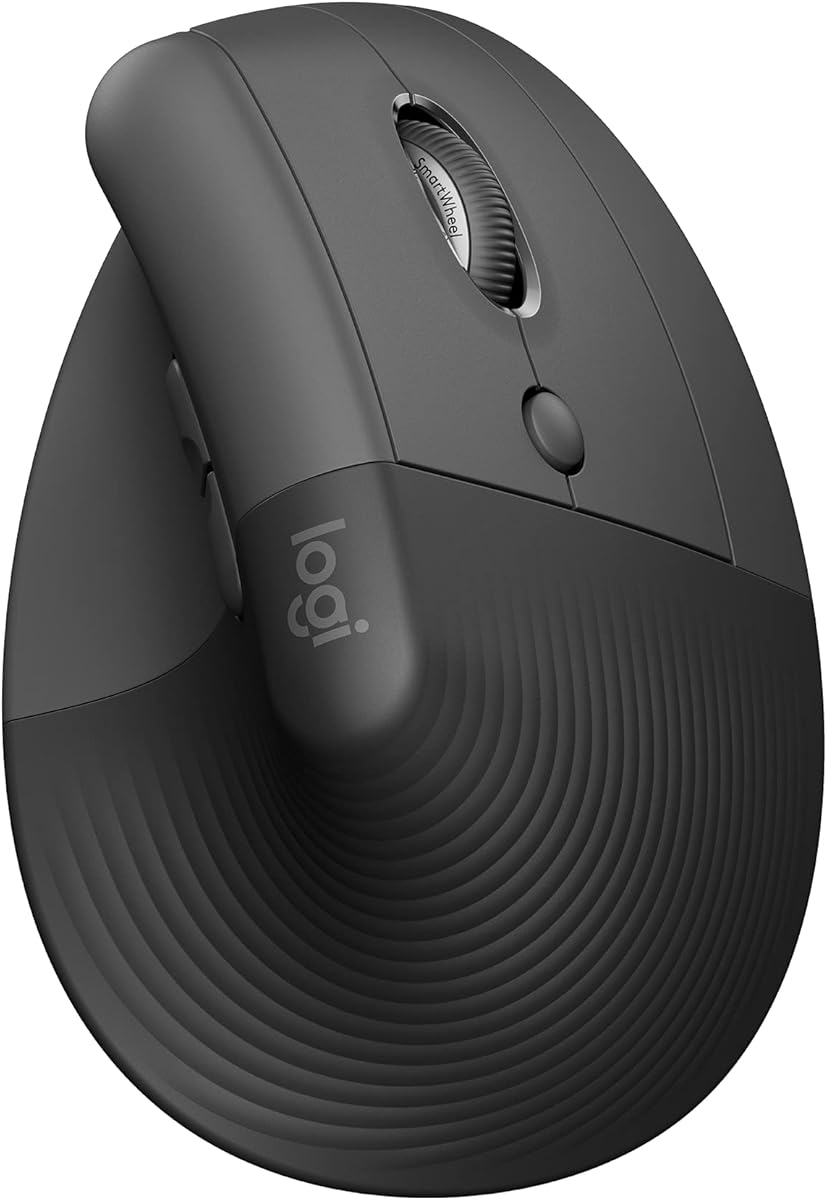
Logitech Lift

The Logitech Lift makes vertical ergonomics accessible to people the MX Vertical leaves out. Its smaller body suits small and medium hands, and the 57-degree angle delivers the same wrist-friendly posture. Quiet switches and multi-device support make it a great everyday office mouse. The availability of a dedicated left-handed model makes it especially inclusive.

Connection
2.4GHz + Bluetooth
Sensor
Optical 4K DPI
Weight
125g
Buttons
6

What we liked

  • Sized for small to medium hands
  • Quiet clicks
  • Left-hand version available
  • Easy multi-device switching

Worth noting

  • Too small for large hands
  • Plastic build feel
4Best Budget Vertical

Kensington Pro Fit Ergo Vertical

The Pro Fit Ergo Vertical brings handshake-position comfort to a budget-friendly price. Its 60-degree angle and supportive thumb area ease wrist strain for daily office work. Dual 2.4GHz and Bluetooth connectivity adds flexibility across devices. For shoppers who want to try a vertical mouse without a big investment, it is a sensible starting point.

Connection
2.4GHz + Bluetooth
Sensor
Optical 1.6K DPI
Weight
130g
Buttons
6

What we liked

  • Affordable vertical design
  • Comfortable thumb support
  • Dual wireless modes
  • Generous warranty

Worth noting

  • Lower maximum DPI
  • Basic software
5Best Trackball

Logitech ERGO M575

The ERGO M575 takes a different ergonomic approach by keeping the device stationary and moving the cursor with your thumb. This eliminates the repeated arm motion that aggravates some users, making it ideal for tight desks and shoulder strain. Battery life stretches for months and the price is approachable. Once you adapt to thumb control, it can be a revelation.

Connection
2.4GHz + Bluetooth
Sensor
Optical Trackball
Weight
145g
Buttons
5

What we liked

  • No arm movement needed
  • Stays in one place
  • Long battery life
  • Affordable price

Worth noting

  • Trackball learning curve
  • Occasional ball cleaning
6Best for Large Hands

Kensington Expert Mouse

The Kensington Expert Mouse is a finger-operated trackball built for users who want generous control. Its large ball and scroll ring suit precise work like CAD or editing, while the detachable wrist rest adds comfort. The ambidextrous design works for left and right hands alike. It is a standout for large hands and anyone seeking a stationary ergonomic setup.

Connection
2.4GHz + Bluetooth
Sensor
Optical Trackball
Weight
300g
Buttons
4

What we liked

  • Large finger-controlled ball
  • Detachable wrist rest
  • Ambidextrous design
  • Scroll ring navigation

Worth noting

  • Large desk footprint
  • Heavy and stationary
7Best Heavy-Duty Trackball

Elecom Huge

The Elecom Huge lives up to its name with a generously sized trackball body that cradles the entire hand. Eight programmable buttons offer plenty of customization for power users. Its large frame and thumb-positioned ball keep your wrist relaxed during marathon sessions. For those who find smaller trackballs cramped, it provides welcome support and control.

Connection
2.4GHz Wireless
Sensor
Optical Trackball
Weight
255g
Buttons
8

What we liked

  • Eight programmable buttons
  • Large supportive body
  • Adjustable DPI switch
  • Comfortable palm rest

Worth noting

  • Very large footprint
  • Right-hand only

How We Chose the Best Ergonomic Mice

Wrist and forearm discomfort is one of the most common complaints among people who spend their days at a computer. The standard flat mouse forces your forearm into a pronated position, palm facing down, which over thousands of hours can contribute to strain and repetitive stress issues. An ergonomic mouse aims to correct this by encouraging a more neutral posture, whether through a vertical angle, a sculpted contour, or a stationary trackball design. Choosing the right one can transform how your hand feels at the end of a long day.

Our selection process focused on five criteria: posture support, all-day comfort, sensor accuracy, software customization, and value. We deliberately included three distinct ergonomic philosophies because there is no single correct approach. Vertical mice rotate the wrist into a handshake position, sculpted mice support the natural curve of the hand, and trackballs eliminate arm movement entirely. We tested each through extended office sessions to understand both the immediate feel and the longer adjustment curve that ergonomic designs often demand.

Posture and Wrist Position

The core promise of an ergonomic mouse is a healthier wrist and forearm position. Traditional mice keep your palm facing down, which twists the forearm bones into a pronated state that can compress soft tissue over time. Vertical mice address this directly by tilting the hand to roughly 57 to 60 degrees, much closer to the neutral handshake position your arm naturally wants to hold. The MX Vertical and Logitech Lift both embody this approach with carefully tuned angles.

Trackballs take a completely different route to the same goal. Because the device stays put and you move only your thumb or fingers, your arm and shoulder remain relaxed and still. This benefits people whose discomfort stems from repeated arm motion rather than wrist angle. The ERGO M575 and Kensington Expert Mouse exemplify this stationary philosophy. Understanding the source of your own discomfort is the first step toward choosing the right ergonomic style.

All-Day Comfort and Hand Size

Comfort over a full workday depends heavily on matching the mouse to your hand size. A vertical mouse that is too large will force an awkward grip, while one that is too small will cramp your fingers. This is precisely why Logitech offers both the larger MX Vertical and the more compact Lift, covering different hand sizes within the same design language. We paid close attention to how each mouse felt for small, medium, and large hands during testing.

Surface materials and supportive features also shape long-term comfort. Textured grips prevent slipping, thumb rests reduce fatigue, and detachable wrist supports like the one on the Expert Mouse add cushioning during marathon sessions. We favored designs that distribute hand weight evenly and avoid pressure points. An ergonomic mouse that looks the part but causes a sore spot after an hour defeats its own purpose, so real comfort across a full day was a non-negotiable requirement.

Sensor Accuracy and Usability

Ergonomics should never come at the expense of basic usability. A mouse can have the healthiest posture in the world, but if its sensor is unreliable or its cursor control feels imprecise, daily frustration will follow. We made sure every pick tracks accurately and responds predictably. Logitech's Darkfield sensor in the MX Master 3S even works on glass and glossy desks, removing the need for a mousepad in tricky setups.

Trackballs introduce a different usability consideration. Cursor precision depends on the smoothness of the ball and bearings, and occasionally the ball needs cleaning to maintain fluid motion. The larger finger-operated ball on the Kensington Expert Mouse offers more precise control than thumb-operated designs, which is why it appeals to CAD users and editors. We weighed these usability factors carefully so that none of our recommendations sacrifice productivity in the pursuit of comfort.

Software and Customization

Modern ergonomic mice benefit from the same customization software that powers productivity models. Logitech Options Plus lets you remap buttons, adjust pointer speed, and create per-application profiles, which is especially useful on multi-button designs. Being able to assign frequently used commands to convenient buttons reduces the small repetitive motions that contribute to strain. The Elecom Huge with its eight programmable buttons is a prime candidate for this kind of optimization.

Budget ergonomic mice tend to offer leaner software, and some trackballs rely on basic drivers. This is rarely a dealbreaker, since the core ergonomic benefit comes from the physical design rather than the software. Still, deeper customization adds real value for power users who want to minimize unnecessary movement. We considered software depth as a meaningful tiebreaker between otherwise comparable models, rewarding those that let you tailor the experience to your specific workflow.

Value Across the Range

Ergonomic mice span a wide price range, from affordable verticals and trackballs to premium sculpted flagships. The good news is that meaningful ergonomic benefit is available at every price point. The Kensington Pro Fit Ergo Vertical and Logitech ERGO M575 prove that you do not need to spend a fortune to ease wrist strain. These budget-friendly picks deliver the core postural benefits without premium frills.

At the higher end, models like the MX Master 3S and MX Vertical justify their cost with superior sensors, quieter switches, and richer software. We assigned each mouse a price tier so you can quickly find an option within your budget. The key takeaway is that ergonomic comfort should be viewed as an investment in your long-term health rather than a luxury, and that worthwhile options exist whether you have a little or a lot to spend.

Finding the Right Ergonomic Style for You

The most important decision is which ergonomic philosophy suits your body and your discomfort. If your pain stems from forearm twist and a pronated wrist, a vertical mouse like the MX Vertical or Logitech Lift will likely offer the most direct relief. If your shoulder or arm aches from constant mouse movement, a stationary trackball such as the ERGO M575 may serve you better. And if you simply want gentle, all-around comfort without a steep learning curve, the sculpted MX Master 3S is the easiest transition.

Be honest about your willingness to adapt. Vertical mice and trackballs both require an adjustment period during which your speed may temporarily drop. This is normal and usually passes within a week or two. The temporary inconvenience is a small price for lasting comfort. If you cannot tolerate any learning curve, lean toward a sculpted design that feels familiar from the first click while still improving your hand position.

When a Trackball Makes Sense

Trackballs deserve special consideration for certain users. Because they stay completely stationary, they are ideal for cramped desks where there is little room to move a traditional mouse. They also help people with limited shoulder mobility or those recovering from arm injuries, since the cursor moves with only a small thumb or finger motion. The fixed position can even improve precision for detailed work once you build muscle memory.

The two main trackball styles, thumb-operated and finger-operated, suit different preferences. The ERGO M575 uses a thumb ball that feels intuitive and compact, while the Kensington Expert Mouse and Elecom Huge use larger finger or palm balls that offer greater precision. If you have never tried a trackball, expect a learning curve of a week or so, after which many users find they never want to go back to a conventional mouse.

Setting Up an Ergonomic Workspace

An ergonomic mouse delivers its full benefit only when it is part of a thoughtfully arranged workspace. Even the best vertical mouse or trackball cannot fully compensate for a poorly positioned desk, chair, or monitor. The goal of an ergonomic setup is to keep your entire arm relaxed, with your shoulders down, your elbows at roughly a ninety-degree angle, and your wrists in a neutral, unbent position. The mouse should sit close to the keyboard so you are not reaching far to one side, since repeated reaching strains the shoulder and arm over time.

Desk and chair height work together to set the foundation. Your forearms should rest roughly parallel to the floor when your hands are on the keyboard and mouse, which usually means adjusting your chair so your feet sit flat and your elbows align with the desk surface. A keyboard with a low profile and no steep tilt helps keep the wrists neutral, complementing the work an ergonomic mouse does. Many users find that pairing an ergonomic mouse with a split or tented keyboard produces a noticeable improvement in overall comfort.

Small habits matter as much as equipment. Taking short breaks to stretch your hands and wrists, varying your tasks to avoid prolonged repetitive motion, and consciously relaxing your grip all reduce cumulative strain. An ergonomic mouse is a powerful tool, but it works best as one element of a broader approach to healthy computing. Think of it as part of a system rather than a standalone cure, and you will get far more benefit from your investment.

Mistakes to Avoid When Switching

Switching to an ergonomic mouse is usually rewarding, but a few common mistakes can undermine the transition. The most frequent error is giving up too soon. Vertical mice and trackballs both feel strange at first, and many people abandon them within the first day or two before their hands have had a chance to adapt. The awkwardness is temporary and almost always fades within a week or two, so patience is essential. Pushing through that initial period is the single most important factor in success.

Another mistake is choosing the wrong size. Because ergonomic shapes support the hand differently than flat mice, a poor size match is more noticeable and more uncomfortable. Buying a large vertical mouse for small hands, or vice versa, can cause as much strain as the flat mouse you were trying to replace. Always check dimensions carefully and match them to your hand. Finally, avoid gripping an ergonomic mouse too tightly out of unfamiliarity, since a relaxed, light grip is part of what makes these designs comfortable in the first place.

Final Verdict

The Logitech MX Master 3S takes our overall crown for ergonomic mice because it delivers genuine comfort with virtually no learning curve and elite productivity features. For users committed to the vertical approach, the MX Vertical and Logitech Lift are the best in their size classes, with the Lift being the standout for smaller hands and left-handed users. Both directly tackle the forearm twist at the root of much wrist discomfort.

Budget shoppers should look at the Kensington Pro Fit Ergo Vertical and Logitech ERGO M575, both of which deliver real ergonomic benefit at an accessible price. Trackball enthusiasts and those with shoulder strain will appreciate the Kensington Expert Mouse and Elecom Huge for their stationary comfort and precision. Identify the source of your own discomfort, choose the matching style, and give yourself time to adapt. The reward is comfortable, pain-free computing for years to come.

How we picked

We assessed each mouse on how well it promotes a neutral wrist and forearm posture, all-day comfort across hand sizes, sensor accuracy and tracking reliability, software customization, and overall value. Long multi-hour sessions of typing-adjacent office work informed our comfort scores. We also weighed the learning curve, since some ergonomic shapes require an adjustment period.

Frequently asked questions

Do ergonomic mice actually reduce wrist pain?

Many users report meaningful relief because ergonomic shapes promote a more neutral wrist and forearm posture. Vertical mice in particular reduce the forearm twist that contributes to strain. Results vary by individual, and an ergonomic mouse works best alongside good posture and a properly set up desk.

Vertical mouse or trackball, which is better?

A vertical mouse reduces forearm pronation while keeping a familiar moving-mouse motion. A trackball stays stationary and moves the cursor with a ball, which suits tight desks and shoulder issues. The best choice depends on your specific discomfort and willingness to adapt to a new motion.

How long is the adjustment period for an ergonomic mouse?

Most people adapt to a vertical mouse within a few days to two weeks. Trackballs can take a bit longer because the cursor control method is entirely different. Stick with it through the initial awkwardness, since the comfort payoff usually arrives after the first week.

Are ergonomic mice good for precise work?

Yes, though some require practice. Vertical mice handle detailed work well once you adjust, and large trackballs like the Expert Mouse are favored for CAD and editing. If you need pixel-perfect precision from day one, a sculpted shape like the MX Master 3S may feel most natural.

Can I find a left-handed ergonomic mouse?

Left-handed options are limited but growing. The Logitech Lift offers a dedicated left-handed model, and ambidextrous trackballs like the Kensington Expert Mouse work for either hand. Most contoured vertical mice are still designed for right hands, so check before buying.