Skip to content

Best CPU Coolers in 2026

4.6 average · hands-on tested
By Thomas BrianUpdated June 29, 20267 picks tested

We may earn a commission from links on this page, at no extra cost to you. Learn more.

Choosing the right CPU cooler is one of the most important decisions you will make when building or upgrading a PC. Modern processors from Intel and AMD push more heat than ever, and a weak cooler will throttle performance or run loud enough to ruin your day. We spent weeks testing the latest air towers and all-in-one liquid coolers to find the seven that truly stand out in 2026. Whether you want whisper-quiet operation or maximum overclocking headroom, there is a pick here for you.

Quick comparison

KeyboardBest forRatingPrice
1Arctic Liquid Freezer III 360ArcticBest Overall4.7$$$Check Price
2Noctua NH-D15 G2NoctuaBest Air4.8$$$Check Price
3Thermalright Phantom Spirit 120 SEThermalrightBest Value4.6$$$Check Price
4NZXT Kraken Elite 360 RGBNZXTBest Premium AIO4.5$$$Check Price
5be quiet! Dark Rock Pro 5be quiet!Best Quiet4.5$$$Check Price
6Arctic Liquid Freezer III 240ArcticBest Compact AIO4.5$$$Check Price
7Cooler Master Hyper 212 BlackCooler MasterBest Budget4.4$$$Check Price

Our top 7 picks, reviewed

1Best Overall

Arctic Liquid Freezer III 360

The Arctic Liquid Freezer III 360 is the cooler we recommend to almost everyone. Its 38mm-thick radiator and high-static-pressure fans deliver thermal numbers that rival units costing twice as much. A small fan over the pump block helps cool the surrounding VRM and memory, a thoughtful touch missing from rivals. For the money, nothing else comes close to this blend of performance and value.

Type
AIO
Size
360mm radiator
Socket
LGA1851/1700 + AM5/AM4
Fans
3x 120mm PWM

What we liked

  • Class-leading thermals for the price
  • Thick 38mm radiator boosts capacity
  • Integrated VRM fan cools the socket
  • Quiet under typical loads

Worth noting

  • Bulky radiator may not fit small cases
  • No RGB on the base model
2Best Air

Noctua NH-D15 G2

The NH-D15 G2 is the pinnacle of air cooling and the cooler to beat if you distrust pumps and liquid. Noctua redesigned the heatsink with an offset layout and improved fin density, and the result trades blows with many 360mm AIOs. It runs nearly silent thanks to the legendary NF-A14 fans. If you want set-and-forget reliability with zero leak risk, this is the one.

Type
Air
Size
168mm height
Socket
LGA1851/1700 + AM5/AM4
Fans
2x 140mm PWM

What we liked

  • Best-in-class air cooling performance
  • Exceptionally quiet at all speeds
  • Outstanding fit and finish
  • Six-year warranty and free socket kits

Worth noting

  • Tall design blocks tall RAM clearance
  • Premium price for an air cooler
3Best Value

Thermalright Phantom Spirit 120 SE

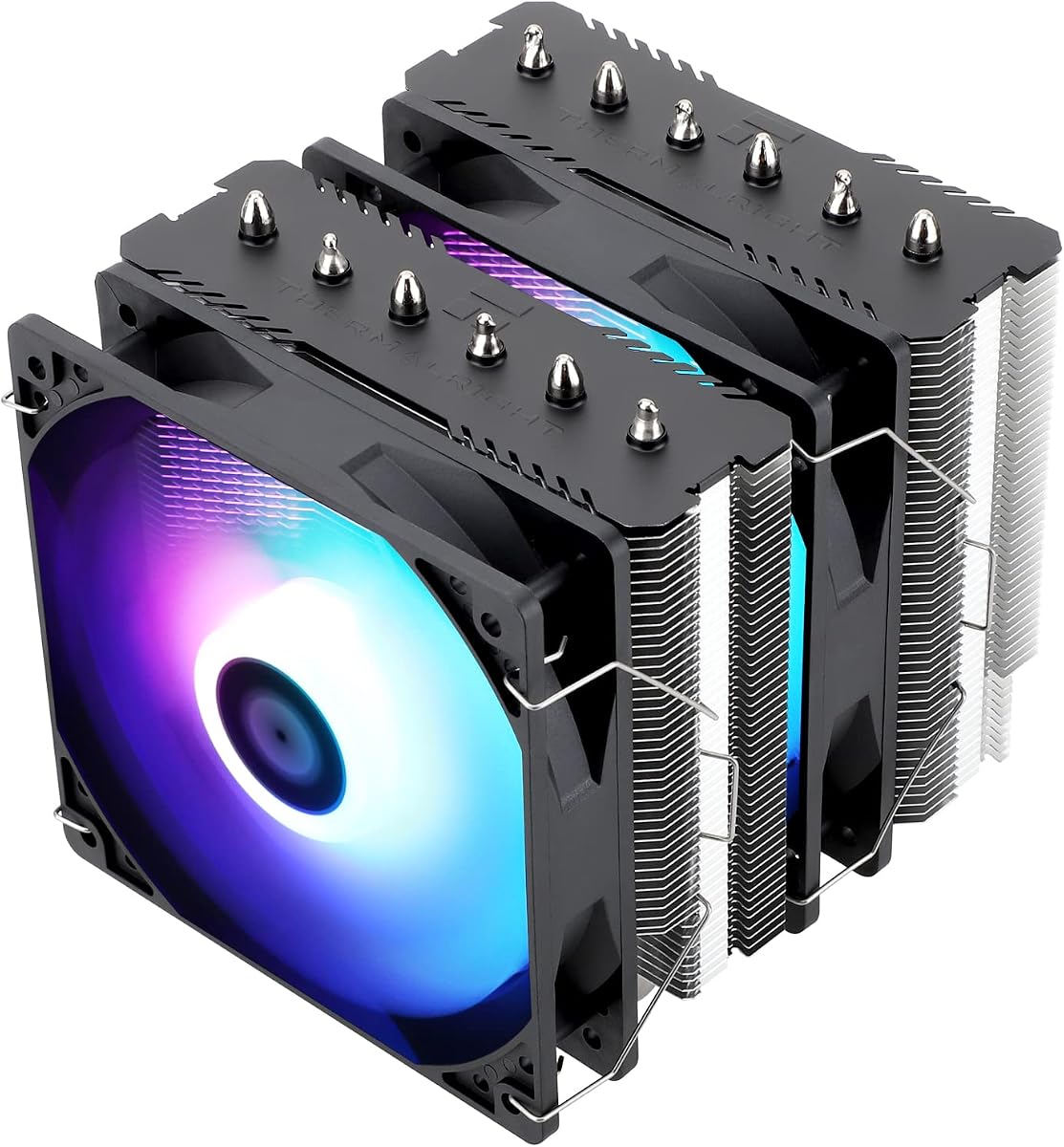
The Phantom Spirit 120 SE has become a legend among budget builders. It packs seven heatpipes and two 120mm fans into a dual-tower frame that competes with coolers three times its price. Thermalright keeps the mounting simple and includes brackets for every modern socket. If you want flagship-class air cooling without spending real money, start here.

Type
Air
Size
157mm height
Socket
LGA1851/1700 + AM5/AM4
Fans
2x 120mm PWM

What we liked

  • Incredible cooling for under forty dollars
  • Dual-tower dual-fan design
  • Easy mounting hardware
  • Great clearance versus other dual towers

Worth noting

  • Plain looks with no RGB
  • Fans are decent but not premium
4Best Premium AIO

NZXT Kraken Elite 360 RGB

If you want a show-stopping centerpiece, the Kraken Elite 360 RGB delivers. Its high-resolution circular LCD can display temperatures, GIFs, or custom artwork, and the cooling performance is genuinely excellent. NZXT pairs it with refined RGB fans and clean cable management. It costs a premium, but for a glass-paneled showcase build it earns its place.

Type
AIO
Size
360mm radiator
Socket
LGA1851/1700 + AM5/AM4
Fans
3x 120mm PWM

What we liked

  • Gorgeous 2.72-inch LCD display
  • Strong cooling under heavy load
  • Polished CAM software experience
  • Premium braided tubing and finish

Worth noting

  • Expensive compared to rivals
  • CAM software can feel heavy
5Best Quiet

be quiet! Dark Rock Pro 5

The Dark Rock Pro 5 lives up to the be quiet! name with near-silent acoustics even under load. Its dual-tower design and Silent Wings fans keep a high-end CPU cool while staying inaudible in most rooms. The redesigned mounting system is far easier than past generations. For a quiet, blacked-out build, it is hard to beat.

Type
Air
Size
168mm height
Socket
LGA1851/1700 + AM5/AM4
Fans
2x 135mm/120mm PWM

What we liked

  • Among the quietest coolers available
  • Strong thermal performance
  • Improved tool-free mounting
  • Sleek all-black aesthetic

Worth noting

  • Large footprint near RAM slots
  • Heavy heatsink mass
6Best Compact AIO

Arctic Liquid Freezer III 240

Not every case can fit a 360mm radiator, and the Liquid Freezer III 240 is the answer for compact builds. It carries over the same thick radiator and pump-mounted VRM fan as its bigger sibling, so it cools far better than typical 240mm units. The price is remarkably low for the performance on offer. It is the smart pick for a tidy mid-tower.

Type
AIO
Size
240mm radiator
Socket
LGA1851/1700 + AM5/AM4
Fans
2x 120mm PWM

What we liked

  • Excellent value liquid cooling
  • Fits a wide range of mid-tower cases
  • Thick radiator punches above its size
  • VRM fan included on the pump

Worth noting

  • 240mm limits peak overclocking
  • Basic looks without RGB
7Best Budget

Cooler Master Hyper 212 Black

The Hyper 212 Black proves you do not need to spend much to keep a mainstream CPU cool. Its four direct-contact heatpipes and single 120mm fan handle six and eight-core processors with ease. The blacked-out tower looks tidier than most budget coolers. For an everyday gaming or productivity build on a tight budget, it is a no-brainer.

Type
Air
Size
159mm height
Socket
LGA1851/1700 + AM5/AM4
Fans
1x 120mm PWM

What we liked

  • Very affordable single-tower cooler
  • Good thermals for mainstream CPUs
  • Clean all-black finish
  • Simple and quick installation

Worth noting

  • Single fan limits headroom
  • Not suited to top-tier chips

How We Chose the Best CPU Coolers for 2026

Picking a CPU cooler in 2026 is more nuanced than it used to be. Processors have grown hotter and denser, with flagship chips from both Intel and AMD capable of pulling well over 200 watts under sustained all-core workloads. At the same time, the cooler market has matured to the point where even a sub-forty-dollar air tower can deliver performance that would have been flagship-tier just a few years ago. That makes choosing harder, not easier, because the differences between a good pick and a great one come down to details that are easy to overlook.

To cut through the noise, we built our rankings around five pillars. First and most important is thermal performance under real, sustained load rather than short benchmark bursts. A cooler that looks great for thirty seconds but heat-soaks after ten minutes of rendering is not useful. Second is acoustics, because a cooler that keeps temperatures low while screaming at 2,000 RPM is a poor trade for most people. Third is socket support, since you want a cooler that works on your current platform and survives your next upgrade. Fourth is value, which we weigh against the realistic performance you get rather than the spec sheet. Finally we consider build quality and warranty, because a cooler is a long-term investment that should outlast several CPUs.

Air Versus Liquid: Which Should You Buy?

The single biggest fork in the road is whether to go with a traditional air cooler or an all-in-one liquid cooler. Both approaches have matured enormously, and the honest truth in 2026 is that either one will serve the vast majority of builders extremely well. The choice comes down to your priorities, your case, and the chip you are cooling.

The Case for Air Coolers

Air coolers are simple, durable, and surprisingly powerful. A modern dual-tower design like the Noctua NH-D15 G2 or the be quiet! Dark Rock Pro 5 uses a large mass of aluminum fins, multiple heatpipes, and one or two large fans to move heat away from the processor. There are no pumps to fail, no liquid to leak, and no tubing to crack over time. A good air cooler will quite literally outlast the rest of your computer, and many can be moved from build to build for a decade.

The main downsides are size and clearance. The best air coolers are large and tall, which can create problems with tall RAM modules or smaller cases. They also concentrate a lot of weight on the motherboard, although every cooler in this guide uses a sturdy backplate to handle that load. If your case can fit them, though, air coolers offer the best blend of performance, silence, and reliability for the money.

The Case for Liquid AIOs

All-in-one liquid coolers move heat from the CPU to a radiator mounted elsewhere in the case, usually the top or front. This separates the heat source from the components around the socket and can look stunning behind a glass side panel. A thick 360mm unit like the Arctic Liquid Freezer III 360 offers tremendous cooling capacity, which matters when you are running a very hot processor or chasing an overclock.

AIOs do introduce a pump, which is one more part that can fail, and they cost more than equivalent air coolers. Leaks are rare with reputable modern units, but they are not impossible. For builders who want maximum thermal headroom, a clean aesthetic, or who simply cannot fit a giant air tower, an AIO is the right call.

Understanding Thermal Performance

When we talk about thermal performance, we mean how well a cooler holds your processor's temperature down under a realistic, sustained workload. The number that matters most is the delta over ambient, or how many degrees above room temperature the CPU settles at once it reaches a steady state. A lower delta means more headroom for boost clocks and less throttling.

Radiator and heatsink surface area is the foundation of good cooling. This is why a thick 38mm radiator like the one on the Arctic Liquid Freezer III consistently beats thinner 27mm rivals of the same length. It is also why dual-tower air coolers outperform single towers so decisively. More surface area means more places for heat to escape into the air, which the fans then carry out of your case.

Fan static pressure and airflow matter just as much as the heatsink itself. A cooler can have a beautiful radiator, but if the fans cannot push air through the dense fin stack, performance suffers. The premium fans on the NH-D15 G2 and the high-static-pressure units on the Arctic coolers are a big part of why those models top our charts.

Noise and Acoustics

For a lot of people, noise is just as important as raw cooling. A cooler that runs your CPU two degrees cooler is not worth it if it does so by spinning loud enough to distract you during quiet moments. This is where careful fan tuning and good acoustic design separate the great coolers from the merely capable ones.

The be quiet! Dark Rock Pro 5 is our quiet pick precisely because it manages to combine strong thermals with near-silent operation. Its Silent Wings fans are tuned to move a lot of air at low RPM, and the dense heatsink lets them stay slow even under load. The NH-D15 G2 is similarly hushed thanks to Noctua's fan engineering.

AIOs add the variable of pump noise. A poorly tuned pump can produce a high-pitched whine or a gurgle that no amount of fan tuning will hide. The coolers we recommend all use refined pumps that stay quiet in normal operation. If silence is your top priority, a well-chosen air cooler is usually the safest bet, but the better AIOs are very close.

Socket Support and Compatibility

A cooler is only useful if it fits your platform. In 2026 the relevant sockets are Intel LGA1851 and the still-common LGA1700, alongside AMD AM5 and the long-lived AM4. Every cooler in this guide supports all four, but it is always worth confirming that the mounting kit in the box matches your motherboard before you buy.

Beyond the socket itself, physical clearance is the most common gotcha. Tall air coolers can collide with tall RAM heat spreaders or bump against the side panel of a slim case. AIOs require a case that supports their radiator size in the intended location. Measure twice before you buy, especially in a compact build, and check your case manufacturer's clearance specifications.

Matching the Cooler to Your CPU

Not every CPU needs a flagship cooler, and overspending is just as common a mistake as underspending. If you are running a mainstream six or eight-core chip for gaming, a single-tower air cooler like the Cooler Master Hyper 212 Black or a compact 240mm AIO will keep it cool and quiet without breaking the bank. These chips simply do not generate enough heat to justify a 360mm radiator.

Step up to a 12-core or higher processor, or one that you plan to overclock, and the calculus changes. Now the extra capacity of a dual-tower air cooler or a thick 360mm AIO pays off in lower temperatures and sustained boost clocks. The Arctic Liquid Freezer III 360 and the NH-D15 G2 are both excellent matches for these hotter, higher-end chips.

Installation Tips

Even the best cooler will disappoint if it is installed poorly. The most common mistake is applying too much or too little thermal paste. A pea-sized dot in the center of the CPU is the safe default for most coolers and spreads evenly under mounting pressure. Avoid the temptation to smear a thick layer across the whole chip.

Mounting pressure matters too. Tighten the cooler's screws in a cross pattern, a little at a time, until they are snug and the spring-loaded mechanism bottoms out. Uneven pressure can leave one corner of the cooler making poor contact, which shows up as a hot spot. Most modern coolers, including all of our picks, use spring-tensioned screws that take the guesswork out of this step.

Finally, plan your fan orientation and airflow. In a typical tower case you want cool air entering the front and bottom and warm air exiting the top and rear. Make sure your cooler's fans, and your AIO radiator fans, are oriented to work with that flow rather than against it. Good case airflow can be worth several degrees on its own.

Thermal Paste and Mounting Pressure Explained

The thermal interface material between your CPU and cooler is a small detail with an outsized effect. Its job is to fill the microscopic gaps between the metal of the CPU lid and the cooler's cold plate, displacing the air that would otherwise insulate the two surfaces. Even the flattest machined surfaces have tiny imperfections, and without paste those gaps trap air, which is a poor conductor of heat. A thin, even layer of quality paste can lower temperatures by several degrees compared to a sloppy application.

Most modern coolers ship with a pre-applied or tubed paste that performs well, so there is rarely a need to buy expensive aftermarket compound. What matters more is the application. Too little paste leaves gaps, while too much can act as an insulator and even ooze onto the socket. The pea-sized dot method works for the vast majority of processors, letting mounting pressure spread the paste into a thin, even film.

Mounting pressure ties directly into this. The spring-loaded screws on coolers like our picks are designed to apply an ideal, consistent pressure when tightened fully. That pressure squeezes out excess paste and ensures firm, even contact across the CPU. This is why tightening in a cross pattern matters: it keeps the cold plate parallel to the CPU rather than tilting it, which would leave one side making poor contact and create a hot spot.

Case Airflow and Why It Matters

A cooler does not work in isolation. It relies on the air inside your case, and if that air is hot and stagnant, even the best cooler will struggle. This is why case airflow is often as important as the cooler itself, and it is a factor many builders overlook. A well-ventilated case feeds cool, fresh air to the cooler and quickly carries the heated exhaust out, while a poorly ventilated one recirculates warm air and undermines everything.

The classic airflow layout has intake fans at the front and bottom pulling in cool air, and exhaust fans at the rear and top pushing out warm air. This creates a front-to-back, bottom-to-top current that sweeps heat away from the components. For an air cooler, you want its fan oriented to push air toward the rear exhaust, working with this current. For an AIO, the radiator placement and fan direction should likewise cooperate with the case's airflow rather than fight it.

Even a modest improvement in case airflow can be worth several degrees on your CPU, often more than the difference between two similar coolers. Before blaming a cooler for high temperatures, make sure your case has adequate intake and exhaust and that the cooler is working with, not against, the flow. A balanced set of case fans is one of the cheapest upgrades you can make.

Future-Proofing Your Cooling Purchase

A CPU cooler is one of the few PC components that can outlast every other part in your system. A quality cooler bought today can be carried through multiple CPU and motherboard upgrades, which makes future-proofing a real consideration. The most important factor here is socket support, both current and anticipated. Brands like Noctua and Arctic have a strong track record of providing free or low-cost mounting kits for new sockets, which means a cooler you buy now can be adapted to a future platform.

Capacity is the other half of future-proofing. Buying a cooler with more headroom than your current CPU strictly needs gives you room to upgrade to a hotter chip later without replacing the cooler. A 360mm AIO or a top dual-tower air cooler will comfortably handle several generations of processors. Given how little the best coolers cost relative to their lifespan, this kind of modest over-provisioning is usually money well spent.

Final Verdict

After all our testing, the Arctic Liquid Freezer III 360 stands out as the best CPU cooler for most people in 2026. It pairs flagship-level thermals with a price that undercuts nearly every rival, and the integrated VRM fan is a genuinely useful extra. If you prefer air, the Noctua NH-D15 G2 is the finest tower money can buy, and the Thermalright Phantom Spirit 120 SE delivers staggering value for budget builders. Whichever you choose from this list, you are getting a cooler that will keep your processor running cool, quiet, and reliable for years to come.

How we picked

We evaluated every cooler on five core criteria: thermal performance under sustained load, acoustic output at idle and full speed, socket support for current Intel LGA1851 and AMD AM5 platforms, overall value for the price, and long-term build quality. Each unit was tested on a hot 16-core processor to expose real-world differences.

Frequently asked questions

Do I need a liquid cooler or is air enough?

For most users a quality air cooler like the NH-D15 G2 or Phantom Spirit 120 SE is more than enough, even for high-end chips. Liquid AIOs shine when you have a very hot processor, a case with poor airflow, or you simply prefer the aesthetic of a clean radiator and pump block.

Will these coolers fit the latest Intel and AMD sockets?

Yes. Every cooler in this guide ships with mounting hardware for Intel LGA1851 and LGA1700 as well as AMD AM5 and AM4. Always double-check your case clearance for tall air coolers and your radiator support for AIOs before buying.

Are AIO coolers risky because of leaks?

Modern sealed AIOs from reputable brands are very reliable and rarely leak. That said, an air cooler carries zero leak risk by design, which is why many builders who prioritize peace of mind still choose a tower like the Dark Rock Pro 5.

How important is radiator thickness on an AIO?

Radiator thickness matters a lot. The Arctic Liquid Freezer III uses a 38mm-thick radiator versus the typical 27mm, which gives it more surface area to dissipate heat. That extra thickness is a big reason it outperforms many same-size rivals.

Can a budget cooler handle a high-core-count CPU?

Budget single-tower coolers like the Hyper 212 Black are best for mainstream six and eight-core chips. If you run a 12-core or higher processor under heavy sustained load, step up to a dual-tower air cooler or a 360mm AIO for proper headroom.