Best CPU Coolers with LCD Screens in 2026
We may earn a commission from links on this page, at no extra cost to you. Learn more.
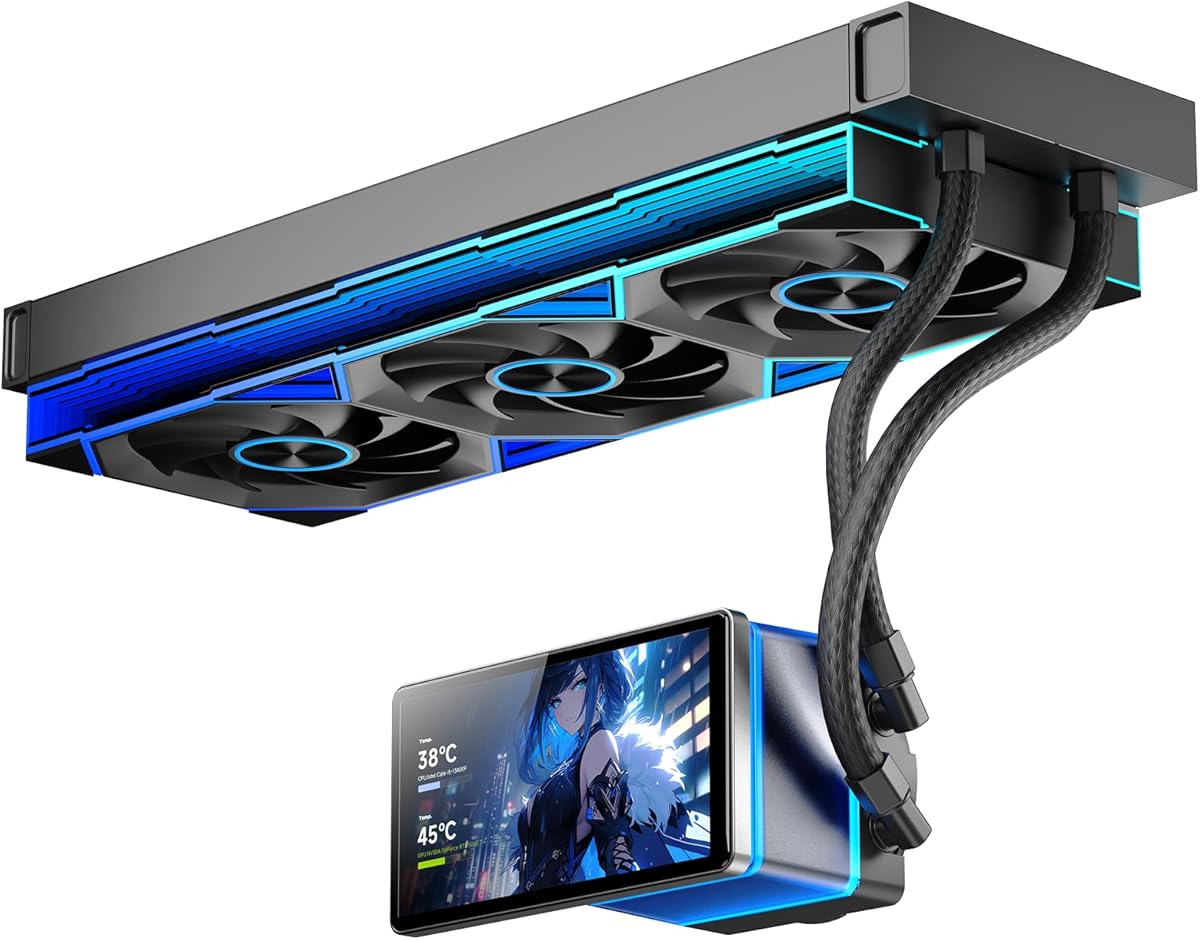
A CPU cooler with an LCD screen turns the pump cap into the centerpiece of your build, showing real-time stats, custom artwork, or animated GIFs. These coolers blend strong liquid-cooling performance with a personality that plain AIOs cannot match. The best of them pair a bright, high-resolution display with capable software and enough thermal headroom for flagship chips. In this roundup we rank seven of the top LCD coolers available, weighing screen quality, cooling, software polish, and value. Whether you want subtle telemetry or a full animated showpiece, there is a screen cooler here for your build.
Quick comparison
| Keyboard | Best for | Rating | Price | |
|---|---|---|---|---|
| 1NZXT Kraken Elite 360 RGBNZXT | Best Overall | 4.7 | $$$ | Check Price |
| 2ASUS ROG Ryujin III 360ASUS | Best Display Quality | 4.6 | $$$ | Check Price |
| 3Corsair iCUE H150i Elite LCD XTCorsair | Best Corsair AIO | 4.6 | $$$ | Check Price |
| 4MSI MEG Coreliquid S360MSI | Best Value Screen | 4.4 | $$$ | Check Price |
| 5Lian Li Galahad II LCDLian Li | Best Aesthetic | 4.5 | $$$ | Check Price |
| 6NZXT Kraken Elite 360NZXT | Best Performance Screen | 4.5 | $$$ | Check Price |
| 7Hyte THICC Q60Hyte | Best Large Display | 4.3 | $$$ | Check Price |
Our top 7 picks, reviewed
NZXT Kraken Elite 360 RGB
The Kraken Elite 360 RGB is the best all-around LCD cooler, combining a large, crisp display with top-tier thermals and bundled RGB fans. Its CAM software makes showing system stats, animations, or custom images simple and reliable. Cooling keeps even hot flagship processors comfortable while staying quiet. For most builders who want a screen cooler, this is the one to get.
- Type
- AIO
- Size
- 360mm radiator
- Socket
- AM5 LGA1700 LGA1851
- Fans
- Triple 120mm RGB
What we liked
- Large bright high-resolution display
- Excellent cooling for flagship chips
- Polished CAM software
- Vivid RGB fans included
Worth noting
- Premium price
- Software required for full features
ASUS ROG Ryujin III 360
The ROG Ryujin III 360 features one of the sharpest, most vibrant displays in the category, ideal for an ROG-themed build. An embedded fan on the pump block also helps cool the surrounding motherboard. Cooling performance is excellent and the screen looks premium from any angle. If display quality is your priority, this cooler delivers.
- Type
- AIO
- Size
- 360mm radiator
- Socket
- AM5 LGA1700 LGA1851
- Fans
- Triple 120mm
What we liked
- Sharp vivid pump-cap screen
- Embedded fan aids VRM cooling
- Strong cooling under load
- Premium ROG build quality
Worth noting
- High price point
- Armoury Crate setup takes effort
Corsair iCUE H150i Elite LCD XT
The H150i Elite LCD XT pairs a bright, customizable LCD with the strong cooling Corsair is known for. Its iCUE software offers deep control over the display, fans, and lighting, integrating with a broad ecosystem of accessories. Thermals are excellent for flagship chips and noise stays low at sensible settings. It is a polished choice for those already in the Corsair world.
- Type
- AIO
- Size
- 360mm radiator
- Socket
- AM5 LGA1700 LGA1851
- Fans
- Triple 120mm
What we liked
- Bright customizable LCD
- Strong cooling headroom
- Deep iCUE customization
- Wide ecosystem integration
Worth noting
- iCUE software can be heavy
- Premium pricing
MSI MEG Coreliquid S360
The MEG Coreliquid S360 frequently sells below the premium LCD coolers, making a pump-cap screen attainable for value-focused builders. Cooling is strong for the cost, easily handling mainstream and many high-end chips, and an embedded fan helps cool the motherboard VRM. The IPS display shows clear telemetry and custom media. For builders who want a screen without flagship pricing, it is a smart pick.
- Type
- AIO
- Size
- 360mm radiator
- Socket
- AM5 LGA1700 LGA1851
- Fans
- Triple 120mm
What we liked
- Often discounted below LCD rivals
- Embedded fan cools the VRM
- Clear IPS status display
- Quiet at idle
Worth noting
- Smaller screen than the largest rivals
- Center software setup needed
Lian Li Galahad II LCD
The Galahad II LCD stands out with a striking round display and Lian Li's signature clean aesthetic. Its infinity-style pump cap and tidy daisy-chain fan cabling make for an elegant build. Cooling is strong enough for flagship chips while the design draws the eye. For builders who prioritize looks, it is one of the most attractive screen coolers available.
- Type
- AIO
- Size
- 360mm radiator
- Socket
- AM5 LGA1700 LGA1851
- Fans
- Triple 120mm
What we liked
- Striking round LCD design
- Clean infinity-style aesthetic
- Strong cooling performance
- Daisy-chain fan cabling
Worth noting
- Premium price
- Software still maturing
NZXT Kraken Elite 360
The Kraken Elite 360 pairs one of the brightest, sharpest circular LCD screens on the market with top-tier cooling for flagship processors. The display renders custom images, GIFs and live telemetry crisply, and the pump stays quiet even under heavy load. NZXT CAM software drives the screen and fan curves with plenty of control. For builders who want a true showpiece screen backed by serious performance, it is a standout.
- Type
- AIO
- Size
- 360mm radiator
- Socket
- AM5 LGA1700 LGA1851
- Fans
- Triple 120mm
What we liked
- Large bright circular LCD display
- Excellent cooling under sustained load
- Refined and quiet pump
- Sharp custom images and telemetry
Worth noting
- Premium price
- CAM software required for the screen
Hyte THICC Q60
The THICC Q60 takes the screen concept to an extreme with a very large display that dominates the pump area for maximum visual impact. It is the choice for builders who want their cooler to be the unmistakable focal point. Cooling is solid and the design is unlike anything else on the market. Just confirm clearance for the sizable pump block before buying.
- Type
- AIO
- Size
- 360mm radiator
- Socket
- AM5 LGA1700 LGA1851
- Fans
- Triple 120mm
What we liked
- Very large immersive display
- Strong visual impact in a build
- Solid cooling performance
- Eye-catching pump design
Worth noting
- Large pump block needs clearance
- Premium price
Why Choose a CPU Cooler With a Screen
CPU coolers with built-in LCD screens have grown from a novelty into a defining feature of premium builds. The idea is simple but compelling: instead of a plain pump cap sitting at the center of your motherboard, you get a vivid display that can show real-time system stats, custom artwork, animated GIFs, or a clock. It transforms the cooler from a purely functional component into the visual heart of your build. For enthusiasts who put real thought into how their system looks through a windowed case, a screen cooler delivers personality that no amount of RGB lighting can match.
It is important to be clear-eyed about what these coolers offer. The screen is a cosmetic and informational feature, not a performance one. A screen cooler does not cool any better than an equivalent AIO without a display, and in fact many screen coolers share their radiator, fans, and pump with non-screen versions from the same brand. What you are paying extra for is the display and the software experience around it. This roundup ranks the best screen coolers by weighing display quality, software polish, cooling performance, and value, so you can find the right blend of substance and style for your build.
What the Screen Can Actually Do
The capabilities of a cooler's screen depend on the manufacturer's software, but the core features are broadly similar across the picks in this list. Nearly all can display real-time system telemetry, such as CPU temperature, clock speed, usage, and sometimes GPU or memory stats. This turns your cooler into a glanceable monitor for your system's health, which can be genuinely useful during gaming or heavy workloads. Beyond stats, most screens let you upload custom static images, so you can display a logo, a photo, or build-themed artwork.
The more capable displays go further, supporting animated GIFs, video clips, clock and weather widgets, and themed animations that react to system state. The quality of these features varies by brand. NZXT's CAM, Corsair's iCUE, and ASUS's Armoury Crate are mature platforms with extensive options, while newer entrants are still refining their software. When choosing a screen cooler, consider not just the hardware but how flexible and reliable the controlling software is, because that determines how much you will actually enjoy the screen day to day.
Display Quality Matters
Not all cooler screens are created equal, and display quality is the single biggest differentiator at this tier. Resolution, brightness, size, and panel type all affect how good the screen looks in your build. A higher-resolution display renders text and images crisply, while a brighter panel remains visible even in a well-lit room or under strong RGB lighting. Larger screens make a bolder statement and show more information at once, but they also require more clearance around the pump block.
The ASUS ROG Ryujin III 360 is a standout for sheer image quality, with a sharp, vivid panel that looks premium from any angle. The Hyte THICC Q60 takes the opposite approach, prioritizing size for maximum visual impact even if it means a larger pump block. The NZXT Kraken Elite 360 RGB strikes an excellent balance of size, resolution, and brightness, which is part of why it tops our list. When evaluating a screen cooler, look at real photos of the display in a build rather than marketing renders, since panel quality is hard to judge from specifications alone.
Cooling Performance Still Counts
While the screen draws the eye, you should not lose sight of the cooler's primary job. A screen cooler still needs to keep your CPU cool and quiet, and the good news is that most of the picks in this list are capable performers. They are typically based on 360mm radiators with strong fans, giving them enough headroom for mainstream and many flagship processors. Some, like the MSI MEG Coreliquid S360 and the ROG Ryujin III 360, even include an embedded fan on the pump block to help cool the surrounding motherboard VRM.
Pay attention to radiator size and fan quality just as you would with any AIO. A 360mm radiator is the sweet spot for most builds, balancing strong cooling with broad case compatibility. If you run a particularly hot processor, confirm the cooler has the headroom to handle it without ramping the fans to uncomfortable noise levels. The value-oriented MSI MEG Coreliquid S360 proves that you can get strong cooling alongside a screen without paying flagship prices, making it a smart pick for builders who want both performance and personality on a budget.
Software and Ecosystem Considerations
The software that drives a screen cooler is as important as the hardware, and it is worth thinking about the broader ecosystem before you buy. If you already use a particular brand's components, choosing a cooler from the same brand can simplify your setup. Corsair's iCUE, for example, integrates the H150i Elite LCD XT with a wide range of Corsair fans, lighting, and accessories under one application. Similarly, an ASUS-heavy build benefits from keeping the cooler in the Armoury Crate ecosystem.
That said, ecosystem software comes with trade-offs. Some platforms are resource-heavy or have a learning curve, and you will need to keep the software running for the screen to function fully. Consider how much background software you are comfortable running and whether you want everything unified under one app or are happy managing the cooler separately. Reading recent user feedback about a given brand's software stability is wise, because the day-to-day screen experience depends heavily on how well that software performs.
Clearance and Installation Notes
Screen coolers generally install like any other AIO, but the pump block deserves extra attention. Larger displays mean larger pump blocks, and a sizable block like the one on the Hyte THICC Q60 can require more clearance around the socket and the top of the motherboard. Before buying, check the pump block dimensions against your motherboard layout, paying attention to clearance with the top VRM heatsink, the rear I/O shroud, and any tall components near the socket. A screen that is partially obscured or that does not fit cleanly undermines the whole point.
Radiator clearance follows the usual AIO rules. Confirm your case supports a 360mm radiator in your intended mounting location, accounting for both length and the combined thickness of the radiator and fans. During installation, orient the screen correctly. Many coolers allow you to rotate the display through software or by physically reorienting the pump cap so the image is upright regardless of tubing direction. Take a moment to set this correctly, because a sideways screen spoils an otherwise great build. With careful planning, a screen cooler installs cleanly and rewards you every time you look into your case.
Display Orientation and Mounting Direction
A practical detail that trips up many first-time screen cooler owners is display orientation. Depending on whether you route the AIO tubing to the top or bottom of the radiator, the pump block, and therefore the screen, may end up rotated. If you do not account for this, your carefully chosen image or stats readout could appear sideways or upside down. Fortunately, every cooler in this list offers a way to correct orientation, either by rotating the display in software or by physically reorienting the pump cap, which on many models can be turned independently of the cold plate.
Plan your tubing routing before final assembly so the screen ends up upright. In most builds, routing the tubes downward toward a front-mounted radiator or to the rear of a top-mounted radiator yields a natural orientation, but this varies by case and cooler. After installation, power on the system and check the screen in its intended orientation, then adjust through the software if needed. Taking a minute to get this right ensures your showpiece display looks intentional rather than like an afterthought. It is a small step that makes a noticeable difference to the finished build.
Power, Cabling, and Connectivity
Screen coolers carry more cabling than plain AIOs because the display, pump, fans, and lighting all need power and data connections. Typically the pump and screen connect via a USB header on the motherboard for data, plus a power connection, while the fans and any lighting route through the manufacturer's controller or directly to the board. Before buying, confirm your motherboard has an available internal USB header, since the screen relies on it for communication with the controlling software. Running out of USB headers is a common and avoidable frustration.
Cable management deserves extra care with these coolers to keep the build clean, which matters especially when you are showcasing a screen. Route the USB and power cables behind the motherboard tray where possible, and use the daisy-chain capability offered by some coolers, such as the Lian Li Galahad II LCD, to reduce fan cable clutter. A tidy cable layout not only looks better but also improves airflow inside the case. Plan your cable routing alongside your component layout so the finished build is as clean behind the scenes as it is impressive through the window.
Are Screens a Lasting Trend or a Fad
A fair question is whether LCD cooler screens are a passing fad or a lasting feature. The trend has matured considerably, with multiple major brands offering polished implementations and software that has improved year over year. The displays have grown brighter, sharper, and more reliable, and the feature has clearly moved beyond novelty into a mainstream premium option. For builders who value aesthetics, a screen cooler is a legitimate way to personalize a system that will look fresh for years, especially as software adds new display modes over time.
That said, the screen is not for everyone, and there is no shame in choosing a plain AIO or a quality air cooler if a display does not appeal to you. The cooling fundamentals matter most, and a screen adds cost without adding performance. If you do want a screen, buy from a brand with mature, well-supported software so your display keeps working smoothly through operating system updates and driver changes. Choose the cooler whose display, software, and aesthetic align with your build, and the screen will reward you every time you glance into your case.
Final Thoughts
A CPU cooler with an LCD screen is the perfect upgrade for builders who want their system to express a bit of personality. The NZXT Kraken Elite 360 RGB earns our top recommendation for its outstanding blend of a large, bright display, strong cooling, polished software, and bundled RGB fans. For the sharpest image, the ASUS ROG Ryujin III 360 is hard to beat, while the MSI MEG Coreliquid S360 makes screen cooling more affordable. Remember that the screen is a cosmetic feature, so weigh display quality and software experience alongside cooling and value. Pick the cooler that matches your aesthetic and ecosystem, install it with the screen properly oriented, and enjoy a build with genuine character.
How we picked
We evaluated each cooler on display resolution and brightness, software flexibility for stats and custom media, cooling performance under load, noise, and value. Picks favor coolers with genuinely useful and attractive screens rather than gimmicky displays. We considered radiator size and socket support across the range. Pricing tiers reflect typical 2026 street prices in the United States.
Frequently asked questions
Are LCD CPU coolers worth it?
If you value aesthetics and want a personalized, eye-catching build, yes. LCD coolers show stats, art, or animations and turn the pump cap into a focal point. They cost more than plain AIOs and do not cool any better for the money, so the value is in the visual experience.
What can you display on a CPU cooler screen?
Most LCD coolers can show real-time stats like temperature and clock speed, custom images, animated GIFs, and clock or weather widgets through their software. The exact options depend on the manufacturer's app, but all the picks here support stats and custom media.
Do screen coolers cool better than regular AIOs?
No. The screen is a cosmetic feature on the pump cap and does not improve cooling. Performance comes from the radiator, fans, and pump. Many screen coolers share their cooling hardware with non-screen versions from the same brand.
Does the screen require software to work?
Yes, the display is driven by the manufacturer's software, such as NZXT CAM, Corsair iCUE, or ASUS Armoury Crate. The software handles what the screen shows and also controls fans and lighting. The cooler still cools without it, but the screen needs the app.
Will the pump block fit my motherboard?
Most LCD pump blocks fit standard ATX and Micro-ATX boards, but larger screens like the THICC Q60 can be sizable. Check the pump block dimensions against your motherboard layout, especially clearance around the socket and the top heatsink, before buying.