Skip to content

Best CPU Coolers for Mini-ITX Builds in 2026

4.5 average · hands-on tested
By Thomas BrianUpdated June 29, 20267 picks tested

We may earn a commission from links on this page, at no extra cost to you. Learn more.

Mini-ITX builds are all about doing more with less, and the cooler is often the single hardest component to get right. Tight clearances, limited case height, and cramped airflow mean a cooler that thrives in a full tower can be impossible in a four-liter chassis. The right small form factor cooler balances low height, quiet operation, and enough capacity to keep your chip in check. In this roundup we rank seven coolers built for compact systems, spanning ultra-low-profile air coolers and slim AIO options. Each pick is chosen for its clearance, noise, and real-world thermal headroom in cramped cases.

Quick comparison

KeyboardBest forRatingPrice
1Noctua NH-L12SNoctuaBest Overall4.7$$$Check Price
2Noctua NH-L9a-AM5NoctuaBest Ultra-Low-Profile4.6$$$Check Price
3Arctic Liquid Freezer III 240ArcticBest Slim AIO4.6$$$Check Price
4Noctua NH-L9iNoctuaBest Single-Socket Air4.5$$$Check Price
5Scythe Big Shuriken 3ScytheBest Mid-Profile4.5$$$Check Price
6Thermalright AXP90-X47ThermalrightBest Compact Tower4.4$$$Check Price
7ID-Cooling IS-55ID-CoolingBest Budget Low-Profile4.3$$$Check Price

Our top 7 picks, reviewed

1Best Overall

Noctua NH-L12S

The NH-L12S is the gold standard for Mini-ITX cooling, combining a 70mm height with a capable 120mm fan that can mount above or below the fin stack. It cools far better than its size suggests while staying quiet under load. The flexible fan placement lets it clear RAM and adapt to tight cases. For most small builds, this is the cooler to beat.

Type
Air
Size
70mm height
Socket
AM5 LGA1700 LGA1851
Fans
Single 120mm

What we liked

  • Excellent cooling for a low-profile design
  • Quiet 120mm slim fan
  • Fits a wide range of SFF cases
  • Top-tier mounting and build quality

Worth noting

  • Fan can overhang nearby slots
  • Premium price for the size
2Best Ultra-Low-Profile

Noctua NH-L9a-AM5

When height is measured in millimeters, the NH-L9a-AM5 is the answer. At just 37mm tall it slots into the smallest cases and never overhangs the socket area, so RAM and slots stay clear. It is best paired with efficient processors rather than power-hungry flagships. For a truly tiny AM5 build, nothing fits more easily.

Type
Air
Size
37mm height
Socket
AM5
Fans
Single 92mm

What we liked

  • Extremely short for tiny cases
  • Stays within the socket footprint
  • Quiet for its size
  • Simple AM5-specific mounting

Worth noting

  • Limited to lower-power chips
  • Small fan spins fast under load
3Best Slim AIO

Arctic Liquid Freezer III 240

For Mini-ITX cases that support a 240mm radiator, the Liquid Freezer III 240 is a superb choice. It moves heat away from the cramped socket area and keeps surrounding components cooler. Performance is excellent for higher-power chips that would tax a small air cooler. Just confirm your case supports the radiator and fan thickness before buying.

Type
AIO
Size
240mm radiator
Socket
AM5 LGA1700 LGA1851
Fans
Dual 120mm

What we liked

  • Strong thermals in a 240mm size
  • Frees up space around the socket
  • Quiet at idle and light load
  • Long five-year warranty

Worth noting

  • Needs a case with 240mm radiator support
  • Thick radiator limits some chassis
4Best Single-Socket Air

Noctua NH-L9i

The Intel counterpart to the L9a, the NH-L9i is a 37mm cooler built for the most space-constrained LGA1700 and LGA1851 systems. It keeps entirely within the socket footprint, leaving memory and expansion slots fully accessible. Pair it with an efficient CPU and it stays cool and quiet. It is the natural pick for the smallest Intel ITX cases.

Type
Air
Size
37mm height
Socket
LGA1700 LGA1851
Fans
Single 92mm

What we liked

  • Tiny footprint for Intel ITX builds
  • Does not overhang RAM or slots
  • Quiet for an ultra-low cooler
  • Trusted Noctua quality

Worth noting

  • Suited to lower-TDP chips
  • Fan audible at full speed
5Best Mid-Profile

Scythe Big Shuriken 3

The Big Shuriken 3 packs impressive cooling into a 69mm package, making it a favorite for low-profile cases that still want air cooling. Its slim 120mm fan keeps noise low while moving plenty of air. RAM clearance is generous thanks to the raised fan position. It is a strong value pick for mid-profile SFF builds.

Type
Air
Size
69mm height
Socket
AM5 LGA1700 LGA1851
Fans
Single slim 120mm

What we liked

  • Strong cooling under 70mm tall
  • Slim 120mm fan runs quietly
  • Good value for the performance
  • Wide RAM clearance

Worth noting

  • Fin stack can crowd tall heatsinks
  • Single fan limits peak capacity
6Best Compact Tower

Thermalright AXP90-X47

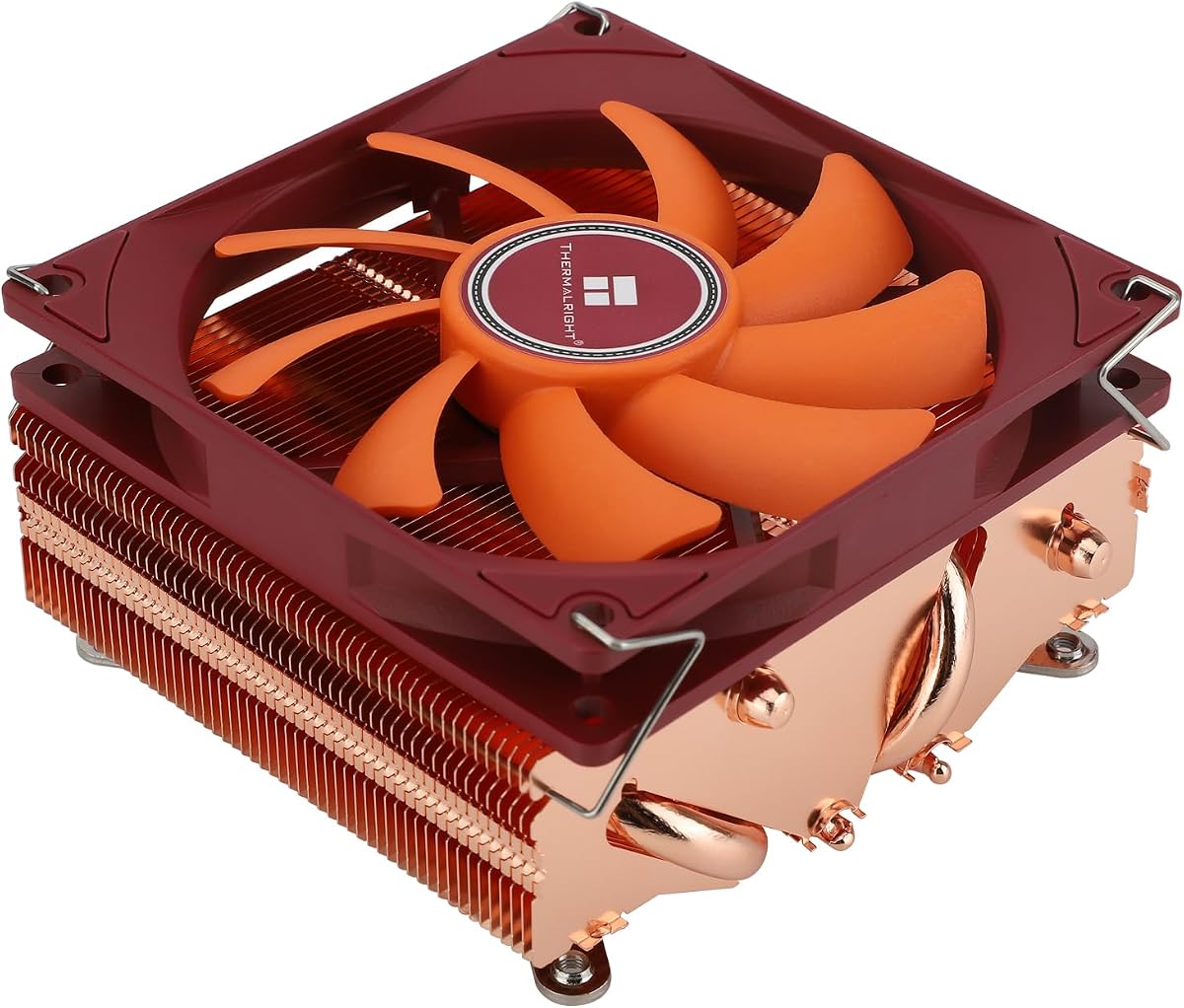
The AXP90-X47 is a budget-friendly ultra-low-profile cooler that fits the tightest cases at just 47mm tall. Its copper base and compact fin array handle efficient processors with ease while staying within the socket footprint. The price makes it an easy recommendation for value-focused SFF builders. Pair it with a sensible chip and it performs admirably.

Type
Air
Size
47mm height
Socket
AM5 LGA1700 LGA1851
Fans
Single 92mm

What we liked

  • Very short at 47mm tall
  • Affordable price
  • Keeps within socket area
  • Copper base for good contact

Worth noting

  • Best with efficient chips
  • Small fan can get loud
7Best Budget Low-Profile

ID-Cooling IS-55

The IS-55 is a wallet-friendly low-profile cooler that adds a touch of ARGB flair to compact builds. At 57mm tall it fits many small cases while offering enough capacity for mainstream chips. Its slim 120mm fan keeps the design quiet for the price. For budget SFF systems that want a little style, it is a solid choice.

Type
Air
Size
57mm height
Socket
AM5 LGA1700 LGA1851
Fans
Single slim 120mm

What we liked

  • Inexpensive low-profile cooler
  • Includes ARGB lighting
  • Slim 120mm fan for the size
  • Decent clearance for RAM

Worth noting

  • Trails premium options on noise
  • Mounting can feel tight

Choosing a Cooler for a Mini-ITX Build

Building in the Mini-ITX form factor is one of the most rewarding challenges in the PC hobby, but it is also where component selection gets unforgiving. Nowhere is this truer than the CPU cooler. In a standard mid-tower you can bolt on almost any cooler and move on, but inside a compact case every millimeter counts. A cooler that is a few millimeters too tall simply will not let the side panel close, and one that overhangs the wrong slot can block your memory or graphics card. Getting the cooler right is often the make-or-break decision in a small form factor build.

This roundup focuses specifically on coolers that suit genuinely small cases, from sub-five-liter consoles to slightly larger compact cubes. We have prioritized fit, clearance, and acoustics over raw thermal capacity, because in SFF the limiting factor is almost never how much heat a cooler can theoretically dissipate. It is whether the cooler physically fits and whether it can stay quiet in a cramped, airflow-restricted enclosure. Below we walk through the key considerations so you can pick the right cooler for your specific case and chip.

Start With Your Case Clearance

Before you even look at coolers, find your case's maximum CPU cooler height specification. This single number determines which coolers are even candidates. The smallest cases on the market may limit you to around 37mm, which means only ultra-low-profile coolers like the Noctua NH-L9i and NH-L9a-AM5 will fit. Slightly larger cases open the door to 47mm, 57mm, and 70mm coolers, each step unlocking more thermal capacity. Larger compact cases may even accommodate a small tower or a radiator.

It is critical to measure rather than guess. Manufacturers usually publish the maximum cooler height, but you should also account for any motherboard standoff differences and the thickness of the side panel. If your chosen cooler is exactly at the limit, leave a margin for safety, because a cooler that just barely touches the panel can cause flex or rattle. When in doubt, choose a cooler a few millimeters under the stated maximum. This conservative approach saves you the frustration of a build that will not close.

Air Versus AIO in Small Cases

Most Mini-ITX builds use air cooling, and for good reason. Low-profile air coolers are simple, reliable, and need no radiator mounting space. They sit directly on the CPU and exhaust heat into the case, which works well as long as your case has at least modest airflow. The downside is that small fans must spin faster to move air, so acoustics can suffer under heavy load. Pairing a low-profile air cooler with an efficient processor is the key to keeping noise manageable.

Slim AIOs like the Arctic Liquid Freezer III 240 offer a different trade-off. By moving heat to a radiator at the edge of the case, they clear the area around the socket and can cool higher-power chips more comfortably. The catch is that your case must support a radiator, and many of the smallest cases do not. If your case does support a 240mm radiator, an AIO can be the better choice for a hotter CPU, provided you confirm the combined radiator and fan thickness fits. For the tiniest builds, though, air cooling usually remains the only practical option.

Matching the Cooler to Your CPU

In a small form factor build, your cooler and CPU choices are linked. An ultra-low-profile cooler like the NH-L9a-AM5 is brilliant for efficient processors but will struggle if you pair it with a power-hungry flagship under sustained load. Conversely, a taller cooler such as the NH-L12S or Big Shuriken 3 can handle more demanding chips while still fitting many compact cases. The smartest approach is to decide your case first, see what cooler heights it allows, and then choose a CPU that fits comfortably within that cooler's capability.

This is where efficient processors shine in SFF. A chip that sips power produces less heat, which means a smaller cooler can keep it quiet and cool. Many builders deliberately choose efficient CPUs for compact systems precisely so they can use a low-profile cooler without acoustic penalties. If you want a high-power CPU in a small case, plan for a taller cooler or a slim AIO, and be prepared for more fan noise under heavy workloads.

Clearance Conflicts to Watch

Height is the obvious clearance concern, but it is not the only one. Many low-profile coolers with a fan larger than the heatsink will overhang adjacent components. The most common conflict is with RAM. If a cooler's fan extends over the memory slots, tall RGB or heat-spreader-equipped modules may not fit. Coolers that stay within the socket footprint, like the NH-L9 series, avoid this entirely, while larger coolers may require low-profile memory.

The first PCIe slot can also be at risk. Some low-profile coolers extend toward the slot used by your graphics card or other expansion cards. In a Mini-ITX board there is only one slot, so any interference is a serious problem. Always cross-reference the cooler's dimensions against your motherboard layout, and when possible look for photos of the exact cooler installed on your board model. A few minutes of research here prevents a frustrating surprise during assembly.

Noise and Airflow in Confined Spaces

Acoustics deserve special attention in SFF because small cases trap heat and force fans to work harder. A cooler that is whisper-quiet in an open test bench can become noticeably louder inside a sealed compact case with limited airflow. The best way to keep noise down is to give your cooler help. Ensure your case has at least one intake or exhaust path, set a gentle fan curve, and avoid pairing an undersized cooler with an overpowered chip.

The coolers in this list were chosen partly for how well they balance cooling and noise at the sizes they target. The NH-L12S in particular manages to stay quiet while cooling effectively, which is why it tops our list. Mid-profile options like the Big Shuriken 3 also strike a good balance. Ultra-low coolers will always be the loudest under heavy load simply due to physics, so reserve them for efficient chips where the fan rarely needs to spin up fully.

Installation in Tight Quarters

Installing a cooler in a Mini-ITX case can be fiddly, so plan your build order carefully. In many compact cases it is far easier to mount the cooler on the motherboard before installing the board in the case. Apply thermal paste, seat the cooler with even pressure using a diagonal tightening pattern, and route the fan cable before everything gets crowded. Once the board is in the case, access to the cooler's screws is often blocked by the graphics card or power supply.

For AIO builds, mount the radiator and fans first, then install the pump block on the CPU, taking care to route the tubing so it does not strain or kink. Cable management is harder in small cases, so tuck and tie cables as you go rather than at the end. A methodical approach pays off, because reworking a finished SFF build means partially disassembling it. With careful planning, every cooler in this roundup installs cleanly and delivers the quiet, cool performance that makes a Mini-ITX build a joy to use.

Airflow Direction and Case Pairing

In a compact case, how the cooler interacts with overall airflow can matter as much as the cooler itself. Low-profile downdraft coolers like the NH-L12S and Big Shuriken 3 blow air down onto the motherboard, which has the side benefit of cooling the surrounding VRM, memory, and socket area. This works best in cases that have at least one intake or exhaust path to move that heated air out. In a sealed case with no airflow, even a good cooler will struggle as hot air recirculates around the components.

Think of the cooler and case as a system. If your case has a fan mount, populating it with a quiet intake or exhaust fan dramatically improves cooling performance for any low-profile cooler. Some sandwich-style SFF cases position the cooler near a vented side panel, allowing the cooler to draw cooler outside air directly. When planning your build, map out the airflow path from intake to exhaust and ensure your cooler is positioned to benefit from it. A modest amount of case airflow can let a smaller cooler perform like a larger one.

Balancing Cost and Capability

Mini-ITX builds often carry a premium because compact components and small-case-friendly parts can cost more than their full-size equivalents. Cooling is one area where you can be strategic about spending. Ultra-low-profile coolers like the Thermalright AXP90-X47 and ID-Cooling IS-55 keep costs down while fitting tight cases, making them smart choices for budget-conscious SFF builders pairing them with efficient chips. Stepping up to a Noctua cooler buys you refinement, quieter operation, and excellent build quality, which many SFF enthusiasts consider worth the premium.

The key is matching your spend to your needs rather than overbuying. A tiny console-style case with an efficient processor does not need an expensive cooler, since a modest ultra-low-profile unit will keep it cool and quiet. A larger compact case running a more demanding chip justifies a higher-capacity cooler or a slim AIO. Decide your case and CPU first, then choose the least expensive cooler that comfortably meets the thermal and clearance requirements. This disciplined approach keeps your SFF build affordable without sacrificing performance where it counts.

Common SFF Cooling Mistakes to Avoid

Several recurring mistakes catch builders new to small form factor systems, and knowing them in advance saves a lot of frustration. The most frequent is buying a cooler before checking the case clearance, only to discover during assembly that it is a few millimeters too tall. Always confirm the maximum cooler height first. The second common error is pairing an undersized cooler with an overpowered processor, which leads to high temperatures and loud fans in a sealed case. Decide your case and cooler height limit first, then choose a CPU that fits comfortably within that thermal envelope.

Another mistake is ignoring case airflow entirely, assuming the cooler alone will manage. In a cramped, poorly ventilated case, even a capable cooler recirculates hot air and underperforms. Populate any available case fan mounts and plan an intake-to-exhaust path. Finally, builders often forget to account for RAM and PCIe clearance, ending up with a cooler that blocks memory or interferes with the single expansion slot. Cross-reference your cooler's dimensions against your specific motherboard and memory before purchase. Avoiding these pitfalls turns a stressful SFF build into a smooth one and ensures your chosen cooler delivers the quiet, cool performance it is capable of.

Final Thoughts

Mini-ITX cooling is a puzzle of fit, clearance, and acoustics, and the right cooler depends heavily on your specific case and chip. The Noctua NH-L12S earns our top spot for the rare balance it strikes between low height and strong, quiet cooling, but each cooler here serves a distinct niche. For the smallest cases, the NH-L9 series fits where almost nothing else will, while the Arctic Liquid Freezer III 240 unlocks higher-power chips in cases that support a radiator. Measure your case carefully, match your cooler to your CPU, and you will have a compact system that runs cool and quiet for years.

How we picked

We assessed each cooler on installed height, socket and motherboard clearance, RAM and PCIe interference, sustained thermals in restricted airflow, and noise. Picks favor coolers that fit genuinely small cases rather than mid-tower compact builds, and we weighed mounting ease in tight spaces. Pricing tiers reflect typical 2026 street prices in the United States.

Frequently asked questions

What cooler height do I need for a Mini-ITX case?

It depends entirely on your case. Check the maximum CPU cooler height in your case specifications, then choose a cooler at or below that figure. Common SFF limits range from about 37mm in the smallest cases to 70mm or more in larger compact chassis.

Can I use an AIO in a Mini-ITX build?

Yes, if your case supports a radiator. Many small cases fit a 240mm radiator, and a slim AIO like the Liquid Freezer III 240 frees up space around the cramped socket while cooling higher-power chips well.

Do low-profile coolers block RAM?

Some do, depending on fan placement. Ultra-low coolers that stay within the socket footprint, like the NH-L9 series, avoid RAM entirely. Larger low-profile coolers with overhanging fans may require low-profile memory.

Are low-profile coolers loud?

They can be louder than full-size coolers because small fans must spin faster to move equivalent air. Pairing a low-profile cooler with an efficient CPU and a gentle fan curve keeps noise reasonable in most builds.

Which cooler is best for a tiny case?

For the smallest cases, the Noctua NH-L9i and NH-L9a-AM5 at 37mm tall are the safest fits. They stay within the socket footprint and clear RAM and slots, making installation straightforward in cramped chassis.