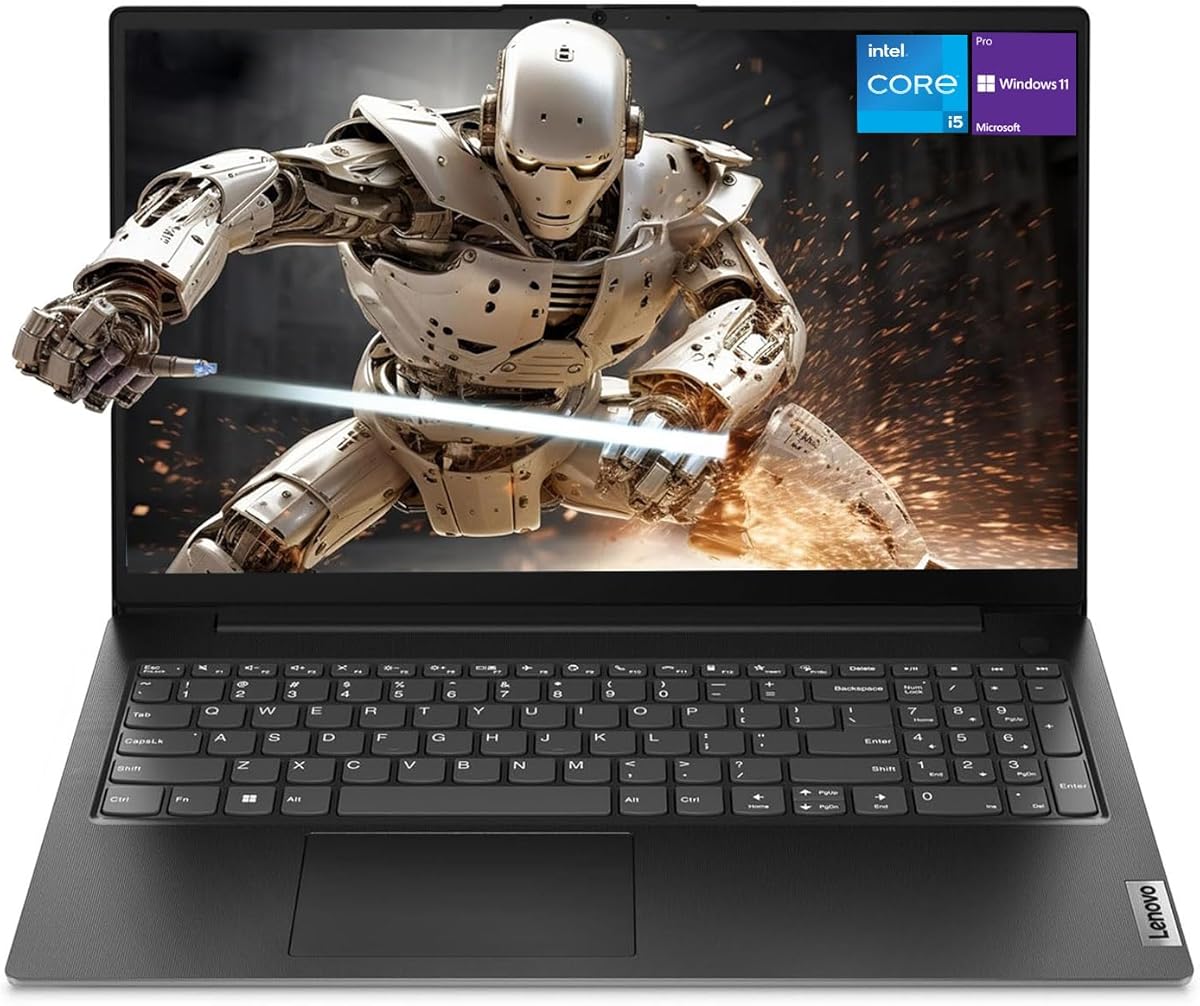
Lenovo ThinkPad E16 Gen 2 Ryzen 7
- ThinkPad keyboard, backlit keys, fingerprint + IR camera security stack
- 32GB DDR5, 1TB SSD, Ryzen 7 7735HS with strong Radeon 680M graphics
- Wi-Fi 6E, dual USB-C with PD/DP, HDMI 2.1, RJ-45—true dock-ready ports
Expert Review & Guide
Buying a business laptop in 2026 is less about chasing the highest Geekbench chart and more about surviving the real workday: dense email threads, spreadsheet pivots, back-to-back video calls, and the occasional hotel desk with one free wall outlet. Spec sheets still matter, but so do the unglamorous details that decide whether a machine feels professional after six months—keyboard travel that does not punish your wrists, a port layout that docks without a shopping bag of dongles, chassis stiffness that survives a backpack commute, and a webcam-microphone stack that makes you look and sound credible on Teams or Zoom.
This roundup ranks ten current Amazon business-oriented laptops with a single editorial filter: how they behave as office tools. We look at typing comfort and keypad usefulness, USB-C power delivery and Ethernet presence, Windows 11 Pro manageability where offered, hinge and lid quality, privacy shutters, and IR or HD cameras for hybrid meetings. Configurations range from efficient Intel N-series machines for light admin work up to a Ryzen 7 ThinkPad-class workstation with 32GB of DDR5 for power users who refuse to close Chrome tabs.
Every product below comes strictly from our curated pack—no filler ASINs, no invented images. Ratings reflect current Amazon scores at research time. We call out tradeoffs honestly: thinner RAM configs that throttle multitasking, older Y-series silicon marketed as “flagship,” HD (not FHD) touch panels, and kits that lean on bundled hubs or Office licenses to sweeten the deal. If you care about how a laptop feels under your fingers and behaves in a managed IT environment more than it looks in a lifestyle ad, start here.
As an Amazon Associate we earn from qualifying purchases. We may earn a commission at no additional cost to you.
Use this table to shortlist by keyboard utility, I/O, and meeting readiness before diving into the full reviews. Specs focus on the workday traits that matter most—display workspace, memory headroom, and connectivity—not marketing slogans.
For founders and solo operators who need a credible daily driver without overbuying silicon, this 2026 Lenovo 15.6-inch business edition hits an unusual sweet spot: light chassis, serious I/O, and just enough security theater to satisfy client-facing work. The Intel N100 will never headline a performance leaderboard, but paired with 8GB of DDR5 and a PCIe 4.0 NVMe drive it boots quickly, flips between Outlook and a browser full of research tabs, and stays composed during a 720p video call with screen sharing. That is the actual job description for most small-business machines.
Keyboard and typing feel sit in the “competent office clamshell” category rather than ThinkPad territory. Key travel is adequate for invoice entry and long email replies; the layout supports comfortable touch typing once you settle in for an hour of AP work. What elevates this model for desk-bound admin is the connectivity suite. Gigabit Ethernet is still the unsung hero of unreliable hotel Wi-Fi and jittery coworking networks. Dual USB-C ports with Power Delivery and DisplayPort, plus two USB-A 3.2 ports and HDMI 1.4b, mean you can drive an external monitor, charge, and keep a wired mouse without immediately reaching for a hub—rare at this price band.
Build quality favors portability over armored toughness. At roughly 0.78 inches thick and 3.33 pounds in Business Black, the lid flex is what you expect from a value chassis: usable, not mil-spec. Still, the finish looks professional on a client table, and the Kensington slot is a practical touch for open offices. Manageability is consumer-leaning—Windows 11 rather than Pro in the pack listing—so IT-heavy fleets should look elsewhere, but for owner-operators who simply need TPM 2.0 encryption support and a privacy shutter over the HD webcam, the fundamentals are covered.
Meeting readiness is honest rather than flashy. The 720p camera with a physical shutter is the right default for shared spaces: you control when the lens is exposed. Microphone quality will not replace a dedicated headset in a noisy café, yet for quiet home-office standups it is serviceable. Pair Wi-Fi 6 and Bluetooth 5.2 with the Ethernet jack and you have fallback paths when the guest SSID collapses mid-demo. Copilot AI PC marketing appears in the title; treat on-device AI features as convenience extras, not the reason to buy.
Storage is the main long-term constraint. A 256GB SSD fills quickly once Windows updates, Office caches, and a few offline folders accumulate. Plan on OneDrive or an external drive from day one if you archive proposals locally. Brightness at 250 nits is fine under warm office LEDs and struggles outdoors or beside floor-to-ceiling windows. Within those boundaries, this Lenovo remains one of the more thoughtful budget business packages because it prioritizes ports and privacy over empty “ultrabook” claims.
Choose it if you primarily write documents, manage email, run lightweight CRMs in the browser, and join scheduled video calls. It is a strong first laptop for a new LLC, a second machine for a bookkeeper, or a student worker device that still needs Ethernet and a lock slot. Skip it if your day includes large local datasets, frequent 4K exports, or company policies that mandate Windows 11 Pro and centralized MDM enrollment out of the box.
Prioritize the dual USB-C PD/DP lanes for a single-cable monitor where possible, and keep the Ethernet cable in your bag for conference venues. HDMI 1.4b covers most projectors; verify refresh expectations if you must drive a high-resolution boardroom display. The audio jack remains useful for wired headsets when Bluetooth pairing fails in RF-noisy spaces.
We may earn a commission at no additional cost to you.
This 16-inch Lenovo earns its “tall screen value” badge because vertical pixels quietly change how you work. The WUXGA 1920×1200 IPS panel offers roughly eleven percent more vertical space than a classic 1080p laptop, which translates into extra Excel rows, longer code or proposal views, and fewer scroll interruptions during research. At 300 nits with an anti-glare coating, it is easier to read beside office windows than dimmer 250-nit panels in this roundup. For people who live in grids and documents, that workspace is the feature.
Under the hood, the 13th Gen Intel Core i5-13420H is a meaningful step up from efficiency N-series CPUs. Eight cores and twelve threads give you headroom for a live Teams call, a shared workbook, and a browser workspace without the interface turning syrupy. The catch is memory: 8GB of DDR5 is still only 8GB. Power users should treat this as a “close unused apps” machine or plan a RAM upgrade path if the chassis allows it in your specific unit. The 512GB NVMe SSD, by contrast, is appropriately sized for mixed local and cloud document stores.
Keyboard experience is one of this model’s business strengths. The full-size deck with a dedicated numeric keypad is the right tool for invoicing, inventory SKUs, and accounting work where tenkey entry is not optional. Key feel is in Lenovo’s familiar midrange zone—not ThinkPad legendary, but more productive than many chiclet travel boards. For meetings, the HD 720p webcam with a physical privacy shutter covers the trust basics: you can prove the lens is closed between calls. Dual microphones are adequate indoors; use a headset when you present from a café.
Port strategy is mixed but workable. You get USB-C with Power Delivery and DisplayPort, two USB-A 3.2 ports, HDMI 1.4, an SD card reader, and a 3.5mm jack. That covers a projector, a card dump from a camera after a trade show, and wired peripherals. The single USB-C lane means a true one-cable dock may force compromises—charge versus display versus accessories—so a small hub still earns a pocket. Wi-Fi 6 and Bluetooth 5.2 keep wireless modern enough for office APs.
Build and mobility sit in the “Luna Grey professional” lane: 3.70 pounds is fine for trunk-to-desk travel and a bit much for ultralight backpacking between back-to-back client sites. Chassis stiffness is solid for the class; the larger 16-inch lid benefits from careful handling in crowded bag shares. Manageability is standard Windows 11 rather than Pro, so centralized BitLocker policy and domain join features may be limited compared with Pro SKUs elsewhere in this guide. For owner-led teams and freelancers who prioritize screen real estate and a real number pad, those tradeoffs are often acceptable.
If your workflow is “spreadsheet heavy, meeting medium, travel occasional,” this Lenovo 16-inch configuration is one of the more balanced midrange picks. Just be disciplined about RAM usage or consider stepping up to the 16GB models later in the list when simultaneous browser profiles and creative tools enter the picture.
The dedicated number pad is the reason many bookkeepers and ops managers should shortlist this machine over prettier 14-inch ultrabooks. Entering SKUs, quantities, and invoice totals is faster when you do not remap a laptop’s letter keys. Combine that with the taller 16:10 canvas and you get a desk-first productivity tool that still packs into a standard backpack.
The ThinkPad E16 Gen 2 wins on RAM, keyboard pedigree, IR camera, Wi-Fi 6E, and Pro manageability. This Lenovo Business 16-inch wins if you want similar screen geometry and an i5-class CPU for less commitment—provided you can live with 8GB of memory and a simpler security stack.
We may earn a commission at no additional cost to you.
Where several pack mates still ship 8GB configurations, this Lenovo 2026 Everyday Laptop starts at a more realistic 16GB of DDR5. That single spec change is why it wears the multitask memory badge. Modern business browsing is not five tabs—it is a CRM, two email accounts, Slack or Teams, a PDF markup, and a spreadsheet that refuses to close. Sixteen gigabytes keeps those workloads in RAM instead of thrashing the SSD, which preserves both responsiveness and drive longevity during long days.
The 13th Gen Core i5 eight-core processor matches that memory choice. Lenovo positions it to “beat heavy workloads,” and in practice that means smoother concurrent Zoom-plus-Office sessions and less hesitation when you reopen a large workbook after a call. The 512GB SSD is adequate for local working sets if cloud archives do the long-term storage. Boot and app launch behavior should feel immediate relative to older SATA or eMMC machines still floating around small offices.
The 16-inch FHD+ display is the other half of the productivity story. A bigger panel reduces the need for an external monitor when you are camping at a kitchen table or hotel desk. Spreadsheet columns and slide decks simply fit better. Color and brightness details are less exhaustively specified than on some ThinkPad or V-series pages, so treat this as a bright indoor office screen rather than a color-critical design tool. For Word, Excel, PowerPoint, and browser SaaS tools, the canvas size is the win.
On the business-hygiene axis—keyboard, ports, manageability, build, webcam—this model is more implied than itemized in the pack brief. Expect a modern Lenovo everyday keyboard suitable for long typing blocks; confirm whether your unit includes a numeric keypad if tenkey entry is mandatory. Port density and Ethernet presence are not the headline features here the way they are on the V15 Gen 4 or ThinkPad E16, so travelers who live on adapters should verify the I/O photo set before purchase. Webcam and shutter details likewise deserve a quick confirmation if privacy hardware is a non-negotiable policy item.
Manageability leans consumer Windows 11 with Copilot assistance rather than Pro fleet tooling. That is fine for freelancers, households that double as home offices, and tiny teams without a full-time IT admin. Larger organizations that push scripts, enforce BitLocker via domain policy, or require Autopilot-friendly Pro images should prefer the Pro-labeled machines in this roundup. Build-wise, the Everyday line targets balanced portability and desk use; it is not marketed as a ThinkPad-tough chassis, so pack it with a sleeve if your commute is rough.
Buy this when RAM headroom and screen size are the bottlenecks in your current laptop—and when you are willing to double-check port and camera specifics against the listing photos. In a field crowded with under-memoried “business” badges, the 16GB DDR5 configuration is refreshingly aligned with how people actually work.
Remote marketers, analysts, educators, and operators who keep communication apps pinned all day. If you routinely see memory pressure warnings on an 8GB machine during calls, this is the corrective step before spending up to a 32GB ThinkPad.
After unboxing, install your video platform’s desktop client, set Windows power mode for balanced performance during calls, and test the built-in mic against a USB headset. Keep a cheap HDMI or USB-C adapter in the same sleeve as the laptop so conference-room surprises do not derail a demo.
We may earn a commission at no additional cost to you.
The ASUS Vivobook 14 earns Best Portable Pro because it combines the three things road warriors actually argue about: size, Pro software rights, and enough storage that you are not permanently in cleanup mode. A 14-inch FHD IPS panel slips into slim bags that fight 16-inch bricks. Sixteen gigabytes of RAM and a 1TB SSD mean you can keep offline client folders, recording caches, and a full browser life without constant external drives. The Intel Core 5 120U’s ten cores and high boost clocks keep the machine responsive when a call, a deck rebuild, and a local file sync collide.
Keyboard feel on Vivobook-class machines is typically shallow but accurate—good for email marathons and slide edits, less ideal if you demand deep ThinkPad travel. Because this is a 14-inch deck, there is no full numeric keypad; finance travelers who live on tenkey should either learn the overlay shortcuts or prefer the 15.6/16-inch Lenovo options. Typing accuracy remains high enough for professional correspondence, and the compact layout helps when tray tables steal half your palm rest.
Ports are the classic modern compromise: USB-C 3.2, a mix of USB-A 2.0 and 3.2, HDMI, and a combo audio jack, plus Wi-Fi 6 and Bluetooth. That is enough for many desks, yet ASUS (via the pack bundle) includes a PLUSERA 8-in-1 hub—effectively admitting that meeting rooms still speak HDMI, SD, and legacy USB. Treat the hub as part of the product, not an accessory afterthought. For manageability, Windows 11 Pro is the differentiator versus Home-leaning classmates: small IT teams can apply stronger device encryption policies and business sign-in patterns without fighting the OS edition.
Build quality targets everyday professional carry rather than drop-tower toughness. The Quiet Blue colorway reads intentional and calm—useful when you open a laptop across from a client. Hinge stability on Vivobooks is generally good for adjusting camera angle on a stack of hotel books; still use two hands on the lid. The privacy shutter over the 720p camera is the right physical control for shared Airbnbs and open desks. SonicMaster-tuned speakers help for playback of recorded meetings; for speaking, a boom mic headset still wins.
Meeting performance is where this Vivobook feels current. Fast boot into Windows 11 Pro, quick resume, and enough CPU to keep background security agents from stuttering your webcam feed. Copilot integration matches Microsoft-centric shops rolling out AI helpers inside Word and Edge. If your week alternates between coworking spaces and client sites, the combination of 14-inch mobility, Pro OS, shuttered camera, and a bundled hub is more coherent than many “business” stickers slapped on barebones 15.6-inch frames.
Consultants, account managers, and founders who present in other people’s offices and need a Pro-managed OS without carrying a 16-inch slab. Also strong for educators moving between classrooms where bag weight matters more than a numeric keypad.
Leave the 8-in-1 hub in the same pouch as your charger. That ritual prevents the classic failure mode: arriving at a boardroom with only USB-C while the display cable is HDMI-A and the clicker is USB-A. Native HDMI on the laptop covers many rooms; the hub covers the weird ones.
Pick the Vivobook for travel size, 1TB storage, and the hub bundle. Pick the V15 Gen 4 for a numeric keypad, onboard RJ-45, and a more traditional 15.6-inch desk footprint with the same Pro OS intent.
We may earn a commission at no additional cost to you.
The Lenovo V15 Gen 4 is the roundup’s desk workhorse because it looks and behaves like something an IT catalog would actually approve. Windows 11 Pro, a wired Gigabit Ethernet jack, HDMI, webcam, and a numeric keypad are the unsexy checklist items that keep offices running. Add a 13th Gen Core i5-13420H and a 16GB/512GB memory-storage pair, and you have a machine that can sit on a reception desk, a warehouse office, or a founder’s dining table without feeling underpowered for mainstream SaaS work.
Keyboard experience is classic 15.6-inch business Lenovo: full-size layout, dedicated number pad, and enough structure for all-day data entry. If your staff process invoices, shipping weights, or SKU lists, that keypad is not a luxury—it is throughput. Keycaps are business-durable rather than boutique soft-touch; spills are still spills, so train coffee discipline. For writers who never touch numbers, the pad still serves as a comfortable right-side palm extension.
Ports tell an honest enterprise story. RJ-45 means you can hardline into a router when Wi-Fi authentication portals misbehave—still common in medical offices, warehouses, and older buildings. HDMI handles the conference TV. USB-C plus USB-A (including a USB 2.0 Type-A) covers printers, scanners, and license dongles that refuse to die. The presence of USB 2.0 is a con only if you blindly plug a fast external SSD into the slow port; label it mentally and move on. Wi-Fi and Bluetooth round out wireless needs for mice and headsets.
Build quality is V-series practical: black plastics chosen for serviceability and cost control more than for “CNC unibody” Instagram posts. That is appropriate. Business fleets replace units; they need machines that tolerate being stacked, wiped down, and loaned. Lid stiffness is adequate for office use. Manageability is a clear strength versus Home editions—Pro unlocks the policies many MSPs expect when they enroll devices into Microsoft 365 Business or similar stacks.
On meetings, you get a functional webcam and the CPU headroom to keep encoding from melting your UI. There is no pack claim of an IR camera or privacy shutter on this exact configuration, so if physical shutters or facial unlock are mandatory, look at the ThinkPad E16 or shutter-equipped IdeaPad and Vivobook. Microphone performance is office-grade; issue USB headsets to staff who sit near warehouse noise. As a standardized workhorse for Windows 11 Pro environments that still believe in Ethernet, the V15 Gen 4 remains easy to recommend.
Accounting pods, clinic front desks, property-management offices, and retail back rooms—anywhere a numeric keypad and a network cable still matter more than a featherweight chassis.
Image with your preferred Windows 11 Pro baseline, enable BitLocker, enroll in your MDM, and standardize on a USB headset SKU. Confirm staff know which USB-A port is the faster one before they complain about “slow backups.”
We may earn a commission at no additional cost to you.
If this guide had to put one laptop in a founder’s hands and walk away, it would be the ThinkPad E16 Gen 2 configuration with Ryzen 7 7735HS, 32GB of DDR5, and a 1TB SSD. It wins Best Overall not because of a single flashy gimmick, but because it is competent across every axis we prioritized: keyboard, ports, manageability, build, and webcam/meetings. The legendary ThinkPad typing experience shows up even in the E series—deep, precise key travel with a backlit English layout that makes night-flight expense reports less miserable. Once you type on it for a week, shallower consumer decks feel unfinished.
Performance headroom is the other half of the confidence. Zen 3+ Ryzen 7 with Radeon 680M graphics handles dense browser work, light creative exports, multi-stream collaboration apps, and even modest local visualization without begging for a discrete GPU. Thirty-two gigabytes of DDR5 is the memory ceiling most professionals will not outgrow until their software stack changes completely. The 1TB NVMe drive keeps recordings, offline SharePoint syncs, and VM leftovers from forcing monthly cleanup rituals. This is a laptop you stop apologizing for.
Ports are unusually complete for a modern thin-ish 16-inch business machine. Two USB-C ports with PD 3.0 and DisplayPort 1.4 support serious docking. HDMI 2.1 outputting 4K at 60Hz respects current conference displays. RJ-45 Ethernet remains available when Wi-Fi is a political situation. Two USB-A ports (including an always-on option in the spec set) keep older peripherals alive. Wi-Fi 6E adds the 6GHz band for cleaner offices that have invested in modern access points. This is the rare notebook that does not punish you for living between a docking station and a hotel desk.
Meeting and security features read like a checklist written by someone who actually joins calls. The FHD 1080p IR camera with privacy shutter is a clear step above 720p-only packs for low-light home offices and boardrooms. IR enables Windows Hello face sign-in; the fingerprint reader in the power button covers the glove-and-mask days. Dual microphones and HARMAN speakers with Dolby Atmos help on playback and capture, though a headset remains best for shared rooms. TPM 2.0 and Windows 11 Pro give MSPs and internal IT the manageability hooks they expect.
Build quality follows ThinkPad priorities: a grey business chassis that values stiffness and serviceability over jewel-like thinness. The 16-inch WUXGA anti-glare IPS panel is excellent for spreadsheets and documents, with the taller aspect ratio that power users prefer. It is still a 16-inch laptop—wonderful on a tray table only if you accept the footprint. For hybrid executives, analysts, engineers adjacent to business roles, and anyone who types thousands of words a week, that footprint is a fair tax.
Compared with cheaper Lenovo business stickers in this pack, you are paying for coherence: the keyboard, the camera stack, the I/O, and the Pro OS all point at the same professional user. If your budget only funds email, choose a lighter config. If your laptop is a primary instrument, the E16 Gen 2 is the instrument.
ThinkPad keyboards remain the reference for business laptops because travel, spacing, and reliability reduce typos during fast note-taking on calls. The backlight matters in dim Uber rides between sites. If typing quality is your top weighted criterion, stop comparing and shortlist this machine first.
Windows 11 Pro, TPM 2.0, biometric options, and Ethernet simplify provisioning scripts and break-glass wired support. Pair with Microsoft 365 Business and a standard USB-C dock model so every hire gets the same desk experience.
Pure road warriors who insist on sub-3-pound 14-inch carry, or roles that only need browser kiosks, can save money with the Vivobook 14 or an N-series V15. Everyone else who lives in documents and meetings should feel the E16’s keyboard before buying down.
We may earn a commission at no additional cost to you.
Lenovo IdeaPad Business Laptop
Touchscreens are polarizing on business laptops until you watch someone annotate a PDF during a call or tap through a point-of-sale adjacent workflow. This IdeaPad Business configuration makes that interaction credible with a 15.6-inch Full HD IPS touch panel, anti-glare coating, and 300-nit brightness. It is bright enough for typical offices and wide enough for reading contracts without pinching the font to illegibility. Fingerprints are the tax; keep a cloth in the drawer.
The Intel 13th Gen Core i5-1335U brings ten cores and Iris Xe graphics into an efficiency-first envelope. Combined with 16GB of RAM and a 1TB SSD, the machine feels roomy for Office, browsers, light photo markup, and Copilot-assisted drafting. It will not match the Ryzen 7 ThinkPad under prolonged CPU load, but most hybrid schedules never sustain those loads—they spike during exports and return to meetings. Windows 11 Pro plus bundled Microsoft Office is a pragmatic unboxing story for teams that hate hunting license keys on day one.
Keyboard duty is full-size IdeaPad: comfortable for email and slide work, with a layout that supports touch typing through long afternoons. It is not a ThinkPad substitute, yet it is better than many budget chiclet boards. The privacy shutter over the HD webcam is the meeting-hygiene highlight—physical certainty beats software mute icons when you step away. Dolby Audio speakers help for small-room playback of recorded standups.
On ports and manageability, expect Wi-Fi 6, modern USB needs for everyday peripherals, and Pro-level OS controls with TPM 2.0. The pack emphasizes a WOWPC recovery USB, which is a practical safety net for non-technical staff who fear “the update that broke login.” Ethernet is not the hero feature here the way it is on the V15 Gen 4; wireless-first offices will not mind, warehouse offices might. Build quality at roughly 3.57 pounds aims at portable professionalism rather than armored field service.
Choose the IdeaPad when touch input, Pro software, and a large SSD matter more than mil-spec keyboards or dual Thunderbolt docks. It is especially persuasive for educators, coordinators, and managers who mark up documents live and still need to look polished on camera with a shutter they can show a client.
PDF contract redlines, classroom annotation, quick zooming on dashboards during standups, and shared-tablet-like browsing at a reception desk. If you never touch the screen, spend toward the V15 Gen 4 or ThinkPad instead.
Enable BitLocker on Windows 11 Pro, use the privacy shutter between calls, and keep the recovery USB labeled in a drawer—not loose in a backpack where it can be lost.
We may earn a commission at no additional cost to you.
2026 Flagship 15.6" Business Laptop
This 15.6-inch “2026 Flagship” listing needs a clear-eyed read. The generous parts of the offer are real: 16GB of RAM, a 512GB SSD, a backlit keyboard, Windows 11 Pro, an FHD IPS anti-glare panel, roughly 3.5-pound portability, and a two-year warranty with phone support. Those traits matter for students and small offices that fear one-year disposable hardware. The hard tradeoff is the processor: Core i5-7Y54 is a low-power chip from an earlier generation, with boost clocks that top out around 3.2GHz. It can handle documents, browsing, and lighter meeting loads, but it is not in the same performance conversation as the 13th Gen H-series or Ryzen 7 machines above.
Keyboard presence is a relative bright spot. Backlighting is uncommon at the bottom of business price charts and genuinely useful when you type in dark rooms. Travel and layout feel traditional rather than premium; acceptable for essays and email, less inspiring if you compare side-by-side with a ThinkPad. Fan cooling is called out explicitly—good, because active cooling helps older Y-series chips sustain office workloads without thermal throttling into molasses as quickly as fanless designs sometimes do.
Ports cover the basics for presentations and peripherals: Wi-Fi, USB, HDMI, and a TF card reader for camera dumps after events. That is a practical student/business mix, though you should not expect the dual USB-C PD docking elegance of the ThinkPad E16. Manageability via Windows 11 Pro is welcome on paper; just remember that seller-bundled Office 365 access may involve a post-purchase support step. Build quality aims at slim portability rather than ThinkPad rigidity—use a sleeve.
Webcam and meeting expectations should stay modest. The FHD display helps you see shared decks clearly; camera hardware is not the headline feature set here. For critical client calls, budget a USB webcam or a quality headset microphone. Battery claims of all-day mixed use are typical marketing; real endurance depends on brightness and call length—test your commute pattern in the return window.
Who is this for? Buyers who value warranty length, Pro OS, backlight, and 16GB RAM more than modern CPU generation—and who understand they are purchasing a basic office clamshell with assertive branding. Who should pass? Anyone comparing Geekbench charts or running local developer stacks. In those cases, the Lenovo V15 Gen 4, Everyday 16GB model, or ThinkPad E16 are more honest performance buys.
Marketing language on marketplace listings often ages faster than the silicon inside. Cross-check the i5-7Y54 against your actual apps. If Adobe exports or large Excel models are weekly events, spend up. If your work is Word, browser ERP, and Zoom, this can still be a rational warranty-led purchase.
Note the seller instruction to contact support for the Office 365 Business account after delivery. Do that early in the return window so you are not stuck without apps when a deadline hits.
We may earn a commission at no additional cost to you.
The Lenovo V15 with Intel N150 is the wired-office entry pick for organizations that need Pro OS, Ethernet, and a privacy shutter without funding Ryzen 7 laptops for every seat. Think reception, admissions, light CRM, and curriculum browsing. The N150’s four cores and up to roughly 3.6GHz clocks are enough for Office, web apps, and online classes when the software stack is cloud-heavy. Pair that with DDR5 and a PCIe SSD and the machine feels responsive within its lane.
Keyboard and keypad utility are central to why this V15 belongs in business lists. Data-entry staff move faster on a full-size deck with a number pad than on compact travel boards. Dolby Audio helps for training videos; for voice calls, standardize headsets. The HD webcam with privacy shutter matches shared-desk hygiene policies—close the shutter when the laptop sits unattended at a front counter.
Connectivity is the surprise strength. Wi-Fi 6 and Bluetooth 5.2 cover modern APs, while RJ-45 saves the day on locked-down networks. USB-C with Power Delivery and DisplayPort, USB-A 3.2, and HDMI create a flexible peripheral story for scanners and external displays. That I/O map is more thoughtful than many ultraportables that assume you own three dongles already. Firmware TPM 2.0 plus Windows 11 Pro supports encryption and business sign-in patterns MSPs care about.
Build is standard V15: practical black business plastics, 15.6-inch FHD anti-glare at about 250 nits and 45% NTSC. Colors are fine for documents, not for brand-design review. Brightness is indoor-office honest. Microsoft 365 online access via Office.com is called out for browser-based Word/Excel/PowerPoint without a local subscription—useful for light seats, limiting for offline-heavy travelers.
Be precise about configuration when ordering. The pack title highlights 8GB DDR5 and 256GB SSD, while some bullet language mentions higher “up to” memory and storage. For procurement, treat the title config as the baseline and upgrade SKUs explicitly if you need more. As a managed entry laptop with Ethernet and a shuttered camera, this V15 still makes coherent sense.
Front desk, student labs, seasonal tax prep overflow, and browser-based warehouse admin. Issue a headset and a locking cable, enroll in MDM, and keep expectations aligned with N-series CPU limits.
Both target efficient office work. Prefer this V15 when Windows 11 Pro and a numeric keypad are mandatory. Prefer the lighter N100 Business Black model when commuting weight and dual USB-C PD ports matter more than Pro fleet features.
We may earn a commission at no additional cost to you.
HP’s 15.6-inch business bundle is really two products in one invoice: a competent Windows 11 Pro laptop with 16GB of RAM and a 1TB SSD, and a lifetime Office 2024 Professional Plus license that includes Word, Excel, Outlook, PowerPoint, and more. For sole props who would otherwise pay recurring Microsoft 365 fees, that software story can dominate the value equation—provided you follow the warning not to install Office 365 over it and invalidate the license. Copilot chat support adds a modern assistant layer inside the Microsoft ecosystem.
Performance sits in honest i3 territory. The 12th Gen Core i3-1215U’s six cores and 4.4GHz boost handle Office, browsing, and video calls when 16GB of DDR4 keeps the working set resident. It will feel busier than the i5-H and Ryzen 7 options under concurrent load, yet for many service businesses it is enough. The 1TB SSD is a standout—store client folders locally without immediate cloud dependence.
The display is the primary caveat for anyone comparing “business laptop” peers. This is an HD 1366×768 touchscreen, not Full HD. Touch input and micro-edge styling help classroom and quick-navigation use, but spreadsheet density and slide sharpness trail every FHD machine in this guide. If you live in wide Excel models, prioritize FHD options first and treat this HP as a software-bundle specialist. Brightness around 250 nits and 45% NTSC are typical for the class.
Keyboard and ports reflect mainstream HP consumer-business hybrids. The keyboard is non-backlit—fine in lit offices, frustrating on late flights. Ports include HDMI 1.4b, two USB-A 3.0, a headphone jack, an SD reader, and a USB-C port that the listing explicitly limits to data transfer without DisplayPort or Power Delivery. That USB-C limitation matters for docking fantasies; plan HDMI plus USB-A peripherals instead. Wi-Fi and Bluetooth cover wireless mice and headsets.
Meeting readiness centers on the HP Wide Vision 720p camera with integrated mics—usable for internal standups, improved with a headset for client pitches. Manageability via Windows 11 Pro is a genuine plus at this tier. Battery guidance cites around five hours mixed use with a fast-charge sprint to mid-capacity; heavy call days will want a brick in the bag. Build is standard HP 15.6-inch plastic: serviceable, not ThinkPad-tough.
Buy the HP when the lifetime Office 2024 license, 1TB SSD, and Pro OS outweigh the HD resolution and data-only USB-C. Skip it when screen sharpness, backlit typing, or advanced USB-C docking are non-negotiable—those buyers are better served by the Vivobook 14, V15 Gen 4, or ThinkPad E16.
Do not install Microsoft 365 over the preinstalled Office 2024 license if you want to keep the lifetime activation. Read the seller’s warning before your IT helper “just installs 365 like usual.”
Browser forms, email, Word correspondence, and Zoom grids can tolerate 1366×768. Multi-column financial models and design review cannot. Match the panel to the job, not the brand sticker.
We may earn a commission at no additional cost to you.

Business work is still typing-dominant. Before you fall for a thin silhouette, ask whether the layout includes a numeric keypad for finance workflows, whether key travel feels stable at speed, and whether a backlight exists for dim rooms. ThinkPad-class decks remain the gold standard; good Lenovo V/IdeaPad boards are acceptable daily drivers; shallow ultraportable keys are fine for email but tiring for 10,000-word proposal days. If possible, type a paragraph in-store or accept a retailer with an easy return window.
List the cables you encounter monthly: HDMI to conference TVs, RJ-45 in older offices, USB-A scanners, USB-C chargers, SD cards from event photographers. Dual USB-C with Power Delivery and DisplayPort enables clean desk docks; Ethernet saves failed Wi-Fi logins; HDMI avoids emergency adapters. A bundled hub, as with the ASUS Vivobook pack option, only helps if you actually carry it. Data-only USB-C ports (see the HP listing) cannot replace a full dock cable—read footnotes.
Windows 11 Pro matters when you care about BitLocker policy, business identity, and MSP remote management. Home or generic Windows 11 editions can be fine for freelancers. TPM 2.0 is the encryption foundation—present on the stronger business SKUs here. Biometrics (fingerprint, IR camera) reduce password friction and shared-PIN bad habits. Privacy shutters are simple, visible trust signals during audits and client visits.
A 3.3-pound laptop that twists in a backpack can cost more in repairs than a slightly heavier stiff chassis. Look for firm hinges that hold a webcam angle, lids that do not oil-can when you open them one-handed, and finishes that hide scuffs in professional settings. ThinkPad and V-series machines generally aim at this; fashion chromebooks do not. Always budget a sleeve.
720p with a shutter is the minimum professional bar; FHD IR cameras (ThinkPad E16) improve low-light framing and Windows Hello. Wide-vision lenses help when more than one person sits at a desk. Speakers are for playback; microphones on laptops struggle in cafés—standardize a USB or Bluetooth headset for customer-facing staff. Test your image against a window backlight; move the lamp or use software lighting controls before blaming the camera alone.
N-series chips are valid for docs and calls. Modern i5 U/H and Ryzen 7 configs earn their keep when tabs, meetings, and light creation overlap. Eight gigabytes of RAM is the new compromise; sixteen is the comfortable default; thirty-two is future-proof for heavy browsers and VMs. A 256GB SSD fills fast—512GB is the practical floor, 1TB the calm place. Ignore the word “flagship” unless the CPU generation supports the claim.
For most hybrid roles, keyboard comfort, port completeness, and meeting hardware decide satisfaction after month three, while CPU score decides only whether heavy weeks feel sticky. A fast chip with 8GB of RAM, a mushy keyboard, and no Ethernet can still fail a real office. Prefer balanced machines like the ThinkPad E16 or V15 Gen 4 unless your workload is explicitly compute-bound.
Not always. Freelancers who only need browsers and Office can thrive on standard Windows 11. Choose Pro when you want stronger device encryption management, business-oriented features, or an MSP will enroll the device into company policies. Several pack options—including the Vivobook 14, V15 models, IdeaPad Business, HP bundle, and ThinkPad E16—ship Pro for that reason.
It can be enough for careful users who close tabs aggressively, but 16GB is the happier default in 2026. Teams plus a browser profile plus Excel is enough to push 8GB systems into memory compression. If you are buying new and see both configs, the 16GB Lenovo Everyday, IdeaPad, Vivobook, V15 Gen 4, HP, and 32GB ThinkPad are safer long-term bets.
Prioritize camera resolution, privacy shutter, microphone strategy, and CPU headroom so encoding does not freeze your UI. The ThinkPad E16 Gen 2 leads this pack with an FHD IR camera, shutter, strong CPU/RAM, and solid speakers. The ASUS Vivobook 14 and Lenovo IdeaPad add shutters in more portable or touch-friendly packages. Regardless of model, keep a headset in your bag for noisy spaces.
Yes if staff enter numbers for more than a few minutes a day. Tenkey speed compounds across invoices and inventory counts. Favor 15.6-inch and 16-inch Lenovo business models with dedicated pads—such as the V15 Gen 4, V15 N-series, and the 16-inch Lenovo Business laptop—over compact 14-inch boards unless travel weight overrides data-entry speed.
They are real for defined roles: document editing, web SaaS, email, and standard calls. They are the wrong tool for local creative production or heavy analytics. Models like the Lenovo 15.6-inch N100 and V15 N150 earn business credibility through ports, TPM, privacy shutters, and Pro OS options—not through CPU bragging rights. Buy them with eyes open.
Not every USB-C port supports DisplayPort video or Power Delivery. Some are data-only, as with the HP model in this guide. Even full-featured ports may be too few when you need Ethernet, SD, and HDMI simultaneously. Hubs and docks remain part of professional kits; the ThinkPad’s dual USB-C PD/DP setup simply reduces how often you reach for them.
Both. Touch helps annotate PDFs, navigate dashboards, and run light front-desk workflows—the IdeaPad Business and HP touch models show that upside. Smudges are real on client calls, so keep a cloth and consider matte anti-glare FHD touch (IdeaPad) over glossy HD panels when image cleanliness matters.
Wi-Fi 6/6E is excellent until a captive portal, congested apartment AP, or warehouse dead zone appears. RJ-45 on the V15 line and ThinkPad E16 is cheap insurance for demos and VoIP stability. If your work is entirely coffee-shop roaming, Ethernet matters less than battery and weight.
Start with the Lenovo ThinkPad E16 Gen 2 if your budget stretches—it best unifies keyboard quality, ports, Pro manageability, build intent, and webcam security. If you need maximum portability with Pro OS, shortlist the ASUS Vivobook 14. If you need a numeric keypad and Ethernet for desk fleets, choose the Lenovo V15 Gen 4. Use the others when a specific constraint—touch, Office license, or entry price—dominates.
The best business laptop in 2026 is the one that disappears under good work: keys where your fingers expect them, ports that match the room you are in, security controls your company trusts, a chassis that survives the commute, and a camera you are willing to turn on without apology. Measured against those standards, the Lenovo ThinkPad E16 Gen 2 is the clearest overall recommendation in this pack, with the ASUS Vivobook 14 and Lenovo V15 Gen 4 covering portable Pro travel and keypad-plus-Ethernet desk duty.
The remaining Lenovo, HP, and marketplace “flagship” options each solve narrower problems—budget commuting, 16GB multitasking, touch markup, warranty length, or lifetime Office licensing. Match the constraint you actually have, verify the CPU generation behind marketing adjectives, and do not under-buy RAM to save a little upfront. Your future meeting self, typing in a poorly lit room on a flaky guest network, will know whether you chose thoughtfully.