Expert Review & Guide

Best Budget Mechanical Keyboards 2026: Value Picks That Feel Premium

Budget mechanical keyboards in 2026 no longer mean hollow plastic shells and scratchy stock switches. The affordable tier now includes gasket-style damping, hot-swap sockets, tri-mode wireless, Hall Effect magnetic boards for adjustable actuation, and creamy pre-lubed linears that used to live only in enthusiast builds. That progress also creates noise in listings: some boards are true mechanicals with replaceable switches, while others sell a “mechanical feeling” membrane stack or a pretty wireless shell that cannot be hot-swapped. If you only skim RGB mode counts, you will buy the wrong board for your desk.

This roundup sticks to ten products from our Amazon pack for best budget mechanical keyboards. We rank for typing feel, layout usefulness, connection flexibility, and how honest the listing is about switch type. Ratings reflect the Amazon listing at the time of writing. We do not print dollar prices because deals move weekly; open each product link for the live offer and current stock.

Start with the three top picks if you want a fast shortlist: a highly rated 75% wireless creamy board, a retro beige tri-mode gasket keyboard, and a magnetic 60%-class board for competitive trigger tuning. Use the comparison table to separate full-size wired options from compact wireless ones. Then read each review for who should buy, who should skip, and where membrane or mech-feel boards sit relative to true hot-swap mechanicals.

Our Top Budget Mechanical Keyboard Picks for 2026

Best Overall Budget

AULA F75 75% Wireless Mechanical Keyboard

★★★★★9.4/10
AULA F75 75% Wireless Mechanical Keyboard
  • Tri-mode Bluetooth, 2.4 GHz, and USB-C with a large rechargeable battery for desk and laptop hopping
  • Hot-swap PCB with pre-lubed Reaper switches and multi-layer foam for a creamy, thocky typing feel
  • 75% layout with arrow keys, volume knob, and full RGB without the footprint of a full-size board
Check Price →
Best Creamy Wireless

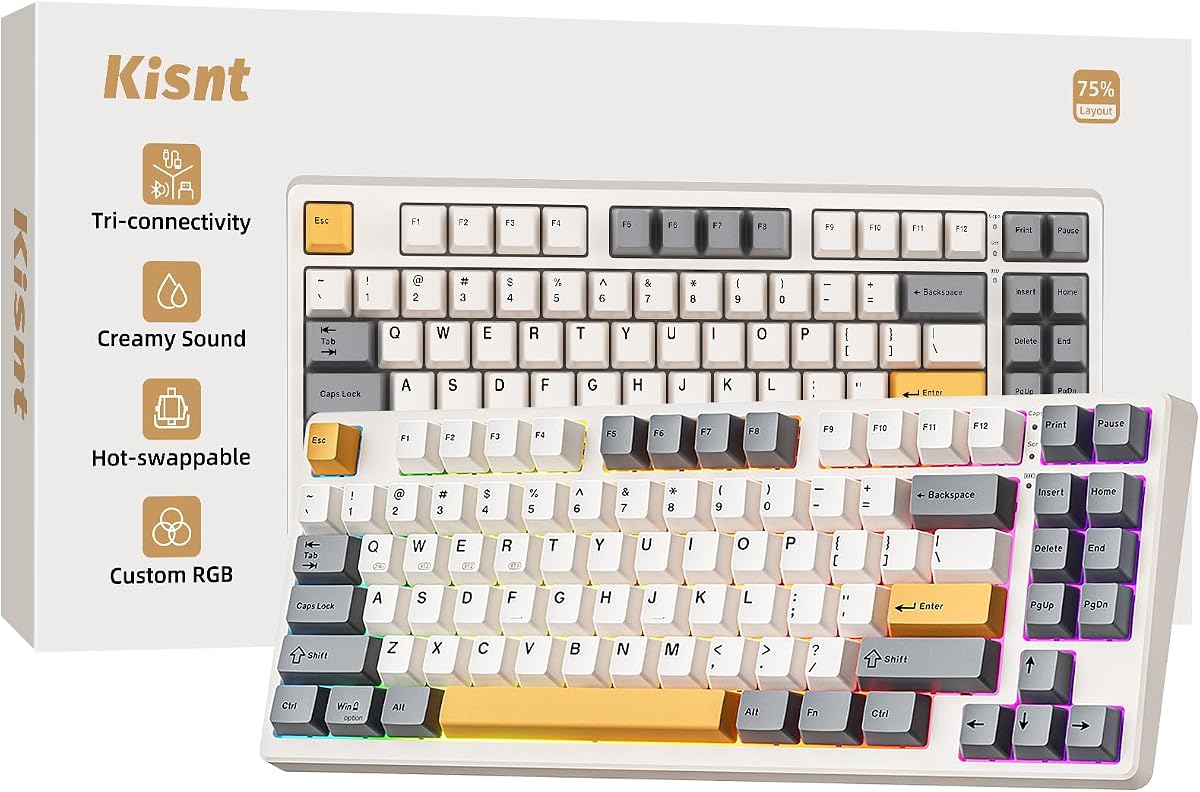
Kisnt KN85 Wireless Mechanical Keyboard

★★★★★9.2/10
Kisnt KN85 Wireless Mechanical Keyboard
  • 75% retro beige board with gasket mount and five foam layers for a deeper marbly thock
  • Tri-mode USB-C, 2.4 GHz, and Bluetooth 5.0 with a 4000 mAh battery for all-day wireless use
  • Hot-swappable pre-lubed linear switches compatible with common 3-pin and 5-pin styles
Check Price →
Best Competitive Magnetic

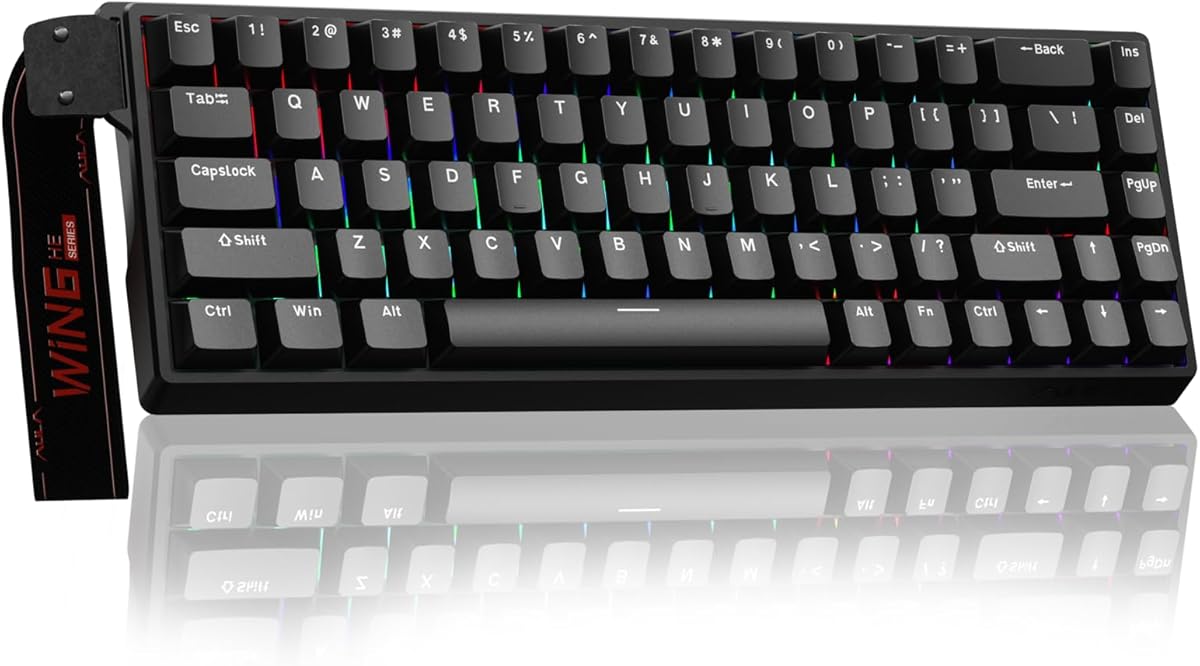
AULA WIN68 HE Mechanical Gaming Keyboard 60%

★★★★★9.2/10
AULA WIN68 HE Mechanical Gaming Keyboard 60%
  • Hall Effect magnetic switches with adjustable actuation from about 0.02 mm to 3.44 mm per key
  • 8000 Hz polling and ultra-low wired latency aimed at competitive FPS and rapid-trigger play
  • Compact 68-key footprint that keeps arrows while freeing a large mouse pad for wide swipes
Check Price →

As an Amazon Associate we earn from qualifying purchases. We may earn a commission at no additional cost to you.

Budget Mechanical Keyboard Comparison: Layout, Switch, Connection

Use this table to match layout size and switch character before you fall for a colorway. Specs highlight the three details that decide daily use: form factor, switch or feel type, and how the board connects. No prices are listed—check the live Amazon page for the current deal.

#ProductSpecificationsScore
1
  • Hot-swappable linear red switches
  • Wired board with 11 backlight modes
  • Double-shot keycaps, full anti-ghosting
8.6
2
  • 104-key full-size wired layout
  • Mechanical-feeling keys, not hot-swap
  • Rainbow LED with one-touch light control
8.8
3
  • 75% tri-mode wireless gasket board
  • Hot-swap pre-lubed linear switches
  • 4000 mAh battery, creamy foam stack
9.2
4
  • 68-key Hall Effect magnetic switches
  • 8000 Hz polling, wired USB
  • Adjustable actuation via web driver
9.2
5
  • 75% tri-mode with side-printed PBT
  • Hot-swap pre-lubed Reaper switches
  • Knob control, multi-layer gasket feel
9.2
6
  • 104-key wired linear red switches
  • Metal top panel, detachable USB cable
  • Rainbow effects with RGB side lighting
8.4
7
  • 75% BT / 2.4G / USB-C wireless
  • Hot-swap Reaper creamy linears
  • Knob, RGB, gasket-style foam fill
9.4
8
  • 96% layout with number pad retained
  • Tri-mode, hot-swap pre-lubed linears
  • 8000 mAh battery, double-shot PBT
9
9
  • Tenkeyless tactile mechanical switches
  • PBT keycaps, brushed aluminum top case
  • White LED, 6-key rollover anti-ghosting
9.2
10
  • 99-key purple membrane, not mechanical
  • Tri-mode BT / 2.4G / USB-C wireless
  • Knob, macros, creamy thock-style sound
8.6

1. Redragon Mechanical Gaming Keyboard Wired - Best Hot-Swap Starter

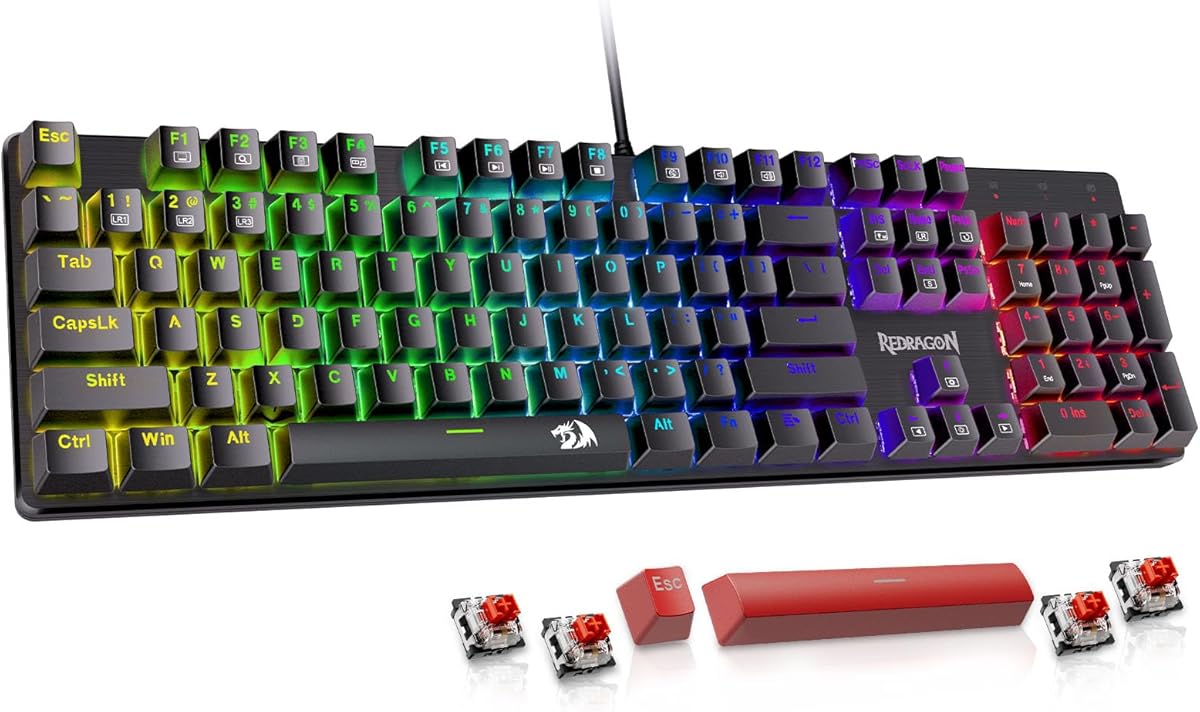
Redragon Mechanical Gaming Keyboard Wired

Redragon Mechanical Gaming Keyboard Wired

8.6/10★★★★☆

The Redragon wired hot-swap board is the classic first mechanical keyboard for people who want real switches without jumping into custom group buys. Linear red switches need less force than many tactiles, which helps in long RPG, MMO, or IMO sessions where you hold movement keys for minutes at a time. Because the sockets are hot-swappable, you can pull a sticky switch or try a heavier linear later without learning to solder. That alone separates this listing from the many budget boards that only imitate a mechanical feel under a rubber membrane sheet.

  • Hot-swappable linear red switches with spare switches included
  • Eleven backlight modes with brightness and speed steps
  • Full-key anti-ghosting plus twelve multimedia shortcuts
Check Price →
✓ Pros
  • True hot-swap linear reds let beginners swap a bad switch without soldering
  • Macro software remaps keys and tweaks lighting for game or office shortcuts
  • Spare switches and red keycaps in the box lower the fear of a dead key
  • Full anti-ghosting supports complex game chords and multi-key shortcuts
  • Twenty-four-month Redragon warranty covers common first-board anxiety
✕ Cons
  • Wired-only design needs a free USB port and cable routing on small desks
  • Backlight color is not freely RGB-customizable beyond the listed modes
  • Stock linear reds can feel light for typists who prefer a tactile bump

Detailed review

Lighting is practical rather than extravagant. Eleven backlit modes and five brightness and speed levels cover late-night coding and brighter living-room setups. The listing notes double-injection keycaps for clearer legends under the light, which matters more after six months of oily finger wear than on unboxing day. Macro editing lets you remap keys, stack shortcuts, or bind multi-step actions to a single press. That software path is useful for streamers, spreadsheet power users, and anyone who wants media keys beyond the twelve built-in shortcuts.

Anti-ghosting across the full key set means chorded game inputs and Ctrl-Alt-Shift combinations register cleanly. That is table stakes for a gaming mechanical, yet plenty of cheap office boards still drop keys under load. Multimedia shortcuts for calculator, volume, and email reduce the need to leave the home row during mixed work-and-play evenings. Plug-and-play behavior on PC and Mac keeps setup short if you are replacing a dead membrane board before a weekend raid.

Build expectations should stay honest. This is a value wired chassis, not a heavy aluminum custom. Stabilizers and case ping will not match a gasket board with five foam layers, and the cable is part of your desk aesthetic whether you like it or not. For a fixed desktop where wireless is unnecessary, that trade is usually fine. Gamers who travel between a living-room console and a bedroom PC should look at the tri-mode options later in this list instead.

Buy this Redragon if you want an inexpensive true mechanical with hot-swap insurance and simple lighting. Skip it if you need Bluetooth for a tablet, a compact layout for mouse space, or a creamier gasket sound signature out of the box. As a starter wired board with spare switches included, it still earns a clear place in a budget roundup aimed at first-time mechanical buyers.

Who this Redragon suits

Students, MMO players, and first-time mechanical buyers who want hot-swap practice without a custom kit will get the most from this board. It also fits secondary PCs where a cable is acceptable and software macros matter more than battery life.

Setup notes for macros and lighting

Install the Redragon software when you care about remaps or lighting tweaks, then save a profile for games and a cleaner profile for writing. Keep the spare switches labeled in a bag so a future swap does not become a scavenger hunt through desk drawers.

Versus other budget wired options

Compared with the Newmen metal-panel full-size board, this Redragon leans harder into hot-swap serviceability. Compared with the Logitech G413 TKL, it offers more lighting modes and easier switch replacement at the cost of brand polish and a tactile bump.

Check Price on Amazon →

We may earn a commission at no additional cost to you.

2. Redragon K521 Upgrade Rainbow LED Gaming - Best Full-Size Mech-Feel

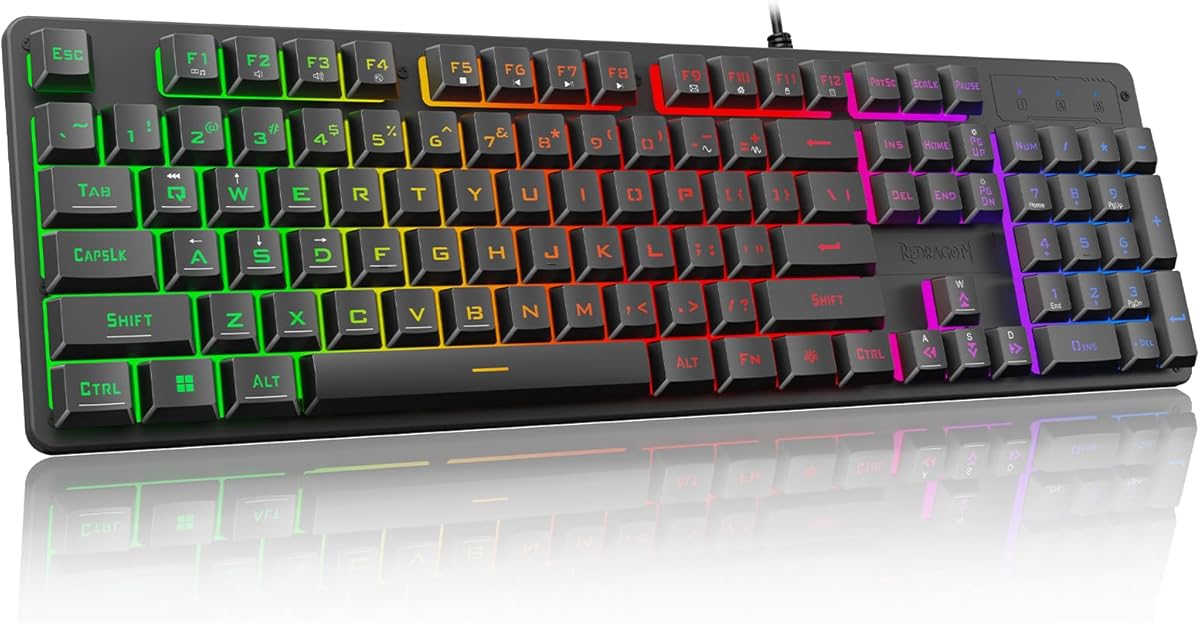
Redragon K521 Upgrade Rainbow LED Gaming Keyboard

Redragon K521 Upgrade Rainbow LED Gaming Keyboard

8.8/10★★★★☆

The Redragon K521 sits in a gray zone that budget shoppers must understand before they click buy. The listing markets mechanical feeling and fast tapping, not hot-swappable MX-style switches. That means you get a sharper, more game-oriented keypress than a mushy office membrane, but you should not expect to pull switches or chase cream-lubed linears later. If your goal is a colorful full-size board for mixed schoolwork and casual games, that distinction may not matter. If your goal is a true mechanical that you can mod, look at the hot-swap AULA and Kisnt boards instead.

  • 104-key full-size wired layout with multimedia shortcuts
  • Mechanical-feeling keys with penetrating rainbow LED design
  • One-touch lighting control plus console and PC compatibility
Check Price →
✓ Pros
  • Full-size layout keeps a number pad for spreadsheets and accounting work
  • One-touch backlight control is simpler than deep Fn-layer hunting
  • Works across Windows, macOS, and common consoles without a driver hunt
  • Nineteen-key anti-ghosting covers common gaming chord patterns
  • Rainbow lighting upgrade looks brighter than older Redragon LED stacks
✕ Cons
  • Mechanical-feeling design is not a hot-swap true mechanical switch board
  • Nineteen-key anti-ghosting is narrower than full N-key rollover boards
  • Wired full-size footprint eats mouse space on shallow desks

Detailed review

Where the K521 earns its place is simplicity. One-touch lighting on and off, multi-step breathing and brightness control, and a penetrating rainbow LED design make the board easy to live with for younger gamers and shared family PCs. Twelve multimedia combination keys speed volume and media control during homework or streaming. Plug-and-play compatibility across Windows versions, Mac, PlayStation, and Xbox expands the board beyond a single tower PC, which is rare value at the low end of the market.

The 104-key layout remains the right call for anyone who lives in Excel, QuickBooks, or data-entry portals. Compact 75% boards look cleaner on desk photos, yet they punish number-heavy workflows until muscle memory for a layer or a separate numpad appears. Anti-ghosting on nineteen keys is enough for many games even if it is not the same as full N-key rollover on enthusiast boards. Casual players will notice reliability; tournament players chasing every simultaneous input should step up to the true mechanicals in this pack.

Sound and feel will not match a gasket-mounted creamy board. Expect a brighter, thinner typing note and less of the marbly thock that keyboard communities chase on video. That is acceptable when the board’s job is rainbow presence and a number pad, not audiophile typing content. Cable management is part of the deal; there is no Bluetooth escape hatch if you want a clean desk photo.

Choose the K521 when you want a bright full-size board for console-friendly gaming and homework and you understand it is mechanical feeling rather than hot-swap mechanical. Pass if switch swapping, gasket foam, or wireless laptop hopping is the point of your upgrade. Honesty about that category boundary is why this board still belongs in a budget roundup rather than being silently oversold as a custom-style mechanical.

Best use cases

Family PCs, student dorm desks with spreadsheet classes, and living-room setups that sometimes plug into a console are the K521’s natural habitat. It is less ideal for enthusiasts building a switch collection.

What mechanical feeling means here

Treat mechanical feeling as a firmer membrane or hybrid stack tuned for gaming response. You gain punch and rainbow flair without gaining solder-free switch swaps or gasket thock.

Check Price on Amazon →

We may earn a commission at no additional cost to you.

3. Kisnt KN85 Wireless Mechanical Keyboard - Best Creamy Wireless

Kisnt KN85 Wireless Mechanical Keyboard

Kisnt KN85 Wireless Mechanical Keyboard

9.2/10★★★★★

The Kisnt KN85 is the budget board we point at when someone says they want a creamy wireless mechanical without spending custom-keyboard money. The 75% eighty-five-key layout keeps function keys and arrows while deleting the number pad, which frees roughly a quarter of the desk for wider mouse swipes. Dimensions stay compact enough for laptop stands and shallow writing desks, yet the board does not force you into a pure 60% Fn-layer lifestyle for Delete and arrows.

  • 85-key 75% layout with F-row and arrows retained
  • Tri-mode USB-C, 2.4 GHz, and Bluetooth with 4000 mAh battery
  • Gasket mount, foam layers, hot-swap pre-lubed linears
Check Price →
✓ Pros
  • Gasket structure and multi-layer foam deliver creamy thock on a budget
  • Tri-mode connectivity covers PC, laptop, tablet, and phone workflows
  • Hot-swap sockets accept common 3-pin and 5-pin switch experiments
  • Retro beige colorway looks intentional instead of generic gamer black
  • Driver remapping and macros help both office macros and game binds
✕ Cons
  • No number pad means spreadsheet-heavy users may want a separate numpad
  • Full driver features lean on Windows in wired or 2.4 GHz modes
  • Creamy sound still depends on desk surface and keycap resonance

Detailed review

Tri-mode connectivity is the practical headline for hybrid workers. USB-C wired mode offers the lowest latency path, 2.4 GHz covers responsive wireless gaming with a dongle, and Bluetooth 5.0 with multiple channels lets you hop between a work laptop and a personal tablet. A 4000 mAh battery supports long wireless days, and you can keep typing while charging when the meter runs low. Latency figures in the listing put wired near two milliseconds and 2.4 GHz near five, which is plenty for most non-tournament play.

Typing feel is where Kisnt separates itself from hollow plastic rainbow boards. Pre-lubed Bsun-style linear switches in a light actuation range feel smooth for writing and gaming alike. Gasket mounting plus base dampener, silicone, and multiple foam layers push the sound toward the deeper marbly thock enthusiasts describe in videos. Hot-swap compatibility means you can later try tactiles or slower linears without soldering. That upgrade path matters more than another unused lighting preset.

RGB offers twenty preset effects with brightness and color control through shortcuts or software. Edge glow around the keycaps gives the beige shell presence without forcing a dark cyber theme. Remapping and macros through the Windows driver help programmers and MOBA players bind awkward chords. Mac users still get solid basic typing over Bluetooth even if deep software tools stay Windows-first.

Warranty and support claims include multi-year coverage and a return window, which lowers risk on a lesser-known brand compared with household names. Still, buy from a listing with clear seller support and keep packaging until you confirm wireless pairing and battery behavior. The KN85 is not a full-size accounting board and not a Hall Effect rapid-trigger machine. It is a gasket-flavored wireless daily driver for people who type a lot and want the board to sound expensive.

Pick the KN85 if creamy sound, beige aesthetics, and tri-mode flexibility top your checklist. Skip it if you refuse to lose the number pad or if competitive adjustable actuation is the only feature you care about. In this pack it is one of the strongest answers to the modern budget brief: wireless, hot-swap, and actually pleasant to type on.

Who should buy the KN85

Writers, students, programmers, and hybrid workers with small desks will appreciate the 75% footprint and soft typing sound. Gamers who value feel over magnetic rapid trigger will also be happy here.

Layout tip if you miss a numpad

Kisnt mentions a matching compact numpad path for data-entry days. That modular approach beats forcing a full-size board onto a desk that barely fits a mousepad.

Versus the AULA F75 twins

The KN85 and AULA F75 boards share the creamy wireless brief. Choose Kisnt for the retro beige gasket story; choose the higher-rated F75 if you prefer the white-and-blue AULA ecosystem and knob-centric media control.

Check Price on Amazon →

We may earn a commission at no additional cost to you.

4. AULA WIN68 HE Mechanical Gaming Keyboard - Best Competitive Magnetic

AULA WIN68 HE Mechanical Gaming Keyboard 60%

AULA WIN68 HE Mechanical Gaming Keyboard 60%

9.2/10★★★★★

The AULA WIN68 HE is the budget answer when your priority is competitive response rather than creamy office thock. Hall Effect magnetic switches detect stem travel with sensors instead of traditional contact leaves, which enables adjustable actuation and rapid-trigger behavior. The listing’s actuation range from about 0.02 mm to 3.44 mm, with fine per-key steps, means you can make movement keys feather-light while leaving ability keys deeper. That flexibility is the reason magnetic boards took over so many FPS shopping lists.

  • Hall Effect magnetic switches with fine actuation adjustment
  • 8000 Hz polling and roughly 0.3 ms wired latency claim
  • 68-key compact layout with web-based Windows driver tools
Check Price →
✓ Pros
  • Adjustable actuation lets you tune WASD depth for different games
  • Rapid-trigger style features help counter-strafe and short taps in FPS titles
  • Compact footprint maximizes mouse space on competitive pads
  • Web driver avoids a heavy install for remaps, RT tools, and RGB
  • South-facing LEDs and rich RGB presets keep the board visually flexible
✕ Cons
  • Wired-only design will annoy users who wanted Bluetooth laptop hopping
  • Web driver focus is Windows-centric rather than macOS-friendly
  • Learning SOCD, DKS, and RT settings takes patience for newcomers

Detailed review

Polling at 8000 Hz and a sub-millisecond latency claim matter most when the rest of your setup can keep up: a high-refresh monitor, a solid USB path, and games that reward micro-adjustments. Casual Minecraft evenings will not reveal the difference. Ranked shooters and rhythm-adjacent movement tech will. The 68-key compact layout saves a large slice of desk while retaining arrows, which is a smarter competitive compromise than a pure 61-key board that hides arrows under layers.

Software lives in a web driver for Windows, covering rapid trigger, SOCD, DKS, MT, TGL, macros, and lighting without a traditional installer package. That lowers friction for LAN bags and school PCs where you cannot install random EXEs. Mac users should expect more limited deep tuning. RGB with millions of colors and multiple presets is available when you want flair, and you can kill the lights for tournament focus.

Build-wise this is a purpose-built wired esports tool. The detachable cable helps packing, and the light chassis is easy to carry to a friend’s house. It will not try to match the foam-filled creamy story of the F75 or KN85. Stabilizer feel and case resonance are secondary to trigger consistency. If you hate cables on principle, this is the wrong aisle even if the magnetic feature list looks exciting.

Buy the WIN68 HE if adjustable actuation and compact mouse space are your real upgrade goals. Skip it if you write novels all day and care more about gasket thock than reset timing. In a budget mechanical roundup it is the clearest specialist: less generalist charm, more ranked-game utility.

Tuning advice for beginners

Start with moderate actuation on WASD rather than the most extreme shallow setting. Extreme values feel amazing in clips and fatiguing in three-hour sessions until your fingers adapt.

Who should skip magnetic for now

Writers, accountants, and anyone who wanted tri-mode wireless for a couch tablet should choose the F75, F99, or KN85 instead. Magnetic value shines when games pay you back for the learning curve.

Layout note on the 60% label

Marketing calls it a 60% class board, yet the 68-key arrangement keeps arrows and essential functions. Confirm the key count photos if you specifically need a true 61-key layout.

Check Price on Amazon →

We may earn a commission at no additional cost to you.

5. AULA F75 Pro Wireless Mechanical Keyboard - Best Knob-Driven Pro

AULA F75 Pro Wireless Mechanical Keyboard

AULA F75 Pro Wireless Mechanical Keyboard

9.2/10★★★★★

The AULA F75 Pro is the dressed-up sibling in the F75 family: same compact 75% idea, with side-printed PBT keycaps and the polished Pro feature mix that shoppers often compare against the standard F75. Tri-mode Bluetooth 5.0, 2.4 GHz, and USB-C wired cover five-device lifestyles for people who bounce between a work notebook, a gaming desktop, and a tablet. A 4000 mAh class battery keeps wireless days realistic instead of decorative.

  • Tri-mode wireless with up to five device connections
  • Hot-swap Reaper switches and side-printed PBT keycaps
  • Multi-function knob for media and lighting control
Check Price →
✓ Pros
  • Side-printed PBT keycaps give a cleaner legend style than many budget sets
  • Pre-lubed Reaper switches and foam stack produce a soft creamy response
  • Knob control makes volume and lighting adjustments tactile and fast
  • Tri-mode links cover work laptop, home PC, and handheld devices
  • Macro programming and Win-lock support serious game sessions
✕ Cons
  • Pro naming can overlap with the standard F75 and confuse comparison shopping
  • Deep RGB music-rhythm features need the Windows driver path
  • 75% layout still omits a dedicated number pad

Detailed review

Feel comes from pre-lubricated stabilizers, LEOBOG Reaper switches, and an advanced foam-and-silicone stack with PCB slotting. The result is the soft, elastic creamy typing that made this product line popular in budget communities. Hot-swap sockets accept 3-pin or 5-pin switches, so beginners can change a single annoying key or rebuild the whole board’s character later. That is a stronger long-term story than a sealed membrane dressed in RGB.

The multi-function knob is the daily quality-of-life win. Volume rolls and lighting changes happen without memorizing obscure Fn combinations during a call or a boss fight. Sixteen-point-eight million color RGB with preset effects and music-rhythm modes through the driver satisfy setup photos, while the option to disable backlight keeps late-night writing calm. N-key rollover and Windows key lock help in intense games where an errant Start menu is worse than a missed skill.

Side-printed legends change the look more than some buyers expect. If you rely on bright top-printed characters under a desk lamp, shine a light on product photos before you commit. Many typists adapt quickly and prefer the cleaner keycap faces. Others who hunt-and-peck in dim rooms may prefer brighter top legends on different boards in this list.

Choose the F75 Pro when you want the creamy AULA 75% formula with Pro keycap styling and knob control. If you find a standard F75 in a colorway you like better, compare listings carefully rather than assuming Pro is always the only correct answer. Both belong near the top of a budget mechanical shortlist for wireless daily drivers.

Pro versus standard F75

Treat Pro as a trim and keycap story on the same excellent platform. Match colorway, current offer, and whether side-printed PBT matters to you more than the standard F75’s look.

Ideal buyer profile

Creators and gamers who hate digging through Fn layers for volume will like the knob. Hybrid workers who keep three devices awake will like tri-mode switching.

Check Price on Amazon →

We may earn a commission at no additional cost to you.

6. Newmen GM325Pro Mechanical Keyboard - Best Metal Full-Size Wired

Newmen GM325Pro Mechanical Keyboard

Newmen GM325Pro Mechanical Keyboard

8.4/10★★★★☆

The Newmen GM325Pro aims at buyers who still want a full-size board and a bit of metal in the hand without leaving the budget aisle. A rugged metal top panel stiffens the typing platform and makes the board feel less toy-like than hollow plastic cases. Linear red switches deliver smooth travel for gaming and quick office taps, and full-key rollover claims support dense input during fights or editing bursts. This is a straightforward wired mechanical, not a gasket custom clone, and that clarity helps set expectations.

  • 104-key full-size linear red mechanical switches
  • Metal top panel with rainbow and RGB side lighting
  • Detachable 1.8 m USB cable and software customization
Check Price →
✓ Pros
  • Metal top plate feels sturdier than many all-plastic budget shells
  • True linear red mechanical switches suit fast gaming taps
  • Full-size number pad remains ideal for finance and inventory work
  • Detachable cable improves packing and port swapping
  • FN shortcuts plus software cover media, macros, and lighting tweaks
✕ Cons
  • ABS keycaps will shine faster than PBT under heavy daily use
  • RGB is focused on side lighting rather than per-key rainbow freedom
  • Wired-only design lacks the laptop hopping of tri-mode rivals

Detailed review

Lighting splits into rainbow mixed effects and RGB side-edge illumination. The side glow reads well in a dim room and photographs cleanly, even if per-key RGB purists want more granular control. Thirteen preset LED rainbow mixes cover the usual wave and reactive looks. If lighting is your whole personality, hotter RGB boards exist later in premium catalogs; if lighting is accent, Newmen’s approach is enough.

The detachable 1.8-meter USB cable is a quiet win. Packed LAN bags and tidy cable sleeves become easier when the keyboard separates from the cord. FN plus function-row shortcuts reach media and calculator tools quickly, while companion software opens remaps, macros, and deeper lighting edits for people who want profiles. Windows-focused use is the natural fit based on the listing language.

Tradeoffs are classic budget full-size. ABS keycaps can polish to a shine where your fingers land most, and the board’s mass and width demand real desk real estate. There is no Bluetooth for couch typing. Sound tuning will not match foam-stuffed 75% cream boards. What you gain is a number pad, metal-panel rigidity, and honest red-switch gaming response for a stationary PC.

Buy the GM325Pro when full-size layout and a sturdier plate matter more than wireless gadgets. Skip it if PBT legends, gasket thock, or multi-device Bluetooth define your upgrade. As a metal-leaning wired workhorse, it fills the practical corner of this pack that compact creamy boards intentionally leave empty.

Desk fit checklist

Measure mousepad width before you commit to 104 keys. If your mouse already hits the keyboard during wide swipes, a 75% or TKL board will feel like a bigger upgrade than new reds on a full-size frame.

Compared with Redragon full-size options

Newmen’s metal panel is the differentiator against lighter plastic rainbow boards. The hot-swap Redragon elsewhere in this list is smarter if you expect to change switches within a year.

Check Price on Amazon →

We may earn a commission at no additional cost to you.

7. AULA F75 75% Wireless Mechanical Keyboard - Best Overall Budget

AULA F75 75% Wireless Mechanical Keyboard

AULA F75 75% Wireless Mechanical Keyboard

9.4/10★★★★★

If this pack needs a single default recommendation, the AULA F75 is it. The board combines the three things budget buyers ask for most often in 2026: a compact-but-usable 75% layout, tri-mode wireless, and a creamy pre-lubed typing feel that does not sound like a toy. White-and-blue styling photographs cleanly and looks less aggressive than scarlet rainbow gamer boards, which helps if the same desk hosts work calls and evening games.

  • 81-key 75% tri-mode wireless mechanical board
  • Hot-swap pre-lubed Reaper switches with foam silencing
  • Knob-controlled RGB and media with strong pack rating
Check Price →
✓ Pros
  • Highest rating in this pack reflects broad buyer satisfaction
  • Creamy Reaper switches and multi-layer foam feel above the price tier
  • Tri-mode wireless with large battery supports real all-day use
  • Knob plus 75% arrows balance compactness and daily usability
  • Hot-swap PCB keeps the board customizable as tastes change
✕ Cons
  • Popular colorways can sell out during major shopping events
  • Number pad absence still frustrates spreadsheet-first professionals
  • Advanced lighting rhythms depend on installing the AULA driver

Detailed review

Connection flexibility is excellent. Bluetooth 5.0, 2.4 GHz wireless, and USB wired modes can juggle up to five devices with shortcut or side-button switching. That matters for people who keep a work laptop and a personal machine awake. The rechargeable battery class is large enough that wireless becomes the normal state rather than a weekend gimmick. When you need maximum consistency for competitive nights, wired mode is one cable away.

Internally, pre-lubricated stabilizers, Reaper switches, extended silicone padding, PCB slotting, and five filling layers aim at the soft thocky profile that made gasket-style budget boards famous. Hot-swap sockets mean you are not stuck if a switch fails or if you later prefer a tactile bump for typing. RGB with many presets and music modes covers flair, while the knob handles brightness and volume without breaking flow.

Macro programming, N-key rollover, and Windows key lock round out the gaming side. The 81-key arrangement keeps arrows and essential keys, so strategy games and editors remain comfortable. You still lose the number pad, which is the recurring 75% compromise. For most students and gamers that trade is worth the mouse space. For accountants, the F99 later in this list is the wiser AULA.

Community and rating momentum help if you want fewer surprises. A 4.7 listing score in this pack signals that the creamy wireless formula is landing for a wide audience, not only enthusiasts who watch typing videos. Support still depends on the seller and warranty path you purchase through, so keep order records and test every connection mode in the first week.

Buy the F75 as your default budget mechanical if you want one board for writing, classes, and games without babysitting a cable. Skip it only if you need Hall Effect tuning, a number pad, or a brand-name aluminum TKL. For everyone else shopping this keyword in 2026, start here and compare color preference against the F75 Pro and Kisnt KN85.

Why it wins Best Overall

It balances layout, wireless convenience, and out-of-box feel better than specialist boards that only win one category. The rating lead in this pack backs that all-rounder status.

First-week setup routine

Pair 2.4 GHz for the main PC, add Bluetooth for a laptop, set a calm lighting profile for work, and lock Win key for games. That thirty-minute setup unlocks most of the board’s value.

Versus Kisnt KN85

Both are creamy wireless 75% class boards. Prefer AULA for rating momentum and white-blue kit vibes; prefer Kisnt for retro beige gasket storytelling and a slightly different switch house feel.

Check Price on Amazon →

We may earn a commission at no additional cost to you.

8. AULA F99 Wireless Mechanical Keyboard - Best Wireless With

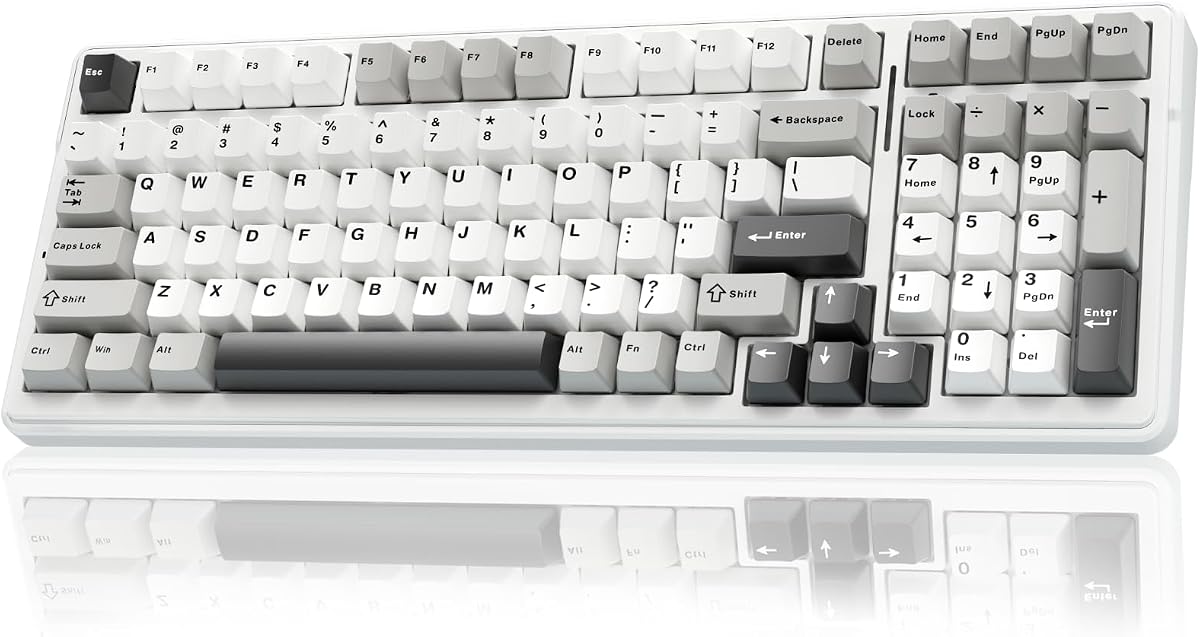
AULA F99 Wireless Mechanical Keyboard

AULA F99 Wireless Mechanical Keyboard

9/10★★★★★

The AULA F99 solves the biggest complaint about trendy 75% boards: missing number keys. Its ninety-nine-key 96% layout keeps arrows and a number area while trimming some full-size bulk, which suits accounting students, inventory managers, and anyone who enters digits constantly. You still reclaim some desk space versus a traditional 104-key slab, especially when the board’s compact framing is paired with a modest mousepad.

  • 99-key 96% compact layout with number pad retained
  • Tri-mode wireless and hot-swap pre-lubed linears
  • 8000 mAh battery with double-shot PBT keycaps
Check Price →
✓ Pros
  • Keeps a number pad while staying more compact than classic 104-key boards
  • Large 8000 mAh battery supports long wireless stretches
  • Hot-swap pre-lubed linears deliver smooth gaming and typing response
  • Gasket-style foam structure softens sound versus hollow plastic boards
  • Double-shot PBT keycaps resist shine better than budget ABS sets
✕ Cons
  • Still wider than 75% boards if maximum mouse space is the goal
  • Learning the denser 96% key placement takes a day for muscle memory
  • RGB and macro depth are strongest with the Windows driver installed

Detailed review

Tri-mode connectivity mirrors the better AULA wireless boards. Bluetooth 5.0, 2.4 GHz, and USB-C wired modes can hold multiple device pairings so a tablet sketch session and a PC game night share one keyboard. The standout hardware detail is the 8000 mAh battery class, which is notably larger than many compact wireless boards in the same shopping bracket. That capacity supports heavier RGB use without constant top-ups.

Hot-swap sockets and pre-lubed linear switches keep the board in true mechanical territory. Pullers in the package lower the intimidation factor for first swaps. Gasket-inspired structure, silicone padding, PCB slotting, and multi-layer foam chase the softer elastic feel associated with creamier AULA boards. Double-shot PBT keycaps help legends survive long office days better than shiny ABS.

RGB effects, macro customization, music modes, and N-key rollover cover both mood lighting and practical binds. Compatibility notes spanning PC, tablet, PlayStation, and Xbox make the F99 a flexible household board if everyone shares one desk corner. As always, confirm OS shortcut modes when you move between Windows and mobile devices.

Pick the F99 when wireless convenience and a number pad must coexist. Skip it if you want the smallest possible competitive footprint or if Hall Effect actuation tuning is mandatory. Among budget mechanicals, it is the sensible bridge between compact fashion and full-size practicality.

Who gets the most from 96%

Finance homework, ERP data entry, and spreadsheet-heavy remote jobs benefit immediately. Pure FPS players who never touch a numpad can save space with the F75 instead.

Battery and lighting habits

Dim or disable RGB when you want maximum wireless longevity. The large cell is a cushion, not an excuse to leave animated rainbow modes at full blast forever.

Versus the purple AULA 99 membrane

This F99 is the true hot-swap mechanical path. The purple AULA 99-key board later in the pack is a membrane alternative with a similar layout idea but a completely different switch story.

Check Price on Amazon →

We may earn a commission at no additional cost to you.

9. Logitech G413 TKL SE Mechanical Gaming - Black | Tactile

Logitech G413 TKL SE Mechanical Gaming Keyboard - Black | Tactile switches

Logitech G413 TKL SE Mechanical Gaming Keyboard - Black | Tactile switches

9.2/10★★★★★

Logitech’s G413 TKL SE is the safe brand-name pick when you want a tactile mechanical that still looks professional on a work desk. The tenkeyless layout removes the number pad to widen mouse space while keeping a familiar arrow cluster and function row. That middle ground remains perfect for office gamers who refuse both full-size bulk and ultra-compact Fn gymnastics. Tactile switches provide a bump that many writers prefer over silent-feeling linear reds.

  • Tenkeyless tactile mechanical switches for gaming and typing
  • PBT keycaps with brushed aluminum-magnesium alloy top case
  • White LED backlight and FN media controls, wired connection
Check Price →
✓ Pros
  • Tactile switches give clearer feedback than light linear reds for many typists
  • PBT keycaps and aluminum top case feel premium in the budget lane
  • TKL layout frees mouse space without forcing tiny 60% layers
  • Clean white LED look suits offices better than rainbow storms
  • Windows and macOS compatibility with straightforward media FN keys
✕ Cons
  • No hot-swap sockets for easy switch experiments
  • Wired-only with no tri-mode battery lifestyle
  • Six-key rollover is narrower than full NKRO enthusiast boards

Detailed review

Materials punch above the usual budget plastic vibe. Heat- and wear-resistant PBT keycaps hold texture longer, and the brushed black aluminum-magnesium alloy top case resists flex better than thin ABS shells. White LED lighting is restrained enough for shared offices and streaming overlays that already have enough color. FN media controls cover volume, playback, mute, lighting toggles, and Windows lock without a scavenger hunt.

Anti-ghosting with six-key rollover is aimed at reliable gaming input rather than enthusiast NKRO bragging rights. For most titles that is sufficient. Competitive players who chord unusual simultaneous inputs may prefer the magnetic WIN68 HE or hot-swap AULA boards with fuller rollover behavior. The G413’s strength is consistency and finish, not feature maximalism.

There is no Bluetooth and no hot-swap playground. You buy Logitech’s tuned tactile experience and live with it. That is a feature if you dislike tinkering and a limitation if your hobby is trying three switch types a month. Cable management becomes part of the aesthetic; a clean sleeved route under the desk keeps the aluminum top looking intentional.

Choose the G413 TKL SE when brand support, tactile typing, and a muted black aluminum look matter more than creamy gasket videos. Skip it when wireless multi-device life or switch swapping is the actual reason you opened this roundup. In a field crowded with RGB twins, its restraint is the differentiator.

Office-friendly gaming board

If your keyboard must survive standup meetings on camera, white LEDs and a brushed black case look more intentional than animated rainbow waves. The tactile bump also helps accuracy during long document days.

When to pick TKL over 75%

Pick TKL if you want a conventional function row and key placement with fewer compact quirks. Pick 75% AULA or Kisnt boards if wireless and creamy foam sound outrank brand familiarity.

Check Price on Amazon →

We may earn a commission at no additional cost to you.

10. AULA 99 Key Purple Keyboard - Best Membrane Wireless

AULA 99 Key Purple Keyboard

AULA 99 Key Purple Keyboard

8.6/10★★★★☆

Include this purple AULA only with eyes open: the listing itself states it is a membrane keyboard, not a mechanical hot-swap board, and it cannot have switches changed. It still appears in a best budget mechanical keyboards pack because shoppers searching that phrase often land on creamy wireless boards with number pads, and this model competes visually in that aisle. Our job is to label it correctly so nobody expects Reaper switches under the keycaps.

  • 99-key purple wireless membrane board with number pad
  • Tri-mode Bluetooth, 2.4 GHz, and USB-C connectivity
  • Programmable macros, knob control, creamy thock-style tuning
Check Price →
✓ Pros
  • Striking purple aesthetic with a compact 96%-style number pad layout
  • Tri-mode wireless covers phones, tablets, and PCs with easy switching
  • Knob and M1–M3 keys speed volume, lighting, and custom shortcuts
  • Quieter membrane stack can suit apartments and shared rooms
  • Foldable kickstand helps tune typing angle without buying a separate wedge
✕ Cons
  • Explicitly a membrane keyboard, not a hot-swap mechanical switch board
  • Smaller 2000 mAh battery than several mechanical wireless options here
  • Serious competitive players will want a true mechanical or Hall Effect board

Detailed review

What it offers instead is convenience and style. Tri-mode Bluetooth, 2.4 GHz, and USB-C wired modes support flexible device hopping. A dual-mode rotary knob adjusts volume and lighting quickly. The ninety-nine-key compact layout keeps a number pad while trimming some full-size bulk, and a foldable two-stage stand lets you change typing angle for wrist comfort. Purple theming and thock-tuned membrane sound aim at the same aesthetic trend as creamy mechanicals, just through a different internal stack.

Programmability remains useful. Macros can collapse multi-step actions into single keys for casual games or office shortcuts, and M1 through M3 keys expand remapping options. Compatibility notes cover common Windows versions plus Mac, Android, and iOS with FN mode toggles. That multi-OS flexibility is genuinely handy for households that share one colorful board across phones and laptops.

Performance expectations should stay grounded. Membrane keyboards can feel pleasant and quieter, yet they will not match Hall Effect rapid trigger or hot-swap experimentation. The listing even suggests stepping up to a higher-tier mechanical if you have strict competitive response needs. Battery capacity is smaller than the 4000 to 8000 mAh mechanical wireless boards in this pack, so RGB-heavy wireless days may need more frequent charging.

Buy the purple AULA 99 when you want wireless convenience, a number pad, and a bold colorway, and you are fine with membrane internals. Skip it if the word mechanical in your search was non-negotiable. Leaving it in the roundup with an honest badge protects readers better than pretending every pretty wireless board shares the same switch technology.

Read the listing fine print

If a product page says membrane and no hot-swap, believe it even when the sound marketing says creamy or thocky. Sound foam can flatter membranes; it does not turn them into mechanical switches.

Better mechanical neighbors in this pack

Want this layout idea with real switches? Move to the AULA F99 wireless mechanical. Want creamier compact typing without a numpad? Choose the F75 or Kisnt KN85.

Check Price on Amazon →

We may earn a commission at no additional cost to you.

Best Budget Mechanical Keyboards 2026: Value Picks That Feel Premium

How to Choose a Budget Mechanical Keyboard in 2026

Separate true mechanical from mechanical feeling

The most expensive mistake in this category is linguistic. True mechanical boards use discrete switches you can often hot-swap. Mechanical-feeling boards and some membrane models imitate travel and sound with a different stack. Both can be enjoyable, but only one supports switch replacement and enthusiast tuning. When a listing emphasizes feeling instead of naming a switch family or hot-swap PCB, assume you are not buying a modding platform.

In this pack, the hot-swap AULA boards, Kisnt KN85, Redragon wired hot-swap model, Newmen reds, Logitech tactiles, and the magnetic WIN68 HE sit on the mechanical side of the line. The Redragon K521 markets mechanical feeling, and the purple AULA 99 is explicitly membrane. Start your shortlist by filtering for the technology you actually want.

Pick a layout for mouse space and number entry

Full-size 104-key boards keep number pads for finance and inventory work but shrink mouse room. TKL removes the numpad while keeping a familiar top row. Seventy-five percent boards keep arrows and function keys in a tighter shell. Sixty-percent-class and 68-key boards maximize mouse space for FPS play. Ninety-six percent boards like the F99 try to keep digits without the full classic width.

Choose based on your week, not a product photo. If you enter numbers for two hours a day, compact fashion will annoy you. If you play wide-sense shooters on a large mousepad, a full-size board will annoy you more.

Match switch character to games and typing

Linear reds and creamy pre-lubed linears favor smooth travel for gaming and long writing sessions. Tactile bumps help typists who want confirmation without a loud click. Hall Effect magnetic switches add adjustable actuation and rapid-trigger tools for competitive play. None of these is universally best; they are different instruments.

If you share an apartment wall, prioritize foam-filled creamy boards or quieter membrane alternatives over sharp clicky experiments. If you stream mechanical ASMR, the gasket foam boards will serve better on microphone than hollow plastic shells.

Decide whether wireless is a need or a novelty

Tri-mode boards earn their complexity when you hop devices or hate cable drag on a clean desk. Wired boards still win for set-and-forget desktops and for competitive magnetic polling features that assume a cable. Battery size matters: a 2000 mAh membrane board and an 8000 mAh mechanical board will not feel the same after a week of RGB wireless use.

Also plan the dongle. 2.4 GHz modes need a USB port or hub slot. Bluetooth is more flexible across phones and tablets but usually higher latency than a dedicated dongle.

Keycaps, foam, and longevity signals

PBT keycaps generally resist shine better than ABS. Double-shot legends outlast printed ones. Foam layers and gasket-like mounts improve sound more than another unused lighting preset. Metal top plates add stiffness. Hot-swap sockets extend lifespan when a single switch fails. Warranty length is not everything, yet a brand that publishes support expectations is easier to live with than a no-name listing with conflicting bullet points.

Frequently Asked Questions

01

What is the best budget mechanical keyboard overall in this roundup?

The AULA F75 75% wireless board is our default pick because it combines a strong listing rating, creamy pre-lubed switches, hot-swap sockets, and tri-mode connectivity in a layout most people can live with every day. It is not the best pure competitive magnetic option and not the best if you need a number pad, but as an all-round budget mechanical it covers the widest set of needs in this pack.

02

Are mechanical-feeling keyboards the same as mechanical keyboards?

No. Mechanical-feeling usually means a membrane or hybrid design tuned to feel firmer and sound sharper than a soft office keyboard. True mechanical keyboards use individual switches under each key, and many budget models now let you hot-swap those switches without soldering. The Redragon K521 in this pack is a clear mechanical-feeling example, while the hot-swap AULA and Kisnt boards are true mechanical platforms.

03

Should I buy a wireless or wired budget mechanical keyboard?

Buy wireless tri-mode if you switch between a laptop and desktop, hate cable drag, or share the board with a tablet. Buy wired if your PC never moves, you want the simplest reliability story, or you are chasing high-polling magnetic features like those on the AULA WIN68 HE. Many people keep 2.4 GHz for games and Bluetooth for portable devices on the same tri-mode board.

04

Is a 75% layout better than full-size for gaming?

For aim-heavy games, yes more often than not, because deleting the number pad widens mouse space. For accounting classes, inventory tools, or constant number entry, full-size or 96% boards remain better. The AULA F99 exists specifically for people who want wireless creamy mechanicals without abandoning the numpad.

05

Who should choose the Hall Effect AULA WIN68 HE?

Competitive FPS players who want adjustable actuation and rapid-trigger style tools should shortlist the WIN68 HE. Writers who mainly care about soft gasket sound and Bluetooth convenience will usually prefer the F75 or Kisnt KN85. Magnetic boards reward people willing to learn software settings; they are not automatically better for every task.

06

Do I need hot-swap sockets on a budget board?

Hot-swap is the best insurance policy in the budget tier. If one switch fails, you replace it instead of retiring the keyboard. It also lets you sample tactile or heavier linear switches later. If you know you will never open the board and you prefer a brand-tuned tactile like the Logitech G413, fixed switches can still be the right simpler purchase.

07

Why is the purple AULA 99 included if it is membrane?

Because shoppers searching best budget mechanical keyboards often encounter lookalike creamy wireless boards, and this pack contains that listing. We keep it in the comparison with an explicit membrane badge and cons list so readers can avoid an accidental non-mechanical purchase—or choose it knowingly for quieter wireless convenience and purple styling.

08

Are PBT keycaps worth caring about at this price?

Yes if you type all day. PBT generally stays textured longer than ABS, which can turn shiny on WASD and spacebar within months of heavy use. Several AULA and Logitech options in this pack highlight PBT, while some value boards still ship ABS. Keycaps are also one of the easiest future upgrades if your board uses a standard layout.

09

Can these keyboards work with Mac and consoles?

Many boards in the pack advertise Windows, macOS, and even PlayStation or Xbox compatibility, especially the Redragon K521 and several AULA wireless models. Deep remapping software is still often Windows-first. On Mac and mobile, expect basic typing and Bluetooth pairing to work while advanced RGB music modes or web drivers may be limited.

10

How should I decide between the AULA F75 and F75 Pro?

Treat them as closely related 75% creamy wireless platforms. Compare the live colorway, keycap printing style, and current offer rather than assuming the Pro name alone settles it. Side-printed PBT and trim details on the Pro appeal to buyers who want a cleaner key look; the standard F75 remains our overall pick on rating and balanced features in this pack.

Conclusion

Budget mechanical keyboards in 2026 are good enough that the old advice to suffer through a mushy membrane until you can afford a custom kit is outdated. Inside this pack, the AULA F75 is the broadest recommendation for creamy wireless daily use, the Kisnt KN85 is the retro beige gasket alternative, and the AULA WIN68 HE is the specialist magnetic board for competitive trigger tuning. Full-size wired options from Redragon and Newmen still make sense when a number pad and a simple cable matter more than Instagram foam shots.

Stay honest about category labels. Hot-swap mechanicals, Hall Effect magnetics, mechanical-feeling boards, and membrane wireless lookalikes can share a search results page while delivering different upgrade paths. Match layout to your mousepad, switch character to your games and documents, and connection mode to the number of devices you actually use each day.

Open the product links for live availability, then use the checklist before you checkout. If you want one cart decision with the least regret for most people reading this guide, start with the AULA F75 and only branch away when you know you need a numpad, tactile brand-name restraint, or magnetic rapid-trigger controls.