Best Budget CPU Coolers in 2026
We may earn a commission from links on this page, at no extra cost to you. Learn more.
You do not need to spend a fortune to keep your processor cool and quiet. The budget cooler market has exploded with options that deliver near-flagship performance for a tiny fraction of the price. We tested the most affordable air towers and entry liquid coolers to find which ones actually punch above their weight in 2026. Whether you are building a first PC or upgrading a stock cooler, these seven picks prove that cool, quiet performance is now genuinely cheap.
Quick comparison
| Keyboard | Best for | Rating | Price | |
|---|---|---|---|---|
| 1Thermalright Peerless Assassin 120 SEThermalright | Best Overall Value | 4.7 | $$$ | Check Price |
| 2Thermalright Phantom Spirit 120 SEThermalright | Best Budget Performance | 4.6 | $$$ | Check Price |
| 3Noctua NH-U12ANoctua | Best Budget Single-Tower | 4.5 | $$$ | Check Price |
| 4Thermalright Aqua Elite 360Thermalright | Best Budget AIO | 4.4 | $$$ | Check Price |
| 5be quiet! Dark Rock Elitebe quiet! | Best Budget Dual-Tower Looks | 4.4 | $$$ | Check Price |
| 6Cooler Master Hyper 212Cooler Master | Best Ultra-Budget | 4.3 | $$$ | Check Price |
| 7Scythe Fuma 3Scythe | Best Budget Quiet | 4.4 | $$$ | Check Price |
Our top 7 picks, reviewed
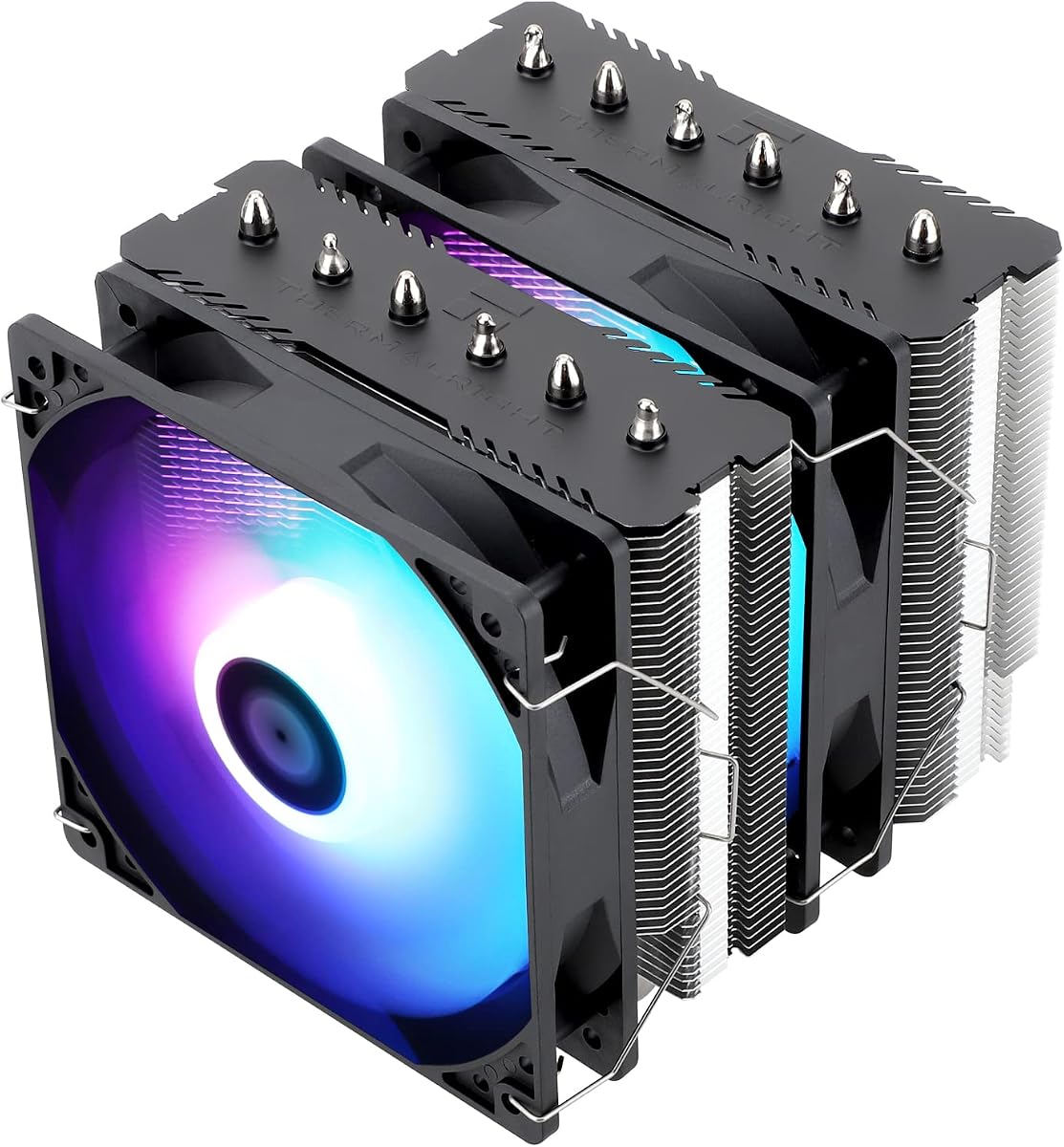
Thermalright Peerless Assassin 120 SE
The Peerless Assassin 120 SE redefined what a budget cooler can be. Six heatpipes and two 120mm fans in a dual-tower frame give it cooling that competes with units many times its price. It runs quietly and installs easily on every modern socket. For most budget builders, this is the single best value in CPU cooling and our top recommendation overall.
- Type
- Air
- Size
- 155mm height
- Socket
- LGA1851/1700 + AM5/AM4
- Fans
- 2x 120mm PWM
What we liked
- Flagship cooling for around thirty-five dollars
- Dual-tower dual-fan design
- Quiet under typical loads
- Simple, secure mounting kit
Worth noting
- No RGB on the standard model
- Stock fans are good not great
Thermalright Phantom Spirit 120 SE
The Phantom Spirit 120 SE is the Peerless Assassin's more capable sibling, adding a seventh heatpipe for a little extra headroom. It cools hotter chips comfortably while staying affordable and quiet. The difference is small but real if you run a higher-end processor on a budget. For a few dollars more, it is a worthwhile step up in capability.
- Type
- Air
- Size
- 157mm height
- Socket
- LGA1851/1700 + AM5/AM4
- Fans
- 2x 120mm PWM
What we liked
- Seven heatpipes for extra capacity
- Strong dual-tower cooling
- Affordable price for the performance
- Good clearance for a dual tower
Worth noting
- Plain looks without RGB
- Slightly taller than the Peerless
Noctua NH-U12A
The NH-U12A is the premium single tower to stretch for when your budget allows a little more. Its dense fin stack and two excellent NF-A12 fans let it punch well above its compact size while staying quiet. The small footprint clears tall RAM and the first PCIe slot with ease. It costs more than rock-bottom towers, but the build quality and long warranty make it a lasting investment.
- Type
- Air
- Size
- 158mm height
- Socket
- LGA1851/1700 + AM5/AM4
- Fans
- 2x 120mm NF-A12
What we liked
- Cooling that rivals larger towers
- Excellent RAM and slot clearance
- Quiet NF-A12x25 fans
- Top-tier build and warranty
Worth noting
- Pricier than other single towers
- Less peak headroom than a dual tower
Thermalright Aqua Elite 360
The Aqua Elite 360 is the budget builder's ticket to liquid cooling and the AIO look. Thermalright keeps the price stunningly low while still delivering capable 360mm thermals and bright addressable RGB. There is no fancy software, but the cooling and aesthetics speak for themselves. For a budget build that wants a clean liquid-cooled look, it is unbeatable.
- Type
- AIO
- Size
- 360mm radiator
- Socket
- LGA1851/1700 + AM5/AM4
- Fans
- 3x 120mm PWM
What we liked
- Cheapest path to 360mm liquid
- Surprisingly capable cooling
- Bright ARGB fans
- Easy installation
Worth noting
- No software ecosystem
- Tubing feels basic
be quiet! Dark Rock Elite
The Dark Rock Elite is the splurge in this budget list for those who want a premium look and library-quiet operation. Its blacked-out dual-tower heatsink and twin Silent Wings fans keep high-core-count chips in check while looking far more expensive than most budget gear. A tool-free system slides the front fan up to clear tall RAM. For builders who can stretch the budget for strong air cooling and clean looks, it is a standout.
- Type
- Air
- Size
- 168mm height
- Socket
- LGA1851/1700 + AM5/AM4
- Fans
- 2x 135mm Silent Wings
What we liked
- Striking all-black brushed finish
- Strong dual-tower cooling
- Near-silent Silent Wings fans
- Tool-free front fan height adjustment
Worth noting
- Tall enough to crowd RAM
- Pricier than the budget towers above
Cooler Master Hyper 212
The Hyper 212 is the legendary budget cooler that introduced countless builders to aftermarket cooling. While newer Thermalright towers now outperform it for similar money, its proven reliability and wide availability keep it relevant. It comfortably cools mainstream chips and installs in minutes. If you find it on sale, it remains a dependable ultra-budget choice.
- Type
- Air
- Size
- 159mm height
- Socket
- LGA1851/1700 + AM5/AM4
- Fans
- 1x 120mm PWM
What we liked
- Iconic low-cost cooler
- Reliable mainstream cooling
- Widely available everywhere
- Easy to install and maintain
Worth noting
- Outclassed by newer budget rivals
- Single fan limits headroom
Scythe Fuma 3
The Scythe Fuma 3 is the quiet, clearance-friendly choice in the budget dual-tower space. Its offset layout leaves the RAM and top PCIe slot free while delivering calm, capable cooling. It is not the absolute coldest, but the balance of quiet operation, clearance, and price is excellent. A smart budget pick for tight or quiet-focused builds.
- Type
- Air
- Size
- 155mm height
- Socket
- LGA1851/1700 + AM5/AM4
- Fans
- 2x 120mm PWM
What we liked
- Quiet, balanced cooling
- Excellent RAM and slot clearance
- Asymmetric design avoids interference
- Reasonable price
Worth noting
- Plain appearance
- Peak cooling trails the best towers
Budget Cooling Has Never Been This Good
There has never been a better time to be a budget PC builder. A few years ago, spending little on a CPU cooler meant accepting mediocre temperatures and a noisy fan. Today, a sub-forty-dollar air tower can deliver cooling that rivals premium coolers from just a generation or two ago, and entry-level liquid coolers have brought the AIO look down to bargain prices. The value on offer in 2026 is genuinely remarkable, and you no longer have to choose between affordability and performance.
This shift is largely thanks to companies like Thermalright, which flooded the market with dual-tower coolers that perform like flagships at budget prices. The competition forced everyone to raise their game, and the result is a category where the cheapest options are often shockingly capable. This guide focuses on coolers that deliver the most cooling and quiet per dollar, because the goal of a budget build is to spend smart, not just spend little.
How We Rank Budget Coolers
We hold budget coolers to the same standards as premium ones, then weight value heavily in the final ranking. The core test is sustained thermal performance: we run a heavy load on a hot processor and record the steady-state temperature once the cooler has fully heat-soaked. This reveals which budget coolers can actually keep up with demanding chips and which run out of headroom under pressure.
We also measure noise across the fan speed range, because a cheap cooler that screams under load is a poor trade no matter how cold it runs. Socket support, build quality, and mounting ease all factor in, since a budget cooler should still be easy to install and survive several upgrades. Above all, we ask a simple question: how much cooling and silence does each dollar buy? The coolers that answer that question best rise to the top.
Cheap Air Versus Cheap Liquid
On a budget, the air-versus-liquid question has a clearer answer than it does at the high end. Dollar for dollar, budget air coolers almost always cool as well as or better than budget AIOs while costing less and carrying zero leak risk. A dual-tower cooler like the Peerless Assassin 120 SE will keep most processors cooler than an entry-level 360mm AIO at the same or lower price.
So why consider a budget AIO at all? Two reasons. The first is aesthetics: a 360mm radiator and an RGB pump simply look different behind a glass panel, and some builders want that liquid-cooled appearance. The second is clearance, since an AIO moves the bulk of the cooler to the radiator and frees up space around the socket for tall RAM and large GPUs. The Thermalright Aqua Elite 360 serves both of those needs at a budget price, but for pure cooling value, air still wins.
Single-Tower Versus Dual-Tower on a Budget
Even within budget air cooling, you face a choice between single and dual-tower designs. Single-tower coolers like the Cooler Master Hyper 212 Black are the cheapest and most compact, and they cool mainstream six and eight-core chips comfortably, while the premium Noctua NH-U12A pushes single-tower cooling much further for a little more money. Their smaller footprint clears tall RAM easily and fits in tighter cases. For a gaming or productivity PC built around a mainstream CPU, a budget single tower is often all you need.
Dual-tower coolers like the Peerless Assassin 120 SE, Phantom Spirit 120 SE, and the premium be quiet! Dark Rock Elite cost more but offer substantially more cooling capacity. They handle hot, high-core-count chips that would overwhelm a single tower, and they do it quietly. The modest price premium is well worth it if your CPU runs hot or you want extra headroom. For most budget builders chasing the best value, a dual tower is the sweet spot.
What You Give Up at the Budget End
Budget coolers compete remarkably well on raw cooling, but they do make compromises, and it helps to know what they are. The most common is fan quality. Budget coolers usually ship with decent but unremarkable fans that move plenty of air but lack the refinement of premium units. They are perfectly fine for most people, and you can always swap in quieter fans later if you want.
Another common omission is RGB and software. Most budget coolers skip the lighting and the companion apps that premium models tout, focusing the budget on the heatsink and fans where it matters for performance. If aesthetics are a priority, a few budget coolers like the Aqua Elite 360 include ARGB, but in general you trade flash for value. Finally, warranties tend to be shorter than premium coolers offer, though the simple, durable nature of these designs means failures are rare.
None of these compromises affect the core job of keeping your CPU cool and quiet. They are the kind of trade-offs that make perfect sense in a value-focused build, where every dollar saved on the cooler can go toward a better GPU or more storage.
Installation Tips for Budget Builders
Budget coolers are just as easy to install as premium ones, and getting the basics right ensures you extract every degree of performance from your inexpensive cooler. Clean the CPU surface, apply a pea-sized dot of thermal paste in the center, and mount the cooler using its included backplate and standoffs. Tighten the screws gradually in a cross pattern until they bottom out for even, full contact.
Pay attention to fan orientation and case airflow, which costs nothing and can be worth several degrees. In a typical tower, cool air should enter the front and bottom while warm air exits the top and rear, and your cooler's fan should be oriented to work with that flow. Make sure the cooler's fan blows toward the rear exhaust, not against it. A little care here lets a cheap cooler perform like a more expensive one.
Where Budget Coolers Cut Costs
To appreciate the value of a budget cooler, it helps to understand where manufacturers actually save money. The biggest savings come from materials and finish rather than core performance. Budget coolers typically use the same aluminum fins, copper heatpipes, and basic mounting hardware as pricier models, but they skip the premium touches: nickel plating, brushed top covers, vibration-damping mounts, and elaborate packaging. None of these omissions meaningfully affect how well the cooler keeps your CPU cool.
The fans are the other place costs are trimmed. Budget coolers ship with competent but unremarkable fans that move plenty of air without the refined acoustics or extended bearing life of premium units. For most people these fans are perfectly fine, and because air coolers use standard fan mounts, you can always upgrade them later. Software, RGB lighting, and long warranties are also commonly cut, which is exactly the right place to economize when the goal is maximum cooling per dollar.
What budget coolers almost never compromise on, at least the good ones, is the fundamental heatsink design that determines cooling performance. This is why a thirty-five-dollar dual-tower cooler can match a hundred-dollar one in raw thermals. The money you save goes toward cosmetic and convenience features, not the parts that actually move heat. Knowing this lets you buy confidently at the budget end without worrying that you are sacrificing the cooling that matters.
How Much Cooler Does Your CPU Actually Need?
A common budget mistake is buying more cooler than your processor requires. Cooling needs scale with how much heat your CPU produces under load, which is roughly tied to its power draw and core count. A mainstream six or eight-core chip used for gaming and everyday tasks produces modest heat, well within the reach of an inexpensive single-tower cooler like the Hyper 212 Black. Spending more on a massive dual tower for such a chip buys headroom you will never use.
Step up to a higher-core-count or higher-power processor, or one you plan to push hard with sustained workloads like video rendering or compiling, and the extra capacity of a budget dual tower like the Peerless Assassin or Phantom Spirit pays off. These coolers cost only a little more than the single towers but offer substantially more headroom. The art of budget building is matching the cooler to the chip, spending just enough to keep temperatures and noise in check without overpaying for capacity you do not need.
Gaming is worth a special mention because it rarely loads all CPU cores at once. Even a fairly powerful gaming CPU spends most of its time well below its peak heat output during games, which means a modest cooler often suffices for pure gaming builds. It is the all-core productivity workloads that truly stress a cooler, so be honest about how you use your PC when deciding how much to spend.
Stretching Your Budget Further
When every dollar counts, a few strategies help you get the most cooling for your money. First, watch for sales, as budget coolers frequently drop in price, and a cooler like the Hyper 212 Black on discount can be an exceptional bargain. Second, consider buying the cooler and a CPU together if a bundle is offered, which sometimes saves money over separate purchases.
Third, do not overlook the value of good case airflow, which costs little and can let a cheaper cooler perform like a more expensive one. A couple of inexpensive case fans arranged for proper front-to-back airflow can lower your CPU temperatures by several degrees, effectively upgrading any cooler for a few dollars. Finally, remember that you can upgrade the cooler's fans later if you want quieter operation, so you do not need to pay for premium acoustics upfront. These tactics let a tight budget go surprisingly far.
Final Verdict
The Thermalright Peerless Assassin 120 SE is the best budget CPU cooler of 2026, delivering flagship-class dual-tower cooling for around thirty-five dollars. It is the default recommendation for nearly any value build. If your CPU runs hotter, the Phantom Spirit 120 SE adds a touch more capacity for a few dollars more, and the Cooler Master Hyper 212 Black is the perfect compact single tower for mainstream chips. For builders who want the liquid-cooled look on a budget, the Thermalright Aqua Elite 360 brings 360mm AIO aesthetics down to a bargain price. Whichever you choose, these coolers prove that great cooling no longer requires a big budget.
How we picked
Every budget cooler was judged on the same five criteria as our premium guides: sustained thermal performance, noise across the fan range, socket support for current Intel and AMD platforms, build quality, and above all value. We prioritized coolers that deliver the most cooling and silence per dollar spent rather than the lowest sticker price alone.
Frequently asked questions
What is the best budget CPU cooler overall?
The Thermalright Peerless Assassin 120 SE is the value champion. For around thirty-five dollars it delivers dual-tower cooling that rivals coolers costing several times as much, making it the default recommendation for nearly any budget build.
Do I really need an aftermarket cooler on a budget?
If your CPU comes with a stock cooler, a cheap aftermarket tower like the Peerless Assassin or Hyper 212 Black will run noticeably cooler and quieter, which protects boost clocks and your sanity. The upgrade costs little and pays off in performance and noise immediately.
Can budget coolers handle high-end CPUs?
Budget dual-tower coolers like the Phantom Spirit 120 SE handle high-end chips remarkably well, even matching some premium coolers. Single-tower options like the Hyper 212 Black are best kept to mainstream six and eight-core processors for the best results.
Is a budget AIO worth it over a budget air cooler?
A budget air cooler like the Peerless Assassin usually cools as well as or better than a budget AIO for less money. Choose a budget AIO like the Aqua Elite 360 mainly if you want the liquid-cooled look or your case cannot fit a tall air tower.
Will these budget coolers fit my socket?
Yes. Every cooler in this guide supports current Intel LGA1851 and LGA1700 along with AMD AM5 and AM4. Always confirm your case has enough height clearance for tall air coolers before buying, especially in compact builds.