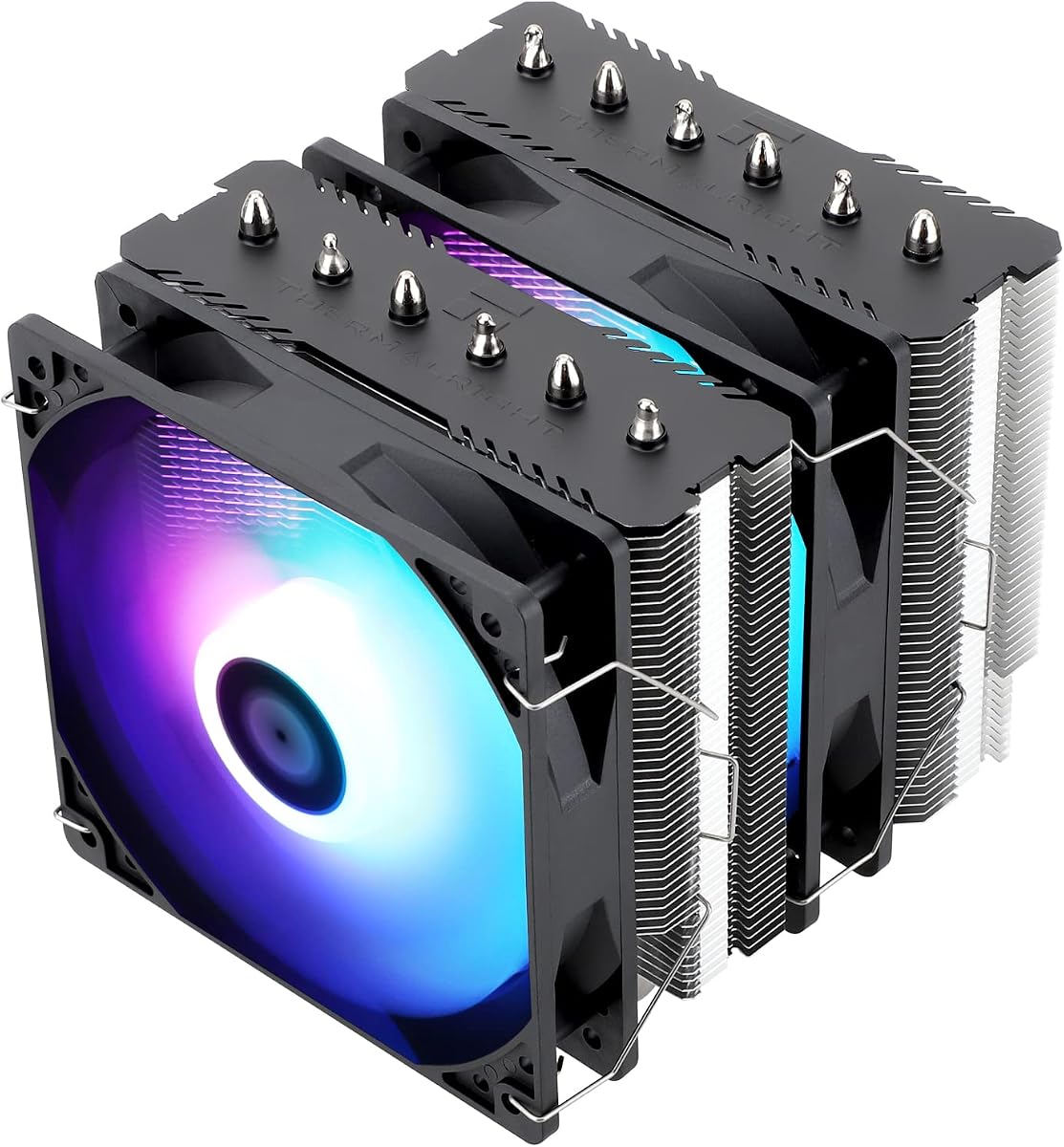
Best Air CPU Coolers in 2026
We may earn a commission from links on this page, at no extra cost to you. Learn more.
Air coolers remain the most reliable and cost-effective way to keep a modern processor cool, and the best of them now rival 360mm liquid coolers. With no pump to fail and no liquid to leak, a quality tower can serve faithfully through several CPU upgrades. We tested the latest single and dual-tower designs from Noctua, Thermalright, be quiet!, and more on a demanding processor. These are the seven air coolers that earn our recommendation in 2026.
Quick comparison
| Keyboard | Best for | Rating | Price | |
|---|---|---|---|---|
| 1Noctua NH-D15 G2Noctua | Best Overall | 4.8 | $$$ | Check Price |
| 2Thermalright Phantom Spirit 120 SEThermalright | Best Value | 4.7 | $$$ | Check Price |
| 3be quiet! Dark Rock Pro 5be quiet! | Best Quiet | 4.6 | $$$ | Check Price |
| 4Noctua NH-U12ANoctua | Best Single-Tower | 4.6 | $$$ | Check Price |
| 5be quiet! Dark Rock Elitebe quiet! | Best Looking | 4.5 | $$$ | Check Price |
| 6Scythe Fuma 3Scythe | Best Mid-Range | 4.5 | $$$ | Check Price |
| 7Cooler Master Hyper 212 BlackCooler Master | Best Budget | 4.4 | $$$ | Check Price |
Our top 7 picks, reviewed
Noctua NH-D15 G2
The NH-D15 G2 is the finest air cooler money can buy and the obvious choice when performance and silence matter most. Noctua refined the fin stack and fan design to trade blows with many 360mm AIOs while staying whisper quiet. The fit, finish, and warranty are second to none. It is expensive, but it is the last air cooler many people will ever need to buy.
- Type
- Air
- Size
- 168mm height
- Socket
- LGA1851/1700 + AM5/AM4
- Fans
- 2x 140mm PWM
What we liked
- Best air cooling performance available
- Near-silent at all fan speeds
- Superb build quality and finish
- Six-year warranty with free socket kits
Worth noting
- Tall design limits RAM clearance
- Premium price point
Thermalright Phantom Spirit 120 SE
The Phantom Spirit 120 SE is the value champion of the air cooling world. Seven heatpipes and two 120mm fans give it cooling that competes with units three times the price. Its slightly slimmer profile clears more RAM than many dual towers. If you want near-top-tier air cooling without spending real money, this is the cooler to buy.
- Type
- Air
- Size
- 157mm height
- Socket
- LGA1851/1700 + AM5/AM4
- Fans
- 2x 120mm PWM
What we liked
- Flagship-class cooling for under forty dollars
- Dual-tower dual-fan layout
- Better clearance than most dual towers
- Simple, secure mounting
Worth noting
- No RGB on the standard model
- Fans are good but not premium
be quiet! Dark Rock Pro 5
True to the brand name, the Dark Rock Pro 5 is one of the quietest high-performance coolers available. Its Silent Wings fans and dense dual-tower heatsink keep a hot CPU cool while staying inaudible in a typical room. The new mounting system is a big improvement over past generations. For a silent, blacked-out build, it is our top pick.
- Type
- Air
- Size
- 168mm height
- Socket
- LGA1851/1700 + AM5/AM4
- Fans
- 2x 135mm/120mm PWM
What we liked
- Among the quietest coolers made
- Excellent thermal performance
- Improved tool-free mounting
- Elegant all-black design
Worth noting
- Large footprint near RAM
- Heavy heatsink mass
Noctua NH-U12A
The NH-U12A packs remarkable performance into a single 120mm tower, making it ideal where a giant dual tower will not fit. Its dense fin stack and two excellent fans let it punch well above its size, often matching larger coolers. Clearance over RAM and the first PCIe slot is generous. It is the premium choice for a compact yet powerful build.
- Type
- Air
- Size
- 158mm height
- Socket
- LGA1851/1700 + AM5/AM4
- Fans
- 2x 120mm PWM
What we liked
- Compact footprint with great clearance
- Cooling that rivals larger towers
- Excellent quiet NF-A12 fans
- Top-tier build and warranty
Worth noting
- Costs more than rival single towers
- Less headroom than a dual tower
be quiet! Dark Rock Elite
The Dark Rock Elite is the cooler to reach for when looks and silence matter as much as raw performance. Its blacked-out dual-tower heatsink and twin Silent Wings fans deliver flagship cooling while staying inaudible in most rooms. A clever tool-free system lets you slide the front fan up to clear tall RAM. For builders who want a premium aesthetic without compromising thermals, it hits a sweet spot.
- Type
- Air
- Size
- 168mm height
- Socket
- LGA1851/1700 + AM5/AM4
- Fans
- 2x 135mm Silent Wings
What we liked
- Striking all-black brushed design
- Top-tier dual-tower cooling
- Near-silent Silent Wings fans
- Tool-free front fan height adjustment
Worth noting
- Tall enough to crowd RAM
- Premium price for an air cooler
Scythe Fuma 3
The Scythe Fuma 3 is a clever dual-tower cooler designed to avoid the clearance headaches that plague the category. Its offset layout leaves the RAM slots and top PCIe slot free while still delivering quiet, capable cooling. It is not the absolute coldest, but the balance of performance, clearance, and price is excellent. A smart pick for tight builds.
- Type
- Air
- Size
- 155mm height
- Socket
- LGA1851/1700 + AM5/AM4
- Fans
- 2x 120mm PWM
What we liked
- Excellent RAM and slot clearance
- Quiet, balanced cooling
- Asymmetric design avoids interference
- Reasonable price
Worth noting
- Looks plain next to rivals
- Peak cooling trails the best towers
Cooler Master Hyper 212 Black
The Hyper 212 Black is the budget pick that punches above its weight. Its four direct-contact heatpipes and single 120mm fan handle mainstream six and eight-core chips comfortably while staying quiet. The blacked-out tower and top cover look tidy in any build. For an everyday gaming or office PC on a strict budget, it delivers exactly what you need and nothing you do not.
- Type
- Air
- Size
- 159mm height
- Socket
- LGA1851/1700 + AM5/AM4
- Fans
- 1x 120mm PWM
What we liked
- Very affordable single tower
- Good thermals for mainstream chips
- Clean all-black finish
- Quick and easy installation
Worth noting
- Single fan caps headroom
- Not for top-tier processors
Why Air Coolers Still Win in 2026
Despite the rise of flashy liquid coolers, air cooling remains the smart default for a huge number of PC builders, and in 2026 the best air coolers are better than they have ever been. The appeal is simple: an air cooler is a solid block of metal and a fan or two, with nothing to leak, no pump to wear out, and nothing to fail catastrophically. A quality tower bought today can be moved from one build to the next for the better part of a decade, which makes it one of the best long-term investments in a PC.
Performance has caught up to the hype around liquid too. A top dual-tower cooler now delivers temperatures that rival 360mm all-in-one units on all but the most extreme overclocked processors. That means the vast majority of builders can get liquid-class cooling without the cost, complexity, or risk of an AIO. The only real trade-offs are physical size and clearance, which careful planning easily solves. For reliability, value, and silence, air cooling is hard to beat.
How We Evaluate Air Coolers
Our rankings are built on a consistent test methodology designed to surface the real differences between coolers that look similar on paper. The headline test is sustained thermal performance: we run a heavy all-core workload on a hot processor and record the steady-state temperature once the cooler has fully heat-soaked. This separates coolers that perform in a quick benchmark from those that hold their ground over a long render or stress session.
Alongside temperatures, we measure acoustics across the entire fan speed range, from near-idle to full speed. A cooler that runs cold but loud is a poor trade for most people, so we weight quiet, capable coolers highly. We also assess practical concerns that spec sheets miss: how much the cooler overhangs the RAM slots, whether it interferes with the top PCIe slot, how easy the mounting hardware is to use, and how long the warranty lasts. All of it is balanced against price to find the true value leaders.
Single-Tower Versus Dual-Tower
The first decision in air cooling is whether to go single-tower or dual-tower. A single-tower cooler uses one fin stack and one or two fans, while a dual-tower cooler sandwiches two fin stacks together, usually with a fan between them and one or both ends. The dual-tower layout offers far more surface area, which translates to better cooling for hot, high-core-count processors.
Dual-tower coolers like the NH-D15 G2, Dark Rock Pro 5, and be quiet! Dark Rock Elite are the choice when you want maximum air cooling capacity. They keep flagship chips in check and provide headroom for sustained heavy workloads. The trade-off is size: these coolers are large, tall, and tend to overhang the RAM slots, so clearance planning is essential.
Single-tower coolers like the NH-U12A and Hyper 212 Black are more compact and clear RAM more easily, while still cooling mainstream and even many high-end chips capably. The premium NH-U12A in particular punches far above its size. If your case is tight, your RAM is tall, or you simply do not need flagship cooling, a quality single tower is often the better real-world choice.
The Clearance Problem
The most common frustration with air cooling is clearance, and it comes in three flavors. The first is RAM clearance: tall dual-tower coolers often overhang the first one or two memory slots, which can prevent tall RGB RAM from fitting or force you to raise the front fan, reducing performance. The second is height clearance, where a tall cooler bumps against the side panel of a slim or compact case. The third is PCIe clearance, where a wide cooler crowds the top expansion slot.
The good news is that these are all solvable with a little planning. Check your cooler's listed height against your case's CPU cooler clearance spec, and check its RAM clearance against your memory's height. Coolers like the Scythe Fuma 3 and Noctua NH-U12A are specifically engineered to minimize these conflicts, with offset or compact designs that leave the RAM and slots free. If you are building in a tight case or using tall memory, prioritize these clearance-friendly options.
Fans and Noise
The fans are where a lot of an air cooler's character lives. A great heatsink paired with weak fans underperforms, while premium fans elevate even a modest heatsink. The fans determine how much air moves through the fin stack and, crucially, how loud the cooler is at a given level of cooling. This is why Noctua's coolers, with their renowned NF-A12 and NF-A14 fans, are so widely praised for quiet operation.
For silence-focused builders, the be quiet! Dark Rock Pro 5 is the standout, with Silent Wings fans tuned to move a lot of air at low RPM. The dense heatsink lets the fans stay slow even under load, which keeps the cooler inaudible in most rooms. If quiet operation is your top priority, look at both the heatsink and the fans together, since a large heatsink lets the fans run slower for the same cooling.
You can also upgrade the fans on most coolers later if the stock units disappoint. Standard 120mm and 140mm mounting makes it easy to swap in quieter or higher-performance fans down the road, which is one more flexibility advantage air cooling holds over sealed AIOs.
Installation and Maintenance
Installing an air cooler is straightforward, but a few details make the difference between great and mediocre results. Start by cleaning the CPU surface, apply a pea-sized dot of thermal paste in the center, and mount the cooler using its backplate and standoffs. Tighten the screws gradually in a cross pattern until they bottom out, which ensures even pressure and full contact across the CPU.
Maintenance is minimal, which is one of air cooling's great virtues. Every few months, blow the dust off the fin stack and fans with compressed air to keep airflow unobstructed. The thermal paste typically lasts years and only needs replacing if you remove the cooler or see temperatures climb. There is no pump to monitor, no coolant to refill, and no tubing to inspect.
Heatpipes and How Air Coolers Move Heat
Understanding how an air cooler actually works helps you judge which ones are worth your money. At the heart of every modern tower cooler are heatpipes, the copper tubes that run from the base, where the cooler contacts the CPU, up into the fin stack. These pipes are not solid; they are hollow and contain a small amount of fluid under low pressure. When the base heats up, the fluid boils into vapor, travels up the pipe to the cooler fins, condenses back into liquid as it releases its heat, and wicks back down to repeat the cycle.
This phase-change process moves heat far faster than solid metal could, which is why heatpipe count and quality are key indicators of a cooler's capacity. More heatpipes, and thicker ones, can carry more heat away from the CPU and spread it across the fin stack. This is part of why the Phantom Spirit 120 SE, with seven heatpipes, edges out coolers with fewer. The fins then provide the surface area where that heat finally transfers into the air the fans push through.
The base design matters too. Most coolers use either a nickel-plated copper base or a direct-contact heatpipe base where the pipes themselves touch the CPU. Both work well when machined flat and mounted correctly. The quality of the contact between the base and the CPU, ensured by good mounting pressure and thermal paste, is the first and most important step in the whole chain of heat transfer.
Upgrading and Swapping Fans
One of the underrated advantages of air coolers is how easily you can upgrade the fans. Because they use standard 120mm and 140mm fan mounts, you can swap the stock fans for quieter or higher-performance units whenever you like. This flexibility means even a budget cooler can be elevated with a pair of premium fans, and it lets you tune the balance between noise and cooling to your exact preference.
If your stock fans are louder than you would like, a set of well-regarded quiet fans can transform the experience without sacrificing much cooling. Conversely, if you want a few more degrees of headroom for an overclock, higher-static-pressure fans can push more air through the dense fin stack. The clips that hold the fans on are typically tool-free, making swaps a five-minute job. This upgradability is something sealed AIOs cannot match as easily.
When choosing replacement fans, match the size to your cooler's mounts and consider static pressure rather than just airflow, since dense fin stacks need pressure to push air through them. Many builders also run their two fans at slightly offset speeds or use a single high-quality fan to reduce noise. The point is that an air cooler is not locked into its stock configuration the way a closed-loop liquid cooler is.
Longevity and Why Air Coolers Last
Air coolers are among the most durable components you can put in a PC. With no pump to wear out, no coolant to degrade, and no tubing to crack, the only moving parts are the fans, and those are inexpensive and easy to replace if they ever fail. A quality heatsink is essentially immortal; it is a block of metal that will perform identically in ten years as it does today. This is why many enthusiasts carry the same air cooler through build after build.
This longevity makes a good air cooler one of the best long-term values in PC building. Spread across the many years and multiple systems it can serve, even a premium cooler like the NH-D15 G2 works out to a modest cost. Brands like Noctua reinforce this with long warranties and free mounting kits for new sockets, ensuring the cooler you buy today remains usable on tomorrow's platforms. When you buy a quality air cooler, you are making a purchase that genuinely lasts.
Final Verdict
The Noctua NH-D15 G2 is the best air CPU cooler of 2026, delivering AIO-rivaling performance with near-silent acoustics and a warranty that backs it for years. If that is more than you want to spend, the Thermalright Phantom Spirit 120 SE offers staggering value and near-flagship cooling for a fraction of the price. For silence, the be quiet! Dark Rock Pro 5 is unmatched, and for tight builds the Noctua NH-U12A and Scythe Fuma 3 solve the clearance problem elegantly. Whichever you choose, a quality air cooler will keep your processor cool and quiet for many years and many builds to come.
How we picked
We ranked each air cooler on sustained thermal performance under a heavy all-core load, acoustic output across the fan speed range, RAM and case clearance, socket support for current Intel and AMD platforms, and overall value. Build quality, mounting ease, and warranty length also factored into the final order.
Frequently asked questions
Can an air cooler match a 360mm AIO?
The very best air coolers, like the Noctua NH-D15 G2 and be quiet! Dark Rock Pro 5, can trade blows with many 360mm AIOs on all but the hottest overclocked chips. For most processors, a top dual-tower air cooler delivers liquid-class temperatures with no pump and no leak risk.
Will a tall air cooler block my RAM?
It can. Many dual-tower coolers overhang the first RAM slot, which forces you to use low-profile memory or raise a front fan. Coolers like the Scythe Fuma 3 and Noctua NH-U12A are designed with better clearance, so check the cooler's RAM clearance spec against your memory height before buying.
How often should I replace the thermal paste?
For most users, thermal paste lasts several years and only needs replacing if you remove the cooler or notice temperatures creeping up. When you do reapply, a pea-sized dot in the center of the CPU is the safe default and spreads evenly under mounting pressure.
Are single-tower coolers enough for gaming?
Yes, for the vast majority of gaming CPUs a single-tower cooler like the Hyper 212 Black or the premium NH-U12A is plenty. Gaming rarely loads all cores at once, so the heat output is well within what a good single tower can handle quietly.
Do air coolers add a lot of weight to the motherboard?
Large dual-tower coolers are heavy, but every cooler in this guide uses a sturdy backplate that distributes the load safely. If you transport your PC often, support the cooler during the move or consider a lighter single tower to reduce stress on the board.