Best Z790 Motherboards in 2026
We may earn a commission from links on this page, at no extra cost to you. Learn more.
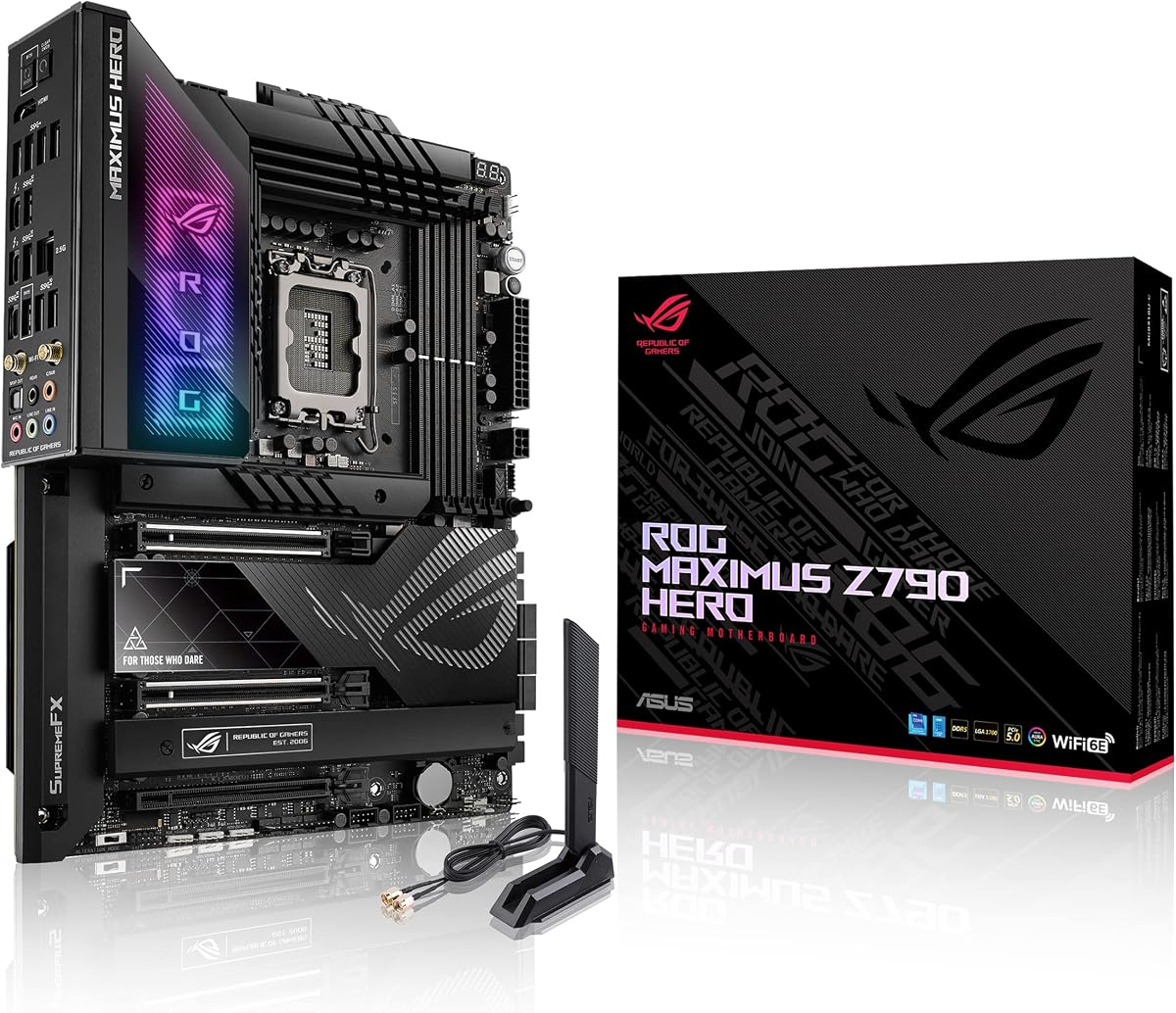
The Z790 chipset remains the enthusiast platform for Intel's LGA 1700 socket, unlocking full CPU and memory overclocking for 12th, 13th and 14th Gen Core processors. Picking the right board is about matching VRM strength to your CPU, choosing between DDR5 speed and value, and making sure the M.2, PCIe 5.0 and networking match your build. This guide ranks nine of the best Z790 motherboards you can buy in 2026, from GIGABYTE, ASUS, MSI and ASRock, spanning affordable Eagle-class boards up to feature-rich Wi-Fi 7 designs, so there is a right pick whether you are pairing a Core i5 or pushing a Core i9 hard.
Top 9 Best Z790 Motherboards
Our top 9 picks, reviewed
ASUS TUF Gaming Z790-Plus WiFi
The ASUS TUF Gaming Z790-Plus WiFi is the all-round pick, blending a robust 16+1 DrMOS VRM that comfortably feeds a Core i9 with a full four M.2 slots, PCIe 5.0 and even a Thunderbolt 4 header. TUF-grade components, generous heatsinks and Fan Xpert 4 round out a board that handles serious builds without drama, and its 4.6 rating reflects that dependability.
- Socket
- LGA 1700 / Z790
- Memory
- DDR5, 4x DIMM
- Power
- 16+1 DrMOS
- Connectivity
- PCIe 5.0, 4x M.2, Wi-Fi 6, TB4
What we liked
- Strong 16+1 DrMOS power for Core i9
- Four M.2 slots with heatsinks
- Thunderbolt 4 and front USB-C header
- Military-grade TUF components and cooling
Worth noting
- Wi-Fi 6 rather than newer Wi-Fi 7
- Priced in the upper mid-range
ASUS Z790-AYW WiFi W II
The ASUS Z790-AYW WiFi W II is the value ATX sweet spot, delivering PCIe 5.0, a 12+1 DrMOS VRM, three M.2 slots and USB4 header support at a friendlier price than the TUF board. ASUS OptiMem II and Enhanced Memory Profile II help wring more from DDR5 kits, and Wi-Fi 6 with 2.5Gb LAN cover networking. It is a smart base for a Core i5 or i7 build.
- Socket
- LGA 1700 / Z790
- Memory
- DDR5
- Power
- 12+1 DrMOS
- Connectivity
- PCIe 5.0, 3x M.2, Wi-Fi 6, USB4
What we liked
- PCIe 5.0 x16 and 12+1 DrMOS VRM
- Thunderbolt / USB4 header support
- OptiMem II for better DDR5 tuning
- Wi-Fi 6 and 2.5Gb LAN included
Worth noting
- Three M.2 slots rather than four
- 12+1 VRM suits mainstream over Core i9
GIGABYTE Z790 Eagle AX
If you want Z790 overclocking on a budget, the GIGABYTE Z790 Eagle AX is the cheapest way in without cutting the essentials. You still get PCIe 5.0, three M.2 slots, Wi-Fi 6E, 2.5GbE and a capable 12+1+1 phase VRM, plus GIGABYTE's Q-Flash Plus and EZ-Latch conveniences. It pairs best with a mid-range Core i5 or i7 where its power delivery is well within its comfort zone.
- Socket
- LGA 1700 / Z790
- Memory
- DDR5, 4x DIMM
- Power
- 12+1+1 phase
- Connectivity
- PCIe 5.0, 3x M.2, Wi-Fi 6E, 2.5GbE
What we liked
- Lowest price of the group
- PCIe 5.0 and Wi-Fi 6E onboard
- Q-Flash Plus and EZ-Latch DIY features
- Solid 12+1+1 phase power design
Worth noting
- Only three M.2 slots
- Simpler thermals than premium boards
MSI PRO Z790-P WiFi
The MSI PRO Z790-P WiFi punches above its price on power, offering a 14+1+1 DrMOS VRM with 55A stages and dual 8-pin CPU connectors that handle a hard-working Core i7 or i9 with ease. DDR5 tuning reaches 7000+ MHz, and the thickened 6-layer copper PCB keeps things stable. Wi-Fi 6E and 2.5GbE cover connectivity in a no-nonsense, well-built package.
- Socket
- LGA 1700 / Z790
- Memory
- DDR5 7000+ OC
- Power
- 14+1+1 DrMOS 55A
- Connectivity
- PCIe 5.0, M.2, Wi-Fi 6E, 2.5GbE
What we liked
- Strong 14+1+1 DrMOS with 55A stages
- Dual 8-pin CPU power for headroom
- DDR5 up to 7000+ MHz OC
- 6-layer 2oz copper PCB
Worth noting
- Plainer ProSeries aesthetic
- M.2 count trails premium boards
ASRock Z790 Riptide WiFi
The ASRock Z790 Riptide WiFi is the memory overclocker's pick, rated for DDR5 8000+ MHz and backed by a hefty 16+1+1 phase VRM that keeps a Core i9 fed. It is also the only board here with Wi-Fi 7 and eight SATA ports, making it ideal for storage-heavy or networking-forward builds. ASRock's Killer 2.5G LAN and PCIe 5.0 round out a genuinely capable enthusiast board.
- Socket
- LGA 1700 / Z790
- Memory
- DDR5 8000+ OC
- Power
- 16+1+1 phase
- Connectivity
- PCIe 5.0, 8x SATA, Wi-Fi 7, 2.5G LAN
What we liked
- Beefy 16+1+1 power phase design
- DDR5 8000+ MHz memory overclocking
- Wi-Fi 7 and Killer 2.5G LAN
- Eight SATA ports for big storage arrays
Worth noting
- Less name recognition than ASUS or MSI
- Feature-dense layout can crowd builds
GIGABYTE Z790 AORUS Elite AX
The GIGABYTE Z790 AORUS Elite AX delivers one of the strongest VRMs here, a 16+1+2 design with 70A power stages that shrugs off a Core i9 under load. Four M.2 slots, PCIe 5.0, a 6-layer PCB and fully covered MOSFET heatsinks make it a serious build platform, while Wi-Fi 6E, 2.5GbE and RGB Fusion cover the modern basics. Excellent power delivery for the money.
- Socket
- LGA 1700 / Z790
- Memory
- DDR5, XMP 3.0
- Power
- 16+1+2, 70A stages
- Connectivity
- PCIe 5.0, 4x M.2, Wi-Fi 6E, 2.5GbE
What we liked
- Powerful 16+1+2 VRM with 70A stages
- Four PCIe 4.0 M.2 slots
- Thick 6-layer PCB and full MOSFET heatsinks
- Wi-Fi 6E, 2.5GbE and RGB Fusion
Worth noting
- Wi-Fi 6E rather than Wi-Fi 7
- Sits mid-pack on owner rating
ASUS Z790 MAX Gaming WiFi 7
The ASUS Z790 MAX Gaming WiFi 7 is the connectivity flagship of this list, pairing cutting-edge Wi-Fi 7 with USB 20Gbps Type-C and Thunderbolt/USB4 header support. A 14+1 DrMOS VRM on a 6-layer PCB handles high-end CPUs, and OptiMem II with AI Cooling II keeps memory and thermals in check. The lone catch is a 1Gb wired LAN, so lean on its excellent wireless.
- Socket
- LGA 1700 / Z790
- Memory
- DDR5
- Power
- 14+1 DrMOS
- Connectivity
- PCIe 5.0, 3x M.2, Wi-Fi 7, USB4
What we liked
- Latest Wi-Fi 7 wireless
- USB 20Gbps Type-C and Thunderbolt/USB4
- 14+1 DrMOS with 6-layer PCB
- OptiMem II and AI Cooling II
Worth noting
- Only 1Gb wired LAN
- Three M.2 slots at a premium price
MSI Z790 Gaming Plus WiFi
The MSI Z790 Gaming Plus WiFi is a solid mainstream gaming board with a 14+1+1 Duet Rail power system, dual 8-pin CPU power and DDR5 tuning to 7200+ MHz. PCIe 5.0, M.2 Shield Frozr and modern Wi-Fi 6E with Bluetooth 5.3 keep it current. Its rating trails the top picks slightly, but for a Core i5 or i7 gaming rig it offers dependable power and good storage cooling.
- Socket
- LGA 1700 / Z790
- Memory
- DDR5 7200+ OC
- Power
- 14+1+1 Duet Rail
- Connectivity
- PCIe 5.0, M.2, Wi-Fi 6E, 2.5Gbps
What we liked
- DDR5 dual-channel up to 7200+ MHz
- 14+1+1 Duet Rail with dual 8-pin CPU power
- M.2 Shield Frozr thermal protection
- Wi-Fi 6E, Bluetooth 5.3 and 2.5Gbps LAN
Worth noting
- Lower owner rating than the leaders
- Aesthetics are fairly plain
MSI MAG Z790 Tomahawk WiFi
The MSI MAG Z790 Tomahawk WiFi is a long-standing enthusiast favourite, carrying a strong 16+1+1 Duet Rail VRM with dual 8-pin CPU power that suits overclocked Core i7 and i9 chips. DDR5 reaches 7200+ MHz, and extended heatsinks with M.2 Shield Frozr keep temperatures in check. It sits at the top of the price range here, but the power and cooling pedigree justify a look.
- Socket
- LGA 1700 / Z790
- Memory
- DDR5 7200+ OC
- Power
- 16+1+1 Duet Rail
- Connectivity
- PCIe 5.0, M.2, Wi-Fi 6E, HDMI/DP
What we liked
- Robust 16+1+1 Duet Rail power system
- Dual 8-pin CPU power for overclocking
- DDR5 up to 7200+ MHz
- Extended heatsinks and M.2 Shield Frozr
Worth noting
- Priciest board relative to its rating
- Wi-Fi 6E rather than Wi-Fi 7
How We Chose the Best Z790 Motherboards

Choosing a Z790 board is fundamentally about matching a platform to a processor and a purpose. Z790 sits at the top of Intel's LGA 1700 stack, and unlike the locked B760 chipset it unlocks full CPU overclocking on K-series chips, so the decisions that matter most revolve around power delivery, memory tuning and the connectivity you actually need. We began by looking at each board's VRM, because a Z790 board that cannot cleanly feed a Core i9 under sustained load undermines the whole point of buying the enthusiast chipset in the first place.
From there we weighed the features that shape a real build. DDR5 support and rated overclocking speed came next, since Z790 is a DDR5 platform where memory frequency has a measurable impact on performance. We assessed M.2 provision and PCIe 5.0, then networking, weighing Wi-Fi 6E against the newer Wi-Fi 7 and confirming 2.5GbE wired options. Finally we balanced all of this against price, because a board that overspends on features you will never use is poor value. The result is a list spanning budget Eagle-class boards to premium Wi-Fi 7 designs, with a sensible pick for every LGA 1700 build.
What the Z790 Chipset Actually Offers
Z790 is the flagship 700-series chipset for Intel's LGA 1700 socket, and its headline advantage over B760 is unlocked overclocking for both CPU and memory. Pair it with a K-series Core processor and you can push clocks beyond stock, while its generous PCIe lane budget allows for more M.2 slots and richer rear I/O than the mainstream B-series. Every board in this roundup supports 12th, 13th and 14th Gen Core chips, giving you a wide upgrade path within the LGA 1700 family.
In practical terms, Z790 is the platform you choose when you want room to grow. It typically brings a PCIe 5.0 x16 graphics slot, multiple M.2 slots, faster networking and stronger VRMs than a comparable B760 board. The trade-off is price: you pay for the extra capability whether or not you use it. That is why our list spans a range of price tiers, from the budget-friendly GIGABYTE Z790 Eagle AX to the feature-laden ASUS Z790 MAX Gaming WiFi 7, so you can buy exactly as much Z790 as your build justifies.
VRM and Power Delivery: The Heart of a Z790 Board
If there is one specification that separates a good Z790 board from a great one, it is the VRM. High-end Intel Core chips draw substantial power under load, and a weak power stage will run hot and potentially throttle. The strongest boards here make this a non-issue: the GIGABYTE Z790 AORUS Elite AX runs a 16+1+2 design with 70A power stages, the ASUS TUF Gaming Z790-Plus uses a 16+1 DrMOS array, and the ASRock Z790 Riptide brings a 16+1+1 phase layout. Any of these will comfortably feed a Core i9-14900K.
For less demanding builds, a smaller VRM is perfectly adequate and saves money. The GIGABYTE Z790 Eagle AX and its 12+1+1 design, or the ASUS Z790-AYW with a 12+1 DrMOS, pair beautifully with a Core i5 or non-K i7 where the power draw is lower. The MSI PRO Z790-P WiFi splits the difference with a 14+1+1 DrMOS using 55A stages and dual 8-pin CPU connectors, giving it more headroom than its price suggests. Match the VRM to your CPU and you will never think about power delivery again.
Memory: DDR5 and Overclocking Headroom
Every Z790 board in this guide is a DDR5 platform, which is the right call in 2026 given DDR5's maturity and falling prices. Where they differ is in rated overclocking speed and the memory-tuning technology onboard. The ASRock Z790 Riptide leads on paper with support up to DDR5 8000+ MHz, while the MSI boards here rate their DIMM slots for 7000 to 7200+ MHz. In real builds, hitting these top speeds depends on your specific memory kit and CPU memory controller, but a higher rating gives you more room to chase performance.
The tuning technology matters too. ASUS boards such as the Z790-AYW and Z790 MAX Gaming include OptiMem II, which carefully routes memory traces to preserve signal integrity and improve overclocking stability. GIGABYTE's AORUS Elite AX supports XMP 3.0 profiles for one-click speed increases. For most users, enabling your kit's XMP profile is all you need, but if you enjoy fine-tuning, choose a board like the ASRock Riptide whose high memory ceiling gives you the most to work with.
Storage and Expansion: M.2, PCIe 5.0 and SATA
Storage flexibility is a real differentiator across these boards. If you run multiple NVMe drives, look to the four-M.2 boards: the ASUS TUF Gaming Z790-Plus and the GIGABYTE Z790 AORUS Elite AX both offer four M.2 slots with heatsinks, giving you room for a large, fast storage array. Boards like the GIGABYTE Z790 Eagle AX and ASUS Z790 MAX Gaming step down to three M.2 slots, which is still ample for most builds. For those who prefer traditional drives, the ASRock Z790 Riptide stands out with eight SATA ports for big mechanical or SSD arrays.
Every board provides a PCIe 5.0 x16 slot for the graphics card, future-proofing your GPU upgrade path. M.2 storage on most of these boards runs at PCIe 4.0 speeds, which comfortably saturates the vast majority of NVMe SSDs on the market. M.2 thermal solutions vary in sophistication, with MSI's M.2 Shield Frozr and GIGABYTE's M.2 Thermal Guard III helping keep high-performance drives from throttling during sustained transfers. Plan your storage layout before buying so the slot count and speeds match your intended drives.
Connectivity: Networking, USB and Thunderbolt
Modern Z790 boards bristle with connectivity, and the differences here can decide your pick. On wireless, most boards run Wi-Fi 6E, which is fast and widely supported, but two boards move to the newer Wi-Fi 7: the ASRock Z790 Riptide and the ASUS Z790 MAX Gaming. If you own a Wi-Fi 7 router or want the longest wireless future-proofing, those two lead. Wired networking is mostly 2.5GbE across the range, though the ASUS Z790 MAX Gaming notably uses a 1Gb Realtek LAN, so factor that in if wired speed matters.
USB and Thunderbolt provision also varies. The ASUS TUF Gaming Z790-Plus and Z790 MAX Gaming both offer Thunderbolt 4 or USB4 header support alongside fast front-panel USB-C, which is valuable for external SSDs and docks. The ASUS Z790-AYW similarly supports a Thunderbolt/USB4 header. Most boards here include USB 3.2 Gen 2x2 20Gbps Type-C for high-speed external storage. If you rely on external drives, docks or capture devices, prioritise the boards with the richest USB and Thunderbolt options.
A Closer Look at the Top Picks
The ASUS TUF Gaming Z790-Plus WiFi earns the top spot because it gets the balance right for the widest range of builds. Its 16+1 DrMOS VRM handles even a Core i9, four M.2 slots cover ambitious storage plans, and the inclusion of a Thunderbolt 4 header is a genuine bonus at its price. Military-grade TUF components and comprehensive cooling make it a dependable foundation, and its 4.6 owner rating is the highest among the ATX boards here.
Behind it, the ASUS Z790-AYW WiFi W II and GIGABYTE Z790 Eagle AX prove you do not need to overspend for a great Z790 experience, delivering PCIe 5.0 and solid VRMs at value prices. The MSI PRO Z790-P WiFi punches above its weight on power, while the ASRock Z790 Riptide is the enthusiast's choice thanks to Wi-Fi 7, eight SATA ports and DDR5 8000+ support. The GIGABYTE AORUS Elite AX offers the strongest VRM for the money, and the ASUS Z790 MAX Gaming leads on connectivity. The MSI Z790 Gaming Plus and MAG Tomahawk round out capable mainstream and premium options for LGA 1700 gaming rigs.
Final Recommendation
For most builders, the ASUS TUF Gaming Z790-Plus WiFi is the best Z790 motherboard in 2026, combining a strong VRM, four M.2 slots and Thunderbolt 4 into a dependable, well-cooled package. If you want to save money without losing the essentials, the GIGABYTE Z790 Eagle AX and ASUS Z790-AYW are excellent value, while the MSI PRO Z790-P WiFi delivers surprising power headroom cheaply. Enthusiasts chasing memory overclocking and the latest wireless should choose the ASRock Z790 Riptide for its Wi-Fi 7 and DDR5 8000+ ceiling, and heavy builders will appreciate the AORUS Elite AX's 16+1+2 VRM. Match the board to your CPU and connectivity needs, and any pick here will anchor a capable Intel build for years.
How we picked
We judged each Z790 board on VRM design and power-phase count, DDR5 support and overclocking headroom, PCIe 5.0 and M.2 storage provision, networking such as Wi-Fi 6E, Wi-Fi 7 and 2.5GbE, and overall value against its price. Because Z790 buyers range from mid-range gamers to serious overclockers, we prioritised boards whose power delivery and cooling genuinely suit the CPUs people pair with them, and kept the list varied across brands and budgets.
Frequently asked questions
What CPUs work with a Z790 motherboard?
Z790 boards use the Intel LGA 1700 socket and support 12th, 13th and 14th Gen Intel Core processors, along with compatible Pentium Gold and Celeron chips. Unlike B760, Z790 unlocks full CPU overclocking on K-series parts, so it is the natural home for a Core i7-14700K or i9-14900K where the VRM strength on boards like the AORUS Elite AX or Tomahawk really matters.
Does Z790 use DDR5 or DDR4 memory?
Every Z790 board in this roundup is DDR5, which is the mainstream choice in 2026 and unlocks high overclocking speeds such as the 8000+ MHz rating on the ASRock Z790 Riptide. Some Z790 boards exist in DDR4 versions, but a board only takes one memory type, so confirm the model before buying and pair it with the matching RAM.
How many power phases do I need on a Z790 board?
For a Core i5 or non-K i7, a 12+1 or 12+1+1 VRM like the Z790 Eagle AX is plenty. For an overclocked Core i9, favour the beefier designs here, such as the 16+1 DrMOS on the TUF Gaming Z790-Plus, the 16+1+2 on the AORUS Elite AX, or the 16+1+1 on the ASRock Riptide, which stay cooler and more stable under sustained load.
Do these Z790 motherboards support PCIe 5.0?
Yes. All nine boards here provide a PCIe 5.0 x16 slot for current and future graphics cards. M.2 storage on most of these boards runs at PCIe 4.0 speeds, which is fast enough for the vast majority of NVMe SSDs, so PCIe 5.0 is primarily reserved for the graphics slot on this class of board.
Should I choose Wi-Fi 6E or Wi-Fi 7 on a Z790 board?
Wi-Fi 6E is fast and widely available on boards like the AORUS Elite AX and MSI Tomahawk, and it is fine for most users. If you have a Wi-Fi 7 router or want maximum future-proofing, the ASRock Z790 Riptide and ASUS Z790 MAX Gaming both offer Wi-Fi 7. Either way, a 2.5GbE wired port is present on most of these boards for lower-latency wired play.