Expert Review & Guide

Best USB-C Speakers in 2026 for Desktop PCs and Laptops

Modern laptops and many desktop motherboards now treat USB-C as more than a charging port. When a Type-C connection carries both power and digital audio, you can replace the tangle of a separate wall adapter, USB power cable, and 3.5 mm aux jack with one neat cable running to a compact speaker pair or soundbar. Shoppers searching for the best USB-C speakers usually want that simplicity first: plug in, select the correct output device, and hear something fuller than built-in laptop drivers without claiming living-room theater scale.

This roundup covers only the ten products in our USB-C speakers pack. We evaluated single-cable USB audio against hybrid designs that still need a 3.5 mm line, clip-on monitor bars versus traditional left-right pairs, Bluetooth convenience versus wired latency for games, and how honestly each listing describes bass limits on a small desk. Ratings come from the product pages at research time. Recommendations emphasize real near-field behavior after long work sessions, not peak wattage banners alone.

Want the shortlist first? Choose the OHAYO clip-on bar when you want the strongest feature mix—Bluetooth 6.0, G-sensor stereo correction, built-in mic, and 16W output—in a space-saving mount. Pick the Creative Pebble Pro when you want premium Creative tuning, BassFlex low end, RGB rings, and headset passthrough in a compact stereo pair. Shortlist the Cyber Acoustics CA-2110USB for the cleanest true single-cable USB experience with a strong listed rating. The comparison table and ten full reviews below walk through every pack product with honest tradeoffs.

Our Top USB-C Speaker Picks for 2026

Best Premium Compact

Creative Pebble Pro

★★★★☆8.6/10
Creative Pebble Pro
  • Up to 10W RMS USB-C audio with optional 30W RMS via USB PD adapter
  • BassFlex and Clear Dialog processing for movies and spoken content
  • RGB rings, Bluetooth 5.3, 3.5 mm AUX, and headset or mic port
Check Price →

As an Amazon Associate we earn from qualifying purchases. We may earn a commission at no additional cost to you.

USB-C Speakers Compared Side by Side

Use this table to filter by connection style, form factor, and extra features before reading the deeper reviews. Specs focus on how each option handles USB-C power and audio, wireless options, and desk placement—not living-room party claims. Ratings reflect listed customer scores at research time.

#ProductSpecificationsScore
1
  • Single USB-C cable for power and digital audio
  • 8W RMS with gain switch; Bluetooth 5.0 and 3.5 mm AUX
  • 45° elevated drivers with Clear Dialog processing
8.8
2
  • 10W peak dual-driver USB or USB-C power and audio
  • Touch RGB lighting and front volume knob
  • 3.5 mm headphone jack for private listening
8.6
3
  • USB-C or USB power with separate 3.5 mm audio cable
  • Touch angular game lights and top volume knob
  • Compact under-monitor footprint; Type-C adapter included
8.6
4
  • One USB connection for power and audio with USB-C adapter
  • Monitor clamp fits 0.1 to 0.98 inch thick screens
  • Single knob for power and volume; 51-inch cable with tie
8.8
5
  • White finish USB-C 2.0 stereo pair with Clear Dialog
  • 8W RMS, gain switch, Bluetooth 5.0, and 3.5 mm AUX
  • 45° elevated drivers; USB-C to USB-A adapter included
8.8
6
  • Up to 10W RMS USB-C; 30W RMS with optional USB PD adapter
  • BassFlex bass and improved Clear Dialog for vocals
  • RGB rings, Bluetooth 5.3, AUX, and headset or mic port
8.6
7
  • USB or USB-C power with 3.5 mm audio input
  • Headphone-out jack and touch cyclic lights
  • 37-inch speaker cable; USB-C to USB-A adapter included
8.8
8
  • Single USB connection for power and audio playback
  • 12W power with attached USB-C to USB-A adapter
  • Top volume knob; 4.5 ft USB cable, 3.3 ft between speakers
9
9
  • 16W max with Bluetooth 6.0 and USB dual mode
  • G-sensor auto stereo flip; built-in mic up to 1.5 m
  • Clip-on monitor mount; five RGB modes with audio sync
10
10
  • 16.1-inch angled soundbar with passive bass radiator
  • USB-C power and audio; USB-A adapter included
  • Bluetooth 5.3 with source switching and RGB effects
8.4

1. Creative Pebble V3 - Best Compact USB-C Stereo

Creative Pebble V3

Creative Pebble V3

8.8/10★★★★☆

The black Creative Pebble V3 is the reference compact USB-C stereo pair in this pack because it solves the most common laptop complaint with minimal friction. Built-in speakers and thin monitor drivers can handle calendar chimes, but they collapse when a soundtrack asks for midbass or when a video call needs intelligible speech without maxing volume. Pebble V3 uses larger custom-tuned 2.25-inch full-range drivers, a 50 percent louder claim versus earlier Pebble generations, and Creative’s Clear Dialog processing to lift spoken content without wrecking background effects.

  • Single USB-C cable for power and digital audio
  • 8W RMS with gain switch; up to 16W peak
  • Bluetooth 5.0, 3.5 mm AUX, and 45° elevated drivers
Check Price →
✓ Pros
  • True one-cable USB-C audio keeps desks tidy on supported PCs
  • Clear Dialog processing improves YouTube and movie dialogue
  • Bluetooth 5.0 adds phone streaming without unplugging USB power
  • Gain switch unlocks louder output on capable USB ports
  • Compact footprint fits cramped dorm and office desks
✕ Cons
  • Bass remains limited compared with powered bookshelf systems
  • AUX cable not included if you need analog fallback
  • White and black versions are separate listings with identical feature sets

Detailed review

Single-cable USB-C operation is the headline feature for 2026 desks. When your laptop or desktop USB-C port supports audio class output, one cable delivers power and digital sound—no separate 3.5 mm wire snaking across the keyboard. That matters on ultrabooks where aux jacks disappeared years ago. For older machines, Creative includes a USB-C to USB-A converter so the same speakers work on legacy ports, drawing power efficiently where USB-C is available for louder USB audio.

The built-in gain switch is easy to overlook but important in practice. On ports that can deliver around 10W, engaging amplified mode pushes the Pebble V3 closer to its 8W RMS and 16W peak claims. On weak hub ports, leave gain off to avoid distortion. That honesty—needing a capable port for maximum output—is healthier than speakers that clip harshly at half volume. Near-field listening at arm’s length rarely needs party levels anyway; the gain switch is about headroom for movies and games, not dorm-room concerts.

Connectivity beyond USB-C keeps the Pebble V3 relevant after work hours. Bluetooth 5.0 lets you pair a phone for bedside playlists while USB still powers the cabinets. A 3.5 mm AUX-in handles analog sources when USB audio is unavailable, though you must supply your own aux cable. The 45° elevated drivers fire sound toward your ears rather than into the desk mat, which improves clarity when the speakers sit below monitor height—a common placement on crowded tables.

Compared with hybrid USB-plus-aux pairs like LENRUE G11, the Pebble V3 wins on cable minimalism when USB audio works. Compared with Pebble Pro, it trades RGB rings, BassFlex extension, and headset ports for a lower complexity footprint and lower cost tier. Compared with clip-on OHAYO, it consumes desk width but avoids monitor clamp compatibility questions entirely. For students, remote workers, and anyone upgrading a MacBook or modern Windows ultrabook, it remains the safest compact USB-C stereo recommendation.

Setup is genuinely plug-and-play on compatible systems: connect USB-C, select Creative Pebble V3 as the output device in OS sound settings, and adjust volume from the right speaker control or the system mixer. If audio fails silently, verify the port supports data and audio—not charge-only—before blaming the hardware. Once configured, the Pebble V3 behaves like a permanent desk appliance rather than a temporary gadget you tolerate until the next sale.

The honest ceiling is scale and bass extension. No pebble-sized USB pair replaces a subwoofer or powered monitor for bass-heavy electronic music at room-filling volume. Buy the Pebble V3 when you want a polished, widely trusted USB-C stereo upgrade with Bluetooth convenience. Step up to Pebble Pro when dialogue and bass matter more, or OHAYO when desk space is zero.

Who the Pebble V3 is for

Ideal for ultrabook owners, small desks, and first-time upgrades from laptop speakers. Strong when USB-C audio works natively and you want Bluetooth for phone playback.

Skip if you need a clip-on mount, built-in microphone, or deep sub-bass for home theater use.

Gain switch tips

Enable gain only on direct laptop or desktop ports known to supply adequate power. If you hear crackling at high volume, reduce system volume and disable gain before assuming a defect.

On USB hubs, try connecting directly to the host machine first—hubs often limit current and cap loudness.

Check Price on Amazon →

We may earn a commission at no additional cost to you.

2. Bluedee Computer Speakers - Best RGB Budget Pair

Bluedee Computer Speakers for Desktop PC

Bluedee Computer Speakers for Desktop PC

8.6/10★★★★☆

Bluedee’s desktop pair targets buyers who want USB or USB-C simplicity plus a touch of personality lighting without entering full gaming-brand software ecosystems. The listing emphasizes Hi-Fi sound clarity from 10W peak dual drivers, instant plug-and-play via included USB or Type-C cable, and a compact enclosure that fits small home offices and dorm desks. Translate that into realistic expectations: this is a near-field USB stereo upgrade, not a monitor-replacement system.

  • 10W peak dual-driver USB or USB-C audio
  • Touch RGB lights with front volume knob
  • 3.5 mm headphone jack for private listening
Check Price →
✓ Pros
  • Single USB path for power and audio simplifies setup
  • Touch-controlled RGB adds atmosphere without mandatory software
  • Headphone jack supports quick private listening at the desk
  • Compact 3.74 x 3.15 x 6.11 inch footprint fits tight spaces
  • Lifetime quality assurance listed by the manufacturer
✕ Cons
  • 10W peak is modest for large rooms or loud gaming sessions
  • RGB may distract on camera during professional video calls
  • Dual-driver marketing does not equal hi-fi accuracy for creators

Detailed review

Instant setup is the practical selling point. No drivers, no Bluetooth pairing ritual, no second audio cable if your USB port carries sound correctly. Plug into PC, laptop, or mini PC, confirm the OS output device, and adjust volume with the front knob spanning zero to full scale. Non-slip pads underneath reduce vibration rattle on hard desks—a small detail that matters when cheap cabinets buzz at mid volume during video calls.

Touch-sensitive RGB lights can pulse with music or games when enabled, or switch off with one tap when you need a clean look for daytime work or client-facing calls. That one-touch behavior is friendlier than apps you forget to uninstall. If you stream on camera, consider keeping lights off permanently; if you game evenings only, the dynamic lighting adds ambiance without committing to a Chroma subscription mindset.

The 3.5 mm headphone jack is a meaningful extra in this pack segment. When a roommate sleeps or a shared office demands silence, you can pivot to headphones without unplugging the speaker USB path or hunting behind the tower for a front-panel jack. That convenience keeps the Bluedee pair viable as a daily driver even when speakers are not appropriate.

Against LENRUE G11, Bluedee offers headphone out and true USB audio on one cable rather than USB power plus aux. Against Creative Pebble V3, Bluedee trades Clear Dialog branding and Bluetooth for touch RGB and a slightly different industrial design. Against Cyber Acoustics, Bluedee pushes RGB and headphone jack while Cyber Acoustics pushes higher listed wattage and a simpler round aesthetic.

Buy Bluedee when your desk is small, your budget is modest, and you want USB-C compatibility with optional visual flair. Skip it when you need clip-on mounting, Bluetooth phone streaming, or creator-grade accuracy. It fills the RGB budget niche honestly without pretending to be a powered bookshelf monitor.

Placement tips: separate the left and right cabinets enough to preserve stereo cues in games, keep the volume knob accessible above keyboard height, and disable RGB if microphone bleed from fan noise matters more than aesthetics. With those habits, Bluedee delivers the clarity jump most shoppers actually seek from best USB-C speakers searches.

Best use cases

Strong for casual gaming, streaming, and office YouTube at arm’s length. The headphone jack makes it a flexible shared-space desk.

Less ideal for music production, TV living-room duty, or ultrawide desks where maximum separation matters.

RGB during work hours

One tap disables lighting entirely—use that feature liberally on professional calls.

If lights pulse distractingly, lower system volume slightly; heavy clipping can exaggerate visual flicker on music-reactive modes.

Check Price on Amazon →

We may earn a commission at no additional cost to you.

3. LENRUE G11 - Best Under-Monitor Compact

LENRUE G11 Computer Speakers for Desktop

LENRUE G11 Computer Speakers for Desktop

8.6/10★★★★☆

LENRUE G11 is the under-monitor specialist in this USB-C pack. Its all-in-one compact shape slides beneath displays that already consume vertical space with stands and cable trays. Four amplifier IC horns and surge stereo marketing claim distortion-free, noiseless playback with an immersive cinema effect for movies, games, and music. In practice, read that as louder and cleaner than laptop drivers—not as home theater replacement.

  • USB-C or USB power plus 3.5 mm audio cable
  • Touch angular game lights with top volume knob
  • Compact all-in-one layout for under-monitor placement
Check Price →
✓ Pros
  • Fits under monitors without consuming side desk width
  • Touch lighting toggle avoids fussy button layouts
  • Bundled cables glued together reduce clutter
  • Type-C adapter included for modern laptops
  • Top volume knob is easy to reach during games
✕ Cons
  • Requires separate 3.5 mm audio—not true single-cable USB audio
  • No Bluetooth, headphone port, or microphone
  • Listing explicitly excludes TV and headphone compatibility

Detailed review

Connection style matters: G11 uses USB or USB-C for power while audio travels on a dedicated 3.5 mm cable. That makes it a hybrid USB-C speaker in the strictest sense—you get modern power connector flexibility but not the one-cable digital audio elegance of Creative Pebble V3 or Cyber Acoustics. For PCs with reliable headphone outputs, hybrid designs still work well and sometimes sidestep USB audio driver quirks on older corporate laptops.

Touch angular game lights provide personality with one-touch on/off control, avoiding traditional multi-button interfaces. Combined with bundled cables glued together to reduce spaghetti, LENRUE optimizes neat battlestations where visual clutter competes with acoustic clutter. If you want RGB without installing software, this approach is lighter weight than gaming-brand ecosystems.

The listing’s negative notes are as important as the positives: no Bluetooth, no headphone port, no mic, and not compatible with TVs or headphones according to manufacturer guidance. Accept those limits before ordering. If wireless phone streaming or private headphone listening is mandatory, choose Pebble V3, Bluedee, or Pebble Pro instead. G11 is a computer desk appliance with a narrow brief—and within that brief, it executes cleanly.

Compared with the Desktop Computer Speakers soundbar at the bottom of this guide, G11 is similarly width-saving but uses dual-speaker staging inside a compact footprint rather than a long angled bar. Compared with Cirqon and OHAYO clip-ons, G11 stays on the desk surface rather than the bezel. Choose based on whether you have under-monitor depth versus side clearance versus zero footprint tolerance.

Volume control lives on top where your hand naturally reaches during fullscreen video or gaming. Type-C adapter inclusion helps modern laptops even when aux remains the audio path. Windows, Mac OS, and Chrome OS compatibility claims cover typical buyer machines, though always verify aux output is enabled in OS settings when sound appears missing despite power LEDs glowing.

Buy LENRUE G11 when space under the monitor is available, hybrid USB power plus aux is acceptable, and touch lighting sounds fun. Skip it when you require single-cable USB audio, wireless playback, or headset passthrough. It rounds out the pack by serving cramped desks that cannot accommodate side-flank stereo pairs.

Hybrid connection setup

Plug USB for power first, then connect 3.5 mm aux to the green headphone or line-out port on your PC.

If hum appears, try a different aux port or reduce volume at the OS level before boosting the speaker knob.

Who should skip G11

Users who need Bluetooth, headphones, or TV inputs should not force this model.

Shoppers with verified USB-C audio on ultrabooks may prefer true one-cable alternatives in this guide.

Check Price on Amazon →

We may earn a commission at no additional cost to you.

4. Cirqon - Best Monitor Clamp

Cirqon Computer Speakers for Desktop PC

Cirqon Computer Speakers for Desktop PC

8.8/10★★★★☆

Cirqon addresses a desk problem stereo pairs ignore: there is no horizontal space left. Its upgraded non-slip clamp attaches to monitor edges between 0.1 and 0.98 inch thick, supporting top, bottom, or side orientation while keeping the desk surface entirely clear for keyboard, tablet, and notepad. For standing-desk users with shallow depth or artists who draw directly on the mat, that zero-footprint approach can matter more than raw wattage.

  • Single USB connection for power and audio
  • Clamp fits 0.1 to 0.98 inch thick screens
  • One knob controls power and volume
Check Price →
✓ Pros
  • Clip mount frees entire desk mat for keyboard and mouse
  • True USB audio on one cable with USB-C adapter included
  • Non-slip clamp supports top, bottom, or side placement
  • 51-inch cable with tie helps manage long routing paths
  • Clear loud sound claim holds up for office and daily media
✕ Cons
  • Monitor USB ports without audio output are explicitly incompatible
  • Clamp range excludes thick gaming monitors without verification
  • No Bluetooth, RGB, or headphone jack for secondary features

Detailed review

Unlike LENRUE G11, Cirqon delivers both power and audio over a single USB connection with included USB-C adapter—no separate aux cable. That aligns with the core promise of best USB-C speakers: one plug from PC to speaker, then clamp to monitor. Windows, Mac, Android, Linux, PS, and Switch compatibility broadens use beyond office PCs, though always connect to a host port that actually outputs USB audio.

The innovative volume knob doubles as power control, simplifying a mount that might otherwise hide buttons behind the bezel. When the speaker sits above eye line, reaching rear toggles is awkward; a front-access knob fixes daily friction. Clear loud sound marketing paired with distortion-resistant claims at max volume suits conference calls and training videos where intelligibility beats bass fireworks.

Compatibility warnings deserve emphasis. Cirqon notes that USB ports on monitors that do not support audio output will not work for this product’s single-cable approach. Many buyers hope to plug into the monitor hub to reduce cable runs—verify that path before assuming success. When monitor USB fails, route to the PC or laptop rear port instead, even if cable management suffers slightly.

Versus OHAYO, Cirqon is simpler: no Bluetooth, no G-sensor, no RGB modes, no built-in mic. That simplicity may be a pro for office buyers who want fewer modes to accidentally trigger. Versus Pebble V3, Cirqon trades stereo separation on the desk for centralized clamp convenience. Measure monitor thickness carefully before ordering.

The 51-inch cable and included tie acknowledge real-world routing from tower USB ports under desks up to elevated monitors. Use the tie to avoid snag points on chair arms and drawer slides. Slim lightweight design also makes Cirqon portable between home and office clamps if you accept remounting time.

Choose Cirqon when desk footprint is the bottleneck and your monitor fits clamp specs with a verified USB audio source. Skip it when you want wireless streaming, lighting effects, or clip-on bars with automatic stereo reversal like OHAYO. Cirqon earns its badge by executing mount-first USB audio without feature bloat.

Clamp placement checklist

Measure bezel thickness at the intended mount point—not all edges are uniform on curved displays.

Avoid ultra-thin laptop lids that may flex; Cirqon targets desktop monitors primarily.

When Cirqon beats OHAYO

Office users who dislike RGB and Bluetooth complexity may prefer Cirqon’s single-knob workflow.

If you never stream from phones, wired-only operation reduces modes that can confuse non-technical household members.

Check Price on Amazon →

We may earn a commission at no additional cost to you.

5. Creative Pebble V3 - Best White Desk Aesthetic

Creative Pebble V3

Creative Pebble V3

8.8/10★★★★☆

The white Creative Pebble V3 is not a different speaker acoustically—it is the same widely recommended USB-C compact stereo pair dressed for bright desks, Apple-centric setups, and Scandinavian-minimal home offices. Every technical note from the black review applies: 2.25-inch custom-tuned drivers, 8W RMS with gain switch headroom, Clear Dialog processing, single USB-C power and audio, Bluetooth 5.0, 3.5 mm AUX-in, and 45° elevated drivers firing toward your ears.

  • White finish USB-C stereo pair with Clear Dialog
  • 8W RMS, gain switch, Bluetooth 5.0, 3.5 mm AUX
  • 45° elevated drivers; USB-C to USB-A adapter included
Check Price →
✓ Pros
  • Identical feature set to black Pebble V3 with white industrial design
  • Matches Apple Studio Display and minimalist desk setups
  • Single USB-C cable audio on supported hosts
  • Bluetooth 5.0 for secondary device streaming
  • Creative Clear Dialog benefits spoken content
✕ Cons
  • White plastic may show dust and scuffs faster than black
  • Same bass limits as all compact USB pebble designs
  • Separate ASIN from black model—buy the finish you want upfront

Detailed review

Finish choice matters when your monitor, keyboard, and desk mat already commit to white or silver palettes. A black speaker pair can look like an afterthought on a coordinated workstation; white Pebble V3 integrates visually while still delivering the acoustic upgrade that justifies the purchase. Listed rating matches the black variant at 4.4, suggesting equivalent buyer satisfaction across finishes.

USB-C one-cable operation remains the primary reason to choose Pebble V3 in any color. Ultrabooks with USB-C audio class support gain immediate clarity for calls and media without dongle chains. Included USB-C to USB-A adapter preserves compatibility on older desktops. When USB audio fails silently, fall back to AUX with a user-supplied cable—functionality Pebble V3 keeps in reserve unlike aux-mandatory LENRUE G11.

Bluetooth 5.0 still enables phone streaming while USB supplies power—useful when the white pair lives on a bedroom shelf between work-from-home days. Gain switch behavior is identical: engage only on ports that can deliver adequate current for amplified mode. Near-field listening at desk distance rarely demands maximum output, but movies benefit from the extra headroom on capable USB-C laptop ports.

Buy white when aesthetics are part of the requirement list, not a nice-to-have. Buy black if your desk already dark and you prefer scuff hiding. Do not expect acoustic differences between ASINs; choose based on visual integration and availability. Against Pebble Pro white would be the comparison if offered—Pro adds RGB, BassFlex, headset port, and higher RMS tiers at a premium tier.

Setup guidance mirrors the black unit: connect, select output device, test gain on and off, pair Bluetooth only when needed to avoid accidental source switching during work calls. Keep cabinets angled toward ear height even when they look sculptural on Instagram—placement beats finish for actual sound quality.

If you already read review one, the decision here is purely cosmetic unless your retailer stocks one finish at a discount. For newcomers, white Pebble V3 is still among the best USB-C speakers for compact stereo clarity with wireless convenience—just ensure your USB port supports audio before expecting one-cable magic.

White desk maintenance

Wipe cabinets with a dry microfiber cloth; avoid harsh solvents that dull matte plastic.

Position away from direct sunlight if your desk sits near a window to reduce yellowing anxiety over years.

Black versus white choice

Choose white for coordinated light setups; choose black if your gear is mostly gaming RGB with dark mats.

Acoustic performance should be treated as identical between the two listings in this pack.

Check Price on Amazon →

We may earn a commission at no additional cost to you.

6. Creative Pebble Pro - Best Premium Compact

Creative Pebble Pro

Creative Pebble Pro

8.6/10★★★★☆

Creative Pebble Pro is the upgrade path when standard Pebble V3 sounds good but movies still feel thin and voices hide under effects. Creative overhauled driver design and digital amps to deliver 3.5x richer and deeper bass claims within the same pebble footprint, plus BassFlex technology that extends low frequencies without muddying clarity across volume levels. Improved Clear Dialog processing further lifts spoken content—a meaningful edge for YouTube educators, webinar-heavy workweeks, and evening Netflix sessions.

  • Up to 10W RMS USB-C; 30W RMS with optional USB PD
  • BassFlex and improved Clear Dialog processing
  • RGB rings, Bluetooth 5.3, AUX, headset or mic port
Check Price →
✓ Pros
  • 3.5x richer bass claim versus prior Pebble generation
  • Optional USB PD adapter unlocks substantial headroom boost
  • Headset or mic port enables quick comms without rear jack hunting
  • RGB rings with multiple effects including pulsate mode
  • Bluetooth 5.3 for modern wireless streaming
✕ Cons
  • Maximum RMS tiers require optional USB PD adapter not included
  • Premium pricing over standard Pebble V3 may not fit tight budgets
  • Still compact drivers—cannot match large powered bookshelf scale

Detailed review

USB-C remains the primary wired path with single-cable convenience on supported hosts. Pebble Pro fires up to 10W RMS and 20W peak on standard USB-C connections while retaining the signature 45° elevated angle that directs sound to your ears. Optional connection to a 30W USB PD adapter—not included—raises potential output to 30W RMS and 60W peak when you want headroom without leaving the compact desk form factor.

RGB rings differentiate Pebble Pro aesthetically from V3’s utilitarian look. Cycle spectrum colors, enable pulsate mode synced to groove, or hold a single-color glow for calm office hours. An RGB control button turns rings off entirely when visual noise matters on camera. Lighting here is integrated hardware, not a mandatory desktop app—reasonable middle ground between LENRUE touch lights and full gaming-brand software stacks.

Connectivity breadth keeps Pebble Pro versatile: Bluetooth 5.3 for wireless streaming, 3.5 mm AUX for analog sources, and a headset or microphone port that transforms the speakers into a quick comms hub. Plug a wired headset or external mic into the Pebble Pro when your PC’s front panel is unreachable behind a clamp-mounted monitor—a scenario increasingly common on minimalist desks.

Against OHAYO, Pebble Pro stays on the desk as a stereo pair rather than a clip-on bar, preserving wider imaging when you can space cabinets slightly. Against Cyber Acoustics, Pebble Pro adds Bluetooth, RGB, BassFlex, and headset ports at a higher feature tier. Against standard Pebble V3, Pro justifies its badge with measurable processing upgrades and optional PD loudness—not just cosmetic RGB.

Setup starts with USB-C audio on the host, then explore gain and volume before assuming PD is necessary. Many buyers will never add a PD brick; movie watchers and gamers chasing headroom might. Disable RGB during serious calls, enable BassFlex benefits by positioning cabinets with modest rear clearance, and use wired USB for primary PC audio to minimize Bluetooth latency during games.

Buy Pebble Pro when you love the Pebble form factor but want deeper bass, better dialog, and premium extras without jumping to massive powered monitors. Skip it when desk space demands clip-on zero footprint or when budget constraints make standard Pebble V3 the smarter first upgrade.

When USB PD is worth it

Consider PD adapter if you routinely max volume and hear compression on standard USB power.

Office workers at moderate call volume may never need the optional brick—test stock USB first.

Headset port workflow

Use the Pebble Pro port for quick headset swaps during back-to-back calls.

External mic passthrough helps streamers who want desk speakers audible to chat while using a broadcast mic.

Check Price on Amazon →

We may earn a commission at no additional cost to you.

7. LENRUE Computer Speakers - Best with Headphone Out

LENRUE Computer Speakers

LENRUE Computer Speakers

8.8/10★★★★☆

This LENRUE pair—not to be confused with the G11 under-monitor variant—targets classic desktop stereo buyers who want louder clearer sound, touch lighting, and critically a headphone output jack on the speaker itself. Multiple debugging claims around suppressing static and improving clarity suggest LENRUE focused on reducing the hiss and fizz that plague cheap USB pairs on quiet office afternoons.

  • USB or USB-C power with 3.5 mm audio input
  • Noiseless headphone-out jack on speaker
  • Touch cyclic lights and 37-inch inter-speaker cable
Check Price →
✓ Pros
  • Headphone jack enables private listening without unplugging speakers
  • Stereo noiseless tuning after multiple debugging claims
  • Rotary power and volume button simplifies daily control
  • Long 37-inch cable allows wider speaker separation
  • USB-C to USB adapter included for modern laptops
✕ Cons
  • Hybrid USB power plus aux—not single-cable USB audio
  • Touch lights may feel gimmicky for professional office aesthetics
  • No Bluetooth for phone streaming unlike Creative options

Detailed review

Connection follows hybrid layout: USB or USB-C supplies power while a 3.5 mm cable carries audio from the PC headphone or line-out port. Included USB-C to USB adapter helps modern laptops even though audio remains analog. That differs from Cyber Acoustics or Pebble V3 single-cable digital USB audio, but it remains a valid path when corporate laptops block USB audio class or when you trust the analog output you already use.

The noiseless headphone-out jack is the standout practical feature. Switch to headphones for late-night gaming, shared dorm rooms, or confidential calls without diving behind the tower. Bluedee also offers headphone out, but LENRUE pairs it with a rotary combined power and volume knob and a longer 37-inch inter-speaker cable that encourages wider stereo placement for better imaging in strategy games and music.

Touch cyclic lights add optional atmosphere with one-touch disable when professionalism matters. Multi-compatibility claims span Windows versions, Chrome OS, Linux, and UNIX—broad language that still boils down to aux plus USB power on typical consumer machines. Gift-oriented marketing in the listing signals mainstream consumer positioning rather than creator monitoring accuracy.

Compared with G11, this LENRUE model emphasizes headphone jack and wider cable spacing over under-monitor compactness. Compared with Pebble V3, it lacks Bluetooth and true USB audio but offers headphone convenience and touch lighting at a competitive tier. Compared with Cyber Acoustics, LENRUE keeps aux mandatory while adding lights and headphone passthrough.

Buy this LENRUE when hybrid connection is fine, headphone jack matters, and you want touch lights with a traditional left-right desk layout. Skip when you need one-cable USB-C audio, clip-on mounts, or wireless phone playback. It serves shared living spaces and bedrooms where speaker and headphone switching happens daily.

Setup tip: connect USB power, connect aux fully seated, rotate knob to power on, set OS volume to 70–80 percent before fine-tuning on the speaker knob for best signal-to-noise. Disable lights during video calls if reflections distract—you are not missing acoustic benefits by doing so.

Headphone jack etiquette

Switch to headphones when others sleep; switch back to speakers for shared movie nights without replugging USB.

Use decent headphones—speaker amp quality cannot fix terrible earbuds.

LENRUE versus G11

Choose this model for headphone out and wider stereo spacing.

Choose G11 when under-monitor footprint is the priority and headphone out is unnecessary.

Check Price on Amazon →

We may earn a commission at no additional cost to you.

8. Cyber Acoustics CA-2110USB - Best Plug-and-Play

Cyber Acoustics USB-Powered 2.0 Speakers (CA-2110USB)

Cyber Acoustics USB-Powered 2.0 Speakers (CA-2110USB)

9/10★★★★★

Cyber Acoustics CA-2110USB wins the plug-and-play badge because it executes the core USB-C speaker promise with almost no secondary features to confuse non-technical buyers. Single USB connection to PC, Mac, or Chromebook delivers both power and audio playback—no 3.5 mm cable, no driver install, no app account. Attached USB-C to USB-A adapter means the same box works on modern ultrabooks and older towers without hunting for dongles.

  • Single USB connection for power and audio
  • 12W power for louder desk playback
  • Attached USB-C to USB-A adapter; top volume knob
Check Price →
✓ Pros
  • Highest listed rating among traditional stereo pairs in this pack
  • True one-cable USB audio without mandatory aux
  • 12W power headroom beats many 10W peak budget units
  • Round design suits office, POS, and home desks
  • One-year warranty and quick start guide included
✕ Cons
  • No Bluetooth, RGB, or headphone jack extras
  • Round aesthetic may not match minimalist rectangular setups
  • Still a compact USB pair—not a subwoofer-backed theater system

Detailed review

Twelve watts power marketing positions CA-2110USB louder than many 10W peak budget pairs in this pack. For point-of-sale systems, training kiosks, home office video calls, and everyday music at desk distance, that headroom matters more than RGB pulsation. Volume controls on top of the right speaker stay reachable when monitors sit low on risers—a small ergonomic win repeated across good office gear.

Cable lengths are honestly specified: about 4.5 feet from USB plug to speaker and 3.3 feet between left and right cabinets. Plan routing before you peel adhesive cable ties. Round styling complements workspaces that reject gaming sharp angles; it may clash with rigid rectangular ultrawide setups, but acoustics do not care about silhouette.

Feature omissions are intentional. No Bluetooth means no phone streaming convenience Pebble V3 offers. No headphone jack means private listening still uses the PC front panel or a USB DAC elsewhere. No RGB means zero distraction on professional calls. For IT departments deploying dozens of identical desks, those omissions reduce support tickets—a feature in enterprise contexts even if enthusiasts yawn.

Versus Bluedee, Cyber Acoustics trades lights and headphone out for higher wattage claims and a cleaner corporate look. Versus Creative Pebble Pro, it trades BassFlex, RGB, and Bluetooth for simplicity and a higher listed customer rating at research time. Versus OHAYO, it stays on the desk as a stereo pair without clamp compatibility questions.

Buy CA-2110USB when you want the most dependable one-cable USB stereo upgrade with strong buyer satisfaction signals and minimal modes to misconfigure. Skip when Bluetooth, lighting, clip-on mounting, or headset ports are hard requirements. It is the default recommendation for relatives who ask you to pick something that just works.

Setup is literally plug in, select output, adjust top knob. If silence persists, verify mute settings and try a direct rear motherboard USB port instead of an unpowered hub. Once working, CA-2110USB should fade into the background as reliable infrastructure—the highest compliment for office audio.

Ideal deployments

Home offices, POS terminals, school computer labs, and family PCs benefit from simplicity.

Less suited to RGB gaming dens or phone-centric Bluetooth listening.

Cable routing

Use the 4.5-foot USB lead to reach tower rear ports cleanly along desk edges.

Separate speakers enough to preserve stereo cues even with only 3.3 feet between cabinets.

Check Price on Amazon →

We may earn a commission at no additional cost to you.

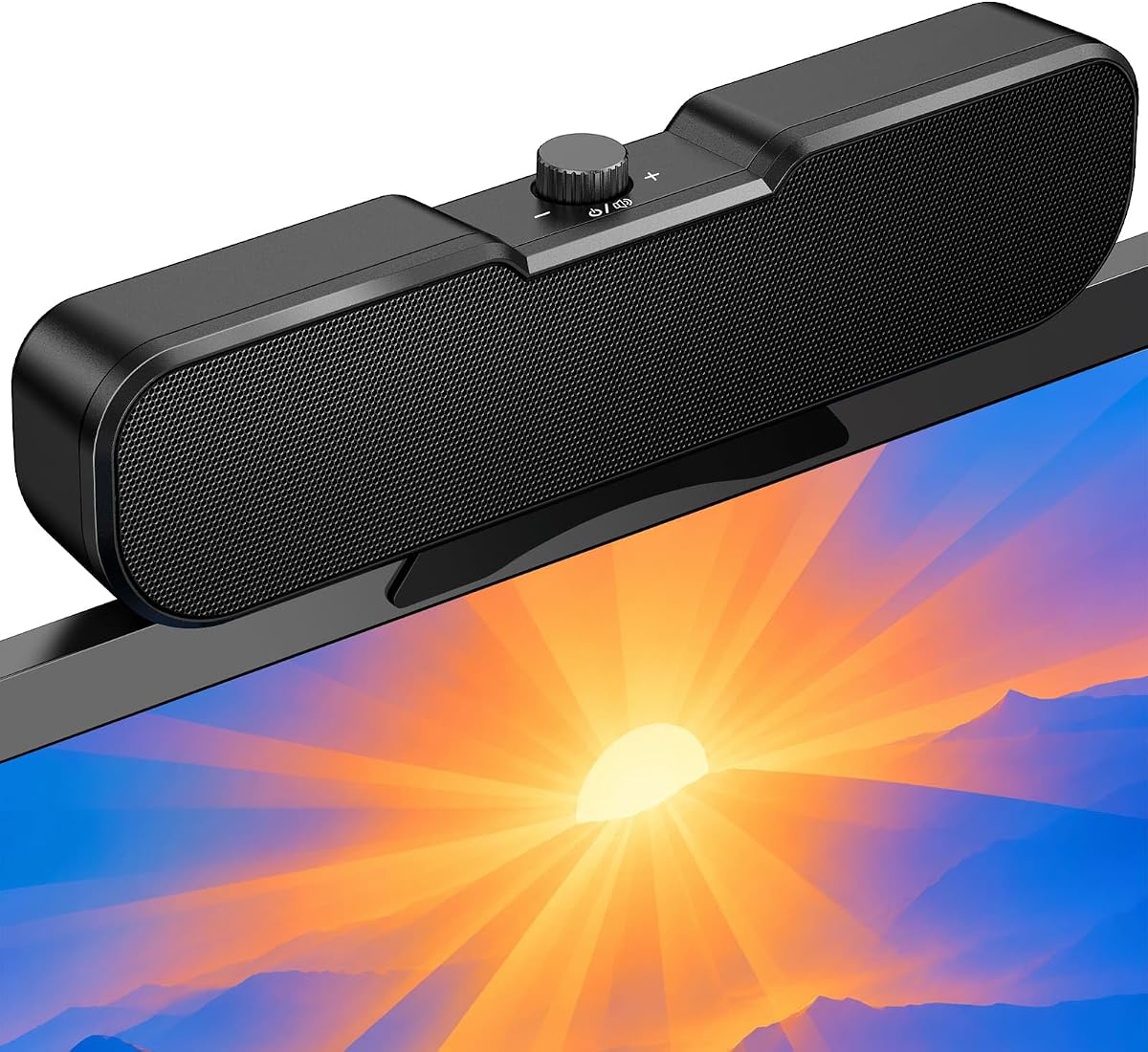
9. OHAYO - Best Overall

OHAYO Computer Speakers for Desktop PC Monitor

OHAYO Computer Speakers for Desktop PC Monitor

10/10★★★★★

OHAYO tops this USB-C speakers guide because it combines the zero-footprint clip-on form factor with the broadest feature set and the strongest listed customer rating in the pack—a perfect 5.0 at research time. Sixteen watts maximum output from dual internal magnetic drivers and a passive radiator targets clearer balanced sound from 35Hz to 18kHz claimed response, suitable for video calls, gaming, and music streaming at typical desk distances without pretending to shake the house.

  • 16W max with dual drivers and passive radiator
  • Bluetooth 6.0 and USB dual mode with low latency claims
  • G-sensor stereo flip; built-in mic up to 1.5 meters
Check Price →
✓ Pros
  • Perfect 5.0 listed rating at research time
  • Clip-on design frees entire desk surface
  • G-sensor automatically corrects stereo when mounted top or bottom
  • Built-in mic supports video calls without headset
  • Five RGB modes including audio-sync light bar
✕ Cons
  • USB power required even in Bluetooth mode
  • Not recommended for ultra-thin laptop screens that may tip
  • Monitor thickness must stay within roughly one inch clamp spec

Detailed review

Dual-mode operation switches between Bluetooth 6.0 and PC USB audio with a long press on the mode button. Bluetooth marketing emphasizes Channel Sounding technology with latency under 50 milliseconds and stable transmission up to 70 meters—take the distance claim as outdoor-line-of-sight language, but low latency intent matters for games and lip-synced video. USB power remains required in both modes, so this is not a cordless picnic speaker; it is a powered desk bar that adds wireless source flexibility.

Built-in G-sensor solves a clip-on stereo problem most rivals ignore: when you mount on top versus bottom of the monitor, left and right channels swap automatically in under half a second. That prevents backwards imaging without manual software toggles—a thoughtful hardware fix that shows OHAYO designed for real mount experimentation rather than spec sheet filler. Built-in microphone with roughly 1.5 meter pickup supports quick Zoom or Teams sessions when you do not want headset hair mess.

Mounting hardware uses upgraded silicone pads with doubled anti-slip grip for non-curved monitors up to about one inch thick. OHAYO cautions against ultra-thin laptop screens that may loosen or tip—respect that warning. Weighing under 300 grams, the bar adds minimal load to desktop monitors while staying off the desk mat entirely—ideal for artists, compact standing desks, and gamers who want mouse space.

Five RGB dynamic lighting modes include off, audio-sync light bar with under 50ms latency claims, and Windows 11 notification integration on supported setups. Brightness adjusts between 10 and 100 percent with under 1W lighting power draw so effects should not steal acoustic headroom. Cycle modes with one button; disable entirely for professional calls.

Versus Cirqon, OHAYO adds Bluetooth, mic, G-sensor, RGB, and higher wattage at the cost of complexity. Versus Pebble Pro, OHAYO sacrifices separate stereo cabinet imaging for centralized clip convenience and call mic integration. Versus Desktop soundbar below, OHAYO adds clamp mount and G-sensor rather than under-monitor placement only.

Buy OHAYO when desk footprint is zero, your monitor fits clamp specs, and you want one hardware piece to cover USB-C PC audio, Bluetooth phone streaming, calls, and light gaming. Skip when you dislike RGB, require separate stereo imaging for competitive FPS panning, or need to clamp onto ultrathin laptop lids. OHAYO earns best overall by solving space, connectivity, and calls together—not by winning raw audiophile metrics.

Mount safety

Verify monitor thickness and curvature before clamping; non-curved displays within spec are the target.

Avoid top-mount on lightweight laptop screens per manufacturer guidance.

Call quality tips

Built-in mic works for casual calls; use a dedicated mic for podcast recording.

Position bar center-aligned with your face for most natural pickup.

Check Price on Amazon →

We may earn a commission at no additional cost to you.

10. Desktop Computer Speakers - Best Soundbar Form

Desktop Computer Speakers

Desktop Computer Speakers

8.4/10★★★★☆

The generically titled Desktop Computer Speakers soundbar occupies the under-monitor niche with a slimmer alternative to clip-on OHAYO or hybrid LENRUE G11. At 16.1 by 3.1 by 3.1 inches, it slides beneath most displays while angling drivers upward toward the listener—a sensible near-field geometry when the bar sits below chin height. Dual full-range drivers plus a 50 by 90 mm passive bass radiator aim for fuller low end without a separate subwoofer footprint.

  • 16.1-inch angled soundbar with passive bass radiator
  • USB-C single cable power and audio
  • Bluetooth 5.3 with source switching controls
Check Price →
✓ Pros
  • Under-monitor soundbar saves horizontal desk width
  • Passive 50 x 90 mm radiator adds fuller low end
  • Bluetooth 5.3 with explicit source switch and memory clear
  • RGB single-color, breathing, or gradient modes
  • Angled drivers direct sound upward toward listener
✕ Cons
  • Lowest listed rating in pack at 4.2—verify return policy
  • Soundbar stereo imaging narrower than spaced pairs
  • 16.1-inch length may not fit shallow depth under all stands

Detailed review

USB-C carries both power and digital audio on compatible devices with included USB-A adapter for legacy ports. That true single-cable path aligns with Pebble V3 and Cyber Acoustics simplicity, but in soundbar form. No driver installation on compatible hosts keeps setup approachable for family PCs and rental apartments where elaborate audio racks are unrealistic.

Bluetooth 5.3 adds wireless streaming while USB remains connected for power. Built-in controls switch between Bluetooth and PC audio, disconnect paired devices, or clear Bluetooth memory—quality-of-life features missing on simpler budget bars. Use wired USB for primary gaming to minimize latency; use Bluetooth for phone playlists when the PC is idle.

RGB customization spans single-color, breathing, gradient, or off for distraction-free office hours. Protective acoustic grille shields drivers from dust and pencil impacts in student desks—a practical touch for shared family computers. Volume, power, source, and lighting controls live on the bar so you are not hunting OS sliders mid-game.

Listed rating of 4.2 is the lowest in this pack, which does not automatically mean failure—it often signals newer listing volatility or buyer mismatch when soundbar imaging disappoints FPS players expecting wide stereo. Set expectations: soundbars trade separation for width savings. Strategy games, calls, and movies fare well; competitive shooters may prefer spaced Pebble or Cyber Acoustics pairs.

Versus OHAYO clip-on, this soundbar stays on the desk surface under the monitor rather than the bezel—choose based on whether you have depth clearance versus clamp thickness tolerance. Versus LENRUE G11, it offers true USB audio and Bluetooth instead of aux-only hybrid connection. Versus Pebble Pro stereo pair, it centralizes drivers and adds passive radiator bass in bar form.

Buy this soundbar when horizontal desk width is gone but under-monitor depth remains, and you want USB-C one-cable simplicity with Bluetooth and RGB. Skip when you need maximum stereo imaging, clip-on zero footprint, or the highest buyer rating confidence—CA-2110USB and OHAYO score stronger on those axes. It completes the pack by covering the angled soundbar form factor honestly.

Under-monitor fit

Measure stand height and depth before ordering; 16.1 inches wide needs unobstructed bay.

Keep radiator port breathing room; do not push bar flush against wall panel.

Bluetooth hygiene

Clear Bluetooth memory when handing PC to family members to avoid auto-connect surprises.

Use source switch to return to PC audio after phone sessions.

Check Price on Amazon →

We may earn a commission at no additional cost to you.

Best USB-C Speakers in 2026 for Desktop PCs and Laptops

How to Choose the Best USB-C Speakers for Your Desk

Understand what USB-C audio actually means on your PC

Not every USB-C port on a laptop or monitor sends audio. Some ports are charge-only; some monitor USB hubs power accessories but cannot pass sound from the display. Before you buy, confirm that your target port supports USB audio class output or that the speaker you choose includes a fallback such as a 3.5 mm aux input. The products in this pack split into two camps: true single-cable USB audio designs like Creative Pebble V3, Cyber Acoustics CA-2110USB, Cirqon, and the Desktop soundbar; and hybrid units that use USB for power but still require a separate analog audio cable, such as LENRUE G11 and the standard LENRUE pair.

When single-cable USB audio works on your machine, the win is real: fewer adapters, less desk clutter, and often a cleaner digital path than a noisy motherboard headphone jack. When it does not, a hybrid speaker with an included USB-C to USB-A adapter may still be the pragmatic choice—you simply treat USB as power and keep using the aux output you already know works.

Form factor: stereo pair, soundbar, or clip-on bar

Left-right stereo pairs like Creative Pebble V3 and Cyber Acoustics preserve the widest imaging when you can space the cabinets even slightly beside the monitor. Under-monitor soundbars like the Desktop Computer Speakers and LENRUE G11 collapse stereo into one chassis, which saves width but narrows the stage. Clip-on bars such as OHAYO and Cirqon reclaim desk surface entirely by attaching to the monitor bezel—ideal when your keyboard tray already consumes every inch of mat space.

Choose the shape that fits your measured desk, not the shape that looks best in product photos. A clip-on bar that exceeds your monitor thickness spec will frustrate you; a wide stereo pair that blocks your drawer will get returned. Measure monitor thickness, free width under the stand, and how far your ears sit from the screen before committing.

Power delivery and loudness expectations

USB-C can deliver more consistent power on modern laptops than old USB-A ports, which matters for speakers with gain switches or higher RMS claims. Creative Pebble V3 and Pebble Pro both note that louder modes benefit from capable USB-C or USB-A ports. Pebble Pro goes further by advertising optional USB PD adapter headroom for substantially higher output—useful if you want headroom without leaving the Creative ecosystem.

Keep expectations grounded. Even 16W clip-on bars and 12W stereo pairs are near-field tools. They will dramatically improve Zoom clarity, YouTube dialogue, and casual gaming compared with laptop drivers, but they will not replace a powered bookshelf system or a 2.1 kit with a floor sub. Buy USB-C speakers for desk convenience and clarity, not for party volume.

Bluetooth, RGB, and extras that actually matter

Bluetooth on USB-powered speakers is almost always a secondary convenience layer—you still need USB connected for power. It shines when you want to stream from a phone without unplugging the PC session, or when you move the Creative Pebble V3 to a bedside table for a lazy playlist. For competitive gaming, prefer the wired USB or aux path to avoid latency variables. OHAYO’s Bluetooth 6.0 marketing emphasizes low latency for games and video; treat that as a plus when you will split time between PC and mobile, not as a replacement for wired esports rigor.

RGB lighting ranges from subtle touch toggles on LENRUE and Bluedee to full ring control on Pebble Pro and five-mode light shows on OHAYO. Buy lights only if you want to maintain them. More practically useful extras include headphone jacks on Bluedee and LENRUE, headset or mic ports on Pebble Pro, and OHAYO’s built-in microphone for quick calls without wearing a headset.

Compatibility traps to read before checkout

Several listings warn that monitor USB ports may not output audio. Cirqon explicitly notes incompatibility when the monitor USB port lacks audio output. LENRUE G11 states no Bluetooth, no headphone port, no mic, and no TV compatibility. Clip-on mounts including OHAYO and Cirqon specify maximum monitor thickness and caution against ultra-thin laptop screens that may tip under clamp weight.

Read those notes as seriously as the feature bullets. A speaker that is perfect on a desktop tower with rear USB ports may fail on a monitor hub you hoped would tidy cables. When in doubt, plan to connect directly to the PC or laptop USB port that you have verified supports audio.

Frequently Asked Questions

01

What are the best USB-C speakers overall in this guide?

OHAYO Computer Speakers rank best overall for most space-constrained desks because they combine clip-on zero footprint, 16W output, Bluetooth 6.0, built-in microphone, G-sensor stereo correction, and a 5.0 listed rating. If you prefer a traditional stereo pair on the desk, Creative Pebble Pro is the premium compact pick and Cyber Acoustics CA-2110USB is the simplest plug-and-play option. Match the winner to whether mount style, feature depth, or cable minimalism matters most on your machine.

02

Do USB-C speakers need a separate 3.5 mm audio cable?

Some do and some do not. True USB audio models—including Creative Pebble V3, Cyber Acoustics CA-2110USB, Cirqon, OHAYO in PC mode, and the Desktop soundbar—carry digital audio over the same USB cable that supplies power. Hybrid models like LENRUE G11 and standard LENRUE Computer Speakers use USB or USB-C for power only and require a separate 3.5 mm aux connection from your PC headphone or line output. Always read the listing connection notes before assuming one-cable operation.

03

Why does my USB-C speaker not produce sound from my monitor USB port?

Many monitor USB hubs provide power and data for accessories but do not pass audio from the display to downstream ports. Cirqon explicitly warns that monitor USB without audio output will not work for single-cable models. Connect directly to a PC or laptop USB port that supports USB audio class, then select the speaker as the default output device in Windows, macOS, or Chrome OS sound settings. If the port is charge-only, you may need a hybrid speaker with aux input instead.

04

Are USB-C speakers loud enough for gaming and movies?

For near-field desk use, yes—models like OHAYO at 16W max, Cyber Acoustics at 12W, and Creative Pebble Pro with optional USB PD headroom deliver meaningful upgrades over laptop and monitor drivers for games, YouTube, and streaming movies. They will not reproduce theater sub-bass or fill a large living room. Competitive gamers who care about precise left-right panning may prefer spaced stereo pairs over soundbars or clip-ons. Accept compact USB limits or step up to powered bookshelf systems outside this pack.

05

Should I use Bluetooth or wired USB for PC gaming?

Prefer wired USB or aux for competitive gaming where latency and stability matter. Bluetooth on speakers in this pack—including OHAYO, Pebble V3, Pebble Pro, and the Desktop soundbar—is best treated as a convenience layer for phones, tablets, and casual listening while USB supplies power. OHAYO markets Bluetooth 6.0 with low latency claims, which helps non-competitive gaming and video sync, but wired remains the safer default for ranked play.

06

What is the difference between Creative Pebble V3 and Pebble Pro?

Pebble V3 is the baseline compact USB-C stereo pair with Clear Dialog, 8W RMS, gain switch, Bluetooth 5.0, and optional AUX—available in black or white. Pebble Pro upgrades drivers and amps for richer bass with BassFlex, improved Clear Dialog, RGB rings, Bluetooth 5.3, headset or mic port, and higher RMS tiers including optional USB PD adapter support for substantial headroom. Choose V3 for budget simplicity; choose Pro when movies, dialogue clarity, and premium extras justify the step up.

07

Can clip-on USB-C speakers damage my monitor?

Clamp designs from OHAYO and Cirqon specify maximum monitor thickness and caution against ultra-thin laptop screens that may tip or flex under clamp weight. OHAYO weighs under 300 grams and uses silicone pads with enhanced grip for non-curved monitors up to about one inch thick. Always measure bezel thickness, avoid overtightening, and follow manufacturer guidance against lightweight laptop lids. Desktop monitors within spec are the intended target.

08

Which USB-C speakers work best with MacBooks?

MacBooks with USB-C audio class support pair cleanly with single-cable models like Creative Pebble V3, Pebble Pro, Cyber Acoustics CA-2110USB, and the Desktop soundbar—white Pebble V3 especially matches Apple desk aesthetics. Verify macOS recognizes the speaker in Sound settings under Output. If USB audio is finicky on a particular hub, hybrid LENRUE models with aux fallback remain viable. Clip-on OHAYO works when your external monitor meets clamp specs and USB audio routes from the Mac or dock.

09

Do I need USB PD for Creative Pebble Pro?

No for everyday desk use. Pebble Pro delivers up to 10W RMS and 20W peak on standard USB-C connections, which satisfies most calls, videos, and moderate music listening. Optional 30W USB PD adapter support unlocks marketing claims up to 30W RMS and 60W peak for buyers who want maximum headroom. Try standard USB first; add PD only if you hear compression or need louder clean output at high volume.

10

What is the best budget USB-C speaker in this pack?

Cyber Acoustics CA-2110USB offers the strongest simplicity-to-satisfaction ratio for buyers who want one-cable USB audio without RGB or Bluetooth extras, backed by a 4.5 listed rating. Bluedee adds RGB and headphone jack at a similar tier with slightly different tradeoffs. Creative Pebble V3 remains the best-known compact stereo upgrade when Bluetooth and Clear Dialog matter. Define budget by features you refuse to sacrifice, not wattage alone.

Conclusion

The best USB-C speakers for 2026 are not one-size-fits-all because USB-C itself means different things on different machines. In this pack, OHAYO leads for feature-rich clip-on convenience with a perfect listed rating, Creative Pebble Pro is the premium compact stereo upgrade for movie dialogue and optional PD headroom, and Cyber Acoustics CA-2110USB is the straightforward single-cable pair for users who want minimal fuss and strong buyer satisfaction. Creative Pebble V3 in black or white remains the benchmark compact USB-C stereo pair with Bluetooth fallback, while Cirqon, LENRUE models, Bluedee, and the Desktop soundbar cover clamp mounts, hybrid aux setups, RGB budget pairs, and under-monitor bars.

Choose connection reality before aesthetics. If your port supports USB audio, single-cable models reduce clutter immediately. If it does not, hybrid LENRUE options or speakers with analog fallback still belong in the conversation. Placement matters as much as protocol: aim drivers toward your ears, respect monitor clamp thickness limits, and keep wired paths for latency-sensitive play.

If you want one default recommendation for a modern laptop or desktop with verified USB-C audio, start with OHAYO when desk space is scarce, Pebble Pro when you want Creative tuning in a small stereo pair, or Cyber Acoustics when you prefer a classic two-speaker layout with the highest simplicity. Read the full reviews below to match badges to your desk constraints rather than chasing the highest watt number on the box.