Best Split Keyboards in 2026
We may earn a commission from links on this page, at no extra cost to you. Learn more.
A split keyboard is one of the simplest changes you can make to type in comfort for hours. By separating the two halves and angling the keys, it lets your wrists and forearms sit in a more natural line instead of twisting inward all day. That relief is why split boards have moved from a niche ergonomic accessory into a mainstream fix for anyone who lives at a desk. The catch is that models vary wildly, from gently curved one-piece frames to fully separable modules you can spread across the desk. This guide ranks nine of the best split keyboards you can buy in 2026, spanning wireless and wired designs, so there is a right pick whatever your budget and typing habits.
Top 9 Best Split Keyboards
Our top 9 picks, reviewed
MEETION S-Curve Wireless Split Keyboard
The MEETION S-Curve is our top split keyboard because it delivers real ergonomic benefit in a slim, tidy package. Its S-shaped split layout aligns your wrists naturally, so you get relaxed posture without a bulky palm rest eating desk space. Add 2.4G and dual-Bluetooth pairing across three devices, quiet low-profile scissor keys and USB-C charging, and it is a comfortable, flexible daily driver at a very fair price.
- Layout
- Full-size S-curve split
- Connectivity
- 2.4G + dual Bluetooth
- Keys
- Slim low-profile scissor
- Power
- Type-C rechargeable
What we liked
- Slim design needs no bulky wrist rest
- Triple connectivity across three devices
- Low-profile keys are quiet and comfortable
- Rechargeable via a single USB-C port
Worth noting
- No dedicated cushioned palm rest
- Lesser-known brand support
Logitech Ergo K860 Wireless Ergonomic Keyboard
The Logitech Ergo K860 is the polished, no-compromise choice for anyone serious about typing comfort. Its curved split keyframe and pillowed memory-foam wrist rest deliver a claimed 54 percent more wrist support, and the adjustable negative-tilt legs let you dial in a natural posture whether seated or standing. It is certified by United States Ergonomics, and the scooped keys feel superb. The price is the only real drawback.
- Design
- Curved split keyframe
- Rest
- Pillowed memory-foam
- Connectivity
- Bluetooth + USB
- Tilt
- 0, -4, -7 degrees
What we liked
- Certified by US Ergonomics for posture
- Pillowed memory-foam wrist rest
- Scooped keys match fingertip shape
- Adjustable negative-tilt palm lift
Worth noting
- Among the most expensive here
- Large one-piece footprint on the desk
Arteck Backlit Wired Ergonomic Split Keyboard
If you want split-keyboard comfort without worrying about batteries, the Arteck backlit wired board is a smart buy. A generous cushioned wrist and palm rest supports your hands through long sessions, the split ergonomic layout eases forearm strain, and a seven-color backlight with three brightness levels keeps it usable after dark. The six-foot USB cable and 24-month warranty round out a dependable, fuss-free package.
- Design
- Curved split ergonomic
- Rest
- Cushioned wrist & palm
- Backlight
- 7 colors, 3 brightness
- Cable
- 6-foot USB
What we liked
- Cushioned wrist and palm rest
- Seven-color adjustable backlight
- Reliable plug-and-play wired setup
- Backed by a 24-month warranty
Worth noting
- Wired cable limits placement
- Membrane feel, not mechanical
Arteck Split Ergonomic Wireless Keyboard
The wireless Arteck is the cord-free counterpart to our backlit pick, and a fine value in its own right. The split ergonomic frame and cushioned wrist rest keep hands relaxed, while a rechargeable battery rated for six months means you rarely think about charging. Setup is as simple as plugging in the nano receiver stored in the base. It is a tidy, dependable everyday board for comfortable typing.
- Design
- Split ergonomic
- Rest
- Cushioned wrist & palm
- Connectivity
- 2.4G USB wireless
- Battery
- 6-month rechargeable
What we liked
- Soft cushioned wrist and palm rest
- Six-month battery on a single charge
- Plug-and-play nano USB receiver
- 24-month warranty and support
Worth noting
- No Bluetooth, receiver only
- One-piece frame is not separable
X9 Wired Ergonomic Split Keyboard
Built for people who spend all day at the keyboard, the X9 wired split keyboard pairs a wave-style split layout with a cushioned wrist rest that keeps hands level with the keys. The full 110-key layout retains a numeric keypad and adds 17 shortcuts for faster work, while an adjustable kickstand and plug-and-play setup keep things simple. It is an affordable, comfort-first board for long working days.
- Layout
- 110-key full-size
- Rest
- Cushioned wrist rest
- Cable
- 5-foot USB wired
- Extras
- 17 shortcuts, kickstand
What we liked
- Integrated cushioned wrist rest
- Full 110-key layout with numpad
- 17 shortcut keys boost productivity
- Simple plug-and-play, no drivers
Worth noting
- Wired only, no wireless option
- Bulky footprint on smaller desks
Kinesis Freestyle2 Ergonomic Keyboard
The Kinesis Freestyle2 is the pick for anyone who wants to tune their split precisely. Unlike fixed ergonomic boards, its two halves rotate and separate up to nine inches, so you can match your shoulder width and preferred angle exactly. Low-force membrane switches ease finger strain, and the standard Windows layout means no relearning. It is a proven, award-winning design that trades flash for genuine adjustability.
- Design
- Fully separable modules
- Separation
- Up to 9in splay
- Switches
- Low-force membrane
- Layout
- Standard Windows
What we liked
- Modules rotate and separate freely
- Low-force switches reduce fatigue
- Standard Windows layout, easy to learn
- Plug-and-play, no drivers needed
Worth noting
- 9-inch model limits max spread
- Basic looks and no backlight
Nulea RT07B Wireless Ergonomic Split Keyboard
The Nulea RT07B is the most affordable way onto this list without giving up the essentials. Its ergonomic split layout reduces forearm twisting, a soft palm rest supports your wrists, and stable scissor-switch keys make typing pleasant. Dual-mode Bluetooth and 2.4G connectivity let you switch between devices easily, and USB-C charging keeps it topped up. For a first split keyboard on a tight budget, it is hard to beat.
- Design
- Ergonomic split layout
- Rest
- Soft palm rest
- Connectivity
- Bluetooth + 2.4G
- Battery
- 200-hour rechargeable
What we liked
- Very affordable split design
- Dual Bluetooth and 2.4G modes
- Scissor-switch keys feel stable
- USB-C rechargeable, no batteries
Worth noting
- Shorter 200-hour battery life
- Palm rest is comfortable but firm
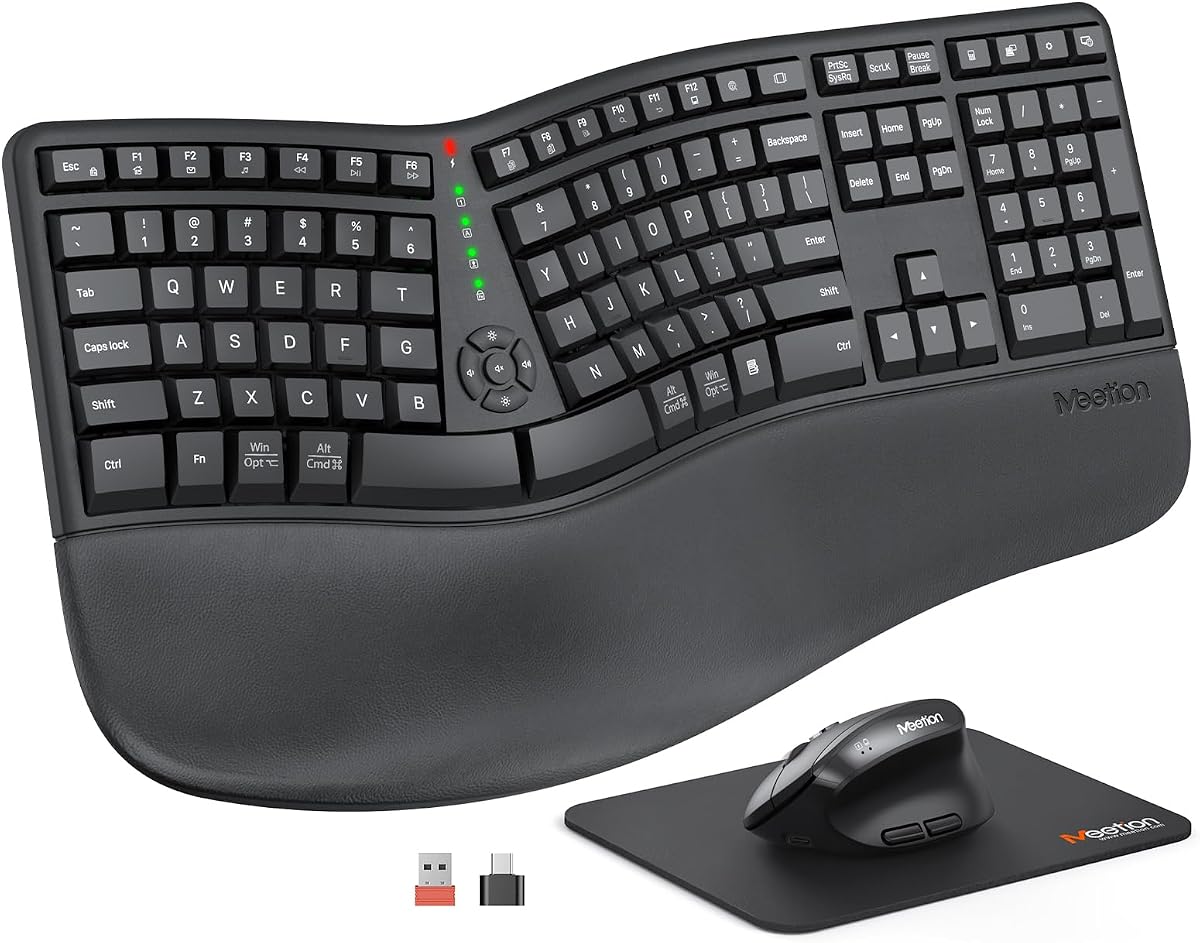
MEETION Split Keyboard and Vertical Mouse Set
If wrist strain comes from both typing and mousing, the MEETION set tackles the pair together. The curved, split full-size keyboard has a pillowed palm rest, and it ships with a vertical ergonomic mouse offering adjustable DPI and a silent switch. Both are rechargeable and share one receiver. Just note the bundled USB-C is an adapter rather than a standalone receiver, and the full-size layout needs a roomy desk.
- Design
- Curved full-size split
- Rest
- Pillowed palm rest
- Mouse
- Vertical, adjustable DPI
- Battery
- 1-2 month rechargeable
What we liked
- Includes a matching vertical mouse
- Pillowed non-slip palm rest
- Concave curve suits natural hand shape
- Rechargeable keyboard and mouse
Worth noting
- USB-C is an adapter, not a receiver
- Large full-size desk footprint
Perixx PERIBOARD-624B Wireless Split Keyboard
The Perixx PERIBOARD-624B stands out for going fully wireless between its two halves, with no cable tethering the modules together. Curved, sloped keys promote a natural arm position, an adjustable tilt lets you fine-tune posture, and built-in multimedia keys add convenience. The membrane switches and long travel will not suit everyone, and its rating trails the field, but for cable-free separation it is a distinctive option.
- Design
- Curved split-key sloped
- Separation
- Wireless, no tether
- Keys
- Low-profile membrane
- Tilt
- Adjustable angle
What we liked
- Truly wireless separable halves
- Curved sloped keys ease strain
- Adjustable tilt for custom posture
- Built-in multimedia shortcuts
Worth noting
- Lowest owner rating on this list
- Membrane feel with long key travel
How We Chose the Best Split Keyboards

Picking a split keyboard is less about chasing the highest spec and more about matching a design to your hands, your desk and your working day. Every model here approaches the same goal, easing the inward twist of your wrists, from a different angle, so our job was to sort them by who each one suits best rather than crown a single winner for everyone. We started by separating the two broad families at this level: one-piece curved boards that give you a fixed, ready-to-use split, and fully separable designs that let you spread and angle the halves to taste.
From there we weighed the features that genuinely change the typing experience. Comfort came first, judged by the shape of the split, the presence and quality of a wrist or palm rest, and the key feel underneath your fingers. Connectivity mattered next, since a board that pairs over both 2.4G and Bluetooth is far more flexible than a receiver-only design. We then looked at battery life on the wireless models, build quality and adjustability, and the reassurance of a real warranty. Finally, we kept the list varied on purpose, from a premium Logitech to a budget Nulea, so there is a sensible choice whatever you want to spend.
What a Split Keyboard Actually Does for You
The core idea is simple. On a normal keyboard your hands are forced together in the middle, which rolls your wrists outward and cocks them inward at the same time, a posture your forearms were never designed to hold for hours. A split keyboard opens a gap between the two halves and usually tents or curves them, letting your wrists run straighter and your shoulders sit more openly. The result, for most people, is noticeably less tension across the forearms and wrists by the end of a long day.
What you are really choosing between is how much of that correction is fixed for you versus adjustable by you. The Logitech Ergo K860 and the Arteck boards decide the angle and gap in advance and add a cushioned rest, so you get proven comfort with zero setup. The Kinesis Freestyle2 and Perixx PERIBOARD-624B instead hand you the controls, letting you separate and rotate the halves to match your own body. Neither approach is better in the abstract. If you want simplicity, pick a fixed design; if you want to dial in an exact posture, pick a separable one. Understanding that trade-off is the key to being happy with a split board.
Matching the Split Keyboard to Your Needs
For Maximum Comfort Straight Out of the Box
If you want the most refined experience with no tinkering, the Logitech Ergo K860 is the clear pick. Its curved keyframe, pillowed memory-foam rest and adjustable negative-tilt legs are engineered together, and the whole thing is certified by United States Ergonomics. For a slimmer take on the same idea, the MEETION S-Curve delivers a natural, relaxed posture without any bulk, which is why it tops our overall ranking.
For a Custom, Adjustable Setup
Typists who want to fine-tune their split should look at the Kinesis Freestyle2, whose modules rotate and separate up to nine inches so you can match your shoulder width exactly. The Perixx PERIBOARD-624B takes separation further by going fully wireless between the halves, removing even the connecting cable, though its lower rating and membrane feel make it a more specialised choice.
For Cord-Free Simplicity
If you want to cut cable clutter, the wireless Arteck split keyboard runs for a claimed six months per charge and sets up with a single nano receiver, while the Nulea RT07B adds dual-mode Bluetooth and 2.4G at a budget price. Both keep a cushioned rest so comfort does not suffer for going wireless.
For All-Day Wired Reliability
For a permanent desk where you never want to think about charging, the Arteck backlit wired board and the X9 wired split are the sensible options. Both plug in and go, both cushion your wrists, and the X9's full 110-key layout with 17 shortcuts suits heavy data entry.
Comfort Features That Matter Most
Two features shape the comfort of a split keyboard more than any others: the geometry of the split itself and the wrist support beneath your hands. The split geometry, meaning how far the halves separate and how much they curve or tent, is what actually corrects your posture, so favour a design whose shape suits how you sit. A gentle curve like the MEETION S-Curve suits people who want subtle correction, while the wider adjustable splay of the Kinesis Freestyle2 suits broader shoulders or a more aggressive angle. There is no universal best; there is only the geometry that feels right to you.
Wrist support is the second half of the equation. A good cushioned or pillowed rest, like the memory-foam pad on the Logitech Ergo K860 or the soft rests on both Arteck boards, keeps your hands level with the keys and stops your wrists from dropping and bending as you tire. Key feel matters too. The low-profile scissor keys on the MEETION and Nulea boards are quiet and require little effort, while the longer-travel membrane keys on some models give a more traditional, springy feel that not everyone prefers. If you can, think about the sound as well, since a quieter board is far kinder in a shared office or a late-night home setup.
A Closer Look at the Top Picks
The MEETION S-Curve earns the top spot because it delivers genuine ergonomic benefit without the compromises that usually come with it. Its S-shaped split aligns your wrists naturally, yet the slim body needs no bulky palm rest, so it keeps your desk clear. Triple connectivity across three devices, quiet low-profile keys and simple USB-C charging make it the split keyboard we would recommend to most people first, and its strong owner rating backs that up.
Behind it, the Logitech Ergo K860 is the premium choice for anyone who wants the most polished, best-supported comfort experience and is willing to pay for it, while the Arteck backlit and wireless boards offer excellent cushioned comfort in wired and cord-free forms respectively. For adjustability, the Kinesis Freestyle2 lets you tune the exact separation of its halves, and the X9 is a heavy-duty wired option for long days. The Nulea RT07B is the budget entry point, the MEETION set pairs a split board with a vertical mouse for full-desk ergonomics, and the wireless Perixx rounds things out for buyers who specifically want cable-free separated halves.
Tips for Getting the Most From a Split Keyboard
A little patience early on pays off. Give yourself a week to adapt, since your fingers need time to relearn crossing the split, and resist switching back to your old board on day two when you feel slower. Most people find the dip in speed vanishes within a few days, and the reduced strain that follows is well worth the short adjustment. Set the separation and tilt deliberately if your model allows it, aiming to keep your wrists straight and your shoulders open rather than hunched, and take a moment to position any wrist rest so your hands sit level with the keys rather than bending up to reach them.
Look after the ergonomics beyond the keyboard, too. A split board works best alongside a monitor at eye level and a chair that supports an upright posture, and pairing it with a vertical or ergonomic mouse, as the MEETION set does out of the box, addresses the other common source of desk strain. Finally, buy from listings with clear return protection, especially for the lesser-known brands here, so you can send a board back if the geometry does not suit you. Comfort is personal, and the freedom to try and return is part of finding the right split keyboard.
Final Recommendation
For most buyers, the MEETION S-Curve is the best split keyboard in 2026, combining a genuinely comfortable split layout, quiet low-profile keys and flexible triple connectivity in a slim, affordable package. If you want the most refined, best-supported experience, the Logitech Ergo K860 is worth its premium, while the Arteck backlit and wireless boards deliver cushioned comfort in wired and cord-free forms. Adjustment seekers should choose the Kinesis Freestyle2, heavy typists the X9, and budget-first buyers the Nulea RT07B. Whichever you pick, match its split geometry and support to how you actually sit, and your wrists will thank you.
How we picked
We judged each split keyboard on typing comfort and posture, the quality of its wrist or palm rest, key feel and switch type, wired or wireless connectivity and battery life, build quality and adjustability, and overall value. Because ergonomics is personal, we favoured designs with proven comfort features and honest trade-offs over spec sheets alone, and we mixed one-piece curved boards with fully separable models to suit different desks.
Frequently asked questions
Are split keyboards better for your wrists?
For many people, yes. By separating the halves and angling the keys, a split keyboard lets your wrists and forearms sit in a straighter, more natural line rather than twisting inward. Boards like the Logitech Ergo K860 and Kinesis Freestyle2 build on that with wrist rests and adjustable splay. It is not a medical cure, but it often reduces the strain that a flat, standard keyboard encourages.
What is the difference between a fixed and a fully separable split keyboard?
A fixed split, like the Logitech Ergo K860 or the Arteck models, is one piece with a permanent gap and curve, so it is simple and always ready. A fully separable split, like the Kinesis Freestyle2 or Perixx PERIBOARD-624B, lets you move the two halves apart and angle them to match your shoulders, giving more customisation at the cost of a slightly fiddlier setup.
Is there a learning curve with split keyboards?
Usually a mild one. Because the keys are angled and spaced differently, most people feel slower for the first few days, especially crossing the split with the wrong hand. Boards that keep a standard layout, such as the Kinesis Freestyle2, shorten that adjustment. Within a week most typists are back to full speed and enjoying the reduced strain.
Do I need a wrist rest with a split keyboard?
It depends on the design. Curved, low-profile boards like the MEETION S-Curve are shaped so a separate rest is not essential, while flatter models benefit from one. Several picks here, including both Arteck boards and the Logitech Ergo K860, build in a cushioned or pillowed rest so you get support without buying an extra accessory.
Should I choose a wired or wireless split keyboard?
Wired boards like the Arteck backlit and X9 never need charging and connect instantly, which suits a permanent desk setup. Wireless models such as the MEETION S-Curve and Nulea RT07B reduce cable clutter and travel more easily, at the cost of occasional charging. If you switch between devices, look for one with both 2.4G and Bluetooth for the most flexibility.