Best RGB CPU Coolers in 2026
We may earn a commission from links on this page, at no extra cost to you. Learn more.
An RGB CPU cooler is where cooling meets showmanship. Sitting front and centre in a glass-panel build, the cooler is one of the most visible parts of your PC, so getting the lighting right matters almost as much as the temperatures. The good news is you no longer have to choose between the two: today's addressable RGB towers and liquid coolers deliver serious thermal performance and vivid, motherboard-synced lighting for surprisingly little money. The trick is picking one whose lighting looks great, syncs with your ecosystem and cools your chip properly. This guide ranks nine of the best RGB CPU coolers you can buy in 2026, from a sub-$17 ARGB tower to premium CORSAIR liquid loops, so there is a right pick whether you want a subtle glow or a rainbow centrepiece.
Top 9 Best RGB CPU Coolers
Our top 9 picks, reviewed
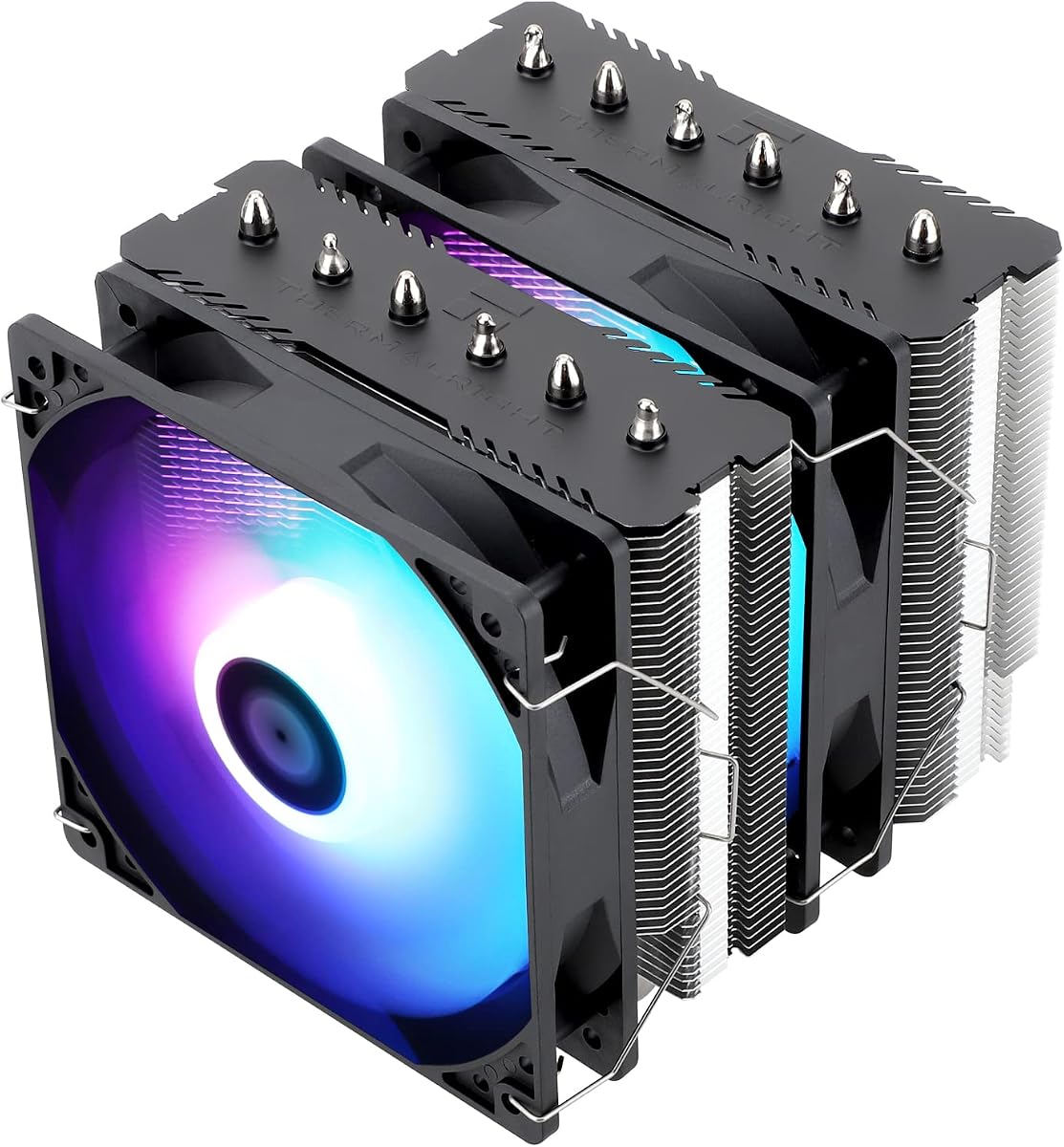
Thermalright Peerless Assassin 120 SE ARGB
The Thermalright Peerless Assassin 120 SE ARGB is the best all-round RGB cooler, blending the legendary twin-tower cooling of the Peerless Assassin line with gorgeous addressable lighting on its dual TL-C12C-S fans. Rated to 245W TDP, it tames flagship chips at a quiet 25.6 dBA, and the ARGB syncs to any 5V header. Few coolers at any price offer this much cooling, this much colour and this much value together.
- Type
- Dual-tower air
- Height
- 6x6mm heat pipes, 155mm, 245W TDP
- Socket Support
- Intel LGA1700/115X/1200/1851, AMD AM5/AM4
- Fans/RGB
- Dual TL-C12C-S PWM, ARGB
What we liked
- Elite cooling with vivid ARGB lighting
- Handles up to 245W TDP
- Quiet 1500RPM fans at 25.6 dBA
- Outstanding value for the performance
Worth noting
- Needs a 5V ARGB header to sync
- No display or screen
Thermalright Assassin X 120R Digital ARGB
The Thermalright Assassin X 120R Digital ARGB packs a remarkable amount of flair into a budget single tower, adding both addressable RGB and a digital screen top cover that shows system data via TRCC software. The 2000RPM PWM fan keeps mid-range chips cool while the ARGB syncs to your 5V header for full colour control. At 151mm it fits most cases, making it a standout value pick for builders who want lighting and a screen cheaply.
- Type
- Single-tower air
- Height
- 4x6mm heat pipes, 151mm
- Socket Support
- Intel LGA1700/1851/1200, AMD AM5/AM4
- Fans/RGB
- 2000RPM PWM, ARGB + digital screen
What we liked
- ARGB plus a digital top-cover screen
- Fast 2000RPM PWM fan
- Slim 151mm height fits most cases
- Low price for the feature set
Worth noting
- Display needs a USB header and software
- Four pipes limit hot-chip cooling
Thermalright Assassin X 120R SE V2
The Thermalright Assassin X 120R SE V2 is the cheapest way onto this list, and it makes the most of every dollar. A pure copper base, four heat pipes and a quiet 1550RPM RGB fan keep mid-range chips cool at 25.6 dBA, and the self-luminous fan lights up the moment it is plugged in through a single shared connector. At a slim 148mm with clear RAM room, it is a fuss-free, colourful upgrade over any stock cooler.
- Type
- Single-tower air
- Height
- 4x6mm heat pipes, 148mm
- Socket Support
- Intel LGA1700/1200/115X/1851, AMD AM4/AM5
- Fans/RGB
- 120mm RGB PWM, 1550RPM, S-FDB bearing
What we liked
- Lowest price on this list
- Self-luminous RGB fan, one connector
- Quiet 1550RPM fan at 25.6 dBA
- Slim 148mm height and RAM clearance
Worth noting
- Basic RGB, not addressable per-LED
- Four pipes for mid-range chips only
CORSAIR iCUE Link Titan 360 RX RGB
The CORSAIR iCUE Link Titan 360 RX RGB is the premium RGB pick, a 360mm all-in-one liquid cooler with the FlowDrive engine and three dazzling RX120 RGB fans. The iCUE Link system connects everything through a single cable for a clean build, and iCUE software gives you total control over lighting and fan curves, including a Zero RPM mode that silences the fans at low temperatures. It is the choice for hot flagship chips and a show-stopping lit build.
- Type
- 360mm liquid AIO
- Height
- FlowDrive pump, 360mm radiator
- Socket Support
- Intel LGA1851/1700, AMD AM5/AM4
- Fans/RGB
- 3x RX120 RGB fans, iCUE Link hub
What we liked
- Top-tier 360mm liquid cooling
- Stunning iCUE-controlled RGB fans
- Single-cable iCUE Link cuts clutter
- Zero RPM mode silences fans at idle
Worth noting
- Premium price and needs the hub
- iCUE software has a learning curve
Cooler Master Hyper 212 Black
The Cooler Master Hyper 212 Black is the trusted classic of this group, and the ideal base for builders who want to pair a proven cooler with their own RGB fans and lighting scheme. Four copper heat pipes and a SickleFlow 120 Edge fan with a broad 690-2500RPM range deliver dependable cooling, while redesigned brackets simplify AM5 and LGA1851 mounting. It ships with paste and a reputation earned over millions of builds; add your own RGB for a personal look.
- Type
- Single-tower air
- Height
- 4 copper heat pipes, 152mm
- Socket Support
- Intel LGA1851/1700/1200, AMD AM5/AM4
- Fans/RGB
- SickleFlow 120 Edge, 690-2500RPM
What we liked
- Legendary reliable Hyper 212 lineage
- Wide 690-2500RPM PWM fan range
- Redesigned brackets ease AM5 install
- Thermal paste included in the box
Worth noting
- Black edition fan is not addressable
- Four pipes cap top-end cooling
Thermalright Phantom Spirit 120 SE ARGB
The Thermalright Phantom Spirit 120 SE ARGB steps up to seven heat pipes and dual TL-C12B-S V2 fans whose high-brightness atomized blades diffuse light for a soft, even glow across up to 17 ARGB modes. It cools like a flagship twin-tower at a quiet 25.6 dBA, and the finely carved copper base pulls heat efficiently. At 154mm with a memory-avoiding layout, it is a superb-value pick for anyone who wants extra cooling capacity with rich, synced lighting.
- Type
- Dual-tower air
- Height
- 7x6mm heat pipes, 154mm
- Socket Support
- Intel LGA1700/1851/115X/1200, AMD AM5/AM4
- Fans/RGB
- Dual TL-C12B-S V2 PWM, ARGB, 17 modes
What we liked
- Seven heat pipes for extra capacity
- Up to 17 ARGB lighting modes
- High-brightness atomized fan blades
- Quiet dual 1500RPM fans at 25.6 dBA
Worth noting
- Twin-tower width, check RAM clearance
- No screen or display
CORSAIR Nautilus 360 RS ARGB (White)
The CORSAIR Nautilus 360 RS ARGB is the pick for a bright, white-themed build, pairing a whisper-quiet 20 dBA pump with three RS120 ARGB fans in a clean white finish. Its convex cold plate comes pre-pasted for a fast install, and the daisy-chain design lets you connect the fans to a single PWM and ARGB header to cut cable clutter. It delivers strong 360mm liquid cooling and easy ARGB control without the complexity of a proprietary hub.
- Type
- 360mm liquid AIO
- Height
- Low-noise pump, 360mm radiator
- Socket Support
- Intel LGA1851/1700, AMD AM5/AM4
- Fans/RGB
- 3x RS120 ARGB fans, daisy-chain
What we liked
- Strong 360mm liquid cooling
- Clean white finish for bright builds
- Whisper-quiet 20 dBA pump
- Daisy-chain fans reduce cabling
Worth noting
- Premium price for a 360mm AIO
- White shows dust more readily
JONSBO CR1400 RGB Compact Cooler
The JONSBO CR1400 RGB is a charming compact tower for small builds that still want a splash of colour. Four pure copper heat pipes feed a 41-fin stack topped by a luminous nameplate, while the 92mm PWM fan glows with rainbow RGB and pops off easily for cleaning thanks to metal removable fasteners. Its small footprint suits tight cases, and at its low price it is an easy way to add both cooling and lighting to a modest system.
- Type
- Single-tower air
- Height
- 4x6mm copper heat pipes, 41 fins
- Socket Support
- Intel LGA1851/1700/1200/115X, AMD AM4/AM5
- Fans/RGB
- 92mm PWM, rainbow RGB
What we liked
- Compact 92mm tower for small builds
- Bright rainbow RGB top nameplate
- Removable fan for easy maintenance
- Very affordable price
Worth noting
- 92mm fan trails 120mm coolers
- Rainbow RGB, limited fine control
Thermalright Peerless Assassin 120 Vision MAX ARGB
The Thermalright Peerless Assassin 120 Vision MAX ARGB is the choice for builders who want their cooler to be the visual star, thanks to a sharp 5-inch 480x854 IPS screen that shows live system data or custom themes via TRCC software. Six heat pipes and dual 2150RPM fans deliver strong twin-tower cooling, and an offset design keeps clearance for tall RAM and the GPU. At 164mm it needs a roomy ATX case, but the payoff is a striking, screen-topped centrepiece.
- Type
- Dual-tower air
- Height
- 6x6mm heat pipes, 164mm
- Socket Support
- Intel LGA1851/1700/115X, AMD AM5/AM4
- Fans/RGB
- Dual 2150RPM PWM, ARGB + 5in IPS screen
What we liked
- Vivid 5in IPS screen with custom themes
- Six-pipe twin-tower cooling
- Fast 2150RPM fans for strong airflow
- ARGB plus offset for RAM and GPU
Worth noting
- Tall 164mm needs a roomy case
- Screen needs software and a USB header
How We Chose the Best RGB CPU Coolers

An RGB cooler wears two hats: it has to keep your processor cool and it has to look good doing it, since in a glass-panel build the cooler is often the first thing anyone notices. Ranking these coolers meant refusing to let one job undermine the other. A dazzling cooler that lets your chip throttle is a failure, and a thermal powerhouse with dull, mismatched lighting misses the point of buying RGB in the first place. We looked for coolers that get both right, delivering real cooling and lighting that actually enhances a build.
We began with cooling performance, judged by heat-pipe count or radiator size, base quality and rated capacity, because temperatures come first no matter how pretty the LEDs are. Then we assessed the lighting itself: brightness, diffusion quality, the number of effects, and crucially whether it syncs cleanly with popular motherboard ecosystems or a proprietary hub. Noise, install ease and value rounded out the scoring. Finally, we kept the list varied on purpose, mixing budget ARGB towers, feature-rich models with screens, and premium liquid AIOs from CORSAIR, so there is a right RGB cooler whether you want a quiet subtle glow or a full rainbow centrepiece.
RGB Versus ARGB and Why It Matters
Before buying any lit cooler, it helps to understand the two lighting standards, because they are not interchangeable and choosing wrong means your lighting will not work. Standard RGB lights an entire fan a single uniform colour at a time and connects through a 12V 4-pin header. Addressable RGB, or ARGB, controls every LED individually through a 5V 3-pin header, unlocking rainbows, colour waves, chasing patterns and per-zone effects. Almost every cooler on this list, from the Phantom Spirit 120 SE ARGB with its 17 modes to the CORSAIR AIOs, uses ARGB for that richer, more dynamic look.
The practical upshot is simple: check your motherboard before you buy. Modern boards almost always include one or more 5V 3-pin ARGB headers, but budget or older boards may only have the 12V RGB type, or none at all. If your board lacks a header, several coolers include a small controller, and the Thermalright Assassin X 120R SE V2 keeps things simple with a self-luminous fan that lights up the moment it is plugged in. Match the cooler's connector to your board's header, or plan for a controller, and you avoid the most common RGB disappointment of all: buying a beautiful cooler you cannot actually control.
Lighting Quality and Sync Ecosystems
Not all RGB is created equal, and the difference between cheap and premium lighting is mostly about diffusion and control. The best fans use treated or atomized blades that spread light evenly for a soft, uniform glow rather than harsh hotspots. Thermalright highlights exactly this on the Phantom Spirit 120 SE ARGB, whose high-brightness atomized blades reflect light for a smoother effect, and the same care shows in the way premium CORSAIR fans render deep, saturated colour.
Where a cooler really earns its keep is ecosystem sync. ARGB coolers that connect to a standard 5V header will sync with your motherboard's software, whether that is ASUS Aura Sync, MSI Mystic Light or Gigabyte RGB Fusion, letting the cooler match your RAM, GPU and case fans in one coordinated scheme. CORSAIR takes a different route with the iCUE Link Titan 360, which plugs into CORSAIR's own iCUE ecosystem through a single-cable hub for exceptionally granular control at the cost of tying you to CORSAIR's software. Decide early whether you want open motherboard sync or a closed premium ecosystem, because it shapes which coolers, and which other components, fit your build cleanly.
Cooling Performance Behind the Lights
It is easy to be seduced by lighting and forget that a cooler's real job is thermal, so weigh the cooling specs just as carefully. Air towers here span from four-pipe single towers like the Assassin X 120R SE V2, which comfortably handle mid-range chips, to six and seven-pipe twin towers like the Peerless Assassin 120 SE ARGB and Phantom Spirit 120 SE ARGB that tame flagship processors up to 245W. More pipes and more fin area mean more cooling headroom, so match the tower to how hot your chip runs.
The two CORSAIR liquid coolers occupy the top of the capacity chart. A 360mm radiator, as on both the iCUE Link Titan 360 and the Nautilus 360 RS ARGB, dissipates more heat than any air cooler here, making these the picks for overclocked flagships or sustained heavy workloads. They also move the thermal mass away from the socket, keeping the area around your RAM and VRM open and airy. The trade-off is a pump that adds a point of failure and a higher price, though CORSAIR's Zero RPM and low-noise pump designs keep them quiet. Whether you go air or liquid, choose on cooling capacity first and let the RGB be the tiebreaker between similarly capable options.
Noise and Fan Behaviour
Lighting says nothing about how a cooler sounds, so acoustics deserve their own look. Among the air towers, the Thermalright models run their fans at a gentle 1500 to 1550RPM for a quiet 25.6 dBA, using long-life S-FDB bearings that stay smooth for years, while models like the Assassin X 120R Digital push to 2000RPM for extra airflow at the cost of a little more noise. PWM control across the board lets the fans idle down when the chip is cool and only ramp under load, which is the single biggest factor in keeping a build quiet day to day.
The liquid coolers approach noise differently. The CORSAIR Nautilus 360 RS runs a whisper-quiet 20 dBA pump, and the iCUE Link Titan 360 adds a Zero RPM mode that stops the fans entirely below a temperature threshold for total silence at idle. That said, an AIO always has a pump humming somewhere, whereas a good air tower can be effectively silent. If a near-silent PC is your goal, a quality ARGB air tower with quiet PWM fans is often the calmer choice, while the CORSAIR AIOs give you strong cooling with well-managed, tunable noise for higher-wattage chips.
Installation, Screens and Extra Features
RGB coolers increasingly bundle features beyond lighting, and those extras shape both the install and the payoff. The showiest addition is a screen: the Peerless Assassin 120 Vision MAX ARGB carries a sharp 5-inch IPS panel and the Assassin X 120R Digital a digital top-cover display, both showing live temperatures, usage or custom images through TRCC software. These look spectacular behind glass, but they require a spare motherboard USB header and a software install, so factor that into your build plan and cable budget.
Installation quality otherwise follows familiar lines. CORSAIR's iCUE Link system is the standout for tidiness, connecting the pump and all three fans through a single cable into a hub to slash clutter, while the Nautilus 360 uses daisy-chained fans and a pre-pasted cold plate for a fast, clean setup. The air towers rely on the same solid mounting hardware as their non-RGB siblings, with Thermalright's metal fasteners and Cooler Master's redesigned AM5 brackets making installs straightforward. One RGB-specific tip: plan your cable runs before mounting, since ARGB and PWM leads plus any USB-C screen cable can crowd the area around the socket if you leave them until last.
A Closer Look at the Top Picks
The Thermalright Peerless Assassin 120 SE ARGB takes the top spot by refusing to compromise, pairing the twin-tower cooling that made the Peerless Assassin famous with bright, synced ARGB on its dual fans. Rated to 245W and quiet at 25.6 dBA, it cools like a premium cooler and lights like one, all at a mid-budget price that shames costlier rivals. It is the RGB cooler we would put in most lit builds without hesitation.
For value, the Assassin X 120R Digital ARGB and Assassin X 120R SE V2 prove you can have colour, and even a screen, for very little, while the Phantom Spirit 120 SE ARGB adds a seventh heat pipe and 17 lighting modes for builders who want more capacity. At the premium end, the CORSAIR iCUE Link Titan 360 is the liquid-cooling and lighting showpiece, with the white Nautilus 360 RS ideal for bright-themed builds. The compact JONSBO CR1400 brings rainbow RGB to small cases, and the Vision MAX ARGB tops it all with a 5-inch IPS screen for a true centrepiece.
Final Recommendation
For most builders after the best RGB CPU cooler in 2026, the Thermalright Peerless Assassin 120 SE ARGB is the standout, combining flagship-class twin-tower cooling with vivid, motherboard-synced lighting at a price that undercuts far flashier coolers. If you want a screen as well as lighting on a budget, the Assassin X 120R Digital ARGB is a bargain, while the Assassin X 120R SE V2 is the cheapest way to add colour to any build. For maximum cooling and a show-stopping lit look, the CORSAIR iCUE Link Titan 360 RX leads the liquid coolers, with the white Nautilus 360 RS perfect for bright themes. And if you want your cooler to be the star of the show, the Vision MAX ARGB's 5-inch screen delivers. Check your motherboard's ARGB header, choose on cooling first, and any of these will make your build run cool and look brilliant.
How we picked
We judged each RGB cooler on lighting quality and sync support, cooling performance, noise under load, ease of install and value. Because these are display pieces as much as coolers, we weighted ARGB brightness, diffusion and ecosystem compatibility alongside raw thermals, and we mixed air towers and liquid AIOs across the price range so there is a sensible pick for every build and budget.
Frequently asked questions
Do RGB CPU coolers cool worse than non-RGB ones?
No. The RGB lighting is on the fan blades or top cover and has no effect on thermal performance. The Thermalright Peerless Assassin 120 SE ARGB cools identically to its non-RGB twin, for example. What matters for cooling is heat-pipe count, base quality and airflow, so choose an RGB cooler on its thermal specs first, then enjoy the lighting as a free bonus.
What is the difference between RGB and ARGB?
Standard RGB lights the whole fan one colour at a time, controlled through a 12V header, while ARGB (addressable RGB) controls each LED individually through a 5V 3-pin header, enabling rainbows, waves and per-LED effects. Most coolers here, like the Phantom Spirit 120 SE ARGB, use ARGB for richer effects. Check your motherboard has the right header before buying, as the two are not interchangeable.
Can I sync my RGB cooler with my motherboard lighting?
Usually yes. ARGB coolers connect to a 5V 3-pin header and sync with motherboard software like ASUS Aura, MSI Mystic Light or Gigabyte RGB Fusion. CORSAIR's iCUE Link Titan 360 uses CORSAIR's own iCUE ecosystem instead. Confirm your motherboard has a spare ARGB header, or use the cooler's included controller, and you can match your cooler's lighting to the rest of your build.
Should I get an RGB air cooler or a liquid AIO?
An RGB air tower like the Peerless Assassin 120 SE ARGB is cheaper, simpler and has no pump to fail, and it cools mid-range and many high-end chips well. An RGB liquid AIO like the CORSAIR Nautilus 360 RS offers more cooling for hot overclocked flagships and a cleaner look around the socket. Choose air for value and reliability, liquid for maximum cooling and radiator lighting.
Do RGB coolers that include a screen justify the extra cost?
It depends on how visible your build is. A screen like the 5-inch IPS panel on the Vision MAX ARGB or the digital display on the Assassin X 120R Digital shows temperatures, usage or custom images and looks fantastic behind glass, but it needs a spare USB header and control software. If your PC is on display, the screen adds real character; if it hides under a desk, save the money.