Expert Review & Guide

Best PC Cases With Vertical GPU Mount in 2026 Showcase

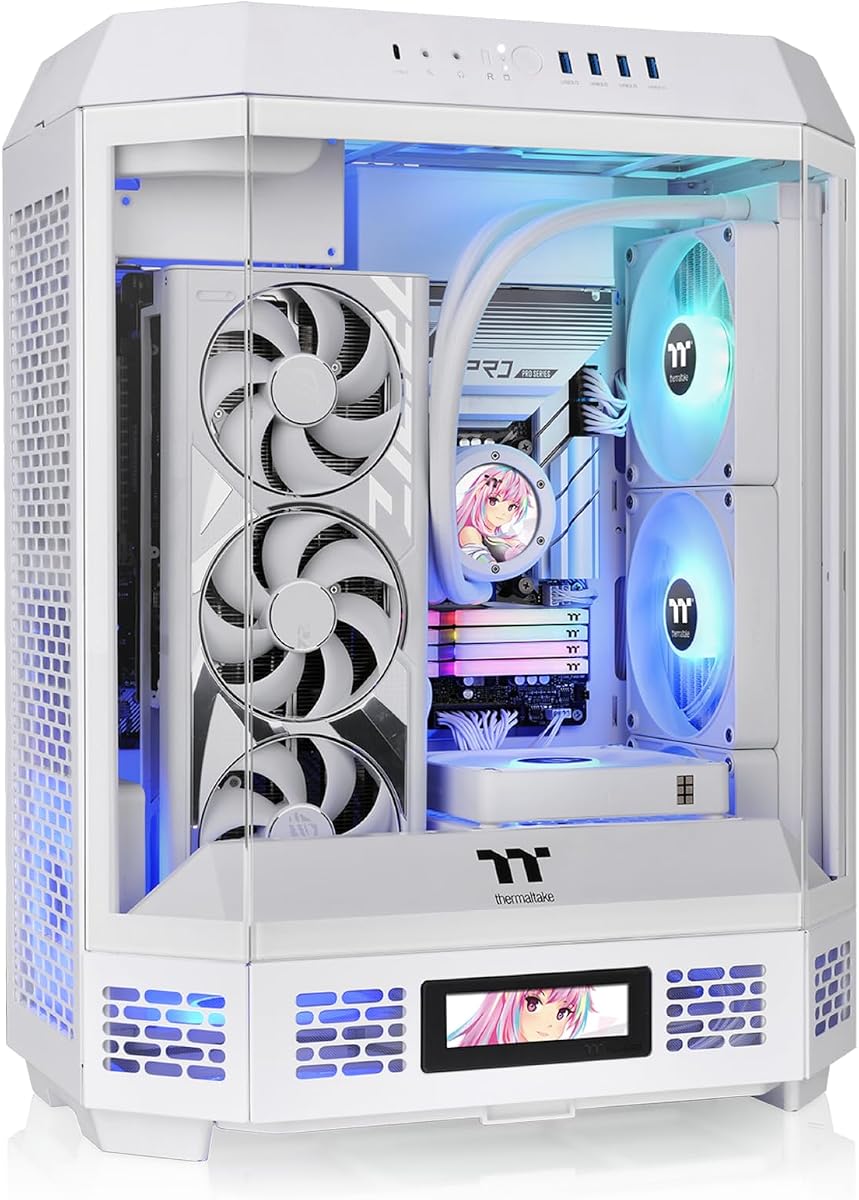
Vertical GPU mounting stopped being a niche mod and became the default look for showcase builds. A graphics card standing beside the motherboard turns the side panel into a product shot: shroud lighting, triple-fan coolers, and backplate art all face the glass instead of hiding against the rear I/O shield. In 2026 the best PC cases with vertical GPU mount combine that theater with honest engineering—PCIe 5.0 riser cables that do not throttle bandwidth, enough slot clearance for four-slot monsters, anti-sag brackets that protect the slot, and airflow paths that keep a standing GPU from cooking in its own exhaust.

This roundup uses only the ten products in our best-pc-cases-with-vertical-gpu-mount pack. The list spans three categories: complete chassis with factory vertical GPU support (SSUPD Xhuttle, darkFlash DY470, Hyte Y70, Thermaltake Tower 600), display-first mid-towers that pair well with aftermarket riser kits (Lian Li V100), and standalone vertical GPU holder kits for upgrading an existing ATX case (Lian Li VG4v4 in black and white, Cooler Master V3). We compared riser generation and length, tilt and height adjustment, slot requirements, GPU thickness limits, dual-chamber cable hiding, panoramic glass coverage, stock fan counts, radiator maps, and whether the vertical path is optimized for intake airflow or pure aesthetics.

Start with our three top picks if you already know you want a luxury included riser, an integrated mid-tower vertical airflow case, or a full-tower dual-chamber vertical build. Use the comparison table to separate factory-mount chassis from add-on kits, then read every review for PCIe slot math, thermal behavior, and the fit quirks that only show up when a thick RTX-class card meets a tilted bracket. You will not find dollar prices here—only compatibility, airflow tradeoffs, and the editorial angles that help you pick a vertical GPU story that still runs cool after the novelty wears off.

Our Top Vertical GPU PC Case Picks for 2026

Best Luxury Vertical Showcase

Hyte Y70 Cherry Red

★★★★★9.6/10
Hyte Y70 Cherry Red
  • Included luxury PCIe 4.0 x16 riser with color-matched canopy for seamless vertical GPU flow
  • Three-piece panoramic tempered glass and dual-chamber interior built for display-first builds
  • Thick side 360mm radiator support plus cold-floor cooling for serious thermal headroom
Check Price →
Best Integrated Mid-Tower Vertical GPU

SSUPD Xhuttle Black

★★★★★9.4/10
SSUPD Xhuttle Black
  • Factory upright GPU mount with optimized vertical airflow path through the display chamber
  • Dual-chamber layout hides PSU and cables while panoramic glass showcases the card
  • Three pre-installed 120mm ARGB reverse fans plus built-in RGB strip and controller
Check Price →
Best Full-Tower Vertical GPU Build

darkFlash DY470 Black

★★★★★9.2/10
darkFlash DY470 Black
  • Full-tower dual-chamber chassis with factory vertical GPU mounting and angled panoramic glass
  • 410mm GPU clearance and dual 360mm radiator support for high-wattage showcase rigs
  • Back plug-in motherboard support for cleaner cable routing behind the display face
Check Price →

As an Amazon Associate we earn from qualifying purchases. We may earn a commission at no additional cost to you.

Vertical GPU PC Case Comparison: Risers, Airflow, and Clearance

Scan whether vertical GPU support is built into the chassis or sold as an add-on kit, then compare riser generation, slot requirements, and cooling headroom. Specs focus on showcase fit and thermal practicality—no prices. Open the live listing for the current offer and exact colorway.

#ProductSpecificationsScore
1
  • PCIe 5.0 x16 200mm riser; PCIe 3.0/4.0/5.0 compatible
  • Three height positions plus dual-angle tilt for airflow or showcase
  • Fits 4-slot GPUs; needs 6–7 PCIe bracket slots on host case
8.8
2
  • Factory vertical GPU mount with optimized vertical airflow
  • 3× 120mm ARGB reverse fans + RGB strip; dual-chamber ATX
  • GPU to 370mm; cooler to 170mm; up to 10 fans / dual 360mm rads
9.4
3
  • White VG4v4 kit: PCIe 5.0 riser with anti-sag RGB support arm
  • Adjustable tilt forward for cooling or backward for display angle
  • Updated #6-32 standoff screws; 4-slot thick GPU support
8.8
4
  • White twin: vertical GPU display + dual-chamber panoramic glass
  • 3× ARGB reverse fans, RGB strip, and ARGB controller included
  • ATX + hidden-connector boards; GPU to 370mm; PSU to 190mm
9.4
5
  • Full-tower vertical GPU + back plug-in ATX motherboard support
  • 410mm GPU; dual 360mm radiators; angled panoramic glass top
  • Dual-chamber layout; 1× PWM ARGB fan included (RGB hub not included)
9.2
6
  • Black DY470: vertical mount full-tower with snap-on cable management
  • 410mm GPU clearance; RTX 40-class headroom; bottom dust filter
  • Dual-chamber ATX; velcro straps and rear cover for tidy routing
9.2
7
  • 4-slot vertical GPU with included luxury PCIe 4.0 riser + canopy
  • 3-piece panoramic glass; dual-chamber; up to 10 fans
  • Side 360mm rad to 125mm thick; top rad to 68mm; cold-floor fans
9.6
8
  • Display platform mid-tower; 4× ARGB PWM fans + LED strip
  • GPU to 420mm; cooler to 178mm; top 360mm radiator
  • Tool-less glass; back-connect ready—pair with VG4 kit for vertical
9.6
9
  • PCIe 4.0 riser; toolless adjust up to 65mm horizontal / 30mm depth
  • Fits most 7-slot ATX cases; removable bracket for 4-slot Micro-ATX
  • 165mm riser length; ABS casing; GPU installs after bracket secured
8.8
10
  • Rotational PCIe slots + floating VGA bracket; three-way GPU install
  • Octagonal 3-glass design; hidden-connector BTF/Project Zero support
  • Up to 9 fans; 420mm radiator support; optional horizontal display stand
9.2

1. Lian Li VG4v4 Black - Best PCIe 5.0 Upgrade

Lian Li VG4v4 Black

Lian Li VG4v4 Black

8.8/10★★★★☆

The Lian Li VG4v4 Black is not a PC case—it is the vertical GPU story for builders who already own a compatible ATX chassis and want a premium riser upgrade without replacing the entire enclosure. Version four of Lian Li's bracket addresses the small frustrations that made earlier vertical kits feel like science projects: a larger cutout around the GPU I/O area so DisplayPort and HDMI cables are less likely to bind when the card sits upright, three height positions to balance side-panel clearance against motherboard component interference, and a dual-angle tilt function that lets you lean the GPU forward for improved intake airflow or backward for a more dramatic showcase pose.

  • 200mm PCIe 5.0 x16 riser rated to 32 Gbps per lane direction
  • Three height adjustments plus forward/back tilt for thermal tuning
  • Anti-sag RGB support arm; accommodates GPUs up to 4 slots thick
Check Price →
✓ Pros
  • PCIe 5.0 riser future-proofs bandwidth for current and next-gen GPUs
  • Dual-angle tilt lets you prioritize cooler clearance or showcase angle
  • Larger GPU I/O cutout reduces HDMI and DisplayPort cable interference
  • Anti-sag bracket attaches to motherboard standoff for real slot protection
  • Updated #6-32 standoff screws improve compatibility versus older M3 hardware
✕ Cons
  • Requires a host case with at least 6 PCIe bracket slots—or 7 for tilted installs
  • Overclocking buttons on some GPUs may conflict with the adjustable support arm
  • Three full-size DisplayPort GPUs can contact the slot at certain tilt angles

Detailed review

The included 200mm PCIe 5.0 x16 riser cable is the headline spec. At up to 32 Gbps per direction, it doubles the bandwidth headroom of PCIe 4.0 risers on paper—meaningful if you are pairing the kit with a PCIe 5.0 motherboard and a high-end graphics card that actually uses the extra lanes under load. Lian Li also states backward compatibility with PCIe 3.0 and 4.0 platforms, which keeps the kit relevant if you are upgrading the visual presentation before the next GPU generation arrives.

Installation discipline matters more with vertical kits than with factory-mount cases. Lian Li's own guidance is worth treating as mandatory: press the GPU downward during insertion so the PCIe latch locks cleanly, and when removing the card, hold the release tab continuously while lifting—otherwise the latch can snap back and damage the slot or the card edge. GPUs with factory overclocking buttons may need those buttons removed before the adjustable support bracket fits. Cards with three full-size DisplayPort outputs may contact the bracket slot when tilted. These are not dealbreakers, but they are the kind of fit notes that separate a smooth Sunday build from a forum thread.

The anti-sag support arm is more than cosmetic. Long vertical GPUs transfer serious torque into the PCIe slot and the riser connection. Mounting the support to a motherboard standoff gives the bracket a rigid anchor instead of relying on the riser flex alone. Integrated RGB on the support arm is optional flair for showcase builds; sync it with the rest of the lighting or leave it static—the structural job is preventing sag that slowly misaligns the slot over months of desk vibration.

Compatibility math is straightforward but non-negotiable. Standard vertical mounting needs at least six PCIe bracket slots on the host case. Tilted configurations need seven. The bracket accommodates thick four-slot GPUs, which covers modern triple-fan flagship coolers without forcing you to remove shroud segments. If your current mid-tower only exposes five slots or places the power supply shroud awkwardly against the vertical zone, this kit is the wrong product regardless of riser quality.

Who should buy the VG4v4 Black instead of a factory vertical case? Anyone with a Lian Li O11-family or similar ATX showcase chassis that already fits the slot map but shipped without a Gen 5 riser. Anyone upgrading from a flaky third-party cable who wants tilt adjustment and anti-sag in one box. Skip it if you need a complete case solution—the SSUPD Xhuttle and Hyte Y70 in this same roundup integrate vertical airflow and glass in one purchase.

Our recommendation: treat the VG4v4 Black as a precision upgrade path. Measure slot exposure, confirm GPU thickness, remove conflicting OC buttons before unboxing, and install the GPU last after the bracket is secured. Done carefully, it is one of the most capable aftermarket vertical kits in this pack.

Host case requirements for VG4v4

Count PCIe bracket slots on your existing case before ordering. Six slots minimum for neutral vertical orientation, seven if you plan to use the tilt function. Confirm the side panel closes with the GPU at your chosen height setting and that bottom intake fans are not blocked by a forward-tilted shroud.

Tilt forward versus tilt back

Forward tilt prioritizes airflow by reducing turbulence between the GPU fans and nearby motherboard components—useful when thermals matter more than the exact viewing angle. Backward tilt prioritizes aesthetics for desk photography and stream overlays. Neutral tilt is the compromise when you are still tuning fan curves and do not want to re-run cable lengths twice.

VG4v4 versus Cooler Master V3

Choose Lian Li when you want PCIe 5.0 bandwidth, RGB anti-sag, and three height positions with tilt. Choose Cooler Master V3 when you need toolless horizontal and depth adjustment in a tighter budget kit and your GPU plus case combo fits the shorter 165mm riser. Both are add-ons, not full cases.

Check Price on Amazon →

We may earn a commission at no additional cost to you.

2. SSUPD Xhuttle Black - Best Integrated Mid-Tower Vertical GPU

SSUPD Xhuttle Black

SSUPD Xhuttle Black

9.4/10★★★★★

SSUPD built its reputation on compact and unconventional layouts, and the Xhuttle Black applies that design language to the vertical GPU mid-tower category most buyers actually shop. This is a complete ATX case with upright GPU mounting baked into the structure, panoramic tempered glass on the left for an uninterrupted view of the graphics card, and—critically—a vertical airflow story that treats the standing GPU as a first-class cooling citizen instead of an afterthought blocked by a flat motherboard plane.

  • Factory vertical GPU mount with dedicated vertical airflow channel
  • Dual-chamber ATX; panoramic tempered glass; 3× ARGB reverse fans
  • GPU to 370mm; CPU cooler to 170mm; up to 10× 120mm fans
Check Price →
✓ Pros
  • Vertical GPU support is engineered into the chassis—not bolted on later
  • Optimized vertical airflow path targets standing GPU thermals directly
  • Dual-chamber layout hides PSU cables from the panoramic glass face
  • Three pre-installed reverse-blade ARGB fans plus RGB strip and controller
  • Supports hidden-connector motherboards and dual 360mm radiators
✕ Cons
  • 370mm GPU limit excludes some long flagship coolers
  • SSUPD brand support and panel tolerances may trail Lian Li or Hyte
  • Flexible vertical or horizontal GPU orientation adds decision fatigue during planning

Detailed review

The dual-chamber layout separates the display zone from the power and storage zone. Your PSU, excess SATA wiring, and drive clutter live behind the partition where panoramic glass cannot embarrass you. That matters doubly for vertical GPU builds because riser cables, GPU power extensions, and ARGB fan hubs all compete for the same hidden millimeters. SSUPD gives the rear chamber enough routing room that the front chamber can read as a deliberate composition: motherboard, standing GPU, reverse-blade intake fans, and an integrated RGB strip framing the scene.

Out of the box you get three 120mm ARGB reverse fans, a built-in RGB strip, and an ARGB controller—enough hardware to power on with color on night one. Reverse-blade fans on the intake side present a cleaner visual face through glass, which is exactly what vertical showcase builds want. The case also advertises flexible orientation: vertical or horizontal GPU setup depending on your aesthetic and thermal priorities. Treat horizontal mode as a fallback if vertical thermals disappoint on a particular card; treat vertical mode as the reason you bought the Xhuttle in the first place.

Cooling headroom is serious for a mid-tower. Up to ten 120mm fan mounts and dual 360mm radiator support give liquid-cooled vertical builds a path without jumping to full-tower bulk. CPU cooler clearance to 170mm covers most tower air coolers. GPU length to 370mm fits many mainstream and upper-mid cards but may exclude the longest enthusiast coolers—measure your exact model before assuming flagship fit. PSU length to 190mm is adequate for standard ATX units; confirm modular cable stiffness does not fight the dual-chamber partition during closure.

Storage is practical rather than extravagant: up to two 3.5-inch HDDs or two 2.5-inch SSDs depending on bracket choices. Hidden-connector motherboard support aligns with the clean-cable philosophy vertical showcases demand. If you are shopping BTF-style boards from ASUS, MSI, or Gigabyte stealth lines, the Xhuttle is one of the more coherent mid-tower pairings in this pack because the case already expects cables to disappear.

Tradeoffs are honest. You are buying a younger brand's interpretation of a Hyte-like vertical story at a different price and polish tier. Panel fit, included fan noise at default curves, and long-term RGB controller reliability may not match luxury competitors. Accept that and the Xhuttle Black becomes a strong integrated answer to the question, "I want vertical GPU airflow in a mid-tower without buying a separate riser kit and guessing compatibility."

Recommend the Xhuttle Black for desk showcase gaming builds, streaming setups where the GPU faces the camera, and builders who want reverse-blade ARGB fans included. Skip it for ultra-long GPU cards, builders who dislike dual-chamber routing learning curves, or anyone who wants Hyte Y70-level panoramic luxury with an included PCIe 4.0 riser canopy.

Vertical airflow setup on the Xhuttle

Mount the GPU vertically first, then map intake reverse fans so they feed the shroud fans directly. Keep exhaust paths open through the top chamber. After the first gaming session, compare GPU hotspot temps against a horizontal mount baseline—vertical cases only win when intake volume matches the standing card's hunger for fresh air.

Who the Xhuttle Black suits best

Ideal for ATX builders who want an all-in-one vertical mid-tower with glass and lighting included. Strong fit for hidden-connector motherboard adopters and dual 360mm AIO planners. Less ideal for 400mm-plus GPUs or buyers who want a included Gen 5 riser in the same box—look at Lian Li VG4v4 plus host case or Hyte Y70 instead.

Check Price on Amazon →

We may earn a commission at no additional cost to you.

3. Lian Li VG4v4 White - Best White PCIe 5.0

Lian Li VG4v4 White

Lian Li VG4v4 White

8.8/10★★★★☆

The Lian Li VG4v4 White is mechanically identical to the black VG4v4 in this roundup: same 200mm PCIe 5.0 riser, same three height positions, same dual-angle tilt logic, same anti-sag RGB support arm, and same six-or-seven-slot host case requirement. The white finish is the entire product differentiation—and for builders assembling white O11 Dynamic, Lancool, or third-party panoramic cases, that finish matters because a black vertical bracket behind white glass reads as an unfinished mod instead of a cohesive showcase.

  • White VG4v4 frame with 200mm PCIe 5.0 x16 riser cable
  • Three height settings; dual-angle tilt; RGB anti-sag support arm
  • 4-slot GPU thickness; 6–7 PCIe bracket slots required on host case
Check Price →
✓ Pros
  • White bracket and support arm match snow-themed showcase builds
  • Same V4 improvements: larger I/O cutout and #6-32 standoff screws
  • PCIe 5.0 riser supports high-bandwidth GPU and motherboard combos
  • Refined frame fits certain third-party GPU brackets better than V3
  • Forward tilt option improves vertical GPU intake when thermals spike
✕ Cons
  • Still an add-on kit—no case, fans, or glass included
  • White hardware shows dust and cable color mismatches faster than black
  • Same OC-button and triple-DisplayPort fit caveats as the black VG4v4

Detailed review

White vertical kits also expose installation quality. Any black extension cable, unpainted GPU bracket, or gray riser shadow becomes visible through tempered glass the moment you power on ARGB. Plan white sleeved GPU power, white or silver cable combs, and motherboard brands that offer white shrouds if you want the VG4v4 White to look as intentional in person as it does in a render. The integrated RGB on the anti-sag arm can bridge minor color mismatches if synced to a soft white or pastel motherboard profile.

Thermal behavior matches the black kit. Forward tilt remains the tool when a standing GPU runs warmer than expected in a white glass chamber—white builds often live on bright desks with more ambient heat from monitors and sunlight. Backward tilt remains the photography angle when the PC faces a streaming camera. Neutral tilt is fine for first boot; adjust after you have real gaming thermals instead of guessing from product photos.

Compatibility notes from Lian Li carry over unchanged. Remove conflicting GPU overclocking buttons before installing the adjustable support. Watch triple full-size DisplayPort cards at tilted angles. Press down on the GPU during insertion and hold the PCIe release tab during removal. The refined V4 frame improves fit with some third-party GPU brackets that frustrated V3 owners—if you are upgrading from an older Lian Li vertical kit specifically because of bracket interference, the white V4 is the current revision to target.

Pair the VG4v4 White with white host cases in this same pack—the SSUPD Xhuttle White or darkFlash DY470 White—only if those cases expose the correct PCIe slot map for an aftermarket vertical bracket. Not every factory vertical case needs an add-on kit; read each listing carefully so you do not double-buy vertical mounting hardware.

Recommend the VG4v4 White when your host chassis is already white and slot-compatible, when you need Gen 5 riser bandwidth, and when tilt plus anti-sag matter more than saving a few millimeters of bracket visibility. Skip it if you are starting from scratch and want integrated vertical airflow—buy a complete vertical case instead.

White-build pairing tips

Match PSU cables, radiator hoses, and RAM heat spreaders to the white theme before sealing glass. Route GPU power extensions behind the bracket spine so they do not create a dark stripe through the panel. Keep a white microfiber cloth nearby—showcase cases punish fingerprints faster than performance cases.

When white VG4v4 beats factory vertical cases

Choose the kit when you already own a white case you love that lacks a Gen 5 riser. Choose a factory vertical chassis like SSUPD Xhuttle White when you want airflow mapping, fans, and glass designed together. The kit wins on upgrade flexibility; the integrated case wins on first-build simplicity.

Check Price on Amazon →

We may earn a commission at no additional cost to you.

4. SSUPD Xhuttle White - Best White Integrated Vertical Mid-Tower

SSUPD Xhuttle White

SSUPD Xhuttle White

9.4/10★★★★★

The SSUPD Xhuttle White is the colorway twin of the black Xhuttle ranked earlier in this guide: dual-chamber ATX mid-tower, panoramic tempered glass, factory vertical GPU mounting with optimized vertical airflow, three pre-installed 120mm ARGB reverse fans, built-in RGB strip, and ARGB controller. If your desk theme is glacier white hardware, this is the integrated vertical GPU case in the pack that matches without spray paint or vinyl wraps.

  • White dual-chamber ATX with factory vertical GPU mount
  • Panoramic glass; 3× ARGB reverse fans; RGB strip + controller
  • Hidden-connector motherboard support; GPU to 370mm
Check Price →
✓ Pros
  • Complete white vertical showcase without painting brackets or buying a separate riser
  • Same optimized vertical airflow philosophy as the black Xhuttle twin
  • Dual tempered glass panels create a bright, open display chamber
  • ARGB hardware included for day-one lighting coherence
  • Dual-chamber routing keeps the white face clean for photography
✕ Cons
  • White interior reveals dust, pet hair, and dark cables immediately
  • Listing copy is shorter than the black variant—verify fan and rad limits on the live page
  • 370mm GPU cap still applies—long cards need measurement

Detailed review

White showcase builds live or die on cable color discipline. The dual-chamber layout helps by moving PSU wiring and bulk storage out of the glass sightline, but GPU power cables, 24-pin extensions, and AIO tubes still cross the display zone. Use white or silver extensions, hide excess length in the rear chamber, and route ARGB hubs behind the motherboard tray before you snap the glass on. The reverse-blade fans look especially clean in white because the blade hubs face the panel the way product photographers prefer.

Vertical GPU thermals behave the same as on the black model: standing cards want steady intake from the bottom and side paths SSUPD designed for upright mounting. Do not assume white paint lowers temperatures—it does not. Run fan curves after a real gaming load and add intake if hotspot sensors climb. Flexible vertical or horizontal GPU orientation remains available; white builds often choose vertical for the Instagram angle and horizontal only if a particular card misbehaves upright.

Hidden-connector motherboard support matters more in white builds because stray black cables ruin the aesthetic faster than they do in black cases. Pair PROJECT ZERO, BTF, or stealth boards when possible. GPU length still tops out around 370mm, CPU coolers around 170mm, and PSU length around 190mm—identical constraints to the black Xhuttle unless SSUPD revises the spec sheet on the live listing.

Compared with darkFlash DY470 White in this roundup, the Xhuttle is a mid-tower with stronger out-of-box fan and RGB completeness but less full-tower radiator extravagance. Compared with Hyte Y70 Cherry, you give up the luxury included riser canopy and three-piece panoramic wrap for a simpler dual-glass layout and SSUPD's vertical airflow tuning. That trade is rational when budget and desk footprint matter more than boutique unboxing theater.

Pick the Xhuttle White for white gaming desks, creator setups filmed from the side, and builders who want vertical GPU support without researching riser lengths. Skip it if you need 410mm GPU clearance, if you dislike maintaining white glass, or if you want Thermaltake Tower 600's rotational PCIe flexibility instead.

White Xhuttle maintenance habits

Schedule light filter and glass cleaning every few weeks—white cases telegraph neglect. Use compressed air on reverse fans before dust mats on the blades. Keep pets and fuzzy blankets away from bottom intakes; white shrouds make hair obvious.

Xhuttle White versus darkFlash DY470 White

Choose Xhuttle for mid-tower footprint, included ARGB fans, and integrated vertical airflow tuning. Choose darkFlash DY470 White for full-tower GPU length, dual 360mm radiator headroom, and angled top glass drama. Both support vertical GPU presentation; the decision is size class and cooling ambition.

Check Price on Amazon →

We may earn a commission at no additional cost to you.

5. darkFlash DY470 White - Best White Full-Tower Vertical Showcase

darkFlash DY470 White

darkFlash DY470 White

9.2/10★★★★★

darkFlash's DY470 White is a full-tower answer to the vertical GPU question when mid-tower clearance feels tight and you still want a bright, glass-forward showcase. Factory vertical GPU mounting is built into the dual-chamber layout alongside back plug-in ATX motherboard support, meaning power and data connectors route behind the board while the standing graphics card, AIO block, and RAM face the angled panoramic glass without a spaghetti of 24-pin cables stealing focus.

  • Full-tower dual-chamber with factory vertical GPU mounting
  • 410mm GPU clearance; dual 360mm radiators; angled panoramic top glass
  • Back plug-in ATX motherboard support; 1× PWM ARGB fan included
Check Price →
✓ Pros
  • 410mm GPU clearance welcomes long modern triple-fan cards vertically
  • Distinctive top-angled glass design elevates desk presence beyond flat side panels
  • Dual-chamber plus velcro straps and snap-on panels simplify cable hiding
  • Back-mounted motherboard support removes front-face cable clutter from the GPU view
  • Bottom dust filter and rear cover help white interiors stay cleaner longer
✕ Cons
  • RGB hub controller is not included despite ARGB fan hardware
  • Only one PWM ARGB fan ships in the box—you may need more intake for hot GPUs
  • Full-tower footprint is too large for compact desks regardless of vertical GPU appeal

Detailed review

The distinctive top-angled glass panel is the design hook. Instead of a flat side window, darkFlash angles visibility so internal hardware reads almost like a display case on a shelf. Vertical GPU mounting amplifies that effect because the shroud fans and backplate logo sit perpendicular to the viewer's line of sight. RTX 40-class compatibility in the marketing copy is shorthand for modern length and thickness—410mm GPU clearance and dual 360mm radiator support back that claim with numbers rather than vibes.

Cooling planning should be proactive. One included PWM ARGB fan is a starting point, not a complete thermal strategy for a vertical high-wattage GPU inside white glass. Budget additional intake and exhaust fans, especially if you mount thick radiators. The bottom dust filter helps white interiors stay presentable, but filters only work if you clean them—white full-towers show neglect faster than black LAN boxes tucked under a desk.

Cable management features—velcro straps, snap-on design, rear cover—exist because dual-chamber full-towers fail in reviews when builders close the glass and discover a PSU cable wave bulging against tempered panel. Route everything behind the chamber divider first, then install the vertical GPU and its power harness, then validate side and top glass clearance with the card fully seated. darkFlash includes a one-year assurance on cases; treat that as standard consumer protection, not a substitute for measuring radiator plus fan sandwich thickness before you buy.

Note the explicit listing caveat: RGB hub controller not included. If you want synchronized ARGB across multiple fans and strips, plan a motherboard header, external hub, or separate controller purchase before build day. That omission is annoying on a showcase chassis but common at this tier—just do not assume plug-and-play rainbow out of the box beyond the single included PWM ARGB unit.

Recommend the DY470 White when you need full-tower vertical GPU clearance in a white theme, when back plug-in boards are on your shortlist, and when angled glass matters more than mid-tower minimalism. Skip it for small desks, for builders who want nine fans pre-installed, or for anyone who needs an included RGB hub in the same box.

DY470 White vertical GPU workflow

Install the back plug-in motherboard and route all rear connectors before mounting the vertical GPU. Confirm radiator locations do not steal air from the standing card's intake path. Add fans until GPU thermals stabilize—one stock fan is rarely enough for showcase vertical builds.

Full-tower vertical versus mid-tower vertical

Full-tower vertical mounting buys length and radiator options at the cost of desk space. Mid-tower integrated cases like SSUPD Xhuttle White trade maximum GPU millimeters for a smaller footprint. Choose DY470 when your GPU or loop plan already failed a 370mm mid-tower checklist.

Check Price on Amazon →

We may earn a commission at no additional cost to you.

6. darkFlash DY470 Black - Best Full-Tower Vertical GPU Value

darkFlash DY470 Black

darkFlash DY470 Black

9.2/10★★★★★

The darkFlash DY470 Black is the same chassis architecture as the white variant ranked just above—full-tower dual-chamber ATX, factory vertical GPU mounting, back plug-in motherboard support, angled panoramic glass, 410mm GPU clearance, dual 360mm radiator support, snap-on panels, velcro cable straps, bottom dust filter, and one included PWM ARGB fan. Black simply forgives mixed cable colors and minor dust more gracefully, which makes it the easier recommendation for builders who care about vertical GPU presentation but do not want to coordinate every wire sleeve.

  • Black DY470 full-tower; vertical GPU + back plug-in ATX boards
  • 410mm GPU; dual 360mm radiators; angled panoramic glass
  • Dual-chamber cable management; bottom dust filter
Check Price →
✓ Pros
  • Strong clearance map for long vertical GPUs without custom modding
  • Black finish forgives cable color mismatches better than the white DY470
  • Dual-chamber separation keeps PSU clutter out of the GPU showcase zone
  • Snap-on panels and velcro straps speed iterative cable tuning
  • Angled glass viewing axis looks distinctive on stream cameras and desk photos
✕ Cons
  • Single included PWM ARGB fan means immediate fan budget planning
  • RGB hub controller sold separately—confirm ARGB plan before build day
  • Full-tower size and weight are impractical for frequent LAN transport

Detailed review

Vertical GPU mounting in a full-tower matters when you combine three factors: a long triple-fan graphics card, a thick side or front radiator, and a desire to keep the card visible through glass. The DY470's 410mm GPU limit clears many flagship-class coolers with margin if you measure power connector bend radius honestly. Dual 360mm radiator support lets you run a side or front loop while still leaving room to tune intake for the standing GPU—a combination mid-towers struggle to offer without compromise.

Back plug-in motherboard support is an underrated vertical-GPU feature. When connectors live behind the board, the front chamber shows GPU, CPU cooler, and RAM without a thick 24-pin cable draped across the shroud. That cleanliness is the entire point of vertical mounting for content creators. Confirm your motherboard SKU actually supports back connection before assuming compatibility—standard ATX boards still fit, they just will not deliver the same cable-free face.

Thermal honesty: vertical GPUs run warmer than horizontal mounts in many cases unless intake is aggressive. One stock fan will not save a 350-watt class card in a glass full-tower. Plan at least a balanced two-in-one-out fan map before you finalize curves, and treat radiator fan exhaust as part of the overall pressure plan instead of an isolated AIO detail. The bottom dust filter helps, but only if intake fans pull through it rather than through unfiltered gaps.

darkFlash lists a one-year assurance and emphasizes premium materials for gamers and creators. Expect good-enough fit and finish for the category, not Hyte-level micro-tolerances. Panel alignment and glass edge quality should be inspected on arrival—full-tower glass is heavy, and shipping stress happens. Register any defects early rather than discovering a corner chip during the vertical GPU install marathon.

Our pick logic: choose DY470 Black when you want integrated full-tower vertical mounting with strong GPU and radiator numbers and do not mind buying extra fans and an RGB hub. Skip it when desk space is limited, when you prefer SSUPD's mid-tower vertical airflow package, or when Hyte Y70's included luxury riser and canopy justify the step up for pure showcase prestige.

Fan plan for vertical DY470 builds

Treat the included PWM ARGB fan as one piece of a larger map. Add bottom intake aimed at the GPU shroud, side or front intake if radiators permit, and top exhaust that responds to CPU and GPU heat together. Tune after a combined CPU+GPU stress test, not after idling on desktop.

DY470 versus Hyte Y70 for vertical GPU

Hyte Y70 wins on included luxury riser, color-matched canopy, and boutique build details. DY470 wins on full-tower clearance, dual 360mm radiator flexibility, and back plug-in support at a different value tier. Choose Hyte for mid-tower furniture-grade showcase; choose darkFlash for maximum hardware volume in vertical view.

Check Price on Amazon →

We may earn a commission at no additional cost to you.

7. Hyte Y70 Cherry Red - Best Luxury Vertical Showcase

Hyte Y70 Cherry Red

Hyte Y70 Cherry Red

9.6/10★★★★★

The Hyte Y70 Cherry Red is the vertical GPU case for builders who want the mounting hardware, glass architecture, and cable-management philosophy in one coherent luxury mid-tower—not a host case plus aftermarket riser guesswork. Hyte includes a luxury PCIe 4.0 x16 riser with a color-matched canopy that visually continues the GPU shroud line into the chassis spine. That canopy detail sounds cosmetic until you live with a vertical build where a bare riser cable breaks the silhouette in every photo.

  • 4-slot vertical GPU with included luxury PCIe 4.0 x16 riser + canopy
  • 3-piece panoramic tempered glass; dual-chamber ATX mid-tower
  • Side 360mm rad to 125mm thick; cold-floor 120/140mm fan support
Check Price →
✓ Pros
  • Included color-matched riser canopy makes vertical GPU flow look intentional, not hacked
  • Three-piece panoramic glass is among the strongest desk-presence designs in the pack
  • Massive cooling map: thick side 360mm radiators plus adjustable top and cold floor
  • Premium build details: labeled routes, Velcro straps, floating storage sleds
  • Four colorways let the case coordinate with GPU and motherboard themes
✕ Cons
  • Cherry red is divisive—confirm the colorway matches your desk before committing
  • Luxury positioning means you still supply most fans compared with fan-packed rivals
  • PCIe 4.0 included riser is excellent but not PCIe 5.0 like Lian Li VG4v4

Detailed review

Three-piece panoramic tempered glass wraps the display chamber the way furniture wraps a display shelf. Dual-chamber interior layout keeps PSU, drives, and rat-nest cabling in the rear zone while the motherboard, vertical GPU, and cooling hardware face the room. Hyte's unified modern aesthetic extends across four colorways; Cherry Red is the bold choice when your GPU backplate and desk accents already lean crimson or when you deliberately want the case itself to anchor the color story.

Vertical GPU support here is four-slot class—thick flagship coolers fit without forcing open-air mods. The included riser handles PCIe 4.0 bandwidth, adequate for current high-end gaming and creator workloads on mainstream platforms. If you are on PCIe 5.0 and obsess over lane headroom, Lian Li's VG4v4 kit in this roundup wins the spec sheet—but Hyte wins the out-of-box showcase coherence most buyers actually see through glass.

Cooling capacity is ginormous relative to mid-tower expectations. Side radiator support accepts up to 360mm units up to 125mm thick—room for thick radiators with push-pull fan sandwiches. Top radiator support adjusts up to 68mm thick configurations. Cold-floor cooling accepts three 120mm or two 140mm fans up to 32mm thick below the GPU intake zone. Up to ten fans total means you can tune vertical GPU thermals with intent instead of hope, though Hyte still expects you to purchase most fans compared with SSUPD's three-fan included bundle.

Build experience details separate Hyte from generic panoramic clones. Helpful labels, reusable Velcro straps, floating storage sleds, and a clicky blue power switch signal that someone who actually builds PCs designed the tray layout. Tool-less panels and extensive rear-chamber routing space reduce the vertical GPU install panic moment when you realize GPU power cables need another half inch of bend radius behind glass.

Tradeoffs: Cherry Red is not neutral. If your hardware palette is black stealth or all white, another Y70 colorway or a different case entirely may photograph better. Hyte's luxury tier costs more than darkFlash or SSUPD alternatives in this pack—you are paying for glass fit, riser presentation, and cooling flexibility together. Accept that trade when the case is the desk centerpiece.

Recommend the Y70 Cherry Red for streamers, desk photographers, and high-end builders who want the most polished integrated vertical GPU story in this roundup. Skip it for invisible under-desk PCs, for buyers who need PCIe 5.0 risers specifically, or for compact desks that cannot accommodate a panoramic mid-tower footprint.

Building vertical on the Y70

Install the included riser and canopy before cable-sleeving final passes so GPU power bends clear the canopy edge. Use cold-floor intake to feed the vertical shroud fans directly. Sync fan curves so side radiator exhaust does not starve GPU intake during combined loads.

Y70 versus SSUPD Xhuttle

Hyte includes a luxury riser and canopy with boutique glass fit; SSUPD includes more stock fans and emphasizes vertical airflow tuning at a different tier. Choose Hyte when presentation quality leads; choose SSUPD when you want more ARGB hardware in the box on day one.

Who Cherry Red is for

Pick Cherry when your desk already commits to red accents or when you want the case to be the primary color statement. Avoid it when you swap GPU brands frequently and want a neutral backdrop—black or snow white Y70 colorways may age better for hardware churn.

Check Price on Amazon →

We may earn a commission at no additional cost to you.

8. Lian Li V100 Black - Best Display Platform for

Lian Li V100 Black

Lian Li V100 Black

9.6/10★★★★★

The Lian Li V100 Black is included in this vertical GPU roundup because it is one of the strongest display-platform mid-towers for builders who plan to add a vertical mounting kit rather than buying a factory-vertical chassis on day one. Lian Li markets it as a display platform with tempered glass, four pre-installed 120mm ARGB PWM fans, an integrated 26-LED ARGB strip, tool-less panels, and support for back-connect ATX or Micro-ATX motherboards—language that aligns perfectly with showcase builds where the GPU will eventually stand upright via a VG4v4 kit from this same pack.

  • Display platform mid-tower with 4× ARGB PWM fans + LED strip
  • GPU to 420mm horizontal; tool-less tempered glass panels
  • Back-connect ATX/Micro-ATX support; top 360mm radiator
Check Price →
✓ Pros
  • 420mm GPU clearance leaves room for long cards even before vertical conversion
  • Four PWM ARGB fans and integrated strip create a finished display baseline
  • Tool-less glass and back-connect support simplify clean showcase routing
  • Lian Li fit and finish trusted for vertical mod hosts in the O11 ecosystem tradition
  • Top 360mm radiator support covers high-wattage CPU cooling alongside GPU showcase plans
✕ Cons
  • Does not include a vertical GPU riser in the box—budget VG4v4 or CM V3 separately
  • Default layout is horizontal GPU; vertical is an intentional upgrade path
  • Four fans are great but not the nine-fan density some vertical showcase builds expect

Detailed review

Out of the box the V100 behaves like a premium horizontal-GPU mid-tower. That is not a weakness—it means you can build, stress test, and validate stability before committing to vertical mounting hardware. When you add the Lian Li VG4v4 Black or White kit, you gain PCIe 5.0 riser bandwidth, tilt adjustment, and anti-sag support engineered by the same brand that designed the case cable routes. Matching brand bracket and case often reduces the guesswork that generic riser kits introduce around slot exposure and side-panel clearance.

Clearance numbers favor ambitious hardware: GPUs up to 420mm, CPU coolers up to 178mm, top radiators up to 360mm. Hydraulic-bearing stock fans move air in the mid-sixties CFM range with noise in the high twenties dBA at peak—respectable for a showcase case that is not trying to win the fan-count arms race. Daisy-chain fan wiring keeps the install tidy before you introduce a vertical riser loop that must coexist with GPU power extensions.

Back-connect motherboard support matters when the GPU goes vertical because the front chamber already becomes the star. Removing 24-pin and EPS clutter from the display zone lets the standing shroud fans and ARGB strip read as the composition. If you stay on a standard ATX board, still route aggressively behind the tray—the glass platform aesthetic punishes visible zip ties.

Why rank the V100 in a vertical GPU guide instead of only factory-vertical cases? Because many experienced builders prefer choosing riser generation separately from chassis architecture. PCIe 5.0 risers, tilt brackets, and anti-sag arms evolve faster than case shells. A V100 plus VG4v4 combo future-proofs the riser path while keeping Lian Li's tool-less glass and fan bundle today.

Skip the V100 if you want one SKU that includes vertical mounting and optimized upright airflow without a second purchase—SSUPD Xhuttle and Hyte Y70 cover that lane. Buy the V100 when you want Lian Li's display platform first and a deliberate VG4v4 vertical upgrade second, or when 420mm horizontal clearance matters during the interim build phase.

V100 + VG4v4 pairing checklist

Confirm six or seven PCIe bracket slots exposed on the V100 for your chosen tilt setting. Install the VG4 kit after motherboard and PSU routing. Validate glass clearance with the GPU at each height position before final cable ties. Sync ARGB strip and anti-sag arm lighting last.

Display platform versus factory vertical case

Factory vertical cases integrate airflow around the standing GPU from CAD stage one. Display platforms like V100 optimize horizontal builds first and vertical presentation via add-ons. Choose platform + kit for flexibility; choose factory vertical for single-box simplicity.

Check Price on Amazon →

We may earn a commission at no additional cost to you.

9. Cooler Master V3 Kit - Best Budget Vertical GPU

Cooler Master V3 Kit

Cooler Master V3 Kit

8.8/10★★★★☆

Cooler Master Vertical GPU Card Holder Kit V3 is the value-oriented vertical upgrade path in this roundup—an ABS bracket, PCIe 4.0 riser cable at 165mm length, and toolless adjustment rails that move the GPU up to 65mm horizontally and 30mm toward the side panel without digging for screwdrivers. Cooler Master targets E-ATX, ATX, and Micro-ATX cases that expose enough PCIe bracket slots, with a removable M-ATX bracket module for four-slot Micro-ATX enclosures that cannot fit the full ATX plate.

  • PCIe 4.0 riser; 165mm cable length; ABS bracket casing
  • Toolless adjust up to 65mm horizontal and 30mm toward side panel
  • Fits most 7-slot ATX cases; removable M-ATX bracket for 4-slot cases
Check Price →
✓ Pros
  • Toolless horizontal and depth adjustment speeds fit tuning without disassembly
  • PCIe 4.0 riser supports modern high-end GPUs on current platforms
  • Removable Micro-ATX bracket expands compatibility to smaller cases
  • GPU installs after the holder is secured—easier solo builder workflow
  • Cooler Master ecosystem trust for builders already using their coolers and PSUs
✕ Cons
  • 165mm riser is shorter than Lian Li VG4v4's 200mm—verify bend radius in tight cases
  • No PCIe 5.0 rating or RGB anti-sag arm like Lian Li's premium kit
  • May block rear exhaust fan in some Micro-ATX layouts per manufacturer note

Detailed review

PCIe 4.0 compatibility covers modern motherboards and GPUs in the RTX 5090 and RX 9070 XT generation marketing language Cooler Master uses on the listing. For gaming and creator workloads on PCIe 4.0 or 5.0 boards, a quality PCIe 4.0 riser remains sufficient for most real-world bandwidth needs—the Lian Li VG4v4's Gen 5 cable wins spec headlines, but Cooler Master wins simplicity for builders who will never saturate x16 Gen 5 lanes with their workload mix.

Flexible installation order helps solo builders: secure the holder in the preferred position first, then install the GPU into the bracket and riser chain. That workflow reduces the awkward one-hand PCIe latch dance inside cramped mid-towers. Toolless rails encourage micro-adjustments when a thick shroud nearly touches glass or when a rear exhaust fan frame interferes with the bracket spine—common Micro-ATX caveats Cooler Master acknowledges by noting the bracket may block rear fans in some cases.

The 165mm riser length is the critical measurement versus Lian Li's 200mm cable in this pack. Tighter cases with deep motherboard trays or aggressive cable management grommets may tolerate 165mm better—or worse—depending on GPU height and power connector orientation. Mock up with the GPU unpowered before you finalize screw tension. ABS casing is practical and lightweight but looks less premium than Lian Li's machined bracket aesthetic behind glass.

Who should choose V3? Builders upgrading a standard ATX mid-tower already on the desk, budget-conscious modders who want vertical presentation without replacing the entire case, and Micro-ATX showcase projects that fit the removable bracket profile. Who should skip it? Buyers who need PCIe 5.0 risers, RGB anti-sag arms, tilt tuning, or factory vertical airflow maps—pay up for Lian Li VG4v4 or buy a SSUPD/Hyte integrated case instead.

Our recommendation: treat Cooler Master V3 as the pragmatic vertical kit when adjustability and case compatibility matter more than boutique presentation details. Pair it with cases that expose clean slot columns and plan extra intake fans because add-on kits never include airflow architecture—only the mounting hardware.

Micro-ATX bracket mode

Remove the M-ATX extension bracket only when your case documentation confirms four-slot vertical compatibility. Check rear fan clearance immediately—Cooler Master warns the bracket may block exhaust in some layouts. Prioritize GPU intake fans if rear exhaust must move or shrink.

CM V3 versus Lian Li VG4v4

Cooler Master wins on toolless adjustment and budget positioning with a shorter PCIe 4.0 riser. Lian Li wins on PCIe 5.0 bandwidth, tilt angles, RGB anti-sag, and longer 200mm cable reach. Both require a compatible host case—neither replaces SSUPD or Hyte integrated vertical airflow design.

Check Price on Amazon →

We may earn a commission at no additional cost to you.

10. Thermaltake Tower 600 Snow - Best Rotational PCIe Vertical

Thermaltake Tower 600 Snow

Thermaltake Tower 600 Snow

9.2/10★★★★★

Thermaltake Tower 600 Snow approaches vertical GPU mounting differently than riser-kit cases or fixed upright brackets. Rotational PCIe slots and a floating VGA bracket enable three-way GPU installations—vertical showcase, traditional horizontal, and alternative orientations Thermaltake documents for this chassis family—without buying a separate Cooler Master or Lian Li riser box. For builders who want flexibility to experiment with GPU pose across the PC's life, that rotational hardware is the headline feature in this pack.

  • Rotational PCIe slots + floating VGA bracket; three-way GPU install
  • Octagonal 3-glass mid-tower; hidden-connector BTF/Project Zero boards
  • Up to 9 fans; 420mm radiator support; optional horizontal display stand
Check Price →
✓ Pros
  • Rotational PCIe slots offer vertical, horizontal, and alternative GPU poses without aftermarket riser kits
  • Three tempered glass panels on an octagonal footprint create a unique showcase silhouette
  • Hidden-connector support for ASUS BTF, MSI PROJECT ZERO, and Gigabyte PROJECT STEALTH
  • 420mm radiator support and nine-fan capacity cover ambitious cooling plans
  • Three-year warranty exceeds many competitors in this vertical GPU pack
✕ Cons
  • Octagonal layout and rotational slots increase planning complexity for first-time builders
  • Optional horizontal display stand is not always included—check the live listing bundle
  • Snow white finish demands the same dust and cable discipline as other white showcase cases

Detailed review

The octagonal mid-tower shell wraps three tempered glass panels around an unconventional footprint that reads more sculpture than commodity rectangle. Tool-free panel removal speeds iterative builds when you are testing GPU angles for thermals versus camera framing. Hidden-connector motherboard support spans ASUS BTF, MSI PROJECT ZERO, and Gigabyte PROJECT STEALTH ecosystems—pair those boards when vertical presentation should not compete with front-face cable bundles.

Cooling headroom backs the flexibility story: up to nine fans and radiator support up to 420mm give vertical GPU configs room to breathe if you plan intake deliberately. Rotational slots do not magically improve thermals—a poorly fed vertical GPU still recirculates warm air. Treat rotation as a presentation and compatibility tool first, then validate temps after each orientation change instead of assuming vertical is always correct.

Thermaltake also advertises an optional horizontal display stand kit that lets the case sit like a showcase pedestal. That mode targets desk collectors and office showpieces more than LAN travelers. Confirm whether your purchase bundle includes the stand or if it is a separate SKU before you plan furniture placement.

Snow white finish aligns with 2026 white-build trends but punishes neglect the way every white glass case does. Three glass panels triple the fingerprint surface area compared with single-window mid-towers. Filters, fan hubs, and rotational bracket hardware still need maintenance access—tool-free panels help, but ownership is not passive.

Three-year warranty coverage is a meaningful differentiator when rotational mechanisms and floating brackets invite more moving parts than a fixed vertical riser. Register the product, document install torque, and avoid forcing PCIe cards into rotated positions that bind the slot.

Recommend Tower 600 Snow when rotational GPU freedom, hidden-connector cleanliness, and distinctive octagonal glass matter more than a Hyte-style included luxury riser canopy. Skip it when you want the simplest vertical path—SSUPD Xhuttle and darkFlash DY470 are more straightforward—or when desk space cannot accommodate the octagonal footprint and optional horizontal stand.

Three-way GPU install planning

Read Thermaltake's orientation guide before seating the GPU. Each pose changes cable lengths, intake paths, and glass reflections. Test thermals independently per orientation instead of copying horizontal fan curves. Document screw positions when you find the pose you keep long term.

Tower 600 versus fixed vertical cases

Fixed vertical cases optimize one showcase angle with simpler mental models. Tower 600 trades simplicity for experimentation—ideal for creators who rearrange desks often. If you know you want vertical forever, Hyte Y70 or SSUPD Xhuttle may be less cognitive overhead.

Hidden-connector pairing

Rotational vertical GPU builds look best when power cables never cross the shroud face. BTF and Project Zero boards remove the worst offenders. Standard ATX still works—just expect more routing work behind the tray before glass goes on.

Check Price on Amazon →

We may earn a commission at no additional cost to you.

Best PC Cases With Vertical GPU Mount in 2026 Showcase

How to Choose a PC Case With Vertical GPU Mount in 2026

Factory vertical case versus add-on riser kit

Complete cases like Hyte Y70, SSUPD Xhuttle, darkFlash DY470, and Thermaltake Tower 600 integrate vertical GPU mounting, glass sightlines, and airflow assumptions in one box. Add-on kits like Lian Li VG4v4 and Cooler Master V3 upgrade an existing compatible chassis. Kits win when you already love your case; factory vertical wins when you want one purchase and coherent thermal planning.

PCIe riser generation and bandwidth reality

PCIe 5.0 risers—Lian Li VG4v4—offer maximum lane headroom for future GPUs and boards. PCIe 4.0 risers—Hyte Y70 included cable, Cooler Master V3—remain sufficient for most gaming and creator workloads today. Rotational slot cases like Tower 600 avoid separate riser quality debates but still depend on slot integrity and cable flex. Replace cheap unknown-brand risers; flaky cables cause instability that looks like GPU defects.

Slot math and GPU thickness

Count PCIe bracket slots on the host case before buying any kit. Lian Li VG4v4 needs six slots minimum or seven with tilt. Thick four-slot GPUs require brackets rated for width, not just length. Measure GPU length with power connectors—darkFlash DY470 hits 410mm, SSUPD Xhuttle about 370mm, Hyte Y70 focuses on four-slot thickness with strong side cooling. Length and thickness failures are return-label problems, not tuning problems.

Vertical GPU airflow is not automatic

Standing a GPU rotates the shroud fan plane relative to case intakes. Factory vertical cases—especially SSUPD Xhuttle—design paths for upright cooling. Add-on kits inherit whatever fans your case already has. Hyte Y70's cold-floor and thick side radiator options exist to feed vertical configs. Plan bottom and side intake, top exhaust, and fan curves validated under gaming load—not idle desktop temps.

Dual-chamber and hidden-connector synergy

Vertical GPU builds amplify cable mess because GPU power crosses the display zone. Dual-chamber cases hide PSU wiring; back plug-in and BTF-style boards hide motherboard connectors. darkFlash DY470, Hyte Y70, SSUPD Xhuttle, and Thermaltake Tower 600 all speak that language. Standard ATX boards still work—you will just work harder for the same clean photo.

Glass, color, and maintenance

Panoramic and multi-panel glass—Hyte Y70, SSUPD, darkFlash, Tower 600—maximize vertical GPU visibility and fingerprint area. White finishes show dust; black forgives more. Budget microfiber cloths, filter cleaning, and realistic fan counts. One included fan on darkFlash DY470 is not a complete vertical GPU thermal plan.

Frequently Asked Questions

01

Does vertical GPU mounting hurt gaming performance?

It can if airflow worsens. A vertical GPU may run warmer than a horizontal mount when intakes do not feed the shroud fans directly or when glass panels trap heat. Factory vertical cases like SSUPD Xhuttle and well-tuned Hyte Y70 builds with cold-floor intake often close the gap. Add-on kits depend entirely on host case fans. Always validate with gaming thermals after install—not synthetic guesses.

02

Do I need a PCIe 5.0 riser cable for vertical GPU mounting?

Not for most current builds. PCIe 4.0 risers—including Hyte Y70's included luxury cable and Cooler Master V3—handle high-end GPUs well in real workloads. Lian Li VG4v4's PCIe 5.0 riser makes sense if you want maximum bandwidth headroom on PCIe 5.0 platforms or if you are buying once for the next GPU generation. Avoid unbranded risers regardless of generation rating.

03

How many PCIe slots does a vertical GPU bracket need?

Lian Li VG4v4 requires at least six bracket slots for standard vertical mounting and seven if you use tilt angles. Cooler Master V3 targets most seven-slot ATX cases and some four-slot Micro-ATX cases with the removable bracket. Factory vertical cases handle slot geometry internally—still verify GPU length and thickness against each case spec sheet.

04

Which case in this pack is best if I want everything included?

Hyte Y70 Cherry Red for luxury panoramic glass with an included PCIe 4.0 riser and canopy. SSUPD Xhuttle Black or White for integrated vertical airflow with three ARGB fans and RGB strip included. darkFlash DY470 for full-tower vertical mounting with 410mm GPU clearance—budget extra fans and an RGB hub. None of these need a separate riser kit unless you are upgrading an existing case.

05

Can I add vertical GPU mounting to any ATX case?

No. You need open PCIe slot columns, adequate side-panel clearance, riser length that reaches without sharp bends, and intake fans that feed the upright shroud. Lian Li V100 is an excellent host for VG4v4 kits but still demands slot math. Micro-ATX cases may work with Cooler Master V3's removable bracket yet can block rear exhaust—read fit notes before buying.

06

Are vertical GPU holder kits the same as vertical-ready cases?

Kits provide bracket and riser hardware only—Lian Li VG4v4 and Cooler Master V3 in this pack. Vertical-ready cases engineer mounting points, glass angles, and often airflow paths together—SSUPD Xhuttle, darkFlash DY470, Hyte Y70, Thermaltake Tower 600. Kits cost less if your case already fits; integrated cases reduce compatibility anxiety.

07

What is anti-sag support and do I need it for vertical GPUs?

Vertical mounts increase torque on the PCIe slot and riser connection. Lian Li VG4v4 includes an RGB support arm anchored to a motherboard standoff. Thermaltake Tower 600 uses a floating VGA bracket. Without support, heavy cards can sag over months, stressing slots and risers. Use manufacturer arms or quality third-party braces for long triple-fan cards.

08

How does Thermaltake Tower 600 rotational PCIe differ from a riser kit?

Tower 600 rotates the slot bracket within the chassis frame, enabling multiple GPU orientations without a separate cable kit. Riser kits replace the direct motherboard slot with a cable and vertical bracket. Rotation offers flexibility to experiment; riser kits offer a fixed upright path tuned to a host case. Both still need thoughtful intake planning.

09

Will a vertical GPU fit with a thick side radiator?

Depends on the case. Hyte Y70 supports thick side 360mm radiators up to 125mm with vertical GPU presentation planned from the start. Mid-towers with tighter chambers may force a choice between side rad thickness and vertical GPU tilt. darkFlash DY470's full-tower volume helps. Always model radiator fan sandwich depth plus GPU width before ordering.

10

Which vertical GPU case should I buy if I only want one recommendation?

For most showcase builders, start with Hyte Y70 if the case is the desk centerpiece and you want an included luxury riser. Choose SSUPD Xhuttle if you want integrated vertical airflow and ARGB fans in a mid-tower. Choose darkFlash DY470 Black if you need full-tower 410mm GPU clearance. Keep your current case and add Lian Li VG4v4 if you only need a Gen 5 riser upgrade. Choose Thermaltake Tower 600 Snow if rotational GPU orientation matters more than a fixed upright pose.

Conclusion

Vertical GPU mounting in 2026 spans luxury integrated mid-towers, full-tower dual-chamber showcases, rotational PCIe experiments, and precision riser kits for cases you already own. The right pick depends on whether you need one-box vertical airflow, maximum GPU length, PCIe 5.0 riser bandwidth, or the flexibility to change GPU orientation later.

From this pack alone: Hyte Y70 Cherry Red leads integrated presentation quality, SSUPD Xhuttle Black and White lead mid-tower vertical airflow value, darkFlash DY470 Black and White lead full-tower clearance, Lian Li VG4v4 Black and White lead Gen 5 riser upgrades, Lian Li V100 pairs with VG4 for a two-step Lian Li showcase, Cooler Master V3 covers budget toolless kits, and Thermaltake Tower 600 Snow offers rotational GPU freedom with hidden-connector support.

Measure slot exposure, riser length, and GPU dimensions before glass goes on. Feed the shroud fans with real intake, clean filters before they show through white panels, and treat vertical mounting as a thermal commitment—not just a photo angle. A standing GPU that runs cool still looks better than a hot one throttling behind tempered glass.