Skip to content

Best PC Cases with USB-C in 2026

By Thomas BrianUpdated July 5, 2026

We may earn a commission from links on this page, at no extra cost to you. Learn more.

Front USB-C has quietly become the port you reach for most, whether you are copying files off a fast external SSD, charging a phone or plugging in a modern peripheral. Yet plenty of cases still bury it behind the machine or leave it off entirely, forcing an awkward reach around the back. The cases in this guide all put a Type-C port right on the front panel where it belongs, and they back it with the airflow, clearance and build quality a modern PC actually needs. This guide ranks nine of the best PC cases with front USB-C you can buy in 2026, from compact mesh mini-towers to premium modular showpieces, so there is a right pick whatever your build and budget.

Top 9 Best PC Cases with USB-C

Best Overall4.8
Best Wood-Accent Design4.8
Best High Airflow4.7
Best Compact SFF4.7
Best for Customization4.7
6$$$
Best Dual-Chamber Value4.6
Best Micro-ATX Value4.5
8
DARKROCK EC2DARKROCK
$$$
Best Budget Airflow4.4
Best Wood-Accent Value4.3

Our top 9 picks, reviewed

1Best Overall

Lian Li Vector V100 (V100RX)

The Lian Li Vector V100 tops the list by combining a handy side USB-C port with a genuinely well-rounded build. Four PWM ARGB fans, 420mm of GPU clearance and back-connect board support make it a clean, capable chassis, while tool-less panels and an included GPU bracket ease assembly. It is a case that gets the connectivity, cooling and cable management right at once, earning the top spot on all-round merit.

Form Factor
ATX Mid-Tower
Motherboard Support
ATX / M-ATX / ITX + back-connect
Cooling
4x 120mm ARGB PWM fans
I/O
Side USB-C, dust filter

What we liked

  • Convenient side-mounted USB-C
  • Four ARGB PWM fans pre-installed
  • Supports back-connect motherboards
  • 420mm GPU and 360mm radiator clearance

Worth noting

  • USB-C is side-mounted, not front
  • Lighting relies on motherboard software
2Best Wood-Accent Design

Okinos Cypress 7 Walnut

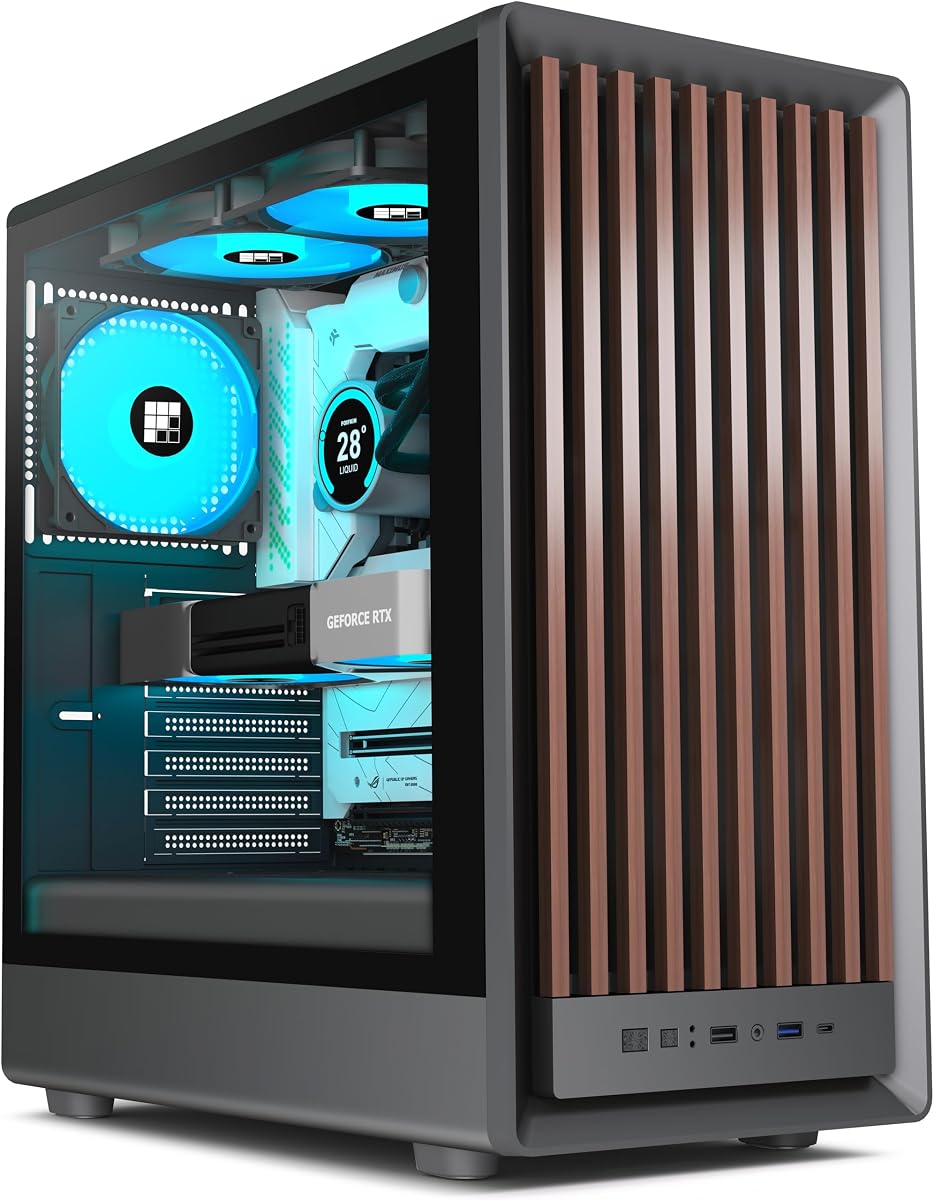
The Okinos Cypress 7 blends genuine walnut wood with a capable modern chassis, and it backs the looks with a fast Type-C 3.2 Gen 2 port rated at 10Gbps. Four pre-installed PWM fans move a strong 200 CFM, a magnetic glass side panel opens without tools, and it holds up to five SSDs for storage-minded builders. It costs more for the wood, but few cases blend warmth and performance so well.

Form Factor
ATX Case
Motherboard Support
ATX / M-ATX / ITX
Cooling
4x 120mm PWM fans, 360mm rad
I/O
Type-C 3.2 Gen 2 (10Gbps)

What we liked

  • Fast Type-C 3.2 Gen 2 10Gbps port
  • Genuine walnut wood front accent
  • Four PWM fans push around 200 CFM
  • Magnetic tool-free glass side panel

Worth noting

  • Side SSD mounts limit fan installation
  • Premium price for the wood finish
3Best High Airflow

NZXT H5 Flow (2024)

The NZXT H5 Flow 2024 is the airflow specialist here, wrapping ultra-fine mesh around the top, front and side to keep temperatures low. A perforated PSU shroud feeds cool air straight to the graphics card, there is room for a 360mm front radiator, and tidy cable channels make for a clean build. With front USB-C and NZXT's polished design, it is a superb everyday high-airflow choice.

Form Factor
Compact ATX Mid-Tower
Motherboard Support
ATX / M-ATX / ITX
Cooling
2x 120mm fans, 360mm front rad
Panel
Tempered glass side

What we liked

  • Fine mesh on three panels for airflow
  • Perforated PSU shroud cools the GPU
  • 360mm front and 240mm top rad support
  • Clean cable channels, hooks and straps

Worth noting

  • Only two fans included
  • Compact frame limits the largest builds
4Best Compact SFF

ASUS Prime AP201

The ASUS Prime AP201 packs surprising capability into a compact 33-litre body, making it the pick for a small-form-factor build with front USB-C. Its quasi-filter mesh panels, drilled with over 57,000 tiny holes, breathe well, and despite the size it fits ATX PSUs, 360mm radiators, 338mm GPUs and up to six fans. Tool-free panels and generous cable cutouts make it a genuinely pleasant small case to build in.

Form Factor
Micro-ATX SFF (33L)
Motherboard Support
M-ATX / ITX
Cooling
Up to 6 fans, 360mm rad
GPU
Up to 338mm

What we liked

  • Compact 33L footprint, SFF-ready
  • Quasi-filter mesh on every panel
  • Supports 360mm radiators and six fans
  • Tool-free side panels and roomy cabling

Worth noting

  • Micro-ATX and ITX boards only
  • GPU limited to 338mm
5Best for Customization

Corsair 4000D RS ARGB Frame

The Corsair 4000D RS ARGB Frame is the choice for builders who like options, and its front I/O panel can be swapped out for more USB ports if you outgrow the default layout. The modular FRAME system lets you upgrade trays and panels later, InfiniRail mounts slide fans wherever airflow needs them, and it supports hidden-connector boards. It is a case designed to change with you rather than lock you in.

Form Factor
Modular ATX Mid-Tower
Motherboard Support
ATX + BTF / Zero / Stealth
Cooling
3x RS ARGB fans, InfiniRail
I/O
Swappable front I/O panel

What we liked

  • Front I/O panel can be swapped for more ports
  • Modular FRAME system upgrades over time
  • InfiniRail slides fans anywhere
  • Ready for hidden-connector motherboards

Worth noting

  • Modular upgrades add to the cost
  • More complex than a fixed-layout case
6Best Dual-Chamber Value

FOIFKIN F600

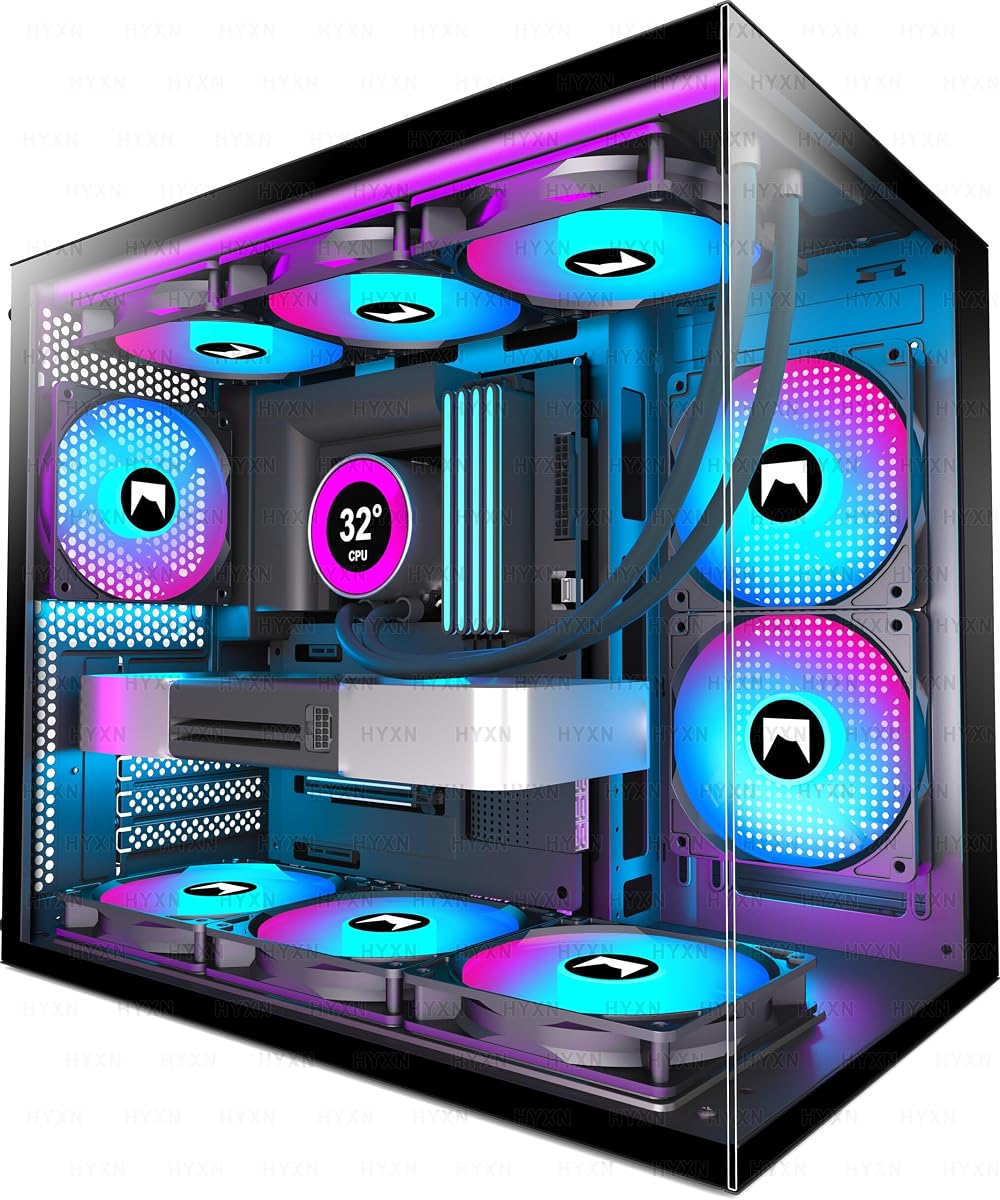
The FOIFKIN F600 delivers a dramatic dual-chamber, panoramic-glass build with front Type-C for a bargain price, and it arrives with seven ARGB PWM fans already fitted. The separated chamber tucks the power supply and cabling out of sight, and it swallows triple 360mm radiators for serious cooling. The brand is less familiar than the big names, but as a cooling-heavy showpiece with modern connectivity on a budget, it delivers a lot.

Form Factor
ATX Mid-Tower
Motherboard Support
ATX / M-ATX / ITX
Cooling
7x 120mm ARGB PWM fans
Panel
270 panoramic glass, Type-C

What we liked

  • Seven ARGB PWM fans included
  • Front Type-C connectivity
  • Dual-chamber layout hides cabling
  • Fits triple 360mm radiators

Worth noting

  • Lesser-known brand with thinner support
  • Reverse-fan layout may confuse first builds
7Best Micro-ATX Value

Cooler Master MasterBox Q300L

The Cooler Master MasterBox Q300L is a longtime budget favourite, and its standout trick is a modular I/O panel that mounts at the front, top or bottom on either side, so your ports sit exactly where you want them. Magnetic dust filters and a perforated design keep it clean and breathing, and it fits 240mm radiators and 360mm GPUs. For a cheap, flexible compact build, it remains a smart buy.

Form Factor
Micro-ATX Compact
Motherboard Support
M-ATX / ITX
Cooling
1x 120mm fan, 240mm rad
I/O
Modular adjustable panel

What we liked

  • Modular I/O panel repositions anywhere
  • Magnetic dust filters included
  • Perforated airflow design
  • Very affordable compact footprint

Worth noting

  • Only one fan pre-installed
  • Micro-ATX and ITX boards only
8Best Budget Airflow

DARKROCK EC2

The DARKROCK EC2 is the value airflow pick, pairing a mesh front and eight-fan capacity with tempered glass and a Type-C-ready panel at one of the lowest prices here. Magnetic dust filters keep the interior clean, and it supports 360mm front radiators and current 50-series graphics cards. It ships with just one fan, so plan to add more, but the airflow-first bones are excellent for the money.

Form Factor
ATX Mid-Tower
Motherboard Support
ATX / M-ATX / ITX
Cooling
8x 120mm fans, 360mm rad
I/O
Type-C ready

What we liked

  • Type-C ready front panel
  • Mesh front for efficient cooling
  • Supports up to eight 120mm fans
  • Magnetic dust filters top and bottom

Worth noting

  • Only one fan pre-installed
  • GPU limited to 340mm
9Best Wood-Accent Value

FOIFKIN M1 Walnut

The FOIFKIN M1 brings a walnut-and-metal aesthetic to a mid-tower at a friendlier price than most wood-accent cases, and it includes four ARGB PWM fans and front Type-C 3.0. The snap-on glass side panel removes without tools, and there is room for up to eight 120mm fans across its mounts. Radiator support tops out at 240mm and the owner rating trails the field, but as an affordable style statement it stands out.

Form Factor
ATX Mid-Tower
Motherboard Support
ATX / M-ATX / ITX
Cooling
4x ARGB PWM fans, 240mm rad
I/O
Type-C 3.0 + USB 3.0

What we liked

  • Walnut front panel adds warmth
  • Four ARGB PWM fans included
  • Front Type-C 3.0 plus USB 3.0
  • Tool-free snap-on glass side panel

Worth noting

  • Only 240mm radiator support
  • Lowest owner rating in this group

How We Chose the Best PC Cases with USB-C

Best PC Cases with USB-C in 2026

Front USB-C has shifted from a premium extra to a near-essential convenience, so we began by confirming that every case here delivers it, then looked closely at the details that separate a token port from a genuinely useful one. Speed and layout mattered: a case like the Okinos Cypress 7 that specifies a 10Gbps Type-C 3.2 Gen 2 port is a different proposition from one merely described as Type-C ready. We noted where the port sits, too, since a well-placed front or side connector is far easier to reach than an awkwardly hidden one.

With connectivity established as a baseline, cooling and clearance decided the ranking. We weighed airflow design, fan capacity and radiator support, along with GPU length limits and motherboard compatibility, because a modern port count means little if the build underneath runs hot or won't fit your hardware. Build quality, cable management and value rounded out the assessment. Finally, we kept the list deliberately varied, from a compact ASUS SFF case to a premium modular Corsair, so there is a sensible USB-C option whatever size and style of build you have in mind.

Front USB-C: Not All Ports Are Equal

It is tempting to treat USB-C as a single feature, but the ports on these cases differ in ways that affect real use. Speed is the big one. The Okinos Cypress 7 leads the field with a Type-C 3.2 Gen 2 port rated at 10Gbps, fast enough to make short work of copying large files off an external SSD. The FOIFKIN M1 lists a Type-C 3.0 port, while several cases, including the DARKROCK EC2 and Lian Li Vector V100, describe their Type-C simply as ready or present without naming a transfer speed. For everyday phone charging and peripherals that gap barely registers, but for frequent large transfers it is worth prioritising a stated fast port.

Placement is the other consideration. Most cases here mount the port on the front panel, which suits a case sitting on or under a desk. The Lian Li Vector V100 instead uses a side-mounted I/O cluster, which can be more convenient when the case sits beside you rather than in front. The Corsair 4000D RS ARGB Frame goes a step further with a swappable front I/O panel, so if you ever want more USB ports you can change the panel rather than the whole case. Match the port's speed and position to how you actually use your machine.

Motherboard Compatibility for USB-C

A detail that catches out first-time builders is that the case's front USB-C is only half the connection. The physical port on the chassis plugs into an internal USB-C header on your motherboard, so if your board lacks that header, the front port simply won't work. Most current motherboards include a front-panel Type-C header, but budget models and older boards sometimes leave it off, so it pays to check your board's specification before you rely on the feature.

Beyond the header, ordinary form-factor compatibility still applies. Most cases here, including the Lian Li Vector V100, NZXT H5 Flow, Corsair 4000D and DARKROCK EC2, take full ATX boards down to Mini-ITX. The compact options, the ASUS Prime AP201 and Cooler Master MasterBox Q300L, are limited to Micro-ATX and ITX, which is worth noting if you have a full-size board. Confirm both the physical board fit and the presence of a front USB-C header, and you avoid the two most common compatibility surprises in this category.

Airflow and Cooling Across the Range

USB-C aside, cooling is what determines whether a case is worth building in, and this list spans a wide range of thermal philosophies. The NZXT H5 Flow 2024 is the airflow purist, wrapping fine mesh around several panels and perforating the PSU shroud to feed cool air directly to the GPU. The ASUS Prime AP201 takes a similar mesh-everywhere approach in a smaller body, with panels drilled full of tiny holes for airflow that belies its compact size.

Fan strategy differs sharply too. The FOIFKIN F600 arrives with seven fans and the Lian Li Vector V100, Okinos Cypress 7 and FOIFKIN M1 each include four, so they are ready to run out of the box. Leaner cases like the DARKROCK EC2 and Cooler Master Q300L include just one fan, expecting you to add your own. Radiator support ranges from the FOIFKIN F600's triple-360mm capacity down to the FOIFKIN M1's single 240mm mount. For a hot build, aim for a mesh-fronted case with plenty of fan mounts and match your radiator plans to the case's stated support before buying.

Clearance and Build Space

Even a beautifully connected case is useless if your graphics card won't fit, so clearance deserves a check. The figures here vary with size. The compact ASUS Prime AP201 handles GPUs up to 338mm and the DARKROCK EC2 up to 340mm, both fine for mainstream cards, while the Lian Li Vector V100 stretches to 420mm for the longest flagships. The FOIFKIN F600 clears 400mm cards inside its dual-chamber shell, leaving room for large modern GPUs.

Interior layout affects the building experience as much as raw clearance. Dual-chamber designs like the FOIFKIN F600 separate the power supply and cabling from the main compartment, which makes for a tidy result but a slightly different assembly process. The Corsair 4000D's modular FRAME system and the Cooler Master Q300L's repositionable I/O panel both add flexibility, letting you adapt the case to your build rather than the other way around. When comparing, pick the case around your largest component and your preferred building style, and the front USB-C becomes the convenient bonus it should be rather than the only reason to buy.

Style, Materials and Finish

Connectivity and cooling settle the ranking, but the way a case looks lives with you every day, and this list offers real variety. The wood-accent designs stand apart: the Okinos Cypress 7 and FOIFKIN M1 both fuse genuine walnut with metal for a warm, natural look that softens a build in a living space rather than a dedicated gaming room. That warmth carries a small premium on the Okinos, and a friendlier price on the FOIFKIN, but both bring a character that plain steel-and-glass towers cannot match.

At the other end sit the showcase and airflow designs. The FOIFKIN F600 leans into drama with 270-degree panoramic glass and pre-installed ARGB fans that light the interior, while the NZXT H5 Flow and DARKROCK EC2 favour a cleaner, mesh-forward look built around function. Compact cases like the ASUS Prime AP201 and Cooler Master MasterBox Q300L keep things understated and space-efficient, suiting a desk where footprint matters more than flair. Because the front USB-C is a given across the whole list, you are free to let material, finish and lighting guide the final choice once cooling and clearance are settled.

A Closer Look at the Top Picks

The Lian Li Vector V100 earns the top spot by being excellent at everything, not just connectivity. Its side USB-C is genuinely handy, but it is the four pre-installed PWM ARGB fans, 420mm of GPU clearance, back-connect board support and tool-less panels that make it the most complete package here. It is the case we would recommend to most people wanting modern connectivity without compromising on cooling or build quality.

Behind it, the Okinos Cypress 7 pairs the fastest, best-specified USB-C on the list with a genuine walnut finish, and the NZXT H5 Flow is the airflow champion for those chasing low temperatures. The ASUS Prime AP201 is the standout small-form-factor pick, while the Corsair 4000D RS ARGB Frame suits builders who want to customise and expand over time. The FOIFKIN F600, Cooler Master Q300L, DARKROCK EC2 and FOIFKIN M1 round out the value end, covering dual-chamber showpieces, flexible compact builds, budget airflow and wood-accent style respectively. Whatever your priorities, there is a well-connected case here to match.

Final Recommendation

For most buyers, the Lian Li Vector V100 is the best PC case with USB-C in 2026, combining convenient connectivity with strong cooling, generous clearance and a genuinely pleasant build experience. If you want the fastest, best-specified port and a touch of natural style, the Okinos Cypress 7's 10Gbps Type-C is the pick, while the NZXT H5 Flow is the choice for pure airflow. Small-form-factor builders should look at the ASUS Prime AP201, tinkerers at the modular Corsair 4000D RS ARGB Frame, and value seekers at the FOIFKIN F600, Cooler Master Q300L or DARKROCK EC2. Just remember to confirm your motherboard has a front USB-C header, and this modern convenience will serve you every day.

How we picked

We judged each case first on its front USB-C connectivity, including the speed and port layout where specified, then on the fundamentals that make a good chassis: airflow and cooling capacity, GPU and radiator clearance, motherboard support, build quality and value. Because Type-C is now common, we treated it as a baseline and let cooling, clearance and price decide the ranking, mixing compact, mainstream and premium designs so the list suits every kind of build.

Frequently asked questions

Why does front USB-C matter in a PC case?

Front USB-C puts a fast, reversible port within easy reach for external SSDs, phones and modern peripherals, instead of forcing you to fumble around the back of the machine. Every case here offers it in some form, from the Okinos Cypress 7's speedy 10Gbps Type-C 3.2 Gen 2 to the side-mounted port on the Lian Li Vector V100. It is one of those conveniences you miss immediately once you've had it.

Are all these USB-C ports the same speed?

No, and it's worth checking. The Okinos Cypress 7 specifies a fast Type-C 3.2 Gen 2 port at 10Gbps, while the FOIFKIN M1 lists a Type-C 3.0 port. Several others, like the DARKROCK EC2, are described simply as Type-C ready without a stated speed. If you regularly move large files off a fast external drive, favour a case that names a 10Gbps or faster port.

Do I need front USB-C support on my motherboard?

Yes. The case provides the physical front port, but it connects to an internal USB-C header on your motherboard, so your board needs one for the port to work. Most modern boards include a front-panel Type-C header, but budget and older models sometimes omit it. Confirm your motherboard has the header before assuming the case's front USB-C will function.

Which USB-C case is best for a small build?

For a genuine small-form-factor build, the ASUS Prime AP201 is the standout, fitting a Micro-ATX or ITX board, a 360mm radiator and a 338mm GPU into a compact 33-litre body with front USB-C. If you want something even cheaper and more flexible, the Cooler Master MasterBox Q300L is a compact Micro-ATX case with a repositionable I/O panel and modern connectivity.

Do any of these cases include fans, or do I buy them separately?

It varies. The FOIFKIN F600 includes seven fans and the Lian Li Vector V100, Okinos Cypress 7 and FOIFKIN M1 each ship with four, so they're ready to build straight away. Others are leaner: the NZXT H5 Flow includes two, while the DARKROCK EC2 and Cooler Master Q300L include just one. Factor extra fans into your budget for the leaner cases if you want strong airflow.