Best Overall for Beginners
NZXT H5 Flow

- Fine mesh airflow panels with two quiet 120mm fans included
- Compact ATX layout with 360mm front radiator upgrade room
- Cable channels, hooks, and straps that forgive first routing attempts
Expert Review & Guide
Choosing a PC case as a beginner is less about the flashiest render and more about finishing a cool, working computer without a parts crisis on night two. The right chassis gives honest GPU clearance, front I/O you understand, dust filters you will clean, and—ideally—enough stock fans that the system breathes before you become an amateur airflow engineer. Mesh mid-towers, compact ATX airflow boxes, and dual-chamber glass kits can all work; they simply ask for different patience.
This guide uses only the ten products in our best-pc-cases-for-beginners pack: DARKROCK EC2, RUIX OV303, MOROVOL 621, FOIFKIN F600, Cooler Master Q300L, NZXT H5 Flow, two HYXN H3 dual-chamber kits, the white ANSAITE C9, and a padded ATX/M-ATX carrying bag. We ranked them for first-build forgiveness, included cooling, clearance honesty, and how clearly each layout matches common tutorial footage.
Start with the three top picks for a shortlist, then use the comparison table and full reviews to match ATX versus Micro-ATX plans, RGB ambition, and desk space. You will not find dollar prices here—only fit, airflow behavior, and the tradeoffs that show up after the side panel closes.


As an Amazon Associate we earn from qualifying purchases. We may earn a commission at no additional cost to you.
Compare stock fans, board size, and clearance before you commit. Specs focus on cooling layout and build flexibility so you can shortlist quickly.

The DARKROCK EC2 is a conventional ATX mid-tower for builders who want mesh airflow and a glass window without jumping into a dual-chamber aquarium. The motherboard tray and drive layout behave like most first-build tutorials, while Type-C readiness, magnetic dust filters, and a tempered glass side keep the chassis feeling current.
Cooling potential is strong on paper: mesh intake, up to eight 120mm fans, and a 360mm front radiator. Treat the single pre-installed fan as a starting point, not a finished plan.
Clearance is honest rather than maximal. Up to 340mm for graphics cards and 200mm for power supplies covers many mainstream parts, but measure your card including the power-connector bend.
Dust control is better than many entry boxes. Separate magnetic filters on the top and bottom make cleaning a monthly wipe instead of a teardown.
Choose the EC2 if you already own fans or enjoy picking a matched kit, and if you prefer a traditional mid-tower silhouette. Skip it if you need a turnkey fan bundle or a GPU longer than roughly 340mm.
First builders who already planned a fan purchase will get the most value.
Install front intakes before the GPU so you can reach the screws.
We may earn a commission at no additional cost to you.
The RUIX OV303 is one of the friendliest open-the-box mid-towers in this pack. Four 120mm prism ARGB PWM fans are already mounted, which removes the classic beginner surprise that the case only included a lonely rear exhaust.
Spacious internals are the second win. Graphics cards up to 420mm, room for multiple drives, and a layout that can take up to ten fans or a 360mm AIO give you space to grow.
The built-in GPU support bracket matters in 2026. Mid-range and higher cards are long and heavy; sag that starts as a cosmetic curve can become a seating problem months later.
Front I/O is current enough for student and creator desks, with USB 3.0 and Type-C for phones, portable SSDs, and controllers. Magnetic dust filters make maintenance realistic.
The honesty check is size and visibility. A panoramic case rewards tidy builds and punishes spaghetti lighting every evening.
Pick the OV303 for an ATX gaming PC with a long dual- or triple-fan GPU, especially if ARGB is part of the fun and you refuse a separate fan project before the weekend is over.
Confirm motherboard ARGB headers or the case controller path.
We may earn a commission at no additional cost to you.

MOROVOL’s 621 mid-tower is the classic beginner value move: a mesh-front ATX case that arrives with four 120mm RGB fans already installed. For someone assembling their first PC on a tight parts list, that fan count can be the difference between a complete-looking system and a quiet disappointment that needs another shopping cart before games stay cool.
Clearance is where you must read twice. GPU length up to 300mm, CPU cooler height up to 155mm, and PSU length up to 160mm work for many mainstream cards and mid-size air coolers, but they are not generous by 2026 standards.
Motherboard support spans ATX, Micro-ATX, and Mini-ITX, and storage lands at two 2.5-inch plus two 3.5-inch drives. The I/O panel sticks to USB 3.0, dual USB 2.0, and audio.
Lighting caveat: the included fans use fixed RGB, not addressable RGB. They look lively in the window, but do not expect per-LED motherboard sync the way ARGB kits advertise.
Build experience is approachable. Removable glass beats wrestling a solid steel door, and the diamond mesh keeps GPU intake from relying on a sealed plastic front.
Students building around shorter dual-fan GPUs and compact air coolers will feel at home.
Verify GPU length under 300mm, cooler height under 155mm, and PSU length under 160mm.
We may earn a commission at no additional cost to you.

The FOIFKIN F600 matches the dual-chamber glass photos many beginners save: high-hardness tempered panels, seven 120mm ARGB PWM fans, and a split layout that parks the power supply away from the motherboard stage. That separation can help thermals and—more importantly for newcomers—gives thick cables a dedicated place to disappear.
Fan configuration is unusually complete, with reverse-blade intakes aimed at clean glass presentation and PWM control so you can calm the chorus after thermal testing. More fans are not automatically cooler if they fight each other, so learn a simple intake-to-exhaust story before rearranging the factory layout.
Cooling ceiling is high on paper, including claims of multiple 360mm radiators. Few first builds need that, but it signals radiator real estate was not an afterthought.
Glass-forward design is both appeal and homework. Every unused header plug shows.
For beginners who want the fishbowl look without buying fans separately, the F600 removes a huge obstacle. The tradeoff is complexity versus classic single-chamber tutorials—watch one dual-chamber build video before you start, and seat the Type-C header carefully.
Streamers, RGB enthusiasts, and careful first builders who enjoy assembly as much as gaming will like this chassis.
Install the PSU and route main power cables through the chamber divide before mounting the motherboard.
We may earn a commission at no additional cost to you.
The Cooler Master Q300L V1 remains a beginner classic because it teaches good habits in a small package. You get a Micro-ATX or Mini-ITX chassis with perforated panels, magnetic dust filters, a transparent side, and a modular I/O panel you can reposition when the desk sits against a wall and USB ports need a new facing.
Clearance is stout for a cube: graphics cards up to 360mm, CPU coolers up to 159mm, and PSUs up to 160mm. A 240mm AIO and up to five fans cover liquid or air plans without needing a full mid-tower.
The open thermal design invites air—and also more dust and more fan noise into the room than thick steel towers. Keep filters clean and give the perforated sides room to breathe.
Building here teaches spatial awareness. Cable space exists but is not luxurious.
As a first case for compact gaming or productivity PCs, the Q300L shines when desk real estate is scarce. It also pairs naturally with the padded carrying bag later in this guide for LAN or campus moves.
Dorm rooms, shared apartments, and tight desks where a mid-tower crowds the monitor.
Start with a quality intake and exhaust pair, then add another fan if GPU heat demands it.
We may earn a commission at no additional cost to you.
NZXT’s H5 Flow is our best overall beginner pick because it matches how first builds actually succeed: clear airflow, enough stock cooling to boot confidently, and cable tools that forgive imperfect first attempts. Ultra-fine mesh on key panels pulls air with less restriction while still filtering dust—more useful on night one than seven uncontrolled fans with nowhere to hide wires.
Two pre-installed Quiet Airflow 120mm fans—one front, one rear—tell a coherent intake-to-exhaust story. You can game on that pair while learning fan curves, then add more later.
GPU cooling benefits from a PSU shroud perforated on the side and bottom so air can feed the card. Cable management uses wide channels, hooks, and straps that reduce the classic side-panel-won’t-close panic.
The compact ATX format is a sweet spot: full ATX support without the desk bulk of the widest dual-chamber showcases. It feels quieter in spirit than perforated cubes and less chaotic than dense ARGB kits.
Install motherboard and cooler before the GPU, route 24-pin and EPS through the recommended channels, and use the straps even when cables look good enough. Fine mesh needs occasional vacuuming or temperatures creep up slowly.
It rewards standard tutorial steps, includes a coherent two-fan kit, and gives straps instead of hoping zip ties alone will save the panel.
Add a front intake or top exhaust when GPU heat climbs, or migrate to a 240mm or 360mm AIO later.
We may earn a commission at no additional cost to you.
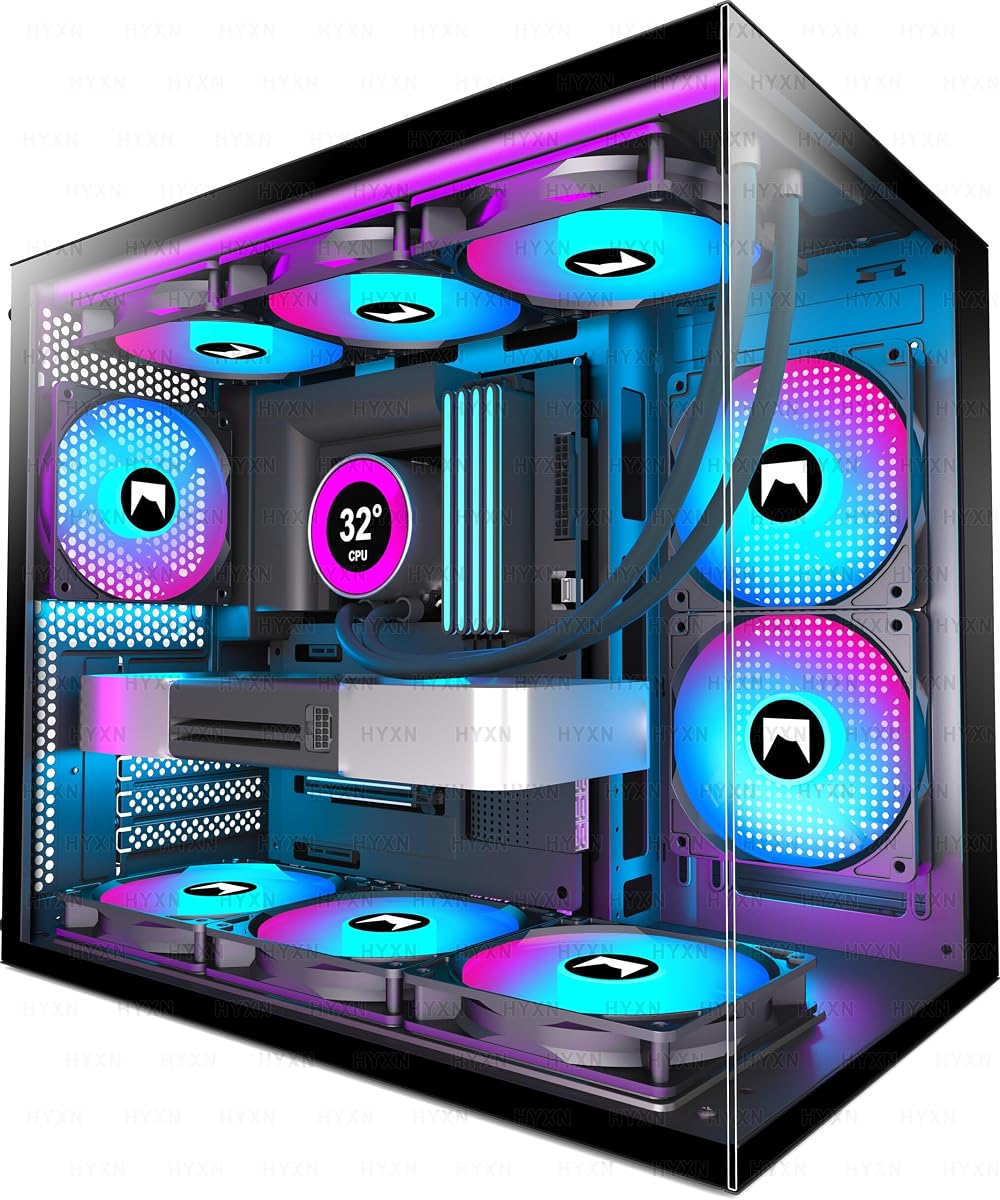
The HYXN H3 three-fan dual-chamber case introduces aquarium-style layout without the full seven-fan carnival. Transparent tempered glass shows the hardware, while the dual cavity splits the PSU and drives from the motherboard stage.
Included cooling is modest: two reverse ARGB fans and one forward fan. That can establish airflow if oriented thoughtfully and enough light to justify the glass.
Compatibility covers ATX through Mini-ITX, GPUs to 400mm, PSUs to 200mm, and roughly one HDD plus two SSDs, with 360mm radiator support. Read B-mode Micro-ATX notes if you combine a thick AIO with this compact glass kit.
The A/B partition and anchor points are beginner-positive physical reminders of where cables should go. Compact dual-chamber cases still punish bulky PSUs and over-long cable kits—prefer modular power and seat the 24-pin before the GPU.
Market feedback sits lower than several alternatives, so check recent owner photos for panel fit and fan-hub behavior. Dry-fit panels and test ARGB before the final motherboard mount.
Builders who like dual-chamber photos but have limited vertical shelf space, and who already own an extra fan or two, will get along with the three-fan kit—especially when Type-C 3.2 is non-negotiable.
Keep PSU sleeving in the rear chamber and only pass the connectors you need.
We may earn a commission at no additional cost to you.

The ANSAITE C9 in white is for beginners who know they want a bright panoramic PC and refuse to buy fans a la carte. Seven prismatic ARGB PWM fans ship installed, with reverse blades on side intakes and exhausts up top and rear to encourage vertical heat escape.
The 270° tempered glass approach is the product: it showcases hardware and offers a bit more acoustic buffering than fully open mesh cubes. Keep magnetic dust filters on—white interiors make dust galaxy-bright under ARGB.
Space claims welcome big parts: GPUs to 440mm, CPU coolers to 180mm, top 360mm radiator support, and PSUs to 220mm. That cooler height matters if you want a dual-tower air cooler before learning AIO mounting.
Front USB 3.2 Gen 2 Type-C is practical for portable SSD game libraries and class video projects when the host supports it. Seat the Type-C motherboard header with alignment pins visible—forcing it is a classic beginner mistake that yields a dead port and an unnecessary return.
Challenges are predictable: fingerprints, dust, and seven fans humming if you never set a PWM curve. The layout wants dual-path thinking even when older tutorials show single-chamber steps.
Use a lens-safe microfiber cloth, not paper towels.
Connect the ARGB chain to one motherboard header or the recommended controller path.
We may earn a commission at no additional cost to you.

The six-fan Infinity Mirror HYXN H3 is the flashier twin of the three-fan model: same compact dual-cavity ATX idea, same glass priorities, but with five reverse and one forward Infinity Mirror PWM ARGB fans filling the visual frame. Beginners who chose PC building partly for those endless-tunnel fan photos get the look without delaying the project for another fan order.
More PWM fans mean finer noise-versus-temperature control once the system posts. Pair dense LEDs with a restrained motherboard lighting profile if you study late.
Clearances mirror the sibling: ATX through Mini-ITX, GPUs to 400mm, PSUs to 200mm, 360mm radiator support, and compact dimensions that help on shelves. Back-mounted motherboard compatibility is a bonus for newer reverse-connector boards—verify your exact board’s requirements before assuming every feature lines up.
Respect glass and fan weight during assembly. Test the ARGB chain before final combing.
Compared with the ANSAITE C9, this H3 is more compact and black-focused. Compared with FOIFKIN, you trade one fan and some radiator fantasy for a shorter footprint.
Power the ARGB chain from one logical controller path and sync to the motherboard if supported.
Anyone who wants the case to look finished at first boot without ordering more fans.
We may earn a commission at no additional cost to you.
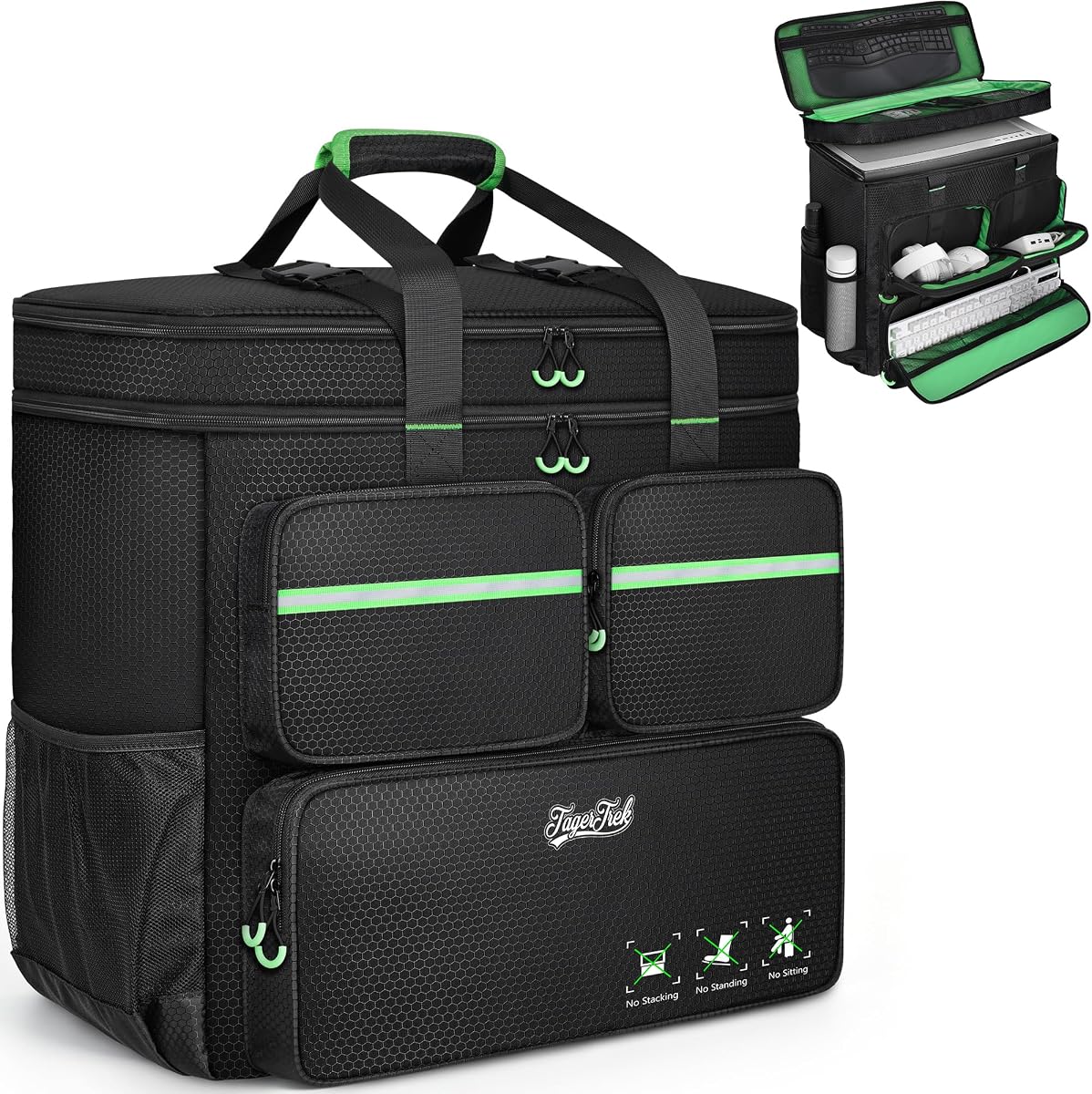
Not every product in a beginner case roundup must be metal. This ATX/M-ATX carrying bag exists because first systems often travel: campus to home, apartment to LAN, desk to repair shop.
Protection features matter more than logos. Thick padding, a securing buckle, water-resistant polyester, and solid stitching help keep a GPU from slamming into a tray when you misjudge a curb.
Organization pockets turn the bag into a mini deploy kit. Space for a keyboard under roughly 19.7 inches plus front pockets for cables, mouse, or charger means fewer arrivals missing a display adapter.
Carry modes include backpack straps and a handle. Stairs favor backpack mode; flat hallway carries may prefer the handle.
This accessory pairs especially well with the Cooler Master Q300L and other compact chassis here. It is a weaker match for the widest 270° showcases if your tape measure exceeds the listed envelope.
Park drives, power down fully, and use the internal buckle.
Measure height, width, and depth with cables detached.
We may earn a commission at no additional cost to you.

First gaming PCs often run warmer than expected because cables block intake and dust coats mesh within months.
A case with one stock fan is unfinished cooling.
ATX boards need ATX-capable cases; Micro-ATX boards fit most ATX cases, but not every compact cube accepts full ATX.
Panoramic dual-chamber cases look incredible and punish messy cables.
For most first ATX builds in this pack, the NZXT H5 Flow is the safest all-around answer: compact mesh airflow, two quiet stock fans, radiator room later, and cable channels that forgive mistakes. If you want more included ARGB fans and a GPU sag bracket, choose the RUIX OV303. Micro-ATX builders on tight desks should look at the Cooler Master Q300L.
Plan for at least one dedicated intake and one exhaust, which is why two-fan kits like the H5 Flow can work immediately. Three to four fans are more comfortable for modern GPUs. Seven-fan kits cool well but add cable complexity.
Yes if you enjoy the building process and will follow cable-partition steps—FOIFKIN and HYXN hide PSUs beautifully. No if you want the fastest path from parts to games and get anxious about visible cables; a mesh mid-tower or the H5 Flow will frustrate you less while you learn.
Micro-ATX is better when desk space is scarce and fewer expansion slots are fine, which is why the Q300L stays popular. ATX is better for maximum future board options and easier cable space in mid-towers. Matching the case to the board you already purchased is what prevents returns.
It is not mandatory, but it is increasingly convenient for phones and portable SSDs. Several cases here include Type-C or USB 3.2 Gen 2 Type-C. The port only works if you connect the header to a compatible motherboard; without that header, the front jack stays decorative.
Take the official graphics card length and add margin for cables and front fan thickness. MOROVOL’s roughly 300mm limit is the tightest among these towers, while RUIX and ANSAITE stretch to 420–440mm. When you are between sizes, choose the more generous case.
Usually yes, because they solve cooling and aesthetics together and reduce packages to coordinate. Prefer PWM fans you can slow down. Fixed RGB, as on the MOROVOL 621, still lights the case but will not offer the same motherboard sync tricks as ARGB kits.
A padded ATX/M-ATX bag helps for stairs, cars, and campus walks, but it does not make tempered glass invincible. Measure fit carefully, use the internal buckle, and consider removing heavy GPUs for rough trips. Soft bags complement a good chassis; they do not replace thoughtful packing.
Very. Fine mesh without a cleanable filter becomes a dusty heater. Magnetic top and bottom filters, like those on the DARKROCK EC2 and RUIX OV303, make maintenance realistic.
Beginner PC cases succeed when they help you finish: honest clearance, usable stock cooling, filters you will clean, and a layout that matches your patience for cables. In this pack, the NZXT H5 Flow is the most balanced first ATX chassis, the RUIX OV303 is the fan-and-bracket shortcut for long GPUs, and the Cooler Master Q300L remains the compact Micro-ATX specialist.
If you are building for glass photos, FOIFKIN, ANSAITE, and the HYXN H3 kits deliver dual-chamber theater with dense ARGB bundles—bring extra care for wiring and dust. DARKROCK and MOROVOL cover more traditional mesh paths with different fan and clearance tradeoffs. Add the padded carrying bag when your first PC needs to travel.