Skip to content

Best OLED Gaming Monitors in 2026

By Priya NairUpdated July 5, 2026

We may earn a commission from links on this page, at no extra cost to you. Learn more.

For gaming, OLED is close to a cheat code. Pixels that light themselves give you perfect blacks and infinite contrast, so shadowed corners of a map hide nothing you cannot see, while the near-instant 0.03ms response time wipes out the smearing and ghosting that plague slower panels. Add refresh rates that now climb past 280Hz and you get motion so clean it feels like the frames are painted onto glass. The old worries about brightness and burn-in still deserve respect, but modern panels handle both far better. This guide ranks nine of the best OLED gaming monitors of 2026, from affordable 27-inch QD-OLED screens to dual-mode 4K powerhouses, so there is a right pick whether you chase esports frame rates or cinematic single-player worlds.

Top 9 Best OLED Gaming Monitors

Best Overall4.8
Best Glossy Panel4.7
Best Value QD-OLED4.7
Best for Esports4.6
Best Budget OLED4.4
Best Color Accuracy4.4
Best Everyday Value4.4

Our top 9 picks, reviewed

1Best Overall

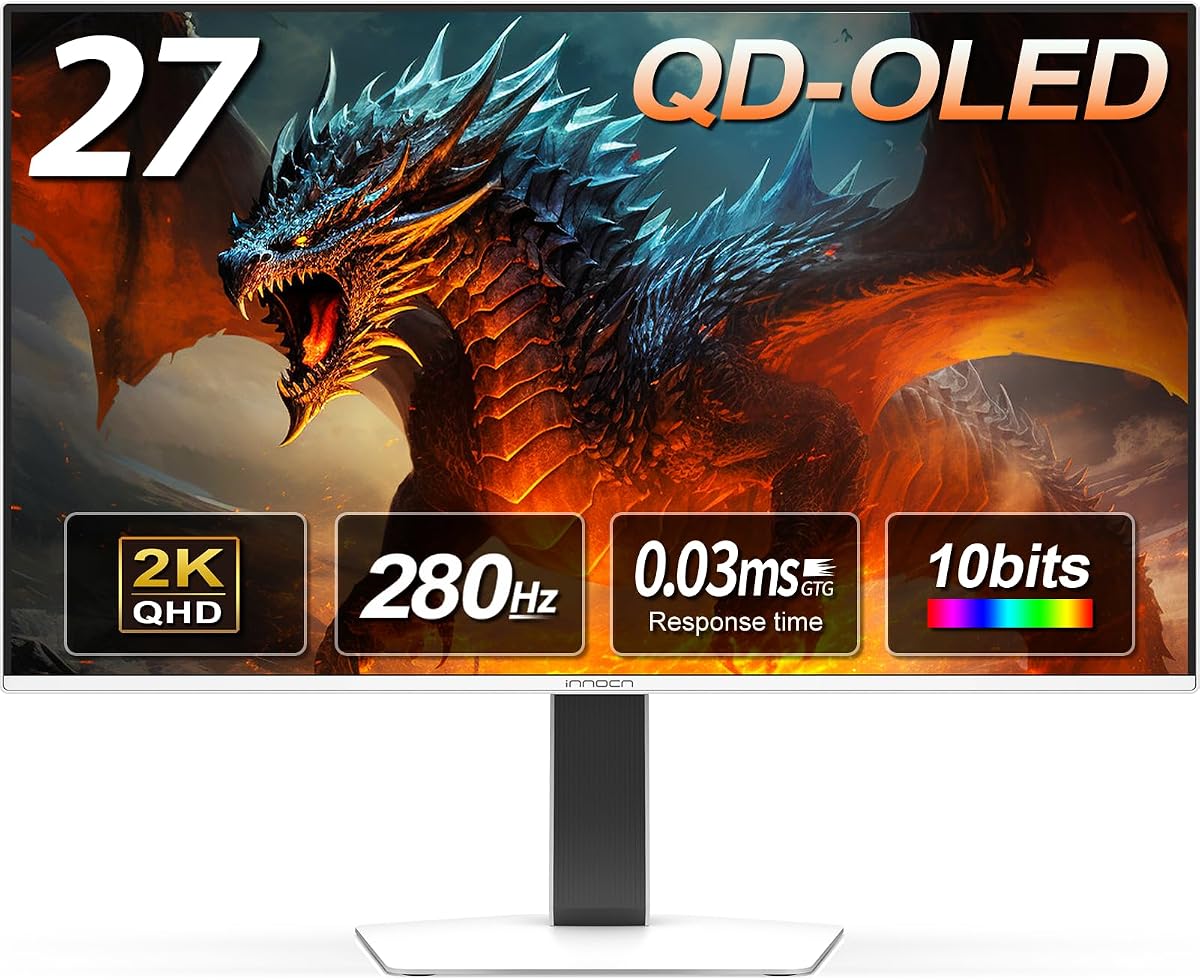
INNOCN 27in QD-OLED 2780s

The INNOCN 2780s is the best all-round OLED gaming monitor here, marrying a genuine 27-inch QD-OLED panel to a 280Hz refresh and a 0.03ms response for blur-free competitive play. Perfect blacks, vivid QD-OLED color and HDMI 2.1 for consoles come at a price that undercuts the majors, and it tops the owner ratings on this list. A superb, well-rounded choice for almost any gamer.

Panel
27in QD-OLED QHD
Resolution
2560x1440
Refresh
280Hz
Response
0.03ms

What we liked

  • Top owner rating on the list
  • Fast 280Hz refresh at a fair price
  • QD-OLED blacks and rich color
  • HDMI 2.1 for PS5 and Xbox

Worth noting

  • Brand less known than LG or ASUS
  • Built-in speaker is basic
2Best 4K Gaming

LG 32GX850A UltraGear 4K OLED

The LG 32GX850A is the pick for players who want it all: a razor-sharp 32-inch 4K OLED for cinematic single-player games, with a dual-mode switch that drops to Full HD at a searing 330Hz when you queue for ranked. Micro Lens Array+ boosts brightness beyond older UltraGear panels, and DisplayHDR True Black 400 plus a fully adjustable stand complete a flagship-grade gaming display.

Panel
32in Glossy OLED 4K
Resolution
3840x2160
Refresh
Dual 165/330Hz
Response
0.03ms

What we liked

  • Crisp 4K glossy OLED at 32in
  • Dual-mode 165Hz 4K or 330Hz FHD
  • Micro Lens Array+ lifts brightness
  • Full stand and DisplayHDR True Black

Worth noting

  • Premium price
  • Native 4K needs a strong GPU
3Best Glossy Panel

LG 27GX704A UltraGear OLED

LG's 27GX704A goes glossy for extra pop, and the payoff is a strikingly vivid 27-inch QHD OLED that peaks at 1300 nits so HDR highlights truly gleam. Anti-glare, flicker-free and low-blue-light UL certifications keep it comfortable through marathon sessions, while 240Hz, a 0.03ms response and both G-Sync and FreeSync guarantee smooth, tear-free play. A gorgeous all-rounder for immersive and competitive gaming alike.

Panel
27in Glossy OLED QHD
Resolution
2560x1440
Refresh
240Hz
Response
0.03ms

What we liked

  • Bright glossy OLED up to 1300 nits
  • Three UL eye-comfort certifications
  • 240Hz with G-Sync and FreeSync
  • DisplayHDR True Black 400

Worth noting

  • Glossy finish reflects in bright rooms
  • QHD rather than 4K
4Best Value QD-OLED

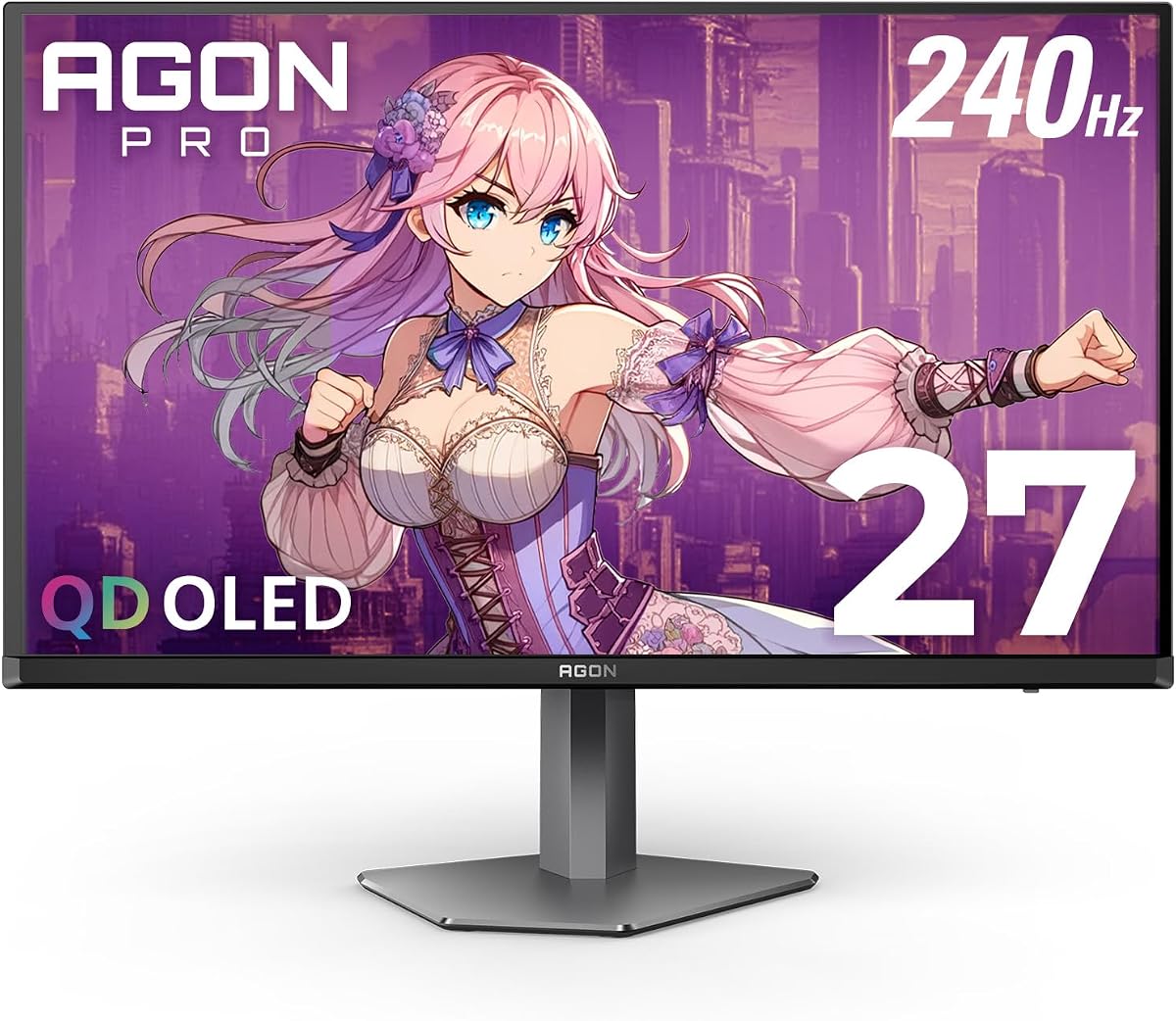
AOC Q27GAZDV 27in QD-OLED

The AOC Q27GAZDV is the smart-money QD-OLED gaming monitor, delivering true blacks, 110% DCI-P3 color and a 240Hz refresh at a price that shames the big names. A 0.03ms response, HDMI 2.1 for PC and console, a built-in USB hub and a height, tilt, swivel and pivot stand make it as practical as it is fast. For most players it is the sweet spot between OLED quality and cost.

Panel
27in QD-OLED QHD
Resolution
2560x1440
Refresh
240Hz
Response
0.03ms

What we liked

  • Strong value for QD-OLED
  • 240Hz with 0.03ms response
  • HDMI 2.1 plus a USB hub
  • Fully adjustable ergonomic stand

Worth noting

  • No 4K resolution
  • Peak brightness trails LG glossy panels
5Best for Esports

Acer Predator X27U QD-OLED

The Acer Predator X27U is built for the competitive crowd, its 26.5-inch QD-OLED sitting squarely in your field of view with ZeroFrame bezels that disappear in multi-monitor rigs. True 10-bit color, 99% DCI-P3 and Delta E under 2 make it accurate as well as quick, and with 240Hz, a 0.03ms response and four high-speed inputs, it is an esports-ready panel that does not skimp on picture quality.

Panel
26.5in QD-OLED WQHD
Resolution
2560x1440
Refresh
240Hz
Response
0.03ms

What we liked

  • 99% DCI-P3 with Delta E under 2
  • Dual DP 1.4 and dual HDMI 2.1
  • ZeroFrame bezels for multi-monitor
  • Fully adjustable stand

Worth noting

  • 26.5in is a touch smaller than 27in
  • No 4K option
6Best 4K Value

ASUS ROG Strix XG32UCWMG 4K OLED

The ASUS ROG Strix XG32UCWMG packs remarkable versatility into a 32-inch 4K OLED, with a dual-mode switch that runs sharp 4K at 240Hz or Full HD at a jaw-dropping 480Hz for competitive shooters. Its TrueBlack Glossy WOLED panel is zero-haze for crisp imagery, and ASUS OLED Care Pro with a Neo proximity sensor guards against burn-in. A three-year warranty and USB-C round out a strong package.

Panel
32in TrueBlack Glossy WOLED
Resolution
3840x2160
Refresh
Dual 240/480Hz
Response
0.03ms

What we liked

  • Dual-mode 4K@240Hz or FHD@480Hz
  • TrueBlack Glossy zero-haze panel
  • OLED Care Pro with proximity sensor
  • USB-C, HDMI 2.1 and 3-year warranty

Worth noting

  • Big 32in panel needs desk depth
  • 480Hz mode drops to Full HD
7Best Budget OLED

Samsung Odyssey OLED G5 (G50SF)

The Samsung Odyssey OLED G5 is the affordable way into QD-OLED gaming, reproducing over 2100 Pantone-validated colors while a thermal-modulation OLED Safeguard system fends off burn-in. Its glare-free finish suits bright rooms, and a 0.03ms response keeps motion clean. The 180Hz refresh sits behind the 240Hz-plus crowd, but for most players it is plenty smooth and the price is hard to argue with.

Panel
27in QD-OLED QHD
Resolution
2560x1440
Refresh
180Hz
Response
0.03ms

What we liked

  • Low price for genuine QD-OLED
  • OLED Safeguard burn-in protection
  • Pantone-validated color
  • Glare-free matte finish

Worth noting

  • 180Hz slower than rivals here
  • HDR10 only, no True Black cert
8Best Color Accuracy

ASUS ROG Strix XG27AQDMG OLED

The ASUS ROG Strix XG27AQDMG leans on third-generation WOLED for brighter whites, clearer text and 99% DCI-P3 color, making it a strong pick where accuracy matters. A custom heatsink and ASUS OLED Care functions reduce burn-in risk, ROG's Anti-flicker tech smooths refresh-rate fluctuations, and an optional uniform-brightness mode keeps luminance consistent. It costs more than QHD peers, but the engineering behind the panel shows.

Panel
26.5in Glossy WOLED QHD
Resolution
2560x1440
Refresh
240Hz
Response
0.03ms

What we liked

  • 99% DCI-P3 3rd-gen WOLED
  • Custom heatsink cuts burn-in risk
  • OLED Anti-flicker technology
  • Uniform brightness option

Worth noting

  • Priced high for a QHD panel
  • 26.5in smaller than some rivals
9Best Everyday Value

Samsung Odyssey G5 (G51F)

The Samsung Odyssey G5 (G51F) is the budget wildcard here, a 27-inch QHD gaming monitor at the lowest price on the list. It is not an OLED panel, so it cannot match the perfect blacks of its siblings, but with HDR10, a 180Hz refresh, a 1ms response and gamer aids like Black Equalizer and Virtual Aim Point, it is a capable, wallet-friendly display for players not ready to spend on OLED yet.

Panel
27in QHD
Resolution
2560x1440
Refresh
180Hz
Response
1ms

What we liked

  • Lowest price on the list
  • QHD sharpness and HDR10
  • Black Equalizer and Virtual Aim Point
  • Height-adjustable stand

Worth noting

  • Not an OLED panel
  • 1ms response and 180Hz trail OLED rivals

How We Chose the Best OLED Gaming Monitors

Best OLED Gaming Monitors in 2026

Ranking OLED gaming monitors means balancing two things that used to pull in opposite directions: picture quality and speed. OLED delivers both, but the panels here differ in how much of each they emphasise, and in the practical details that decide whether a monitor earns a permanent place on your desk. We started with owner ratings, because a gaming monitor lives or dies on real-world reliability, motion feel and how it holds up over months of use, not on a spec sheet alone. Product number broke any ties so the order stays fair and repeatable.

From there we weighed the specs that shape competitive and immersive play in equal measure. Refresh rate and response time came first, since they define motion clarity and the feeling of connection between input and screen. Contrast and black level were next, because OLED's perfect blacks are its signature advantage in dark games. We then looked at resolution and size, color coverage, adaptive-sync support, HDMI 2.1 for consoles, burn-in mitigation and stand ergonomics. Finally we kept the list varied, from a budget QHD screen to dual-mode 4K flagships, so there is a right answer for every kind of gamer.

Why OLED Wins for Gaming

The single biggest reason OLED transforms gaming is contrast. Because each pixel makes its own light and can switch off entirely, black is genuinely black, not a dim gray glow. In a horror game or a night map, that means shadows keep their depth while still revealing the detail you need to spot an enemy, and HDR highlights like explosions or muzzle flashes punch out of the darkness with drama an LCD cannot reproduce. The AOC Q27GAZDV, Acer Predator X27U and LG UltraGear panels all lean on this to make dark scenes come alive.

The second reason is motion. OLED pixels change state almost instantly, which is why every gaming panel here quotes a 0.03ms gray-to-gray response time. Paired with refresh rates that now reach 280Hz on the INNOCN 2780s and even 480Hz in the ASUS XG32UCWMG's Full HD mode, that near-zero response wipes out the smearing and ghosting that blur fast action on slower screens. Add adaptive sync, with G-Sync and FreeSync support across the list, and frames stay tear-free and low-latency. The result is motion so clean it can feel like a different medium, which is exactly what competitive players and cinematic single-player fans both want.

Refresh Rate, Response Time and Adaptive Sync

For gaming, the trio of refresh rate, response time and adaptive sync decides how a monitor feels in your hands. Refresh rate is how many times per second the panel redraws; higher numbers mean smoother motion and lower perceived latency, which matters most in fast shooters. This list runs from a fluid 180Hz on the Samsung Odyssey OLED G5 up to 280Hz on the INNOCN 2780s, with the dual-mode LG 32GX850A and ASUS XG32UCWMG unlocking 330Hz and 480Hz respectively when you drop to Full HD. Beyond a certain point the gains are subtle, but for ranked play every extra hertz can help.

Response time governs how quickly a pixel shifts color, and here OLED simply wins: 0.03ms across the board means motion clarity that LCD panels struggle to touch even with aggressive overdrive. Adaptive sync ties it together by matching the monitor's refresh to your GPU's output, eliminating the tearing and stutter that appear when the two fall out of step. Every OLED here supports G-Sync Compatible, FreeSync or both, so whatever graphics card you run, you get smooth, tear-free frames. When those three work in concert, the game feels instantaneous, which is the whole point.

Matching the Monitor to Your Games

For Competitive Shooters

If you play ranked FPS titles, prioritise refresh rate and a size that fits your field of view. The INNOCN 2780s and its 280Hz panel top the fast crowd while earning the best owner rating here, and the Acer Predator X27U's 26.5-inch QD-OLED is a classic esports size with bezel-free edges. For the ultimate frame rates, the ASUS XG32UCWMG hits 480Hz in Full HD mode.

For Cinematic Single-Player

For story-driven games where atmosphere matters, sharpness and immersion come first. The LG 32GX850A delivers 4K on a 32-inch glossy OLED for breathtaking detail, and the glossy LG 27GX704A peaks at 1300 nits for HDR scenes that dazzle. Both wring the most from OLED's perfect blacks in moody, dramatic worlds.

For Console Players

If you game on a PS5 or Xbox Series X, HDMI 2.1 is essential. The AOC Q27GAZDV, Acer Predator X27U and the LG panels all include it, ready to run high-refresh 1440p or 4K from a console rather than capping you at lower frame rates. The AOC in particular offers console-ready connectivity at a friendly price.

For Tight Budgets

Not everyone can spend flagship money, and that is fine. The Samsung Odyssey OLED G5 brings genuine QD-OLED quality at the low end, while the non-OLED Samsung Odyssey G5 (G51F) is the cheapest way onto a sharp 180Hz QHD gaming screen if you are not ready to commit to OLED yet.

Burn-In: How Worried Should Gamers Be?

Burn-in is the question every OLED buyer asks, and for gamers the honest answer is that the risk exists but is much smaller than reputation suggests, especially with 2026 panels. The danger comes from static elements, a persistent HUD, health bar, minimap or scoreboard, being displayed at high brightness for very long stretches. Games vary their imagery constantly, which naturally reduces the risk compared with, say, leaving a spreadsheet open all day, so pure gaming use is relatively kind to an OLED.

The panels here also fight back with hardware and software. Samsung's OLED Safeguard uses a thermal-modulation system to keep the screen cool, LG runs automatic pixel-refresh and pixel-shift routines, and the ASUS ROG models add a custom heatsink plus OLED Care Pro with a Neo proximity sensor that blanks the screen when you step away. Follow a few habits, run at a sensible brightness rather than maximum, hide the taskbar, let the panel run its maintenance cycles overnight, and enable any anti-static-image features, and burn-in becomes an unlikely footnote rather than a looming threat. The ASUS panels' three-year warranty and LG's panel coverage add further peace of mind.

It also helps to think about how you actually use the screen between gaming sessions. The higher-risk scenario is not gaming at all but leaving a bright, static desktop, a fixed toolbar, a stock ticker or a paused video, glowing in the same spot for hours every day. If your OLED doubles as a work monitor, set a short screen timeout, use a dark theme, and move or auto-hide persistent interface elements so no single pixel carries the same bright image indefinitely. The ASUS ROG panels' proximity sensor handles some of this automatically, and every monitor here runs compensation cycles that even out pixel wear over time. Treat those features as allies rather than nuisances, and an OLED gaming monitor should stay pristine for years of mixed play and productivity.

Resolution, Size and the Dual-Mode Trick

Choosing a size and resolution for an OLED gaming monitor is really a question about your graphics card and your games. Most competitive players gravitate to 27-inch QHD panels like the INNOCN 2780s, AOC Q27GAZDV and LG 27GX704A, because 2560x1440 is sharp enough to look great yet light enough for a mid-range GPU to push very high frame rates. Drop to the 26.5-inch Acer Predator X27U or ASUS XG27AQDMG and the image sits neatly inside your field of view, an ergonomic advantage in fast-paced shooters where you want to take in the whole screen at a glance.

Bigger 4K panels tell a different story. The LG 32GX850A and ASUS XG32UCWMG deliver stunning detail on a 32-inch canvas, ideal for cinematic single-player worlds, but native 4K at high refresh demands a powerful card. This is where the dual-mode trick shines: both monitors let you flip between crisp 4K at a lower refresh and Full HD at an extreme refresh, so the same screen serves a story campaign one evening and a ranked session the next. The LG runs 165Hz in 4K or 330Hz in Full HD, while the ASUS pushes an astonishing 480Hz. It is a genuinely useful feature that lets one panel wear two hats, and it is worth seeking out if your gaming spans both immersive and competitive genres.

Final Recommendation

For most players, the INNOCN 2780s is the best OLED gaming monitor in 2026, combining a fast 280Hz QD-OLED panel, HDMI 2.1 for consoles and the highest owner rating here at a price that undercuts the majors. If you want maximum sharpness, the LG 32GX850A brings dual-mode 4K, while the ASUS XG32UCWMG offers a compelling 4K value with a wild 480Hz Full HD mode. The AOC Q27GAZDV is the QD-OLED value champion, the Acer Predator X27U the esports specialist, and the Samsung Odyssey OLED G5 the budget QD-OLED pick. If OLED is out of reach, the Samsung Odyssey G5 (G51F) is a sharp, affordable stopgap. Whichever you choose, OLED's perfect blacks and instant motion will make every game feel more alive.

How we picked

We ranked these OLED gaming monitors on the things that decide matches and immersion: refresh rate and response time, contrast and black level, color coverage, resolution and size, adaptive-sync support, HDMI 2.1 connectivity for consoles, burn-in protection and stand ergonomics. Owner rating led the order, with product number breaking ties, and we kept the field varied across sizes, resolutions and prices so competitive and casual players are both covered.

Frequently asked questions

Are OLED gaming monitors worth it in 2026?

For gaming, absolutely. OLED's per-pixel lighting gives perfect blacks and infinite contrast, so dark scenes reveal detail LCDs crush, and the 0.03ms response means motion stays crisp at high frame rates. Value panels like the AOC Q27GAZDV and Samsung Odyssey OLED G5 now make that quality attainable, so the main reasons to wait are a tight budget or heavy static-content use.

What refresh rate do I need for OLED gaming?

For fast competitive play, aim high: the INNOCN 2780s runs 280Hz and the dual-mode LG 32GX850A and ASUS XG32UCWMG hit 330Hz and 480Hz in Full HD mode. For most players a 240Hz panel like the AOC Q27GAZDV or Acer Predator X27U is more than smooth. Even the 180Hz Samsung Odyssey OLED G5 feels fluid for slower-paced or single-player games.

Do OLED gaming monitors get burn-in?

The risk is real but small on modern panels, which build in protection. The Samsung models use OLED Safeguard thermal modulation, LG runs pixel-refresh routines, and the ASUS ROG panels add a custom heatsink and OLED Care Pro with a proximity sensor. Vary your content, hide the taskbar and HUD when idle, and let maintenance cycles run, and burn-in is unlikely over normal gaming use.

Should I pick QHD or 4K for OLED gaming?

QHD panels like the INNOCN 2780s and Acer Predator X27U reach very high refresh rates and are far easier to drive, which suits competitive gaming. A 4K OLED such as the LG 32GX850A or ASUS XG32UCWMG is sharper for immersive titles but demands a powerful GPU. Both LG and ASUS 4K picks include a dual-mode switch that trades resolution for speed on demand.

Does HDMI 2.1 matter for console gaming on OLED?

Yes. HDMI 2.1 carries the bandwidth a PS5 or Xbox Series X needs for high-refresh 4K or 1440p gaming, so it is the port to look for. The INNOCN 2780s, AOC Q27GAZDV, Acer Predator X27U and LG panels here all include HDMI 2.1, making them ready to unlock the smoothest console performance rather than capping you at lower frame rates.