Expert Review & Guide

Best Mouse for Work in 2026: Expert Picks for Productivity

The best mouse for work in 2026 is the pointer that disappears into your workflow: quiet enough for shared desks and video calls, comfortable through eight-hour days, and connected to every machine you touch before lunch. Whether you live inside spreadsheets, design tools, or email threads, the right mouse reduces wrist strain, speeds horizontal navigation, and eliminates the friction of swapping between laptop, dock, and tablet. This guide ranks ten mice drawn exclusively from our work-mouse product pack—productivity-first models alongside a few gaming crossovers that power users repurpose for heavy macro workflows.

We judge each pick on ergonomic fit, click volume, scroll wheel quality, connection flexibility, battery or recharge approach, software depth, and honest platform caveats where macOS limits side buttons or Linux needs extra setup. Amazon ratings reflect listing averages at writing time. We omit dollar prices because promotions shift weekly—follow each product link for the current offer. Every URL keeps our standard affiliate tag without changing what you pay at checkout.

Scan the comparison table to shortlist by connection type and defining traits, then read individual reviews for tradeoffs and fit. Our top three badges highlight the best overall productivity flagship, the strongest ergonomic vertical option, and the top tri-mode value pick for multi-device desks.

Our Top Work Mouse Picks for 2026

Best Overall for Work

Logitech MX Master 3S Bluetooth

★★★★★9.2/10
Logitech MX Master 3S Bluetooth
  • 8K DPI any-surface tracking including glass with MagSpeed scroll wheel
  • Quiet Clicks and FLOW cross-computer control across three Bluetooth devices
  • Ergonomic thumb controls with app-specific profiles via Logi Options+
Check Price →
Best Ergonomic for Wrist Relief

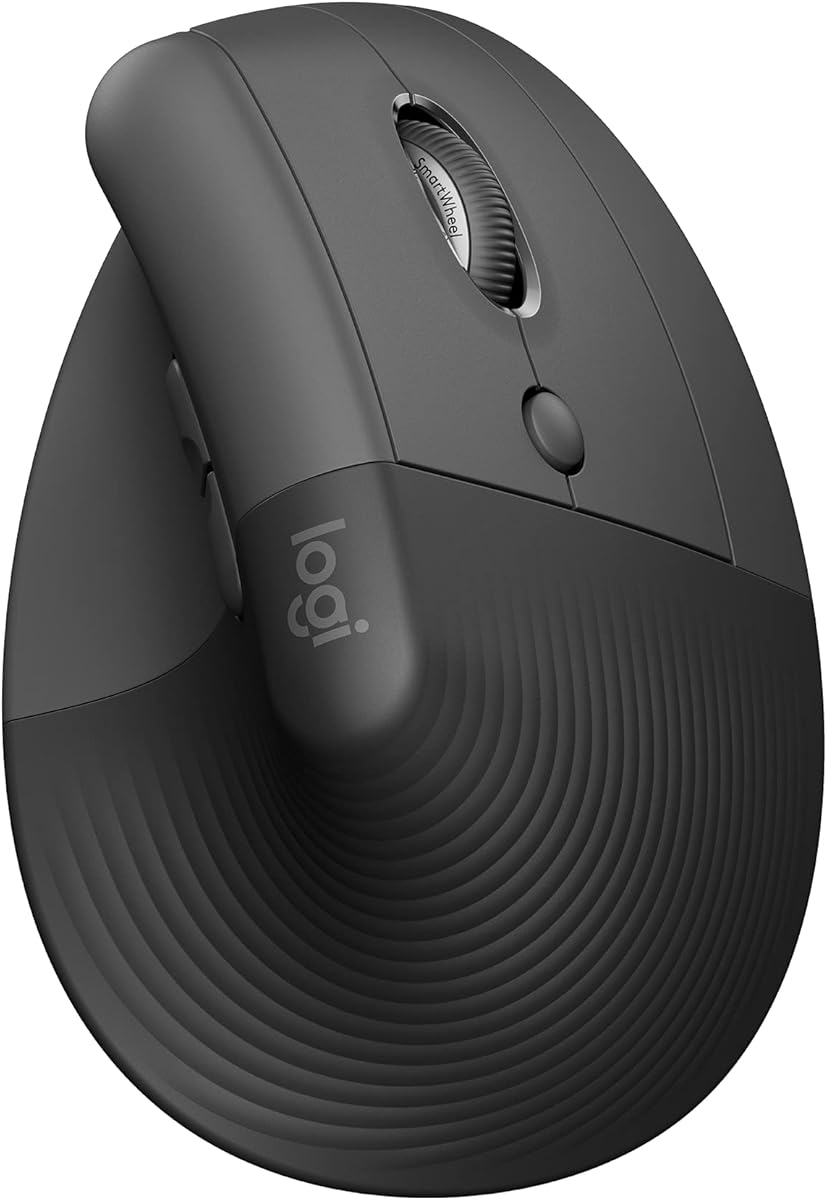
Logitech Lift Vertical Ergonomic

★★★★☆8.8/10
Logitech Lift Vertical Ergonomic
  • 57-degree vertical grip certified by leading ergonomists for natural forearm posture
  • SmartWheel seamless scrolling with whisper-quiet customizable clicks
  • Bluetooth Low Energy or Logi Bolt USB-A with up to two-year battery life
Check Price →
Best Multi-Device Value

TECKNET Tri-Mode Silent Mouse

★★★★★9/10
TECKNET Tri-Mode Silent Mouse
  • Side horizontal scroll wheel for spreadsheets and wide design canvases
  • Three-device BT 5.3/5.0 and 2.4 GHz switching with silent clicks
  • Metal main scroll wheel and six DPI steps up to 4800, USB-C rechargeable
Check Price →

As an Amazon Associate we earn from qualifying purchases. We may earn a commission at no additional cost to you.

Best Mouse for Work Comparison: Ergonomics, Connectivity, and Scroll Features

Match each model to your desk setup before you commit to a shell shape. This table covers all ten pack products with three defining specs each—no prices, so you can focus on workflow fit rather than promo tags that change weekly.

#ProductSpecificationsScore
1
  • Bluetooth only, up to three devices, no USB receiver included
  • 8K DPI any-surface sensor with MagSpeed electromagnetic scroll
  • Quiet Clicks, FLOW cross-computer, Logi Options+ customization
9.2
2
  • BT 5.3/5.0 plus 2.4 GHz USB-A, three-device one-button switching
  • Metal scroll wheel plus side horizontal scroll for spreadsheets
  • Six DPI steps to 4800, USB-C rechargeable, silent clicks
9
3
  • 57-degree vertical grip, ergo-certified for small-to-medium right hands
  • Bluetooth Low Energy or Logi Bolt USB-A receiver included
  • SmartWheel scrolling, four of six buttons customizable, quiet clicks
8.8
4
  • Dual-device Bluetooth 5.1 with bottom pairing switch
  • Programmable side and top buttons, two-way metal scroll wheel
  • USB-C rechargeable, three on-the-fly DPI stages up to 4000
9
5
  • Full-size ambidextrous shell with soft rubber side grips
  • Back/Forward buttons plus tilt-to-scroll via Logitech software
  • Two-year AA battery life with Unifying nano receiver
9.2
6
  • Compact ambidextrous shell, 2.4 GHz USB-A nano receiver
  • Line-by-line scroll wheel, up to one-year AA battery life
  • Plug-and-play on Windows, Mac, and Linux without software
9
7
  • Compact ergonomic shell with rubber side grips, 2.4 GHz USB-A
  • Five DPI steps to 2600 with on-body adjustment
  • Up to 24-month AAA battery life with power-saving switch
9
8
  • HERO 25,600 DPI sensor with zero smoothing or acceleration
  • 11 programmable buttons and dual-mode hyper-fast scroll wheel
  • Adjustable weights and on-board memory for profile portability
9.2
9
  • Focus+ 26K DPI optical sensor with intelligent tracking functions
  • HyperScroll tilt wheel with free-spin and tactile modes
  • 11 programmable buttons with optical Gen-2 switches
9.2
10
  • HyperSpeed wireless or Bluetooth with multi-device support
  • 9 programmable controls and 18K optical sensor
  • Up to 285 hours HyperSpeed or 535 hours on Bluetooth
8.8

1. Logitech MX Master 3S Bluetooth - Best Overall for

Logitech MX Master 3S Bluetooth

Logitech MX Master 3S Bluetooth

9.2/10★★★★★

If one mouse defines modern desk productivity, it is the Logitech MX Master 3S Bluetooth edition. Logitech built this variant for professionals who already live inside Bluetooth ecosystems—MacBook users, Linux developers, and hybrid workers who pair directly to laptops without sacrificing a USB port to a dongle. The silhouette remains the gold standard for right-hand ergonomics: a tall palm shelf, sculpted thumb rest, and secondary controls placed where your hand naturally rests rather than where industrial designers thought looked symmetrical.

  • Bluetooth only, up to three devices, no USB receiver included
  • 8K DPI any-surface sensor with MagSpeed electromagnetic scroll
  • Quiet Clicks, FLOW cross-computer, Logi Options+ customization
Check Price →
✓ Pros
  • MagSpeed scroll is dramatically faster and quieter than standard wheels for long document review
  • Tracks reliably on glass desks and glossy surfaces where budget sensors fail
  • FLOW lets you move the cursor and transfer files between two computers seamlessly
  • Quiet Clicks reduce open-office noise without sacrificing tactile feedback
  • Thumb wheel and side buttons accelerate timeline scrubbing and tab switching
✕ Cons
  • Bluetooth-only edition ships without USB receiver or charging cable
  • Premium shell fits medium-to-large right hands; small palms may find it tall
  • Full feature set requires Logi Options+ software install on each host

Detailed review

MagSpeed electromagnetic scrolling is the feature that converts skeptics. Ratchet through contract clauses line by line, then flick the wheel into free-spin mode and traverse a hundred-page annual report in two seconds. The mechanism is quieter than mechanical encoders and more precise than budget free-spin wheels that overshoot targets. For analysts reviewing dense PDFs, product managers scanning roadmap decks, and attorneys marking up redlines, that scroll quality alone justifies the upgrade from a basic two-button pointer.

The 8K DPI Darkfield-class sensor tracks on glass conference tables, lacquered desks, and marble kitchen counters where optical mice from a decade ago simply stopped. You can lift the MX Master 3S to a standing-desk mat, a hotel nightstand, or a coworking hot desk without packing a mouse pad. Customizable sensitivity through Logi Options+ lets designers dial precise control for pixel work and crank DPI for multi-monitor jumps across ultrawide setups.

Quiet Clicks address the social reality of open offices and remote calls where microphone bleed exposes every peripheral tap. Logitech claims a ninety-percent noise reduction versus standard switches while preserving tactile feedback—you still feel the actuation without broadcasting it to teammates on Zoom. That balance matters more than raw decibel charts because satisfaction and confidence in each click affect typing rhythm and selection accuracy throughout the day.

FLOW cross-computer control separates the MX Master line from every other productivity mouse on this list. Pair the pointer to two or three machines—typically a Windows desktop and a MacBook—and move the cursor across the edge of one screen onto the other as if they shared a single display. Copy text on the PC, glide to the Mac, and paste without reaching for a KVM switch or cloud clipboard workaround. File transfer over the same link handles images and documents for quick asset handoffs between work and personal partitions.

The Bluetooth-only packaging is the tradeoff buyers must understand before checkout. This edition ships without a Logi Bolt USB receiver and without a charging cable, assuming you already own USB-C cords and prefer pure wireless pairing. That keeps the box lean for Apple-centric buyers but frustrates desktop users who want dongle fallback when IT disables Bluetooth. If you need receiver flexibility, compare the standard MX Master 3S or the Lift model that includes Logi Bolt in the box.

Customization depth through Logi Options+ remains best-in-class for office workflows. Assign thumb-wheel horizontal scroll to timeline scrubbing in Premiere, map a side button to mute in Teams, and save app-specific profiles that load when Photoshop or Excel takes focus. The learning curve is real—expect an hour of initial setup—but the payoff compounds every week you keep the same job and software stack.

Who the MX Master 3S Bluetooth edition fits best

Choose this model if you run two or three Bluetooth-capable machines daily, care about glass-desk tracking, and want the quietest premium clicks Logitech offers without jumping to the MX Master 4 price tier. It suits product managers, consultants, developers, and executives who review documents more than they game.

Skip it if you need a included USB receiver, have small hands that find tall shells uncomfortable, or want horizontal thumb scrolling dedicated to Excel without holding Shift. Left-handed professionals should look at ambidextrous alternatives elsewhere in this guide.

Setup tips for multi-machine FLOW workflows

Install Logi Options+ on every host before enabling FLOW. Match network subnets so file transfer works across firewall boundaries in corporate environments. Assign the thumb wheel to horizontal scroll in spreadsheet apps during profile setup—you will not discover that mapping by accident.

Charge via any USB-C phone cable since none ships in this box. Enable Smart Actions if you live inside repetitive copy-paste loops between CRM and email clients.

Check Price on Amazon →

We may earn a commission at no additional cost to you.

2. TECKNET Tri-Mode Silent Mouse - Best Multi-Device Value

TECKNET Tri-Mode Silent Mouse

TECKNET Tri-Mode Silent Mouse

9/10★★★★★

Office work rarely demands gaming-grade polling rates, but it does punish mice that make horizontal navigation awkward. The TECKNET tri-mode silent mouse addresses that gap with a dedicated side scroll wheel that lets you flick across Excel columns, Figma canvases, and wide PDF layouts without holding Shift or dragging scrollbars. Combined with a precision metal main wheel, the pointer feels tuned for analysts, coordinators, and anyone who lives inside documents rather than inside a game lobby.

  • BT 5.3/5.0 plus 2.4 GHz USB-A, three-device one-button switching
  • Metal scroll wheel plus side horizontal scroll for spreadsheets
  • Six DPI steps to 4800, USB-C rechargeable, silent clicks
Check Price →
✓ Pros
  • Side scroll wheel cuts wrist strain navigating wide Excel and Figma layouts
  • Three-device switching covers laptop, tablet, and docked desktop without extra dongles
  • Metal main wheel feels durable and precise through years of daily scrolling
  • Silent clicks suit shared offices, libraries, and home workspaces with sleeping partners
  • Rechargeable pack lasts months with moderate daily use and includes charging cable
✕ Cons
  • Side buttons are not supported on macOS per manufacturer documentation
  • Buttons are not programmable for custom office macros or shortcuts
  • Ergonomic shell suits small-to-medium hands better than large palms

Detailed review

Connectivity is where this model separates itself from basic two-button travel mice. Pair two Bluetooth hosts—typically a work laptop and a personal tablet—while keeping a 2.4 GHz USB-A receiver ready for a locked-down desktop that refuses Bluetooth peripherals. A single button cycles among all three connections, which is genuinely useful when you bounce between a docked PC, a MacBook on the couch, and an iPad for note-taking. None of the buttons are programmable, so power users who remap everything in Logi Options+ should look elsewhere, but most office staff only need reliable switching and quiet primary clicks.

Six adjustable DPI steps from 800 to 4800 cover the range from pixel-precise design tweaks to fast cursor travel across a dual 4K monitor wall. An LED blink pattern confirms the active step so you are not guessing sensitivity mid-presentation. The sensor handles typical desk surfaces well, though glass and high-gloss finishes remain weak spots—as with most office optical sensors at this tier.

Silent clicks are a meaningful quality-of-life upgrade in shared workspaces. Libraries, open-plan sales floors, and bedroom offices where a partner sleeps during your late shift all benefit from reduced click percussion. The tradeoff is slightly softer feedback than Logitech Quiet Click switches, which some typists describe as mushy until muscle memory adapts after a few days.

Rechargeability removes AA battery hunts from your quarterly supply list. A full USB-C charge in roughly ninety minutes to two hours yields months of moderate daily use at TECKNET's stated two-hour-per-day estimate. Low-battery LED warnings give advance notice before a critical client call, and wake-from-sleep is instant compared to some Bluetooth mice that lag after idle periods.

Build quality exceeds expectations for a tri-mode feature stack at this tier. The metal scroll wheel resists the wobble that plagues plastic encoders after six months of heavy use, and the shell contour includes a modest thumb ledge for right-hand comfort. Large palms may want the fuller M510 or MX Master silhouettes instead.

Platform caveats matter before you standardize this mouse across a mixed Mac and Windows fleet. TECKNET documents that side buttons do not function on macOS, which eliminates back-forward browser shortcuts unless you remap via keyboard alternatives. IT buyers should pilot one unit with their heaviest spreadsheet users before a bulk order.

Spreadsheet and design workflow notes

Assign the side wheel muscle memory early: horizontal flick becomes faster than trackpad two-finger swipe once practiced. Pair the 2.4 GHz receiver to your primary workstation for lowest latency during live data sessions, reserving Bluetooth for secondary tablets.

If your team mixes MacBooks and Windows laptops, treat side-button loss on macOS as a hard limitation—not a driver bug waiting for an update.

Battery and charging habits

Top up weekly if you work more than TECKNET's two-hour daily baseline. Auto-sleep after ten minutes preserves charge during back-to-back meetings when you forget to power down manually.

Keep the included USB-C cable in your laptop bag; third-party cords work but charge times vary with wattage.

Check Price on Amazon →

We may earn a commission at no additional cost to you.

3. Logitech Lift Vertical Ergonomic - Best Ergonomic for Wrist

Logitech Lift Vertical Ergonomic

Logitech Lift Vertical Ergonomic

8.8/10★★★★☆

Repetitive strain injuries do not announce themselves with dramatic pain on day one—they accumulate as forearm pronation, ulnar deviation, and wrist extension repeat thousands of times per week. The Logitech Lift vertical ergonomic mouse attacks that geometry by rotating your hand into a handshake posture roughly fifty-seven degrees off the desk plane. Ergonomists certify the shape because it aligns the forearm bones more neutrally than flat mice that force palm-down pronation all day.

  • 57-degree vertical grip, ergo-certified for small-to-medium right hands
  • Bluetooth Low Energy or Logi Bolt USB-A receiver included
  • SmartWheel scrolling, four of six buttons customizable, quiet clicks
Check Price →
✓ Pros
  • Vertical posture reduces forearm pronation that causes repetitive strain over months
  • Soft textured grip and thumb rest keep the hand relaxed during long editing sessions
  • Includes Logi Bolt receiver unlike the Bluetooth-only MX Master 3S edition
  • SmartWheel shifts between ratchet and free-spin modes for mixed document types
  • Up to two-year battery life minimizes desk clutter from charging cables
✕ Cons
  • Designed for small-to-medium right hands; large palms or lefties need different models
  • Vertical learning curve takes several days before muscle memory feels natural
  • No horizontal thumb scroll wheel for spreadsheet power users

Detailed review

Lift targets small-to-medium right hands specifically. Logitech scaled the vertical grip down from the larger MX Vertical so desk professionals with average hand sizes get support without stretching for buttons placed too high on taller shells. The softly textured grip and dedicated thumb rest encourage relaxation rather than claw gripping, which is the unconscious tension pattern flat mice often encourage during stressful deadline weeks.

SmartWheel scrolling adapts to content type without manual mode switches in many apps. Ratchet precisely through code reviews and legal paragraphs, then let momentum carry you through long web articles when free-spin behavior engages. It is not MagSpeed-fast like the MX Master 3S, but it is quieter and smoother than wheels on budget vertical competitors that feel gritty after a month.

Unlike the Bluetooth-only MX Master 3S edition in this pack, Lift ships with a Logi Bolt USB-A receiver alongside Bluetooth Low Energy pairing. That dual-path connectivity matters for corporate laptops where IT whitelists dongles but blocks new Bluetooth pairings, and for users who want wired-receiver latency fallback when presentation timing is critical. Switch hosts with the bottom pairing button rather than FLOW-style edge crossing—you are choosing Lift for posture, not cross-machine clipboard tricks.

Four of six buttons customize through Logi Options+, enough for mute, screenshot, and desktop-switch shortcuts without overwhelming casual users. Quiet click switches keep volume down during standups and shared coworking booths. Battery life stretches toward two years on AA cells depending on scroll intensity and Bluetooth polling—comparable to flat office mice despite the taller shell requiring more material.

The adaptation period is real. Expect three to five days of reduced accuracy and occasional mis-clicks as your extensor muscles learn new trajectories. Most users report the vertical grip feels natural by week two and painful to abandon by month three when returning to a flat travel mouse on vacation. Do not judge Lift on hour one.

Lift omits a horizontal thumb scroll wheel, so spreadsheet-heavy analysts who live in Excel may prefer the TECKNET side-scroll model or MX Master thumb wheel instead. Choose Lift when wrist and forearm comfort outrank horizontal navigation speed in your priority stack.

Who should prioritize Lift over flat ergonomics

Prioritize Lift if you already feel forearm fatigue, work full-time at a desk, and fit small-to-medium right-hand sizing. Physical therapists often recommend vertical trials before more expensive chair and desk upgrades because pointer posture changes are immediate.

Avoid Lift if you are left-handed, have very large hands, or need FLOW file transfer between two computers. Those users should read our MX Master 3S and M510 reviews instead.

Desk setup pairing advice

Lower your chair armrests slightly when switching to vertical grip so elbows stay near ninety degrees. Pair Lift with a keyboard tenting angle or negative tilt tray if your employer offers ergonomic assessments.

Keep a flat ambidextrous spare mouse for guest users or left-handed colleagues who borrow your desk—vertical shapes confuse one-time visitors.

Check Price on Amazon →

We may earn a commission at no additional cost to you.

4. Lenovo Yoga Pro Mouse - Best Rechargeable Bluetooth Workhorse

Lenovo Yoga Pro Mouse

Lenovo Yoga Pro Mouse

9/10★★★★★

Lenovo's Yoga Pro mouse occupies a sensible middle ground between budget tri-mode competitors and Logitech's premium MX line. It is a full-size right-hand shell with soft side material, symmetrical enough to feel balanced while still placing a thumb rest where long sessions need support. For professionals who want rechargeable Bluetooth without Logitech pricing—or who simply prefer Lenovo ecosystem pairing with ThinkPad laptops—it delivers credible daily-driver performance.

  • Dual-device Bluetooth 5.1 with bottom pairing switch
  • Programmable side and top buttons, two-way metal scroll wheel
  • USB-C rechargeable, three on-the-fly DPI stages up to 4000
Check Price →
✓ Pros
  • Full-size symmetrical shell with soft side material suits extended desk sessions
  • Programmable buttons adapt to browser shortcuts, mute toggles, and app switches
  • Two-way metal scroll wheel handles both vertical documents and horizontal timelines
  • Dual Bluetooth pairing switches cleanly between work laptop and personal tablet
  • USB-C recharge reaches full battery in under two hours for months of daily use
✕ Cons
  • Right-handed design excludes left-handed professionals without adaptation time
  • Lenovo software is less mature than Logi Options+ for cross-app profile sync
  • Tidal Teal color may not match conservative corporate desk aesthetics

Detailed review

Dual-device Bluetooth 5.1 pairing covers the most common hybrid setup: work laptop plus personal tablet or secondary monitor PC. A bottom-mounted switch jumps between hosts without software dance, though Lenovo's companion app unlocks deeper button programming and DPI fine-tuning up to 4000. Three on-the-fly DPI stages handle presentation pointer mode, normal desktop work, and precision graphic tweaks without opening settings mid-meeting.

The two-way metal scroll wheel is an understated highlight. Vertical ratcheting handles email threads and documentation, while horizontal tilt—or two-way interpretation depending on app support—helps navigate timelines and wide tables. Metal construction resists the plasticky flex cheaper wheels develop after a year of aggressive scrolling during quarterly reporting crunches.

Silent left and right buttons keep noise appropriate for open offices, though they lack the branded Quiet Click marketing Logitech attaches to MX models. Side and top buttons program to shortcuts through Lenovo software: consider mapping one to Teams mute and another to Windows snap layouts if you juggle calls and window management constantly.

USB-C recharge reaches full capacity in under two hours and sustains two to three months of typical office use before the next top-up. That cadence beats weekly charging on some gaming crossovers and eliminates AA procurement entirely. The Tidal Teal finish stands out on minimalist desks—either a personality statement or a corporate policy headache depending on your office culture.

Multi-surface tracking via Lenovo's blue optical sensor handles cloth mats, wood, and laminate competently, though glass remains a weak point as with most non-Darkfield sensors. Programmable depth is good but not Logi Options+ mature—profile export and cross-machine sync lag behind Logitech's ecosystem if you rebuild laptops frequently.

Choose Yoga Pro when you want a rechargeable, programmable Bluetooth workhorse from a mainstream PC brand without gaming RGB or aggressive styling. Skip it if you need ambidextrous shapes, three-device switching, or FLOW-style cross-computer control.

Ideal Yoga Pro buyer profile

ThinkPad-centric consultants, remote developers on Lenovo hardware, and home-office workers who program a handful of shortcuts will extract full value. The shell fits medium-to-large right hands comfortably.

Look elsewhere if you require left-hand support, horizontal thumb wheels, or silent clicks certified to specific decibel thresholds for regulated call-center environments.

Software setup priorities

Install Lenovo's mouse utility on first boot to map DPI stages and side buttons before muscle memory hardens on defaults. Export profiles if IT reimages your laptop quarterly.

Disable unnecessary LED behaviors if any shipped on your firmware revision to stretch battery during travel weeks.

Check Price on Amazon →

We may earn a commission at no additional cost to you.

5. Logitech M510 Full Size Wireless - Best Full-Size AA

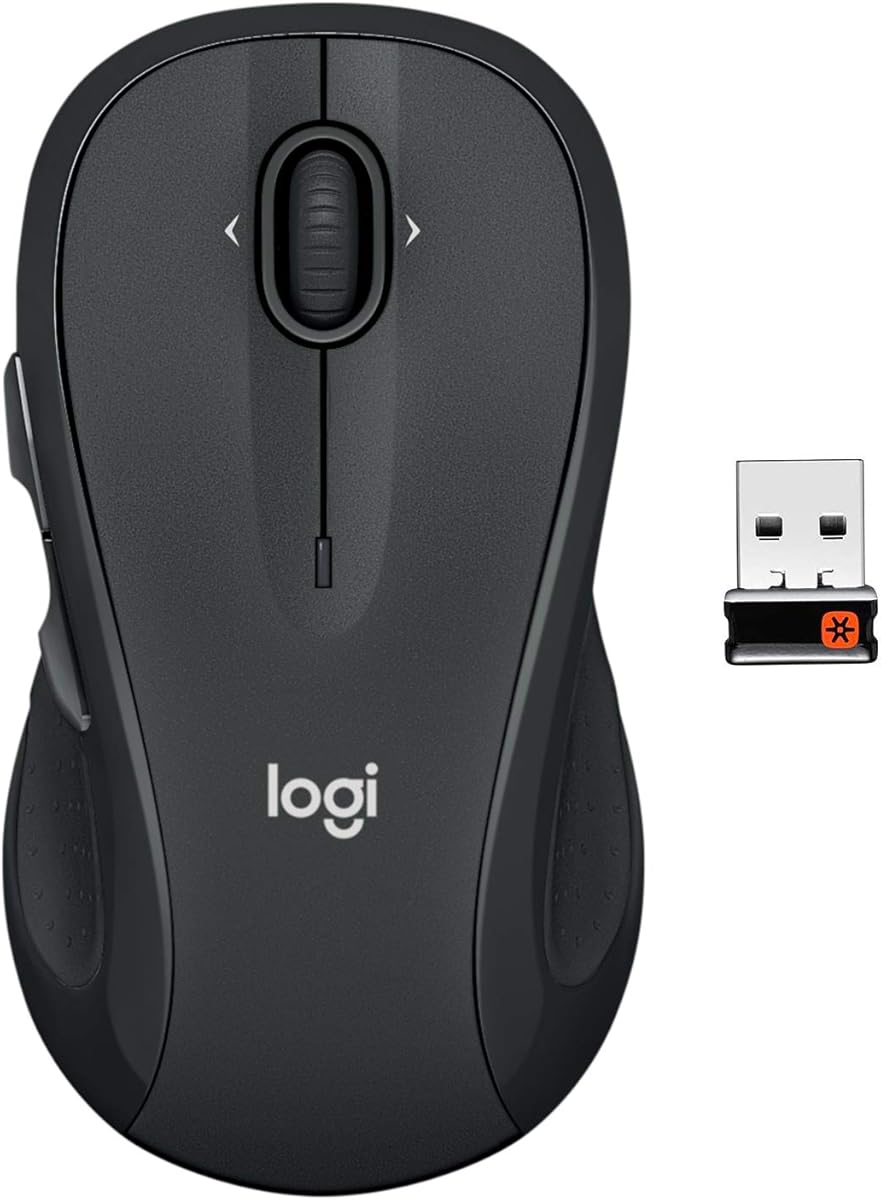
Logitech M510 Full Size Wireless

Logitech M510 Full Size Wireless

9.2/10★★★★★

Sometimes the best mouse for work is the one your IT department already standardized a decade ago—and for millions of desks, that mouse is the Logitech M510. This full-size ambidextrous wireless model trades flash for fundamentals: a broad palm area, soft rubber side grips, Back and Forward buttons, tilt-to-scroll for horizontal navigation, and AA battery life measured in years rather than weeks.

  • Full-size ambidextrous shell with soft rubber side grips
  • Back/Forward buttons plus tilt-to-scroll via Logitech software
  • Two-year AA battery life with Unifying nano receiver
Check Price →
✓ Pros
  • Contoured ambidextrous shape supports both hands through marathon spreadsheet sessions
  • Two-year battery life practically eliminates mid-quarter battery emergencies
  • Tilt-to-scroll and programmable side buttons accelerate web and document navigation
  • Unifying receiver pairs additional Logitech keyboards on the same USB dongle
  • Proven reliability with millions of units deployed in corporate fleets worldwide
✕ Cons
  • 2.4 GHz only—no Bluetooth for tablet or phone pairing without a dongle
  • Tilt-scroll and button remapping require Logitech SetPoint or Control Center install
  • Standard click volume is louder than Quiet Click or silent office alternatives

Detailed review

Ambidextrous shaping matters more than marketing teams admit. Left-handed analysts, shared hot desks, and training rooms where any colleague might sit down all benefit from a symmetric shell that does not assume right-hand thumb controls. The M510 is not truly neutral—side buttons favor right-hand reach—but the overall contour accommodates both orientations better than sculpted ergo mice.

Two-year battery life practically eliminates the procurement category of spare AA boxes in supply closets. Smart sleep, an physical on-off switch, and a battery indicator LED remove surprise dead-battery moments before executive presentations. For fleet buyers, predictable replacement cycles beat rechargeable models that fail when users forget cables.

Tilt-to-scroll unlocks horizontal movement in music libraries, map applications, spreadsheets, and wide web pages when paired with Logitech SetPoint on Windows or Logitech Control Center on macOS. That software dependency is the catch: plug-and-play works for basic pointing, but advanced scrolling and button remapping require installs IT may need to approve. Budget ten minutes per machine during onboarding.

The Unifying nano receiver stays flush in laptop USB ports and pairs additional compatible Logitech keyboards on the same dongle—valuable when ultrabooks offer one precious Type-A port behind a hub. Range covers typical conference rooms, though 2.4 GHz interference from dense Wi-Fi environments occasionally causes micro-stutters cured by receiver repositioning.

Click volume is standard—not silent—so open offices and bedroom workers may prefer TECKNET silent models or MX Quiet Click instead. The scroll wheel is line-by-line mechanical rather than free-spin electromagnetic, which feels slower on hundred-page PDFs but precise for line editing.

The M510 remains the rational pick when you want proven reliability, ambidextrous flexibility, minimal charging overhead, and programmable side buttons without gaming aesthetics. It is not exciting, and that is exactly why corporate fleets keep reordering it.

Fleet and shared-desk considerations

Standardize Unifying receivers with matching keyboard models to conserve USB ports on docked laptops. Label mice in coworking pools because the grey shell looks identical to cheaper M185 units at a glance.

Stock AA batteries centrally rather than per-desk to capitalize on the two-year life claim without individual hoarding.

Software features worth enabling

Map Back/Forward to browser history and assign tilt-scroll to horizontal navigation in Excel during SetPoint setup. macOS users need Control Center for parity—do not assume Windows configs transfer.

Program one side button to lock computer or mute audio if your workplace lacks keyboard macro tools.

Check Price on Amazon →

We may earn a commission at no additional cost to you.

6. Logitech M185 Compact Wireless - Best Compact Budget Pick

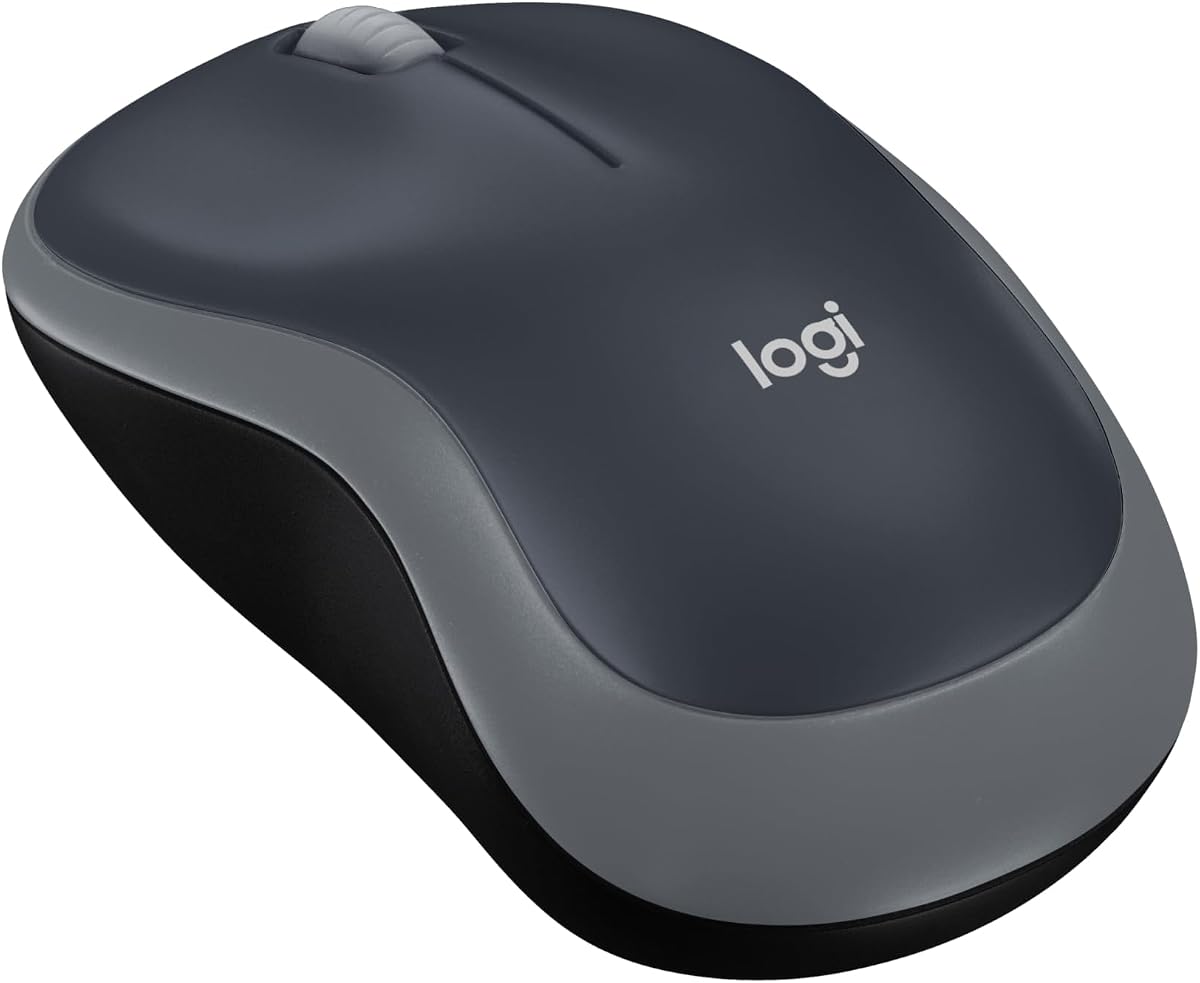
Logitech M185 Compact Wireless

Logitech M185 Compact Wireless

9/10★★★★★

Not every work mouse needs eleven buttons and electromagnetic scrolling. The Logitech M185 compact wireless mouse proves that a reliable two-button-plus-scroll design still beats touchpads for productivity—Logitech cites internal studies showing fifty-percent higher productivity versus laptop trackpads for users who switch. For hot desks, student budgets, and secondary machines, compact simplicity wins.

  • Compact ambidextrous shell, 2.4 GHz USB-A nano receiver
  • Line-by-line scroll wheel, up to one-year AA battery life
  • Plug-and-play on Windows, Mac, and Linux without software
Check Price →
✓ Pros
  • Compact footprint fits cramped hot-desk setups and crowded café tables
  • Included AA battery and one-year life keep total cost of ownership low
  • Ambidextrous shape works for left-handed users without hunting specialty models
  • Plug-and-play simplicity needs zero IT approval or driver installation
  • Logitech three-year hardware warranty outlasts most disposable office peripherals
✕ Cons
  • No side buttons, horizontal scroll, or multi-device switching for power users
  • Compact size may feel cramped for large hands during full workdays
  • Standard click sound is audible in quiet library or shared-bedroom setups

Detailed review

The ambidextrous contoured shell fits small to medium hands in tight workspaces: airline tray tables, café counters, and cluttered kitchen tables during remote mornings. It is deliberately smaller than the M510, trading palm support for portability. Large-handed professionals will feel cramped by hour three and should step up within this same guide.

Plug-and-play over 2.4 GHz USB-A nano receiver requires zero software on Windows, Mac, or Linux. That matters when IT locks installations, when you borrow a conference-room PC for an hour, or when relatives need a mouse that simply works on an old family desktop. Range reaches thirty-three feet in open air—enough for living-room couch computing.

Included AA battery and up-to-one-year life keep total ownership cost predictable. Smart sleep extends runtime, though heavy daily users may see shorter intervals than marketing claims. Logitech backs the hardware with a three-year limited warranty—unusually generous for a peripheral often treated as disposable.

Line-by-line scrolling suits email and web reading but feels tedious on long PDFs compared to free-spin wheels on premium models. There are no side buttons for browser Back navigation—you will use keyboard shortcuts or screen taps instead. Click sound is audible in quiet environments, unlike silent office alternatives ranked higher here.

Recycled plastic content in the shell—seventy-seven percent post-consumer in black variants—addresses sustainability procurement boxes some enterprises now score during vendor reviews. Carbon footprint disclosure on the listing helps ESG reporting, even if individual buyers rarely weigh kilograms CO2e against ergonomics.

Buy the M185 when budget, simplicity, and portability dominate your checklist. Skip it when spreadsheets, multi-device workflows, or all-day large-hand ergonomics define your job.

Best use cases for compact M185

Secondary travel mouse paired with an MX Master at home base, loaner pool for guest workers, and student laptops where every ounce and dollar counts.

Emergency replacement when your premium mouse ships for RMA and you need something from a local store that stocks Logitech reliably.

Limitations to plan around

No Bluetooth means no tablet pairing without adapters. No side buttons means keyboard-heavy navigation habits.

Glass desks and glossy surfaces may stutter—use any cloth mat in hotel rooms.

Check Price on Amazon →

We may earn a commission at no additional cost to you.

7. TECKNET Compact Ergonomic Mouse - Best Travel-Friendly Office Mouse

TECKNET Compact Ergonomic Mouse

TECKNET Compact Ergonomic Mouse

9/10★★★★★

Traveling professionals face a narrow design problem: laptop bags reward small mice, but eight-hour workdays punish flat travel shells that ignore thumb support. TECKNET's compact ergonomic mouse—distinct from the tri-mode B0FB9BR23C model elsewhere in this guide—threads that needle with rubber side grips, five DPI steps to 2600, and claimed twenty-four-month AAA battery life in a footprint under four inches long.

  • Compact ergonomic shell with rubber side grips, 2.4 GHz USB-A
  • Five DPI steps to 2600 with on-body adjustment
  • Up to 24-month AAA battery life with power-saving switch
Check Price →
✓ Pros
  • Small dimensions slide into laptop sleeves without bulging the zipper
  • Rubber side grips add thumb support missing from flat travel mice
  • Five DPI levels adapt from precise design work to fast web browsing
  • 24-month battery claim reduces carry weight from spare batteries on trips
  • On/off switch prevents accidental wake in packed bags during commutes
✕ Cons
  • AAA batteries are not included in the box per manufacturer notice
  • Side buttons do not function on macOS systems
  • Glass desk tracking is explicitly not supported on this optical sensor

Detailed review

The contoured shape follows the natural hand curve better than puck-style travel mice that force pinch grips. Rubber side panels add friction during bumpy train commutes when polished plastic slides on sweaty palms. Right-hand bias is clear, though the compact width still beats full-size models for sleeve storage.

Five adjustable DPI levels from 800 to 2600 switch via on-body controls without software. Drop to 800 for hotel-room photo retouching on a single laptop screen, crank to 2600 when presenting on a projector with low native resolution and you need faster cursor travel. Glass surface tracking is explicitly excluded—pack a thin mat for glass hotel desks.

2.4 GHz USB-A plug-and-play keeps pairing simple on rental PCs and client machines where Bluetooth pairing menus waste billable minutes. Range reaches forty-nine feet per TECKNET specs—more than airplane and rideshare scenarios require but useful in large conference rooms when the receiver stays in your laptop at the podium.

Battery logistics deserve attention: AAA cells are not included despite the long-life marketing, so budget spares or rechargeables on day one. The on-off switch prevents bag-jostle wake that drains cells between trips—a small detail missing on some ultra-compact competitors.

Side buttons face the same macOS limitation as other TECKNET models in this pack: functional on Windows for Back/Forward, inactive on Mac per manufacturer notice. Mixed-platform consultants should treat those buttons as Windows-only bonuses.

Choose this TECKNET when travel frequency and ergonomic side grips matter more than tri-mode Bluetooth switching. Choose the B0FB9BR23C tri-mode sibling when desk-based multi-device workflows dominate.

Packing and travel workflow

Store the USB receiver in the mouse belly compartment during transit—TECKNET hides it there by design. Flip the power switch off before zipping the bag.

Carry one spare AAA in your cable pouch; twenty-four-month claims assume moderate use, not fourteen-hour travel days.

How it compares to the tri-mode TECKNET

This model is smaller, AA-powered, and 2.4 GHz only. The tri-mode adds Bluetooth, USB-C recharge, side horizontal scroll, and metal main wheel at the cost of bulk.

Own both if you commute with the compact unit and dock the tri-mode at home office.

Check Price on Amazon →

We may earn a commission at no additional cost to you.

8. Logitech G502 Hero Wired - Best Wired Power User

Logitech G502 Hero Wired

Logitech G502 Hero Wired

9.2/10★★★★★

Gaming mice on work desks raise eyebrows in corporate photos—but the Logitech G502 Hero earns its place when programmable depth and scroll speed matter more than boardroom aesthetics. This wired model packs a HERO 25,600 DPI sensor, eleven programmable buttons, dual-mode hyper-fast scroll, adjustable weights, and on-board memory that stores profiles without cloud accounts.

  • HERO 25,600 DPI sensor with zero smoothing or acceleration
  • 11 programmable buttons and dual-mode hyper-fast scroll wheel
  • Adjustable weights and on-board memory for profile portability
Check Price →
✓ Pros
  • Hyper-fast scroll wheel free-spins through hundred-page PDFs in seconds
  • Eleven programmable buttons map to Photoshop shortcuts, Teams actions, and IDE macros
  • Wired connection eliminates battery anxiety and Bluetooth wake delays entirely
  • Adjustable weight system tunes heft for precise CAD work or lighter browsing
  • On-board memory stores profiles on the mouse for locked-down corporate PCs
✕ Cons
  • RGB lighting and gaming aesthetic look out of place in conservative boardrooms
  • Wired tether limits couch-and-laptop flexibility that wireless work mice offer
  • Heavy shell and right-hand bias fatigue some users during non-gaming eight-hour days

Detailed review

Hyper-fast scroll wheel free-spins through lengthy PDFs, Slack histories, and Jira backlogs faster than any ratchet-only office mouse in this comparison. Toggle to tactile mode when you need line-by-line precision for code review or contract edits. That duality mirrors what productivity users love about MX MagSpeed at a lower entry point—minus wireless convenience.

Eleven buttons map to Photoshop macros, IDE build commands, Teams push-to-talk, and browser tab cycling through Logitech G HUB. On-board memory carries profiles on the mouse itself, crucial when IT blocks gaming software installs on secondary partitions—you configure once on a personal machine and plug into locked-down workstations.

Adjustable weights—up to five 3.6-gram modules—let CAD users add heft for steady tracing while writers remove weights for lighter flick movements. The tuning is gimmicky to casual browsers but meaningful to professionals who notice gram-level differences during eight-hour SolidWorks or Illustrator sessions.

Wired connection eliminates Bluetooth wake delays, dongle pairing failures, and mid-presentation battery death. Latency is effectively zero for live demos and screen sharing. The tether is the cost: couch laptop sessions and quick hops to the conference room suffer compared to wireless picks ranked higher for hybrid mobility.

RGB LIGHTSYNC lighting looks aggressive on executive desks and drains zero work benefit unless you enjoy personalization. Disable lighting in G HUB for a subdued appearance that passes casual Zoom scrutiny. Click volume trends louder than silent office models—open-plan neighbors will hear rapid spreadsheet selections.

Right-hand ergonomic shaping with pronounced thumb shelf suits medium-to-large hands. Lefties and minimalists should skip. Buy G502 Hero when you treat your mouse as a programmable control surface for creative or technical work and accept a wire.

Work-focused G HUB mappings to try

Map thumb buttons to undo-redo stacks in Adobe apps, mute and camera toggles in Zoom, and desktop virtual-desktop switches in Windows 11. Store profiles on-board for IT-restricted machines.

Set hyper-fast scroll as default for research roles; switch tactile mode before fine spreadsheet cell editing.

When wired crossover beats pure office mice

Video editors scrubbing timelines, developers with heavy IDE macro layers, and designers running tablet-adjacent dual workflows benefit most.

Remote-only workers who present from sofas should prioritize MX Master or TECKNET tri-mode wireless instead.

Check Price on Amazon →

We may earn a commission at no additional cost to you.

9. Razer Basilisk V3 Wired - Best Wired Macro-Heavy Work

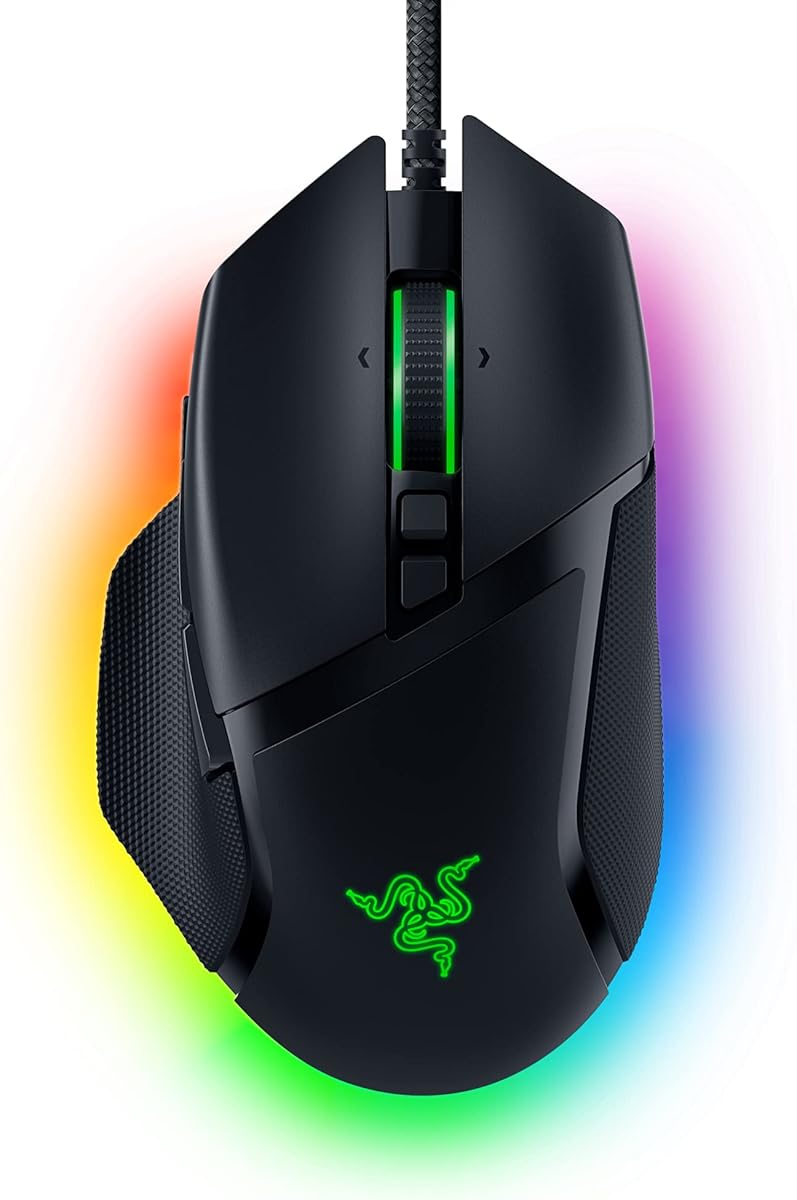
Razer Basilisk V3 Wired

Razer Basilisk V3 Wired

9.2/10★★★★★

Razer's Basilisk V3 wired mouse brings HyperScroll tilt wheel, eleven programmable buttons, and a Focus+ 26K DPI sensor to professionals who want Synapse-level customization without wireless compromise. The iconic ergonomic shell—with dedicated thumb rest and accessible button cluster—supports long coding, editing, and analysis sessions that punish flat ambidextrous designs.

  • Focus+ 26K DPI optical sensor with intelligent tracking functions
  • HyperScroll tilt wheel with free-spin and tactile modes
  • 11 programmable buttons with optical Gen-2 switches
Check Price →
✓ Pros
  • HyperScroll tilt wheel adds horizontal navigation for spreadsheets and timelines
  • Thumb rest and iconic ergonomic form support long editing and coding sessions
  • Optical switches deliver crisp, consistent clicks through millions of actuations
  • Synapse software enables deep macro layers for video editors and data analysts
  • 26K DPI sensor tracks sub-pixel movements for precision graphic design work
✕ Cons
  • Chroma RGB zones draw attention in minimal home-office setups
  • Requires Razer Synapse for full button programming on each workstation
  • Wired-only design prevents quick transitions to tablet or conference-room laptop

Detailed review

HyperScroll tilt wheel adds horizontal navigation missing from many productivity mice except dedicated side-wheel models. Free-spin through long vertical documents, then tilt for horizontal timeline movement in video apps or column scanning in spreadsheets. Tactile mode engages for weapon-wheel-style cycling that translates surprisingly well to switching between Excel worksheets.

Optical Gen-2 switches actuate in 0.2 milliseconds with seventy-million-click durability ratings—overkill for email, but meaningful for users who notice double-click failures on aging office mice mid-contract season. Crisp feedback reduces mis-clicks during fast CAD selections compared to mushy budget switches.

Synapse software depth rivals Logitech G HUB: macros, lighting zones, sensitivity stages, and surface calibration. Disable Chroma RGB on each zone if your desk aesthetic is minimalist; otherwise expect pulsing colors in client-facing webcam frames. Setup time investment mirrors any power-user pointer—budget an hour, revisit quarterly as apps change.

26K DPI sensor tracks with zero smoothing for pixel-accurate design work on high-resolution panels. Most office users never exceed 3200 DPI, but headroom prevents acceleration artifacts when jumping across dual ultrawide monitors during data dashboard reviews.

Wired-only design anchors you to the desk like the G502 Hero. Presentation mobility and tablet pairing are non-starters. Choose Basilisk V3 wired when your workstation is fixed, your workflows are macro-heavy, and you prefer Razer Synapse over Logitech G HUB ergonomics.

Compared to the wireless Basilisk V3 X ranked tenth, this wired model offers faster scroll modes and more buttons at the cost of cable management. Office buyers should decide wire versus battery before debating Razer versus Logitech ecosystem lock-in.

Synapse setup for non-gaming professionals

Create a work profile separate from any gaming profile to avoid accidental DPI spikes during spreadsheets. Map thumb paddle to alt-tab or mission control depending on OS.

Turn off all lighting zones for video calls; re-enable later if you work solo.

Basilisk V3 wired versus TECKNET side scroll

Basilisk tilt wheel integrates horizontal scroll on the main wheel axis; TECKNET dedicates a separate side wheel some users find more intuitive for Excel.

Basilisk wins on macro count and sensor; TECKNET wins on silent clicks and wireless tri-mode flexibility.

Check Price on Amazon →

We may earn a commission at no additional cost to you.

10. Razer Basilisk V3 X HyperSpeed - Best Wireless Gaming

Razer Basilisk V3 X HyperSpeed

Razer Basilisk V3 X HyperSpeed

8.8/10★★★★☆

The Razer Basilisk V3 X HyperSpeed closes this guide as the wireless gaming crossover for professionals who refuse cables but still want nine programmable buttons and low-latency performance. HyperSpeed wireless targets sub-millisecond class responsiveness for competitive gaming, which translates to snappy pointer feel during live presentations and screen annotation—domains where Bluetooth office mice occasionally feel sluggish after sleep.

  • HyperSpeed wireless or Bluetooth with multi-device support
  • 9 programmable controls and 18K optical sensor
  • Up to 285 hours HyperSpeed or 535 hours on Bluetooth
Check Price →
✓ Pros
  • HyperSpeed wireless latency is low enough for real-time design and presentation control
  • Bluetooth mode stretches battery to multi-week work schedules between charges
  • Nine programmable buttons cover browser tabs, volume, and app-launch shortcuts
  • Ergonomic Basilisk shape with thumb support suits right-hand desk professionals
  • Mechanical Gen-2 switches maintain click consistency through years of daily use
✕ Cons
  • RGB and gaming branding feel mismatched in client-facing executive offices
  • HyperSpeed dongle occupies a precious USB-A port on thin modern laptops
  • Battery life drops significantly when RGB lighting stays enabled during work hours

Detailed review

Dual connectivity modes split use cases cleanly. HyperSpeed with the included dongle covers primary desk work with the lowest latency Razer offers in this form factor. Bluetooth stretches battery toward five hundred thirty-five hours claimed—weeks of work weeks between charges if RGB stays off and polling moderates. Switch modes in software when traveling without dongle access.

Nine programmable controls map fewer commands than the wired Basilisk V3's eleven, but still exceed every pure office mouse here except the G502 and wired Basilisk. Mechanical Gen-2 switches maintain consistency through multi-year daily actuation cycles. Thumb rest and signature Basilisk ergonomics carry over from the wired model for right-hand comfort.

18K DPI optical sensor handles multi-monitor jumps and precision design tasks without spinouts on typical desk surfaces. Disable Windows pointer precision enhancement per Razer guidance for accurate tracking—good advice for any high-DPI pointer in professional color grading or UI design.

Battery reality check: 285 hours on HyperSpeed with RGB enabled falls far below Bluetooth endurance. Office users should disable lighting and expect multi-week rather than multi-month intervals between USB charges. Keep a cable in the bag for long conference travel.

Aesthetic mismatch remains the elephant in the room. Razer branding, RGB zones, and gaming-market positioning clash with conservative finance and legal office norms. Functionally it works; culturally your manager may question expense reports. Consider matte black with all lights off for subtlety.

Pick Basilisk V3 X when you already own Razer keyboards or headsets, want wireless freedom with gaming-grade buttons, and accept dongle occupation of a USB-A port. Pure office workers rank higher picks first unless macro depth is non-negotiable.

Battery optimization for work schedules

Use Bluetooth for email-and-doc days; switch HyperSpeed for design sessions demanding lowest latency. Disable RGB entirely during business hours.

Charge weekly if you live on HyperSpeed with moderate RGB rather than trusting headline hour counts literally.

Corporate environment fit check

Verify IT allows Razer Synapse installs before bulk purchases. Some enterprises block gaming peripheral software categorically.

If Synapse is blocked, on-device button layers are limited compared to full software configuration—pilot one unit first.

Check Price on Amazon →

We may earn a commission at no additional cost to you.

Best Mouse for Work in 2026: Expert Picks for Productivity

How to Choose the Best Mouse for Work in 2026

Ergonomic shape versus compact portability

Full-size shells like the Logitech M510 and Lenovo Yoga Pro support palm contact across long shifts, spreading pressure away from wrist creases. Compact models like the M185 and TECKNET travel mouse trade palm shelf for bag space—fine for two-hour café sessions, punishing for eight-hour analyst blocks.

Vertical grips like Logitech Lift rotate the forearm into neutral posture and suit users with emerging strain symptoms. Adaptation takes days; benefits compound over months. Match vertical mice to hand size—Lift targets small-to-medium right hands specifically.

Right-hand sculpted mice—MX Master 3S, most gaming crossovers—fit medium-to-large palms best. Ambidextrous options serve shared desks and left-handed professionals without separate SKUs.

Connectivity: Bluetooth, 2.4 GHz, and tri-mode flexibility

Bluetooth multi-device pairing excels when you switch among laptop, tablet, and secondary PC without swapping dongles. Pure Bluetooth models like the MX Master 3S Bluetooth edition free USB ports but sacrifice dongle fallback when IT disables radio pairing.

2.4 GHz USB-A receivers deliver consistent latency for data-heavy sessions and older desktops without Bluetooth. Logitech Unifying receivers add keyboard pairing on the same dongle—valuable on port-scarce ultrabooks.

Tri-mode mice combining dual Bluetooth and 2.4 GHz—TECKNET B0FB9BR23C—cover hybrid fleets. Confirm macOS side-button limitations before standardizing on TECKNET across mixed platforms.

Scroll wheels and horizontal navigation

MagSpeed and hyper-fast free-spin wheels accelerate long document review. Ratchet-only wheels like the M185 feel precise but slow on hundred-page PDFs.

Dedicated side scroll wheels—TECKNET tri-mode—or tilt wheels—M510 with software, Basilisk HyperScroll—reduce Shift-plus-scroll habits in Excel and design tools. Spreadsheet-heavy roles should prioritize horizontal navigation explicitly.

SmartWheel and dual-mode wheels switch behavior per app friction—Lift and MX Master families lead here.

Click volume and shared workspace etiquette

Quiet Click, silent TECKNET switches, and Lenovo silent buttons reduce open-office noise and video-call bleed. Standard M510 and M185 clicks are audible—acceptable in private offices, distracting in libraries and bedroom setups.

Mechanical gaming switches—Razer Gen-2, G502—feel crisp but project further than silent office alternatives. Disable aggressive clicking patterns during calls regardless of switch type.

Battery strategy: AA longevity versus USB-C recharge

AA-powered mice—M510, M185, Lift—eliminate charging cables and suit fleet procurement with centralized battery stocks. Claimed one-to-two-year lifespans assume moderate use; heavy scrollers should budget replacements sooner.

Rechargeable models—TECKNET tri-mode, Lenovo Yoga Pro—reduce waste and long-term battery cost but require cable discipline. MX Master 3S Bluetooth edition omits cable in box—plan accordingly.

Gaming wireless crossovers drain faster with RGB enabled; treat headline hour counts as optimistic for lit configurations.

Software depth and IT policy realities

Logi Options+, Logitech G HUB, Lenovo utilities, and Razer Synapse unlock button remapping, app profiles, and DPI tuning. Corporate machines may block installs—verify before buying macro-dependent gaming crossovers.

On-board memory on G502 Hero stores profiles without software on locked PCs after initial configuration elsewhere.

Plug-and-play simplicity—M185, TECKNET 2.4 GHz—wins when IT forbids any peripheral utilities.

Frequently Asked Questions

01

What is the best mouse for work overall in 2026?

The Logitech MX Master 3S Bluetooth edition leads for most desk professionals who juggle multiple Bluetooth machines, need glass-desk tracking, and value MagSpeed scrolling plus Quiet Clicks. It lacks an included USB receiver and charging cable, so buyers who need dongle fallback should compare the standard MX Master line or Logitech Lift, which includes Logi Bolt. Spreadsheet-heavy users on a budget may prefer the TECKNET tri-mode mouse for its dedicated side scroll wheel.

02

Is a vertical mouse better for work-related wrist pain?

Vertical mice like the Logitech Lift reduce forearm pronation—the palm-down twist flat mice encourage—which ergonomists link to repetitive strain over months and years. Lift is ergo-certified and sized for small-to-medium right hands. Expect several days of reduced accuracy during adaptation. Vertical grips help prevention and early discomfort but are not medical devices; consult a professional for diagnosed conditions. They also omit dedicated horizontal scroll wheels, so Excel power users should weigh wrist relief against navigation speed.

03

Do I need Bluetooth or is a USB dongle enough for work?

USB 2.4 GHz dongles deliver consistent latency and suit locked-down desktops with reliable Type-A ports. Bluetooth excels when you switch among laptop, tablet, and phone without occupying ports—common on ultrabooks with one or zero USB-A connectors. Tri-mode mice offer both. Pure Bluetooth models like the MX Master 3S Bluetooth edition assume you do not need dongle backup; corporate buyers should confirm IT Bluetooth policies before standardizing.

04

Are gaming mice like the G502 or Razer Basilisk good for office work?

Yes, for specific power users. Wired gaming mice offer hyper-fast scroll wheels, many programmable buttons, and on-board profile memory valuable for video editing, CAD, and development workflows. Tradeoffs include RGB aesthetics, louder clicks, wired tethering, and software installs IT may block. Casual email-and-spreadsheet workers rank dedicated office models higher for silence, multi-device Bluetooth, and subtle design. Choose gaming crossovers when macro depth outweighs boardroom appearance.

05

Why do some mice list macOS side-button limitations?

Several TECKNET models document that side buttons do not function on macOS due to driver and OS API differences—not defective hardware. Windows users get Back/Forward mapping; Mac users rely on keyboard shortcuts or trackpad gestures instead. Logitech M510 tilt-scroll similarly requires Logitech Control Center on Mac for full feature parity. Always pilot mixed-platform fleets before bulk orders.

06

How important is DPI for office work versus gaming?

Office tasks rarely need gaming-grade 25K DPI, but adjustable sensitivity still matters. Designers and multi-monitor users benefit from on-the-fly DPI switching—800 for pixel edits, 3200 for cursor jumps across dual 4K panels. MX Master 3S offers 8K tracking optimized for any-surface precision rather than raw number bragging. Budget office mice with 1600–2600 ceilings suffice for email and document work on single 1080p screens.

07

Should I choose rechargeable or AA battery mice for my home office?

AA mice like Logitech M510 and Lift minimize cable clutter and suit users who forget charging routines—two-year lifespans are realistic with moderate use. Rechargeable TECKNET and Lenovo models reduce long-term battery waste and eliminate emergency store runs but need weekly or monthly top-ups depending on use intensity. MX Master 3S Bluetooth edition ships without a cable, so USB-C spare phone cords become mandatory. Pick based on cable tolerance, not headline eco claims alone.

08

What scroll wheel features matter most for spreadsheet work?

Horizontal navigation separates spreadsheet power users from casual browsers. Dedicated side scroll wheels on the TECKNET tri-mode mouse, tilt-scroll on Logitech M510 with software, and HyperScroll tilt on Razer Basilisk models reduce wrist strain from Shift-plus-scroll habits. Free-spin main wheels—MX Master MagSpeed, G502 hyper-fast—accelerate vertical traversal through long tables but do not replace horizontal movement. Prioritize side or tilt horizontal input if Excel or Sheets dominates your week.

09

Does the MX Master 3S Bluetooth edition include a USB receiver?

No. This pack listing is the Bluetooth-only variant without Logi Bolt USB receiver and without charging cable in the box. It pairs to up to three devices via Bluetooth on Windows, macOS, Chrome OS, and Linux. Buyers needing dongle fallback should consider Logitech Lift—which includes Logi Bolt—or other MX Master SKUs outside this specific ASIN. Plan USB-C charging separately.

10

How quiet should my work mouse be for video calls?

Quiet Click MX Master 3S, silent TECKNET models, and Lenovo Yoga Pro silent buttons reduce microphone pickup during open-mic standups and bedroom offices. Standard Logitech M510 and M185 clicks register clearly on sensitive headset mics. Gaming mice trend louder with mechanical switches. If call-heavy roles define your day, prioritize verified quiet switches over crisp mechanical feedback. Mouse pads and desk surface also amplify click transmission—soft mats help marginally.

Conclusion

The best mouse for work in 2026 depends less on DPI bragging rights than on how you actually spend desk hours: scrolling contracts, jumping between laptop and tablet, surviving open-plan noise, or fighting forearm fatigue before it becomes a medical appointment. This guide ranked ten pack products from the Logitech MX Master 3S Bluetooth flagship through budget M185 simplicity to Razer and Logitech gaming crossovers for macro-heavy professionals.

Start with connection needs—Bluetooth multi-device, dongle reliability, or tri-mode flexibility—then filter by ergonomic shape and horizontal scroll requirements. Our top badges highlight MX Master 3S for overall productivity, Lift for vertical wrist relief, and TECKNET tri-mode for multi-device value with side spreadsheet scrolling. Read individual reviews for platform caveats, especially macOS side-button gaps on TECKNET models.

Every link above uses our affiliate tag at no extra cost to you and omits prices that shift weekly. Match the mouse to your hand size, software policies, and noise environment, pilot when possible, and treat the pointer as daily infrastructure—not an impulse add-on at checkout.