Best Overall
GIGABYTE B850 AORUS Elite WIFI7

- AM5 B850 with strong DDR5 training headroom
- WiFi 7 plus 2.5GbE for modern networking
- 14+2+2 VRM suited to Ryzen 7000/8000/9000
Expert Review & Guide
DDR5 is no longer a speculative upgrade path. On both AMD AM5 and Intel LGA 1700, modern desktop platforms expect DDR5 as the default memory standard, and the motherboard you choose decides how easily that memory trains, how high it clocks with a dual-stick kit, and whether tall heat spreaders collide with your VRM heatsinks. This guide is not an AM5-only shortlist. It is a cross-platform roundup of boards that treat DDR5 as a first-class design priority rather than a checkbox on a marketing slide.
The practical differences that matter in 2026 are less about raw DIMM count and more about EXPO versus XMP profile support, how aggressively the BIOS defaults load those profiles, WiFi 7 versus WiFi 6E for wireless builds, and whether a board-plus-RAM bundle removes guesswork from kit matching. Intel boards lean on XMP 3.0; AMD boards lean on EXPO, though many DIMMs carry both tags. Dual-rank or four-stick configs remain the stress test for memory controllers, so we favor layouts and firmware that behave well with a clean 2x16GB or 2x32GB kit.
Below you will find ten boards spanning Gigabyte, MSI, ASUS, and ASRock across B650, B850, X870E, Z790, and B760 chipsets. We call out honest tradeoffs: premium USB4 and WiFi 7 boards earn their complexity, value Eagle and B760M options cut features carefully, and one MSI bundle ships a matched 32GB DDR5 kit so you can focus on CPU and cooler clearance instead of shopping two SKUs that may not train cleanly together.

As an Amazon Associate we earn from qualifying purchases. We may earn a commission at no additional cost to you.
Use this table to sort by platform first—AM5 for Ryzen 7000/8000/9000, LGA 1700 for 12th through 14th Gen Intel—then by wireless generation, M.2 count, and whether the listing already includes a dual-channel DDR5 kit. Specs summarize what matters for memory stability and everyday build planning, not marketing slogans.
GIGABYTE B850 AORUS Elite WIFI7
If you want one motherboard that makes DDR5 feel boring—in the good way—the Gigabyte B850 AORUS Elite WIFI7 is the board we keep recommending for Ryzen builds that prioritize clean EXPO boots over boutique silicon lottery chasing. B850 sits in the sweet spot of the AM5 stack for 2026: newer platform features than aging B650 SKUs, without forcing every builder into X870E-level port sprawl. Four DDR5 slots give you a path to 64GB or 96GB later, but the board is happiest when you start with a matched dual-channel kit in the second and fourth slots as Gigabyte’s manual diagrams typically advise.
Memory behavior is the reason this board earns Best Overall in a DDR5-specific guide. The 14+2+2 phase design keeps VRM temperatures in check when a Ryzen 7 or Ryzen 9 is boosting beside tall DRAM heat spreaders. That adjacency matters more than marketing ever admits: when MOSFET heatsinks run hot and RAM sticks are already dense with aluminum, thermal coupling can nudge instability that looks like a bad DIMM. Gigabyte’s Elite thermal armor leaves enough practical clearance for mainstream RGB kits while still covering the power stages thoroughly.
WiFi 7 is the networking differentiator versus older Elite AX boards that stopped at WiFi 6E. If your router already speaks 802.11be, you gain multi-link flexibility and better spectral efficiency in crowded apartments. If you are still on WiFi 6, the radio remains backward compatible, so you are not stranded. Wired users get 2.5GbE, which is the right default for NAS sync and multi-gig home switches without paying for a 5GbE controller you may never saturate.
Storage is sensible rather than maximalist: three M.2 slots with PCIe 5.0 on the primary path cover a boot drive plus a high-capacity game library for most people. Creators who need five NVMe devices should look at the Strix X870E-E instead. What the AORUS Elite does well is keep the primary M.2 thermally guarded so sustained writes do not throttle as quickly in warm cases. USB-C on the rear I/O and modern internal headers make docking and VR headsets less of a dongle festival.
Firmware maturity on B850 has improved through the Ryzen 9000 era, and that matters for DDR5 because AGESA updates often ship memory compatibility fixes alongside CPU microcode. Plan to flash before you judge a kit harshly. Use Q-Flash if you are upgrading from an older CPU that will not post, then load optimized defaults, enable EXPO, and only then chase manual voltages. Most dual-stick 6000–6400 MT/s kits that list EXPO should train without drama on this board.
Who should skip it? Extreme overclockers who want every debug LED, post code, and USB4 pair on the rear I/O will outgrow Elite quickly. Intel builders are on the wrong socket entirely. Everyone else building a DDR5 Ryzen gaming or creator PC in 2026 gets a board that treats memory, wireless, and power delivery as a coherent package rather than a pile of checkbox features. That coherence is why it sits at the top of this cross-platform list.
Populate two matched modules first. Leave the other slots empty until you need capacity. Enable EXPO after a stable baseline POST, then run a memory stress suite overnight before you trust the machine with work files. This board’s BIOS makes that workflow straightforward for first-time AM5 builders.
Measure your dual-tower cooler’s rear fin stack against the VRM armor before you buy 60mm+ RGB DRAM. Most mainstream air coolers fit, but oversized vanity kits can force you into low-profile memory. Prefer dual-stick kits with moderate spreader height if you already own a chunky cooler.
Choose the Strix X870E-E if you need dual USB4, five M.2 slots, or ASUS AEMP-assisted memory tooling as a daily habit. Otherwise the B850 Elite already covers WiFi 7 and strong DDR5 manners without the premium board tax.
We may earn a commission at no additional cost to you.

The Gigabyte B650 AORUS Elite AX remains a DDR5-relevant board in 2026 because maturity beats novelty when your goal is reliable memory training. B650 launched early in the AM5 era, which means years of AGESA revisions, QVL expansions, and community reports about which kits post at EXPO speeds. If you are migrating a known-good dual-stick DDR5 kit from an older B650 build, this Elite AX is often the least surprising landing pad.
Gigabyte calls out both AMD EXPO and Intel XMP support on the DIMMs, which sounds odd on an AMD board until you remember how memory vendors label kits. Many popular 6000 MT/s modules ship with both profile types. Having firmware that understands either tag reduces the chance you buy a kit that only lists XMP and then wonder why EXPO menus look empty. Still verify the SPD in CPU-Z or Ryzen Master after enabling the profile so you know which table actually loaded.
Power delivery uses a twin 14+2+1 design with 70A stages on an eight-layer 2X copper PCB. That is more board than casual gamers need, and that surplus helps DDR5 stability indirectly: cooler VRMs and a stiff power plane reduce the electrical noise that can complicate high-frequency memory. Pair it with sensible case airflow across the socket-adjacent MOSFET array, especially if your RAM sticks are tall enough to restrict local convection.
Connectivity is still competitive. WiFi 6E covers the six-gigahertz band that many apartments rely on to escape 2.4/5 GHz congestion. You will not get WiFi 7 multi-link features, and that is the main reason we ranked the B850 Elite above this board for new wireless builds. Wired networking stays at 2.5GbE, and USB-C appears on both front-panel and rear paths depending on case cabling.
Thermals deserve a specific callout for DDR5 builders. The six-millimeter heatpipe and fully covered MOSFET heatsinks are not cosmetic. Sustained all-core CPU loads heat the area immediately beside DIMM slot one. If you have ever seen random cold-boot training failures after a long render, temperature soak is a suspect. This Elite’s armor helps keep that zone calmer than bare budget boards.
Buy the B650 AORUS Elite AX when you find a favorable listing, already own WiFi 6E networking gear, or want a proven DDR5 host for a Ryzen 7700X, 7800X3D, or 9700X without paying for B850-only features you will not use. Skip it if your router is WiFi 7 and you want the antenna generation to match, or if you need more than the storage layout this board provides. As a DDR5 platform piece, it remains honest and capable.
Check your kit’s product page for both logos. In BIOS, load the AMD EXPO profile when available; fall back to XMP only if EXPO is missing. Avoid enabling both competing auto-rules at once. After applying, confirm frequency, primary timings, and voltage match the kit’s rated table.
If you are buying new and WiFi 7 or newer USB options matter, spend the incremental step to the B850 AORUS Elite WIFI7. Keep this B650 when the deal is strong or you are reusing existing 6E antennas and a known kit.
We may earn a commission at no additional cost to you.

The Gigabyte B650 Eagle AX is the DDR5 on-ramp for builders who want AM5 without funding a showcase board. Eagle naming usually signals trimmed aesthetics and simpler I/O, not a toy electrical design. You still get four SMD DDR5 slots with EXPO and XMP support, which is the minimum viable feature set for a modern Ryzen memory subsystem. If your priority is posting a 6000 MT/s dual-stick kit and gaming at high frames, this board can absolutely host that job.
Where Eagle saves cost shows up quickly: Realtek Gigabit LAN instead of 2.5GbE, and a 12+2+2 digital VRM that is adequate for mainstream Ryzen parts but less ideal for sustained all-core 16-core workloads in hot cases. DDR5 itself does not demand flagship phases, but CPU power noise and board temperature still influence how often marginal memory configs fail training. Keep expectations honest: pair Eagle with a dual-stick kit at popular sweet-spot speeds rather than a four-DIMM 8000 MT/s fantasy.
Storage is surprisingly generous for the tier. One PCIe 5.0 M.2 plus two PCIe 4.0 M.2 slots cover a Gen5 boot drive and two secondary drives without adapter cards. M.2 thermal guards help more on the primary slot than people expect; DDR5 builds often share case heat with NVMe drives stacked near the GPU. Eagle’s layout is conventional ATX, so cable management and GPU clearance behave like any mid-range Gigabyte board from the last few years.
Wireless is WiFi 6E, which remains excellent if your access point offers a clean six-gigahertz channel. Antenna placement still matters more than the generation badge: mount the antennas outside a steel case, not tucked behind a GPU shroud. Builders chasing WiFi 7 should look at the B850 Elite, MSI Gaming Plus bundle, or Strix B850-A instead of forcing Eagle to be something it is not.
Fine-tuning features like Smart Fan 6 and Q-Flash matter for DDR5 troubleshooting. When a kit fails to train, the fastest recovery is Clear CMOS, boot at JEDEC defaults, update BIOS, then re-enable EXPO. Q-Flash lets you update without a CPU in some Gigabyte workflows, which is a lifesaver if you bought a newer Ryzen before the board’s out-of-box microcode understood it. Eagle includes that practical Gigabyte tooling even as a value board.
Pick the B650 Eagle AX when you want DDR5 on AM5 with WiFi, triple M.2, and enough VRM for a Ryzen 5 or Ryzen 7 gaming CPU. Skip it for heavy workstation chips, multi-gig wired networks, or builds that need rear USB4. As a DDR5 host, it is competent, not flashy—and competence is exactly what first serious memory kits need.
Think Ryzen 5 7600/9600X and Ryzen 7 7700/9700X class parts with a quality air or 240–360mm AIO. For 7950X or 9950X class all-core loads, step up to Elite or Strix power designs so VRM heat does not cook the DIMM zone.
Gigabit LAN is the clear compromise you accept for the Eagle’s price positioning. Use WiFi 6E for general browsing and gaming, or add a 2.5GbE PCIe card later if your NAS workflow demands it.
Stay on dual-stick EXPO kits in the widely validated 6000 MT/s neighborhood for Ryzen. Avoid mixing brands or capacities. Eagle will run faster kits, but your success rate climbs when you buy for the AMD sweet spot.
We may earn a commission at no additional cost to you.

DDR5 on Intel LGA 1700 is a different personality than DDR5 on AM5. The Gigabyte Z790 AORUS Elite AX is our pick when you are committed to 12th, 13th, or 14th Gen Core CPUs and want the memory controller fed by a board that takes power delivery seriously. Z790 unlocks the tuning headroom many B760 boards soft-limit, and Elite AX wraps that chipset in a 16+1+2 phase design with 70A stages—exactly the kind of electrical stiffness high-frequency DDR5 appreciates.
XMP 3.0 is the Intel-side counterpart to AMD EXPO. Enable the profile that matches your kit’s primary SPD table, then validate. Intel memory controllers vary by CPU stepping and cooling, so a kit that flies on one 14700K may need a mild voltage bump on another. The AORUS BIOS exposes the levers without burying them under five layers of AI mysticism. Start with XMP, leave secondary timings on auto until the machine is stable, then explore if you enjoy the hobby.
Four M.2 slots make this board a sleeper favorite for DDR5 editing rigs that also ingest lots of footage. You can keep a Gen4 or Gen5 boot drive, a scratch disk, and archive storage onboard without a PCIe add-in card that steals lanes awkwardly. M.2 Thermal Guard III and full MOSFET coverage matter when the GPU and NVMe stack turn the lower board into a heat basin during long exports.
Compared with the ASUS Z790-AYW WiFi W II in this same guide, the Gigabyte leans harder into VRM mass and storage count, while the ASUS leans into USB4 header support and a different aesthetic. Neither replaces AM5 if you want a longer CPU upgrade runway. If you already own a strong Intel cooler and DDR5 kit, though, Z790 Elite AX is how you keep that investment productive.
Wireless stays on WiFi 6E with 2.5GbE wired. That is appropriate for most homes in 2026 even as WiFi 7 spreads. The lack of WiFi 7 is a con only if you specifically bought a be-class router to multi-link your desktop. For creators on Ethernet and gamers on 6E, it is a non-issue. Focus instead on DIMM quality: buy a dual-stick kit from a brand with a real Intel QVL presence.
Choose this board for high-core Intel gaming and creator PCs that live on DDR5 XMP. Skip it if you are starting fresh and can choose AM5 for future CPU drops, or if you need micro-ATX. It is the muscle Intel option in a guide that otherwise spends a lot of time on Ryzen—and DDR5 builds on both sides deserve that balance.
Update BIOS, load optimized defaults, install two sticks in the QVL-preferred slots, enable XMP 3.0, save, then stress test. If training fails, try the next-lower profile or loosen primary timings before raising DRAM voltage blindly.
B760 can run DDR5 well and often costs less, but Z790 is the better canvas if you care about memory overclocking flexibility and PCIe/storage lane arrangements for busy creator boards. The ASRock B760M in this list is the compact alternative when ATX is too much.
We may earn a commission at no additional cost to you.
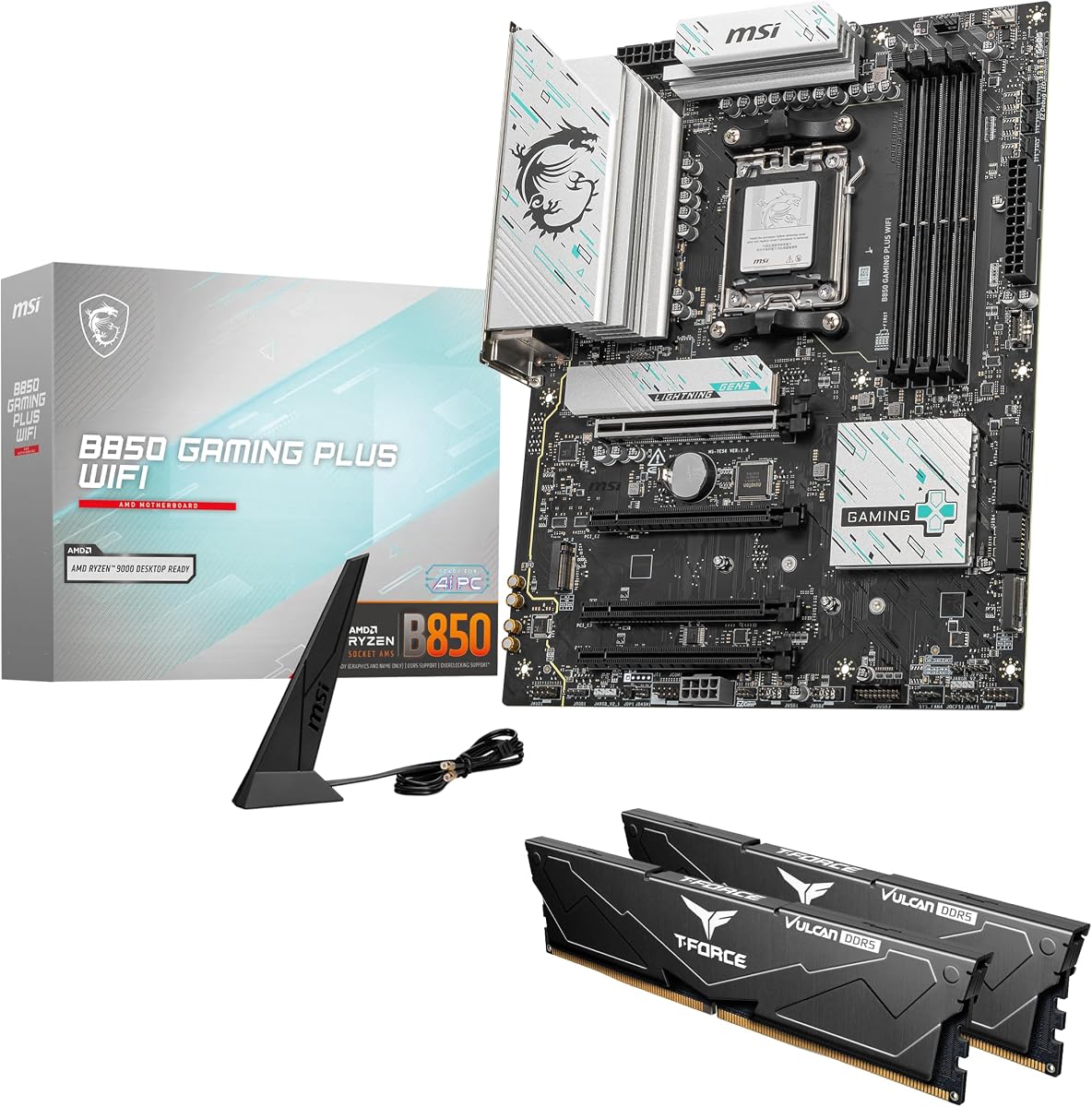
MSI B850 GAMING PLUS WIFI + 32GB DDR5 Bundle
Memory shopping is where DDR5 builds go sideways: wrong slot population, mismatched ranks, kits that only list the other platform’s profile, or sticks that physically collide with a VRM sink. The MSI B850 Gaming Plus WiFi bundle attacks that failure mode directly by shipping a TEAMGROUP T-Force Delta 32GB (2x16GB) DDR5 kit alongside the motherboard. For a first AM5 machine, that pairing is worth more than a slightly fancier PCB alone.
The included kit runs at 6000 MHz with CL38 and is designed for one-click enablement through AMD EXPO or Intel XMP 3.0 menus. On this AM5 board you will use EXPO. Six thousand MT/s remains the pragmatic Ryzen sweet spot for 1:1 Infinity Fabric behavior on a huge range of CPUs. You are not leaving performance on the table by accepting a validated dual-stick kit instead of gambling on an 8000 MT/s poster child that may downclock in daily use.
The motherboard side is a modern B850 ATX part with PCIe 5.0 graphics and M.2 pathways, WiFi 7, and 5G LAN—an unusually strong networking pair for a bundle SKU. That combination means the package is not a clearance oddity; it is a coherent 2026 gaming platform. MSI’s Gaming Plus naming usually lands between barebones Tomahawk simplicity and TORPEDO RGB excess, which suits builders who want the machine to look intentional without a light show mandate.
Tradeoffs are real. You inherit whatever spreader height and RGB personality the T-Force Delta kit brings, so dry-fit your cooler before you assume dual-tower clearance. You also cannot customize the memory SKU inside the bundle listing. If you already own a tuned DDR5 kit you love, buy a bare board like the B850 AORUS Elite or Strix B850-A instead. The bundle shines when the alternative is staring at twenty nearly identical 32GB kits.
From a DDR5 education standpoint, this package teaches good habits: dual-channel first, profile enablement second, stress testing third. Keep the spare DIMM slots empty. Document the EXPO voltage and timings after the first successful boot so you can restore them after a BIOS flash. If you ever upgrade capacity, replace both sticks as a new matched kit rather than adding two orphans.
We named this Best Bundle because it solves the actual DDR5 problem newcomers hit, not because it beats the X870E-E at enthusiast extremes. For a Ryzen 5/7 gaming PC destined for 1080p or 1440p, it is one of the calmest ways to get onto DDR5 in 2026 without writing a secondary research paper on QVLs.
Install both included modules in the dual-channel slots MSI marks in the manual. Boot once at defaults, enter BIOS, enable EXPO for 6000 MT/s, save, then run a memory tester. Do not add extra sticks later without retesting.
Skip the bundle if you need low-profile memory for a giant air cooler, already own 64GB, or want a specific white RGB theme the Delta kit does not match. The Strix B850-A and AORUS Elite WIFI7 are better á la carte canvases.
WiFi 7 plus 5Gb LAN is unusually strong for a bundle. If your home already has multi-gig switching, you can keep the desktop wired at high speed while still having modern wireless as backup—excellent for LAN parties and NAS days.
We may earn a commission at no additional cost to you.

ASUS ROG Strix B650-A Gaming WiFi
The ASUS ROG Strix B650-A Gaming WiFi is the DDR5 board people buy when the PC must look finished in a white or silver case, not merely POST. Under the cosmetic layer sits a competent 12+2 power stage design with ProCool connectors and chunky VRM heatsinks that channel airflow rather than blocking it. For Ryzen 7000 and 9000 gaming CPUs with dual-stick DDR5, that is a proven formula.
ASUS memory features matter in a DDR5 roundup. Even on B650, the broader ROG/TUF firmware family carries Enhanced Memory Profile thinking and OptiMem-style trace attention that show up as higher success rates with picky kits. You still need correct slot population. You still should update BIOS when installing Ryzen 9000 if your board revision shipped earlier. ASUS is explicit that a BIOS update may be required for 9000/8000 series CPUs—budget an afternoon for that before you blame DDR5.
Storage includes one PCIe 5.0 M.2 and two PCIe 4.0 M.2 slots, all with heatsinks. That is the right count for most gamers. Creators who archive locally may wish for a fourth slot, which is where the newer Strix B850-A or X870E-E pull ahead. Thermals around the primary M.2 stay reasonable if your case has a front intake; the heatsinks are not decorative afterthoughts.
Networking is WiFi 6E and 2.5G LAN. In a guide that also features WiFi 7 B850 boards, the Strix B650-A reads as last-generation wireless with current-generation style. That is fine if your router is 6E and you care more about the white PCB aesthetic than be-class radios. Aura Sync integration is either a feature or a nuisance depending on how you feel about RGB ecosystems.
Compared with the Gigabyte B650 AORUS Elite AX, the Strix B650-A wins on themed aesthetics and ASUS software familiarity, while the Gigabyte often wins on raw VRM bragging rights and a more neutral look. DDR5 behavior on both is strong with dual-stick EXPO kits. Pick based on case theme, BIOS comfort, and which brand’s QVL lists the kit you already purchased.
Buy the Strix B650-A for a clean white AM5 DDR5 build that does not need WiFi 7. Skip it if you want the newest wireless radio, hate Armoury Crate, or need USB4. It remains a stylish, credible DDR5 host—just not the newest radio on this list.
If your CPU is newer than the board’s box sticker era, flash BIOS with a supported older CPU or USB BIOS FlashBack if your revision supports it. Only after that should you enable EXPO and evaluate DDR5 stability.
White Strix boards show cable pigment. Use white or sleeved extensions if the window faces a living room. Tall black DRAM can look intentional; mismatched rainbow kits can fight the silver shroud.
We may earn a commission at no additional cost to you.

The ASUS Z790-AYW WiFi W II targets Intel builders who care about how DDR5 coexists with a modern dock-heavy desk. Thunderbolt and USB4 header support is the headline for creators who move between laptop-like docking and a desktop. Memory-wise, ASUS Enhanced Memory Profile II and OptiMem II are the features that keep this board relevant in a DDR5-focused article rather than a generic Z790 roundup.
OptiMem-style trace layout is ASUS shorthand for cleaner memory signal integrity. In practice, that means better odds of posting high-quality dual-stick kits at their XMP ratings, and a friendlier starting point if you tighten timings later. It is not magic: four DIMMs populated with mixed ranks can still humble any consumer board. Treat dual-channel as the default architecture for performance, not a temporary state.
Power delivery is 12+1 DrMOS on a six-layer PCB—adequate for many unlocked Intel CPUs with sensible power limits, less ideal if you plan to remove all limits on a top-bin chip in a stifling case. DDR5 stability benefits from cooler VRMs, so keep intake air moving across the upper board. Large VRM and M.2 heatsinks plus Fan Xpert 4 with AI Cooling II give you software levers when temps climb.
Wireless is the honest weak spot relative to WiFi 6E and WiFi 7 boards in this guide. WiFi 6 remains fine for many homes, especially if you live on 2.5GbE wired anyway. If wireless is your only uplink and your router is 6E/7, prefer the Gigabyte Z790 AORUS Elite AX for 6E or jump platforms to an AM5 WiFi 7 board if you are not locked into Intel cooling and CPUs.
I/O flexibility is where AYW earns its keep: rear USB 10Gbps Type-C/Type-A, front USB 10Gbps Type-C, and Thunderbolt/USB4 header support for compatible cases and add-in implementations. Photographers and editors who park a dock on the desk will feel that difference daily, while pure gamers may never notice.
Pick the Z790-AYW WiFi W II for a themed Intel DDR5 build that values docking and ASUS memory tooling. Skip it for maximum VRM bragging rights, WiFi 7, or any future-CPU roadmap beyond LGA 1700. In this dual-platform guide, it represents the Intel desk-centric personality rather than the raw power personality.
If you use a Thunderbolt dock for displays and Ethernet, confirm your case and cable plan for the USB4 header path. DDR5 speed will not matter if your daily friction is hot-plugging a forest of USB 2.0 hubs.
Use the primary XMP profile first. Explore Enhanced Memory Profile options only after the rated kit profile is stable. ASUS tooling can help stubborn kits, but it should not replace buying a dual-stick kit with a sane rating.
We may earn a commission at no additional cost to you.
ASUS ROG Strix X870E-E Gaming WiFi
The ASUS ROG Strix X870E-E Gaming WiFi is the premium DDR5 destination on AM5 when you want the memory subsystem backed by every ROG tool ASUS ships in 2026. AEMP, Dynamic OC Switcher, Core Flex, and AI-assisted networking/cooling features surround a board whose electrical design—18+2+2 stages at high current per stage—exists to keep Ryzen 9000 flagships fed while DDR5 runs at ambitious profiles. This is not a subtle board, and it should not be purchased as if it were.
DDR5 enthusiasts buy X870E-class boards for training margin and firmware depth. AEMP can help squeeze additional performance from kits that are close but not perfect on auto rules. That does not replace a good dual-stick foundation; it amplifies one. Populate two matched modules, update to a recent BIOS, and only then explore ASUS memory helpers. Five M.2 slots mean your storage plane can grow without a RAID card, which matters for creators who also chase fast scratch disks beside a high-clock memory config.
Connectivity is the other half of the premium story. Dual USB4 Type-C ports, a 20Gbps front-panel Type-C connector, PD-capable USB, WiFi 7, and Realtek 5Gb Ethernet cover docks, VR, capture, and NAS without add-in sprawl. DIY features—Q-Release Slim, M.2 Q-Latch/Q-Release/Q-Slide, Q-Antenna, Q-Code—reduce the annoyance tax when you reseat GPUs and drives while iterating on memory stability. Premium boards earn their keep during the third rebuild, not the first unboxing.
Thermals are aggressive by design: massive heatsinks, integrated I/O cover, L-shaped heatpipe, high-conductivity pads. That mass near the DIMMs is a double-edged sword for ultra-tall RAM. Most ROG-certified kits fit; novelty skyscraper spreaders may not. Dry-fit before you commit to a cooler-plus-RAM stack that leaves no service loop for the 24-pin cable.
Versus the B850 AORUS Elite WIFI7, you are paying for USB4, extra M.2, deeper OC tooling, and a heavier VRM. Versus the Strix B850-A, you are stepping into the X870E feature ceiling. Casual gamers will not feel all of that in frame time. Workstation builders, AI experimenters, and memory hobbyists will.
We named it Best Premium because it is the clearest no-compromise DDR5 host in this pack. Skip it if your build brief is a quiet 32GB 1440p gaming PC—the B850 Elite or MSI bundle will make you happier. Choose it when the motherboard is the product you want to live in for years of AM5 CPUs and increasingly hungry memory kits.
You need this tier if you regularly retune memory, run multi-NVMe creator workloads, or depend on USB4 docks. If you enable EXPO once and never open BIOS again, a B850 board already solves DDR5.
Start with the kit’s EXPO profile. Use AEMP when you want ASUS to propose an enhanced table after the rated profile is proven stable. Treat AEMP as an optimization pass, not the first boot step.
The heatsink complex is tall and wide. Pair with a mid-tower that has genuine CPU cooler clearance and top exhaust. Compact cases that barely clear ATX can make premium armor feel claustrophobic during cable work.
We may earn a commission at no additional cost to you.

Not every DDR5 build needs an ATX showcase board. The ASRock B760M Pro RS is the compact Intel answer when you want modern memory on LGA 1700 without funding Z790. Micro-ATX keeps the chassis options open for desk-friendly cases, while DDR5 support with advertised overclock headroom up to 7200 MT/s shows ASRock expects enthusiasts to push kits beyond JEDEC defaults—even on a B-series chipset.
B760 versus Z790 is the strategic question. You typically lose some CPU PCIe bifurcation flexibility and finer overclocking freedom, but you keep the DDR5 memory slots that matter for 12th–14th Gen upgrades from older DDR4 machines. If you are moving from a B660 DDR4 board, this is a clean jump: new board, new dual-stick DDR5 kit, same cooler if it supports LGA 1700 brackets.
The 7+1+1 Dr.MOS VRM is honest about its audience. It suits mainstream Core i5 and efficiency-leaning i7 configurations better than fully unleashed flagship chips. For DDR5, that can be a blessing: a cooler board around the socket often means fewer mysterious cold-boot training failures. Keep power limits sane in BIOS if you do run a hotter CPU, and prioritize case airflow over glass cocoon aesthetics.
Display outputs include HDMI and DisplayPort, plus eDP mentioned in the product positioning for certain panel integrations—useful if you run an iGPU while waiting on a graphics card or building a compact office PC. Expansion is tighter than ATX: plan your GPU and any capture or network cards carefully. WiFi is not built-in; budget an M.2 Key E module or USB adapter if wireless is required.
In this cross-platform DDR5 guide, the B760M Pro RS exists to remind Intel builders that memory generation upgrades do not require maximum chipset SKUs. A careful dual-stick XMP kit at a realistic speed will transform snappiness more than a Z790 box you only use for stock gaming. ASRock’s BIOS is utilitarian; learn the XMP toggle and fan page, then stop tinkering until stability is proven.
Buy it for compact Intel DDR5 upgrades, HTPC-like desks, and budget rebuilds. Skip it for multi-GPU-adjacent creator layouts, integrated WiFi needs, or CPUs that demand heavy VRM. It is the smallest board in this roundup and one of the most pragmatic.
Choose a micro-ATX case with a front intake path that washes air across the CPU socket. Short GPUs make cable life easier. Confirm DDR5 stick height against side panels on sandwich-style cases.
Use the M.2 Key E site for a modern WiFi card if you need wireless. That keeps USB ports free and usually yields better antenna options than dongles. Plan antenna routing before you close the side panel.
We may earn a commission at no additional cost to you.

ASUS ROG Strix B850-A Gaming WiFi
The ASUS ROG Strix B850-A Gaming WiFi closes this list as the balanced ROG answer to DDR5 on AM5: newer than B650 Strix, lighter than X870E-E, and aligned with WiFi 7 routers landing in homes through 2026. Four M.2 slots and a 14+2+2 power design rated for high current per stage give it real substance beneath the silver-white ROG costume. If you like ASUS firmware and want modern wireless without flagship sprawl, start here.
DDR5 support includes AEMP, which places this board in the same tuning conversation as higher Strix models. That matters when your kit is slightly awkward on pure auto EXPO. It also matters when you upgrade from 32GB to 64GB later and need firmware that has seen dense modules before. ASUS AI Advisor and AI Networking II will either delight you or be ignored—neither outcome blocks good memory hygiene.
Compared with the Gigabyte B850 AORUS Elite WIFI7, the Strix B850-A trades some neutrality for ROG aesthetics, an extra M.2 slot, and ASUS software conveniences. DDR5 success rates should be excellent on both with dual-stick kits. Choose Gigabyte for Best Overall value coherence; choose Strix when the case theme and Aura ecosystem already define the build.
Thermals use massive heatsinks bridged to VRMs with high-conductivity pads and an integrated I/O cover. As with other armored boards, dry-fit tall DRAM. The Q-Antenna kit makes WiFi 7 setup less fiddly than loose SMA connectors behind a desk. 2.5G LAN covers wired multi-gig for most people who are not on 5Gb switching yet.
USB 20Gbps Type-C support keeps external SSD docks snappy—useful when your internal M.2 slots start filling with game libraries. PCIe 5.0 readiness future-proofs the graphics slot even if your current GPU is PCIe 4.0. None of that replaces correct EXPO enablement, but it means the board will not feel outdated when your DDR5 kit is still going strong two upgrades later.
Pick the Strix B850-A as a stylish WiFi 7 DDR5 host for Ryzen 9000 gaming and creation. Skip it only if you need the X870E-E’s USB4 dual rear ports and five M.2 slots, or if you prefer the Gigabyte Elite’s simpler overall recommendation. It is a strong final option that keeps ROG in the DDR5 conversation without forcing every builder into flagship territory.
Stay on B850-A if you want WiFi 7, four M.2, and AEMP without dual USB4 and five-drive density. Step to X870E-E when docks, storage sprawl, and maximum OC tooling are daily requirements.
Match spreader color to the silver-white Strix shroud. Dual-stick white or pale kits photograph cleaner than mixed black towers. Confirm height against your cooler before chasing the tallest RGB DIMMs on the shelf.
We may earn a commission at no additional cost to you.
DDR5 is available on both AMD AM5 and Intel LGA 1700, but kits and boards are not interchangeable across sockets. Choose your CPU generation first. Ryzen 7000/8000/9000 builders should shortlist B650, B850, and X870E boards in this guide. Intel 12th–14th Gen builders should shortlist Z790 and B760 options. Only after the socket is fixed should you compare EXPO versus XMP labeling, WiFi generation, and VRM mass.
EXPO is AMD’s extended profile standard; XMP 3.0 is Intel’s. Many retail DDR5 kits include both tables in SPD. On AM5, prefer EXPO when present. On Intel, use XMP. Enabling the wrong mental model—forcing extreme secondary timings from a forum screenshot—causes more failed boots than slow JEDEC defaults ever will. Load the profile, confirm frequency in the OS, then stress test.
Consumer DDR5 memory controllers are happiest with two matched modules. Four sticks increase electrical load and often force lower stable speeds. If you need 64GB, prefer 2x32GB over 4x16GB when your budget and QVL allow it. Leave unused slots empty. Populate the slots your manual marks for dual-channel operation—often the second and fourth slots from the CPU.
High DDR5 clocks do not live in isolation from thermals. Tall RGB spreaders parked against hot MOSFET armor can soak heat and contribute to flaky training. Measure clearance with your air cooler’s rear tower. Low-to-mid height dual-stick kits are the adult choice for dense VRM boards like AORUS Elite and ROG Strix models.
WiFi 7 matters when your router supports 802.11be and you depend on wireless for gaming or large uploads. WiFi 6E remains excellent on a clean six-gigahertz channel. If you live on Ethernet, prioritize 2.5GbE or 5GbE LAN and treat wireless as convenience. Do not buy a harder BIOS experience just to gain a radio generation you cannot use.
Board-plus-RAM bundles like the MSI B850 Gaming Plus package reduce mismatched kit risk and guarantee a dual-channel starting point. Á la carte shopping wins when you need a specific height, capacity, or aesthetic. Never mix leftover DDR5 sticks from different kits and expect EXPO to paper over the physics.
DDR5 speed will not fix a storage plan that saturates shared lanes. Count how many NVMe drives you need on day one and in two years. Three M.2 slots cover most gamers; four or five suit creators. PCIe 5.0 graphics slots future-proof the physical interface even when your current card runs at PCIe 4.0 rates. Prioritize lane clarity over collecting every rear I/O badge.
You need a motherboard whose memory slots are electrically wired for DDR5. You cannot install DDR5 in a DDR4 board, even if the CPU socket looks familiar from a previous generation. On current AMD AM5 boards, DDR5 is the only option. On Intel LGA 1700, you must buy a DDR5 version of the board—many Z790/B760 models were also sold in DDR4 variants. Always read the product title and DIMM specification. Every board in this guide is a DDR5 model. Once that hardware requirement is met, firmware quality, slot population, and kit matching decide whether your rated EXPO or XMP speed is boringly stable or a weekend troubleshooting project.
Both are SPD profile standards that store frequency, timings, and voltage so you do not set every parameter by hand. EXPO is AMD’s standard and is the profile you should enable on AM5 boards when available. XMP 3.0 is Intel’s standard and is the usual path on Z790 and B760 DDR5 boards. Many kits include both profiles. That does not mean the secondary timings are identical, but it does mean one SKU can serve either platform. Enable one profile family at a time, save, reboot, and verify in the OS. If a kit only lists XMP and you are on AMD, check whether the board firmware exposes that XMP table; many AM5 boards do, including several Gigabyte models in this roundup.
For a huge range of Ryzen 7000 and 9000 gaming CPUs, dual-stick kits around 6000 MT/s with EXPO remain the pragmatic sweet spot because they balance Infinity Fabric behavior, training success rates, and price. Faster kits can win in niche benchmarks, especially with strong CPUs and favorable silicon, but they also fail more often when four DIMMs are populated or when BIOS revisions change. Intel systems often showcase higher marketing frequencies on Z790, yet daily stability still favors quality dual-stick kits over chasing the largest number on the box. Buy for validated dual-channel first; treat extreme bins as a hobby layer.
Buy a bundle when you do not already own memory and you want a matched dual-stick kit that the seller has paired with the board—exactly the appeal of the MSI B850 Gaming Plus WiFi plus 32GB package in this guide. Bundles reduce QVL anxiety and guarantee you start in dual-channel. Buy separately when you need a specific capacity, low-profile height for a huge cooler, or a colorway the bundle does not include. Avoid Franken-kits that mix leftover modules. If you go á la carte, still prefer a single dual-stick kit from one manufacturer lot over random singles.
You can try, but you should not plan on it. Mixing brands, densities, or ranks is a common reason EXPO/XMP profiles fail or run unstable under load. Adding two sticks later to turn 2x16GB into 4x16GB often forces a lower stable frequency even when all four modules are individually fine. If you know you will need 64GB soon, buying 2x32GB on day one is usually smoother than expanding later. When you do upgrade, replace the entire kit as a matched set, clear CMOS, boot at JEDEC defaults, then re-enable the memory profile and retest. Treat capacity upgrades as a new validation cycle, not a hot-swap.
WiFi generation does not change how DDR5 trains, but it changes whether the rest of the board still feels modern while your memory kit ages gracefully. WiFi 7 helps if your router supports 802.11be and wireless is your primary uplink. WiFi 6E remains excellent on a clean six-gigahertz channel. If you are wired on 2.5GbE or 5GbE, radio generation is secondary—prioritize VRM quality, M.2 count, and BIOS reputation for memory instead. This guide calls out WiFi 7 boards like the B850 AORUS Elite WIFI7, MSI bundle, Strix X870E-E, and Strix B850-A so you can match networking intent without confusing it for a memory feature.
VRM heatsinks sit beside DIMM slot one on most ATX boards. Tall DRAM spreaders can block local airflow and thermally couple to hot MOSFET armor during long CPU loads. Heat soaked into the modules can make cold-boot training flaky even when the same kit was stable at room temperature after a short gaming session. The fix is mechanical more often than electrical: choose moderate-height dual-stick kits, improve intake across the upper motherboard, or pick a cooler layout that does not force the rear fin stack into the RAM bay. Premium boards with huge armor—AORUS Elite, ROG Strix—need dry-fitting before you commit to skyscraper RGB.
Yes, if you already own a strong Intel cooler, a 13th/14th Gen CPU, or a workflow tied to specific Intel features—and you accept that LGA 1700 is near the end of its desktop runway. DDR5 on Z790 can be excellent, especially on boards like the Gigabyte Z790 AORUS Elite AX with serious VRM mass and four M.2 slots. If you are starting from zero and care about dropping in future Ryzen generations, AM5 is the longer platform bet. This guide includes both because “best motherboards for DDR5” is a memory-generation question, not an AMD-only question. Match the socket to the CPU you will actually install this year.
Install two matched sticks in the dual-channel slots your manual diagrams. Boot once with default JEDEC settings so the board can train conservatively. Update BIOS if your CPU requires it. Enter firmware setup, load optimized defaults, enable EXPO on AMD or XMP on Intel, save, and reboot. Confirm frequency and first timings in the operating system, then run a memory stress suite before you trust creative work or competitive gaming. If training fails, clear CMOS, try the next-lower profile, or reseat modules. Do not stack manual voltage changes on top of a broken auto profile until the rated table itself is stable.
The MSI B850 Gaming Plus WiFi plus 32GB bundle is the gentlest on-ramp: the kit is included, the EXPO path is documented around 6000 MT/s, and you are not cross-shopping twenty memory SKUs. The Gigabyte B850 AORUS Elite WIFI7 is the best á la carte choice if you already know you want a specific dual-stick kit and prefer a balanced WiFi 7 board. Avoid starting on the Strix X870E-E unless you enjoy firmware menus—the premium tools are powerful, but they are not required for a stable EXPO boot. Stability comes from dual-channel hygiene more than from owning every AI-branded BIOS page.
Choosing the best motherboard for DDR5 in 2026 means picking a platform that matches your CPU socket first, then validating that the board’s memory firmware, DIMM layout, and heatsink geometry cooperate with a dual-stick kit you actually plan to buy. Gigabyte’s B850 AORUS Elite WIFI7 is the balanced AM5 answer for most builders who want WiFi 7 without stepping into flagship complexity. The ROG Strix X870E-E remains the premium destination when USB4, five M.2 slots, and aggressive DDR5 tooling justify the extra board real estate.
Intel builders should treat Z790 AORUS Elite AX and Z790-AYW WiFi W II as different personalities of the same socket: one leans storage density and VRM mass, the other leans USB4 header flexibility and a cleaner white-leaning aesthetic. The ASRock B760M Pro RS proves you do not need a full ATX Z board to run DDR5 at competitive EXPO-class speeds if your cooler and case already favor micro-ATX. And if shopping two SKUs feels like a liability, the MSI B850 Gaming Plus WiFi bundle is the cleanest way to land a matched 32GB kit.
Whatever you pick, enable the memory profile after a clean CMOS, leave the far DIMM slots empty when you only have two sticks, and confirm cooler clearance before you chase RGB towers that sit against MOSFET armor. DDR5 rewards patience more than it rewards four populated slots. Build for stability first, then explore tighter timings once the machine posts reliably for a week of real work and play.