Skip to content

Best Monitors for Programming in 2026

By Ethan BrooksUpdated July 5, 2026

We may earn a commission from links on this page, at no extra cost to you. Learn more.

A coding monitor is a tool you stare at for eight or more hours a day, so the details that matter are not the ones marketing shouts about. What actually helps you write and read code is crisp text, enough vertical and horizontal space to see whole functions and side-by-side files, a panel that stays comfortable through long sessions, and an ergonomic stand that fits your desk. Refresh rate and colour gamut are secondary here, though a decent IPS panel never hurts. This guide ranks nine monitors that suit programmers, from sharp QHD 27-inch panels to space-saving ultrawides and a portable triple screen for laptop coders on the move.

Top 9 Best Monitors for Programming

Best for Text Sharpness4.6
Best Budget 4K Value4.6
Best Compact Pick4.6
Best Curved for Focus4.5
Best for High Refresh4.4
Best Wide-Screen Value4.5
Best for Reference Coding4.0

Our top 9 picks, reviewed

1Best Overall

CIDETTY Triple Portable Monitor for Laptop

For programmers who work on a laptop, the CIDETTY triple portable monitor is a smart way to open your editor, a browser and a terminal side by side without a fixed desk setup. Three FHD IPS panels give sharp, readable text, the two-cable plug-and-play connection avoids driver headaches, and it works across Windows, macOS, ChromeOS and Linux. The slim, travel-friendly build makes it a rare productivity win on the road.

Display
15.6in FHD IPS triple
Resolution
1080P per panel
Connection
2-cable plug & play
Compatibility
Win/Mac/Chrome/Linux

What we liked

  • Triples your laptop screen space instantly
  • Sharp 1080P IPS panels for text
  • Plug and play, no drivers needed
  • Ultra-thin and genuinely portable

Worth noting

  • Lesser-known brand
  • Needs enough laptop power to drive three screens
2Best for Text Sharpness

ASUS ProArt Display PA278QV 27in WQHD

The ASUS ProArt PA278QV is a superb coding monitor thanks to its 27-inch WQHD IPS panel, which renders text with the sharpness long sessions demand. The full ergonomic stand pivots to portrait, handy for scrolling long files, and the built-in USB hub tidies a multi-device desk. Factory-calibrated colour is a bonus for anyone who dabbles in design, though its real strength here is clean, readable code.

Display
27in WQHD IPS
Resolution
2560 x 1440
Color
100% sRGB, dE < 2
Ergonomics
Tilt/pivot/swivel/height

What we liked

  • Crisp 1440p IPS text at 27 inches
  • Factory-calibrated 100% sRGB
  • Full ergonomic stand with pivot
  • USB hub and rich connectivity

Worth noting

  • No high refresh rate
  • Priced above basic 1440p panels
3Best Budget 4K Value

Acer KB272 27in FHD IPS Monitor

The Acer KB272 is the value pick for coders who want a large IPS screen without spending much. Its 27-inch panel covers 99% sRGB and runs up to 120Hz, so scrolling through long files feels smooth, and the near bezel-less frame suits a two-monitor coding wall. The trade-off is Full HD resolution, which looks a little soft at this size, so text purists may prefer a 1440p panel.

Display
27in FHD IPS
Resolution
1920 x 1080
Refresh
Up to 120Hz
Color
99% sRGB

What we liked

  • Excellent price for a 27in IPS
  • 99% sRGB for accurate colour
  • Up to 120Hz for smooth scrolling
  • Zero-frame design for dual setups

Worth noting

  • 1080p looks soft at 27 inches
  • Basic tilt-only stand
4Best Compact Pick

Acer KB220Q H2bi 21.5in Full HD

The Acer KB220Q is a tidy 21.5-inch panel that packs Full HD into a smaller area, so text looks crisp thanks to its higher pixel density. That makes it a great companion screen for a terminal, chat or documentation next to a larger main display, and the zero-frame edges line up neatly in a multi-monitor coding setup. As a sole display it is a touch small, but as a supporting screen it punches above its price.

Display
21.5in Full HD
Resolution
1920 x 1080
Refresh
Up to 100Hz
Color
99% sRGB

What we liked

  • Sharp pixel density at 21.5 inches
  • 99% sRGB colour coverage
  • Zero-frame design for multi-monitor
  • Very affordable secondary screen

Worth noting

  • Small for primary coding work
  • Tilt-only, no height adjustment
5Best Ultrawide

SAMSUNG 34in ViewFinity S50GC Ultra-WQHD

The Samsung ViewFinity S50GC gives coders a single 34-inch 21:9 canvas that fits an editor, browser and terminal side by side without a bezel down the middle. PIP and PBP let you view two machines at once, useful for a work laptop beside a personal build, and the eye-care dimming keeps long sessions comfortable. It is the pick for programmers who want ultrawide real estate rather than two separate screens.

Display
34in Ultra-WQHD
Ratio
21:9
Resolution
3440 x 1440
Extras
PIP/PBP, HDR10

What we liked

  • 21:9 space replaces a dual setup
  • PIP/PBP for two sources at once
  • Comfortable ambient-light dimming
  • Wide, seamless coding canvas

Worth noting

  • Curveless panel lacks height adjust info
  • 1440 vertical is modest for the width
6Best Curved for Focus

SAMSUNG 32in Odyssey G55C QHD Curved

The Samsung Odyssey G55C is a 32-inch QHD curved panel that gives programmers a large, immersive workspace with room for multiple windows. The 1000R curve wraps around your peripheral vision to help you focus on the code in front of you, and the 165Hz refresh keeps fast scrolling smooth. It leans gaming in its design, so some coders dislike a curve for straight lines of text, but the sheer real estate is compelling.

Display
32in QHD curved
Resolution
2560 x 1440
Refresh
165Hz
Curve
1000R

What we liked

  • Large 32in QHD workspace
  • 1000R curve fills your view
  • 165Hz makes scrolling silky
  • Strong value for a big panel

Worth noting

  • Gaming-first design over ergonomics
  • Curve is divisive for straight text
7Best for High Refresh

Samsung 27in Odyssey G5 (G51F) QHD

The Samsung Odyssey G5 G51F is a 27-inch QHD monitor that suits programmers who also game after hours. The 1440p resolution keeps code crisp at a comfortable size, while the 180Hz refresh and height-adjustable stand cover both work and play. Colour is not factory-calibrated like a ProArt, so it is not a design tool, but for a sharp, fast, well-priced dual-purpose screen it delivers real value.

Display
27in QHD
Resolution
2560 x 1440
Refresh
180Hz
Extras
HDR10, height adjust

What we liked

  • Sharp 1440p at 27 inches
  • Fast 180Hz for gaming after work
  • Height-adjustable stand
  • Keenly priced QHD panel

Worth noting

  • Gaming panel, colour is uncalibrated
  • HDR10 is entry-level only
8Best Wide-Screen Value

Sceptre 34in Prime Ultrawide (E345B-QU180D)

The Sceptre Prime is a budget-friendly 34-inch ultrawide that hands programmers a lot of horizontal space for the money. The 3440 x 1440 panel lets you view multiple windows, spreadsheets or timelines at once, dual HDMI and DisplayPort inputs run up to 180Hz, and built-in speakers keep the desk tidy. Support and stand ergonomics are basic, but for cheap ultrawide real estate it is hard to fault.

Display
34in UWQHD
Resolution
3440 x 1440
Refresh
Up to 180Hz
Extras
Built-in speakers

What we liked

  • Big 21:9 space for code and docs
  • Up to 180Hz across HDMI and DP
  • Built-in speakers save desk space
  • Aggressive price for an ultrawide

Worth noting

  • Value brand with basic support
  • Stand adjustment is limited
9Best for Reference Coding

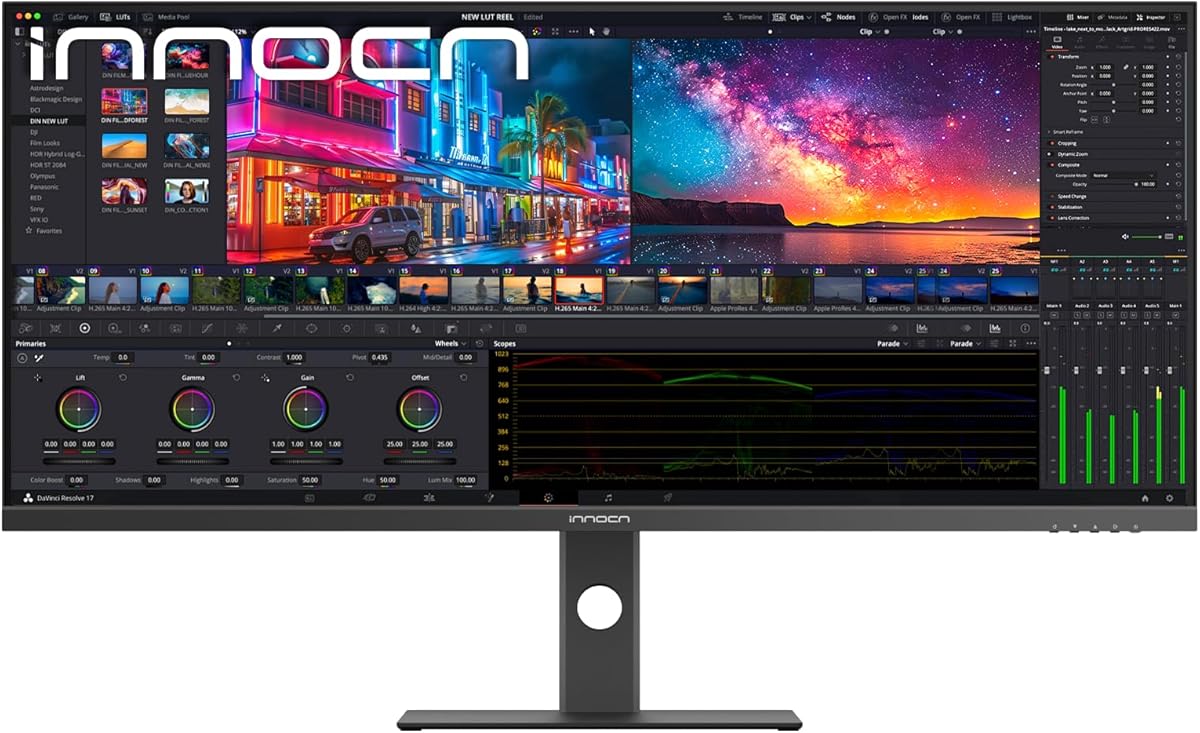
INNOCN 34in Ultrawide WQHD (34C1R)

The INNOCN 34C1R is an IPS ultrawide built for coding with reference material open alongside your editor. The 21:9 panel gives you the width of two monitors, PIP and PBP let you display two machines at once, and the height-adjustable stand supports long sessions. Its owner rating trails the leaders and IPS ultrawides can show some backlight bleed, but the 100% sRGB IPS panel is a genuine step up in colour and viewing angles.

Display
34in WQHD IPS
Resolution
3440 x 1440
Refresh
180Hz
Extras
PIP/PBP, height adjust

What we liked

  • IPS ultrawide with 100% sRGB
  • PIP/PBP for two devices
  • Height-adjustable ergonomic stand
  • 180Hz IPS for smooth work

Worth noting

  • Lower owner rating than rivals
  • IPS ultrawides can show backlight bleed

How We Chose the Best Monitors for Programming

Best Monitors for Programming in 2026

Choosing a monitor for coding is a different exercise from picking one for gaming or watching films. A programmer spends the day reading dense lines of text, jumping between an editor, a browser, a terminal and documentation, so the qualities that matter are the ones that reduce eye strain and let you see more at once. We started there, ranking each display on how sharp its text looks, how much usable space it gives you, how comfortable it stays over an eight-hour session, and how easily it slots into a multi-monitor or laptop-based workflow.

Pixel density came first, because crisp text is the single biggest comfort factor when you read code all day. A 27-inch panel at 1440p, like the ASUS ProArt PA278QV, hits a natural sweet spot, while a smaller Full HD screen such as the Acer KB220Q keeps density high in a compact frame. From there we looked at screen real estate, favouring large panels and 21:9 ultrawides that replace a two-monitor setup with one seamless canvas. Panel type mattered too: IPS delivers the wide viewing angles and consistent colour that keep text legible from edge to edge. Finally, we weighed connectivity for multi-display rigs and ergonomic stands that let you set the screen at a healthy height and angle.

Why Text Sharpness Matters More Than Anything

The unglamorous truth of a coding monitor is that its most important job is rendering small text cleanly. Blurry or aliased characters force your eyes to work harder on every line, and over a full day that fatigue adds up fast. This is why resolution relative to screen size, or pixel density, sits at the top of our list. A 1440p panel at 27 inches gives roughly 109 pixels per inch, sharp enough that letterforms stay clean and you can comfortably fit more lines of code on screen. Drop to Full HD at the same 27 inches, as the Acer KB272 does, and density falls to around 81 pixels per inch, which looks noticeably softer for text even though it is perfectly fine for video.

Smaller panels flip this maths in your favour. The 21.5-inch Acer KB220Q packs the same Full HD resolution into a smaller area, pushing density back up so text looks crisp, which is why compact screens make excellent secondary displays for a terminal or chat window. IPS technology reinforces sharpness by holding colour and contrast steady across the whole panel, so text near the edges reads as clearly as text in the centre. When you are choosing between two coding monitors, comparing their pixel density is often more useful than comparing headline features, because it directly predicts how tiring the screen will be to read.

The Case for More Screen Real Estate

If sharpness keeps you comfortable, screen space keeps you productive. Programming is a multi-window job: you rarely look at just one thing. Being able to see your editor, a browser with documentation and a terminal all at once, without constantly alt-tabbing, removes a surprising amount of friction from the day. There are three good ways to get that space, and each suits a different desk.

The classic approach is a large single panel like the 32-inch Samsung Odyssey G55C, which offers enough room to tile several windows on one screen. The second is an ultrawide, and this is where the Samsung ViewFinity S50GC, Sceptre Prime and INNOCN 34C1R come in. Their 3440 x 1440 panels give you the horizontal width of two monitors in one uninterrupted surface, with no bezel splitting your view, and their PIP and PBP modes can even show two computers side by side. The third route is going portable and modular, which is exactly what the CIDETTY triple monitor delivers for laptop coders, folding out into three panels wherever you happen to be working. Whichever you choose, the goal is the same: fit more of your workflow in front of your eyes at once.

Panel Types and Viewing Comfort

Nearly every monitor worth buying for programming uses an IPS panel, and for good reason. In-plane switching technology delivers wide 178-degree viewing angles and consistent colour, so the screen looks the same whether you are staring dead centre or glancing at the corner where your terminal sits. That consistency matters when your eyes roam constantly across a busy multi-window layout. The ASUS ProArt PA278QV and INNOCN 34C1R lean on IPS to keep every part of the display sharp and evenly lit.

Comfort features stack on top of the panel itself. Blue-light reduction and flicker-free backlighting, found across these picks, ease the strain of long sessions, while a matte anti-glare finish stops overhead lights and windows from bouncing distractingly off the screen. The Samsung ViewFinity even adjusts its own brightness to match the room. Curved panels like the Odyssey G55C's 1000R design are more divisive for coders: the wrap helps immersion and keeps the far edges equidistant from your eyes, but some programmers find curved lines subtly distracting when reading straight rows of text. It comes down to personal taste, and it is worth trying a curve before committing if you read code for hours.

Connectivity for a Multi-Monitor Setup

Programmers love a multi-screen desk, so the ports on the back of a monitor deserve attention. At a minimum you want the flexibility to connect more than one machine, which is where HDMI and DisplayPort inputs matter, and several picks here provide both. The Sceptre Prime, for instance, carries dual HDMI and dual DisplayPort, making it easy to hook up a work laptop and a personal desktop and switch between them.

A built-in USB hub, like the one on the ASUS ProArt PA278QV, is quietly one of the most useful features for a cluttered coding desk, letting you plug a keyboard, mouse and storage into the monitor and route everything to your computer through a single cable. USB-C is even better where available, carrying video, data and laptop charging over one connector. PIP and PBP support, offered by the Samsung ViewFinity, INNOCN 34C1R and others, lets a single ultrawide display two sources at once, effectively giving you two screens in one. And if you code on the go, the CIDETTY portable monitor's two-cable plug-and-play connection means no drivers and no fuss when you set up in a new spot.

Ergonomics and All-Day Use

A monitor you look at all day needs to sit at the right height and angle, or your neck and back will pay for it. The best stands here, such as the fully adjustable one on the ASUS ProArt PA278QV, offer tilt, swivel, pivot and height adjustment, letting you raise the screen so its top edge sits near eye level and even rotate it into portrait mode, which is wonderful for scrolling through long files or reading tall documents. The INNOCN 34C1R and Samsung Odyssey G5 also provide height adjustment, a feature worth prioritising if you care about posture.

Budget panels often skimp here, offering only tilt, as the Acer KB272 and KB220Q do. That is not a dealbreaker, since a cheap monitor arm or riser can add the missing adjustment for very little, but it is worth factoring into the total cost. Pairing an ergonomic screen with sensible habits, keeping the display an arm's length away, taking regular breaks and dimming brightness to match the room, makes a real difference over a career of long coding days. A comfortable setup is not a luxury for a programmer; it is what keeps you working well into the evening without a headache.

A Closer Look at the Top Picks

The CIDETTY triple portable monitor takes the top spot for its rare combination of usefulness and flexibility, giving laptop-based programmers two or three extra sharp IPS panels wherever they work, with a plug-and-play setup that just works across every major operating system. It is the pick that changes how you code away from a fixed desk. Right behind it, the ASUS ProArt PA278QV is the choice for anyone who values text sharpness above all, pairing a crisp 27-inch WQHD IPS panel with a fully ergonomic stand and a tidy USB hub.

For those on a tighter budget, the Acer KB272 delivers a large 99% sRGB IPS screen for very little, while the compact Acer KB220Q makes an ideal high-density secondary display. If you want to replace a dual-monitor rig with one seamless canvas, the Samsung ViewFinity S50GC, Sceptre Prime and INNOCN 34C1R each offer 34-inch ultrawide space at different price points, and the Samsung Odyssey G55C and G51F cover coders who game after hours with large, fast panels. There is a right answer here whether you code on a laptop, at a single big screen or across a wall of monitors.

Final Recommendation

For most programmers, the CIDETTY triple portable monitor is the standout pick in 2026, transforming a single laptop into a genuine multi-screen workstation anywhere you sit down. If you work at a fixed desk and want the sharpest possible text, the ASUS ProArt PA278QV is the better buy, with its crisp 27-inch WQHD IPS panel and excellent ergonomic stand. Budget-focused coders should look at the Acer KB272 for a big, colour-accurate IPS screen at a low price, or pair it with the compact KB220Q for a two-display setup. And if screen real estate is your priority, choose one of the 34-inch ultrawides, the Samsung ViewFinity S50GC for a polished experience or the Sceptre Prime for value. Match the monitor to how and where you code, and your eyes and your productivity will both thank you.

How we picked

We judged each display on text sharpness and pixel density, usable screen real estate for code and reference material, panel type and viewing comfort, connectivity for multi-monitor setups, and ergonomic adjustment. Because programmers read far more than they game, we weighted resolution, IPS quality and stand flexibility above refresh rate, while still noting where a faster panel adds value for those who game after hours.

Frequently asked questions

What resolution is best for programming?

1440p (QHD) at 27 inches is the sweet spot, giving crisp text and plenty of vertical space for code, which is why the ASUS ProArt PA278QV and Samsung Odyssey G5 stand out. Full HD works on smaller panels like the Acer KB220Q where pixel density stays high, but looks soft stretched across a 27-inch screen. Ultrawides trade some sharpness for width.

Is an ultrawide monitor good for coding?

Yes. A 34-inch ultrawide such as the Samsung ViewFinity S50GC, Sceptre Prime or INNOCN 34C1R replaces a dual-monitor setup with one seamless 21:9 canvas, ideal for keeping your editor, browser and terminal side by side. PIP and PBP modes even let you view two computers at once, which suits developers juggling work and personal machines.

Does refresh rate matter for programming?

Less than for gaming, but a higher refresh rate makes scrolling through long files feel noticeably smoother on the eyes. Panels like the Samsung Odyssey G5 at 180Hz and Odyssey G55C at 165Hz are a bonus if you game after work. For pure coding, a quality IPS panel like the ProArt PA278QV matters more than raw refresh.

Should I use a portable monitor for programming?

If you code on a laptop, a portable option like the CIDETTY triple screen is a genuine productivity boost, adding two or three extra panels for your editor, browser and terminal wherever you work. Plug-and-play setup avoids drivers, and the slim design travels easily, though your laptop needs enough power to drive the extra displays smoothly.

Do I need a colour-accurate monitor to write code?

Not for code itself, but a panel with good sRGB coverage like the Acer KB272 at 99% sRGB or the ASUS ProArt PA278QV is worth having if you also touch design, front-end styling or image work. For plain programming, a sharp IPS panel with a comfortable ergonomic stand matters far more than factory calibration.