Best Overall for Photo Editing
ASUS ProArt PA279CRV 27" 4K
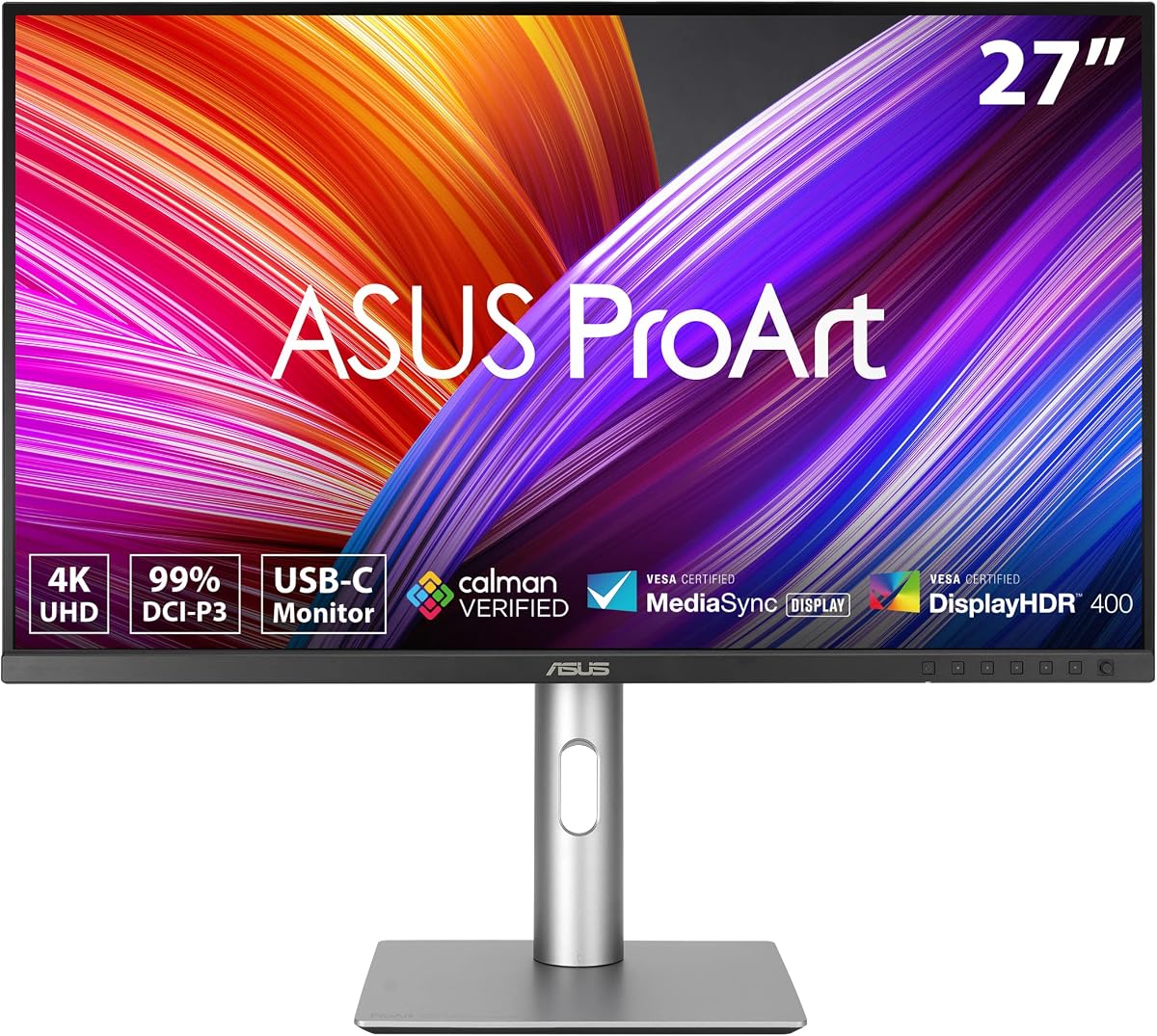
- Calman Verified factory calibration with Delta E under 2
- 99% DCI-P3 and 99% Adobe RGB for print-ready wide gamut
- USB-C 96W PD, daisy-chain, and full ergonomic stand
Expert Review & Guide
Photo editing is one of the few desktop tasks where the monitor is not just a window onto your work—it is the instrument. Skin tones, shadow detail in a forest scene, the subtle shift between two similar blues in a product shot: all of that lives or dies on panel quality, factory calibration, and color gamut coverage. A gaming monitor with aggressive overdrive and sRGB-only coverage can look punchy in a store demo and still fail a soft-proofing session minutes later. Conversely, a properly calibrated wide-gamut IPS panel lets you trust what you see well enough to send files to print or deliver to a client without a separate reference display.
This guide evaluates ten current Amazon-listed monitors from our photo-editing pack against the criteria working photographers and retouchers actually argue about: Delta E accuracy claims, DCI-P3 and Adobe RGB coverage, 4K versus QHD pixel density on a 27-inch canvas, USB-C power delivery for MacBook desks, daisy-chaining for dual-monitor setups, and whether HDR certification means anything for stills workflows. ASUS ProArt models anchor the color-critical tier with Calman verification; LG UltraFine-style panels offer polished 4K HDR at strong ratings; INNOCN and CUNPU compete on factory color targets at lower tiers; Dell brings a 32-inch VA canvas for editors who want size over absolute gamut; and portable or budget entries fill secondary roles with limitations spelled out honestly.
Every product below uses real pack ASINs, images, and affiliate URLs with tag=reviewconsens-20. We omit dollar figures because street pricing moves weekly and rarely tells you whether a panel fits your camera profile or print pipeline. Start with the three top picks for a fast shortlist, scan the comparison table for resolution and gamut at a glance, then read the full reviews for workflow-specific notes on Mac integration, ergonomics, and where each monitor stops being a primary editing display.


As an Amazon Associate we earn from qualifying purchases. We may earn a commission at no additional cost to you.
Use this table to compare resolution, color gamut positioning, and connectivity before diving into individual reviews. Specs focus on attributes that matter for Lightroom, Capture One, and Photoshop workflows—not fluctuating listing prices.
The ASUS ProArt PA279CRV is the monitor we would put on the desk of a photographer who prints exhibition work, delivers brand campaigns, and occasionally grades short client reels from the same machine. Its headline specification is not merely 4K resolution—it is simultaneous 99% DCI-P3 and 99% Adobe RGB coverage on a factory-calibrated IPS panel verified by Calman to Delta E under 2. That combination matters because many panels claim wide gamut in marketing copy but ship in a vivid sRGB mode that hides how much clipping happens in saturated foliage or fashion fabrics. ProArt targets creators who need the monitor to behave like a measuring instrument, not a demo screen.
At 27 inches and 3840×2160, pixel density lands near 163 PPI, which is the sweet spot many Lightroom and Capture One users prefer: sharp enough that 100% zoom reveals fine fur and fabric weave without forcing macOS or Windows into fractional scaling that blurs UI text. The IPS wide-view behavior also helps when a client sits beside you reviewing selects—you are not fighting color shift at modest off-axis angles during a tethered shoot review. For studio photographers who pivot the panel vertically to inspect full-length portraits, the ergonomic stand covers tilt, swivel, pivot, and height adjustment without a separate VESA arm purchase.
Connectivity is deliberately workstation-grade. DisplayPort over USB-C with 96-watt power delivery means a MacBook Pro or slim Windows ultrabook can drive the panel, charge, and route through the built-in USB hub with one cable—valuable when your desk already hosts a colorimeter, card reader, and backup SSD. DisplayPort daisy-chaining supports a second ProArt or reference panel downstream, which is how many retouchers run a primary wide-gamut display plus a sRGB proofing screen without a GPU port shortage. HDMI and additional DisplayPort inputs cover desktop towers and capture appliances that lack USB-C alt mode.
HDR certification on a photo-first monitor is easy to over-read. Still photographers spend most hours in SDR editing spaces with controlled gamma, yet HDR headroom can help when reviewing RAW files with extreme dynamic range or when handing off assets to video colleagues. The PA279CRV’s HDR support is a nice secondary benefit; the primary reason to buy it remains calibrated wide-gamut accuracy and Adobe RGB headroom for inkjet and lab print workflows that exceed sRGB.
ASUS bundles complimentary Adobe Creative Cloud access for a limited promotional window and backs the hardware with an extended five-year warranty path after online registration—details that do not replace a good ICC profile but signal intent toward professional longevity. In daily use, expect to profile annually with your own colorimeter anyway; factory calibration is a strong starting point, not a substitute for monitor drift over months of heat cycles.
Compared with the QHD ProArt models in this pack, the PA279CRV trades higher cost and GPU demand for pixel density that makes critical sharpening and noise inspection more trustworthy. Compared with LG UltraFine alternatives, ASUS pushes harder on Adobe RGB percentage and Calman branding—meaningful if your print pipeline is Adobe RGB-centric rather than P3-video-centric.
Choose this panel if you deliver fine-art prints, packaging photography, or brand imagery where Adobe RGB gamut and verified factory calibration reduce rework. It fits Mac and PC desks that want single-cable USB-C with real power delivery, and studios planning a daisy-chained dual-ProArt wall. Skip it if you only publish to social web sRGB and prefer a larger 32-inch canvas—consider the Dell S3225QS in this pack instead.
Load a hardware ICC profile from your colorimeter in the OS and in Lightroom/Capture One soft proofing modules. Keep brightness between 100 and 120 cd/m² for print matching unless your viewing booth standard dictates otherwise. Disable vivid or gaming modes in the OSD before profiling, and re-verify after the panel’s warm-up period of roughly thirty minutes.
We may earn a commission at no additional cost to you.
LG 27UP650K-W 27" UltraFine 4K
LG’s 27UP650K-W occupies the pragmatic middle of this pack: a 27-inch 4K UltraFine-class IPS panel with up to 95% DCI-P3 expression, DisplayHDR 400 compatibility, and the highest aggregate rating here at 4.6 stars. For photographers whose deliverables skew toward Instagram, web galleries, and occasional 4K client slideshows rather than wide-gamut inkjet proofing, that gamut target aligns well with modern P3-capable phones and laptops. You still get true 3840×2160 resolution for inspecting focus and noise at meaningful zoom levels, but you are not paying for the dual Adobe RGB plus DCI-P3 marketing stack that defines the ASUS ProArt PA279CRV.
The white finish and slim bezel treatment matter more than spec sheets admit. Many home-studio photographers build desks around silver Mac minis, light wood surfaces, and natural window light—the 27UP650K-W visually disappears into that environment better than black gaming panels with aggressive angular stands. Ergonomics are properly implemented: height, tilt, and pivot adjustments let you align the panel with eye level for long tethered sessions and rotate to portrait for full-body fashion comps or vertical social crops.
DisplayHDR 400 is not a substitute for a reference HDR mastering monitor, yet it gives headroom when reviewing high-dynamic-range exports or testing how highlight roll-off survives in HDR10-capable delivery chains. Black Stabilizer and Dynamic Action Sync features read gaming-forward on paper; photographers can ignore them or disable related modes during color work. More relevant day-to-day are Reader Mode and flicker-safe backlight behavior, which reduce eyestrain when you are cloning dust spots across hundreds of frames the night before a gallery opening.
Connectivity is traditional: HDMI and DisplayPort without integrated USB-C laptop charging. That is a meaningful tradeoff for MacBook-primary users who wanted one-cable desks—plan on a CalDigit or similar dock, or use a desktop Mac where power delivery is irrelevant. On the positive side, you avoid the occasional USB-C alt-mode quirks that plague mixed-vendor docks when daisy-chaining storage and displays.
LG’s Switch app marketing emphasizes split-screen multitasking, streaming shortcuts, and hotkey layouts—useful when you are batch-exporting while monitoring a YouTube tutorial, less critical than hardware calibration but genuinely handy for hybrid creator desks. Onscreen control utilities still let you adjust basic picture parameters from the desktop without fumbling OSD joysticks with colorimeter probes attached.
Against the LG 27US500-W sibling in this pack, the 27UP650K-W adds stronger HDR branding, richer advertised DCI-P3 coverage, and a more fully adjustable stand. Against ASUS ProArt 4K, you sacrifice Calman verification and Adobe RGB headroom but gain buyer ratings and a polished UltraFine identity many Apple users already trust.
Wedding and portrait photographers who deliver mostly digital galleries and occasional prints in standard gamuts will find this panel balanced. It also suits videographers who shoot stills on the side and want P3-friendly color without ProArt pricing. Pair it with a desktop tower or docked laptop rather than expecting single-cable MacBook charging.
Allow warm-up time before critical color reviews, then profile with your meter. Disable any dynamic contrast or gaming enhancement modes in the OSD. If you edit beside a window, use a hood or reposition the panel so direct sunlight does not compete with the backlight during skin-tone sessions.
We may earn a commission at no additional cost to you.
ASUS ProArt PA278CGRV 27" 1440p
Not every photo editor needs 4K. The ASUS ProArt PA278CGRV makes a persuasive case that 27-inch QHD at 1440p remains a productivity sweet spot when paired with modern color science and Mac-aware tuning. Factory Calman verification to Delta E under 2, 97% DCI-P3 coverage, and explicit MacBook P3 color temperature matching address the number-one complaint from Apple laptop photographers: external panels that look warmer or cooler than the Retina display they reference on the road. When you return to the desk and dock, you want continuity—not a second guessing game about which screen lied about a model’s skin tone.
The 144Hz variable refresh rate is unusual in a color-branded ProArt model and genuinely improves daily feel. Lightroom Classic filmstrip scrolling, Photoshop canvas pans, and 4K timeline scrubbing in Premiere all benefit from smoother motion without switching to a separate gaming monitor that throws color accuracy out the window. FreeSync support further reduces tearing when you occasionally unwind with a game after a export batch finishes. For hybrid photo-video creators, that dual personality saves desk space and calibration time.
Auto KVM is a workstation feature photographers rarely see on consumer displays. Connect a MacBook and a desktop tower simultaneously, then switch keyboard and mouse control between them without reaching for input toggles—ideal for retouchers who cull on a laptop on location and finish on a workstation at home. Combined with USB-C 96W power delivery, DisplayPort daisy-chaining, and a built-in USB hub, the PA278CGRV builds a credible single-monitor command center for multi-machine studios.
Light Sync uses an ambient light sensor to adjust the panel’s color gamut based on room lighting. In theory, that keeps visual judgments more consistent when morning sun floods the studio and afternoon shifts to tungsten accents. In practice, strict color-managed workflows should disable adaptive features before running hardware calibration, then decide empirically whether re-enabling Light Sync helps or hurts your specific room. Treat it as an optional assist, not a replacement for profiling.
DisplayHDR 400 certification and ASUS DisplayWidget Center software round out a package that feels engineered for creators who touch OSD settings frequently—switching between sRGB emulation for web proofing and full P3 editing, for example. The ergonomic stand covers tilt, swivel, pivot, and height, supporting vertical orientation for magazine layouts and long-form portrait retouching.
Choose the PA278CGRV over the older PA278CV when you want higher refresh, Auto KVM, Light Sync, and stronger Mac color matching. Choose the PA279CRV 4K instead when pixel-level sharpening inspection and Adobe RGB print headroom outweigh smoothness and KVM convenience.
Dock a MacBook Pro via USB-C for charge, data, and display. Attach a desktop Mac mini through DisplayPort for overnight batch exports. Use Auto KVM to toggle control without swapping cables. Profile the panel in macOS ColorSync and disable Light Sync during profiling sessions for repeatable ICC results.
If your final outputs are primarily social, email newsletters, and medium-format web portfolios, 1440p at 27 inches still presents plenty of canvas space with larger UI targets than 4K scaling. Landscape photographers exporting 45-megapixel frames may still prefer 4K for critical zoom, but event shooters retouching hundreds of 24-megapixel files often prioritize speed and ergonomics over absolute pixel density.
We may earn a commission at no additional cost to you.

The ASUS ProArt PA278CV is the disciplined sRGB specialist of this pack. Where wide-gamut monitors chase percentage bragging rights, this panel promises something many working photographers actually need daily: Calman Verified factory calibration to Delta E under 2 inside 100% sRGB and Rec.709 boundaries. If your income depends on wedding galleries, corporate headshots, real-estate HDR blends, and product shots destined for ecommerce JPEGs, living inside accurate sRGB is not a compromise—it is the deliverable.
At 2560×1440 on a 27-inch IPS canvas, UI elements in Lightroom and Capture One remain comfortably sized on both macOS and Windows without the scaling gymnastics 4K sometimes demands on non-Retina desktops. Text stays crisp, filmstrip thumbnails remain legible, and you gain workspace compared with 24-inch 1080p panels that force constant panel juggling. The ergonomic stand with 90-degree pivot supports vertical editing for Pinterest assets and 9:16 social crops without buying a second portrait monitor.
USB-C with 65-watt power delivery hits the practical charging threshold for many thin-and-light laptops and MacBook Air class machines, simultaneously carrying display signal and hub data. DisplayPort daisy-chaining—ASUS advertises up to four panels—lets studio managers build uniform banks of matched ProArt screens for associate retouchers, a scenario where consistent sRGB behavior matters more than individual wide-gamut hero panels. HDMI and in-box cabling reduce first-day friction when unboxing during a busy season.
Eye-care certifications and flicker-free backlight behavior matter when you are syncing 800 reception photos after midnight. The PA278CV will not wow you with HDR400 badges or 144Hz scrolling, and that is fine: fewer modes to disable before profiling, fewer temptations to crank vividness for client previews that will not survive export. Think of it as the reliable second chair in an orchestra—not the soloist, but essential for harmony.
Buyer ratings slightly edge the PA279CRV 4K model, suggesting long-term satisfaction among users who understood they were buying a color-accurate QHD workhorse rather than a spec-sheet champion. The five-year warranty path with registration extension mirrors other ProArt models, reinforcing value for freelancers who amortize gear across multiple seasons.
Upgrade to the PA278CGRV if you need P3 coverage, 144Hz, and Auto KVM. Upgrade to the PA279CRV if print workflows demand Adobe RGB. Stay with the PA278CV when sRGB fidelity, daisy-chain flexibility, and USB-C tidiness cover ninety percent of your invoices.
Ideal for school photography volume shops, agency retouchers delivering sRGB ad banners, and YouTube educators who want accurate Rec.709 stills for thumbnails without overspending on gamut they will never publish. Also strong as a matched secondary panel in a dual-monitor sRGB proofing chain beside a wide-gamut primary.
We may earn a commission at no additional cost to you.

INNOCN built its reputation selling panels that borrow professional buzzwords—Delta E under 2, HDR400, 1.07 billion colors—and deliver surprisingly competent hardware for freelancers stretching gear budgets between paying gigs. The 27-inch 4K USB-C model in this pack is a prime example: a 3840×2160 IPS display with advertised sub-2 Delta E accuracy, 400-nit-class HDR400 readiness, and a frameless design that looks credible in client-facing home studios without screaming gaming aesthetics.
Connectivity covers the modern hybrid desk: USB-C for MacBooks and Mac minis, DisplayPort for discrete GPU towers, HDMI for backup laptops or capture boxes. INNOCN deliberately dropped legacy VGA and DVI, which reduces clutter for photographers who no longer own those cables anyway. The adjustable stand offers swivel, height, pivot, and tilt ranges comparable to panels costing considerably more, letting you mount the screen vertically for lookbook layouts or drop it low for seated detailed retouching.
Where INNOCN requires buyer diligence is gamut documentation. The listing emphasizes color accuracy metrics and HDR more than explicit DCI-P3 or Adobe RGB percentages. Treat wide-gamut claims skeptically until your own colorimeter profiles the panel—many INNOCN buyers report pleasing out-of-box saturation that still benefits from ICC tuning before sending skin tones to print. For strictly web-bound photographers, profiling to sRGB emulation may be sufficient after verification.
Built-in speakers are not studio monitors, yet they help when reviewing client slideshow exports or tutorial voiceovers without powering separate desktop speakers. At 60Hz refresh, scrolling is standard rather than silky, which is acceptable for stills-first workflows but less ideal if you pivot heavily into 4K video deliverables.
With a 4.4-star average, buyer sentiment aligns with our take: strong value 4K canvas if you accept some manual calibration homework and less hand-holding than ASUS or LG. Pair it with a decent colorimeter and treat the factory state as a head start, not a finish line.
Choose INNOCN when 4K pixel density matters but ProArt pricing does not fit this season’s cash flow. Choose LG 27UP650K-W when you want clearer DCI-P3 marketing and UltraFine polish. Choose PA279CRV when Adobe RGB print workflows justify flagship spend.
Profile on delivery, verify gamut volume in profiling software, and store ICC profiles per lighting scenario if your studio shifts daylight versus tungsten. Disable dynamic brightness and eco modes. If skin tones look neon before profiling, drop saturation in OS color management rather than trusting preset modes.
We may earn a commission at no additional cost to you.

Sometimes the best editing upgrade is not more gamut—it is more inches. The Dell 32 Monitor S3225QS spreads 3840×2160 across a 31.5-inch VA panel, lowering pixel density relative to 27-inch 4K but expanding usable canvas for Lightroom’s develop module, Photoshop’s layers stack, and Capture One’s tool tabs without constant panel hiding. Architectural photographers, composite artists, and multi-app editors often prefer that trade: slightly softer 100% zoom in exchange for seeing entire interfaces at once.
VA technology brings contrast ratios near 3000:1 according to Dell’s spec sheet, which helps moody landscape work and low-key portraits retain depth without lifting blacks into gray mush. That strength comes with the classic VA caveat: color and contrast shift if viewers move off-center. For solo editing at a fixed eye position, the issue is manageable; for client sign-off with three people on a sofa, an IPS ProArt or LG may behave more predictably.
Dell advertises 99% sRGB and 95% DCI-P3 coverage—respectable wide-ish gamut for a panel that also chases 120Hz FreeSync Premium and 0.03ms response marketing aimed at gamers. Photographers can treat high refresh as a quality-of-life boost when panning large composites or reviewing 4K video timelines, not as an invitation to leave game mode enabled during skin retouching. ComfortView Plus blue-light reduction targets all-day wear without the nuclear yellow cast older eye-comfort filters imposed.
Connectivity is straightforward HDMI and DisplayPort without USB-C laptop charging—plan accordingly on MacBook desks. Built-in speakers received a generational upgrade in Dell’s marketing copy, useful for scratch audio reviews but not replacing headphones for final checks. The minimalist ash white enclosure and thin bezels photograph well for studio tour content, if that matters to influencer photographers.
Calibration expectations should mirror other mixed-use panels: profile yourself, disable dynamic contrast, and verify uniformity across the wider VA surface—large panels often show slight corner variance. If your work is print-critical Adobe RGB, the ASUS PA279CRV remains the safer instrument. If your work is immersive editing at arm’s length with dramatic contrast aesthetics, the S3225QS rewards the size jump.
Composite photographers layering dozens of elements, video-first creators who still export stills, and editors who prioritize interface space over pixel-peeping at 200% zoom. Less ideal for strict print proofing teams or group client reviews off-axis.
VA wins perceived depth and contrast; IPS wins angle stability and often tighter factory color consistency. Know which failure mode hurts your clients more before choosing size over panel technology.
We may earn a commission at no additional cost to you.

The LG 27US500-W targets photographers who care about desk aesthetics and dual-monitor symmetry as much as raw gamut charts. Its three-side borderless IPS design minimizes the visual seam when pairing two 27-inch 4K panels side by side—a common layout for wedding studios running Lightroom on one screen and email or gallery software on the other. HDR10 support and up to 90% DCI-P3 expression handle stills destined for modern phones and tablets without forcing flagship ProArt budgets.
Out of the box, the 1000:1 contrast specification is honest IPS territory rather than VA drama, which means blacks look acceptable in controlled lighting but not cinematic. For catalog and lifestyle photographers working in bright studios, that trade often favors consistent tone over extreme shadow crunch. Wide viewing angles help when assistants mark selects standing beside the desk during a same-day edit session.
Onscreen Control software lets you tile windows and tweak basic monitor settings from the mouse rather than the rear joystick—small quality-of-life wins that accumulate across hundreds of culling hours. Reader Mode reduces blue emission for late-night exports when you probably should sleep but have a client deadline anyway. Flicker-safe backlight behavior complements that for marathon retouching.
The ergonomic limitation is real: tilt adjustment without height or pivot means most users will want a VESA arm or riser to align the panel with eye level and a second monitor. Photographers doing vertical portrait work should plan on mounting hardware rather than relying on the included stand alone.
Versus the 27UP650K-W in this pack, you sacrifice pivot/height ergonomics and a slice of advertised DCI-P3 coverage for borderless styling and often lower street positioning. Versus INNOCN 4K, you gain LG’s software ecosystem and more transparent gamut messaging at the cost of USB-C integration.
Buy the 27US500-W when you are building a matched white dual-4K wall on a budget tighter than UltraFine premium tiers. Pair both panels with the same colorimeter profile workflow so brightness and white point match across the seam.
Profile both panels to the same target white point and gamma. Match brightness with a meter, not by eye—the borderless design hides bezels but not luminance mismatch. Use identical cables and GPU outputs when possible to avoid subtle signal path differences.
We may earn a commission at no additional cost to you.

CUNPU enters this pack as the spec-forward budget challenger: 27-inch 4K IPS, advertised 100% DCI-P3 coverage, Delta E under 2, and picture-by-picture alongside picture-in-picture for comparing two machines or two versions of an edit on one screen. For photographers who constantly A/B skin retouching approaches or reference a client’s brand guidelines on a second PC while working on a primary tower, PBP avoids window-snapping gymnastics at sub-4K resolutions.
The ultra-slim bezel treatment and 163 PPI pixel pitch mirror higher-tier panels on paper. IPS wide viewing angles help when a second shooter weighs in on selects during a festival after-party edit bay setup. Seventy-hertz refresh is a modest bump over 60Hz—not transformative, but noticeable when scrolling long galleries compared with older budget 4K office monitors.
The 4.0-star average is the honest warning label. Budget wide-gamut monitors sometimes arrive with acceptable center-panel accuracy but uneven backlight bleed or corner tint that calibration cannot fully fix. Buy from sellers with solid return policies, inspect uniformity with full-field gray images on day one, and profile immediately. Treat marketed DCI-P3 coverage as a hypothesis your colorimeter confirms or rejects.
Connectivity is DisplayPort 1.4 and HDMI 2.0 without USB-C—fine for desktop towers, less elegant for MacBook-only desks. Adaptive sync marketing suggests gaming DNA; disable related enhancements before color work. At 300 nits peak brightness, plan on controlling room light or adding a hood for critical tone judgments midday.
CUNPU makes sense for emerging photographers upgrading from 1080p who want 4K and P3 buzzwords without ProArt invoices, provided you accept verification labor and potential panel lottery risk. For business-critical color, step up to Calman-verified ASUS or better-rated LG UltraFine models.
If PBP dual-input comparison is your killer feature and budget is tight, CUNPU delivers a tool higher-tier panels omit. If single-input color fidelity is paramount, spend elsewhere in this pack.
Feed your retouching tower via DisplayPort and a reference MacBook via HDMI into PBP mode to compare exports side by side at full resolution. Match input color spaces in software because the panel cannot replace disciplined file versioning.
We may earn a commission at no additional cost to you.
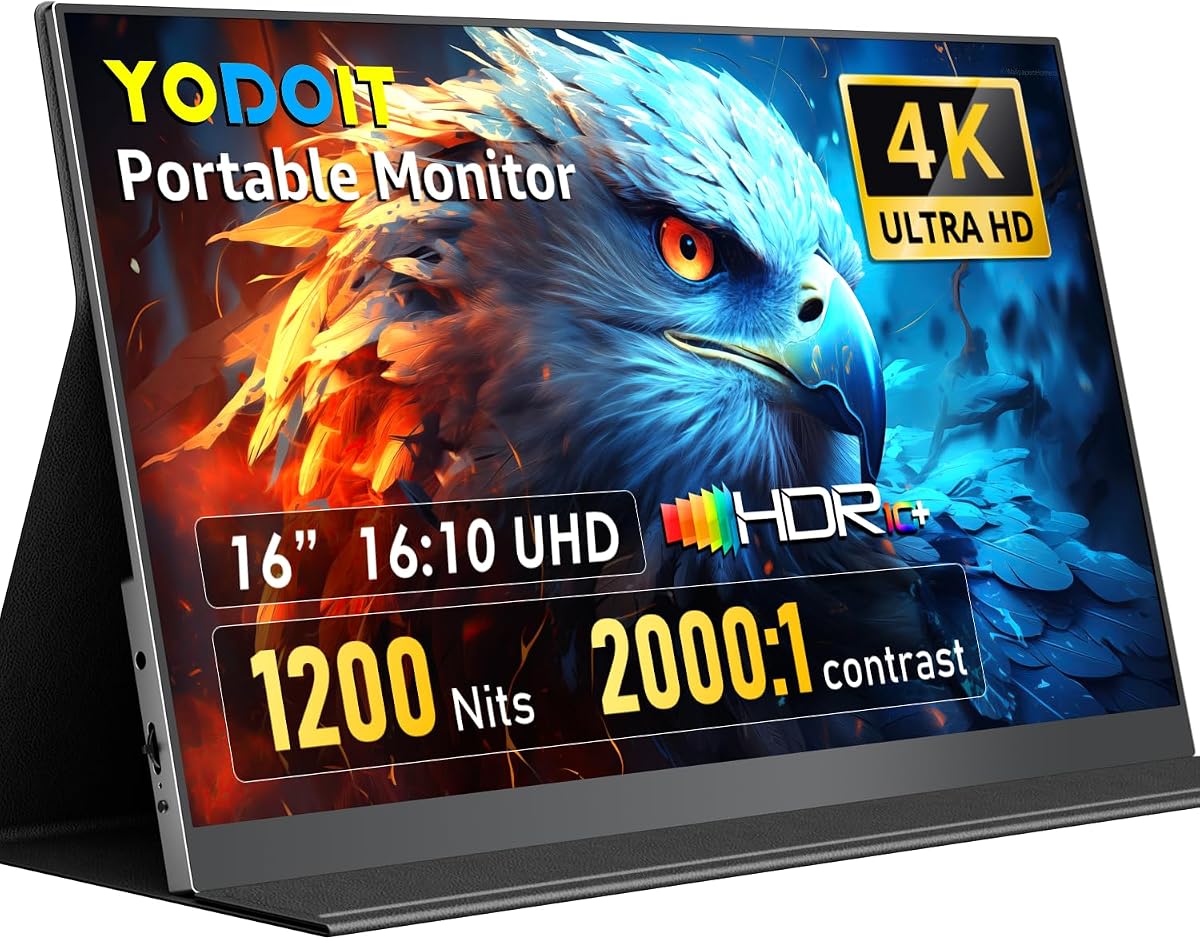
Field photographers live a different monitor problem: laptops with mediocre panels and no shade to review shots on location. The Yodoit 16-inch 4K portable targets that pain with 1200-nit peak brightness—roughly triple typical travel screens—and a matte anti-glare finish that keeps highlight detail visible when you are editing beside a bright window at a destination wedding or reviewing inspection photos on a sunny job site.
Resolution is 3840×2400 in a 16:10 aspect ratio, packing more vertical pixels than standard 16:9 4K portables. That matters when Lightroom’s develop panels and histograms consume horizontal space you cannot spare on a 15-inch laptop alone. IPS viewing angles help when passing the screen to a client for quick approval, though brightness drops off battery power should be expected—carry the included power adapter for critical sessions.
Yodoit claims 145% sRGB coverage and 2000:1 contrast, unusually ambitious for portable class hardware. Verify with profiling before trusting skin tones for final deliverables, but even conservative interpretation beats washed-out travel monitors that hide blown highlights until you return to the studio. Built-in dual speakers support quick video playbacks for social teams traveling light.
Connectivity requires attention: a single USB-C cable may not drive full 4K brightness on all host devices, so Yodoit bundles USB-C to USB-A plus power adapter paths for stable output. Mini HDMI covers DSLR tethering appliances, older laptops, and occasional console hookups when downtime entertainment follows a shoot. The magnetic folio case props the panel at usable angles on irregular surfaces—airline tray tables, hotel desks, tailgates.
At 4.5 stars, buyers clearly value the niche: a second screen that survives daylight rather than a desk replacement. Use it to cull, flag, and perform moderate retouching on the road, then finish hero edits on a ProArt or LG primary panel back home.
Do not expect five-way ergonomic stands, daisy-chaining, or Adobe RGB print proofing. Expect portability, brightness, and enough resolution to keep you productive between locations.
Pack the included power adapter when editing at full brightness. Test your laptop’s USB-C alt-mode wattage at home before trips. Prefer Mini HDMI plus power when host USB-C ports are data-only.
Treat Yodoit as a location confidence monitor and laptop extender, not the sole calibrated display in your pipeline. Sync ICC profiles across machines when returning to desk workflows.
We may earn a commission at no additional cost to you.

Including the Sceptre 27-inch Prime Gaming Monitor in a photo-editing guide requires honesty upfront: this is not the panel you buy to soft-proof gallery prints or inspect 45-megapixel medium-format files at 100% zoom. It is a 1920×1080 IPS display at 27 inches—pixel density low enough that text and fine detail look soft compared with every 4K and QHD option above. It earns its place as a budget secondary screen for email, tethering dashboards, Spotify, and client chat while your ProArt or LG primary panel handles color-critical develop work.
That said, 100% sRGB coverage is legitimate for web-only photographers who need a matched sRGB reference monitor beside a wide-gamut primary. Many studios run dual displays exactly this way: edit on P3 or Adobe RGB hardware, then preview exports on sRGB to catch channel clipping before upload. The Sceptre’s 4.5-star rating suggests reliable basic hardware without premium calibration branding.
100Hz refresh and FreeSync make admin tasks feel snappy—scrolling long Lightroom filmstrips on the secondary display while keeping the develop module on the main screen, for example. Built-in speakers and dual HDMI inputs reduce cable swaps when alternating between a culling laptop and a desktop tower. Blue Light Shift and eye-care marketing target long desk hours, though photographers should still disable vivid presets if this screen touches any color judgment.
VESA mount support lets you position the Sceptre vertically for chat and metadata panels, a surprisingly effective layout when the primary monitor is horizontal 4K. The black frameless aesthetic disappears visually when tucked beside larger white UltraFine panels.
If your budget allows only one monitor, skip this model for photo editing and choose INNOCN 4K, CUNPU, or LG instead. If you already own a calibrated primary and need an inexpensive sRGB satellite with decent reviews, Sceptre fits without pretending to be more than it is.
Think secondary, think sRGB reference, think admin—not hero retouching canvas.
Tether capture status display, client-facing slideshow on a side desk, assistant culling station, or dorm-room starter screen before upgrading to 4K primary. Never the sole monitor for print-focused professionals.
We may earn a commission at no additional cost to you.
Resolution determines how much detail you see at 1:1 zoom and how large interface elements appear. At 27 inches, 4K (3840×2160) offers roughly 163 PPI—ideal for inspecting fine detail in fur, fabric, and eyelashes without excessive OS scaling. QHD (2560×1440) on the same size lowers density but keeps UI buttons comfortable and reduces GPU load during large panorama stitches. At 32 inches, 4K density drops near 140 PPI, trading pixel-peeping sharpness for expansive workspace favored by composite artists. Avoid 1080p at 27 inches for primary retouching; text and detail look soft compared with modern standards.
Gamut describes which colors the panel can physically show. sRGB covers most web and consumer print labs; 100% sRGB with Delta E under 2 is sufficient for many working pros. DCI-P3 extends into richer reds and greens valuable for video-adjacent stills and modern phone displays. Adobe RGB reaches further into cyans and greens critical for fine-art inkjet workflows. Marketing percentages are starting points—verify with a colorimeter. Factory Calman verification, as on ASUS ProArt models, indicates third-party validation of out-of-box accuracy but does not eliminate annual profiling.
IPS dominates color-critical editing for wide viewing angles and stable tone across the screen. VA panels, like the Dell S3225QS, offer higher contrast for dramatic imagery but shift color off-axis—fine for solo editors, risky for client couch reviews. OLED exists in ultra-premium tiers outside this pack with perfect blacks but burn-in considerations for static UI toolbars. For most photographers in this list, IPS remains the default safe choice.
USB-C with power delivery declutters MacBook desks by carrying video, data, and charging on one cable—96W tiers support MacBook Pro workloads better than 65W. Daisy-chaining DisplayPort reduces cable spaghetti in multi-monitor retouching bays. HDMI and DisplayPort remain essential for desktops and older laptops. Ergonomic stands with height, pivot, and swivel prevent neck strain during long sessions; tilt-only stands often need VESA arms. Portrait pivot helps fashion, magazine, and social vertical crops.
HDR400 and HDR10 certifications help preview highlight roll-off in high-dynamic-range content but matter less for SDR print workflows. Higher refresh rates like 120Hz or 144Hz improve scroll smoothness and hybrid video editing without harming stills if gaming modes stay disabled during color work. Features like Auto KVM, picture-by-picture, and ambient light sensors add desk convenience but may conflict with strict calibration—disable adaptive modes before profiling.
Budget for a hardware colorimeter even when buying Calman-verified panels. Profile at your working brightness, typically 100–120 cd/m² for print matching unless your viewing standard differs. Warm up the monitor thirty minutes before profiling. Store ICC profiles per machine and re-profile every few months or after moving the desk. Soft-proof in Lightroom and Capture One using the same profile active in the OS.
4K is not strictly necessary, but at 27 inches it provides comfortable pixel density for inspecting fine detail at 100% zoom without blurry OS scaling. Many professionals still edit effectively on QHD panels like the ASUS ProArt PA278CV, especially when deliverables are web-bound. If you print large or crop heavily into high-resolution files, 4K reduces guesswork. If budget forces a choice between 4K without calibration and QHD with Calman verification, take accuracy first.
It depends on output. Pure web and standard lab print workflows often live comfortably in 100% sRGB with good calibration. Hybrid creators delivering to phones and 4K displays benefit from DCI-P3 coverage in the ninety-to-ninety-nine percent range. Fine-art inkjet printers using wide inks still favor Adobe RGB headroom, which the ASUS ProArt PA279CRV emphasizes. More gamut without profiling discipline can mislead you into oversaturated edits that clip on export.
No. Calman Verified factory calibration gives you a trustworthy starting point and narrows unit-to-unit variance, but panels drift with age, heat, and brightness changes. A hardware colorimeter remains essential for generating OS and application ICC profiles tailored to your studio lighting. Think of factory calibration as arriving tuned from the shop—you still maintain the instrument.
Gaming monitors prioritize refresh rate and response time, sometimes sacrificing color accuracy or adding vivid presets that lie about saturation. The Sceptre model in this pack illustrates the compromise: fine as a secondary sRGB screen, poor as a primary retouching display at 1080p. Hybrid panels like the ASUS ProArt PA278CGRV attempt to bridge both worlds with 144Hz and Calman verification. If you buy gaming-first hardware, disable motion enhancement and vivid modes and profile carefully.
USB-C with adequate power delivery simplifies MacBook desks dramatically—one cable for charge, display, and hub ports. The PA279CRV and PA278CGRV offer 96W, suitable for many MacBook Pro configurations. LG models in this pack largely omit USB-C charging, pushing you toward docks. Mac mini users care less about PD but still appreciate USB-C data hubs integrated into ProArt displays.
Yes, but matching white point and brightness matters more than matching brand logos. Profile both panels with the same colorimeter, aim for identical luminance, and accept that gamut differences may persist. Pairing a wide-gamut primary with an sRGB secondary—as with a ProArt plus Sceptre layout—is a common professional pattern for web proofing.
Many print-focused editors target 100 to 120 cd/m², aligning with commonly recommended proofing luminance, though your specific print vendor or viewing booth standard may differ. Avoid max brightness—it skews perception and accelerates drift. Measure with a colorimeter rather than guessing by eye, especially near windows.
Portable monitors like the Yodoit 16-inch 4K excel at location culling, client previews, and moderate adjustments in bright environments thanks to high nit output and matte coatings. They supplement rather than replace desk calibration workflows. Finish critical color work on a primary panel after travel, syncing profiles across machines.
Landscape work often benefits from deep contrast to judge shadow separation, which VA panels like the Dell S3225QS deliver. However, if you frequently show edits to clients at angles or use the monitor for precise hue adjustments in foliage, IPS stability wins. Many landscape photographers choose IPS for accuracy and add contrast creatively in post rather than relying on panel exaggeration.
Every two to six months is a common professional interval, or immediately after moving your desk, upgrading GPU drivers that affect color management, or noticing drift during gray-card tests. High-end workflows before major print runs merit a fresh profile even if the calendar says otherwise. Consistency beats chasing perfect lab numbers once.
The best monitor for photo editing is the one whose gamut, resolution, and ergonomics match how you actually earn—not the one with the longest specification list. In this pack, the ASUS ProArt PA279CRV leads when Adobe RGB and Calman-verified 4K accuracy justify flagship spend. The LG 27UP650K-W balances UltraFine polish, 95% DCI-P3, and strong buyer ratings for digital-first creators. The ASUS ProArt PA278CGRV serves Mac-heavy hybrid desks that want QHD, 144Hz, and Auto KVM without surrendering ProArt color intent.
Budget and specialty roles have clear homes too: INNOCN and CUNPU bring 4K and wide-gamut claims at accessible tiers if you verify with your own meter; Dell’s 32-inch VA panel expands canvas size; LG’s 27US500-W simplifies dual-monitor aesthetics; Yodoit solves outdoor brightness problems portables usually ignore; and Sceptre remains a honest sRGB secondary—not a primary retouching tool. Whichever you choose, profile it, control your room light, and let deliverable requirements drive gamut decisions more than marketing adjectives.
Use the comparison table to narrow candidates, read the full reviews for workflow-specific tradeoffs, and keep affiliate URLs intact if you purchase through our links—we earn a commission at no additional cost to you, and you help support guides like this one.