Skip to content

Best Monitors for Color Accuracy in 2026

By Thomas BrianUpdated July 5, 2026

We may earn a commission from links on this page, at no extra cost to you. Learn more.

Colour accuracy is a specialised demand that cuts across photography, video, design and print. When your work has to look the same on your screen as it does on someone else's device or on paper, you need a monitor that reproduces colour faithfully rather than simply vividly. The specs that deliver this are wide gamut coverage across sRGB, Adobe RGB and DCI-P3, factory calibration to a low Delta E, and a consistent IPS panel that holds colour steady from edge to edge. This guide ranks nine monitors chosen specifically for how accurately they render colour, spanning affordable sRGB IPS panels, wide-gamut 4K displays and Calman Verified professional screens.

Top 9 Best Monitors for Color Accuracy

Our top 9 picks, reviewed

1Best Overall

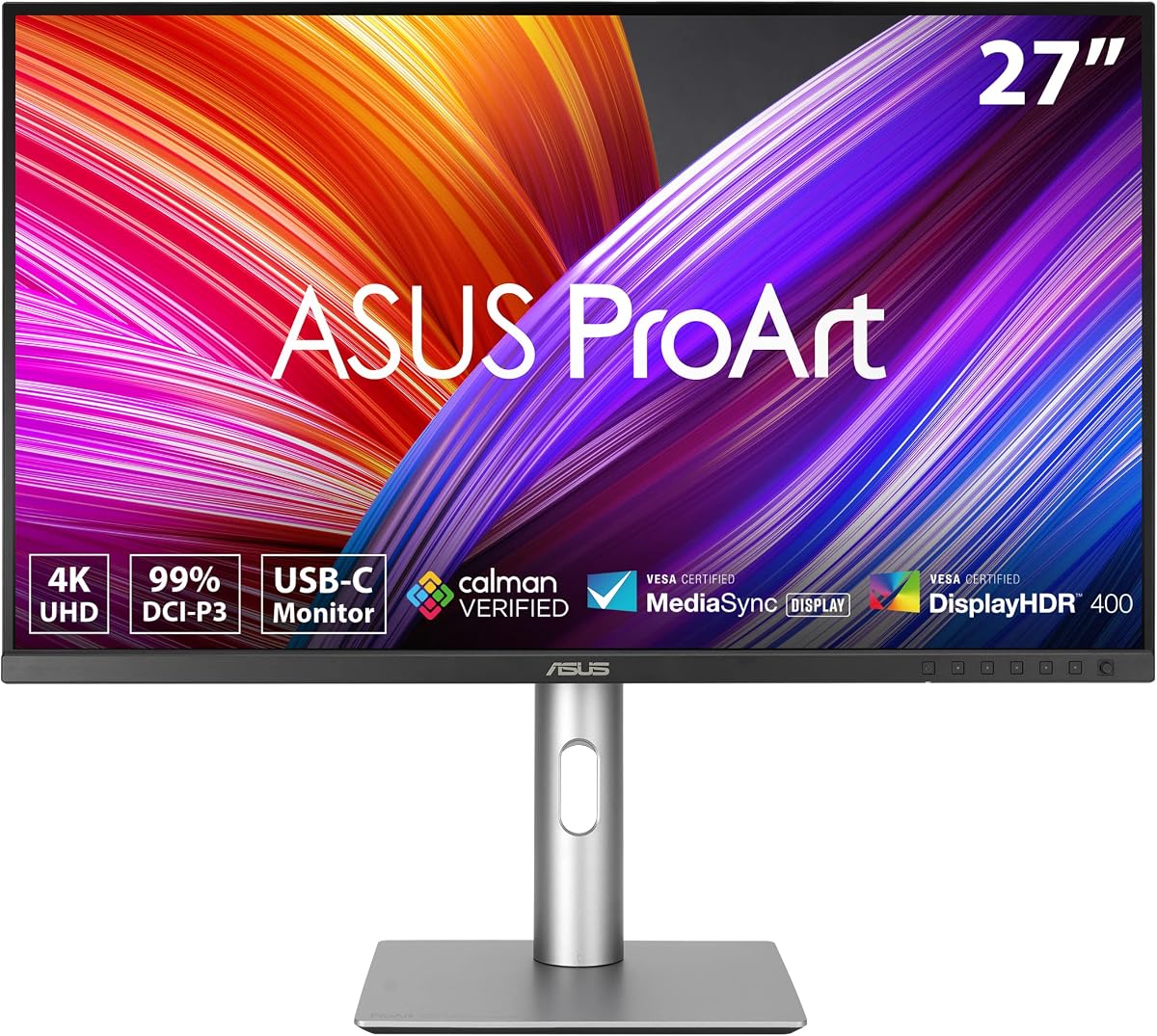
ASUS ProArt Display PA278QV 27in WQHD

The ASUS ProArt PA278QV is the accuracy pick for most people, arriving Calman Verified and factory calibrated to Delta E under 2 with full 100% sRGB and Rec.709 coverage. That means trustworthy colour the moment you power it on, no colorimeter required to get started. The 27-inch WQHD IPS panel is sharp and even, and the ergonomic stand and USB hub make it practical. It sticks to sRGB, but for standard colour-critical work it is superb.

Display
27in WQHD IPS
Resolution
2560 x 1440
Color
100% sRGB/Rec.709, dE < 2
Extras
Calman Verified, USB hub

What we liked

  • Factory calibrated to Delta E < 2
  • Full 100% sRGB and Rec.709
  • Calman Verified accuracy
  • Ergonomic stand with USB hub

Worth noting

  • sRGB only, no Adobe RGB
  • Not 4K resolution
2Best Compact Pick

ASUS ProArt PA248QV 24in WUXGA

The ASUS ProArt PA248QV delivers the same Calman Verified, factory-calibrated 100% sRGB accuracy as its larger siblings in a compact, affordable 24-inch frame. Its taller 16:10 WUXGA panel adds useful vertical workspace for toolbars and timelines, and a bundled Adobe Creative Cloud trial helps newcomers get started. Resolution and size are modest, so it is less suited to pixel-level detail, but for reliable, verified colour on a smaller desk it is hard to beat.

Display
24in WUXGA IPS
Resolution
1920 x 1200
Ratio
16:10
Color
100% sRGB/Rec.709, dE < 2

What we liked

  • Calman Verified factory calibration
  • Full 100% sRGB and Rec.709
  • Taller 16:10 for extra workspace
  • Includes 3-month Adobe Creative Cloud

Worth noting

  • Full HD-class resolution only
  • 24in is small for detail work
3Best Budget IPS

Acer KB272 27in FHD IPS Monitor

The Acer KB272 is the value entry point for accurate colour, covering 99% sRGB on a large 27-inch IPS panel for a very low price. It is not factory-calibrated to a stated Delta E like the ProArt panels, so it is a step below true reference work, but its gamut coverage is genuinely useful for hobbyist editing and design. The 120Hz refresh and zero-frame design are welcome extras, though Full HD looks a touch soft at this size.

Display
27in FHD IPS
Resolution
1920 x 1080
Refresh
Up to 120Hz
Color
99% sRGB

What we liked

  • 99% sRGB coverage for the price
  • Large 27in IPS panel
  • Up to 120Hz refresh
  • Zero-frame design for dual setups

Worth noting

  • No factory calibration Delta E
  • Full HD looks soft at 27 inches
4Best 4K Value

LG 27US500-W UltraFine 27in 4K

The LG 27US500-W pairs sharp 4K UHD resolution with up to 90% DCI-P3 coverage, giving it a wider gamut than the sRGB-only panels at a similar price. That makes it a smart choice for HDR10 content and modern wide-gamut devices, and the 27-inch IPS panel keeps colour consistent across the screen. It does not quote a factory Delta E and rides a basic tilt-only stand, so pair it with a colorimeter for exacting work, but the value is strong.

Display
27in 4K UHD IPS
Resolution
3840 x 2160
Color
Up to 90% DCI-P3
Extras
HDR10, Reader Mode

What we liked

  • Sharp 4K UHD resolution
  • Up to 90% DCI-P3 wide gamut
  • HDR10 for richer colour
  • Clean borderless white design

Worth noting

  • No factory Delta E quoted
  • Basic tilt-only stand
5Best Portable Pick

UPERFECT True Color 15.6in Portable

The UPERFECT True Color is a portable 15.6-inch monitor that punches above its size on colour, with 125% sRGB coverage and neutral white calibration for consistent, true-to-life hues on the move. Flicker-free dimming and low blue light keep it comfortable, and USB-C plus HDMI make it easy to pair with a laptop or console. The small screen and the usual variability of portable panels are limits, but for accurate colour in a travel-friendly form it stands out.

Display
15.6in FHD portable
Resolution
1080P
Color
125% sRGB
Extras
USB-C, HDMI, VESA

What we liked

  • Wide 125% sRGB coverage
  • Neutral white factory calibration
  • Flicker-free, low blue light
  • USB-C and HDMI for anywhere

Worth noting

  • Small 15.6in screen
  • Portable panels vary in quality
6Best for Wide Gamut

Acer CB272K 27in 4K USB-C Monitor

The Acer CB272K brings 4K resolution and 99% sRGB colour together with a genuinely versatile 90W USB-C port that charges a laptop and carries video over one cable. Its fully adjustable stand, offering height, tilt, swivel and pivot, makes it comfortable for long colour-critical sessions, and the zero-frame design suits a dual-monitor desk. It covers sRGB rather than a wide gamut and quotes no factory Delta E, so it is an accurate all-rounder rather than a reference panel.

Display
27in 4K IPS
Resolution
3840 x 2160
Color
99% sRGB
Extras
90W USB-C, full ergonomics

What we liked

  • Crisp 4K UHD resolution
  • 99% sRGB colour coverage
  • 90W USB-C charges and connects
  • Full height, tilt, swivel, pivot

Worth noting

  • sRGB gamut only, not wide
  • No factory Delta E figure
7Best Budget 4K

Dell 27 Plus 4K Monitor (S2725QS)

The Dell S2725QS offers a sharp 27-inch 4K IPS panel with 99% sRGB coverage and Dell's reliable build, making it a dependable pick for accurate everyday colour work. The 4K resolution helps with fine detail and the 120Hz refresh keeps interaction smooth. It sticks to the sRGB gamut and is not calibrated to a stated Delta E, so serious professionals will want to profile it themselves, but for a trustworthy, well-supported 4K screen it is a solid value.

Display
27in 4K IPS
Resolution
3840 x 2160
Refresh
120Hz
Color
99% sRGB

What we liked

  • Sharp 4K IPS resolution
  • 99% sRGB colour coverage
  • Smooth 120Hz refresh
  • Trusted Dell build and support

Worth noting

  • sRGB only, no wide gamut
  • Not factory calibrated to Delta E
8Best for Print Work

ASUS ProArt PA329CRV 32in 4K

The ASUS ProArt PA329CRV is the reference-grade choice for print and high-end colour work, with 98% DCI-P3 coverage factory calibrated to Delta E under 2 and Calman Verified. Its large 32-inch 4K panel gives you a spacious, detailed canvas, and 96W USB-C docks a laptop over one cable. It is the priciest and largest option here, demanding both budget and desk space, but for professionals who need verified wide-gamut accuracy it delivers exactly that.

Display
32in 4K UHD IPS
Resolution
3840 x 2160
Color
98% DCI-P3, dE < 2
Extras
Calman Verified, USB-C 96W

What we liked

  • 98% DCI-P3 wide-gamut coverage
  • Factory calibrated to Delta E < 2
  • Large 32in 4K workspace
  • USB-C with 96W charging

Worth noting

  • Priced at the top of this list
  • Large size needs desk space
9Best High-Refresh Pick

Samsung 27in Odyssey G5 (G51F) QHD

The Samsung Odyssey G5 G51F is the pick for anyone who wants decent colour alongside gaming speed, pairing a sharp QHD panel with a fast 180Hz refresh and HDR10. It is a gaming monitor rather than a calibrated professional display, so it quotes no gamut percentage or Delta E and will need profiling for exacting work. But for a dual-purpose screen that handles casual colour tasks and fast games, its height-adjustable stand and low price make it appealing.

Display
27in QHD
Resolution
2560 x 1440
Refresh
180Hz
Extras
HDR10, height adjust

What we liked

  • Sharp 1440p resolution
  • Fast 180Hz refresh rate
  • HDR10 for added depth
  • Height-adjustable stand

Worth noting

  • No stated gamut or Delta E
  • Gaming panel, not calibrated

How We Chose the Best Monitors for Color Accuracy

Best Monitors for Color Accuracy in 2026

Accurate colour is a demanding, measurable target, and it is the one thing every monitor on this list has to get right. Whether you edit photos, grade video, design for print or simply want colours that match across your devices, the goal is the same: the display should show colour as it truly is, not as a punchy, oversaturated approximation. We built our ranking around that principle, assessing each monitor on its stated gamut coverage across sRGB, Adobe RGB and DCI-P3, whether it ships factory calibrated to a low, verified Delta E, how consistent its IPS panel stays across viewing angles, and how well its resolution and connectivity support a colour-critical workflow.

Calibration and gamut carried the most weight, because accuracy is a claim that can and should be measured. We favoured displays with a stated Delta E and a specified gamut percentage, such as the Calman Verified ASUS ProArt panels, over those that promise vibrant colour without evidence. Panel consistency came next, and here IPS is essentially mandatory, since it keeps colour uniform across the screen and at an angle. We then considered resolution, favouring 4K panels like the LG 27US500-W and Acer CB272K for detail, and finished with practical connectivity such as USB-C. The list deliberately spans budget IPS screens, wide-gamut 4K displays and verified professional panels, so there is an accurate option at every price.

Understanding Delta E and Why It Matters

If you learn one term when shopping for a colour-accurate monitor, make it Delta E. It is the single number that describes how far a display's colours stray from their true values, calculated as the perceptual distance between the colour shown and the colour intended. A Delta E of 0 would be perfect, and a value under 2 is widely accepted as the point at which differences become imperceptible to the human eye. When a manufacturer quotes and verifies a Delta E under 2, as ASUS does across the ProArt PA248QV, PA278QV and PA329CRV, they are guaranteeing measurable, trustworthy accuracy rather than a vague promise.

The reason this matters so much is that the eye is a poor judge of absolute colour. A screen can look perfectly pleasant while being noticeably off, and you would never know until your work appeared wrong on another device or in print. A low, verified Delta E removes that risk at the source. It is worth noting what a stated Delta E does not tell you: it does not describe how wide the colour gamut is, only how accurate the monitor is within the gamut it covers. That is why the best colour-accurate displays pair a low Delta E with broad gamut coverage, and why a monitor that quotes neither, like the gaming-focused Samsung Odyssey G5, sits lower on a list built around accuracy despite being a fine screen for other purposes.

Colour Gamut Coverage Explained

Alongside accuracy, gamut coverage determines the range of colours a monitor can physically display, and matching it to your work is essential. The sRGB space is the baseline standard for the web and most screens, so a panel covering 100% sRGB, like the ASUS ProArt PA278QV and PA248QV, ensures your colours look right on the majority of devices where they will be seen. For a great many people whose work stays on screens, full sRGB coverage is exactly what they need, and the Acer KB272 and Dell S2725QS deliver 99% of it at friendly prices.

Wider gamuts serve more specialised needs. DCI-P3, which began in digital cinema and now appears on phones, tablets and modern laptops, is covered up to 90% by the LG 27US500-W and to 98% by the ASUS ProArt PA329CRV, making those panels suited to HDR and current-device work. Adobe RGB, meanwhile, matters most for print, where inks reproduce colours beyond sRGB. The UPERFECT True Color takes an interesting angle, quoting 125% sRGB coverage, which signals a gamut extending beyond the sRGB space, useful for vivid, accurate colour in a portable form. The key takeaway is that more gamut is not automatically better; a display that accurately covers the exact space your work targets beats one that covers a huge gamut but hits it inaccurately.

Factory Calibration Versus Self-Calibration

There are two ways a monitor arrives at accurate colour: the factory does it for you, or you do it yourself. Factory calibration means each panel is measured and corrected on the production line and shipped with a verification of its Delta E, so it is accurate the moment you unbox it. The Calman Verified ASUS ProArt models, the PA278QV, PA248QV and PA329CRV, are built around this, and it is a genuine convenience, letting you trust the screen from the first minute without buying extra hardware.

Self-calibration is the alternative, and even factory-calibrated screens benefit from it over time because all displays drift as they age. It requires a hardware colorimeter, a small device you place on the screen while software measures and profiles the colours, and it is the standard practice for professionals who recalibrate every few weeks. Monitors that ship without a stated Delta E, such as the Acer KB272, LG 27US500-W and Acer CB272K, still cover a useful gamut but leave the accuracy work to you, so factor the cost of a colorimeter into the equation if your work is colour-critical. The practical rule is simple: buy a factory-calibrated panel if you want accuracy out of the box, and plan to self-calibrate regardless if your output has commercial stakes.

Panel Type and Viewing Consistency

Colour accuracy is only meaningful if it holds up across the whole screen and as you shift your position, and this is where panel technology becomes non-negotiable. IPS, or in-plane switching, panels deliver wide 178-degree viewing angles and keep colour and brightness consistent from edge to edge, so a tone in the corner reads the same as one in the centre and does not wash out when you lean back. Every display in this roundup, from the budget Acer KB272 to the professional ASUS ProArt PA329CRV, uses IPS precisely for this reason, because other panel types shift colour off-axis and cannot be trusted for critical judgement.

Beyond the panel itself, a matte anti-glare finish, found on the ProArt models and the UPERFECT portable, prevents ambient light from bouncing off the screen and distorting your perception of colour, which is why colour work is best done in controlled lighting. Features like flicker-free backlighting and low blue light, highlighted on the UPERFECT True Color, add comfort for the long sessions colour work often demands. HDR10 support on the LG 27US500-W and the ASUS ProArt PA329CRV extends the range of brightness the panel can show, adding depth for HDR content. None of these features substitute for calibration and gamut coverage, but together they ensure the accuracy you paid for is what you actually see.

Resolution, Size and Connectivity

Once colour is handled, the practical shape of the monitor decides how comfortable it is to work on. Resolution affects how much fine detail you can inspect: 4K panels like the LG 27US500-W, Acer CB272K, Dell S2725QS and ASUS ProArt PA329CRV pack four times the pixels of Full HD into the same space, which helps when judging fine texture and sharpness. Screen size follows a similar logic, with the 32-inch ProArt PA329CRV offering a spacious canvas and the compact 24-inch ProArt PA248QV and 15.6-inch UPERFECT suiting smaller desks or travel.

Connectivity ties the setup together. USB-C has become the standout feature, carrying video, data and laptop power over a single cable, and both the Acer CB272K and ASUS ProArt PA329CRV supply a strong 96W or 90W of charging to dock a laptop cleanly. The UPERFECT portable uses USB-C and HDMI to pair easily with laptops and consoles on the move. Ergonomic stands matter too, and the fully adjustable stands on the Acer CB272K and ProArt panels, offering height, tilt, swivel and pivot, let you position the screen for comfortable, accurate viewing over long sessions. These practicalities will not change how accurate the colour is, but they determine whether working with it is a pleasure or a chore.

A Closer Look at the Top Picks

The ASUS ProArt PA278QV earns the top spot because it delivers exactly what a colour-accurate monitor should: Calman Verified factory calibration to Delta E under 2, full 100% sRGB and Rec.709 coverage, and a sharp, even IPS panel, all at a reasonable price. It is the display we would recommend to most people who need trustworthy colour without complications. The compact ASUS ProArt PA248QV offers the same verified accuracy in a smaller, cheaper frame, making it the ideal pick for tighter desks and budgets.

Beyond the ProArt leaders, the Acer KB272 provides an accessible 99% sRGB IPS panel for hobbyists, the LG 27US500-W and Acer CB272K add 4K resolution with wider or USB-C-equipped feature sets, and the Dell S2725QS is a dependable, well-supported 4K value. For professionals needing verified wide-gamut colour, the 32-inch ASUS ProArt PA329CRV with its 98% DCI-P3 and factory calibration is the reference choice, while the UPERFECT True Color proves accurate colour can travel, and the Samsung Odyssey G5 covers those who want gaming speed alongside decent colour. There is an accurate screen here for every workflow and budget.

Final Recommendation

For most people who need accurate colour in 2026, the ASUS ProArt PA278QV is the best choice, combining Calman Verified factory calibration, full sRGB coverage and a quality IPS panel at a sensible price. If your desk or budget is smaller, the ASUS ProArt PA248QV delivers the same verified accuracy in a compact form, and for demanding print and wide-gamut work the 32-inch ASUS ProArt PA329CRV with its 98% DCI-P3 coverage is worth the investment. Budget-minded buyers should look at the Acer KB272 for sRGB accuracy or the Dell S2725QS for dependable 4K, while the UPERFECT True Color brings accurate colour on the road. Prioritise a verified Delta E and the right gamut for your output, and your colours will finally look the same everywhere they are seen.

How we picked

We judged each monitor on its stated colour gamut coverage across sRGB, Adobe RGB and DCI-P3, whether it ships factory calibrated to a measured Delta E, the consistency of its IPS panel across viewing angles, resolution for detail, and connectivity that fits a colour-critical workflow. We weighted verified calibration and gamut breadth most heavily, favouring accuracy over brightness, refresh rate or gaming extras.

Frequently asked questions

What does Delta E mean for colour accuracy?

Delta E measures the difference between the colour a monitor shows and the true colour it should show, so a lower number means greater accuracy. A Delta E under 2 is generally considered indistinguishable to the human eye, which is why factory-calibrated panels like the ASUS ProArt PA278QV, PA248QV and PA329CRV quote it. Monitors without a stated Delta E may still be decent but are not verified accurate out of the box.

Which colour gamut should I look for?

It depends on your output. Full 100% sRGB, as on the ASUS ProArt PA278QV and Acer CB272K, covers web and screen work. Wide DCI-P3 coverage, found on the LG 27US500-W and ASUS ProArt PA329CRV, suits HDR, video and modern devices, while Adobe RGB matters for print. Match the gamut to where your work will ultimately be viewed.

Do I still need to calibrate a factory-calibrated monitor?

Factory calibration gives you an accurate starting point, which is why Calman Verified panels like the ASUS ProArt series are so valued. But displays drift over time, so professionals still re-profile periodically with a hardware colorimeter. For casual accurate colour, a factory-calibrated monitor out of the box is usually enough; for commercial work, plan to recalibrate every few weeks.

Is an IPS panel necessary for accurate colour?

Effectively yes. IPS panels hold colour and brightness consistent across the whole screen and at wide viewing angles, which is essential when accuracy matters. Every monitor in this roundup, from the budget Acer KB272 to the professional ASUS ProArt PA329CRV, uses IPS, because other panel types shift colour as you move off-centre and cannot be trusted for critical work.

Can a portable monitor be colour accurate?

It can be surprisingly good. The UPERFECT True Color, for example, covers 125% sRGB with neutral white calibration, making it a genuinely usable colour screen on the move. Portable panels vary more in quality than desktop monitors and tend to be smaller, so they are best as a travel companion rather than a primary reference display, but the better ones handle accurate colour well.