Best Mice for Wrist Pain in 2026
We may earn a commission from links on this page, at no extra cost to you. Learn more.
Wrist pain from a mouse is rarely dramatic; it creeps in as a dull ache after a long day, then a twinge that lingers into the evening. The usual culprit is the flat, palm-down grip a standard mouse forces, which twists your forearm into an unnatural position and loads the wrist for hours. A vertical or ergonomic mouse fixes the root cause by rotating your hand into a relaxed handshake angle, taking pressure off the wrist without slowing you down. This guide ranks seven of the best mice for wrist pain in 2026, from an affordable dual-mode vertical to Logitech's premium ergonomic flagship, so there is a comfortable pick whatever your hand size and budget.
Top 7 Best Mice for Wrist Pain
Our top 7 picks, reviewed
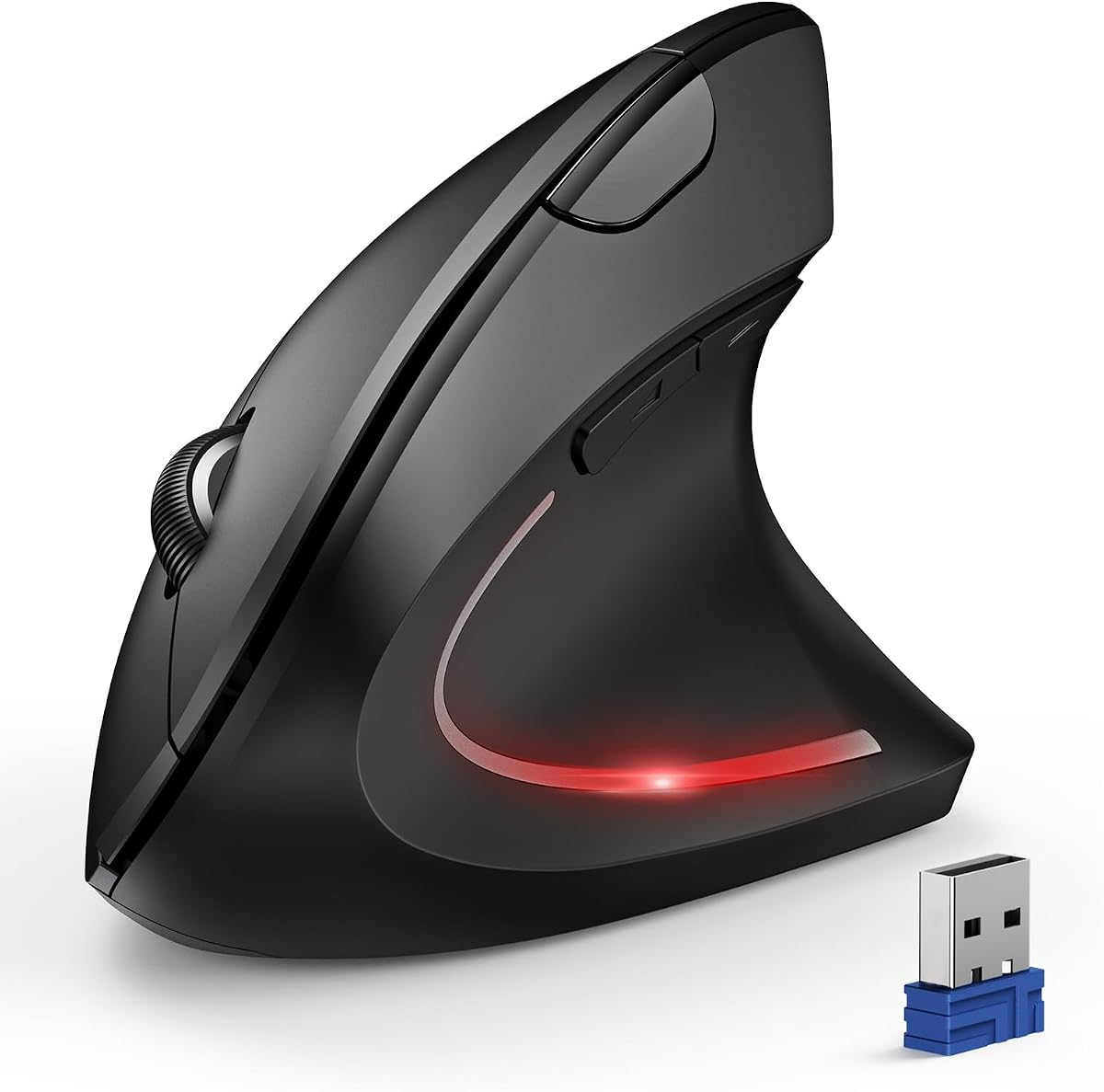
Ergonomic Vertical Wireless Mouse (Pink)
This vertical wireless mouse tops the list by nailing the essentials that ease wrist pain at a very fair price. Its upright shape holds your hand in a natural handshake angle so the forearm stays relaxed, dual USB and Bluetooth pairing suits laptops and desktops alike, and the quiet clicks keep it office-friendly. Three DPI steps cover everyday work, and it fits small to medium hands comfortably for long, strain-free sessions.
- Connection
- USB + Bluetooth dual
- DPI
- 1000/1600/2400
- Buttons
- 6, quiet click
- Shape
- Vertical, small/medium hands
What we liked
- Vertical shape keeps the wrist upright
- Dual USB and Bluetooth connection
- Genuinely quiet left and right clicks
- Highest owner rating on this list
Worth noting
- Sized for small to medium hands
- DPI tops out at 2400
TECKNET Bluetooth Vertical Ergonomic Mouse
The TECKNET vertical mouse is the flexible everyday pick, pairing an upright ergonomic shape with Bluetooth and 2.4GHz connectivity across three devices. Its near-vertical angle eases wrist pressure, six DPI levels up to 4800 keep the cursor moving with minimal hand travel, and quiet clicks suit a shared workspace. A 12-month battery means you rarely think about power, making it a low-maintenance companion for anyone whose wrist protests after long days.
- Connection
- Bluetooth + 2.4GHz
- DPI
- 6 levels to 4800
- Buttons
- 6, quiet click
- Battery
- 12 months
What we liked
- Switches across three devices easily
- Six DPI levels up to 4800
- Long 12-month battery life
- Quiet clicks for shared offices
Worth noting
- Right-handed design only
- Uses AAA batteries, not included
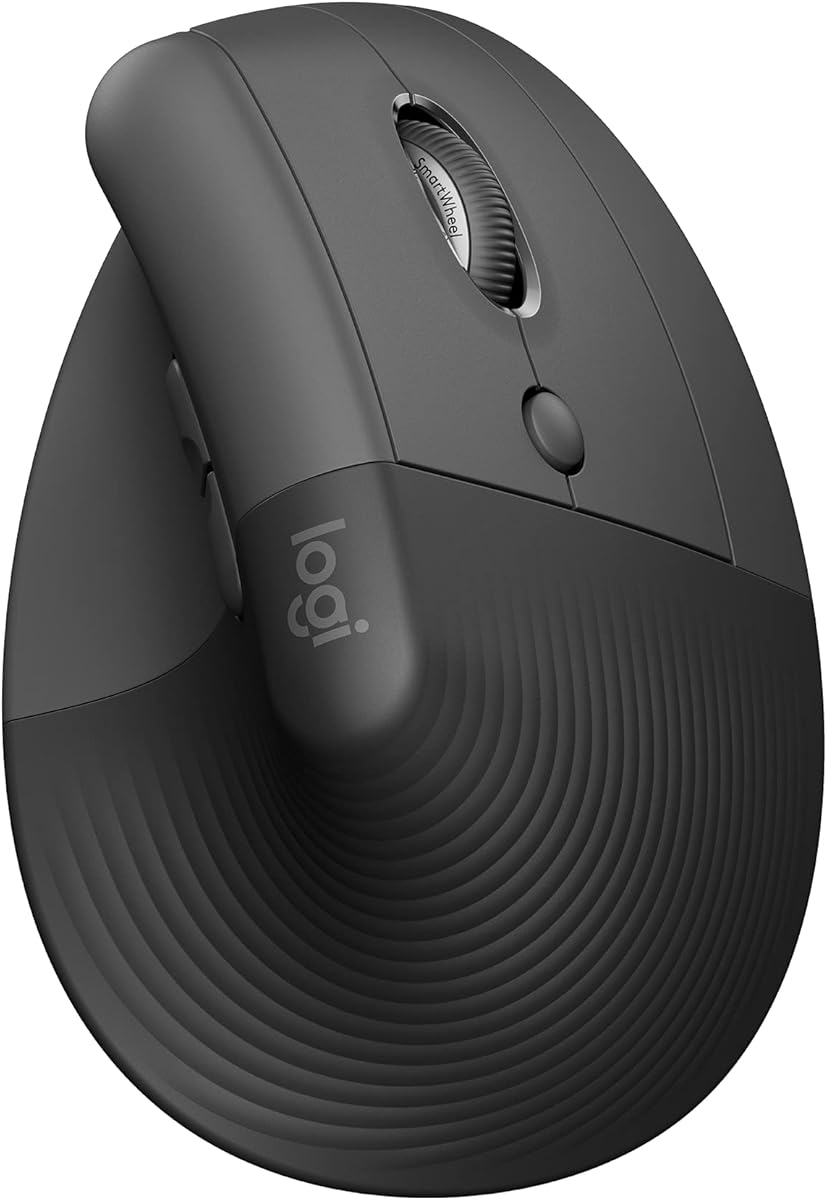
Logitech Lift Vertical Ergonomic Mouse
The Logitech Lift brings brand-name polish to wrist relief, with a 57-degree vertical angle designed and tested by ergonomists to promote a natural forearm posture. A softly textured grip, snug thumb rest and quiet SmartWheel make it comfortable and pleasant to use, and it pairs across Windows, macOS and iPadOS. Sized for small to medium right hands, it is the pick if you want proven ergonomics and Logitech's reliable support behind it.
- Connection
- Bluetooth / Logi Bolt
- Angle
- 57-degree vertical
- Buttons
- 6, quiet click
- Shape
- Small/medium right hands
What we liked
- 57-degree angle certified by ergonomists
- Whisper-quiet clicks and SmartWheel
- Works across Windows, macOS and iPadOS
- Trusted Logitech build and support
Worth noting
- Best for small to medium hands
- Costs more than generic verticals
LEKVEY Vertical Wireless Mouse
The LEKVEY vertical mouse is a tidy, rechargeable option for easing wrist pain without ongoing battery costs. Its scientific handshake shape encourages a neutral wrist and forearm, most owners report real relief after a short adjustment period, and page-back and forward buttons speed up browsing. A single charge lasts over 150 hours, and the plug-and-play 2.4G receiver keeps setup simple. A dependable, wallet-friendly route to a more comfortable desk.
- Connection
- 2.4G wireless
- DPI
- 800/1200/1600
- Buttons
- 6, page nav
- Power
- Rechargeable 150hr
What we liked
- Rechargeable, no batteries to buy
- Handshake grip reduces overall strain
- Page-back and forward buttons
- Over 150 hours per charge
Worth noting
- 2.4G only, no Bluetooth
- DPI tops out at 1600
Logitech MX Vertical Wireless Mouse
The Logitech MX Vertical is the flagship of wrist-friendly mice, with a 57-degree angle that Logitech says reduces muscular activity by around ten percent versus a standard mouse. A high-precision 4000 DPI sensor means roughly four times less hand movement, easing fatigue, and a cursor-speed switch and three-device pairing round out a premium package. It costs more and favours larger hands, but for serious relief with no compromise it is the top choice.
- Connection
- Wireless, up to 3 devices
- Angle
- 57-degree vertical
- Sensor
- 4000 DPI, speed switch
- Power
- Rechargeable
What we liked
- Cuts muscle activity by around 10 percent
- 57-degree angle eases wrist pressure
- 4000 DPI means far less hand movement
- Moves content across three computers
Worth noting
- Premium price point
- Larger size suits bigger hands
Anker Vertical Ergonomic Optical Mouse
The Anker vertical mouse is a long-standing, affordable choice that gets the basics right. Its handshake shape rotates the wrist into a healthier neutral position, and dedicated next and previous buttons make it especially handy for anyone who spends the day moving between web pages. Three DPI steps cover most tasks, and Anker's 18-month warranty adds reassurance. A sensible, budget-friendly first step toward less wrist pain.
- Connection
- 2.4G wireless
- DPI
- 800/1200/1600
- Buttons
- 5, next/prev
- Shape
- Vertical handshake
What we liked
- Handshake grip reduces wrist strain
- Next and previous buttons for browsing
- 18-month warranty for peace of mind
- Affordable and widely trusted
Worth noting
- 2.4G only, no Bluetooth
- Uses AAA batteries, not included
JYKEYMOUT Vertical Wireless Mouse
The JYKEYMOUT vertical mouse proves you do not have to spend much to give your wrist a break. Its upright ergonomic shape promotes a neutral handshake position, while dual Bluetooth and 2.4G connectivity, six silent buttons and Type-C recharging deliver features usually seen at higher prices. The brand is less familiar, so lean on return protection, but as a low-risk way to try a vertical mouse it is hard to argue with the value.
- Connection
- Bluetooth + 2.4G
- DPI
- 1000/1200/1600
- Buttons
- 6, silent
- Power
- Rechargeable Type-C
What we liked
- Very low price for a vertical mouse
- Dual Bluetooth and 2.4G connection
- Silent clicks for quiet spaces
- Rechargeable via Type-C
Worth noting
- Lesser-known brand
- DPI tops out at 1600
How We Chose the Best Mice for Wrist Pain

Choosing a mouse to ease wrist pain is different from choosing one for gaming or general use, because the priority is not speed or flashy features but the position it holds your hand in for hours at a stretch. Standard mice ask you to lay your palm flat and rotate the forearm inward, a posture that is fine for a few minutes but loads the wrist and tendons over a full working day. The fix is a mouse that rotates your hand upright into a natural handshake, and every pick on this list is built around that idea.
From there we weighed the details that determine whether relief actually materialises. Grip angle came first, with the 57-degree verticals like the Logitech Lift and MX Vertical setting the benchmark. Hand-size fit came next, because an ergonomic shape only works if it matches your hand, so we noted which mice suit smaller or larger hands. We then considered adjustable DPI, which lets you move the cursor with smaller motions, quiet clicks for shared spaces, and the convenience of dual connectivity and long or rechargeable batteries. Throughout, we favoured real owner comfort feedback over marketing, since the only test that matters is how your wrist feels after a week.
Why a Standard Mouse Hurts Your Wrist
To understand the fix, it helps to understand the problem. When you use a flat, conventional mouse, your palm faces the desk and your forearm has to twist inward, rotating the two bones of the forearm across each other. Hold that position for eight hours a day, clicking and gripping, and the tendons and nerves passing through the wrist take a steady, low-level load. For many people that load builds into the familiar ache, tingling or stiffness that signals it is time to change something.
A vertical mouse addresses this at the source. By standing the mouse up and angling it, typically between 52 and 57 degrees, it lets your hand rest in the neutral handshake position it naturally wants, with the thumb up and the forearm untwisted. The Logitech MX Vertical goes further, claiming a roughly ten percent reduction in muscular activity compared with a standard mouse. The key point is that this is a postural fix, not a gimmick: you are not masking the pain, you are removing the twisted position that caused it in the first place. That is why the change often feels significant once your hand adjusts.
Matching the Mouse to Your Needs
For the Best All-Round Relief
If you want a straightforward, affordable mouse that eases wrist pain without fuss, the pink vertical wireless pick is our top choice. It combines the upright handshake shape with dual USB and Bluetooth connectivity and genuinely quiet clicks, and it carries the highest owner rating here. For a similar experience with more DPI flexibility and longer battery life, the TECKNET vertical is an excellent alternative.
For Proven, Certified Ergonomics
Buyers who want the reassurance of a recognised brand and ergonomist-tested design should look at Logitech. The Logitech Lift offers a 57-degree angle, quiet SmartWheel and broad device support for small to medium hands, while the flagship Logitech MX Vertical adds a precision sensor and the largest measured reduction in muscle activity. Both cost more than generic verticals, but the design pedigree and support are real.
For the Tightest Budget
You do not have to spend much to help your wrist. The LEKVEY and Anker verticals both deliver the essential handshake shape at a low price, the LEKVEY with rechargeable convenience and the Anker with handy browsing buttons and an 18-month warranty. The JYKEYMOUT goes lower still while adding dual connectivity and silent clicks, making it a low-risk way to try the vertical form.
For Bigger Hands
Hand size is easy to overlook but crucial. Most compact verticals here suit small to medium hands, so if yours are larger, the Logitech MX Vertical is the natural fit, with a bigger body that fills a large palm and keeps the grip relaxed rather than cramped.
Finding the Right Fit for Your Hand
An ergonomic mouse only delivers on its promise if it matches your hand, and this is where many people go wrong. A vertical mouse that is too small forces your fingers to curl and your hand to hover, reintroducing the tension you were trying to escape; one that is too large leaves you overreaching for the buttons. So before you buy, it is worth measuring your hand from wrist crease to fingertip and checking the listed sizing.
Most of the mice here, including the Logitech Lift and the pink vertical pick, are designed for small to medium hands, which covers a large share of users. The Logitech MX Vertical is the more generously sized option for those with bigger hands. If you are between sizes or unsure, favour a mouse with a clear return policy so you can test the fit in real use. Comfort is personal, and the only reliable way to know a shape suits you is to rest your hand on it for a few days, which brings us to the adjustment period every vertical mouse asks for.
The Adjustment Period: What to Expect
It is worth being honest that switching to a vertical mouse is not instant magic. When you first pick one up, the handshake grip feels unfamiliar and your cursor control may be slightly less precise than with the flat mouse your hand has used for years. This is normal, and nearly every owner review of these mice, from the LEKVEY to the TECKNET, mentions it: give it a few days to a couple of weeks and the new grip becomes second nature.
The reason the adjustment is worth pushing through is that the discomfort you are replacing is the harmful kind, the twisted forearm and loaded wrist, while the temporary awkwardness of learning a new shape fades. Manufacturers typically suggest a one to two week adaptation window, and it helps to switch gradually rather than all at once if your work allows. Lower the DPI slightly while you learn if fine control feels tricky, then raise it once your hand settles. Persist through those first days and most people find they genuinely do not want to return to a conventional mouse.
A Closer Look at the Top Picks
The pink vertical wireless mouse takes the top spot by delivering the core wrist-relief formula, an upright handshake shape, quiet clicks and flexible dual connectivity, at a genuinely affordable price, backed by the strongest owner rating on the list. It is the mouse we would suggest most people try first when wrist pain sets in.
Behind it, the TECKNET vertical adds multi-device pairing, higher DPI and a year-long battery, while the Logitech Lift brings ergonomist-certified design and brand support for those who want it. The LEKVEY offers rechargeable value, and the Logitech MX Vertical stands as the premium, big-handed flagship with the largest measured strain reduction. The Anker rounds things out for browsers on a budget, and the JYKEYMOUT is the ultra-cheap way to test whether a vertical shape suits you before spending more.
Building a Wrist-Friendly Workspace
A better mouse is the biggest single change you can make, but it works best as part of a wrist-friendly setup. Position the mouse close to your keyboard so you are not reaching sideways, keep your forearm supported and roughly level with the desk, and let larger movements come from the elbow and shoulder rather than flicking the wrist. Raising the DPI on a mouse like the TECKNET or MX Vertical helps here, since covering the screen takes smaller motions.
Small habits matter too. Take short breaks to stretch your hand and wrist, vary your tasks so you are not making the same motion for hours, and avoid gripping the mouse tightly, a relaxed hand is the whole point of the vertical shape. If pain is persistent or severe, it is always worth seeing a professional rather than relying on a mouse alone. But for the everyday ache that comes from a flat mouse and a long day, the right vertical pick from this list, combined with a sensible desk setup, can make a real and lasting difference.
Final Recommendation
For most people, the pink vertical wireless mouse is the best mouse for wrist pain in 2026, offering the upright handshake shape, quiet clicks and dual connectivity that ease strain, all at a modest price. If you want more DPI and battery flexibility, the TECKNET vertical is a fine alternative, while the Logitech Lift and MX Vertical bring certified ergonomics for those willing to spend more, the latter especially for larger hands. On the tightest budget, the LEKVEY, Anker and JYKEYMOUT all deliver the vertical form for very little. Match the size to your hand, give it a couple of weeks to feel natural, and pair it with a tidy desk setup for the best relief.
How we picked
We judged each mouse on the things that actually ease wrist strain: the grip angle and handshake posture it encourages, how well it fits different hand sizes, adjustable DPI to keep movements small, quiet clicks for shared spaces, and connectivity and battery convenience. We leaned on real owner ratings and honest comfort feedback rather than marketing, and kept the list varied in price and size so relief is within reach at any budget.
Frequently asked questions
How does a vertical mouse help with wrist pain?
A vertical mouse rotates your hand into a natural handshake position instead of the flat, palm-down grip a standard mouse forces. That neutral angle keeps the forearm relaxed and takes twisting pressure off the wrist. Models like the Logitech Lift and MX Vertical use a 57-degree angle specifically to ease strain during long computer sessions.
Is there an adjustment period with a vertical mouse?
Yes, usually a few days to a couple of weeks. Your hand needs time to learn the new grip and angle, so precision can feel slightly off at first. Most owners of mice like the LEKVEY and Anker report that comfort improves quickly, and after the adjustment they would not go back to a flat mouse.
Does hand size matter when choosing an ergonomic mouse?
It matters a lot. The Logitech Lift and the pink vertical pick suit small to medium hands, while the larger Logitech MX Vertical is better for bigger hands. A mouse that is too small or too large forces you to grip awkwardly, which undermines the ergonomic benefit, so measure your hand and match it.
Do quiet clicks make a difference for comfort?
Quiet clicks do not directly reduce wrist strain, but they make an ergonomic mouse far more pleasant in shared offices, libraries or at home late at night. Several picks here, including the TECKNET, Logitech Lift and JYKEYMOUT, feature silent or near-silent buttons so you get comfort without the distracting noise.
Can adjustable DPI reduce wrist strain?
Indirectly, yes. Higher DPI moves the cursor further for the same hand motion, so you make smaller, less repetitive movements across the screen, which eases fatigue. The Logitech MX Vertical's 4000 DPI sensor is designed around this idea, and the multi-level DPI on the TECKNET lets you tune sensitivity to your screen.