Best Mice for CAD in 2026
We may earn a commission from links on this page, at no extra cost to you. Learn more.
CAD work punishes an ordinary mouse. Hours of panning, zooming, orbiting, and clicking demand precise tracking, a dependable middle button, extra programmable keys for shortcuts, and a shape that keeps your hand comfortable long after the standard mouse would have you aching. Some engineers go further and add a dedicated 3D controller that lets one hand fly through a model while the other keeps working. This guide ranks nine of the best mice for CAD in 2026, covering purpose-built CAD mice, versatile ergonomic pointers, a trackball, and 3Dconnexion's SpaceMouse controllers, so there is a right tool whether you draft in 2D or model complex assemblies in 3D.
Top 9 Best Mice for CAD
Our top 9 picks, reviewed
3Dconnexion SpaceMouse Compact 3D Mouse
The SpaceMouse Compact tops our list because it transforms how you move through a 3D model. Its 6DoF cap lets you pan, zoom, and orbit simultaneously with a gentle push or twist, keeping your other hand free to select and edit. Two buttons each open a radial menu of favorite commands, and the weighted steel base stays planted. Paired with a regular mouse, it is the most impactful CAD upgrade here.
- Connection
- Wired USB
- Sensor
- 6DoF controller
- Buttons
- 2 radial menus
- Use
- 3D navigation
What we liked
- Intuitive six-degrees-of-freedom navigation
- Two buttons open eight-command radial menus
- Compact, stable brushed-steel base
- Two-year manufacturer warranty
Worth noting
- A companion to, not a replacement for, a mouse
- Wired connection only
Logitech MX Master 2S Bluetooth Edition
For drafters who want one excellent everyday mouse rather than a specialized controller, the Logitech MX Master 2S is the standout. Its multi-surface sensor tracks accurately even on glass, the hyper-fast wheel speeds up scrolling through large drawings, and the sculpted shape stays comfortable across long sessions. Bluetooth switching across three computers is a bonus for anyone running a workstation and a laptop side by side.
- Connection
- Bluetooth
- Scroll
- Hyper-fast wheel
- Devices
- Up to 3
- Shape
- Ergonomic right-hand
What we liked
- Tracks precisely on almost any surface
- Hyper-fast wheel for large drawings
- Controls up to three computers
- Comfortable sculpted ergonomic shape
Worth noting
- Not CAD-specific, lacks a dedicated CAD button
- Right-handed shape only
3Dconnexion SpaceMouse Wireless
The wireless SpaceMouse gives you the same fluid six-degrees-of-freedom navigation as the Compact, freed from a cable. Push, pull, and twist the controller to fly through assemblies while your mouse hand keeps editing, and enjoy up to a month of battery per USB-C charge. Two programmable buttons and a protective carry case make it a polished choice for professionals who move between desks.
- Connection
- Wireless + USB-C
- Sensor
- 6DoF controller
- Buttons
- 2 programmable
- Battery
- Up to 1 month
What we liked
- Advanced wireless 3D navigation
- USB-C charging with month-long battery
- Two programmable side buttons
- Includes a durable carry case
Worth noting
- Premium price
- Works alongside a mouse, not instead of one
3Dconnexion CadMouse Pro Wireless
The CadMouse Pro Wireless is the purpose-built pointer for drafters, and it shows. A precise 7200 DPI sensor keeps cursor control tight, seven buttons put shortcuts within reach, and a dedicated CAD middle button makes accessing application functions effortless without a hard scroll-wheel click. Triple connectivity over 2.4G, Bluetooth, and USB-C means it slots into any workstation. This is a mouse designed by people who understand CAD.
- Connection
- 2.4G + BT + USB-C
- DPI
- 7200 optical
- Buttons
- 7
- Scroll
- Smart Mouse Wheel 2
What we liked
- High 7200 DPI optical sensor
- Seven buttons including a CAD middle button
- Triple connectivity for any setup
- Smart Mouse Wheel 2 for precise zoom
Worth noting
- Costs more than a general-purpose mouse
- Right-handed design
3Dconnexion CadMouse Compact Wireless
The CadMouse Compact Wireless brings 3Dconnexion's CAD-focused button layout into a smaller, more portable body. Seven buttons keep your shortcuts close, the shape is designed to fit the hand naturally for longer comfortable sessions, and energy-efficient Bluetooth reduces cable clutter on the desk. It is the pick for drafters with smaller hands or anyone who moves between a workstation and a laptop bag.
- Connection
- Bluetooth
- Buttons
- 7
- Sensor
- Optical
- Shape
- Hand-fit ergonomic
What we liked
- Seven buttons for CAD workflows
- Compact, travel-friendly size
- Natural hand-fitting shape
- Energy-efficient Bluetooth connection
Worth noting
- Smaller body suits smaller hands
- Fewer connection options than the Pro
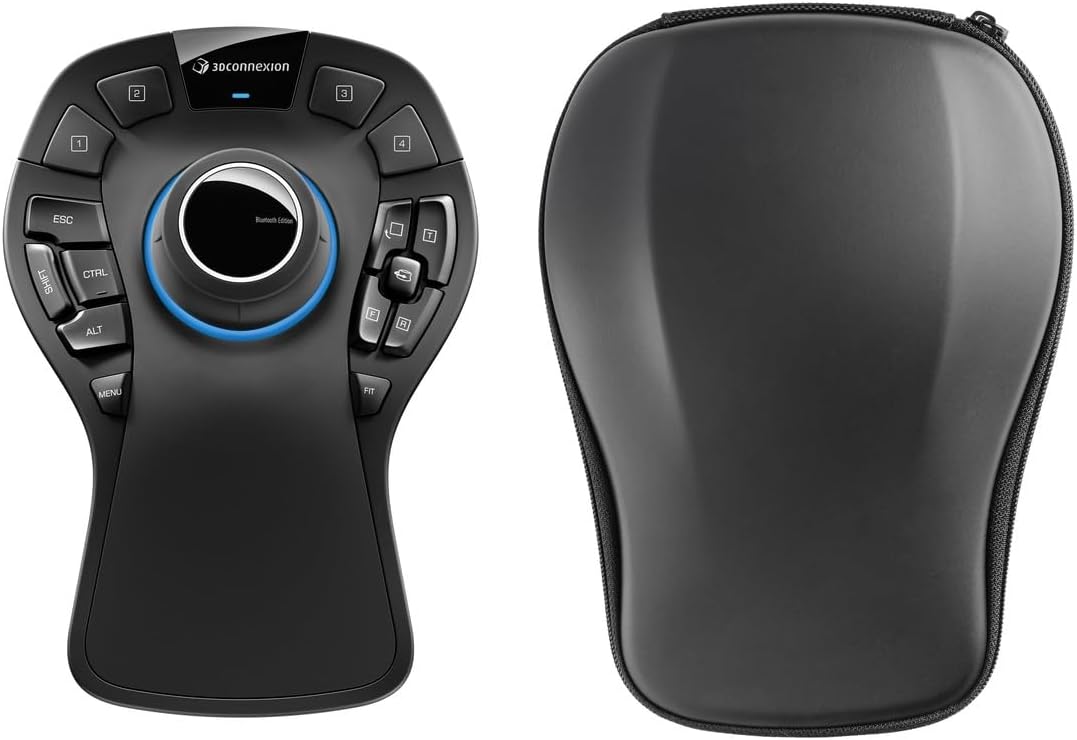
3Dconnexion SpaceMouse Pro Wireless
The SpaceMouse Pro Wireless is the top-tier 3D controller for serious modelers, adding a broad function panel of dedicated keys to the core 6DoF navigation. A generous 1100 mAh battery keeps it running through long days, and Bluetooth Low Energy with USB-C charging keeps it wireless. If you spend your days deep in complex assemblies, this is the professional's navigation device, best paired with a good CAD mouse.
- Connection
- Wireless + USB-C
- Sensor
- 6DoF controller
- Battery
- 1100 mAh Li-poly
- Bluetooth
- Low Energy
What we liked
- Professional-grade 6DoF navigation
- Large rechargeable Li-poly battery
- Bluetooth Low Energy plus USB-C
- Full-size button and function panel
Worth noting
- High professional price
- A dedicated device to add to your desk
3Dconnexion CadMouse Pro (Wired)
The wired CadMouse Pro delivers 3Dconnexion's CAD expertise without any charging to think about. Its standout is a dedicated middle button that needs less force than a scroll-wheel click, ideal for the constant third-button presses CAD demands. An angled body encourages a more natural hand posture, and an incurvated thumb rest gives easy access to the side buttons. For a permanent desk setup, wired reliability is a genuine plus.
- Connection
- Wired USB
- Buttons
- 7
- Shape
- Angled ergonomic
- Extra
- Dedicated middle button
What we liked
- Purpose-built CAD middle button
- Angled shape for natural posture
- Incurvated thumb rest with side buttons
- No batteries or charging to manage
Worth noting
- Wired only
- Priced above general-purpose mice
ELECOM EX-G Wireless Trackball Mouse
The ELECOM EX-G is the trackball option for CAD users on tight or cluttered desks. Your thumb rolls the ball to move the cursor, so the mouse stays put and your arm rests still, while six programmable buttons and tilt scrolling handle shortcuts and horizontal panning. Its ergonomic shape is built around the hand's natural folding motion, and the ball pops out easily for cleaning. A comfortable, affordable alternative to a traditional mouse.
- Connection
- 2.4GHz USB
- Control
- Thumb trackball
- Buttons
- 6 programmable
- DPI
- 750/1500
What we liked
- Thumb trackball needs no desk space
- Six programmable buttons with tilt scroll
- Ergonomic shape for hand comfort
- Easy-clean, smooth ruby bearings
Worth noting
- Modest 750/1500 DPI options
- Trackballs require an adjustment period
Ergodriven Om Vertical Ergonomic Mouse
The Ergodriven Om is the affordable comfort pick for drafters whose wrists suffer from long CAD sessions. Its vertical handshake shape puts the wrist and shoulder into a healthier position, silent micro-force buttons reduce tension, and an onboard OLED makes dialing in one of four DPI levels simple. Dual Bluetooth and 2.4G connectivity plus a long-life rechargeable battery keep it practical, and copy-paste and custom buttons speed daily work.
- Connection
- BT + 2.4G
- DPI
- 1200-2400 (4 levels)
- Buttons
- 5 custom
- Shape
- Vertical
What we liked
- Vertical shape eases wrist and shoulder strain
- OLED screen for easy DPI tuning
- Silent, micro-force buttons
- Dual wireless with rechargeable battery
Worth noting
- Vertical grip takes getting used to
- Lower DPI ceiling than dedicated CAD mice
How We Chose the Best Mice for CAD

CAD is one of the most demanding jobs you can give a mouse. A drafter or 3D modeler spends the day in a relentless loop of selecting, panning, zooming, orbiting, and clicking, often for hours without pause. That workload exposes the weaknesses of an ordinary mouse quickly: imprecise tracking that overshoots a vertex, a scroll-wheel middle click that strains the finger after the thousandth press, too few buttons to hold the shortcuts you rely on, and a shape that leaves your wrist tight by the afternoon. Our goal was to find devices that hold up to this specific, punishing rhythm.
We assessed each product on the criteria that matter for technical work. Tracking precision came first, because CAD demands accurate placement more than fast movement. CAD-specific functions came next, above all a usable middle button and a healthy set of programmable keys. We then weighed ergonomic comfort over long sessions, connectivity flexibility for different workstations, and value. Crucially, we recognized that CAD splits into two distinct needs, precise cursor control and fluid 3D navigation, and so we included both traditional CAD mice and 3Dconnexion's dedicated SpaceMouse controllers. The best setups often use one of each.
Why CAD Mice Are Different
The middle button is the quiet hero of CAD. In most CAD applications, that third button controls panning and orbiting, and on a standard mouse it means pressing down through a scroll wheel, an action that grows uncomfortable when you do it constantly. The 3Dconnexion CadMouse range solves this with a dedicated, low-force middle button that sits ready under your finger, a small change that removes a real source of daily fatigue. Add seven buttons, as on the CadMouse Pro Wireless, and you can bind the commands you reach for most without leaving the mouse.
Then there is the question of navigation itself. Moving through a 3D model with a mouse alone means repeatedly switching modes, panning, then zooming, then orbiting, one at a time. A SpaceMouse changes that entirely. Its 6DoF sensor reads gentle pushes, pulls, and twists to move the camera in every direction at once, so your view flows naturally while your mouse hand stays on selection and editing. This two-handed approach, championed by the SpaceMouse Compact and its wireless siblings, is why so many professionals swear by it once they adapt.
Sensor precision underpins all of this. CAD is a game of exact placement, snapping to a vertex, aligning an edge, catching a midpoint, so a mouse whose cursor drifts or jumps costs you re-selections and lost time. A fine, adjustable sensor like the 7200 DPI unit in the CadMouse Pro Wireless lets you slow the cursor for meticulous work and speed it up to cross a large drawing, without ever feeling twitchy. Consistency matters more than the peak figure: the best CAD mice track the same way on every surface, every time, so your hand and the cursor stay in perfect agreement.
Matching the Mouse to Your Needs
For 3D Modeling and Assemblies
If your day is spent rotating and inspecting complex 3D models, a dedicated navigation controller earns its keep fastest. The SpaceMouse Compact is the ideal starting point, delivering fluid 6DoF navigation at a sensible price, while the SpaceMouse Wireless adds cable-free freedom. Professionals who want a full panel of dedicated function keys should look at the SpaceMouse Pro Wireless. Remember these pair with a regular mouse rather than replacing it.
For 2D Drafting and Precision Work
Drafters who work primarily in 2D benefit most from a precise, well-buttoned CAD mouse. The CadMouse Pro Wireless is the standout, with its 7200 DPI sensor, dedicated CAD middle button, and triple connectivity. The Compact version suits smaller hands and travel, and the wired CadMouse Pro is the choice for a fixed desk where charging is one thing less to think about.
For Long-Session Comfort
If wrist or shoulder strain is your main concern, an ergonomic shape helps more than any sensor. The ELECOM EX-G trackball keeps your arm still and your desk clear, while the Ergodriven Om's vertical handshake grip and silent buttons ease tension over long days. Both take a few days to master but reward you with lasting comfort, and many pros combine one with a SpaceMouse.
For a Versatile All-Rounder
Not everyone wants specialized hardware. If you need one capable mouse that handles CAD alongside everything else, the Logitech MX Master 2S is the flexible pick, with precise multi-surface tracking, fast scrolling for large files, and switching across three computers. It lacks a dedicated CAD button, but for lighter CAD use it is comfortable and dependable.
Specifications That Matter Most
For CAD, two specifications outweigh the rest: the quality of the middle button and the number of programmable keys. A dedicated, low-force middle button, as on the CadMouse family, removes one of the most repetitive strains in technical work, while a generous button count lets you keep your essential shortcuts on the mouse rather than reaching for the keyboard. Precision of tracking matters more than headline DPI; a sensor you can fine-tune, like the 7200 DPI unit in the CadMouse Pro Wireless, gives you both detail control and quick travel.
Beyond the mouse itself, consider whether a 3D controller belongs in your setup. If you model in 3D, a SpaceMouse is arguably the single biggest workflow improvement available, and the choice among the Compact, Wireless, and Pro comes down to budget and how many dedicated buttons you want. Ergonomics round out the picture: match the shape to your hand and habits, whether that is the angled CadMouse Pro, the space-saving ELECOM EX-G trackball, or the wrist-friendly Ergodriven Om. Finally, weigh wired against wireless by your desk: a fixed workstation favors the no-charging simplicity of a wired device, while a mobile professional will value the clean, portable freedom of Bluetooth and USB-C.
A Closer Look at the Top Picks
The SpaceMouse Compact takes our top spot because nothing else on this list changes CAD navigation so dramatically for the money. Learning to fly through a model with one hand while editing with the other feels awkward for a day and indispensable ever after, and its weighted steel base and radial-menu buttons make it a polished tool. It is the upgrade we would recommend first to any 3D modeler.
Close behind, the Logitech MX Master 2S is the versatile everyday choice, and the SpaceMouse Wireless brings the same 6DoF magic without a cable. Among dedicated pointers, the CadMouse Pro Wireless is the purpose-built star with its CAD middle button and precise sensor, the Compact CadMouse suits smaller hands, and the wired CadMouse Pro rewards a permanent desk. For comfort-first buyers, the ELECOM EX-G trackball and Ergodriven Om vertical mouse ease strain affordably, while the SpaceMouse Pro Wireless stands ready as the professional's full-featured navigation controller.
Tips for a Better CAD Setup
The most transformative habit is adopting a two-handed workflow. If you buy a SpaceMouse, resist the urge to keep navigating with your mouse; deliberately move all panning, zooming, and orbiting to the controller and leave the mouse purely for selection and editing. It feels slow at first, but within a week the split becomes second nature and your speed climbs noticeably. Give yourself that adjustment period rather than judging the device on day one.
Invest a little time in configuration too. Every CadMouse and SpaceMouse can have its buttons mapped to your application's most-used commands, so identify the handful of shortcuts you trigger constantly and bind them within reach. Keep your DPI dialed to a setting that lets you place points accurately without excessive hand movement, and clean the sensor or trackball periodically so tracking stays crisp. With the right device configured to your workflow, hours of CAD become far less tiring and considerably more productive.
Final Recommendation
For most CAD users, the 3Dconnexion SpaceMouse Compact is the best single upgrade in 2026, bringing fluid 3D navigation to any workstation at a reasonable price. Pair it with a precise pointer, and the CadMouse Pro Wireless is our top choice thanks to its dedicated CAD middle button and adjustable 7200 DPI sensor. Drafters wanting an everyday all-rounder should consider the Logitech MX Master 2S, while comfort-focused buyers will appreciate the ELECOM EX-G trackball or the wrist-friendly Ergodriven Om. Professionals living in complex assemblies can step up to the SpaceMouse Pro Wireless. Match the tools to whether you draft in 2D or model in 3D, and your hands and your deadlines will both thank you.
How we picked
We judged each device on tracking precision, button count and CAD-specific functions such as a usable middle button, ergonomic comfort during long modeling sessions, connectivity, and value. Because CAD blends fine cursor control with heavy navigation, we weighted precision and programmable controls highly, and we included both traditional CAD mice and dedicated 3D navigation devices so drafters and 3D modelers are each served.
Frequently asked questions
Do I need a special mouse for CAD?
You do not strictly need one, but a CAD mouse helps. A dedicated CAD mouse like the 3Dconnexion CadMouse Pro adds a purpose-built middle button and extra shortcut keys that make constant panning, zooming, and command access far smoother than a standard mouse. If budget is tight, a precise multi-button mouse such as the Logitech MX Master 2S still works well.
What is a SpaceMouse and do I need one?
A SpaceMouse is a 3D navigation controller from 3Dconnexion that you use alongside a normal mouse, not instead of it. Its 6DoF cap lets one hand pan, zoom, and orbit a model simultaneously while your mouse hand keeps editing. It is most valuable for 3D modeling; 2D drafters gain less from it, so match it to your work.
How much DPI do I need for CAD?
CAD rewards precision over raw speed, so a controllable sensor matters more than a huge DPI number. The CadMouse Pro Wireless offers up to 7200 DPI with fine adjustment, which gives you both accurate detail work and quick travel across large drawings. Even mid-range sensors are fine if the tracking is consistent and adjustable.
Is a trackball or vertical mouse good for CAD?
Both can help with comfort during long sessions. A trackball like the ELECOM EX-G keeps your arm still and saves desk space, while a vertical mouse such as the Ergodriven Om eases wrist strain. Each has a short learning curve, and neither replaces the dedicated CAD functions of a 3Dconnexion device, so many pros pair one with a SpaceMouse.
Wired or wireless for a CAD workstation?
Both work well for CAD. Wired options like the CadMouse Pro remove any charging worry and guarantee zero latency, which suits a permanent desk. Wireless models such as the CadMouse Pro Wireless and SpaceMouse Wireless offer a cleaner desk and portability, with modern batteries lasting weeks to a month between charges.