Best Laptops for Streaming in 2026
We may earn a commission from links on this page, at no extra cost to you. Learn more.
Streaming asks more of a laptop than most people expect. Whether you are going live on Twitch, running a webinar or building a channel, the machine has to encode video, run your streaming software, keep a game or presentation smooth and drive a webcam all at once. That means processor power and memory matter most, backed by a good screen for monitoring and a webcam that looks sharp. This guide ranks nine of the best laptops for streaming in 2026, spanning big-screen creator rigs, capable mid-range machines and affordable talking-head options, so there is a right pick whether you broadcast gameplay or host a show.
Top 9 Best Laptops for Streaming
Our top 9 picks, reviewed
MALLRACE 16in Gaming Laptop (Ryzen 7 5825U)
The MALLRACE 16-inch is our top streaming pick, pairing an 8-core, 16-thread Ryzen 7 5825U with 16GB of memory and a fast 1TB NVMe SSD. That combination gives real headroom to run OBS, your capture and a browser at once, while the roomy 16-inch Full HD screen makes monitoring your scene easy. WiFi 6 and USB-C round out a well-balanced, upgrade-friendly machine for going live.
- CPU
- AMD Ryzen 7 5825U
- RAM
- 16GB LPDDR4
- Storage
- 1TB NVMe SSD
- Display
- 16in FHD
What we liked
- 8-core Ryzen 7 for smooth encoding
- Roomy 16in Full HD display
- Fast 1TB NVMe SSD storage
- WiFi 6 and USB-C for accessories
Worth noting
- LPDDR4 rather than newer DDR5
- Integrated Vega graphics, not discrete
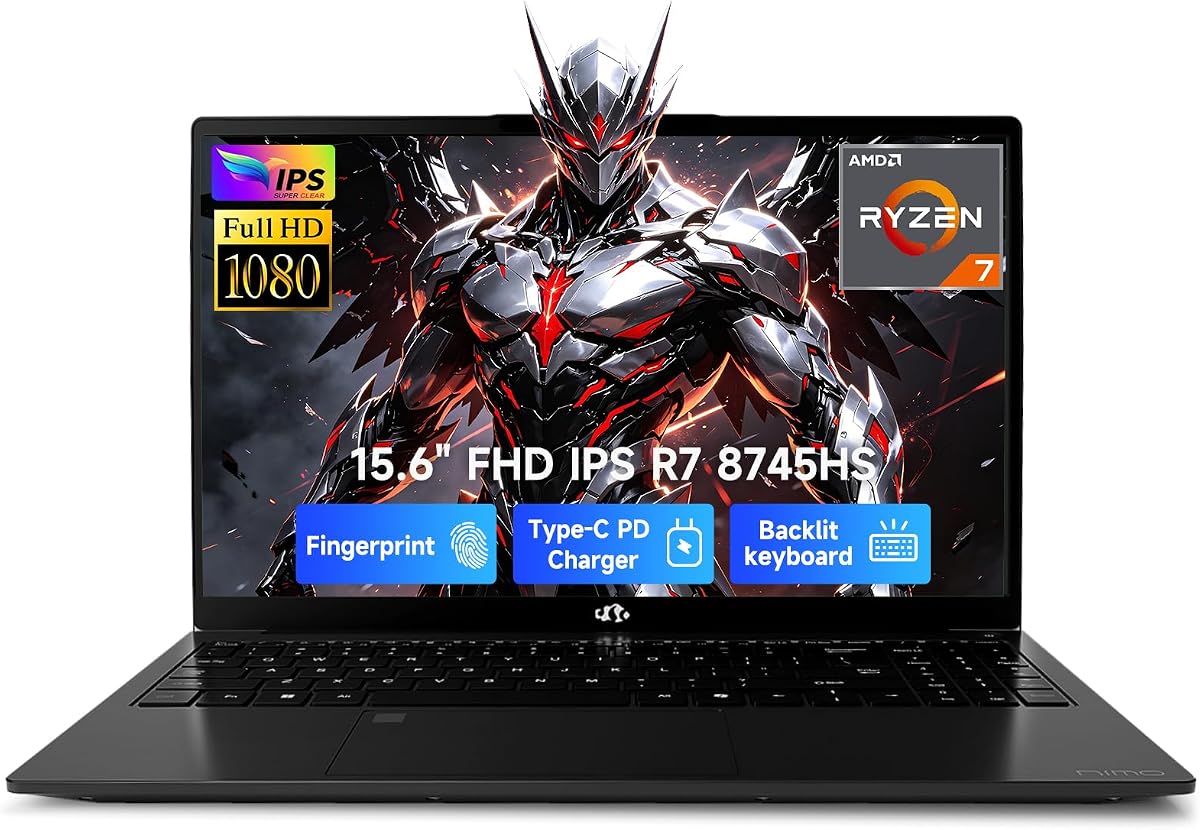
NIMO 15.6 Creator Laptop (Ryzen 7 8745HS)
The 15.6-inch NIMO is a superb streaming and creator machine in a manageable size, driven by an 8-core Ryzen 7 8745HS, 32GB of DDR5 and a 1TB PCIe 4.0 SSD. The Radeon 780M handles 1080p live streaming with ease, and the memory pool means encoding, recording and browsing coexist without stutter. Add 100W USB-C charging and a two-year warranty and it is a confident, portable pick for creators.
- CPU
- AMD Ryzen 7 8745HS
- RAM
- 32GB DDR5
- Storage
- 1TB PCIe 4.0 SSD
- GPU
- Radeon 780M
What we liked
- Fast 8-core Ryzen 7 8745HS
- Generous 32GB DDR5 memory
- Radeon 780M streams 1080p smoothly
- 100W USB-C PD fast charging
Worth noting
- FHD panel rather than the 17in 4K
- Lesser-known creator brand
NIMO 17.3in Creator Laptop (Ryzen 7, 4K)
For streamers who want maximum screen real estate, the 17.3-inch NIMO offers an expansive up-to-4K display that comfortably fits your scene, chat and monitoring windows side by side. A 54W Ryzen 7 8745HS, 32GB of DDR5 and a 1TB SSD give it serious encoding muscle, and USB4 lets you add an external GPU later. It is big to carry, but as a home streaming base it is hard to beat at this price.
- CPU
- AMD Ryzen 7 8745HS
- RAM
- 32GB DDR5
- Storage
- 1TB PCIe 4.0 SSD
- Display
- 17.3in 4K
What we liked
- Huge 17.3in up-to-4K display
- 54W Ryzen 7 for heavy encoding
- 32GB DDR5 and 1TB SSD
- USB4 docking for an external GPU
Worth noting
- Large chassis is less portable
- Integrated graphics for demanding games
NIMO 17.3in Creator Laptop (512GB Config)
This 17.3-inch NIMO doubles as an editing and streaming workhorse, matching the same 8-core Ryzen 7 8745HS and 32GB of DDR5 to a big up-to-4K panel that is as good for cutting footage as it is for monitoring a live scene. The 1TB PCIe 4.0 SSD gives fast access to project files, and the lay-flat hinge helps when collaborating. If you both edit and stream, this is a strong, well-priced all-rounder.
- CPU
- AMD Ryzen 7 8745HS
- RAM
- 32GB DDR5
- Storage
- 1TB PCIe 4.0 SSD
- Display
- 17.3in 4K
What we liked
- 8-core Ryzen 7 for editing and streaming
- 32GB DDR5 for heavy multitasking
- Large 17.3in up-to-4K screen
- 180-degree lay-flat hinge
Worth noting
- Bulky for travel
- Integrated Radeon graphics only
HP Stream 14 (16GB, Celeron N4120)
The HP Stream 14 is a budget-friendly option for simple streaming setups, notable for a generous 16GB of RAM at this price that helps it juggle a browser, chat and a light broadcast. The Celeron N4120 is not built for heavy game encoding, so it suits talking-head streams, presentations and restreaming best. A bundled docking station, 720p camera and Office 365 add everyday value in a light, portable body.
- CPU
- Intel Celeron N4120
- RAM
- 16GB DDR4
- Storage
- 128GB eMMC + dock
- Display
- 14in HD BrightView
What we liked
- Surprising 16GB RAM for the price
- Compact, light 3.24 lb design
- Bundled docking station storage
- 720p camera and Office 365 included
Worth noting
- Celeron CPU limits live encoding
- eMMC storage over a true SSD
HP Chromebook 14 (Celeron N4000)
The HP Chromebook 14 is the pick for lightweight, browser-based streaming and restreaming rather than heavy local encoding. Its Celeron N4000 and 4GB of RAM keep costs low and battery life long at up to 13.5 hours, while the built-in webcam and dual mics cover basic video calls and simple broadcasts. Think of it as an affordable companion for cloud-based tools, not a gaming stream machine.
- CPU
- Intel Celeron N4000
- RAM
- 4GB
- Storage
- 32GB eMMC
- Display
- 14in HD anti-glare
What we liked
- Very affordable entry point
- Long 13.5-hour battery life
- Light, portable ChromeOS design
- Built-in webcam and dual mics
Worth noting
- 4GB RAM and ChromeOS limit live encoding
- Not suited to demanding broadcasts
1080P HD USB Webcam with Microphone
Because most budget laptops have weak built-in cameras, this 1080p USB webcam is the cheapest upgrade to a noticeably better stream. Its wide-angle lens, auto light correction and noise-cancelling mic deliver a cleaner picture and sound than the 720p sensors on machines like the HP Stream, and a privacy cover adds peace of mind. Plug-and-play over USB means it works instantly on any laptop here.
- Resolution
- 1080p 30fps
- Lens
- Wide-angle
- Mic
- Noise-cancelling
- Extras
- Privacy cover, plug & play
What we liked
- Sharp 1080p feed beats laptop cams
- Built-in noise-cancelling microphone
- Wide-angle lens and auto light correction
- Simple plug-and-play USB setup
Worth noting
- An accessory, not a laptop
- Fixed 30fps rather than 60fps
Samsung Galaxy Chromebook Go
The Samsung Galaxy Chromebook Go suits beginners who want to go live simply from a browser rather than run a full production suite. Its slim, military-tested build, 12-hour battery and fast WiFi make it a reliable grab-and-go device for talking-head streams and cloud tools. With 4GB of RAM and ChromeOS it will not run desktop OBS, so pair it with a web-based streaming service for the smoothest results.
- CPU
- Intel Celeron N4500
- RAM
- 4GB
- Storage
- 64GB eMMC
- Display
- 14in HD
What we liked
- Slim, light and easy to carry
- All-day 12-hour battery
- Fast WiFi for stable uploads
- Very low price for a beginner
Worth noting
- 4GB RAM limits it to simple streams
- ChromeOS cannot run desktop OBS
ASUS 14in FHD Laptop (Pentium N6000)
The ASUS 14-inch FHD laptop is a low-cost entry point with a nicer Full HD IPS panel than most budget rivals, useful for monitoring a simple stream or joining calls. Its Pentium N6000 and 4GB of RAM keep it to light duties, so it is best for basic broadcasts and everyday use rather than heavy encoding. A bundled docking station adds storage, though the modest rating means managing expectations.
- CPU
- Intel Pentium N6000
- RAM
- 4GB
- Storage
- 64GB eMMC + dock
- Display
- 14in FHD IPS
What we liked
- Crisp 14in Full HD IPS screen
- Bundled docking station storage
- HD webcam for video calls
- Among the lowest prices here
Worth noting
- Only 4GB RAM for multitasking
- Lowest owner rating on this list
How We Chose the Best Laptops for Streaming

Streaming is a multitasking problem before it is anything else, so our selection began with the components that keep a live broadcast smooth. The processor came first, because encoding video in real time while your game, presentation or capture runs is genuinely demanding, and multi-core chips like the AMD Ryzen 7 8745HS and 5825U in our top picks give the headroom that budget dual-core processors simply cannot. Memory came next, since your streaming software, browser, chat and source all compete for RAM at once, and 16GB is the practical minimum with 32GB preferred for gameplay.
From there we weighed the screen, the webcam and connectivity. A larger display makes monitoring your scene, chat and settings far easier, which is why several 16 and 17.3-inch machines feature prominently, while webcam quality shapes how you actually look on stream. We also considered storage speed for recordings, USB-C and USB4 for capture devices and external GPUs, and value, so the list spans powerful creator rigs, capable mid-range laptops and affordable options for anyone starting a channel on a budget.
What Streaming Actually Demands From a Laptop
The honest picture is that streaming pushes a laptop harder than ordinary use, because it runs several heavy tasks simultaneously. Encoding is the big one: turning your video into a broadcast stream in real time chews through CPU cycles, and on weaker chips it either drops frames or leaves nothing for your game. That is why processor cores and clock speed dominate here, followed closely by memory, since a stream that runs out of RAM stutters no matter how fast the CPU is. A machine like the 32GB NIMO handles all of this comfortably; a 4GB Chromebook does not.
What you are really choosing between is the type of streaming you plan to do. Full local production with scenes, overlays and gameplay needs a strong Windows laptop with a capable CPU and plenty of memory. Simple talking-head streams, webinars and cloud-based restreaming can run on lighter, cheaper machines. Add a good webcam and stable WiFi to whichever you pick, and match the horsepower to your ambitions rather than buying more or less than your stream needs.
It also helps to understand how the encoding actually happens, because it explains the whole ranking. Streaming software can encode using the processor, which produces excellent quality but eats CPU cycles that your game also wants, or using a hardware encoder built into the graphics chip, which offloads that work and frees the processor. The 8-core Ryzen 7 machines here have plenty of both processor headroom and a capable Radeon or Vega hardware encoder, which is why they handle gameplay streaming so comfortably. A budget dual-core Celeron or Pentium, by contrast, has neither much CPU to spare nor a strong hardware encoder, so it drops frames the moment you try to encode a fast-moving game. That single difference is why the list separates so cleanly into serious production machines and lighter devices built for simpler, cloud-assisted broadcasts.
Matching the Laptop to Your Needs
For Gameplay and Full Production Streaming
If you stream games with overlays and scenes, you need real encoding power, and the Ryzen 7 machines lead here. The MALLRACE 16-inch and the 15.6-inch NIMO both pair 8-core processors with ample memory to run your game and broadcast software together, while the 17.3-inch NIMO adds a huge screen and USB4 for an external GPU. Any of these handles demanding local production far better than a budget laptop.
For Webinars and Talking-Head Streams
If you mostly appear on camera, present slides or host a show, you do not need a gaming rig. The HP Stream 14 with 16GB of RAM manages light broadcasts and presentations well, and pairing it with the 1080p USB webcam sharpens your feed noticeably. It is an affordable, portable setup for content that is more about you than about gameplay.
For Streaming on a Tight Budget
Beginners can start cheaply. The HP Chromebook 14 and Samsung Galaxy Chromebook Go offer long battery life and portability for browser-based and cloud streaming, while the ASUS 14-inch FHD laptop adds a nicer screen for monitoring. None will run desktop OBS, so lean on web-based tools and keep your production simple to stay smooth.
For Streamers Who Also Edit
If you cut highlights or produce videos as well as going live, favour the machines with big screens and fast storage. The 17.3-inch NIMO configurations combine an 8-core Ryzen 7, 32GB of DDR5 and a roomy PCIe 4.0 SSD, making them as capable at editing timelines as they are at monitoring a live scene.
Specifications That Matter Most
Two specifications shape a streaming laptop more than any others: the processor and the memory. A strong multi-core CPU, like the Ryzen 7 8745HS in the NIMO creator laptops, encodes video without starving your game or presentation, and it is the single biggest factor in whether a stream holds a steady frame rate. Pair it with at least 16GB of RAM, and ideally 32GB for gameplay, so your broadcast software, sources and browser all have room to run. Skimp on either and even a nice screen will not save the experience.
The display, webcam and connectivity deserve attention too. A larger screen, found on the 16 and 17.3-inch picks, makes monitoring your scene and chat far easier during a live show, while a good webcam, whether built-in or the 1080p USB upgrade here, decides how you actually look on camera. Fast NVMe storage keeps recordings and clips loading quickly, and USB-C or USB4 ports let you connect capture cards and, on the NIMO machines, even an external GPU. Get the CPU and RAM right first, then round out the screen, camera and ports to match how you stream.
A Closer Look at the Top Picks
The MALLRACE 16-inch takes the top spot by balancing genuine streaming power with value. Its 8-core Ryzen 7 5825U and 16GB of memory give real encoding headroom, the 1TB NVMe SSD keeps recordings quick, and the roomy 16-inch Full HD screen makes monitoring easy. For most streamers it is the machine that does the most for the money, comfortably running a broadcast, a game and a browser together.
Close behind, the NIMO creator laptops are superb for serious streaming and editing, with the 15.6-inch model offering portability and the two 17.3-inch versions delivering big up-to-4K screens and 32GB of DDR5. For lighter setups, the HP Stream 14 and the two Chromebooks cover budget and cloud-based streaming, while the ASUS 14-inch adds a nicer panel at a low price. And the 1080p USB webcam is the smart accessory that lifts any of them, turning a soft built-in camera into a sharp, professional-looking feed.
Practical Tips for a Smoother Stream
A few adjustments make any of these laptops stream better. Use hardware encoding where your software offers it, since offloading the work from the CPU frees up power for your game or presentation, and the Ryzen 7 machines handle this especially well. Close background apps before going live so your 16GB or 32GB of RAM goes to the broadcast, and plug into power rather than relying on battery, because streaming drains it fast on every machine here.
Pay attention to your feed and your connection too. A dedicated webcam like the 1080p USB model transforms how you look compared with a 720p built-in camera, and good lighting matters even more than resolution. For upload stability, use a wired Ethernet connection or the WiFi 6 found on the MALLRACE where possible, since a dropped connection ends a stream instantly. Finally, test your full setup before broadcasting to an audience, so scenes, audio and camera are dialled in before you go live.
Getting your settings right inside OBS or your platform of choice matters as much as the hardware. Start with a realistic bitrate and resolution for your upload speed, because pushing 1080p60 at a high bitrate on a shaky connection causes more visible stutter than a clean 720p or 1080p30 stream. On the capable machines here, set the encoder to your GPU's hardware option so the CPU stays free for your game, and only fall back to CPU encoding when quality at low bitrates is the priority. Audio deserves attention too; a clear microphone and a simple noise gate do more for viewer retention than most visual tweaks, since people forgive a soft picture far sooner than they tolerate harsh or muddy sound. Save a tested profile once everything looks and sounds right, so future streams start reliably without re-tuning every setting each time you go live.
Final Recommendation
For most streamers, the MALLRACE 16-inch is the best laptop for streaming in 2026, combining an 8-core Ryzen 7, 16GB of memory and a big screen into a well-balanced, affordable rig. If you want more power or a larger canvas, the NIMO creator laptops step up with 32GB of DDR5 and up-to-4K displays, with the 15.6-inch model for portability and the 17.3-inch versions for a full home base. Budget streamers should look at the HP Stream 14 or the Chromebooks for lighter, cloud-based broadcasts, and everyone should consider the 1080p USB webcam to sharpen their feed. Match the processor and memory to how you stream, and any of these will help you go live with confidence.
How we picked
We judged each laptop on the things that decide a smooth stream: processor cores and speed for encoding, memory for running your broadcast software alongside everything else, screen size and quality for monitoring, and webcam and connectivity for a clean feed. We prioritised machines with real multitasking headroom over spec sheets alone, and we mixed powerful creator laptops with budget options and a webcam upgrade so the list suits both serious streamers and beginners.
Frequently asked questions
What specs matter most for a streaming laptop?
Processor power and memory matter most, because streaming software encodes video in real time while your game or presentation runs. Aim for a multi-core CPU like the Ryzen 7 chips in the NIMO and MALLRACE picks and at least 16GB of RAM, with 32GB ideal for gameplay streaming. Screen size for monitoring and a decent webcam round out the essentials.
Can a budget laptop handle live streaming?
It depends on the type of stream. Talking-head broadcasts, webinars and restreaming work on budget machines like the HP Stream 14 or Samsung Galaxy Chromebook Go, especially through cloud tools. Encoding demanding gameplay live, though, needs a stronger CPU and more RAM, which is where the Ryzen 7 NIMO and MALLRACE laptops pull ahead.
Do I need a separate webcam for streaming?
Often yes. Built-in laptop cameras, like the 720p sensors on budget models here, tend to look soft and handle low light poorly. A dedicated 1080p USB webcam, such as the plug-and-play model on this list, gives a noticeably sharper picture and better microphone, and works instantly on any of these laptops for a big quality jump at low cost.
Is a bigger screen better for streaming?
A larger screen helps you monitor your stream, chat and settings at once without alt-tabbing, which is why the 16 and 17.3-inch NIMO and MALLRACE machines are popular with streamers. That said, big screens are less portable, so if you stream on the go a 14 or 15.6-inch model plus an external monitor at home can be the better balance.
Can Chromebooks be used for streaming?
Chromebooks like the HP Chromebook 14 and Samsung Galaxy Chromebook Go work for browser-based and cloud streaming, and their long battery life and portability are appealing. They cannot run desktop OBS or Streamlabs, however, so for full-featured local production with scenes and overlays you will want a Windows laptop from this list instead.