Best Laptops for Kids in 2026
We may earn a commission from links on this page, at no extra cost to you. Learn more.
Buying a laptop for a child is a different job from buying one for yourself. Raw speed matters far less than a machine that survives a backpack, boots quickly for homework, holds a charge through the school day and keeps young users inside sensible boundaries. Price matters too, because a first laptop will be dropped, spilled on and outgrown. This guide ranks nine of the best laptops for kids you can buy in 2026, weighing durability, parental controls, the right screen size for small hands and eyes, and honest value. Whether you want a rugged ChromeOS machine that manages itself or a Windows laptop with more room to grow, there is a fitting pick here.
Top 9 Best Laptops for Kids
Our top 9 picks, reviewed
acer Chromebook Plus Spin 514 (2-in-1)
The acer Chromebook Plus Spin 514 is the best all-round pick for kids because it grows with them. The 360-degree hinge folds it into a tablet for reading, sketching and touch games, while 8GB of RAM and a 512GB SSD give plenty of headroom for older students. ChromeOS keeps supervision simple through Family Link, and the 13-hour battery easily clears a school day.
- Display
- 14in FHD IPS touch
- RAM
- 8GB
- Storage
- 512GB SSD
- Extras
- 2-in-1, backlit keys
What we liked
- Flips to a tablet for reading and drawing
- Roomy 8GB RAM and 512GB SSD
- Bright, sharp FHD IPS touchscreen
- Long 13-hour battery life
Worth noting
- Costs more than most kids' laptops
- Overpowered for very young children
NIMO 15.6in Student Laptop (Intel N150)
If you can stretch the budget, the NIMO is a step-up pick that a child will not outgrow quickly. It pairs a full 15.6-inch FHD screen with a newer Intel N150 chip, a backlit keyboard for evening homework and a fingerprint reader that keeps young siblings out. The standout two-year warranty is genuine peace of mind, and its class-leading owner rating speaks to reliability at a slightly higher price.
- Display
- 15.6in FHD
- RAM
- 4GB
- Storage
- 128GB SSD
- Extras
- Fingerprint, 2-yr warranty
What we liked
- Highest owner rating on this list
- Newer Intel N150 processor
- Backlit keyboard and fingerprint login
- Reassuring 2-year warranty
Worth noting
- Priced above the typical kids' budget
- Only 4GB of RAM
Samsung Galaxy Chromebook Go
The Samsung Galaxy Chromebook Go is built for the drops and dings of childhood, with a military-tested chassis that shrugs off backpack life. It is slim, light and easy for younger kids to carry, boots in seconds and lasts a 12-hour school day. ChromeOS updates quietly and pairs neatly with Google Family Link for parental controls, making it a fuss-free, affordable first laptop.
- Display
- 14in HD
- RAM
- 4GB
- Storage
- 64GB eMMC
- OS
- ChromeOS
What we liked
- Military-tested tough build
- Slim and light for small hands
- All-day 12-hour battery
- Very affordable price
Worth noting
- Modest 64GB storage and 4GB RAM
- Runs web and Android apps only
HP Chromebook 14 (Celeron N4120)
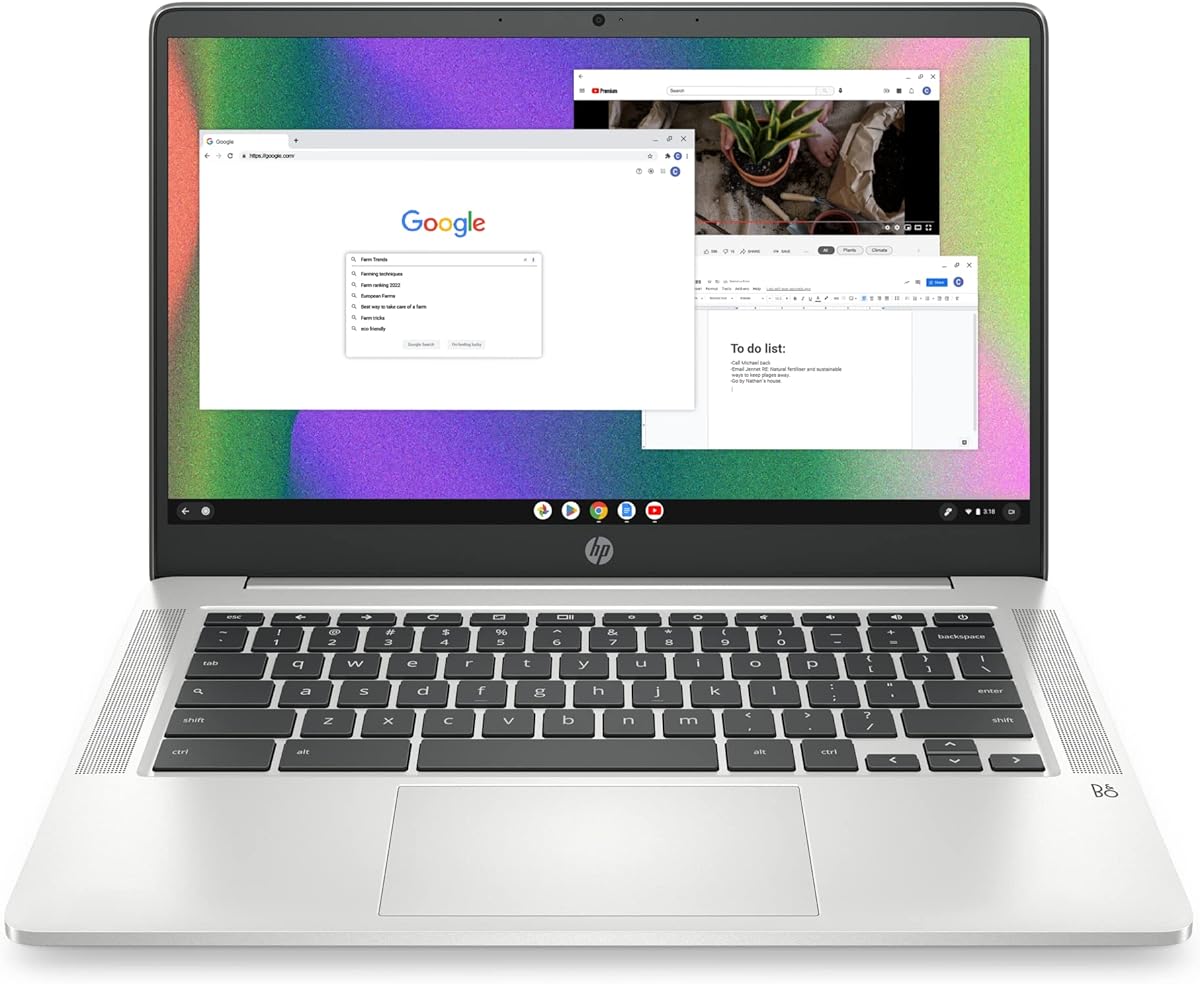
The HP Chromebook 14 is a friendly first laptop for younger children, wrapping a trusted brand and simple ChromeOS into a thin, light body. The anti-glare 14-inch screen is comfortable for young eyes during long homework or reading sessions, and the quad-core Celeron handles classwork and streaming without fuss. Family Link makes supervision easy, and the low price softens the blow of the inevitable knocks.
- Display
- 14in HD anti-glare
- RAM
- 4GB
- Storage
- 64GB eMMC
- OS
- ChromeOS
What we liked
- Anti-glare screen is easy on eyes
- Trusted HP brand and support
- Thin, lightweight and portable
- Long battery for the school day
Worth noting
- Basic HD (1366x768) resolution
- 64GB storage fills up fast
Lenovo IdeaPad 3i Chromebook (15.6in)
For a child who wants room to spread out, the Lenovo IdeaPad 3i Chromebook offers a big 15.6-inch Full HD screen that suits shared homework, video lessons and streaming. A healthy 8GB of RAM keeps multiple tabs smooth, well above the ChromeOS norm, and the sturdy Lenovo build handles daily use. It stays home more than it travels, but as a desk-based family Chromebook it is roomy and dependable.
- Display
- 15.6in FHD
- RAM
- 8GB
- Storage
- 64GB eMMC
- OS
- ChromeOS
What we liked
- Large 15.6in Full HD display
- Generous 8GB RAM for ChromeOS
- USB-C and USB-A connectivity
- Trusted Lenovo build quality
Worth noting
- Only 64GB of storage
- Larger size is less portable
Lenovo Chromebook 14in Touch (Kompanio 520)
This Lenovo Chromebook adds a responsive 14-inch Full HD touchscreen, which younger kids love for tapping through lessons and drawing apps. A built-in webcam privacy shutter is a thoughtful safety touch for a child's device, and WiFi 6 keeps online classes stable. The efficient MediaTek chip favours long battery life over raw speed, so keep it to browser and Android tasks and it stays smooth and cool.
- Display
- 14in FHD touch
- RAM
- 4GB
- Storage
- 64GB eMMC
- Extras
- WiFi 6, privacy shutter
What we liked
- Full HD touchscreen for tapping and drawing
- Webcam privacy shutter built in
- WiFi 6 for smooth video lessons
- Light 2.86 lb body
Worth noting
- ARM chip runs fewer apps
- 64GB storage and 4GB RAM are modest
HP 14 Portable Laptop (16GB RAM)
For an older child who needs real Windows software, this HP 14 is a smart choice thanks to an unusually generous 16GB of RAM that keeps tabs, documents and video calls running smoothly. A year of Office 365 is bundled in, and the SD slot and HDMI port add flexibility. The 64GB drive is tight, so lean on cloud storage or a memory card, but the multitasking headroom is excellent for the money.
- Display
- 14in HD
- RAM
- 16GB
- Storage
- 64GB eMMC
- OS
- Windows 11 Home
What we liked
- Rare 16GB RAM at this price
- Full Windows 11 with Office 365
- SD card slot and HDMI output
- Trusted HP brand
Worth noting
- Only 64GB of onboard storage
- HD screen and efficiency-class chip
HP Chromebook x360 14in Touch (2-in-1)
The HP Chromebook x360 is a versatile 2-in-1 aimed squarely at kids aged eight to twelve, flipping into four modes and shipping with a stylus for writing and drawing. WiFi 6E keeps lessons connected, a webcam privacy shutter adds safety, and the backlit keyboard helps in dim rooms. The 4GB of RAM keeps it to lighter ChromeOS tasks, but the flexibility and included pen make it a fun, creative first machine.
- Display
- 14in FHD touch
- RAM
- 4GB
- Storage
- 64GB SSD
- Extras
- Stylus, 4 modes
What we liked
- Converts between laptop, tablet, tent and stand
- Stylus pen included in the box
- WiFi 6E and privacy shutter
- Backlit keyboard for evenings
Worth noting
- Only 4GB RAM and 64GB storage
- Priced at the top of the budget
15.6in Student Laptop (8GB / 256GB, Rose Gold)
This 15.6-inch student laptop is the budget Windows option for families who want a full desktop OS without spending much. A crisp FHD IPS panel, 8GB of RAM and a roomy 256GB SSD cover schoolwork, streaming and light multitasking, while the fingerprint reader and backlit keys are welcome extras. The unfamiliar brand and modest rating mean buying with return protection, but for the price it delivers the essentials.
- Display
- 15.6in FHD IPS
- RAM
- 8GB
- Storage
- 256GB SSD
- Extras
- Fingerprint, backlit keys
What we liked
- Large 15.6in Full HD IPS screen
- Balanced 8GB RAM and 256GB SSD
- Fingerprint login and backlit keyboard
- Light 3.7 lb build
Worth noting
- Lower owner rating than the rest
- Unbranded, so lean on returns
How We Chose the Best Laptops for Kids

Choosing a laptop for a child means weighing very different things than you would for yourself. Speed and cutting-edge specifications barely register when the buyer is eight years old; what matters is whether the machine survives daily life, keeps the child safe and stays simple enough that neither of you spends the weekend troubleshooting. We started by sorting the field into the two operating systems that make sense for young users: ChromeOS, which is cheap, secure and almost self-managing, and Windows, which offers more room to grow into real software. Each suits a different age and need.
From there we weighed durability first, because a child's laptop lives a hard life of drops, spills and backpack cramming. We looked for tough builds, reassuring warranties and brands with real support. Next came the ease of parental supervision, since a first laptop should keep a child inside sensible boundaries without constant policing. We then considered screen size and clarity for developing eyes, battery life that clears a full school day, weight that small hands can manage, and finally honest value, because a first laptop will be outgrown. The result is a varied list, from rugged Chromebooks to Windows machines with room to grow.
What to Look for in a Child's First Laptop
The honest picture is that a great kids' laptop is defined by resilience and simplicity far more than by power. Expect an efficiency-focused processor, 4GB to 8GB of RAM, a solid-state or eMMC drive between 64GB and 512GB, and a 14 to 15.6-inch screen. None of these machines will edit video or run demanding games smoothly, and that is fine, because a child rarely needs them to. What a child needs is a computer that turns on quickly for homework, holds a charge through the day and does not break the first time it slides off a sofa.
The single biggest decision is ChromeOS versus Windows. ChromeOS, found on most of this list, is the safer default for younger children: it is inexpensive, resistant to viruses, updates itself and pairs tightly with Google Family Link so parents can manage screen time and content from a phone. Windows, on the HP 14 and the rose gold student laptop, is the better long-term bet for older kids who need particular desktop programs or full Office apps, though it asks a little more setup and supervision in return. Match the operating system to the child, not the other way round, and the rest of the choice becomes far easier.
Matching the Laptop to Your Child
For Younger Children
Young children need something tough, simple and safe above all. The Samsung Galaxy Chromebook Go is our pick here, with a military-tested body that survives drops, a light frame small hands can carry, and ChromeOS that pretty much runs itself. The HP Chromebook 14 is an equally friendly alternative, adding an anti-glare screen that is gentle on young eyes during long reading and homework sessions. Both pair seamlessly with Family Link so you can set boundaries from your own phone.
For Older Students
An older child who is starting to need real software will get more from a Windows machine. The HP 14 with 16GB of RAM stands out, offering rare multitasking headroom, full Windows 11 and a year of Office 365 for essays, spreadsheets and research. The rose gold student laptop is a cheaper Windows route with a big FHD IPS screen and a 256GB SSD. For a ChromeOS user who wants power to grow into, the acer Spin 514 carries 8GB of RAM and a spacious 512GB drive.
For Creative and Hands-On Kids
Some children learn best by touching, drawing and tinkering. The HP Chromebook x360 is built for them, flipping into four modes and shipping with a stylus for writing and sketching straight out of the box. The Lenovo touchscreen Chromebook is a lower-cost touch option with a bright Full HD panel and a handy webcam privacy shutter. Both turn lessons into something more tactile, which keeps younger and more restless learners engaged.
For a Shared Family Machine
If the laptop will live on the kitchen table and serve the whole household, favour a bigger screen. The Lenovo IdeaPad 3i Chromebook offers a roomy 15.6-inch Full HD display and a generous 8GB of RAM, making it comfortable for shared homework, video lessons and streaming. It travels less easily than the 14-inch models, but as a stationary family Chromebook it is spacious, sturdy and easy to supervise.
Specifications That Matter Most
Two things shape a child's experience more than any headline chip: durability and battery life. A tough build, like the military-tested Samsung Chromebook Go, is worth more than a faster processor when the owner is a kid, because the machine that survives the year is the one that was worth buying. Battery life matters almost as much, since a laptop that dies at lunchtime is useless for afternoon homework. The 12 to 13-hour ChromeOS machines and Chromebooks here comfortably clear a school day with charge to spare.
After that, look at screen size, storage and the safety extras. A 14-inch panel suits most kids, big enough to read yet light enough to carry, while a 15.6-inch model fits older or home-based use. Storage is often tight at 64GB on Chromebooks, which is fine because ChromeOS leans on the cloud, but a Windows child who saves files locally is better served by a 256GB SSD like the one on the rose gold student laptop. Finally, do not overlook safety touches such as the webcam privacy shutters on the Lenovo and HP x360 Chromebooks, and the value of a recognised brand like HP, Lenovo, Samsung or acer, which means better support if something goes wrong.
A Closer Look at the Top Picks
The acer Chromebook Plus Spin 514 earns the top spot because it balances everything a family wants and grows with the child. Its 360-degree hinge turns it into a tablet for reading and drawing, 8GB of RAM and a 512GB SSD give it real staying power, and the bright FHD IPS touchscreen is a pleasure to use. ChromeOS keeps supervision effortless through Family Link, and the 13-hour battery clears any school day. It is the machine we would hand to a child who will keep it for several years.
Behind it, the NIMO 15.6-inch laptop is the step-up pick for families who can spend a little more, rewarding them with a newer Intel N150 chip, a two-year warranty and the highest owner rating here. The Samsung Galaxy Chromebook Go and HP Chromebook 14 are the tough, affordable choices for younger kids, while the Lenovo IdeaPad 3i and Lenovo touchscreen Chromebook cover bigger screens and touch input. For older students needing Windows, the HP 14 with 16GB of RAM is the multitasking pick, the HP x360 the creative 2-in-1, and the rose gold student laptop the budget Windows floor.
Tips for Setting Up a Kids' Laptop
A little setup work makes a child's laptop safer and longer-lived. Before handing it over, create a dedicated child account and configure parental controls, Google Family Link on the ChromeOS models or Microsoft Family Safety on the Windows ones, so screen time, apps and content are managed from the start rather than added after a problem appears. Set the machine to install updates automatically, which keeps it secure with no effort from you or your child.
Protect the hardware too. A padded sleeve costs little and prevents most backpack damage, and a simple household rule about keeping food and drink away from the keyboard avoids the most common spills. Lean on the cloud for storage, since the 64GB Chromebooks here fill quickly; saving schoolwork to Google Drive or Microsoft 365 keeps local drives clear and backs files up automatically. Finally, buy from listings with clear return protection, especially for the unbranded rose gold model, so a faulty unit is easy to swap. With sensible setup and the right pick, a first laptop can last a child for years.
Final Recommendation
For most families, the acer Chromebook Plus Spin 514 is the best laptop for kids in 2026, combining a durable, flexible 2-in-1 design with enough power and battery to grow alongside a child. If you can stretch the budget, the NIMO with its Intel N150 chip and two-year warranty is the step-up choice that will not be outgrown quickly. For younger children, the rugged Samsung Galaxy Chromebook Go and gentle-eyed HP Chromebook 14 are cheap, tough and easy to supervise. Older students needing real Windows software should look to the HP 14 with 16GB of RAM, creative kids to the stylus-equipped HP x360, and budget-minded families to the rose gold student laptop. Whichever you choose, match durability, safety and screen size to your child's age, and a first laptop will serve them well.
How we picked
We judged each laptop on durability and build, ease of parental supervision, screen size and clarity, battery life, weight and portability, and value for a family budget. Because children are hard on hardware and rarely need heavy power, we favoured tough, low-maintenance machines that stay simple and safe over spec-sheet muscle, and we mixed ChromeOS and Windows so parents can match the operating system to their child's age and needs.
Frequently asked questions
What is the best age to give a child their own laptop?
Most families find seven to nine a sensible starting point, when schoolwork begins to involve online research and typing. For younger children, a simple, rugged Chromebook like the Samsung Galaxy Chromebook Go or HP Chromebook 14 is easiest to supervise. Older kids who need real software will get more from a Windows machine such as the HP 14 with 16GB of RAM.
Are Chromebooks or Windows laptops better for kids?
Chromebooks are usually better for younger children: they are cheap, fast, hard to break through software, update automatically and pair tightly with Google Family Link for parental controls. Windows laptops like the HP 14 suit older students who need specific desktop programs or full Office apps, at the cost of more setup and supervision.
How do I set up parental controls on a kids' laptop?
On the ChromeOS picks here, Google Family Link lets you set screen-time limits, approve apps and filter content from your own phone. On the Windows laptops, Microsoft Family Safety does the same, adding activity reports and web filtering. Set these up before handing the laptop over, and create a child account rather than sharing an adult login.
How durable do kids' laptops need to be?
Durability matters more than speed at this age. The Samsung Galaxy Chromebook Go is military-tested to survive drops, and Chromebooks in general handle rough treatment well because they store little locally. A protective sleeve and a rule about food and drink near the laptop go a long way, whichever model you choose.
What screen size is best for a child?
A 14-inch screen, like the acer Spin 514 or Samsung Chromebook Go, is the sweet spot: big enough to read comfortably yet light enough for small hands and backpacks. A 15.6-inch model such as the Lenovo IdeaPad 3i suits older kids or shared home use, but is heavier to carry between home and school every day.