Skip to content

Best Laptops for CAD in 2026

By Thomas BrianUpdated July 5, 2026

We may earn a commission from links on this page, at no extra cost to you. Learn more.

CAD is one of the most demanding things you can ask a laptop to do. Spinning a complex assembly, rebuilding a parametric model or rendering a walkthrough leans hard on the graphics processor, the memory and the accuracy of the display, and a machine that feels fine for office work will crawl the moment you load a real project. The right tool is a mobile workstation with a professional GPU, plenty of fast RAM and certified drivers. This guide ranks eight of the best laptops for CAD in 2026, from certified NVIDIA RTX Ada workstations to a gaming machine, whether you model in AutoCAD, SolidWorks, Revit or Fusion 360.

Top 8 Best Laptops for CAD

Best for Large Assemblies5.0
Best Big-Screen Workstation5.0
Best Gaming-Class GPU4.5
Best for AutoCAD Certification5.0
Best for Rendering Value3.9

Our top 8 picks, reviewed

1Best Overall

Dell Precision 7680 (RTX 1000 Ada, 4K OLED)

The Precision 7680 is the best all-round CAD machine here, pairing a certified NVIDIA RTX 1000 Ada GPU with a gorgeous 16-inch 4K OLED touchscreen at 100% DCI-P3. The 14-core i5-13600HX, 32GB of DDR5 and a 1TB SSD keep modelling smooth, and Thunderbolt 4 drives up to four external monitors. It is a genuine mobile workstation at a surprisingly reachable price.

GPU
NVIDIA RTX 1000 Ada 6GB
Display
16in 4K OLED touch
RAM
32GB DDR5
Storage
1TB SSD

What we liked

  • Certified workstation GPU for CAD
  • Stunning 4K OLED colour-accurate panel
  • Fast 32GB DDR5 CAMM memory
  • Thunderbolt 4 and four-monitor support

Worth noting

  • 6GB VRAM limits very large assemblies
  • Priced as a professional workstation
2Best for Large Assemblies

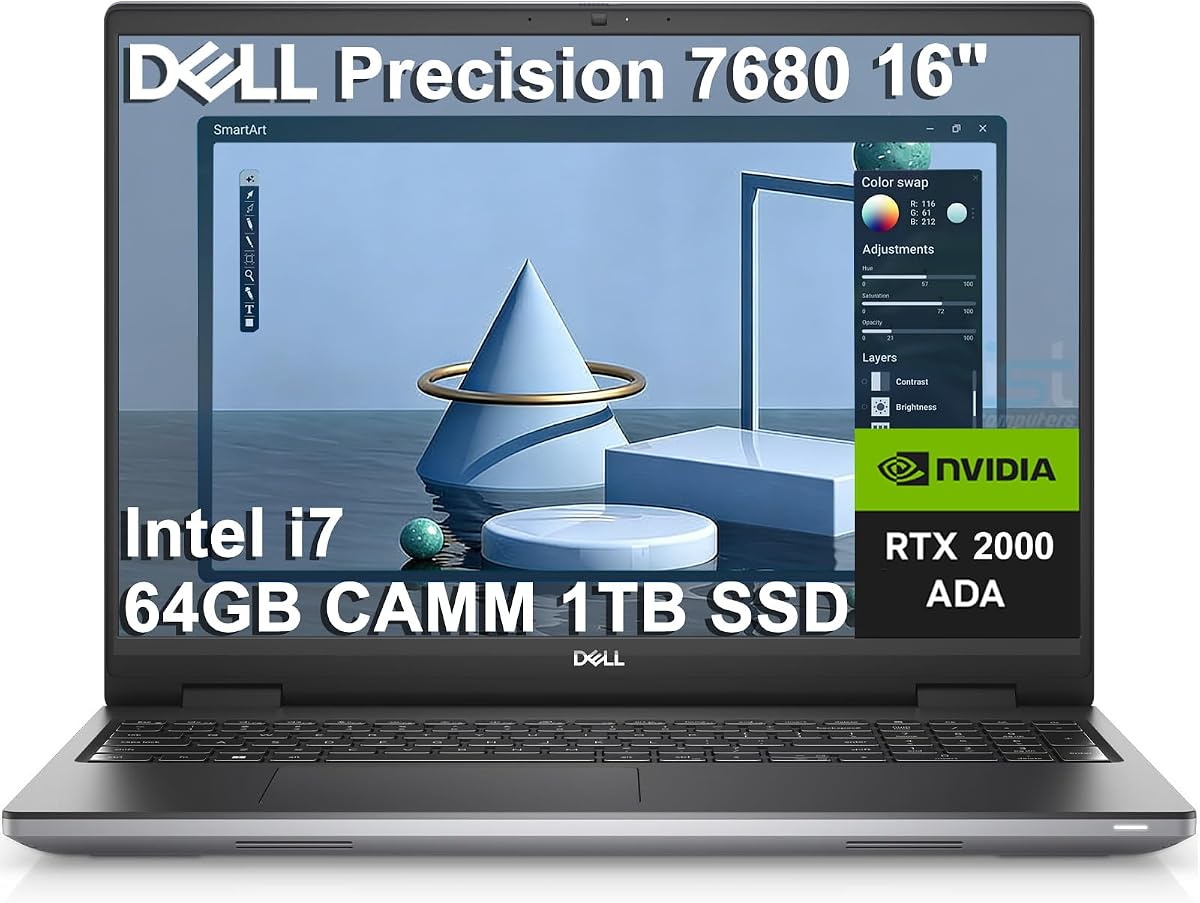
Dell Precision 7680 (RTX 2000 Ada, 64GB)

If your projects are large, this Precision 7680 configuration steps up to an 8GB NVIDIA RTX 2000 Ada GPU and a massive 64GB of DDR5, giving you the VRAM and memory headroom that big SolidWorks and Revit models demand. The 20-core i7-13850HX rebuilds and renders quickly, and it can still drive four external monitors. The FHD+ panel is less dazzling than the OLED, but the horsepower here is the point.

GPU
NVIDIA RTX 2000 Ada 8GB
Display
16in FHD+ anti-glare
RAM
64GB LPCAMM2 DDR5
Storage
1TB SSD

What we liked

  • 8GB RTX 2000 Ada for heavier scenes
  • Huge 64GB DDR5 memory
  • 20-core i7-13850HX processor
  • Drives four 4K external displays

Worth noting

  • FHD+ panel over the top model's OLED
  • Workstation-class pricing
3Best Big-Screen Workstation

Dell Precision 7780 (17.3in, RTX 2000 Ada)

The 17.3-inch Precision 7780 is the pick if you want the biggest possible canvas for detailed drawings. Its bright 500-nit, 99% DCI-P3 panel shows fine geometry clearly, while the 24-core i9-13950HX and 8GB RTX 2000 Ada GPU chew through rebuilds and rendering. With 32GB of DDR5 and up to 2TB of storage it handles serious projects, though the large body trades portability for that expansive screen.

GPU
NVIDIA RTX 2000 Ada 8GB
Display
17.3in FHD 500-nit
RAM
32GB LPCAMM2 DDR5
Storage
1TB/2TB SSD

What we liked

  • Roomy 17.3in 99% DCI-P3 display
  • 24-core i9-13950HX flagship CPU
  • Certified RTX 2000 Ada graphics
  • Fingerprint reader and backlit keys

Worth noting

  • Large 17-inch chassis is less portable
  • Higher price than the 16-inch models
4Best Value Workstation

Dell Precision 7680 (RTX 2000 Ada, 2TB)

This Precision 7680 mirrors our large-assembly pick but doubles storage to 2TB, making it ideal if you keep sprawling project files and rendered output on the machine itself. You still get the 8GB RTX 2000 Ada GPU, 64GB of DDR5 and four-monitor support, so nothing about the CAD performance is compromised. With no fixed price shown, it is worth watching for a keen deal on a well-equipped workstation.

GPU
NVIDIA RTX 2000 Ada 8GB
Display
16in FHD+ anti-glare
RAM
64GB LPCAMM2 DDR5
Storage
2TB SSD

What we liked

  • Generous 2TB SSD for project libraries
  • 64GB DDR5 for heavy multitasking
  • 8GB certified RTX 2000 Ada GPU
  • Wi-Fi 6E and Thunderbolt 4

Worth noting

  • No listed price at time of writing
  • FHD+ rather than a higher-res panel
5Best 32GB Configuration

Dell Precision 7680 (RTX 2000 Ada, 20-Core)

For most CAD users, this Precision 7680 with 32GB of DDR5 and the 8GB RTX 2000 Ada GPU hits the sweet spot between capability and cost. The 20-core i7-13850HX handles parametric rebuilds and moderate rendering with ease, and the four-monitor output suits a proper desk setup. Only those working with the very heaviest models will feel the 32GB ceiling; for everyone else this is a smartly balanced workstation.

GPU
NVIDIA RTX 2000 Ada 8GB
Display
16in FHD+ anti-glare
RAM
32GB LPCAMM2 DDR5
Storage
1TB SSD

What we liked

  • 8GB RTX 2000 Ada at a lower cost
  • 20-core i7-13850HX processor
  • 32GB DDR5 suits most projects
  • Excellent port and monitor support

Worth noting

  • 32GB may cap the largest assemblies
  • FHD+ panel is functional, not vivid
6Best Gaming-Class GPU

ASUS ROG Strix G16 (RTX 5060)

The ROG Strix G16 brings a modern GeForce RTX 5060 that is excellent for GPU rendering and viewport smoothness, backed by robust cooling and a 165Hz screen. The catch for CAD is that it is a consumer card without the ISV certification that professional apps prefer, and 16GB of RAM is tight for big models. For rendering-heavy hobbyists and light professional work, though, it is fast and good value.

GPU
NVIDIA RTX 5060
Display
16in FHD+ 165Hz
RAM
16GB DDR5
Storage
1TB Gen4 SSD

What we liked

  • Powerful new RTX 5060 for rendering
  • Fast 165Hz FHD+ display
  • Strong ROG cooling under load
  • 14-core i7-14650HX processor

Worth noting

  • Consumer GPU lacks ISV certification
  • Only 16GB RAM for CAD workloads
7Best for AutoCAD Certification

HP ZBook Power (T1200, Renewed)

The HP ZBook Power is a certified mobile workstation carrying ISV approvals for AutoCAD, SolidWorks, CREO and more, which matters if your firm requires supported hardware. Its NVIDIA T1200 is entry-level professional graphics rather than a rendering monster, but paired with 32GB of memory and a rugged aluminium chassis it is dependable for 2D and moderate 3D work. Being a renewed unit keeps the price of that certification in check.

GPU
NVIDIA T1200 4GB
Display
15.6in FHD IPS
RAM
32GB DDR5
Storage
1TB SSD

What we liked

  • ISV-certified for AutoCAD and SolidWorks
  • Durable MIL-STD 810H aluminium build
  • 32GB memory and 1TB SSD
  • 8-core i7-11850H with backlit keys

Worth noting

  • Older T1200 is entry-level pro graphics
  • Sold as a renewed unit
8Best for Rendering Value

Dell Precision 5560 (RTX A2000, Renewed)

The Precision 5560 packs a fast 8-core i9-11950H and a professional RTX A2000 GPU into a slim 15.6-inch frame, making it a portable option for CAD on the move. With 32GB of memory and a 1TB SSD it handles everyday drafting and lighter 3D work well, though its 4GB of VRAM and lower owner rating mean it is best matched to modest assemblies rather than the largest scenes.

GPU
NVIDIA RTX A2000 4GB
Display
15.6in FHD+ 1920x1200
RAM
32GB DDR5
Storage
1TB SSD

What we liked

  • 8-core i9-11950H reaches 5GHz
  • Professional RTX A2000 graphics
  • 32GB RAM and a 1TB SSD
  • Compact 15.6in workstation body

Worth noting

  • Lowest owner rating on this list
  • 4GB VRAM suits smaller models

How We Chose the Best Laptops for CAD

Best Laptops for CAD in 2026

CAD punishes weak hardware in ways ordinary tasks never do, so our selection started from the components that actually decide whether a model spins smoothly or stutters. The graphics processor came first, because CAD viewports, shading and rendering all lean on it, and professional cards with certified drivers behave more predictably in apps like SolidWorks and AutoCAD than consumer chips do. We looked closely at VRAM, since it governs how large and detailed a scene the GPU can hold before performance falls off a cliff.

From there we weighed system memory, processor core count and storage. CAD loves RAM, so we favoured machines starting at 32GB and highlighted the 64GB configurations for anyone wrestling with big assemblies. Fast multi-core processors like the 20-core and 24-core Intel HX chips in the Dell Precision family accelerate rebuilds and rendering, while roomy NVMe SSDs keep large project files and reference material close at hand. Finally, we considered display accuracy, build quality and ISV certification, because a colour-accurate panel and a workstation validated for your software remove friction from real professional work.

What Makes a Laptop Good for CAD

A CAD laptop is really a mobile workstation, and it differs from a normal machine in a few deliberate ways. The graphics are professional-grade, meaning cards such as the NVIDIA RTX 1000 and RTX 2000 Ada, or older Quadro and A-series parts, whose drivers are certified against specific software. That certification is not marketing; it is why an ISV-approved machine like the HP ZBook Power renders a SolidWorks assembly without the visual glitches a gaming card can occasionally throw. Memory is generous, storage is fast and plentiful, and the chassis is built to sustain heavy loads without throttling.

The trade-off is that this capability is expensive and, in the largest models, heavy. A 17.3-inch Precision 7780 is a superb desk machine but a lot to carry, while a slim 15.6-inch Precision 5560 sacrifices some VRAM for portability. Understanding where a machine sits on that spectrum, and matching it to whether you draft occasionally on the move or render all day at a desk, is the key to buying the right workstation rather than the most expensive one.

It is also worth being clear-eyed about what a consumer laptop cannot reliably do here. A gaming machine such as the ASUS ROG Strix G16 has a genuinely fast GPU and will happily spin a viewport, but its drivers are optimised for games rather than validated against professional applications, which is where occasional display glitches or unsupported-configuration warnings can creep in on the most demanding software. For a hobbyist or a student that is a perfectly sensible compromise in exchange for a lower price and a high-refresh screen. For a practice that bills clients and depends on rock-solid stability, the certified Dell Precision and HP ZBook machines are the safer foundation, because their whole design goal is predictable behaviour under sustained professional load rather than peak frame rates.

Matching the Laptop to Your Needs

For 2D Drafting and AutoCAD

If your work is mostly 2D drafting and moderate 3D in AutoCAD, you do not need the biggest GPU, but you do benefit from certification and reliability. The HP ZBook Power, with its ISV approvals and rugged MIL-STD build, is a sensible, supportable choice, and its 32GB of memory keeps large drawings responsive. The entry-level workstation graphics are more than enough for line work and dimensioning.

For 3D Modelling in SolidWorks and Revit

Parametric modelling and BIM reward memory and VRAM, so step up to an 8GB RTX 2000 Ada machine such as the Precision 7680 configurations. The 64GB versions give you room for large assemblies and linked files, while the 20-core i7-13850HX rebuilds features quickly. These certified workstations are the safest bet for demanding professional 3D work.

For Rendering and Visualisation

If you spend real time producing renders and walkthroughs, GPU horsepower and a good screen matter most. The ASUS ROG Strix G16 with its RTX 5060 is fast at GPU rendering for the money, while the top Precision 7680's 4K OLED panel is superb for reviewing materials and lighting. Pair either with plenty of RAM to keep scenes fluid.

For CAD on the Move

Field engineers and consultants who draft on site want a machine they can actually carry. The 15.6-inch Precision 5560 offers a professional RTX A2000 GPU and a fast i9 in a slim body, making it the most travel-friendly workstation here despite its smaller VRAM pool.

Specifications That Matter Most

Three specifications dominate CAD performance: the GPU, system memory and the processor. Start with the graphics card and its VRAM, because the viewport, shading and rendering all depend on it. A certified professional card such as the RTX 1000 or RTX 2000 Ada gives you tested drivers and predictable behaviour, and 8GB of VRAM handles noticeably larger scenes than 6GB or 4GB before performance degrades. For most users the 8GB RTX 2000 Ada models strike the best balance of capability and price.

Memory is the next lever. CAD applications hold entire models in RAM, so 32GB is the floor and 64GB is the goal for large assemblies and heavy multitasking, both offered in the Precision line-up. The processor matters for rebuilds, simulations and CPU rendering, and the multi-core Intel HX chips here, up to the 24-core i9-13950HX in the 7780, make short work of those tasks. Finally, do not overlook a fast, roomy NVMe SSD, which keeps big project files and rendered output loading quickly, and a colour-accurate display if visualisation is part of your job. Get the GPU, memory and CPU right and the rest is refinement.

A Closer Look at the Top Picks

The Dell Precision 7680 with the RTX 1000 Ada and 4K OLED panel earns the top spot by getting the whole package right at a reachable price. You get certified graphics, a stunning colour-accurate touchscreen, 32GB of fast DDR5 and Thunderbolt-driven four-monitor support, all in a proper workstation chassis. For most CAD professionals it is the machine we would recommend first, balancing capability, display quality and reliability.

Behind it, the RTX 2000 Ada Precision configurations are the answer for heavier work, adding 8GB of VRAM and up to 64GB of memory for large assemblies, with the 2TB version doubling storage for project-heavy users. The 17.3-inch Precision 7780 is the big-screen flagship for detailed desk work, while the certified HP ZBook Power is the pick when your firm requires ISV-approved hardware. For rendering value the ASUS ROG Strix G16 delivers a modern RTX 5060 cheaply, and the compact Precision 5560 keeps a professional GPU portable for CAD on the road.

Practical Tips for CAD Performance

A few habits get the most from a CAD laptop. Keep the professional graphics drivers current, ideally the studio or certified branch your software recommends, since these are where the stability benefits live. When you work at a desk, take advantage of the four-monitor support on the Precision machines to keep your model, reference and toolbars on separate screens, which speeds up real modelling more than most people expect.

Manage heat and memory sensibly too. CAD sustains high loads, so keep vents clear and consider a cooling pad for long rendering sessions on slimmer machines like the Precision 5560. Close background applications before big rebuilds so your 32GB or 64GB of RAM goes to the model rather than stray browser tabs. And store active projects on the internal NVMe SSD rather than a network drive during heavy work, then archive to the cloud or external storage once you are done, so day-to-day performance stays quick.

A few settings inside your CAD software make a surprising difference as well. In SolidWorks and Inventor, enabling hardware acceleration and the RealView or equivalent GPU features lets the professional card in these Precision and ZBook machines do the work it was built for, rather than falling back on the processor. Turning off unnecessary visual effects, simplifying large assemblies with lightweight or resolved modes as appropriate, and keeping the graphics driver on the certified branch your vendor recommends all help the viewport stay fluid. If you regularly present to clients, plug into an external monitor over Thunderbolt and take advantage of the four-display support on the Precision line, since reviewing a render on a large, colour-accurate screen is far more convincing than crowding it onto the laptop panel. Small habits like these often unlock more real-world smoothness than chasing a slightly faster component.

Final Recommendation

For most CAD users, the Dell Precision 7680 with the RTX 1000 Ada GPU and 4K OLED display is the best laptop for CAD in 2026, combining certified graphics, a superb screen and strong all-round specifications. If you work with large assemblies, the RTX 2000 Ada configurations with 64GB of memory give you the headroom you need, and the 17.3-inch Precision 7780 is the ultimate big-screen desk workstation. Choose the HP ZBook Power when ISV certification is mandatory, the ASUS ROG Strix G16 for affordable rendering muscle, and the Precision 5560 when you need a professional GPU you can carry. Match the GPU, memory and screen to your software and workflow, and any of these will handle serious CAD with confidence.

How we picked

We judged each laptop on the specifications that decide CAD performance: the professional or gaming GPU and its VRAM, the amount and speed of system memory, processor core count, SSD capacity and the accuracy and resolution of the display. We weighted certified mobile workstations that run applications such as SolidWorks and AutoCAD reliably, and we noted where a machine trades certification for raw value so the list suits both firms and freelancers.

Frequently asked questions

Do I really need a workstation GPU for CAD?

For professional CAD you benefit greatly from a certified workstation GPU such as NVIDIA's RTX Ada or older Quadro and A-series cards, because their ISV-certified drivers are tuned and tested for apps like AutoCAD and SolidWorks. A consumer card like the RTX 5060 in the ROG Strix G16 renders quickly, but lacks that certification, so it is better suited to hobbyists and rendering than mission-critical firm work.

How much RAM do I need for CAD work?

32GB is the practical minimum for comfortable CAD, which is why most picks here start there. Large assemblies, complex Revit models and heavy rendering push you toward 64GB, offered by the RTX 2000 Ada Precision configurations. More memory lets you keep bigger models, reference files and rendering tasks open at once without slowdowns.

Is 6GB or 8GB of VRAM enough for CAD?

6GB, as on the top-ranked RTX 1000 Ada Precision, is fine for most 2D and mid-size 3D work. Step up to 8GB, found on the RTX 2000 Ada models, for larger assemblies, texture-heavy visualisation and GPU rendering, where more VRAM keeps the viewport smooth and prevents scenes from spilling into slower system memory.

Does display accuracy matter for CAD?

It matters most for visualisation and design review rather than raw drafting. The 4K OLED 100% DCI-P3 panel on our top Precision pick is excellent for presenting renders and materials, while the 99% DCI-P3 500-nit screen on the 7780 is great for detailed work. For pure geometry, resolution and screen size matter more than colour gamut.

Can a renewed workstation be a good buy for CAD?

Yes. Renewed units like the HP ZBook Power and Precision 5560 here let you buy certified professional hardware for far less than new. They keep the workstation-class GPUs, generous memory and durable builds; just buy from listings with clear return protection and check the warranty terms before you commit.