Skip to content

Best Laptops for Architects in 2026

By Priya NairUpdated July 5, 2026

We may earn a commission from links on this page, at no extra cost to you. Learn more.

Architecture is one of the most demanding jobs you can hand a laptop. Revit models, AutoCAD drawings, SketchUp scenes and rendered visualisations all lean hard on the GPU, devour RAM and reward a large, colour-accurate screen. The wrong machine stutters through a complex model and turns a render into a coffee break; the right one keeps you in flow. This guide ranks nine laptops for architects in 2026, from true NVIDIA-powered mobile workstations built for CAD and rendering to capable high-memory all-rounders and portable options for site visits. Whatever your practice looks like, from student to studio principal, there is a pick here that matches your software, your workflow and your budget.

Top 9 Best Laptops for Architects

Best Colour-Accurate Display5.0
Best AI Copilot+ Pick4.8
Best for CAD Gaming Power4.3
Best Premium OLED Ultrabook4.2
Best Budget 3D Value4.8

Our top 9 picks, reviewed

1Best Overall

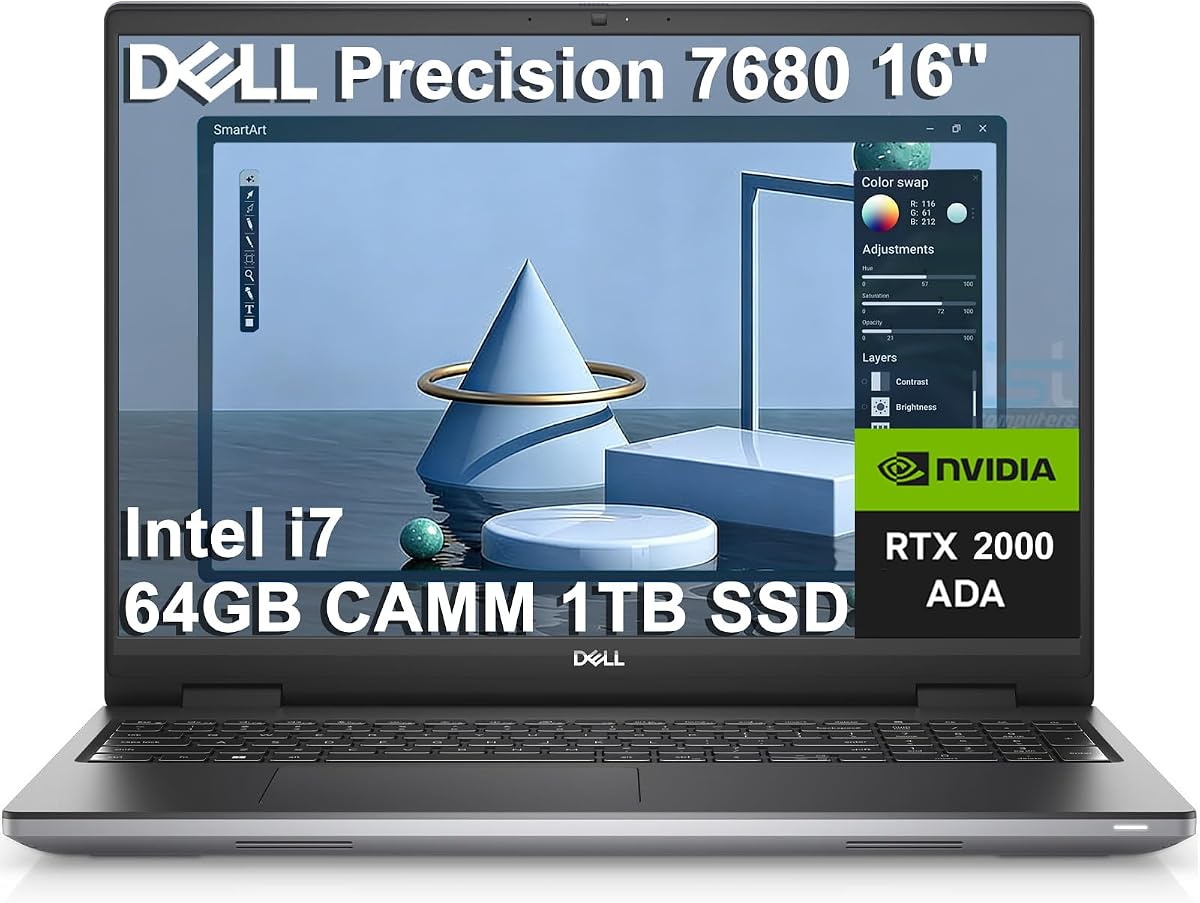
Dell Precision 7680 (RTX 2000 Ada, i7)

The Dell Precision 7680 with the 8GB RTX 2000 Ada is the best all-round architect's laptop here, a true mobile workstation built for Revit, AutoCAD and rendering. Its professional NVIDIA GPU, 64GB of DDR5 and i7-13850HX chew through large BIM models and viewport-heavy scenes, and it can drive four external 4K displays for a full studio desk. It is expensive and heavy, but for demanding CAD work it simply does not flinch.

GPU
NVIDIA RTX 2000 Ada 8GB
CPU
Intel i7-13850HX
RAM
64GB DDR5
Storage
1TB SSD

What we liked

  • 8GB workstation-class RTX Ada GPU
  • Enormous 64GB DDR5 for big models
  • Anti-glare 16in FHD+ pro display
  • Drives four external 4K monitors

Worth noting

  • Well above a mainstream budget
  • Heavy chassis, short battery life
2Best for Rendering

Dell Precision 7680 (RTX 2000 Ada, 2TB)

Nearly identical to our top pick but with a doubled 2TB SSD, this Dell Precision 7680 is the choice for architects who render heavily and hoard large project archives. The same 8GB RTX 2000 Ada GPU and 64GB of DDR5 power through ray-traced visualisations and complex models, while the bigger drive keeps years of drawings, textures and renders on hand. It is a serious, premium workstation for anyone whose output is visual and voluminous.

GPU
NVIDIA RTX 2000 Ada 8GB
CPU
Intel i7-13850HX
RAM
64GB DDR5
Storage
2TB SSD

What we liked

  • 8GB RTX 2000 Ada for GPU rendering
  • Massive 2TB SSD for project archives
  • 64GB DDR5 handles huge scenes
  • Four-monitor 4K output support

Worth noting

  • Premium workstation pricing
  • Bulky and power-hungry
3Best Colour-Accurate Display

Dell Precision 7680 (RTX 1000 Ada, OLED)

For architects whose presentation renders and material studies demand true-to-life colour, this Dell Precision 7680 with a 4K OLED touchscreen covering 100% of DCI-P3 is the pick. The RTX 1000 Ada GPU and 14-core i5-13600HX comfortably handle CAD and modelling, and 32GB of DDR5 keeps large scenes fluid. The standout is that display, whose contrast and colour make your visualisations look exactly as clients will see them printed.

Display
16in 4K OLED 100% DCI-P3
GPU
NVIDIA RTX 1000 Ada 6GB
RAM
32GB DDR5
Storage
1TB SSD

What we liked

  • Gorgeous 4K OLED, 100% DCI-P3
  • Workstation RTX 1000 Ada GPU
  • 14-core Intel HX processor
  • Touchscreen and 32GB DDR5

Worth noting

  • Priced above a mainstream budget
  • Workstation weight, modest battery
4Best AI Copilot+ Pick

Lenovo IdeaPad Slim 3X (Snapdragon X)

The Lenovo IdeaPad Slim 3X is the pick for architects who prize portability and battery over raw rendering muscle, a Copilot+ PC with a 45 TOPS NPU, 16GB of RAM and a durable metal body. Its tall 15.3-inch WUXGA screen suits 2D drafting and light modelling, and the all-day endurance is ideal for site visits and client meetings. Verify your CAD tools run well on Arm, then enjoy a genuinely mobile companion.

CPU
Snapdragon X (45 TOPS NPU)
RAM
16GB
Storage
512GB SSD
Display
15.3in WUXGA 16:10

What we liked

  • All-day battery for site and studio
  • 45 TOPS NPU for Copilot+ AI
  • Roomy 15.3in 16:10 WUXGA display
  • Durable metal MIL-STD chassis

Worth noting

  • No discrete GPU for heavy rendering
  • Arm apps compatibility to check
5Best for CAD Gaming Power

ASUS V16 Gaming Laptop (RTX 5060)

The ASUS V16 brings gaming-grade GPU power to CAD on a sensible budget, its NVIDIA RTX 5060 with 8GB of GDDR7 accelerating SketchUp, Lumion and viewport-heavy modelling far beyond any integrated chip. A 10-core Core 7 240H and 144Hz WUXGA screen keep everything smooth. The 16GB of RAM is the main limit for very large BIM models, but for 3D-heavy architects who want GPU muscle without workstation prices, it is a smart buy.

GPU
NVIDIA RTX 5060 8GB GDDR7
CPU
Intel Core 7 240H (10-core)
RAM
16GB
Display
16in WUXGA 144Hz

What we liked

  • Powerful RTX 5060 GPU for 3D work
  • Fast 144Hz 16in WUXGA display
  • 10-core Intel Core 7 240H
  • Strong value for the GPU power

Worth noting

  • 16GB RAM is tight for big BIM models
  • Gaming styling and shorter battery
6Best Storage Value

Lenovo IdeaPad 15.6 (40GB / 2.5TB, i5)

This Lenovo IdeaPad 15.6-inch is the memory-and-storage bargain for architects doing mostly 2D drafting and modelling, packing a huge 40GB of RAM and 2.5TB of combined storage with a 10-core Core i5. That memory keeps big AutoCAD files and reference material open at once, and the vast storage swallows entire project libraries. It relies on integrated graphics, so save heavy GPU rendering for a workstation, but for drawings it flies.

CPU
Intel Core i5 (10-core)
RAM
40GB DDR4
Storage
2TB SSD + 512GB dock
Display
15.6in FHD touch

What we liked

  • Huge 40GB RAM for large models
  • 2.5TB total project storage
  • 10-core Core i5 and Iris Xe
  • Windows 11 Pro and Office included

Worth noting

  • Integrated graphics, no discrete GPU
  • Only FHD, not colour-calibrated
7Best Premium OLED Ultrabook

ASUS Vivobook S 14 OLED (Ryzen AI 9)

The ASUS Vivobook S 14 OLED is the pick for architects who want a gorgeous, portable machine for presentations and drafting on the move. Its 3K 120Hz OLED covers 100% of DCI-P3 for accurate material and render review, and the 10-core Ryzen AI 9 with 24GB of LPDDR5X handles modelling briskly. It leans on integrated graphics, so pair it with a workstation for heavy rendering, but as a slim, colour-true companion it excels.

CPU
AMD Ryzen AI 9 365 (10-core)
RAM
24GB LPDDR5X
Display
14in 3K 120Hz OLED
Storage
1TB SSD

What we liked

  • Stunning 3K 120Hz OLED, 100% DCI-P3
  • 45+ TOPS NPU and 10-core CPU
  • 24GB fast LPDDR5X memory
  • Slim 2.87 lb ultra-portable design

Worth noting

  • Integrated graphics limit heavy rendering
  • Premium price for the class
8Best Budget 3D Value

KAIGERR 15.6in Laptop (Ryzen 7 5700U)

The KAIGERR 15.6-inch is the budget value pick for architecture students and light 3D work, pairing an eight-core Ryzen 7 5700U with 16GB of RAM and a fast 512GB NVMe SSD. Those cores and that memory handle AutoCAD, SketchUp and modest models capably for the money. There is no discrete GPU, so keep heavy rendering to the cloud or a workstation, but as an affordable modelling machine it punches above its price.

CPU
AMD Ryzen 7 5700U (8C/16T)
RAM
16GB DDR4
Storage
512GB NVMe SSD
Display
15.6in FHD

What we liked

  • Eight-core Ryzen 7 for the price
  • 16GB RAM and 512GB NVMe SSD
  • Wi-Fi 6 and rich connectivity
  • Strong value for modelling work

Worth noting

  • Integrated Radeon, no discrete GPU
  • Lesser-known brand and support
9Best Ultra-Portable

ASUS Vivobook Go 15 (Ryzen 3 7320U)

The ASUS Vivobook Go 15 is the ultra-portable, budget option for architects who mainly need to view drawings, sketch ideas and present on the go. Its thin, MIL-grade body, 11-hour battery and fast charging make it a comfortable site and travel companion, and DDR5 memory keeps it responsive for light tasks. With a Ryzen 3 and 8GB of RAM it is not for heavy CAD, but as a durable second machine it delivers.

CPU
AMD Ryzen 3 7320U (4C/8T)
RAM
8GB DDR5
Storage
256GB SSD
Display
15.6in FHD

What we liked

  • Thin, light, MIL-grade durable
  • Up to 11 hours of battery
  • Fast charging and webcam shield
  • Recognised ASUS brand and support

Worth noting

  • Entry-level CPU and integrated graphics
  • 8GB RAM limits large models

How We Chose the Best Laptops for Architects

Best Laptops for Architects in 2026

Architectural software is uniquely punishing, so our ranking started from the hardware that determines whether Revit, AutoCAD, SketchUp and a render engine feel effortless or exhausting. The graphics processor came first, because CAD viewports, 3D modelling and ray-traced rendering all lean on the GPU, and a certified workstation card like the NVIDIA RTX 2000 Ada in the top Dell Precision machines delivers both raw power and driver stability that integrated graphics cannot approach. Alongside the GPU we weighed RAM, since large BIM models and busy scenes can consume tens of gigabytes, making 32GB a sensible floor and 64GB a genuine advantage for the heaviest studios.

From there we looked at the CPU, favouring high core counts for meshing, calculation and export tasks, and at storage, insisting on fast NVMe drives with enough capacity to hold sprawling project files, textures and renders. Display quality earned close attention too, because architects live on their screens: resolution, size and colour accuracy all shape how comfortably you draft and how faithfully your presentations read. Finally we balanced this against owner ratings, portability and price, keeping the list varied so it answers the needs of a rendering-heavy studio, a 2D-focused drafter and a student alike.

What Architectural Work Demands From a Laptop

Architecture is really several different workloads wearing one job title, and each stresses a laptop differently. Two-dimensional drafting in AutoCAD is comparatively light and rewards a big, sharp screen and plenty of RAM to keep many drawings open. Three-dimensional modelling in Revit or SketchUp leans harder on the GPU and CPU as models grow complex. Rendering, whether in Lumion, Enscape or V-Ray, is the most brutal stage of all, hammering the GPU and devouring memory, which is why the true workstations on this list, the Dell Precision machines with their RTX Ada GPUs and 64GB of RAM, sit at the top. Recognising which of these dominates your day is the key to buying the right amount of machine.

There is also the question of where you work. A studio-bound architect can happily carry a heavy, powerful workstation that spends its life on a desk driving multiple monitors, and the Dell Precision picks are built exactly for that. An architect who splits time between site, client meetings and the office may value the all-day battery and portability of the Lenovo IdeaPad Slim 3X or the slim ASUS Vivobook S 14 OLED far more than the last ounce of rendering speed. And a student learning the tools needs enough capability to run the software without paying for professional certification they will not use, which is where value machines like the KAIGERR and ASUS V16 come in. The best laptop is the one whose strengths align with both your software and your working life.

Matching the Laptop to Your Needs

For Rendering-Heavy Studios

If your work centres on 3D modelling and rendering, only a proper GPU workstation will keep you productive, and the Dell Precision 7680 machines are the answer. The 8GB RTX 2000 Ada GPU accelerates ray-traced renders, the 64GB of DDR5 holds enormous scenes without paging, and four-monitor 4K output builds a full studio desk. Choose the 2TB variant if you archive large render libraries, or the 4K OLED model if faithful colour on presentation visuals matters most. These are heavy and pricey, but for demanding output they are unmatched here.

For CAD Power on a Budget

If you want strong 3D performance without workstation pricing, the ASUS V16 with its NVIDIA RTX 5060 is the value champion, driving SketchUp, Lumion and viewport-heavy modelling far faster than any integrated chip. Its 144Hz WUXGA screen and 10-core CPU keep things fluid. The KAIGERR, with an eight-core Ryzen 7 and 16GB of RAM, is a cheaper route for students doing lighter modelling. Both trade some polish and battery life for capability, but they let you run serious software affordably.

For 2D Drafting and Big Models

Architects who mostly draft in 2D and juggle large files should prioritise RAM and storage over a discrete GPU, and the Lenovo IdeaPad 15.6-inch is the standout, with a huge 40GB of RAM and 2.5TB of storage. That memory keeps countless AutoCAD drawings and references open, while the vast drive holds entire project archives. It leans on integrated graphics, so heavy rendering belongs on a workstation or the cloud, but for drawing-centric work it is superb value and comfortably fast.

For Mobility and Presentations

If you are often on site or presenting to clients, portability, battery and a beautiful screen matter more than rendering power. The Lenovo IdeaPad Slim 3X, a Copilot+ PC with all-day battery and a durable metal body, is ideal for a mobile architect, while the ASUS Vivobook S 14 OLED pairs a stunning colour-accurate 3K OLED with a featherweight 2.87 lb chassis. The ASUS Vivobook Go 15 is the tough, cheap option for simply viewing and sketching on the move. None is a rendering beast, but all shine away from the desk.

Specifications That Matter Most

For architects, the GPU and its VRAM sit at the heart of the buying decision. A workstation-class NVIDIA RTX Ada card, as in the Dell Precision machines, offers both the horsepower and the certified driver stability that professional Revit and AutoCAD work rewards, while a gaming GPU like the RTX 5060 in the ASUS V16 delivers most of the performance for less. Eight gigabytes of VRAM is a comfortable target for 3D and rendering. Close behind the GPU comes RAM: 32GB is the sensible minimum for serious modelling, 64GB is ideal for the heaviest scenes, and the 40GB Lenovo IdeaPad shows how generous memory alone transforms large 2D work.

The display and storage complete the picture. Screen size and resolution affect drafting comfort, and colour accuracy, ideally near 100% of DCI-P3 as on the OLED Dell and ASUS options, matters enormously for presentation renders and material studies that must match the finished result. For storage, favour fast NVMe drives with real capacity, because project files, textures and renders grow quickly, and options like the 2TB Dell and the 2.5TB Lenovo save constant housekeeping. Do not overlook the CPU either; a high core count, such as the 10 and 14-core chips found across these picks, speeds meshing, calculation and export throughout the working day.

A Closer Look at the Top Picks

The Dell Precision 7680 with the RTX 2000 Ada and 64GB of RAM takes the overall crown because it does everything an architect asks without complaint: certified NVIDIA GPU power for CAD and rendering, vast memory for large models, and enough external display support to anchor a full studio desk. Its sibling with a 2TB drive is the pick for render-heavy archivists, and the 4K OLED variant is the one to buy if colour fidelity on presentation visuals is paramount. Between them these three cover the demanding professional end of the spectrum thoroughly.

Below the workstations, the field opens up to suit different priorities. The ASUS V16 brings gaming-grade GPU power to CAD at a friendlier price, the Lenovo IdeaPad 15.6-inch is a memory-and-storage bargain for 2D-heavy drafters, and the KAIGERR is the affordable modelling machine for students. For mobility, the Lenovo IdeaPad Slim 3X and the ASUS Vivobook S 14 OLED trade discrete graphics for outstanding battery, portability and, in the ASUS, a gorgeous colour-true OLED, while the rugged ASUS Vivobook Go 15 rounds things out as the ultra-portable viewer. Together they let every kind of architect find a match.

Practical Tips for Architectural Work on a Laptop

A few habits keep even a powerful architecture laptop running smoothly. Manage your models: purge unused families and elements, work in worksets where possible, and keep drawings tidy so the GPU and RAM are not fighting bloat, which helps machines with tighter memory like the ASUS V16 handle bigger jobs. Store active projects on the fast internal NVMe rather than a network or external drive, and archive completed work off the machine, taking advantage of the generous capacities on the Dell 2TB and Lenovo 2.5TB picks to avoid constant shuffling.

Think about your setup and thermals too. On a studio workstation like the Dell Precision, driving external monitors and keeping the machine plugged in during rendering gets the best performance, and multi-monitor support turns it into a proper desk. Keep GPU drivers current, ideally the studio or professional driver branch on workstation cards, for stability in large CAD files. When mobility matters, offload heavy rendering to a cloud service so a portable machine like the ASUS Vivobook S 14 OLED stays cool and quiet on battery. With disciplined file management and the right pick from this list, an architect's laptop can stay fast and reliable through years of demanding projects.

Final Recommendation

For most professional architects, the Dell Precision 7680 with the RTX 2000 Ada and 64GB of RAM is the best laptop in 2026, a certified workstation that runs Revit, AutoCAD and rendering without flinching. Choose the 2TB model if you archive heavily, or the 4K OLED variant if presentation colour accuracy is your priority. Architects wanting serious GPU power for less should look at the ASUS V16, while 2D-focused drafters get outstanding value from the 40GB Lenovo IdeaPad. For mobility, the Lenovo IdeaPad Slim 3X and the colour-true ASUS Vivobook S 14 OLED lead, and students on a budget are well served by the KAIGERR or the rugged ASUS Vivobook Go 15. Match the machine to whether you render locally or draft on the move, and one of these will carry your practice forward.

How we picked

We ranked each laptop on what architectural work truly demands: discrete GPU power and VRAM for CAD and rendering, RAM for large models, CPU cores, storage speed for big project files, and display quality including resolution and colour accuracy. We weighed real owner ratings and price against that hardware, favouring proven workstation GPUs and generous memory over thin-and-light styling, and flagged the value picks best kept to lighter 2D and modelling tasks.

Frequently asked questions

What GPU do architects need in a laptop?

For serious CAD and rendering, a discrete NVIDIA GPU is essential, and workstation-class RTX Ada cards like the RTX 2000 Ada in the top Dell Precision picks are ideal because they are certified and stable in Revit and AutoCAD. A gaming GPU such as the RTX 5060 in the ASUS V16 also delivers strong 3D performance for less. For 2D drafting alone, integrated graphics can suffice.

How much RAM do architects need?

For large BIM models and multitasking across CAD, rendering and reference material, 32GB is the comfortable target and 64GB, as in the Dell Precision workstations, is ideal for the heaviest work. The 40GB Lenovo IdeaPad is a strong value option for big 2D projects. For lighter modelling and study, 16GB, as in the KAIGERR or ASUS V16, is a workable minimum.

Is a colour-accurate display important for architects?

Yes, especially for presentation renders, material studies and anything a client will see. A screen covering close to 100% of DCI-P3, like the 4K OLED Dell Precision or the ASUS Vivobook S 14 OLED, shows colours faithfully so your visualisations match the final output. For pure line-drawing work, resolution and screen size matter more than perfect colour.

Can I use a gaming laptop for architecture?

Absolutely. Gaming laptops like the ASUS V16 pack powerful NVIDIA GPUs that accelerate 3D modelling and rendering at a lower price than certified workstations. The trade-offs are shorter battery life, flashier styling and drivers tuned for games rather than certified for CAD, which can occasionally matter in large enterprise Revit files. For most architects and students, a strong gaming GPU is excellent value.

Do I need a workstation laptop, or is a regular laptop enough?

It depends on your work. If you run heavy Revit models and GPU rendering daily, a certified mobile workstation like the Dell Precision 7680 pays off in stability and multi-monitor power. If you mostly draft in 2D, model lightly and present, a high-RAM all-rounder such as the Lenovo IdeaPad or a colour-accurate ultrabook like the ASUS Vivobook S 14 OLED is more portable and far cheaper.