Integrated keyboard versus standalone pad
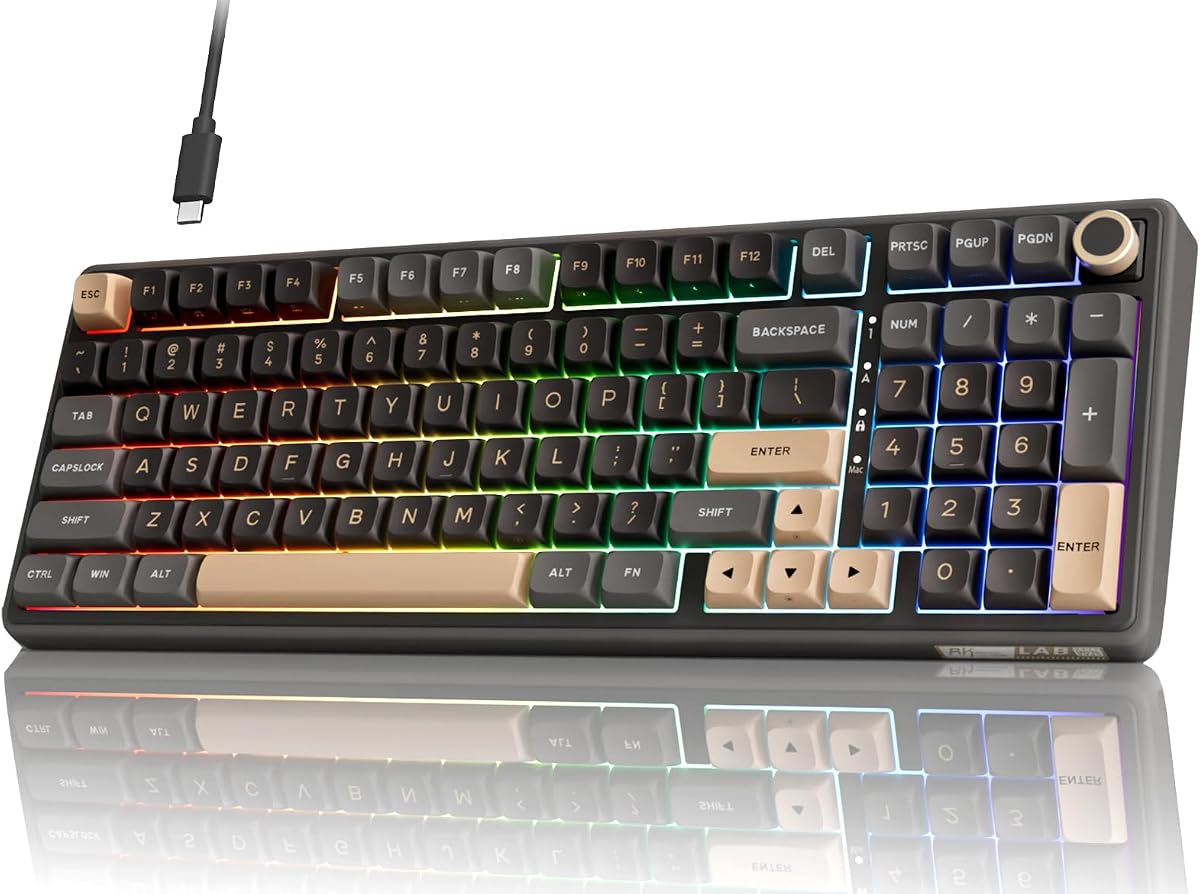
The first decision is architectural: replace your entire keyboard with a 96% or full-size board that embeds the numpad, or keep your current typing board and add a USB or wireless pad beside it. Integrated solutions like the YUNZII B98 PRO and RK R98 Pro guarantee consistent key feel, one cable (or one wireless pairing), and standard numpad placement muscle memory expects. They cost more upfront and lock you into one layout width.
Standalone pads from Kisnt, TechGarden, Gurjot, and others shine when you love a laptop or 75% mechanical board that lacks digits. You gain flexibility to position the pad left or right, swap pads independently when travel demands, and avoid relearning alpha keys. The tradeoff is second cable or dongle, possible desk sliding, and slight placement differences versus integrated full-size boards.
Connection type: wired, 2.4GHz, or Bluetooth
Wired USB pads and keyboards eliminate battery anxiety and pairing dropouts during live month-end close—critical when a dead battery mid-reconciliation is unacceptable. TechGarden, Kisnt, Gurjot, and the RK R98 Pro exemplify plug-and-play reliability IT departments prefer on imaged Windows fleets.
2.4GHz wireless with dongle (Foloda, BOYI, 8BitDo) splits the difference: no Bluetooth menu wrestling on old laptops, yet freedom from cable clutter. Dongles consume USB ports unless hubbed. Bluetooth rechargeable pads (havit, BOYI, YUNZII wireless modes) suit multi-device hopping and ultrabooks with few ports, but verify OS support—havit excludes Mac entirely.
Switch feel and office noise politics
Mechanical switches range from silent linear creams on RK and YUNZII to tactile browns on Kisnt to loud clicky blues on Gurjot and the 22-key mechanical pad. Open-plan spreadsheet teams should prioritize dampened tactiles or scissor membranes unless private offices absorb click echo.
Hot-swap sockets on Kisnt, RK, BOYI, and YUNZII let you tune numpad cluster separately from alpha keys—a power move when digits want tactile bumps but letters want linear speed. Non-hot-swap budget pads commit you to factory switches for the product lifetime.
Key count beyond digits
Bare 17–19 key pads cover numbers and operators only—enough for pure ten-key roles. Twenty-two to twenty-six key layouts add Tab, Delete, ESC, and calculator shortcuts that reduce hand travel. Gurjot's 34-key expansion integrates arrows and page keys for multi-monitor Excel warriors. BOYI's 30 keys add copy/paste and screen-knob controls for power users willing to learn software.
More keys mean larger footprint. Measure desk depth with mouse pad, main keyboard, and pad template before buying expanded layouts that collide with narrow keyboard trays.
Mac, Windows, and Chrome compatibility
Windows-centric pads (havit, Foloda) may frustrate Mac Excel users when Num Lock, calculator shortcuts, or navigation keys misbehave. Kisnt documents Mac limitations explicitly. Gurjot and YUNZII market broader Mac support—still test on your OS version before fleet deployment.
Chrome OS appears rarely in listings; assume partial function key support unless Q&A confirms recent success. Accounting firms on mixed OS should standardize pads with documented cross-platform behavior rather than cheapest Windows-only SKU.
Enthusiast features versus procurement simplicity
TFT screens, GIF uploads, QMK/VIA layers, and RGB music sync delight hobbyists but complicate corporate procurement where vendor software is blocked. TechGarden and Foloda remain the low-friction choices for IT closets and loaner laptops.
BOYI, 8BitDo Retro 18, and YUNZII B98 PRO reward users who enjoy setup weekends. Budget time for firmware, remapping, and cable management—not just unboxing.