Skip to content

Best Keyboards Under $100 in 2026

By Priya NairUpdated July 5, 2026

We may earn a commission from links on this page, at no extra cost to you. Learn more.

A hundred-dollar budget opens up the most rewarding stretch of the keyboard market. At this level you are no longer settling for a functional slab; you can choose a pre-lubed gasket-mounted board with a satisfying thock, a tri-mode wireless deck with a multi-function knob, or a quirky custom keyboard with a built-in display. The range is huge, though, so the challenge shifts from finding something usable to matching a board's character to your own tastes and workflow. This guide ranks nine of the best keyboards you can buy for under 100 dollars in 2026, spanning custom hot-swappable mechanical boards, wireless multi-device decks and simple, reliable office keyboards, so there is a right pick whether you crave a premium typing feel or dependable everyday value.

Top 9 Best Keyboards Under $100

Best for Gaming4.6
Best for Office Work4.5
Best Budget Gaming4.4
Best Quiet Typing4.4
Best Hot-Swappable4.3

Our top 9 picks, reviewed

1Best Overall

Womier SK80 75% Custom Keyboard

The Womier SK80 tops the list because it packs genuine enthusiast features into a sub-100 package. A gasket mount with EVA plate gives it a soft, responsive feel and clean typing sound, pre-lubed hot-swappable switches let you tune it to taste, and a colour multimedia screen in the corner shows GIFs, caps state and settings. Cherry-profile keycaps and Type-C connectivity round out a board that feels far pricier than it is.

Layout
75% gasket-mount
Switches
Hot-swap pre-lubed linear
Build
Cherry-profile keycaps
Extras
Color multimedia screen

What we liked

  • Gasket mount delivers a soft, creamy feel
  • Hot-swappable with pre-lubed switches
  • Built-in customisable display screen
  • Detachable Type-C for Mac and Windows

Worth noting

  • 75% layout drops the number pad
  • Wired only, no wireless mode
2Best for Gaming

SteelSeries Apex 3 RGB Gaming Keyboard

The SteelSeries Apex 3 remains a smart gaming buy well under 100 dollars, pairing a recognised brand with practical durability. Whisper-quiet switches keep it office-friendly, the IP32 rating shrugs off spilled drinks, and the magnetic wrist rest adds genuine comfort during long sessions. It is a membrane rather than a mechanical board, but the reactive 10-zone RGB and dedicated media controls make it a dependable, hassle-free choice for gaming and general use.

Switches
Whisper-quiet gaming
Backlight
10-zone RGB
Build
IP32 water resistant
Extras
Magnetic wrist rest

What we liked

  • Trusted gaming brand with support
  • Quiet switches suit shared rooms
  • IP32 rating survives spills
  • Comfortable magnetic wrist rest

Worth noting

  • Membrane feel, not mechanical
  • No wireless or hot-swap option
3Best Wireless

AULA F75 Pro Wireless Mechanical Keyboard

The AULA F75 Pro is the wireless standout here, connecting via Bluetooth, 2.4GHz or USB-C to as many as five devices while still typing like a proper enthusiast board. Pre-lubed Reaper switches and layered silicone dampening give it a smooth, thocky feel, the hot-swap PCB welcomes solderless upgrades, and a 4000mAh battery keeps it running for days. A multi-function knob handles media and lighting with a twist.

Layout
75% (81 keys)
Switches
Hot-swap pre-lubed Reaper
Connection
BT/2.4GHz/USB-C
Extras
4000mAh + knob

What we liked

  • Tri-mode wireless up to five devices
  • Hot-swap 3-pin and 5-pin switches
  • Big 4000mAh battery lasts for days
  • Multi-layer silicone dampening

Worth noting

  • 75% layout has no number pad
  • Software needed for full customisation
4Best for Office Work

Amazon Basics Wired QWERTY Keyboard

Not everyone shopping under 100 dollars wants a custom board, and the Amazon Basics Wired QWERTY keyboard answers the need for something that simply works. The full-size layout keeps a number pad for spreadsheets, the media hotkeys cover volume and playback, and there is nothing to install. It is basic membrane typing, but for a home office, a shared machine or a reliable spare, it is unbeatable value and the safest low-risk pick here.

Layout
Full-size QWERTY
Switches
Membrane
Connection
Wired USB
Extras
Media hotkeys

What we liked

  • Plug-and-play with no drivers
  • Full-size layout with number pad
  • Convenient media and volume keys
  • Lowest price on this list

Worth noting

  • Plain membrane typing feel
  • No backlight or wireless
5Best Budget Gaming

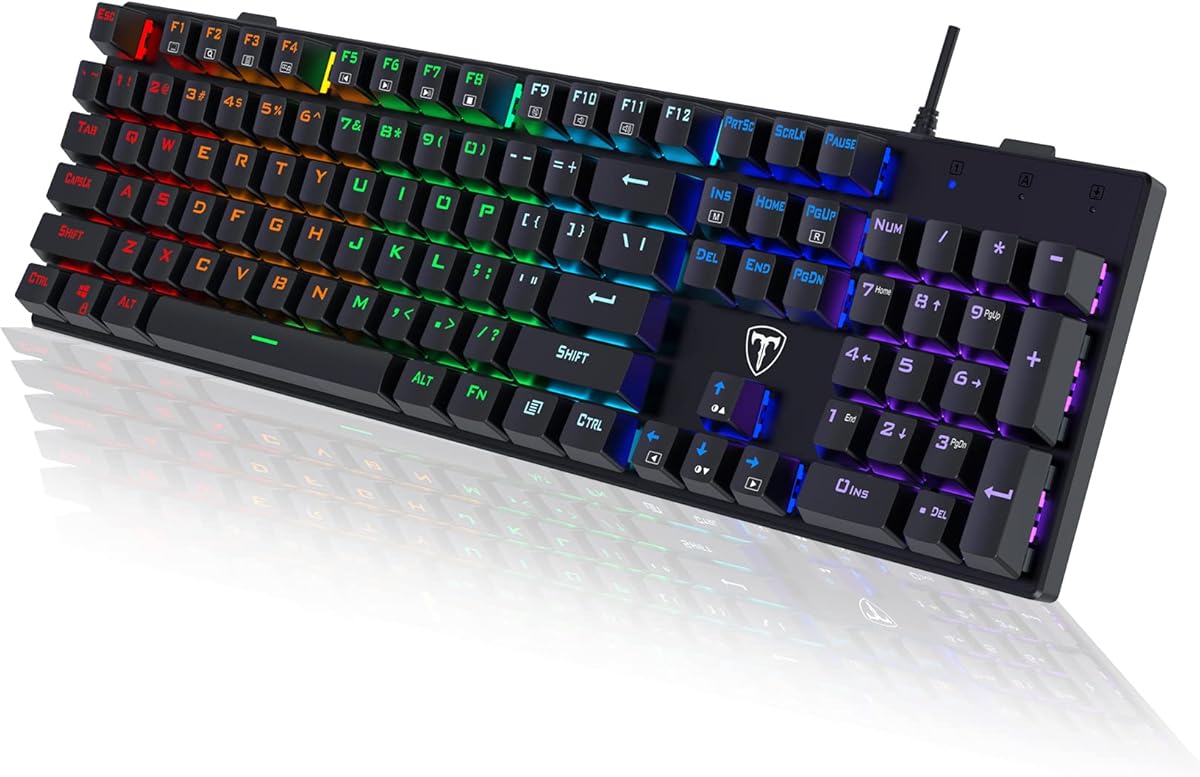
Redragon K521 Rainbow LED Keyboard

The Redragon K521 is the value gaming option, delivering a full-size board with rainbow lighting, one-touch backlight control and 19-key anti-ghosting for a fraction of the budget. It is a mechanical-feel membrane rather than a true switch board, so purists will look elsewhere, but the tactile keys, dozen multimedia shortcuts and low price make it a fun, capable deck for casual gamers who want colour without spending much of their hundred dollars.

Layout
Full-size (104 keys)
Switches
Mechanical-feel
Connection
Wired USB
Backlight
Rainbow LED

What we liked

  • Very affordable full-size board
  • Rainbow LED with brightness control
  • 19-key anti-ghosting for combos
  • 12 multimedia shortcut keys

Worth noting

  • Mechanical feel, not real switches
  • Lighting zones are not fully custom
6Best Quiet Typing

TECKNET Wired Gaming Keyboard

The TECKNET wired board is the pick for quiet, solid typing without spending near the top of the budget. Whisper-quiet switches keep keystrokes discreet, the all-metal panel feels reassuringly rigid, and the integrated wrist rest even has drainage holes for spills. Fifteen-zone RGB and 25-key anti-ghosting let it double as a casual gaming deck, though Mac users lose the media shortcuts. For shared offices it is a genuinely considerate choice.

Layout
Full-size ergonomic
Switches
Whisper-quiet volcano
Connection
Wired USB
Build
All-metal panel

What we liked

  • Near-silent whisper-quiet switches
  • Sturdy all-metal top panel
  • Integrated wrist rest with drainage
  • 15-zone RGB and 25-key anti-ghosting

Worth noting

  • Media keys not Mac compatible
  • Large footprint with wrist rest
7Best Hot-Swappable

Redragon K671 Mechanical Keyboard

The Redragon K671 is the affordable entry into mechanical customisation, with hot-swappable red linear switches you can replace without soldering and durable double-shot PBT keycaps that resist shine. Macro editing lets you remap keys, and the box even bundles spare switches and keycaps to start tinkering. The RGB colour is fixed rather than adjustable, but as a first hot-swap board you can grow into, it offers a lot of room to experiment cheaply.

Switches
Hot-swap red linear
Keycaps
Double-shot PBT
Connection
Wired USB
Backlight
11 RGB modes

What we liked

  • True hot-swappable red switches
  • Durable double-shot PBT keycaps
  • Macro editing via software
  • Spare switches and keycaps included

Worth noting

  • Backlight colour is fixed
  • Wired only, no wireless
8Best Wireless Value

AULA S99 Tri-Mode Wireless Keyboard

The AULA S99 is the versatile wireless value pick, switching between Bluetooth, 2.4GHz and USB-C to follow you across phone, tablet and PC. Its 96% layout keeps a full number pad while trimming wasted space, and the rotary knob makes volume and lighting tweaks effortless. It is a creamy membrane rather than a mechanical board, and hot-swapping is off the table, but as a colourful do-everything deck it delivers plenty for the money.

Layout
96% with number pad
Connection
BT/2.4GHz/USB-C
Switches
Creamy membrane
Extras
RGB media knob

What we liked

  • Three connection modes for flexibility
  • 96% layout keeps the number pad
  • Handy dual-mode volume knob
  • Full-key macro programming

Worth noting

  • Membrane board, no hot-swap
  • Bold colour finish not for all
9Best for Cute Setups

AULA 99-Key Wireless Keyboard (Pink)

The pink AULA 99-key board is the style-led choice, wrapping tri-mode wireless, 16.8 million RGB colours and a control knob in a cute, creamy package. The 99-key layout keeps a number pad for everyday work, and the foldable kickstand lets you dial in a comfortable angle. It is a membrane board without switch swapping, so treat it as an aesthetic-first everyday deck rather than an enthusiast piece, and it delivers a charming setup for very little of the budget.

Layout
99-key with number pad
Connection
BT/2.4GHz/USB-C
Switches
Creamy membrane
Extras
RGB control knob

What we liked

  • Tri-mode wireless connectivity
  • 16.8 million RGB colours
  • Control knob for quick adjustments
  • Foldable two-stage kickstand

Worth noting

  • Membrane keys, not mechanical
  • No switch swapping possible

How We Chose the Best Keyboards Under $100

Best Keyboards Under $100 in 2026

The hundred-dollar bracket is where keyboards get genuinely interesting, and also where choice becomes overwhelming. This is the price at which enthusiast features like gasket mounting, pre-lubed switches and PBT keycaps start appearing, yet the shelf is still crowded with plain office boards and gaming decks that look similar on paper. Our approach was to separate the field by intent: dedicated enthusiasts who want a premium typing feel, gamers who prioritise reliability and speed, multi-device users who need wireless flexibility, and practical buyers who simply want something that works.

From there we weighed the elements that define daily use at this level. Typing feel and sound came first, because a gasket-mounted, well-dampened board like the Womier SK80 is a fundamentally different experience from a hollow budget slab. Switch and keycap quality followed, separating hot-swappable mechanical boards with PBT caps from softer membrane models. We then considered layout, connectivity and battery life for the wireless picks, along with build materials and the reassurance of a known brand. Finally, we kept the list deliberately broad, from a display-equipped custom board to a plain office keyboard, so there is a sensible answer whatever you value most.

Understanding Mounts, Switches and Keycaps

Three details separate a merely good keyboard from a great one at this price, and knowing them makes the choice far clearer. The first is the mounting style. Cheaper boards screw the switch plate rigidly into the case, which produces a firm, sometimes hollow feel. Gasket-mounted boards like the Womier SK80 and AULA F75 Pro suspend that plate on soft gaskets, cushioning each press and deepening the sound into the satisfying thock enthusiasts chase. Layers of silicone and foam inside further quiet the empty-case rattle that plagues budget boards.

The second detail is the switch, and here hot-swappability matters most. A hot-swap PCB lets you pull and replace switches by hand, so you can retune the feel of the Womier SK80, AULA F75 Pro or Redragon K671 without soldering. Pre-lubed switches, as on the first two, arrive smoother out of the box. The third detail is keycap material. Cheap boards use ABS caps that quickly go shiny; better ones use double-shot PBT, as on the Redragon K671, which keeps its texture and legends for years. Understanding these three factors explains exactly why some hundred-dollar boards feel worth every cent while others feel like overpriced plastic.

Matching the Keyboard to Your Needs

For the Best Typing Feel

If you spend your day typing and want each keystroke to feel and sound wonderful, the Womier SK80 is the pick, combining a gasket mount, pre-lubed switches and Cherry-profile keycaps with a fun multimedia display. The AULA F75 Pro delivers a similarly creamy, thocky experience with the added bonus of wireless freedom. Both feel dramatically better than the plain boards most people are used to, and both let you fine-tune the feel by swapping switches later.

For Reliable Gaming

Gamers who value durability and low fuss will be well served by the SteelSeries Apex 3, a recognised brand with quiet switches, spill resistance and a comfortable wrist rest. For those who want gaming flair on a tighter portion of the budget, the Redragon K521 offers full-size anti-ghosting and rainbow lighting cheaply. Neither is a custom enthusiast board, but both handle everyday and mid-level play without drama.

For Multi-Device Wireless Use

If your keyboard needs to roam between a work laptop, a gaming PC and a phone, the AULA F75 Pro leads, pairing to as many as five devices over Bluetooth, 2.4GHz or USB-C with a big 4000mAh battery. The AULA S99 is the more affordable wireless option, keeping a number pad and adding a control knob. Both make a single keyboard usable across an entire desk of devices.

For Simple, Dependable Office Work

Not everyone wants to tinker, and the Amazon Basics wired board is the honest choice for buyers who just need a keyboard that works. It keeps a full number pad and media keys, needs no software, and costs a fraction of the budget. The quiet TECKNET is a step up for shared offices, adding near-silent switches and a sturdier metal build while remaining sensibly priced.

Specifications That Matter Most

Two specifications shape the experience of a keyboard in this bracket more than any others: the mounting and switch system, and connectivity. If typing feel is your priority, look for a gasket-mounted board with dampening layers and hot-swappable, pre-lubed switches, as found on the Womier SK80 and AULA F75 Pro; this combination is what makes a hundred-dollar board feel premium rather than merely functional. If you value long-term flexibility, prioritise a hot-swap PCB so you can change switches as your tastes evolve, and favour double-shot PBT keycaps like those on the Redragon K671 that resist shine and wear.

Connectivity and layout deserve equal weight. Decide whether you need wireless freedom or prefer the zero-latency simplicity of a wired board; the AULA F75 Pro and S99 cover the former, while the Womier SK80 and most gaming picks are wired. Battery capacity matters for wireless choices, and the F75 Pro's 4000mAh cell is a genuine advantage. For layout, weigh desk space against features: a 75% board frees room but drops the number pad, while full-size and 96 to 99% decks keep it. Finally, build materials and extras like a multi-function knob or, in the SK80's case, a small display, add real quality-of-life value that separates the standouts from the merely adequate.

A Closer Look at the Top Picks

The Womier SK80 earns the top spot because it delivers a genuinely enthusiast experience at a mainstream price. Its gasket mount and EVA plate give it a soft, cushioned keystroke, the pre-lubed hot-swap switches sound clean and creamy straight out of the box, and the colour multimedia screen is a delightful touch that no rival here matches. Cherry-profile keycaps and Type-C connectivity make it a board you can happily use, admire and upgrade for years, and it is the one we would recommend to most buyers chasing a premium feel.

Behind it, the SteelSeries Apex 3 is the dependable gaming choice and the AULA F75 Pro is the wireless enthusiast's dream, offering the SK80's feel with the freedom to roam. The Amazon Basics and TECKNET boards anchor the practical end for office buyers, the Redragon K521 covers budget gaming, and the Redragon K671 is the affordable route into hot-swap tinkering. The AULA S99 and pink 99-key board round things out for flexible and style-led wireless setups, ensuring the list has a clear answer whatever kind of keyboard you are after.

Tips for Getting the Most From Your Keyboard

A little effort transforms a good board into a great one. On hot-swappable models like the Womier SK80, AULA F75 Pro and Redragon K671, try a few different switches to find the weight and sound you prefer, and add a set of aftermarket keycaps if you want to personalise the look further. Keep the board clean by brushing out dust and crumbs regularly, since debris is the quickest way to make even a premium keyboard feel scratchy, and consider a keycap puller for deeper cleaning between the switches.

Make the most of the software and extras. Boards with programmable macros and knobs, such as the AULA models and the Redragon K671, let you assign shortcuts and control media without reaching for the mouse, which pays off in both games and daily work. If you chose a wireless board, dropping the RGB brightness or turning the backlight off will stretch battery life significantly, and the F75 Pro's large cell already lasts for days. Finally, buy from listings with clear return protection so you can send a unit back if it arrives faulty. With these habits, a sub-100-dollar keyboard can deliver years of satisfying use.

Final Recommendation

For most buyers, the Womier SK80 is the best keyboard under 100 dollars in 2026, combining a gasket mount, pre-lubed hot-swap switches, PBT keycaps and a charming multimedia display into a board that punches well above its price. Gamers who want a trusted, low-fuss deck should choose the SteelSeries Apex 3, while anyone needing wireless freedom will love the tri-mode AULA F75 Pro and its long battery life. Practical office buyers can save money with the Amazon Basics or quieter TECKNET, and tinkerers on a tighter portion of the budget should start with the hot-swappable Redragon K671. Whichever you pick, match its feel, layout and connectivity to how you actually work, and this budget delivers a keyboard you will genuinely enjoy using.

How we picked

We assessed each keyboard on typing feel and sound, switch and keycap quality, layout, connectivity, build materials and the value it delivers below a 100-dollar budget. Because this bracket spans plain office boards to enthusiast-grade custom decks, we weighed real-world feel over spec-sheet bullet points and deliberately mixed gasket-mounted mechanicals, wireless models and budget staples so the list reflects the full range of ways to spend well here.

Frequently asked questions

Is a 100 dollar keyboard worth it over a cheap one?

For most people, yes. Around 100 dollars you can get gasket-mounted boards like the Womier SK80 with pre-lubed hot-swap switches and PBT keycaps, delivering a typing feel and sound that budget boards simply cannot match. That said, if you only need something reliable for office work, the Amazon Basics board proves you do not have to spend the full budget to get the job done.

What makes a gasket-mounted keyboard better?

A gasket mount suspends the switch plate between soft gaskets instead of screwing it rigidly to the case, giving a softer, more cushioned keystroke and a deeper, quieter sound. The Womier SK80 and AULA F75 Pro both use this design, which is why they feel more premium and less hollow than the plain plastic boards common at lower prices.

Should I choose a wired or wireless keyboard under 100?

Wired boards like the Womier SK80 give zero latency and never need charging, which suits desktop gaming. Wireless picks such as the AULA F75 Pro and S99 add tri-mode connectivity so one keyboard works across your phone, tablet and PC, with the F75 Pro pairing to as many as five devices. Choose wireless if you switch devices often, wired if the board stays at one desk.

What does hot-swappable mean and do I need it?

Hot-swappable means you can pull out and replace the switches by hand, with no soldering, so you can change how the keyboard feels and sounds whenever you like. Boards like the Womier SK80, AULA F75 Pro and Redragon K671 all support it. You do not strictly need it, but it future-proofs your board and makes experimenting with different switches easy and cheap.

What keyboard layout should I buy at this price?

It depends on your workflow. A 75% layout like the Womier SK80 or AULA F75 Pro saves desk space while keeping arrows and function keys, ideal for gaming and compact setups. If you rely on a number pad for data or accounting, a full-size board like the Amazon Basics or a 96 to 99% deck like the AULA S99 keeps it while still trimming some width.