Skip to content

Best Keyboard for Fortnite in 2026

4.6 average · hands-on tested
By Dylan AidenUpdated June 27, 20267 picks tested

We may earn a commission from links on this page, at no extra cost to you. Learn more.

Fortnite rewards speed: fast builds, faster edits, and consistent keypresses under pressure. The best Fortnite keyboards combine quick, reliable switches, solid key rollover and a compact layout that frees up room for big mouse movements. After testing each in Zero Build and competitive lobbies, these are the seven best keyboards for Fortnite in 2026.

Quick comparison

KeyboardBest forRatingPrice
1SteelSeries Apex Pro TKL Gen 3SteelSeriesBest Overall4.7$$$Check Price
2Razer Huntsman V2 TKLRazerBest Optical Speed4.7$$$Check Price
3Corsair K70 PRO TKLCorsairBest Magnetic Value4.5$$$Check Price
4Razer Huntsman MiniRazerBest 60% for Aim4.5$$$Check Price
5Logitech G915 TKL LightspeedLogitechBest Wireless4.6$$$Check Price
6Corsair K70 PRO Mini WirelessCorsairBest Wireless 60%4.5$$$Check Price
7Corsair K70 RGB PROCorsairBest Full-Size4.6$$$Check Price

Our top 7 picks, reviewed

1Best Overall

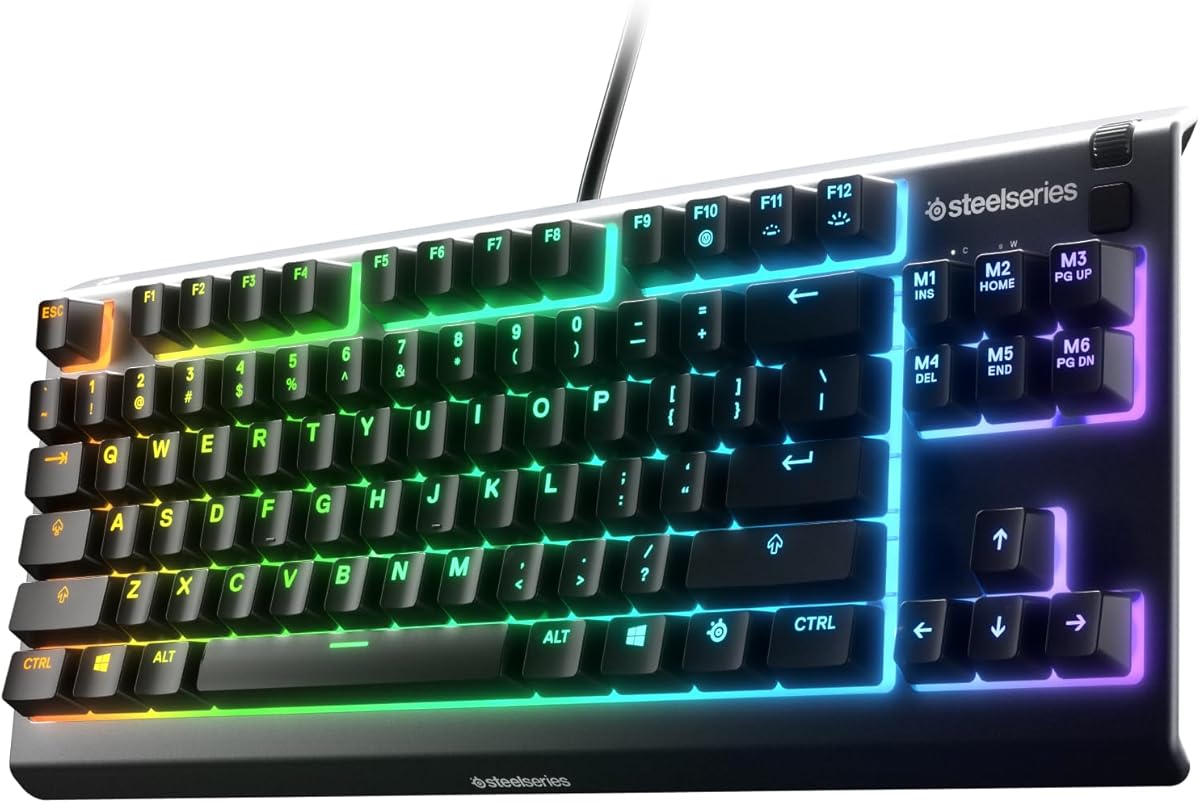
SteelSeries Apex Pro TKL Gen 3

The Apex Pro TKL Gen 3 is the Fortnite keyboard to beat. You can set edit and build keys to actuate as shallow as 0.1mm and use rapid trigger so keys reset the instant you lift — a real advantage when you're editing at speed. Rapid Tap helps with movement too. The most genuinely competitive board here.

Layout
TKL (87-key)
Switches
OmniPoint 3.0 magnetic
Actuation
0.1–4.0mm
Extras
Rapid trigger, SOCD

What we liked

  • Adjustable actuation for instant edits
  • Rapid trigger speeds rebinds
  • Rapid Tap / SOCD support
  • Doubleshot PBT keycaps

Worth noting

  • Heavy software
  • Premium price
2Best Optical Speed

Razer Huntsman V2 TKL

If you want raw speed without the price of a Hall-effect board, the Huntsman V2 TKL is superb. Its linear optical switches register near-instantly and 8,000Hz polling keeps latency minimal, so builds and edits feel crisp and immediate. Often under $150, it's a fast, value-friendly competitive pick.

Layout
TKL (87-key)
Switches
Gen-2 linear optical
Polling
8,000Hz
Extras
Sound dampeners

What we liked

  • Near-instant optical actuation
  • 8,000Hz polling for low latency
  • Consistent, fast key presses
  • PBT keycaps and wrist rest

Worth noting

  • No adjustable actuation
  • Synapse needed for full control
3Best Magnetic Value

Corsair K70 PRO TKL

A strong, slightly cheaper alternative to the Apex Pro. The K70 PRO TKL's MGX magnetic switches bring adjustable actuation and rapid trigger to Corsair's ecosystem, plus SOCD for cleaner movement. If you want Hall-effect performance for Fortnite at a friendlier price, this is it.

Layout
TKL (87-key)
Switches
MGX magnetic
Features
Rapid trigger, SOCD
Keycaps
Doubleshot

What we liked

  • Adjustable magnetic switches
  • Rapid trigger + SOCD
  • Pre-lubed, smooth feel
  • Solid gaming build

Worth noting

  • iCUE needed for tuning
  • Competes with the Apex Pro
4Best 60% for Aim

Razer Huntsman Mini

Low-sensitivity Fortnite players who swing the mouse wide will love a 60%, and the Huntsman Mini is the best of them. Its optical switches are fast and consistent, and ditching the number pad and arrow cluster frees up huge room for aiming and flicks.

Layout
60% (61-key)
Switches
Linear optical
Frame
Aluminum top
Keycaps
PBT doubleshot

What we liked

  • Maximum desk space for aiming
  • Fast linear optical switches
  • Sturdy aluminum top
  • Durable PBT keycaps

Worth noting

  • Wired only
  • Function layer for some keys
5Best Wireless

Logitech G915 TKL Lightspeed

Want a tidy, cable-free setup without losing competitive edge? The G915 TKL's Lightspeed wireless is effectively lag-free, and the low-profile switches feel fast for building and editing. A premium, clutter-free choice for serious Fortnite players.

Layout
TKL (87-key)
Connection
Lightspeed / BT
Profile
Low-profile mechanical
Battery
Up to 40h

What we liked

  • Lag-free Lightspeed wireless
  • Fast low-profile switches
  • Clean, cable-free desk
  • Premium aluminum build

Worth noting

  • Not hot-swappable
  • Premium price
6Best Wireless 60%

Corsair K70 PRO Mini Wireless

The best of both worlds for Fortnite: a tiny 60% footprint and genuinely competitive wireless. Corsair's sub-1ms Slipstream and 8,000Hz polling mean no latency penalty, the hot-swap switches let you tune feel, and the small size maximizes mouse room.

Layout
60% (61-key)
Connection
Slipstream / BT / USB
Switches
Hot-swap Cherry MX
Polling
8,000Hz

What we liked

  • Sub-1ms Slipstream wireless
  • Compact 60% for aiming
  • 8,000Hz polling
  • Hot-swappable switches

Worth noting

  • Pricey for a 60%
  • iCUE software is heavy
7Best Full-Size

Corsair K70 RGB PRO

Prefer a full-size board with a number pad? The K70 RGB PRO is fast and durable, with smooth Cherry MX Red switches, 8,000Hz polling and a tournament switch to lock out distractions mid-match. A dependable, no-nonsense Fortnite workhorse.

Layout
Full-size
Switches
Cherry MX Red
Polling
8,000Hz
Keycaps
PBT doubleshot

What we liked

  • Fast Cherry MX Red switches
  • 8,000Hz hyper-polling
  • Rugged frame and wrist rest
  • Tournament switch

Worth noting

  • Takes more desk space
  • iCUE is heavy

How to choose a keyboard for Fortnite

Fortnite is about speed and consistency — building, editing and repositioning faster than your opponent. Here's what helps.

Switch speed and type. Fast actuation matters most. Optical switches (Razer Huntsman) register near-instantly and are very consistent. Magnetic Hall-effect switches (Apex Pro, K70 PRO TKL) go further, letting you adjust how shallow each key actuates and add rapid trigger, which resets a key the moment you lift — a real edge for fast edits. Standard mechanical Cherry MX Reds are still fast and reliable if you don't need analog features.

Rapid trigger and SOCD. If you take Fortnite seriously, an adjustable Hall-effect board with rapid trigger sharpens editing and rebinds, and SOCD/Rapid Tap can clean up movement. These features are the main reason to spend up.

Layout for mouse room. Lower-sensitivity players swing the mouse a lot, so a smaller board helps. TKL drops the number pad while keeping arrows and a function row; 60% goes smaller still for maximum aiming space. Pick the size that matches your sensitivity and how many keys you bind.

Rollover and polling. Look for full n-key rollover so every simultaneous press registers during frantic building, and high polling (8,000Hz on several picks) for the lowest input latency.

Wired vs wireless. Modern 2.4GHz wireless (Lightspeed, Slipstream) is effectively lag-free, so a clean, cable-free desk no longer means a competitive penalty — just keep it charged. Avoid Bluetooth for competitive play.

Decide whether you want analog Hall-effect features and how compact a board you can adapt to, then let our ranked picks above point you to the right one.

Why Fortnite specifically rewards a compact keyboard layout

Most competitive games benefit from a smaller keyboard layout, but Fortnite has a specific reason: building.

Fortnite's building mechanic binds wall, floor, ramp, and roof placement to keys that most players set to Q, F, C, V, or custom keys near WASD. The faster you switch between building pieces and weapons, the higher your skill ceiling. Players who use a full-size keyboard find their right hand further from these keys during intense build fights because the board's overall width pushes WASD further left than necessary.

A TKL or 75% board repositions WASD closer to the center of the desk, reducing the reach between building keys and the WASD cluster. This sounds like a small detail — and for casual play it is — but for players building extensively in high-pressure situations, the reduced key reach translates to fewer misclicks and faster build inputs.

60% boards go further and free up the most desk space for mouse movement, which matters for players who play on lower sensitivity and need wide mouse swings to aim while building.

Rapid trigger in Fortnite: does it actually help?

Rapid trigger is a Hall-effect switch feature that resets the key the instant you lift — rather than requiring the stem to travel back above the actuation point. In counter-strafing games like CS2 and Valorant, this provides a measurable advantage by allowing faster directional changes.

In Fortnite, the benefit is more context-dependent. Fortnite's movement system uses momentum-based physics that differs from the precise counter-strafing of tactical shooters. The directional snapping that rapid trigger enables in CS2 works differently in Fortnite's engine.

Where rapid trigger does help in Fortnite: building inputs. If you're pressing and releasing building keys in fast sequences during intense build fights, rapid trigger ensures each press registers precisely without key rollover issues. This is most relevant at high build speeds where multiple key events happen within milliseconds.

For casual Fortnite players or those focused on Zero Build, rapid trigger is a nice-to-have rather than essential. For competitive builders pushing speed limits, it's a genuine advantage worth the premium.

Key binds and keyboard customisation for Fortnite

Fortnite's control scheme is highly customisable, and the right keyboard makes the most of that flexibility.

QMK/VIA programmability lets you create dedicated Fortnite profiles with macro keys for common build sequences. Some players bind a single key to a wall-and-ramp combination used constantly in combat. This isn't officially supported in tournament play but is viable for ranked and casual matches.

Per-key actuation with Hall-effect switches lets you set the movement keys (WASD) to a light, fast actuation — 0.5mm or less — while keeping building keys at a deeper actuation to avoid accidental presses during intense moments. This level of per-key tuning is exclusive to Hall-effect keyboards like the SteelSeries Apex Pro.

Switch weight matters more in Fortnite than most games. Building puts keyboard keys through rapid, repeated presses in short bursts — pressing a key 10–15 times in under two seconds during a build fight is normal. Lighter switches (35–45g) let your fingers maintain that speed without tiring. Heavier switches increase the effort per press, which compounds during extended play sessions.

The keyboard is not the limiting factor for most Fortnite players below Champion League. Consistent practice and game sense drive performance far more than hardware. But the right keyboard removes friction, and in Fortnite, friction in key response during building genuinely costs fights.

Why the keyboard matters so much in Fortnite

Fortnite is unusually demanding on a keyboard because building and editing happen at high speed alongside aiming and movement. Every wall, ramp, floor and edit is a keypress, often several per second during a build fight, so the keyboard's responsiveness and key feel directly affect how fast and cleanly you can build. A laggy or mushy board costs you fights that a crisp, fast one would win. That is why competitive Fortnite players care about their keyboard as much as their mouse, and why the picks here prioritise speed, responsiveness and reliable simultaneous key presses.

Switches for fast building

Switch choice shapes how quickly and comfortably you can build and edit. Linear switches are the popular choice for Fortnite because they are smooth and fast, with no tactile bump to slow rapid repeated presses during builds. Lighter linear switches let you fire off building inputs with minimal effort, which helps during frantic exchanges. Some players prefer a slightly heavier switch to avoid accidental presses. There is no single right answer, but a smooth, light linear switch is the most common pick for high-speed building, so consider one if you build aggressively.

Magnetic switches and rapid trigger

The newest competitive keyboards use magnetic (Hall effect) switches that bring real advantages to Fortnite. Adjustable actuation lets you set how far a key travels before it registers, and rapid trigger resets the key the instant you lift, allowing faster repeated inputs that suit Fortnite's rapid building and editing. These features can genuinely speed up your builds and edits compared with traditional switches. If you play competitively and want every edge, a magnetic-switch board is worth considering, though a fast traditional mechanical board still serves the vast majority of players very well.

Anti-ghosting and key rollover

Fortnite often requires pressing several keys at once — moving, jumping, building and switching pieces simultaneously — so anti-ghosting and N-key rollover matter. These features ensure every key you press registers even when you hit many at the same time, which is essential during complex build sequences. All the keyboards here handle simultaneous presses reliably, so you never lose an input mid-build. When choosing any gaming keyboard for Fortnite, confirm it offers full anti-ghosting and rollover, since a board that drops inputs during busy moments will cost you fights no matter how fast its switches are.

Layout and size for building binds

Layout affects how comfortably you can reach your building and editing binds. Many Fortnite players use a TKL or smaller board to bring the mouse closer for low-sensitivity aiming and to keep building keys within easy reach. The keys you bind for wall, ramp, floor, roof and edit should fall naturally under your fingers, so consider how your binds map to the layout. A compact board frees mouse space and can make your build binds more accessible, which is why so many competitive players favour TKL and smaller layouts for Fortnite.

Comfort for long sessions

Fortnite sessions and ranked grinds run long, and the constant building makes hand comfort a genuine performance factor. A board with a comfortable typing angle and, if you like, a wrist rest keeps your hands relaxed so your building stays sharp late into a session. Fatigue leads to slower, sloppier builds when matches are on the line. Choose a board that feels comfortable for extended play, since staying fresh through long sessions directly affects how well you build and edit when it matters most.

Wired or wireless for Fortnite

Modern wireless gaming keyboards with a 2.4GHz dongle deliver latency low enough for competitive Fortnite, and going wireless tidies your desk. Wired boards remain a great value and remove any doubt about latency or battery. Either works well for Fortnite, so choose based on whether a tidy, cable-free desk is worth the premium to you. If you go wireless, use the 2.4GHz dongle rather than Bluetooth for the lowest latency and keep the board charged so it never dies mid-session. Both options can deliver the responsiveness Fortnite demands.

Setting up your binds

Getting the most from your keyboard in Fortnite is largely about your binds. Map your building pieces and edit to keys you can reach quickly without moving your hand off the movement keys, and experiment until the layout feels natural. Many players bind building to keys around WASD or to the mouse for speed. Use the keyboard software to set up any macros allowed by the game and to create a Fortnite profile. Practise your binds until they become muscle memory, since fast, accurate building comes from a comfortable layout you have drilled.

Getting the most from your Fortnite keyboard

Beyond binds, a few steps maximise performance. Keep the firmware updated for the latest features and stability, tune actuation and rapid trigger if your board supports magnetic switches, and disable distracting lighting effects during matches. Pair the board with a comfortable wrist rest for long sessions and keep it clean so every key stays crisp. With fast switches, reliable rollover, well-placed binds and a comfortable setup, a good Fortnite keyboard lets you build, edit and aim at your full potential when the game is on the line.

Practice turns hardware into wins

A great keyboard gives you the speed and reliability to build fast, but it is practice that turns that potential into wins. Once you have a responsive board with comfortable, well-placed binds, drill your building and editing until the inputs become automatic. The best players combine fast hardware with thousands of reps, so the keyboard never gets in the way of their hands. Treat your keyboard as the tool that removes limits on your speed, then put in the practice to take full advantage of it, and you will see your build fights improve.

Choosing the right Fortnite keyboard for you

In the end, the best Fortnite keyboard balances fast, comfortable switches, reliable simultaneous key presses, a layout that keeps your binds within reach, and a build that stays comfortable through long sessions. Competitive players may want magnetic switches with rapid trigger for the fastest possible building, while most players are superbly served by a quality fast mechanical board. Decide how competitively you play and how much you value the newest features, then pick the board that fits, and it will let your building and aim perform at their best.

How we picked

We played hours of Fortnite on each keyboard, focusing on build and edit speed, switch responsiveness and consistency, key rollover during rapid inputs, and how much desk space the layout freed up for aiming. We weighted features that genuinely help in-game — rapid trigger, fast actuation and a compact footprint — over RGB and marketing claims.

Frequently asked questions

What keyboard do Fortnite pros use?

Many competitive Fortnite players favor TKL or 60% boards (for more mouse room) with fast, consistent switches. Hall-effect boards with rapid trigger, like the SteelSeries Apex Pro TKL, have become especially popular because adjustable actuation and instant key resets help with fast editing.

Are Hall-effect keyboards worth it for Fortnite?

For competitive players, yes. Adjustable actuation lets you set edit and build keys to register on the lightest touch, and rapid trigger resets a key the instant you lift — both help you edit and reposition faster. For casual play, a fast optical or mechanical board is plenty.

Should I use a TKL or 60% keyboard for Fortnite?

Both are popular because removing the number pad frees up desk space for wider, lower-sensitivity mouse movement. A TKL keeps arrows and a function row; a 60% is even smaller but moves some keys to a function layer. Choose based on how much room you want versus how many dedicated keys you need.

Is a wireless keyboard okay for competitive Fortnite?

Yes. Modern low-latency wireless like Logitech Lightspeed (G915 TKL) or Corsair Slipstream (K70 PRO Mini) is effectively as fast as wired. Just keep it charged. Bluetooth, by contrast, isn't ideal for competitive play.