Best Overall Productivity Combo
Logitech MX Keys S Combo

- Laptop-like MX Keys S typing with adaptive backlighting
- MX Master 3S MagSpeed scroll and precise tracking
- Multi-device Bluetooth or Logi Bolt for Windows, Mac, Linux
Expert Review & Guide
Buying a keyboard and mouse combo in 2026 is less about grabbing the brightest rainbow box and more about matching how you actually sit at a desk. Some kits chase MagSpeed productivity scrolling and multi-device Bluetooth. Others prioritize sixty-five-gram wireless mice, tri-mode receivers, and RGB that syncs across both peripherals. A few quietly focus on wave keywells and wrist rests for people whose hands hurt before their aim does. The wrong bundle wastes a USB port, fights your OS, or forces you to replace the mouse six months later.
This ReviewConsensus guide ranks ten keyboard-and-mouse combos from our best-keyboard-and-mouse-combo pack. We weigh connection modes, typing comfort, mouse weight and sensor ambition, layout size, software support, and honest tradeoffs. Ratings reflect Amazon averages at research time. We omit dollar prices because promotions swing constantly—use the comparison table for specs and the reviews for who each kit truly serves.
If you want a shortcut, start with three top picks: the Logitech MX Keys S Combo for refined multi-device work, the Redragon S101M-KS for flexible tri-mode gaming value, and the MSI Forge GK110 for a dependable wired RGB set. Everyone else can scan compact Redragon kits, ergonomic wave combos, rechargeable RedThunder options, and bright white wired starters.


As an Amazon Associate we earn from qualifying purchases. We may earn a commission at no additional cost to you.
Use this table to separate premium productivity pairs, tri-mode RGB gaming kits, ergonomic wave sets, compact TKL wireless bundles, and simple wired starters. Specs highlight connectivity, mouse capability, and the trait that defines each combo—no prices, because live deals change weekly.
The Logitech MX Keys S Combo is the productivity-first answer when you want a keyboard and mouse that feel designed as a pair rather than thrown in a box together. You get the MX Keys S wireless keyboard with its laptop-like profile and spherically dished keys, plus the MX Master 3S mouse with MagSpeed electromagnetic scrolling and an 8K DPI sensor that Logitech says can track even on glass. Graphite finish, a matching palm rest, USB-C charging on both sides of the kit, and Logi Options+ software turn the bundle into a serious desk system for writers, analysts, developers, and anyone who lives in documents all day.
Typing on the MX Keys S is the reason many people upgrade from membrane gaming combos. The low-profile keys are shaped for fingertips, travel feels fluid and quieter than clicky mechanical boards, and the stable chassis sits at an angle that rewards long sessions. Smarter illumination lights keys as your hands approach and adapts to ambient light, with more customization available in Logi Options+. That matters in dim offices and late-night apartments where full RGB rainbow effects feel like overkill and a soft white wash is enough.
The MX Master 3S is still one of the most capable office mice you can buy. MagSpeed scrolling claims up to a thousand lines per second when you want to fly through long pages, then switches to precise ratchet control for line-by-line work. The sculpted right-hand shape supports better wrist posture than flat travel mice, and the side buttons plus gesture button become muscle memory once you map them in Options+. If you edit spreadsheets, codebases, or design files, that scroll wheel alone can justify choosing this combo over lighter gaming kits.
Multi-device and multi-OS support is where Logitech separates itself from most value gaming bundles in this pack. Pair up to three devices over Bluetooth Low Energy or the included Logi Bolt USB receiver, then hop among Windows, macOS, Linux, and Chrome OS machines without re-pairing every morning. Creative professionals who keep a work laptop and a home desktop on the same desk will appreciate Easy-Switch behavior far more than a single 2.4 GHz gaming dongle locked to one PC.
Software depth is another differentiator. Logi Options+ can create Smart Actions that chain multiple steps into one keystroke, remap buttons, and fine-tune illumination. You do not need the app for basic typing and clicking, but power users get real time savings. Both pieces also include certified post-consumer recycled plastic content according to Logitech’s materials notes, which will not change click feel but may matter for sustainability-minded buyers comparing similarly priced premium kits.
Honest tradeoffs still exist. This is not a hot-swap mechanical gaming board with N-key rollover theater, and the Master 3S is a right-hand productivity sculpture rather than a sixty-gram FPS glider. Competitive gamers chasing ultralight shells and ten-thousand DPI marketing should look at Redragon’s S107KS or S156 instead. Budget shoppers may also prefer a rechargeable RGB kit if desk aesthetics matter more than MagSpeed precision.
Within this roundup, the MX Keys S Combo earns Best Overall because the keyboard and mouse are individually excellent and genuinely complementary. Choose it for professional desks, hybrid Mac/Windows households, and anyone tired of mismatched peripherals. Skip it only if you need aggressive RGB gaming branding, a left-hand mouse, or the absolute lowest spend for a first gaming PC.
Buy this kit if your primary work is writing, coding, finance, design review, or multi-monitor research. It is especially strong when you switch among a Windows tower, a MacBook, and a Linux machine. Home offices that already standardized on Logitech Bolt receivers will integrate it cleanly.
Check the packaging and mouse battery bay for the Logi Bolt receiver—Logitech notes it is usually inside the mouse or attached in the box. Pair Bluetooth devices through system settings, then use the Easy-Switch channel keys to hop machines. Install Logi Options+ only after basic pairing works so you can attribute any remapping quirks to software rather than radio setup.
Redragon S101M-KS and S107KS win on RGB atmosphere, lighter mice, and aggressive gaming DPI ranges for less money. The MX combo wins on typing refinement, scroll precision, cross-OS polish, and long-session comfort. If your desk is half Excel and half ranked shooters, many people still keep MX for work and a separate light mouse for games.
We may earn a commission at no additional cost to you.
Redragon’s S101M-KS is the wireless gaming keyboard and mouse combo that makes the most sense when you want RGB flair, tri-mode flexibility, and a matched pair without assembling separate peripherals. The keyboard and mouse can run wired over USB-C, over Bluetooth, or through a shared 2.4 GHz receiver that controls both devices at once. That single-dongle trick keeps USB ports free on crowded laptops and small form-factor PCs—exactly the problem messy dual-receiver kits create.
Lighting is a clear part of the pitch. The keyboard offers true RGB with eight backlight patterns plus speed and brightness controls, and the mouse joins the light show so the desk reads as one aesthetic. You can shut lighting off when you need battery endurance; Redragon claims the rechargeable keyboard can stretch toward three hundred hours with RGB disabled. A battery indicator helps you stop guessing whether tonight’s raid will end with a dead backlight rather than a dead character.
The mouse targets accessible gaming rather than ultralight esports extremes. Five DPI steps from eight hundred through forty-eight hundred cover office pointing and most mainstream titles, and Redragon software can refine DPI and polling between one hundred twenty-five and one thousand hertz. Seven mouse buttons are remappable, which is enough for browser forward/back plus a couple of push-to-talk or ability binds without requiring a twelve-button MMO brick.
On the keyboard side, ten independent multimedia keys and twelve combination media shortcuts keep volume and playback handy during games and streams. Splash resistance, a Windows lock key, and a six-foot detachable USB-C cable round out the practical list. The typing feel is gaming-membrane / mechanical-feel rather than hot-swap enthusiast mechanical—fine for most players, less exciting if you already own a gasket custom board and only need a mouse.
Compatibility stays focused on Windows PCs and laptops, with plug-and-play behavior that suits dorm rooms and first gaming builds. Redragon’s thirty-six-month warranty messaging and around-the-clock support claim are stronger than many no-name combo boxes. Download software from Redragon’s site when you want macros and lighting profiles; day-one use does not require the driver if you are happy with stock DPI steps and lighting modes.
Tradeoffs are predictable for the category. Bluetooth latency and feature parity can trail the 2.4 GHz mode for serious play, so competitive sessions should stick to the shared receiver or wired USB-C. The mouse is not as light as Redragon’s own sixty-five-gram S107KS companion in this pack, and typists who want MX Keys quietness will still prefer Logitech. Still, as an all-in-one wireless gaming starter, the S101M-KS punches above generic rainbow kits.
Pick the S101M-KS when you want one shopping decision to replace a tired wired membrane set and a cheap office mouse. Skip it if you need a true ergonomic wave keyboard, a numpad-free compact layout, or premium MagSpeed productivity scrolling.
Ideal for students, first PC builders, and living-room gaming PCs that want wireless freedom without buying peripherals separately. Also smart when USB-A ports are scarce and a shared receiver matters.
Use 2.4 GHz or wired mode for ranked games and fast editors. Reserve Bluetooth for couch browsing or secondary laptops. Store the receiver in the mouse bay when traveling so it does not vanish into a backpack pocket.
Choose S101M-KS for multimedia keys and a familiar full gaming-combo feel. Choose S107KS if you specifically want a lighter sixty-five-gram mouse, higher DPI ceiling, and denser software tuning for competitive aiming.
We may earn a commission at no additional cost to you.
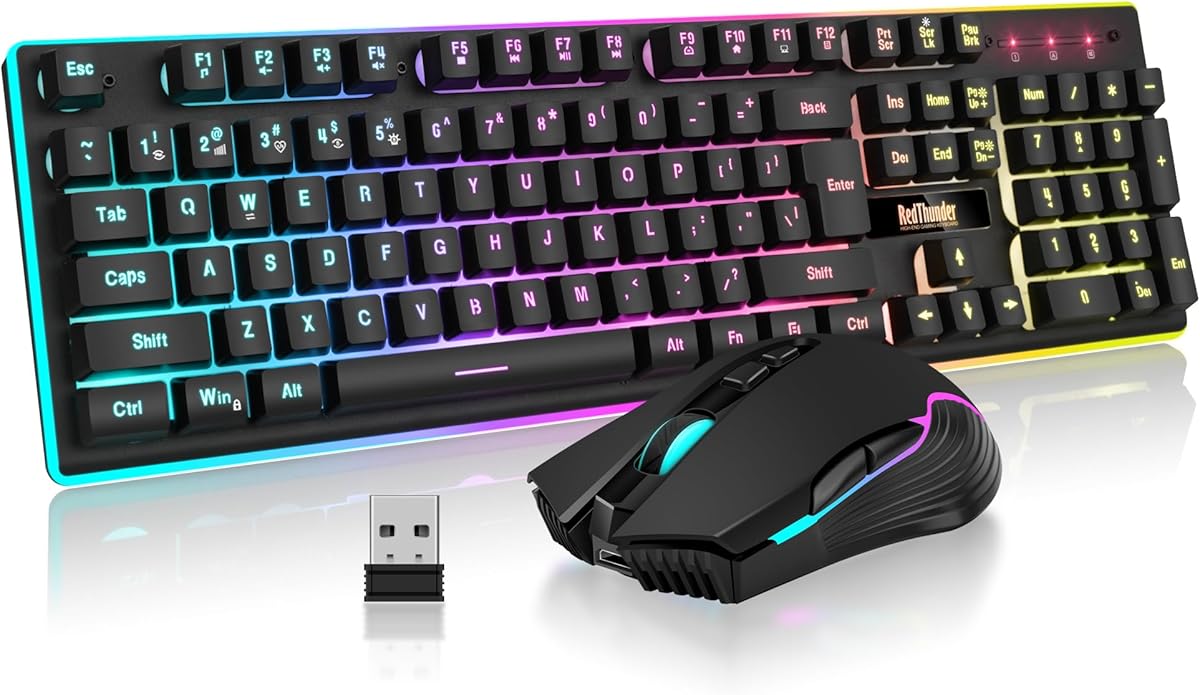
The RedThunder K10 Wireless combo chases a simple brief: rechargeable 2.4 GHz keyboard and mouse with bright rainbow lighting at a budget-friendly tier. The keyboard carries a three-thousand milliamp-hour cell and the mouse an eight-hundred milliamp-hour cell, combining into the marketed thirty-eight-hundred milliamp-hour package. RedThunder says you can expect roughly eight hours of continuous use with lights on, plus auto-sleep after two idle minutes to stretch real-world days further.
Connection is classic single-receiver 2.4 GHz. The USB dongle hides in the bottom of the mouse, and pairing is pre-done for plug-and-play setup. That is friendlier for less technical users than tri-mode Bluetooth menus, but it also means you are tied to a USB-A port and Windows-centric compatibility. Mac support is limited on the keyboard side, so Apple-desk buyers should look at Logitech or the ULSOU wave kit with explicit Fn layout switching instead.
Lighting is the K10’s personality. Three rainbow effect groups, breathing and static modes, and multiple brightness levels push glow through legends, logo, gaps, and edges. The mouse cycles seven colors. Note the quirks RedThunder discloses: surrounding light is missing in one indicator corner, and the mouse scroll wheel LED only lights while charging. If you want synchronized software RGB ecosystems, MSI or Redragon kits with deeper drivers may satisfy you more.
Build claims focus on durability rather than boutique materials. Ten-million-keystroke ratings, two-shot ABS legends that resist fading, and a frosted metal cover aim to keep the board from feeling like disposable plastic. The mouse is a standard right-hand gaming shape with anti-sweat texturing and seven buttons at up to thirty-two hundred DPI—adequate for indie games, older multiplayer titles, and general browsing, less ideal for high-sens tactical shooters.
Mechanical-feel anti-ghosting keys give more travel feedback than chiclet office boards without true mechanical hot-swap sockets. For many first-time buyers that is enough. Enthusiasts who already know switch weights and gasket mounts will outgrow it quickly. Charge both devices about eight hours before first use as instructed; shipping charge levels are often conservative for safety.
The Amazon rating sits lower than most kits in this pack, so expectations should stay honest. Wireless stability is fine for casual play and homework, but interference, sleep wake latency, and finish consistency are the usual budget-combo risks. RedThunder’s reset-pairing guidance helps when the link drops, and support contact is the path if a unit arrives unpaired.
Buy the K10 Wireless when you want a glowing rechargeable set for a Windows gaming PC and do not need Bluetooth multi-device hopping. Skip it for professional typing quality, Mac-primary desks, or competitive aiming. In this list it is the colorful budget wireless option, not the refined daily driver.
Teen gaming bedrooms, secondary PCs, and apartment setups that want RGB without separate purchases. Also workable as a living-room Windows HTPC kit if the receiver stays within solid range.
Dim or disable lighting when grinding long campaigns. A short press wakes sleeping devices, but competitive players should tap a key before a match starts so the first input is not eaten by wake latency.
We may earn a commission at no additional cost to you.
MSI’s Forge GK110 Combo is the clean wired answer for players who want brand-name RGB without managing batteries or Bluetooth menus. The set pairs a quiet, responsive membrane-style gaming keyboard with an optical mouse that climbs to twelve thousand eight hundred DPI—far beyond what most casual titles need, but useful headroom if you like high desktop sensitivity or large mousepads. Predefined RGB effects on both pieces keep the Forge aesthetic coherent on MSI and mixed-brand towers alike.
Everyday usability is stronger than the gaming badge alone suggests. MSI calls out smooth keystrokes suited to productivity and long sessions, which matters for students who write papers on the same machine they play on. A dedicated volume scroll wheel is a small luxury that cheaper boards omit; adjusting Discord, movies, or game audio without Fn gymnastics becomes habitual quickly.
Anti-ghosting across twenty-six keys covers common WASD-plus-modifiers clusters for mainstream games. It is not full N-key rollover mechanical hardware, and you should not expect hot-swap switches. For Fortnite, League, Minecraft, indie platformers, and most AAA single-player titles, the rollover set is enough. Fighting-game purists and complex MMO binders may still prefer true mechanical boards bought separately.
The mouse side emphasizes durable switches rated beyond twenty million clicks and a precise optical sensor. Wired mice still win for zero battery anxiety and consistent latency in tournaments or LAN nights. Cable management is the tax: plan routes so the keyboard and mouse cords do not fight your mousepad edge. If your desk already looks like a wireless shrine, this kit is a deliberate step back toward simplicity.
Compared with RedThunder’s wired K10 bundle, the Forge set leans on MSI branding, higher DPI ceiling, and the volume wheel rather than a bundled wrist rest. Compared with Logitech MX, it is louder in personality, more RGB-forward, and less refined for pure typing. That positioning is honest—MSI is selling a gaming starter kit with better-than-generic optics, not a creator workstation peripheral pair.
Software expectations should stay modest. Predefined lighting effects are the main customization path highlighted in the product story. If you need per-key RGB studios and deep macro trees, Redragon’s software-backed S107KS or a dedicated mechanical board will go further. If you want to plug in and play tonight, Forge GK110 is refreshingly direct.
Choose the MSI Forge GK110 Combo for a reliable wired RGB desk under a trusted PC-brand umbrella. Skip it when wireless clutter reduction or multi-device Bluetooth switching is mandatory. As a no-charge, no-dongle gaming set with a strong rating, it is one of the safest wired picks in this pack.
Great for MSI tower owners who want matching peripherals, dorm desks that punish lost dongles, and anyone rebuilding a PC after cheap no-name combos failed. Also sensible for LAN travel when you refuse to rely on hotel USB charging.
Use adhesive clips or a desk grommet so the mouse cable has a soft bungee-like arc. Keep the volume wheel on the side you naturally reach during calls. If you type extensively, consider a separate palm rest—the Forge kit does not include one like the RedThunder wired trio.
Pick MSI when zero latency doubt and zero charging matter more than couch distance. Pick Redragon S101M-KS or S107KS when you want tri-mode freedom and a lighter modern mouse shell.
We may earn a commission at no additional cost to you.

The Redragon S156 targets players who want a cleaner footprint than a full-size rainbow slab without going full sixty-percent minimalist. Its ninety-four-key layout keeps arrow keys and a condensed number area while saving mouse space, and four dedicated macro keys sit ready for clips, mutes, or ability binds. Tri-mode connectivity—2.4 GHz, Bluetooth, and USB-C—lets the same kit serve a gaming desktop, a work laptop, and a tablet-adjacent secondary device.
The headline peripheral is the roughly sixty-one-gram ultralight mouse. Lightweight shells change aim fatigue in long sessions, especially for claw and fingertip grip players who dislike brick-heavy office mice. Redragon markets up to forty-eight hundred DPI and about two hundred hours of mouse battery depending on use, which is the right conversation for wireless gaming value. RGB on the mouse is software-tunable across a wide color range, while the keyboard offers multiple built-in lighting modes.
Keyboard feel is quiet mechanical-feel rather than premium gasket thock. That keeps apartment neighbors happier and makes the S156 more plausible as a day-job board than louder clicky kits. Windows and Mac compatibility out of the box helps mixed households, though you should still verify shortcut expectations on macOS. Redragon documents numeric-pad quirks worth reading: some operators require Shift combinations, and a few familiar numpad keys are omitted to preserve the compact layout.
A single USB receiver runs keyboard and mouse together, with storage in the mouse bay plus a backup slot on the keyboard rear. That dual-storage detail sounds minor until you have lost a nano dongle between couch cushions. Bluetooth mode covers machines without free USB ports, while USB-C wired mode handles charging and backup input during dead-battery emergencies.
Software lives on Redragon’s site for deeper DPI, lighting, and macro work. Install it when you need profiles; skip it when stock settings already match your games. Compared with the S101M-KS, the S156 is more about compact geometry and mouse weight than multimedia-key abundance. Compared with the S107KS, it trades some DPI ceiling for a still-light shell and a slightly different compact keyboard philosophy.
Limitations follow the compact brief. Spreadsheet power users who live on a full number pad may hate the condensed cluster. The keyboard is not a hot-swap custom, and the mouse, while light, is not a tournament-only sensor flagship. Still, for small desks, travel dual-boot machines, and cable-averse gaming bedrooms, the S156 is one of the more thoughtful bundles here.
Buy the S156 when you want tri-mode convenience plus a genuinely light wireless mouse in one carton. Skip it if you need a full hundred-four-key accounting layout or Logitech-grade productivity scrolling.
Apartment desks, portable mini-ITX setups, and hybrid work-play laptops that share one peripheral kit. Also a fit for players upgrading from heavy wireless office mice who still want a matching keyboard.
Read Redragon’s Shift and Del notes before relying on the compact cluster for data entry jobs. If full-time accounting is your day job, pair a separate USB numpad or choose a full-size combo instead of fighting the layout.
We may earn a commission at no additional cost to you.

The ULSOU wave keyboard and mouse combo is the comfort specialist in a pack dominated by RGB gaming kits. Instead of chasing DPI leaderboards, it shapes the keywell into a wave with an integrated wrist rest so fingers rest on natural arcs during long typing days. Adjustable kickstands let you change the keyboard height, which is a bigger deal for wrist comfort than another lighting mode most people will click once and ignore.
The matching mouse is a contoured right-hand ergonomic shape with forward and back side buttons for browser navigation. Three DPI levels cover everyday pointing without burying you in software. That restraint is the point: ULSOU markets plug-and-play 2.4 GHz with one receiver for both devices, no driver ritual, and a claimed thirty-three-foot range for desk and couch-adjacent use.
Power is AA-based—one cell in the keyboard and one in the mouse, batteries not included. Automatic sleep after thirty seconds on the keyboard and fifteen minutes on the mouse stretches those cells, and any keypress wakes the board. Some buyers prefer this to rechargeable lithium routines; others dislike battery shopping. If you already live on USB-C rechargeable gear, Redragon and Logitech kits will feel more consistent.
Dual-system layout support is a quiet strength. Fn+Q and Fn+W style switching helps Windows and macOS users share the same hardware, which matters in mixed households more than rainbow breathing modes. Compatibility messaging spans modern Windows versions, Mac, Chromebooks, and typical desktops or laptops. It will not replace a vertical camber medical mouse for severe RSI, but as an affordable wave starter it is more thoughtful than flat gaming membranes.
Aesthetics are understated black rather than gamer RGB. That makes the ULSOU kit easier to place in professional home offices and living rooms where neon edges look out of place on camera. Typing feel remains membrane with wave sculpting—not MX Keys dished elegance, not mechanical thock. Give your hands a week to adapt to the wave; first-day awkwardness is common and usually fades.
Compared with Logitech’s MX Keys S Combo, ULSOU offers a more aggressively shaped comfort keyboard at a value tier but cannot match MagSpeed scrolling, multi-device Easy-Switch polish, or Options+ automation. Compared with RedThunder and Redragon gaming sets, it trades light shows for wrist-rest geometry. Choose based on whether your evenings are ranked matches or long documents.
Buy the ULSOU wave combo for comfort-first Windows or Mac desks that want a matched wireless pair without RGB theater. Skip it for competitive gaming sensors, rechargeable convenience, or premium quiet chiclet typing.
Writers, students, remote workers, and anyone whose wrists complain on flat gaming keyboards. Also a solid living-room PC choice when you want wireless reach without glowing legends on camera.
A wave keyboard helps many people but is not a medical device. Keep your chair height, monitor elevation, and mouse shoulder line in mind. If pain persists, consult a professional and consider more specialized vertical mice or split keyboards beyond this pack.
ULSOU wins on wave geometry per dollar. Logitech wins on typing refinement, mouse scrolling excellence, and multi-device software. Move to MX when comfort alone is no longer enough and workflow speed matters.
We may earn a commission at no additional cost to you.

Redragon’s S107KS is the wireless gaming combo to beat when mouse weight and DPI headroom matter as much as RGB. The kit keeps tri-mode flexibility—wired, Bluetooth, and 2.4 GHz—with a two-in-one receiver driving keyboard and mouse together. The keyboard can remember up to five devices, which is unusually generous for a value gaming bundle and helpful if your desk rotates among a tower, a laptop, and a living-room machine.
The mouse is the star: about sixty-five grams, up to ten thousand DPI, and polling up to one thousand hertz with software control. That combination targets players who want faster flicks without a brick dragging behind their aim. Redragon claims around two hundred hours of mouse endurance depending on scenario, which is the right class of number for a light wireless gaming mouse that still has RGB personality.
Customization runs through Redragon’s software for macros, DPI steps, report rate, RGB, and button remaps. The keyboard contributes six RGB lighting modes and twenty-five-key anti-ghosting for cleaner WASD-plus-modifier play. Twelve multimedia function keys cover volume and playback without opening on-screen mixers. None of this replaces a hundred-dollar standalone esports mouse, but as a matched combo it is far more ambitious than generic seven-color kits.
Battery and mode strategy still matter. Use 2.4 GHz for games, Bluetooth for casual secondary devices, and wired USB when you need to top up mid-session without stopping. Lighting brightness and effects are the usual endurance tax—dim them for weeknight study sessions and turn them up when the room lights go down for co-op nights.
Typing quality remains in the gaming-membrane / mechanical-feel lane. It is responsive enough for Discord, homework, and chat-heavy games, but writers who live in long prose may still prefer MX Keys S. The S107KS also assumes a Windows-first software world; Mac users can type and click, yet deep configuration should be considered Windows-native.
Within Redragon’s own family in this pack, S107KS is the aiming-focused pick, S101M-KS is the multimedia-friendly full combo, and S156 is the compact light-mouse alternative. That internal variety is useful: you are not stuck with one Redragon personality. Against MSI’s wired Forge set, S107KS adds wireless freedom and a lighter mouse at the cost of charging habits.
Choose the S107KS if you want a modern lightweight wireless mouse bundled with a tri-mode RGB keyboard and real software hooks. Skip it if you need ergonomic wave shaping or absolute silent office manners.
FPS and battle-royale players on a budget who still want a matched keyboard, streamers who remap mute and scene keys, and students replacing heavy office mice without buying two separate premium devices.
Start around eight hundred to sixteen hundred DPI for most shooters, raise polling to one thousand hertz in 2.4G mode, and disable fancy lighting if you notice any stutter on older USB hubs. Recalibrate aim in a training map after every DPI change.
S107KS wins gaming agility and RGB. MX wins typing feel, scroll precision, and professional multi-OS polish. Few people need both unless their work and play machines are the same tower with conflicting priorities—in that case, MX for day, light Redragon mouse for night is a common split.
We may earn a commission at no additional cost to you.
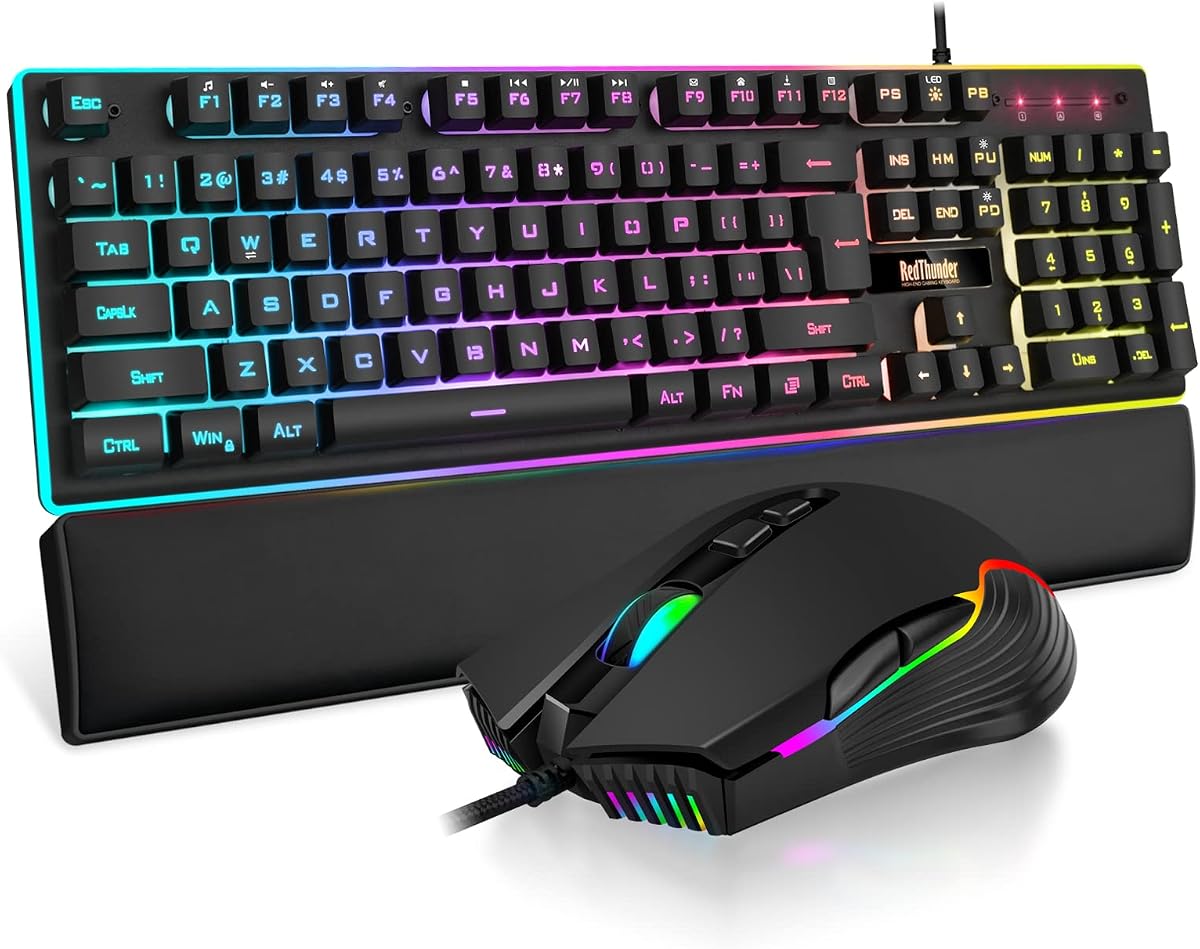
RedThunder’s wired K10 bundle expands the usual two-piece combo into a three-piece desk kit: full-size RGB keyboard, seven-button mouse, and a soft faux-leather memory-foam wrist rest. For players who know they want wired simplicity and wrist support without shopping three SKUs, that packaging is the whole value proposition. The hundred-four-key layout keeps F-keys and a numeric pad for games that still use number binds and for homework that still needs spreadsheets.
The keyboard uses a mechanical-feel deck over a steel plate for stiffness, with twenty-six anti-ghosting keys for common multi-key actions. Floating keycaps and RGB on the keys plus a bottom light bar create the classic rainbow gaming look. Adjustable feet let you tilt the board, and the included wrist rest softens long sessions more than bare desk edges ever will.
The mouse steps up to a seventy-two-hundred DPI optical sensor with a thousand-hertz polling claim and side lighting that matches the keyboard’s energy. Seven buttons cover DPI cycling and navigation binds. Wired mice still shine for uninterrupted weekend campaigns—no sleep wake, no charge cable across the WASD zone mid-fight. Just budget cable routes so the soft wrist rest and mouse cord do not fight each other.
Build messaging emphasizes ABS keycaps, a sturdy plate, and non-slip mouse texturing. This is still a value kit, not a CNC aluminum custom, but it feels more complete than keyboard-only budget boards that leave your wrist on hard laminate. The leatherette rest will wear differently than fabric rests; wipe it down and keep drinks off it if you want the surface to age gracefully.
Compared with the wireless K10 in this same brand family, the wired trio trades rechargeable freedom for higher DPI marketing, a wrist rest, and zero battery management. Compared with MSI Forge GK110, RedThunder includes the rest and a more flamboyant light show, while MSI offers brand familiarity and a volume wheel. Your preference for accessories versus brand ecosystem decides the fork.
Software depth is limited relative to Redragon’s configurable suites. Expect onboard lighting modes and DPI buttons rather than elaborate cloud profiles. For many buyers that is a feature: less fiddling, more playing. Typists seeking quiet chiclet keys should look elsewhere; this combo announces itself visually and acoustically as a gaming set.
Buy the wired K10 trio when you want RGB, a full-size layout, and a wrist rest in one checkout. Skip it when wireless desks or premium typing feel are non-negotiable.
First gaming PCs, holiday gift bundles, and bedrooms where the buyer wants an obvious upgrade from a stock office keyboard—complete with glowing edges and a wrist rest that feels like a present.
Place the rest so your wrists stay straight rather than bent upward aggressively. Remove it for FPS sessions if you prefer a lower mouse and keyboard plane. Clean the faux leather with a slightly damp cloth; avoid soaking the foam core.
We may earn a commission at no additional cost to you.

The K1 white RGB keyboard and mouse combo is the bright, simple wired starter kit for people who want a full-size glowing board without wireless complexity. One hundred four keys, floating keycaps, and a standard layout with F-row and number pad make it familiar to anyone coming from an office membrane keyboard. Plug-and-play USB means there is no receiver to lose and no Bluetooth menu to confuse grandparents setting up a family PC.
Lighting includes eight colors, five modes, brightness steps, and speed control, with the option to turn lights off. Double-shot legends help lettering survive longer than printed budget keycaps. The white shell reads differently from the black gamer default—cleaner on filmed desks, more playful in kids’ rooms, easier to spot crumbs you should clean anyway.
Ergonomic claims focus on stepped keycap heights and non-slip feet rather than a wave sculpt. That still reduces some fatigue versus a dead-flat travel keyboard. The mouse offers six DPI steps from six hundred to thirty-two hundred and a seven-color breathing LED you can lock by combining side and middle buttons. It will not threaten ultralight esports mice, but it is a clear step up from a tiny laptop nub or a grocery-store optical oval.
Reliability details include a USB cable with gold plating and an anti-interference magnet ring in the marketing story, plus ABS plastics for daily wear. Compatibility spans older and newer Windows versions plus Mac and Linux at a basic input level. As always with value wired kits, multimedia shortcuts and lighting controls are the customization ceiling.
Where the K1 wins is honesty of purpose. It is not pretending to be MX Keys, not promising ten-thousand DPI wireless, and not bundling a wrist rest. It is an affordable white RGB pair for homework, Minecraft-era gaming, and first desktop upgrades. Compared with MSI Forge, you trade brand prestige and volume-wheel convenience for a lighter spend and a white aesthetic. Compared with RedThunder’s wired trio, you give up the rest and some DPI ceiling.
Noise and feel are typical membrane RGB: audible enough to hear, soft enough for most apartments. If you need silent late-night typing, look at Logitech’s low-profile kit instead. If you need wireless range to a couch, look at RedThunder K84 or Redragon tri-mode sets.
Choose the K1 combo for a cheerful wired full-size starter, especially if you want white peripherals. Skip it when advanced sensors, ergonomic waves, or cable-free desks are the priority.
Kids’ PCs, dorm starter towers, and secondary family machines that need something more fun than beige leftovers. Also handy when you specifically want white keycaps to match a light PC theme.
Use static low brightness for homework video calls so the keyboard does not strobe on webcam. Save breathing rainbow modes for evening games. Turning lights off entirely extends the serious study vibe without changing hardware.
We may earn a commission at no additional cost to you.

The RedThunder K84 is the compact wireless specialist: an eighty-four-key seventy-five-percent keyboard paired with a lightweight honeycomb-shell mouse. By dropping the number pad while keeping arrows and dedicated media keys, it frees a surprising amount of mousepad width on shallow desks and mini-ITX setups. If your aim game improves when the mouse sits closer to your midline, this geometry matters more than another full-size rainbow slab.
Both pieces recharge over USB, with an eighteen-hundred-fifty milliamp-hour keyboard cell and a five-hundred milliamp-hour mouse cell in the spec story. Lighted continuous use is advertised around eight hours, with two-minute auto-sleep to protect real-world endurance. Charge roughly eight hours before first use with the original cable path RedThunder recommends; shipping charge is intentionally low.
The mouse’s perforated honeycomb shell lands near sixty-five grams and feels more modern than solid plastic bricks. Optical sensing up to thirty-two hundred DPI covers casual FPS and everyday pointing. The tradeoff with honeycomb designs is housekeeping—dust and crumbs love perforations—so plan occasional compressed-air cleanings if you eat at the desk.
Lighting offers dynamic modes, solid colors, and rainbow effects on the keyboard, with status indicators for caps, function lock, and Windows lock on dedicated keys. The mouse cycles seven colors automatically without manual color picking. Competitive minimalists can turn keyboard lights down; RGB fans get enough glow to match a small gaming corner.
Connection is single-receiver 2.4 GHz shared through the mouse bay—simple, but USB-A dependent and not multi-device Bluetooth. That keeps latency predictable for games while limiting tablet pairing dreams. Mac support should be considered secondary; Windows PCs are the home turf. Pairing resets are available if the link ever drops, similar to other RedThunder wireless kits.
Against the full-size K10 Wireless, the K84 is the better small-desk and aim-space choice, while K10 keeps numpad convenience. Against Redragon S156, K84 is more aggressively tenkeyless-adjacent and honeycomb-styled, whereas S156 keeps a condensed numpad and broader tri-mode options. Pick based on whether you ever type numbers on a dedicated cluster.
Buy the K84 when you want rechargeable wireless compactness with a light mouse and do not need a numpad. Skip it for accounting layouts, Bluetooth phone pairing, or premium quiet typing. It closes this pack as the space-saving wireless alternative rather than the all-rounder champion.
FPS-leaning players on cramped desks, travel-friendly mini PCs, and anyone upgrading from a full-size board who already knows they never touch the numpad.
Flip the mouse occasionally and blow dust from the shell. Avoid liquids near the perforations. If you dislike the look or feel of honeycomb plastics, choose Redragon’s solid light mice in the S107KS or S156 kits instead.
Full-size RedThunder K10 Wireless and Redragon S101M-KS keep number pads for mixed work. K84 wins pure mousing room and visual minimalism. Measure your desk depth and be honest about numpad habits before committing.
We may earn a commission at no additional cost to you.

Wireless combos reduce cable drag and make standing desks tidier, especially when one shared receiver controls both devices. Tri-mode kits add Bluetooth for laptops that hate dongles and USB-C wired fallback when batteries die. Wired combos still win for LAN parties, zero charge planning, and the simplest plug-and-play gifts. If you already lose nano receivers monthly, either pick kits with in-mouse storage or stay wired.
Full-size boards keep number pads for accounting, legacy game binds, and tenkey muscle memory. Seventy-five-percent and compact ninety-four-key layouts reclaim mouse space that improves aim comfort on small desks. Be honest: if you never touch the numpad, a TKL-style combo like the RedThunder K84 can feel liberating. If you enter numbers all day, do not buy compact nostalgia and regret it on Monday morning.
Productivity mice prioritize sculpted shapes, horizontal scroll or MagSpeed wheels, and multi-device pairing. Gaming mice prioritize weight, higher DPI ceilings, polling rate, and side-button remaps. Combos force a compromise—excellent when both halves match your primary task, frustrating when you work in Excel and compete in tactical shooters on the same peripheral pair. Some users happily own MX for work and a light Redragon mouse for ranked nights.
Low-profile dished keys like MX Keys S favor fast quiet typing. Mechanical-feel gaming membranes favor travel feedback and RGB legends. Wave ergonomic decks favor wrist angles over aesthetics. Open offices and shared bedrooms should treat noise as a first-class filter. Headphones on your head do not silence a clicky board for the person beside you.
Confirm Windows, Mac, and Linux claims before you buy. Layout switching keys matter more than a logo on the box. Software can unlock macros and DPI curves—or become bloat you never install. Power is the last filter: USB-C rechargeable lithium, AA replaceable cells, or forever-wired. Pick the maintenance style you will actually follow so the kit does not die mid-week.
A combo is enough when both halves match your main use case and you value one checkout, matched aesthetics, and a shared receiver. Buy separately when you need a premium typing keyboard plus a specialized ultralight FPS mouse, or when you are left-handed and most combo mice will not fit. Many people start with a solid combo, then upgrade only the weaker half later.
For mixed Windows and Mac productivity, the Logitech MX Keys S Combo is the strongest office-oriented kit in this pack thanks to dished low-profile keys, MagSpeed scrolling, multi-device pairing, and Logi Options+ automation. If you want wave ergonomics on a simpler 2.4 GHz link, the ULSOU wave combo is the comfort-focused alternative. Gaming RGB kits can do email, but they are rarely the best all-day typing experience.
Redragon’s S107KS stands out for a roughly sixty-five-gram mouse, high DPI ceiling, and tri-mode flexibility with software tuning. The S101M-KS is a close value pick if you want multimedia keys and a familiar full combo feel. Use 2.4 GHz or wired modes for competitive play and treat Bluetooth as a convenience channel for secondary devices.
Tri-mode is worth it if you hop among a desktop, a laptop, and occasional tablets, or if you want a wired charging fallback without losing the kit when batteries die. Single-mode 2.4 GHz is enough for one Windows PC desk. Pure wired remains ideal when you never want to think about charge lights again.
No. Mechanical-feel usually means a membrane or similar switch tuned to mimic deeper travel and stronger feedback. True mechanical boards use discrete switches, often with hot-swap sockets and very different sound signatures. Combos in this guide that say mechanical-feel are fine for most gamers and students, but enthusiasts seeking switch swapping should buy a dedicated mechanical keyboard separately.
Weight matters most for long gaming sessions and high-sensitivity aiming styles. A sixty-one to sixty-five-gram wireless mouse feels dramatically different from a heavy office brick. For productivity scrolling and casual browsing, shape and button placement often matter more than shaving every gram. Match weight to your primary fatigue point.
Logitech’s MX Keys S Combo is the most convincing multi-OS citizen here. ULSOU documents Windows and Mac layout switching. Several gaming kits will type on Mac over basic input modes but may lose lighting software, macros, or Windows-key behaviors. Always verify media keys and Command/Option expectations if macOS is your daily driver.
If numpad use is occasional, a compact kit plus your laptop’s keys—or a tiny USB numpad drawer emergency option—can be enough. If you enter numbers hourly, choose full-size or a compact board that still retains a usable number cluster, and read any Shift-layer quirks before relying on it for work.
Use the 2.4 GHz receiver on a USB port toward the desk edge or a short extension to clear metal PC cases. Avoid crowding the dongle beside dense USB 3 hard-drive clusters when possible. Keep batteries charged, disable unused Bluetooth clutter, and update chipset firmware on the PC. Persistent dropouts on a new unit should go through returns rather than endless re-pairing rituals.
Usually yes. Bright animated effects are the first thing to dim or disable when a manufacturer’s endurance claim assumes lights off. Static low brightness is a compromise that keeps legends visible without draining cells as quickly as rainbow waves. Wired RGB kits sidestep the issue entirely if glow matters more than cable freedom.
The best keyboard and mouse combo is the one that matches your desk physics and daily software, not the one with the loudest product box. Logitech’s MX Keys S Combo remains the productivity benchmark for multi-device work. Redragon’s tri-mode kits—especially S101M-KS and S107KS—cover wireless gaming value with shared receivers and modern light mice. MSI’s Forge GK110 keeps wired RGB simple and dependable when batteries would only get in the way.
Ergonomic wave buyers should start with the ULSOU kit, compact-desk players with RedThunder K84 or Redragon S156, and gift shoppers who want an obvious upgrade with a wrist rest should look at the wired RedThunder trio. White aesthetic starters can grab the K1 wired set without overthinking sensors.
Pick your connection mode, layout size, and mouse priorities first, then use the reviews above to confirm tradeoffs. When those three decisions are clear, the right combo in this pack usually becomes obvious within a minute.