Expert Review & Guide

Best Gasket Mount Keyboards of 2026 for Creamy Typing

Gasket mount keyboards changed what “premium typing” means on a normal desk. Instead of a plate bolted rigidly to the case, the plate sits on soft gaskets so each keystroke flexes slightly, dulls harsh case ping, and turns factory linears into that soft, creamy thock people chase in typing videos. In 2026 you no longer need a boutique group buy to get multi-layer foam, pre-lubed switches, hot-swap sockets, and a media knob. The hard part is sorting which boards are truly gasket-built and which ones just print “creamy” on the box.

This guide covers only the ten boards in our gasket-mount pack—from compact 60% wired and wireless machines to 75% daily drivers, a 96% numpad keeper, and one barebones kit for builders. We look at mount feel, foam stack honesty, switch quality out of the box, connectivity, keycaps, software, and whether the layout matches how you actually work. Ratings and product details stay tied to the pack listings; we do not invent specs or ASINs.

Our top three favor boards that deliver gasket flex and creamy sound without a steep learning curve: the Ajazz AK820 for balanced 75% wired polish, the Womier SK80 for gasket feel plus a unique multimedia display, and the YUNZII B75 PRO for tri-mode wireless with five-layer padding. The rest earn clear lanes—budget 60% gaming, creamy 75% value, 98-key productivity, wireless topographic style, entry ice-blue RGB, and a DIY barebones path—so you can pick by desk space and customization appetite, not just RGB screenshots.

Our Top Gasket Mount Keyboard Picks for 2026

As an Amazon Associate we earn from qualifying purchases. We may earn a commission at no additional cost to you.

Gasket Mount Keyboard Spec Comparison at a Glance

Use this table to filter by layout, wired versus wireless, and how much DIY you want. Specs skip street prices, which swing constantly. Note that the GMK87 is a barebones kit—you supply switches and keycaps—while the others ship ready to type with factory linears and foam stacks aimed at that soft gasket sound.

#ProductSpecificationsScore
1
  • 66-key 60% wired gasket mount with volume knob
  • Hot-swap pre-lubed Blueberry linear switches
  • Five-layer foam stack and onboard RGB control
8.8
2
  • 75% wired gasket mount, 1000Hz polling
  • Hot-swap linears, 6-layer foam, double-shot keycaps
  • Volume knob, RGB presets, browser-based driver
9
3
  • Wired USB-C 75% gasket mount custom board
  • Color multimedia display, hot-swap PCB
  • Pre-lubed linears, EVA fill, Mac/Win support
9.4
4
  • 96%/98-key gasket mount with numpad
  • Hot-swap cream linears, five-layer foam
  • MDA PBT keycaps, detachable aluminum knob
9.2
5
  • 80% barebones gasket kit with TFT screen
  • Tri-mode BT/2.4G/USB-C, VIA programmable
  • Hot-swap PCB; switches and keycaps sold separately
7.8
6
  • 82-key wired gasket mount with metal knob
  • Poron sandwich foam, hot-swap pre-lubed linears
  • South-facing RGB, double-shot PBT keycaps
9.4
7
  • Tri-mode 60% gasket mount, 4000mAh battery
  • QMK/VIA, IMD shine-through topographic keycaps
  • Hot-swap pre-lubed linears, PCB single-key slotting
9.2
8
  • 75%/85-key tri-mode wireless gasket board
  • Pre-lubed Bsun linears, five-layer foam stack
  • 4000mAh battery, RGB edge glow, PBT keycaps
9.2
9
  • 86-key wired 75% gasket mount board
  • Five-layer foam with Poron cushioning
  • Hot-swap creamy switches, ice-blue backlight
8.8
10
  • Tri-mode BT/2.4G/USB-C, 4000mAh battery
  • Gasket mount, five-layer padding, hot-swap
  • Knob control, south-facing RGB, Milk linears
9.2

1. TMKB T68E - Best Compact Wired Gasket

TMKB T68E 60% Wired Gaming Mechanical Keyboard

TMKB T68E 60% Wired Gaming Mechanical Keyboard

8.8/10★★★★☆

The TMKB T68E is the pack’s clearest answer if you want gasket flex in the smallest practical shell. Its 66-key layout keeps a compact 60%-class footprint while adding a dedicated aluminum volume knob—something many bare 60% boards skip. That knob is not a plastic spinner; TMKB calls out durability past thirty thousand rotations, which matters if you constantly ride volume during streams or late-night playlists. On a crowded desk, losing the numpad and outer chrome is the point: more mouse runway without giving up media control.

  • 66-key 60% wired gasket mount with aluminum volume knob
  • Hot-swap pre-lubed Blueberry linear switches
  • Five-layer sound absorption and web-based remapping
Check Price →
✓ Pros
  • True gasket structure with a five-layer foam stack for soft, creamy sound
  • Hot-swap sockets and pre-lubed Blueberry linears ready on day one
  • Aluminum volume knob rated for heavy rotation use
  • Onboard RGB control without forcing a desktop install
  • Compact footprint frees mouse space on small desks
✕ Cons
  • 60% layout hides arrows and F-keys behind layers that take practice
  • Wired-only—no Bluetooth or 2.4GHz dongle option
  • White aesthetic may clash with darker RGB-heavy setups

Detailed review

Gasket mounting is the headline. The plate rides on soft supports, and five dampening layers soak case hollows that make cheaper tray-mount boards sound tinny. Combined with factory-lubed Blueberry linear switches, the T68E aims for that cloud-soft bottom-out enthusiasts describe as creamy rather than sharp and clacky. You will still hear keystrokes in a quiet room—no gasket board is silent—but the tone is fuller and less ringing than a screw-locked plate with empty cavities.

Hot-swap sockets keep the board from feeling like a dead end. If the stock Blueberry linears are too light, too long, or not thocky enough for your taste, you can pull them and drop in most 3-pin or 5-pin MX-style switches without soldering. That flexibility is why gasket + hot-swap packages dominate 2026 Amazon roundups: the mount sets the acoustic foundation, and the sockets let you chase personal feel later.

RGB is handled onboard with twenty effects and six brightness and speed levels, so casual users never need a driver. When you do want remaps and macros, TMKB points to a web-based tool instead of a heavyweight install that clutters a work laptop. That approach is friendlier for shared machines and locked-down office PCs, though advanced profiles still depend on whatever the browser driver exposes.

Tradeoffs are honest. Pure 60% muscle memory takes a week if you live in spreadsheets or constantly need F-keys. There is no wireless mode, so the cable is part of the deal—fine for a fixed gaming PC, less ideal for hopping between a couch tablet and a laptop. Stabilizer quality and unit-to-unit foam consistency can vary in this price band; if a board arrives with a rattle-prone spacebar, a dab of lube or clip-in stabilizer work is still enthusiast homework.

Who should buy it: FPS players and minimalists who already like layer navigation, want gasket creaminess without a huge chassis, and prefer plug-and-play wired reliability over battery anxiety. Skip it if arrows must sit on the base layer every day or if you refuse to learn Fn combinations for navigation.

Who the T68E fits best

Choose the T68E when desk width is scarce and you already type comfortably on 60% or 65% boards. Gamers who bind utilities to mouse side buttons often adapt faster than office workers who tab through Excel all day. The white shell and vivid RGB also suit clean aesthetic desks more than stealth black battlestations.

Setup tips for creamier sound

Type on a desk mat, confirm the cable is fully seated in the USB-C port, and spend ten minutes remapping arrows to a layer you can reach without looking. If stabs ping, temporarily remove the spacebar and check seating before blaming the gasket mount—most “hollow” complaints on compact boards start at the larger keys.

Check Price on Amazon →

We may earn a commission at no additional cost to you.

2. DIERYA DK81E - Best Creamy 75% Value

DIERYA DK81E 75% Mechanical Gaming Keyboard

DIERYA DK81E 75% Mechanical Gaming Keyboard

9/10★★★★★

The DIERYA DK81E is the pack’s straightforward 75% wired gasket recommendation when you want creamy typing without learning a tiny layout. Function keys, arrows, and a navigation cluster stay on the base layer, which is why 75% boards dominate shared desks and coding setups. DIERYA layers a cushioned gasket structure with six sheets of sound-dampening material—more foam layers than several peers here—and pairs that stack with factory-lubed linear switches for a softer, fuller tone aimed at gaming, writing, and office work.

  • 75% wired gasket mount with six foam layers
  • Hot-swap pre-lubed linears rated for long lifespan
  • 1000Hz polling, volume knob, browser driver
Check Price →
✓ Pros
  • Six-layer dampening plus gasket mount for soft, full sound
  • Familiar 75% layout keeps F-row, arrows, and nav keys visible
  • 1000Hz wired polling suits competitive play without battery lag
  • Double-shot keycaps and hot-swap sockets support long-term use
  • Web driver works across Windows, macOS, and Linux browsers
✕ Cons
  • Wired-only connectivity limits multi-device couch or tablet use
  • White theme is not for everyone seeking a dark stealth look
  • Preset RGB count is solid but not as flashy as screen-equipped rivals

Detailed review

Hot-swap support for both 3-pin and 5-pin switches means the stock linears are a starting point, not a life sentence. DIERYA rates those switches for tens of millions of actuations, and double-shot keycaps help legends survive oily marathon sessions. If you later want tactiles for typing or lighter linears for aim trainers, a switch puller is enough. That upgrade path is the difference between a disposable RGB board and a gasket platform you keep refining.

Performance basics are covered for wired play. A 1000Hz polling rate keeps input snappy for competitive titles, and the detachable USB-C cable removes battery anxiety entirely. You can coil the cable for a cleaner desk or replace it if a pet chews the stock lead. The volume knob doubles as a play/pause control when pressed, which is the kind of small quality-of-life detail that makes a “gaming” keyboard feel usable for music and video work.

Customization stays browser-based. Remaps, macros, shortcuts, and lighting tweaks live in DIERYA’s web driver instead of a permanent desktop package, and the listing calls out support through browsers on Windows, macOS, or Linux. Fifteen lighting effects and a huge RGB color space cover most desk themes; if you need per-key cinema lighting and music reactive showpieces, look at the Womier SK80 instead.

Compared with the Ajazz AK820, the DK81E competes in the same 75% wired gasket lane with a slightly different foam story and a white aesthetic. The Ajazz edges our overall pick on refined PBT presentation and community familiarity, while the DIERYA is the value creamy daily driver when six-layer fill and a browser toolchain matter more than brand polish. Stabilizer consistency still varies in this segment—test the larger keys early and return promptly if something rattles excessively.

Buy the DK81E if you want a white 75% gasket board that plugs in, sounds soft, and leaves room to hot-swap later. Pass if wireless multi-device switching is non-negotiable or if you need a numpad on the same chassis—then look at the RK R98 Pro instead.

DK81E versus other 75% boards in this pack

Against the Ajazz AK820, expect a similar layout mission with different foam marketing and finish. Against the Kisnt KN85 and YUNZII B75 PRO, you trade wireless convenience for simpler wired latency and zero charging cycles. Against the Womier SK80, you trade the color screen and deeper themed software for a cleaner, less gadgety top deck.

Best uses day to day

The DK81E shines for students, junior developers, and hybrid gamers who want arrows always visible. Keep RGB brightness moderate in shared offices; gasket foam softens pitch, but it does not erase the fact that mechanical linears still announce every keystroke.

Check Price on Amazon →

We may earn a commission at no additional cost to you.

3. Womier SK80 - Best Display Custom Build

Womier SK80 75% Keyboard with Color Multimedia Display

Womier SK80 75% Keyboard with Color Multimedia Display

9.4/10★★★★★

The Womier SK80 earns a top-pick badge because it is more than another foam-filled 75%. The color multimedia display in the upper right corner turns status chrome into something you actually look at: custom GIFs, Caps Lock, connection cues, Win/Mac mode, backlight brightness and speed, RGB mode and color, volume, language, and more. The screen sits at an eleven-degree oblique angle so it reads naturally from a typing posture instead of forcing you to crane over a flat badge. If you want a gasket board that feels like a personal gadget, this is the pack’s showpiece.

  • 75% wired gasket mount with color multimedia screen
  • EVA positioning plate and bottom fill for soft feel
  • Hot-swap pre-lubed linears, Mac/Win, deep driver tools
Check Price →
✓ Pros
  • Unique color screen for GIFs, status icons, volume, and RGB feedback
  • Gasket mount with EVA plate and fill delivers soft creamy typing
  • Hot-swap PCB supports 3-pin and 5-pin switch experiments
  • Strong software depth including macros, lighting, and music sync
  • Black Kanagawa theme looks intentional, not generic RGB plastic
✕ Cons
  • Wired-only—no tri-mode battery for multi-device roaming
  • Screen and themed software add complexity some users never need
  • Heavier customization path than plug-and-play budget boards

Detailed review

Under the theme keycaps, the SK80 uses a gasket mount with an EVA positioning plate and bottom filling. That combination is aimed at soft, responsive travel and lower typing noise—the creamy profile Womier markets for gaming immersion. Pre-lubed linear switches with south-facing transparent light diffusers help legends and RGB pop while keeping the out-of-box sound cleaner than dry stock switches on barebones kits. Stabilizers arrive pre-lubed as well, which matters because large-key rattle ruins otherwise good gasket acoustics.

Hot-swap compatibility for 3-pin and 5-pin switches keeps the board in the custom lane. Cherry-profile art theme keycaps give the Black Kanagawa variant a cohesive look rather than a random Amazon rainbow. Nineteen lighting effects, nine colors, and adjustable brightness and flow rates cover ambient moods; music syncing can pulse lights to audio when you want the desk to feel like a stage. None of that replaces the gasket flex itself, but it explains why the SK80 sits above plain white boxes in enthusiast interest.

Software is a real differentiator. RGB modes, macros, and GIF image display settings live in Womier’s driver ecosystem, which is more involved than onboard-only boards but unlocks the screen’s personality. Mac and Windows compatibility plus a detachable USB-C cable make it a flexible single-desk machine. You still need to accept the wired tether; this is not the Kisnt or YUNZII-style roam-between-devices keyboard.

Compared with the Ajazz AK820, the SK80 trades some “quiet daily driver” simplicity for personality and screen features. The Ajazz remains our best overall gasket pick for balanced PBT typing polish; the Womier wins when you want the desk to feel custom and visual. Typing sound should still be creamy and controlled if the foam and EVA fill are seated well—inspect for loose screws or uneven case gaps if a unit sounds oddly hollow.

Pick the SK80 if you like themed keycaps, enjoy tinkering with GIFs and lighting profiles, and want gasket creaminess in a black 75% shell. Skip it if you hate companion software, need wireless, or prefer a minimal top deck with nothing but keys and a knob.

Making the multimedia screen useful

Load a short loop that matches your desk theme, map volume feedback so you are not guessing with OS meters, and keep Caps Lock indication enabled if you write a lot. The screen is a productivity tool when it shows status; it is clutter when it only plays a noisy animation you never glance at.

Who should choose SK80 over Ajazz

Choose Womier when aesthetics and the display matter as much as thock. Choose Ajazz when you want a cleaner metal-knob 75% with PBT focus and fewer novelty surfaces. Both are gasket hot-swap wired boards; the decision is personality versus streamlined polish.

Check Price on Amazon →

We may earn a commission at no additional cost to you.

4. RK ROYAL KLUDGE R98 Pro - Best Gasket With

RK ROYAL KLUDGE R98 Pro Wired Mechanical Keyboard

RK ROYAL KLUDGE R98 Pro Wired Mechanical Keyboard

9.2/10★★★★★

Most gasket boards in this pack squeeze toward 60% or 75% and assume you will live without a number pad. The RK Royal Kludge R98 Pro rejects that compromise. Its ninety-eight-key layout keeps a numpad, arrows, and most function access in a denser shell than classic full-size boards, which is ideal for accounting, spreadsheet work, data entry, and anyone who still touch-types the right-side number block. You get gasket creaminess without pretending a separate USB numpad is the same thing.

  • 98-key gasket mount layout retaining a number pad
  • Hot-swap pre-lubed cream linear switches
  • MDA double-shot PBT keycaps and CNC metal knob
Check Price →
✓ Pros
  • Keeps a numpad while staying denser than full-size boards
  • Gasket mount and five-layer foam target creamy thock
  • MDA PBT keycaps feel more premium than thin ABS sets
  • Detachable aluminum CNC knob and clear status indicators
  • Online driver for remaps, macros, and RGB on Win and Mac
✕ Cons
  • Larger footprint than 75% options—less mouse room
  • Wired-only despite strong customization elsewhere
  • Cream switch taste is subjective; some prefer sharper tactiles

Detailed review

Acoustically, RK leans on a gasket structure plus five foam layers for thocky, creamy sound with pre-lubed linear cream switches. Those cream switches are popular in enthusiast circles for smooth travel and a soft auditory signature. Hot-swap sockets accept 3-pin and 5-pin replacements if you later want heavier springs or tactiles for coding. Five layers of absorption help, but desk surface and keycap material still shape the final tone—PBT MDA profile caps here are a meaningful upgrade over thin shine-through ABS.

MDA profile is worth calling out. Compared with flat OEM or cherry-style sets, MDA’s taller, more wrapped finger feel can make long typing sessions more comfortable for people who like sculpted rows. Double-shot PBT construction resists shine and legend fade better than cheap dye-sub ABS. Combined with a detachable high-quality aluminum CNC metal knob, the R98 Pro feels like a productivity-first gasket board rather than a pure RGB toy.

Status communication is clearer than on many compact boards. Four indicators cover Num Lock, Caps Lock, Win Lock, and Mac mode, which matters when you hop operating systems. The online RK driver handles key redefinition, macros, and custom RGB on Windows and Mac, and more than twenty lighting modes cover monochrome and dynamic looks. Wired connectivity keeps latency predictable for gaming even though the board’s soul is hybrid work.

The obvious cost is desk space. A 98-key gasket board still claims more real estate than the Ajazz AK820 or YUNZII B75 PRO, so ultrawide mouse pads for low-sens FPS may feel crowded. If you rarely touch a numpad, you are paying in width for keys you will ignore. If you use numbers constantly, this is the clearest gasket pick in the pack.

Choose the R98 Pro for finance, logistics, spreadsheet-heavy jobs, and gamers who still want Numpad binds. Skip it for minimal desks or if wireless multi-device life is the priority—then look at Kisnt, YUNZII, or the HITIME M67 instead.

When a 96%/98% gasket board beats 75%

Pick the R98 Pro when number entry is daily, not occasional. Temporary Fn-layer number rows on 75% boards slow accountants and inventory workflows. The denser 98 layout is the pragmatic middle between TKL purity and full-size bulk.

Keycap and switch notes

Leave the MDA PBT set on unless you already own a matching aftermarket kit—profile mismatches feel weird under the fingers. If cream linears feel too muted, try a slightly heavier linear before abandoning the gasket chassis entirely.

Check Price on Amazon →

We may earn a commission at no additional cost to you.

5. GMK87 Barebones Kit - Best DIY Barebones Gasket Kit

GMK87 Keyboard Barebones Kit

GMK87 Keyboard Barebones Kit

7.8/10★★★★☆

The GMK87 is the honest outlier in this roundup: it is a gasket-mounted barebones kit, not a finished creamy keyboard in a gift box. That distinction matters for expectations and for the 3.9 rating in the pack. You get an 80%-class eighty-seven-key chassis with a TFT-LCD screen, metal volume knob, hot-swap PCB, tri-mode connectivity, and VIA programmability—but switches and keycaps are your responsibility. If you want plug-and-play thock tonight, buy any other board here. If you want to invent the sound signature yourself, this is the builder lane.

  • 80% TKL-class barebones kit with TFT screen and knob
  • Tri-mode Bluetooth 5.0 / 2.4GHz / USB-C wireless
  • Hot-swap gasket PCB with VIA programming support
Check Price →
✓ Pros
  • True DIY path: choose your own switches and keycaps
  • Tri-mode wireless with a sizable 3000mAh battery
  • TFT screen and metal knob add modern builder features
  • VIA support unlocks serious remapping without proprietary lock-in
  • Gasket mount and kickstand suit long customization experiments
✕ Cons
  • Barebones means it is incomplete until you buy switches and keycaps
  • Lower pack rating reflects kit complexity and mixed builder experiences
  • Not a day-one creamy out-of-box board like the Ajazz or YUNZII

Detailed review

Connectivity is unusually flexible for a kit at this level. Bluetooth 5.0, 2.4GHz wireless, and wired Type-C cover tablets, phones, laptops, and PCs, with a 3000mAh battery for rechargeable wireless use. NKRO support and multi-device pairing make it a sandbox for people who already juggle machines. The detachable USB-C cable can charge while you type, which is essential during long VIA remapping sessions.

The interactive TFT screen can show custom images, date, and time—closer in spirit to the Womier SK80’s multimedia idea, but on a kit you assemble. RGB with south-facing LEDs and sixteen million colors gives whatever keycap set you install a chance to shine. VIA macros and lighting control are a big deal for enthusiasts who dislike closed vendor software; open tooling ages better when a brand’s driver site disappears.

Gasket mounting and a dual-stage foldable kickstand target comfort and reduced case vibration. A USB storage compartment helps cable management. Hot-swap sockets claim compatibility with Cherry, Gateron, Otemu, Kailh, and other MX-style 3-pin and 5-pin switches. Sound quality will rise or fall with your foam install, switch choice, stabilizer work, and keycap material—the kit supplies the platform, not the final creamy YouTube clip.

Why the lower rating? Barebones kits accumulate friction: missing parts expectations, firmware quirks, wireless pairing learning curves, and buyers who thought “keyboard” meant ready-to-type. ReviewConsensus will not pretend this is a beginner gift. It is a project. Budget separately for a switch set, keycaps, and optionally a lube kit if you want cream-tier acoustics.

Buy the GMK87 when you already know how to install switches, seat keycaps, and flash or use VIA. Skip it as a first mechanical keyboard—start with the Ajazz AK820, Kisnt KN85, or YUNZII B75 PRO, then graduate to kits once you know which switch weight you actually like.

Builder checklist before you order

Confirm you are purchasing the barebones configuration, list the switches and keycap profile you will buy, and verify VIA compatibility on your OS. Plan an evening for assembly and another for keymap tweaks. Rushing a kit is how stabilizers end up poorly seated.

How it compares to finished gasket boards

Finished boards in this pack optimize for out-of-box creaminess. The GMK87 optimizes for choice. Its tri-mode and screen can outperform simpler wired boards after you invest in parts—but the investment is real, and the rating reflects that mixed path.

Check Price on Amazon →

We may earn a commission at no additional cost to you.

6. Ajazz AK820 - Best Overall Gasket Mount

Ajazz AK820 TKL 75% Hot Swappable Mechanical Keyboard

Ajazz AK820 TKL 75% Hot Swappable Mechanical Keyboard

9.4/10★★★★★

The Ajazz AK820 is our best overall gasket mount keyboard in this pack because it nails the fundamentals without gimmicks: a true gasket structure, meaningful foam, pre-lubed linears, hot-swap freedom, PBT keycaps, and a compact 82-key 75% layout that keeps function keys while reclaiming desk space for your mouse. Ajazz positions the metal volume knob as a premium, non-slip control for instant mute and level changes—useful in ranked games and video calls alike. The layout is the daily-driver sweet spot for most people graduating from full-size membranes.

  • 82-key 75% wired gasket mount with metal volume knob
  • Poron sandwich cotton and high-density foam stack
  • Hot-swap linears, south-facing RGB, double-shot PBT
Check Price →
✓ Pros
  • Refined gasket mount with Poron and dense foam for solid creamy thock
  • Double-shot PBT keycaps resist shine better than budget ABS
  • Flex-cut PCB and hot-swap sockets support serious customization
  • South-facing LEDs play nicer with many aftermarket keycap sets
  • Metal knob and detachable USB-C suit gaming and office desks alike
✕ Cons
  • Wired-only—no Bluetooth or 2.4GHz for tablet hopping
  • Stock linear taste may still be too soft for clicky fans
  • Driver depth is less flashy than screen-equipped Womier builds

Detailed review

Mount and sound are where the AK820 earns its rank. Instead of a traditional screw-locked tray feel, the gasket design works with Poron sandwich cotton and high-density foam to kill hollow case noise and push toward the solid, creamy, thocky signature buyers chase. That does not mean silent office stealth—it means denser, less pingy acoustics and a cushioned bottom-out that feels expensive under the fingers. Flex-cut PCB slotting further softens the typing plane for stability with a bit of give.

Customization is practical. Hot-swap sockets take 3-pin and 5-pin switches, so factory-lubed sea salt moonlight-style linears (or similar pre-lubed linears depending on batch) are a baseline. South-facing RGB helps with shine-through and many cherry-profile aftermarket sets that collide with north-facing LEDs. Twenty default lighting modes cover casual flair, while driver software unlocks deeper RGB and music rhythm effects when you want them. Double-shot PBT keycaps are a genuine upgrade for oil resistance and legend longevity.

Ergonomics and compatibility stay simple. Detachable USB-C wired connection means stable, low-latency input for Mac and Windows without worrying about dongle loss. The sleek profile works in aesthetic desk photos and serious workstations. Compared with the DIERYA DK81E, the Ajazz feels like the more polished “buy once” 75% wired pick; compared with the Womier SK80, it is less theatrical and more about typing substance; compared with wireless YUNZII and Kisnt options, it trades roaming freedom for never charging.

Weaknesses are predictable. If you need one keyboard for a phone, tablet, and work laptop on the couch, tri-mode boards serve you better. If you love loud clicky switches, you will hot-swap eventually—the stock story is creamy linear. Unit QC still matters: check stabilizer rattle on arrival, because even good gasket boards can ship with a loose spacebar that needs reseating.

Recommend the AK820 as the default gasket purchase for writers, coders, and gamers who want creamy 75% wired performance with PBT credibility. It is the board we would hand to a friend who said, “I want that soft thock sound people talk about,” without wanting a DIY kit.

Why it wins Best Overall

Balance beats novelty. The AK820 combines mount quality, foam materials, keycap grade, and layout practicality without forcing a screen workflow or barebones shopping list. That combination is what most gasket shoppers actually need in 2026.

Versus YUNZII B75 PRO

Pick Ajazz for wired simplicity and PBT-forward polish. Pick YUNZII when Bluetooth and 2.4GHz multi-device life matter more than a cable-free desk being optional. Typing character can be similarly creamy; connectivity is the fork in the road.

Quick desk setup advice

Use a desk mat, set Win/Mac mode correctly on day one, and lower RGB brightness in shared spaces. Spend five minutes confirming the knob mute behavior so you are not hunting OS volume during a match.

Check Price on Amazon →

We may earn a commission at no additional cost to you.

7. HITIME x XVX M67 - Best Wireless 60% Gasket

HITIME x XVX M67 Wireless 60% Percent Keyboard

HITIME x XVX M67 Wireless 60% Percent Keyboard

9.2/10★★★★★

The HITIME x XVX M67 is the pack’s wireless 60% specialist: gasket-mounted, hot-swap, QMK/VIA capable, and dressed in IMD topographic keycaps that let RGB shine through the pattern instead of only around legends. JadeStone theming makes it a desk centerpiece, while tri-mode Bluetooth 5.0, 2.4GHz, and Type-C connectivity plus a 4000mAh battery support real portable use across up to five devices. That combination targets creators and gamers who want creamy thock without dragging a coil cable everywhere.

  • Tri-mode BT/2.4G/USB-C 60% with 4000mAh battery
  • QMK/VIA programmable gasket mount, PCB slotting
  • IMD topographic shine-through keycaps, hot-swap linears
Check Price →
✓ Pros
  • Tri-mode wireless with multi-device switching and a large battery
  • QMK/VIA support for serious remapping beyond vendor-only tools
  • IMD topographic keycaps create distinctive RGB pattern shine
  • Gasket mount with layered silencer fill for creamy low-noise typing
  • Hot-swap pre-lubed transparent linears with long rated lifespan
✕ Cons
  • 60% layers frustrate users who need always-visible arrows and F-keys
  • VIA remapping notes require wired mode for some changes
  • Topographic look is polarizing if you want a plain professional board

Detailed review

Gasket structure and PCB single-key slotting soften the typing feel, and four layers of silencer fill between PCB, plate, and switches aim for low-noise creaminess suitable for offices and late sessions. Pre-lubed transparent mechanical switches claim an eighty-million keystroke lifespan and a creamy, thocky voice. Extra LEDs under stabilizers and on the space bar push RGB presentation beyond basic per-key lighting—nice if aesthetics are half the reason you buy a compact board.

QMK/VIA is the power-user magnet. Open firmware means layouts, shortcuts, and lighting logic are not trapped in a single brand’s aging app. The listing notes that remapping is done in wired mode, after which the map works across wireless and wired connections—plan a short USB session when you rebuild layers. For Linux, macOS, and Windows users who already live in VIA, this is more future-proof than closed web drivers alone.

IMD pattern shine-through is either the reason you click buy or the reason you bounce. If you want a quiet black board for client Zoom calls, the topographic glow may feel flashy. If you want a keyboard that photographs like a custom, the M67 delivers a look many finished white 75% boards cannot match. Seventeen-plus backlight modes, saturation controls, and software RGB tweaks give you room to tone it down or go maximal.

Compared with the TMKB T68E, you gain wireless freedom and VIA depth but accept a more opinionated visual design. Compared with the Kisnt KN85 or YUNZII B75 PRO, you sacrifice easy F-row access for maximum mouse space. Competitive players who rely on 2.4GHz will appreciate the tri-mode stack; pure Bluetooth is still the higher-latency option for twitch shooters.

Get the M67 if you love compact layouts, want open-source remapping, and care about distinctive RGB keycaps. Avoid it if layer navigation makes you slower at work or if your office culture prefers understated hardware.

Wireless tips for gaming

Prefer the 2.4GHz dongle for competitive play, keep the keyboard charged on a schedule, and reserve Bluetooth for tablets and secondary machines. Remap a reachable layer for arrows before your first ranked session.

VIA workflow reminder

Plug in USB-C when editing keymaps, save your layout, then unplug and test wireless. Export a backup of your VIA configuration so a reset does not erase a week of layer crafting.

Check Price on Amazon →

We may earn a commission at no additional cost to you.

8. Kisnt KN85 - Best Budget Creamy Wireless

Kisnt KN85 Wireless Mechanical Keyboard

Kisnt KN85 Wireless Mechanical Keyboard

9.2/10★★★★★

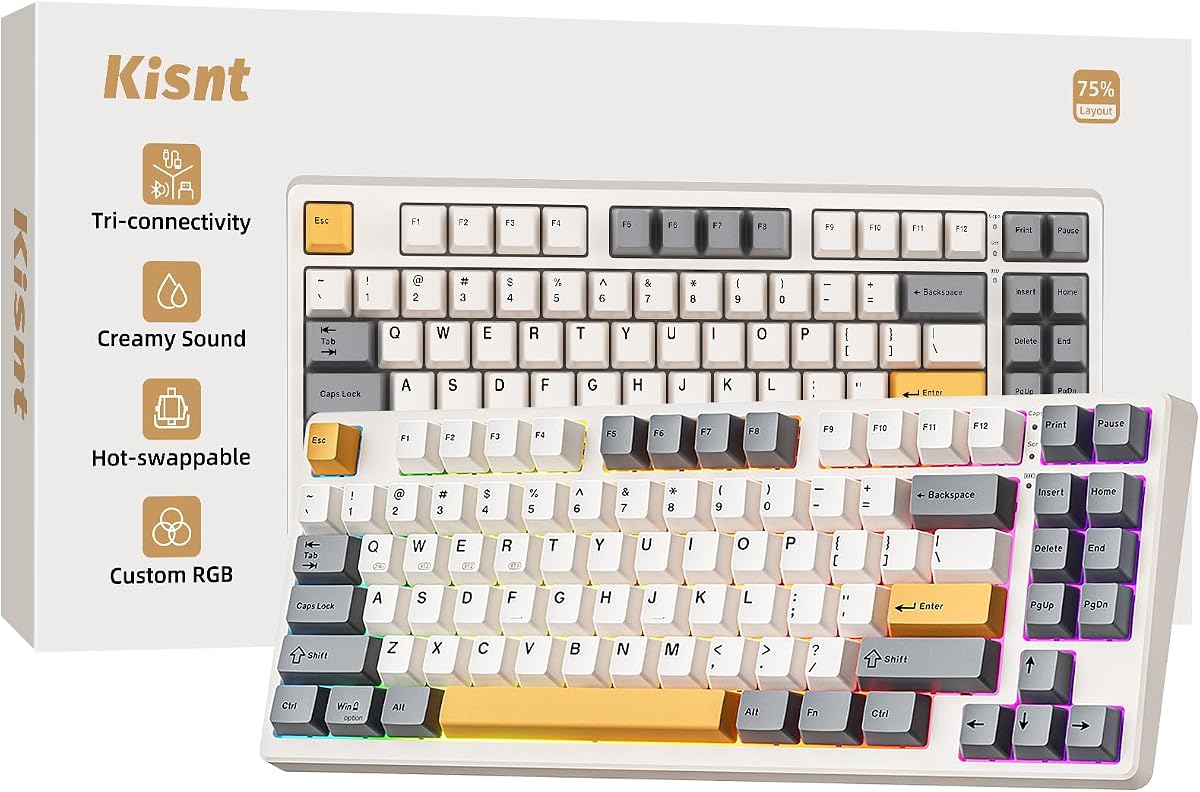
The Kisnt KN85 is the pack’s budget-minded creamy wireless 75%—an eighty-five-key board that keeps F-keys and arrows while freeing roughly a quarter of full-size depth for mouse movement. Retro beige styling gives it a warmer, calmer presence than aggressive black-and-RGB gaming shells, which helps if the keyboard lives on camera during streams or sits in a living-room setup. Dimensions stay compact enough for small desks and laptop pairings without forcing pure 60% layer gymnastics.

  • 85-key 75% tri-mode wireless with 4000mAh battery
  • Gasket mount with five-layer foam and base dampener
  • Hot-swap pre-lubed Bsun linears, PBT keycaps, RGB edge glow
Check Price →
✓ Pros
  • Tri-mode connectivity with clear latency figures across USB, 2.4G, and BT
  • Gasket mount and five-layer foam target marbly thock on a budget
  • Retro beige aesthetic stands out from generic black RGB clones
  • Hot-swap Bsun linears make feel experiments easy
  • Strong warranty messaging and support posture for a value brand
✕ Cons
  • Full programming driver is Windows-focused and prefers wired/2.4G
  • No numpad—data-entry users may need a separate keypad
  • Creamy marketing still cannot make mechanical boards whisper-quiet

Detailed review

Connectivity is a highlight. USB-C, 2.4GHz wireless, and Bluetooth 5.0 with three channels cover PC, laptop, tablet, phone, and even console scenarios, with Kisnt quoting roughly 2ms wired, 5ms 2.4G, and 11ms Bluetooth. A 4000mAh battery supports all-day wireless work, and you can keep typing while charging when the pack runs low. Win/Mac switching helps hybrid workers who bounce between a work Windows machine and a personal MacBook.

Sound and feel lean gasket-creamy: base dampener, silicone pad, and five foam layers chase a deeper marbly thock instead of sharp clack. Pre-lubed Bsun linear switches in a light actuation band suit long typing and casual gaming; hot-swap 3/5-pin sockets let you chase tactiles later. PBT keycaps with edge RGB glow create a halo effect rather than only shining through legends—tasteful if you keep brightness moderate.

Software is capable but narrower than QMK/VIA boards. Twenty lighting effects are available from the board, while the KN85 driver on Windows in wired or 2.4G mode unlocks remaps and macros. Mac-only households should confirm which features they truly need onboard. That limitation is acceptable at this value tier, especially if your main machine is a Windows gaming PC.

Against the YUNZII B75 PRO, Kisnt competes directly on tri-mode 75% gasket ground with a different aesthetic and brand support story. YUNZII may feel more “enthusiast catalog,” while Kisnt sells practical creamy wireless with a friendlier beige vibe. Against the Ajazz AK820, you gain wireless and lose the pure wired simplicity of a PBT-focused metal-knob daily driver.

Buy the KN85 if you want creamy gasket wireless without jumping to a barebones kit, and if retro beige matches your desk. Skip it if you need open-source VIA on every OS or a built-in numpad—then consider the R98 Pro (wired) or a separate keypad alongside this board.

Ideal users

Students, hybrid workers, and intermediate enthusiasts who want wireless 75% creaminess on a value budget. Also a strong pick when black RGB boards all look the same in product photos and you want something warmer on camera.

Battery and latency habits

Use 2.4GHz for games, Bluetooth for tablets, and wired when charging overnight at the desk. Lower RGB brightness to stretch battery during travel weeks.

Check Price on Amazon →

We may earn a commission at no additional cost to you.

9. RK ROYAL KLUDGE X87 - Best Entry Ice-Blue Gasket

RK ROYAL KLUDGE X87 Mechanical Keyboard

RK ROYAL KLUDGE X87 Mechanical Keyboard

8.8/10★★★★☆

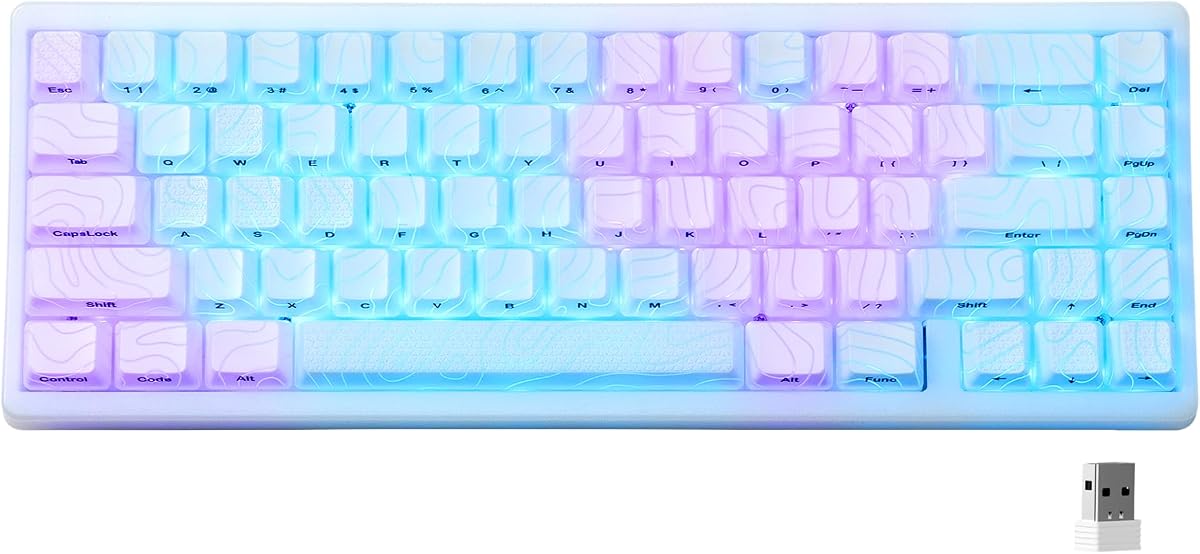
The RK Royal Kludge X87 is the gateway gasket board in this pack: an eighty-six-key wired 75% with a purple shell, ice-blue backlight, creamy hot-swap switches, and a five-layer foam story that includes Poron cotton between PCB and case. RK markets it as beginner-friendly mechanical bliss—plug in, type, and get the soft sound people upgrade for—without demanding VIA literacy or a parts shopping list. That framing is accurate if you accept ABS keycaps and a single-color lighting theme.

  • 86-key wired 75% gasket mount with five-layer foam
  • Hot-swap creamy switches on 3-pin sockets
  • Ice-blue single-color backlight with eleven modes
Check Price →
✓ Pros
  • Approachable gasket intro with Poron cushioning and multi-layer foam
  • Purple shell and ice-blue lighting create a distinct look
  • Hot-swap creamy switches invite first-time customization
  • Wired reliability with software support for light patterns
  • 75% layout keeps essential keys without full-size bulk
✕ Cons
  • ABS shine-through keycaps will polish sooner than PBT rivals
  • Ice-blue single-color RGB is less flexible than full RGB boards
  • Fewer premium touches than Ajazz PBT or Womier screen models

Detailed review

Gasket structure and foam layers reduce vibration and harsh noise compared with empty plastic shells. Creamy switches aim for frictionless travel suited to gaming combos and long typing. Three-pin hot-swap sockets make first switch swaps less intimidating; you can explore heavier linears or tactiles once you know what you dislike about the stock feel. Software support lets you record light patterns among eleven ice-blue modes, which is narrower than sixteen-million-color RGB but cohesive with the purple aesthetic.

Where the X87 trails our top picks is materials hierarchy. ABS shine-through keycaps look bright with ice-blue LEDs but develop fingertip shine faster than the double-shot PBT sets on the Ajazz AK820 or RK’s own R98 Pro. Full RGB fans may find monochrome lighting limiting. There is also no wireless mode, so the X87 competes with the DIERYA DK81E and Ajazz in the wired 75% lane rather than with Kisnt or YUNZII.

Still, as an entry ramp into gasket mounts, it has a clear job. Many buyers bounce off expensive custom kits; the X87 teaches what plate flex and foam do for sound before you spend on a GMK87 barebones project. The purple and ice-blue combination also avoids looking like yet another black rectangle in a dorm room.

Compared with the R98 Pro from the same brand family, the X87 is smaller and numpad-free, with a more playful shell language and less PBT luxury. Compared with the Ajazz AK820, expect a more budget-leaning keycap and lighting story for a similar layout mission. Stabilizer QC remains the usual watch item—test larger keys early.

Choose the X87 if you want a distinctive, affordable wired gasket starter and like ice-blue-on-purple styling. Move up to Ajazz or YUNZII when PBT quality or wireless connectivity becomes the priority.

First upgrade path

Keep the gasket chassis and eventually swap to a PBT keycap set that fits the layout, then experiment with different linear weights. That sequence teaches more than buying a second entire keyboard immediately.

Who should skip the X87

Skip it if you already know you want full RGB, tri-mode wireless, or premium PBT out of the box—those needs are better served elsewhere in this same pack.

Check Price on Amazon →

We may earn a commission at no additional cost to you.

10. YUNZII B75 PRO - Best Tri-Mode Wireless

YUNZII B75 PRO 75% Wireless Mechanical Keyboard

YUNZII B75 PRO 75% Wireless Mechanical Keyboard

9.2/10★★★★★

The YUNZII B75 PRO closes our ranking as a top-pick tri-mode wireless gasket board: eighty-two keys, a multifunctional knob, five-layer padding, creamy pre-lubed Milk linear switches, and Bluetooth / 2.4GHz / USB-C connectivity backed by a 4000mAh battery. Dark grey styling reads more adult than neon battle-station kits, while south-facing RGB and more than twenty lighting modes keep enough flair for a gaming PC. It is the board we recommend when creamy gasket feel and cable-free flexibility both matter.

  • 82-key 75% gasket mount with multimedia control knob
  • Tri-mode BT/2.4G/USB-C and 4000mAh battery
  • Five-layer padding, hot-swap Milk linears, south-facing RGB
Check Price →
✓ Pros
  • Tri-mode wireless with a large battery for work and play
  • Gasket mount and five-layer padding deliver creamy, solid typing
  • Multifunction knob handles volume, RGB, and mode switching
  • Hot-swap PCB supports 3-pin and 5-pin experiments
  • Dark grey finish feels more mature than loud gamer plastic
✕ Cons
  • Deep programming features skew toward Windows software workflows
  • Wireless adds pairing and charging chores wired boards avoid
  • Stock Milk linear character may be too soft for tactile purists

Detailed review

Mount and foam execution match what shoppers mean by gasket creaminess. Five-layer noise cancellation, tuned stabilizers, double-shot keycaps, and pre-lubricated switches work together for a solid, soft acoustic profile. The gasket structure gives the plate float that tray-mount boards lack. You still hear typing—especially on hard desks without a mat—but the tone should be deeper and less brittle than budget plastic boards with no fill.

The knob is more than volume candy. Rotate for sound level and backlight control; long-press behaviors can switch between gaming and office orientations depending on how YUNZII maps modes on your unit. That physical control reduces Fn-layer spelunking during movies and raids. Hot-swap sockets keep the Milk linears from locking you in if you later want sharper tactiles for coding.

Tri-mode life is the practical advantage over Ajazz and DIERYA. Pair a work laptop on Bluetooth, keep a 2.4GHz dongle in the gaming PC, and fall back to USB-C for charging or maximum stability. Battery anxiety is real if you leave RGB at max forever; dim effects when you travel. Programmability for remaps, macros, and custom RGB is strongest in Windows according to the product story—Mac users should verify which features they need onboard.

Versus the Kisnt KN85, YUNZII is the more catalog-enthusiast dark grey alternative with a similar wireless mission; versus the HITIME M67, it keeps a friendlier 75% layout at the cost of topographic IMD theatrics; versus the Womier SK80, it wins on wireless and loses the color multimedia screen. That triangle of tradeoffs is why it sits in our top three rather than only mid-pack.

Buy the B75 PRO if your desk life spans multiple devices and you want gasket creaminess without building a kit. Skip it only if you refuse wireless complexity or already standardized on a wired Ajazz-style daily driver you love.

Multi-device setup pattern

Assign Bluetooth slot one to your laptop, reserve 2.4GHz for the gaming desktop, and label the dongle so it never vanishes in a backpack. Practice the mode toggle once so switching mid-meeting is muscle memory.

Typing and gaming balance

Milk linears favor smooth continuity over crisp tactile feedback. Writers and gamers who like soft bottom-out will feel at home; programmers who rely on tactile bumps should budget for a hot-swap set.

Versus other top picks

Choose YUNZII over Ajazz for wireless. Choose it over Womier when you care more about battery life than a GIF screen. Keep Ajazz if a simple USB-C cable and PBT-forward wired polish still match your only desk.

Check Price on Amazon →

We may earn a commission at no additional cost to you.

Best Gasket Mount Keyboards of 2026 for Creamy Typing

How to Choose a Gasket Mount Keyboard in 2026

What gasket mounting actually changes

In a gasket mount, the plate is suspended on flexible gaskets instead of screwed tightly to the case. That isolation adds flex, softens bottom-out shock, and reduces the sharp case ping common on tray-mount boards. Foam layers between case, PCB, and plate further shape the voice toward creamy or thocky. Marketing language is loud in 2026, so treat “gasket” as a structural claim you verify with materials lists—Poron, EVA, multiple foam sheets—not just a buzzword on the title.

Layout: 60%, 75%, 80%, or 96%/98%

Compact 60% boards like the TMKB T68E and HITIME M67 maximize mouse space but hide arrows and F-keys on layers. 75% boards such as the Ajazz AK820, DIERYA DK81E, Womier SK80, Kisnt KN85, RK X87, and YUNZII B75 PRO keep the keys most people need daily. The GMK87 barebones kit sits in an 80%/TKL-class zone for builders. The RK R98 Pro preserves a numpad for spreadsheet-heavy work. Pick layout before RGB theme—wrong footprint regrets last longer than wrong lighting presets.

Wired purity versus tri-mode wireless

Wired USB-C boards win on simplicity and consistent latency: Ajazz, DIERYA, Womier, TMKB, RK R98 Pro, and RK X87. Tri-mode boards—YUNZII, Kisnt, HITIME M67, and the GMK87 kit—earn their keep when you hop between a desktop, laptop, and tablet. Use 2.4GHz for games, Bluetooth for secondary devices, and wired when charging. Battery capacity around 3000–4000mAh is common in this pack; bright RGB shortens runtime.

Switches, hot-swap, and creaminess

Most boards here ship pre-lubed linear switches marketed as creamy—Blueberry, Milk, Bsun, cream linears, and similar. Linears feel smooth without a tactile bump, which many gamers prefer. Hot-swap sockets on essentially every product in this pack mean you can revise that choice later. If you know you love sharp tactiles or clickies, either hot-swap after purchase or accept that stock cream linears are a soft starting point, not a universal ideal.

Keycaps, knobs, screens, and software

PBT double-shot sets (Ajazz, RK R98 Pro, and several others) resist shine better than thin ABS shine-through caps (more common on entry boards like the X87). Knobs are genuine quality-of-life for volume and sometimes RGB. Screens on the Womier SK80 and GMK87 kit are delightful if you will customize them and pointless if you will not. Software ranges from onboard controls to browser drivers to VIA/QMK—match the toolchain to your patience level.

Finished board versus barebones kit

Nine products in this pack are finished keyboards. The GMK87 is not. Kits unlock maximum choice and often better long-term value for enthusiasts, but they require buying switches and keycaps and accepting a lower out-of-box readiness score. Beginners should start finished; return to kits once you know your preferred switch weight and keycap profile.

Frequently Asked Questions

01

What makes a gasket mount keyboard feel different from a normal mechanical board?

A gasket mount suspends the plate on soft gaskets so the typing surface can flex slightly instead of sitting rigidly screwed to the case. That flex, especially when paired with foam layers, softens impact noise and reduces sharp case ping. The result is often described as creamier or thockier. Mount style is not the only factor—switches, stabilizers, keycaps, and desk surface still matter—but gasket structure is the foundation most modern “creamy” Amazon boards advertise.

02

Are gasket mount keyboards quiet enough for an office?

They are usually less harsh than hollow tray-mount boards, but they are not silent. Pre-lubed linears plus foam can sound softer and deeper, which helps in shared spaces, yet coworkers will still hear rapid typing. If true silence is mandatory, look at specialized silent switches or a quiet membrane board instead of expecting gasket foam alone to erase mechanical noise. A desk mat and moderate typing force also help.

03

Which gasket keyboard in this guide is best for most people?

The Ajazz AK820 is our best overall pick for most desks: 75% layout, genuine gasket and foam materials, hot-swap pre-lubed linears, south-facing RGB, and double-shot PBT keycaps on a simple wired USB-C connection. If you need wireless multi-device use, choose the YUNZII B75 PRO instead. If you want a multimedia screen and themed customization, choose the Womier SK80.

04

Do I need hot-swap sockets on a gasket mount board?

You do not need them to enjoy gasket flex on day one, but they dramatically improve long-term satisfaction. Stock creamy linears are a taste. Hot-swap sockets let you try different weights or tactile bumps without soldering. Every finished board in this pack emphasizes hot-swap for that reason; the GMK87 kit likewise expects you to install the switches you want.

05

What is the difference between the GMK87 kit and the other keyboards here?

The GMK87 is a barebones gasket kit with a screen, knob, tri-mode wireless, and VIA support, but it does not include a full ready-to-type switch and keycap experience the way the Ajazz, Kisnt, or YUNZII boards do. You must buy and install those parts. That DIY path explains both its flexibility and its lower pack rating relative to finished creamy boards.

06

Should gamers pick 60% or 75% gasket keyboards?

Competitive FPS players who want maximum mouse space often prefer 60% boards like the TMKB T68E or HITIME M67 and bind rarely used keys to layers or mouse buttons. Most gamers who also work, study, or stream are happier on 75% boards where Esc, the F-row, and arrows remain obvious. Latency depends more on wired versus 2.4GHz versus Bluetooth than on gasket foam itself.

07

Is a volume knob worth caring about?

Yes for many people. Knobs on boards like the Ajazz AK820, DIERYA DK81E, TMKB T68E, RK R98 Pro, YUNZII B75 PRO, and the kits with knobs make volume and sometimes playback or RGB adjustments faster than keyboard shortcuts. They are not mandatory for sound quality, but they improve daily usability—especially if you constantly adjust game audio or call volume.

08

Can I use these gasket keyboards with a Mac?

Most boards in this pack advertise Windows and Mac compatibility, often with a Win/Mac mode toggle or indicator. Command/Option placement may still need remapping through onboard shortcuts or software. VIA/QMK boards like the HITIME M67 are especially flexible once you set a Mac-friendly layout. Always confirm modifier behavior on your specific machine after switching modes.

09

Why do some gasket boards still rattle?

Gasket mounts improve plate isolation, but stabilizers on spacebars, shifts, and enters can still rattle if they are dry, poorly clipped, or unevenly seated. Unit variation exists even among well-reviewed models. Test large keys on arrival, reseat keycaps, and use return windows when a board arrives with obvious stab issues. Foam fixes hollowness more than it fixes bad stabilizer assembly.

10

How should I prioritize features if I am upgrading from a membrane keyboard?

Prioritize layout comfort first, then gasket-plus-foam sound, then hot-swap, then wireless. Start with a finished 75% board such as the Ajazz AK820 or Kisnt KN85 rather than a barebones kit. Give yourself a week to adapt to mechanical actuation depth before judging the purchase. Add custom switches later if the stock creamy linears are close but not perfect.

Conclusion

Gasket mount keyboards are no longer a niche flex—they are the practical way to get softer, creamier typing from mainstream boards in 2026. In this pack, the Ajazz AK820 is the safest overall wired 75% recommendation, the Womier SK80 is the custom-display showpiece, and the YUNZII B75 PRO is the tri-mode wireless pick that keeps gasket padding without trapping you on one PC.

If your needs are more specific, the lanes are clear: TMKB and HITIME for compact 60% desks, DIERYA and RK X87 for value wired 75% starters, Kisnt for retro beige wireless creaminess, RK R98 Pro when a numpad is non-negotiable, and the GMK87 only when you knowingly want a barebones VIA project. Match layout and connectivity first; let RGB themes break ties second.

Buy the board that fits how you type this month, keep a desk mat under it, and use hot-swap freedom when your taste evolves. Creamy sound is a system—mount, foam, switches, stabs, and keycaps—and every product above gives you a different on-ramp into that system without inventing parts that are not in the pack.