Best Overall Lightweight
Razer Viper V4 Pro

- Focus Pro 50K Gen-3 sensor with up to 930 IPS and Frame Sync tracking
- 49g ultra-light symmetrical shell tuned with pro player input
- HyperSpeed Wireless Gen-2 with true 8K polling for competitive latency
Expert Review & Guide
Picking the best gaming mouse in 2026 is less about chasing a single DPI number and more about how three physical systems work together on your desk: the optical sensor that tracks every micro-adjustment without smoothing or spinout, the shell shape that fits your grip for hours without hot spots, and the weight that lets you flick, stop, and micro-correct at the speed your game demands. Flagship sensors from Logitech HERO 2 and Razer Focus Pro now push well past 35,000 DPI with high IPS ceilings, but a 50K sensor in a shape that fights your hand will still lose aim duels to a mid-tier optic in a shell you actually control. Weight marketing is equally easy to misread—sub-50g wireless icons reward aggressive low-sensitivity play, while adjustable-weight classics like the G502 family still win for people who want deliberate, planted tracking in MMO and FPS hybrids.
This roundup focuses on gaming mice built for competitive shooters, battle royales, MOBAs, and long MMO sessions—wired workhorses and wireless esports shells drawn only from our curated product pack. We span iconic ergonomic shapes with thumb rests, symmetrical pro shells under 60 grams, feature-dense wireless RGB successors, and a budget DeathAdder-style entry point. Across every pick we weigh sensor class and claimed tracking fidelity, whether the silhouette is palm-friendly or claw/fingertip oriented, and how mass (from 49g ultra-lights up through tunable G502 weight systems) changes how the mouse starts and stops on a pad.
Use the top picks if you want a fast shortlist aimed at sensor clarity, shape comfort, and weight control, then dig into the comparison table and full reviews for button layouts, polling rates, battery claims, and who each mouse is actually for. There is no universal winner—only the best match for your grip type, preferred grams on the pad, and whether you prioritize raw esports lightness, programmable density, or an ergonomic right-hand shape that disappears after a four-hour raid.


As an Amazon Associate we earn from qualifying purchases. We may earn a commission at no additional cost to you.
Scan sensor class, shell shape cues, and weight first—those three columns usually decide whether a mouse feels like an esports flick tool, a planted MMO controller, or an everyday ergonomic companion. Ratings reflect aggregated buyer feedback at research time and should be weighed alongside grip type, polling needs, and how much button density you actually use.
The Logitech G502 Hero remains the reference when the conversation turns to shape and weight instead of pure grams-on-a-scale bragging. Its right-hand ergonomic shell has a pronounced palm hump, a deep thumb shelf, and a silhouette that encourages a relaxed palm or hybrid claw grip. That geometry is why so many players still prefer it for long sessions: the mouse fills the hand, reduces the urge to pinch the sides, and keeps the sensor path relatively stable under the palm. If your aim style rewards deliberate tracking more than whip-fast direction changes, this shape is a feature, not a compromise.
Sensor performance is anchored by Logitech’s HERO optic, rated up to 25,600 DPI with zero smoothing, filtering, or acceleration. In practical desktop use you will live far below that ceiling—often between 400 and 1600 DPI depending on game and pad size—but the important claim is consistency. HERO’s sub-micron tracking pitch and high IPS capability mean flicks and stop-and-shoot micro-adjustments do not invent phantom curves. For a wired mouse at this maturity, that reliability is exactly what keeps the G502 Hero relevant against newer wireless flagships.
Weight is where the G502 Hero is uniquely honest. Logitech includes up to five 3.6 g weights you can arrange to bias the balance forward, aft, or centered. Start with no weights if you want the liveliest feel the shell allows, then add mass until horizontal tracking stops overshooting. Many hybrid FPS/MMO players settle somewhere in the middle: enough grams to plant the cursor on a headshot, not so many that wrist flicks feel like shoving a paperweight. Few mice in this pack let you experiment that directly.
Button density is part of the shape story. Eleven programmable controls, a dual-mode hyper-fast scroll wheel, and LIGHTSYNC RGB give the G502 Hero a cockpit feel that thin symmetrical mice refuse to match. Mechanical switch tensioning with metal spring and pivot hardware aims for a crisp primary click, which pairs well with the heavier shell—you feel the actuation instead of floating over it. On-board memory matters if you swap between a gaming desktop and a travel laptop without reinstalling software every time.
Tradeoffs are clear. Competitive players who have migrated to 50–60 g wireless shells will find even a stripped G502 Hero relatively stout, and the cable is a real consideration on large low-sensitivity pads unless you use a bungee. Left-handed users are out of luck. Still, if your priority list is sensor honesty, a supportive ergonomic shape, and tunable weight rather than tournament grams, the G502 Hero is the most intentional adjustable-mass option in this roundup.
Pick this mouse if you palm or hybrid-claw with a medium-to-large hand, play a mix of shooters and button-heavy games, and want to dial mass instead of committing to an ultra-light shell. It is also a strong desk mouse for people who edit video or browse between matches and still want a gaming-grade sensor.
Disable Windows enhance pointer precision, set a single DPI step in G HUB that matches your pad width, and add weights one at a time while doing the same flick drill. If overshoot increases when you add rear mass, move weight forward or remove a slug—balance changes feel as much as total grams.
Against the Viper V4 Pro or Superlight 2, the G502 Hero trades raw agility and wireless freedom for button density and tunable heft. Choose those when shape-and-weight priorities skew to low mass and symmetry; stay here when you want the mouse to feel planted and loaded with controls.
We may earn a commission at no additional cost to you.

The Logitech G PRO X2 SUPERSTRIKE is the pack’s clearest statement that modern gaming mice are no longer only about grams and DPI tables. Built with pro input and engineered around customizable magnetic analog switches, it targets players who care how a click starts, resets, and feels under the fingertip as much as how the sensor tracks. At 61 grams with a thin-wall case and large UHMWPE feet, the mass is competitive without chasing the absolute lightest shell in the list—an important nuance if ultra-sub-50g mice feel twitchy in your hand.
Sensor-wise, HERO 2 is the headliner: tracking beyond 888 IPS, up to 44,000 DPI, and 88 g-force claims with the usual Logitech promise of no smoothing, acceleration, or filtering. That combination matters when you combine large arm flicks with tiny wrist corrections; the optic has to stay locked through both regimes. Pair it with LIGHTSPEED wireless and lag-free 8 kHz polling (as tested on Logitech’s reference pad conditions) and you get a sensor-plus-link stack aimed squarely at tournament cadence rather than casual browsing.
Shape remains in the pro-symmetrical family Logitech has refined for years: relatively low profile, side curves that work for claw and fingertip, and less palm fill than a Basilisk or classic G502. If you already like Superlight-class silhouettes, the SUPERSTRIKE will feel familiar while the click system is what changes muscle memory. The 0.7 mm thin-wall construction and glide feet reinforce the lightweight story—effortless starts and stops on cloth pads without the hollow rattle some ultra-lights develop.
Where this mouse separates itself is the Haptic Inductive Trigger System and rapid-trigger magnetic switches. Ten-level actuation points and five-level rapid trigger reset let you shorten the travel for spam-heavy titles or lengthen it for deliberate clicks. Logitech claims roughly 30 ms faster clicks in its peak configuration narrative, but the more useful framing is consistency: you tune a click profile the way keyboard players tune actuation. Haptic feedback can reinforce confirmation without relying solely on a mechanical bump, which some players love and others will disable on day one.
Battery life is quoted in a 60–90 hour window depending on settings, with USB-C charging in the box and POWERPLAY 2 enablement for continuous wireless play if you already own the pad ecosystem. Advanced features require G HUB, so expect a software session before the mouse feels “yours.” For players who prioritize sensor pedigree, a modern lightweight shape, and the ability to rewrite click behavior, the SUPERSTRIKE is the most experimental—and most tunable—pro mouse here.
Choose the SUPERSTRIKE if you play competitive shooters or hybrid esports titles, already like symmetrical Logitech pro shapes, and want to customize actuation and haptics rather than only DPI steps. Skip it if you want a dense MMO side cluster or a deep palm-rest ergonomic.
At 61g it sits between the 49–54g Viper Pro line and heavier ergonomic shells. If Superlight 2 feels perfect at 60g but you want next-gen click tech, this is the lateral move. Keep DPI conservative; HERO 2’s ceiling is headroom, not a target.
We may earn a commission at no additional cost to you.
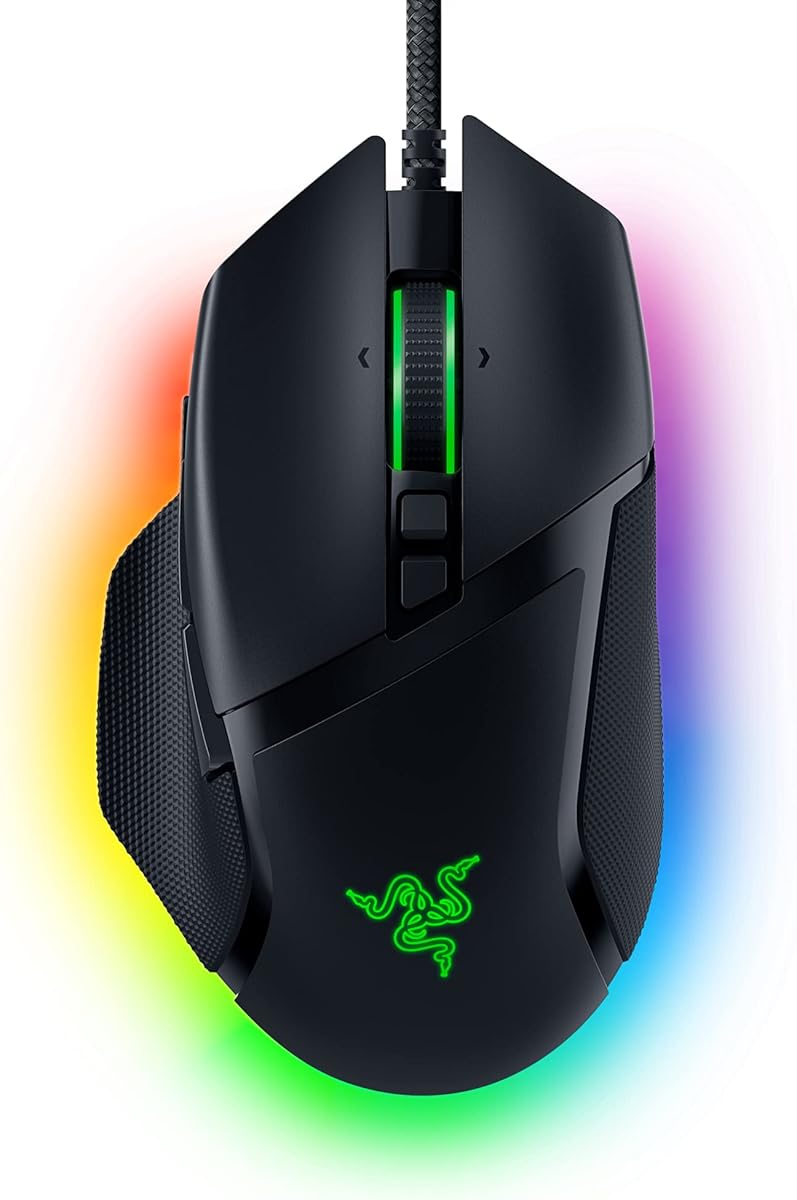
If shape is your primary buying axis, the Razer Basilisk V3 is the wired ergonomic answer in this pack. The iconic silhouette with a dedicated thumb rest has been iterated for years because it works: the hand sits in a guided posture, side buttons fall under the thumb without a reach, and the palm gets continuous support that thin symmetrical mice rarely provide. For medium and larger right hands using palm or relaxed claw grips, that geometry can reduce fatigue more effectively than shaving another five grams.
The Focus+ 26K DPI optical sensor is Razer’s intelligent tracking stack for this generation of Basilisk—zero smoothing for crisp response and pixel-precise accuracy, with software helpers that reward calibration on your pad. Competitive players who live at low DPI will appreciate that the sensor’s job is honesty, not inventing a “smooth” curve. Combined with Optical Mouse Switches Gen-2 at a claimed 0.2 ms actuation and a long click lifecycle, the click-and-track loop feels sharp even though the shell itself is built for control rather than pure weight weenie status.
Weight here is about planted confidence. The Basilisk V3 does not advertise a 49g race number; it feels like a mouse that wants you to guide the crosshair instead of whipping the shell through air. That pairs naturally with its HyperScroll tilt wheel—free-spin for blasting through inventories or feeds, tactile mode for discrete weapon or ability steps. Eleven programmable buttons extend the shape’s advantage: because the thumb rest positions your digit, secondary controls remain reachable without contorting the grip that keeps the sensor stable.
Chroma RGB across eleven lighting zones is spectacle, not aim, but it does reinforce the Basilisk’s identity as a full-featured desk centerpiece. Synapse configuration is effectively required to unlock the mouse’s best self—button maps, DPI stages, scroll behavior, and lighting scenes. Remember to disable Windows enhance pointer precision so the Focus+ sensor’s raw tracking is what your game sees.
Choose the Basilisk V3 when you want ergonomic shape first, a strong 26K-class sensor second, and wired simplicity third. If you need wireless endurance or the lightest possible flick tool, look at the Viper Pro line or Superlight 2 instead. For MMO, immersion-heavy RPGs, and FPS players who prefer a guided right-hand shell over a flat symmetrical puck, this remains one of the most coherent shape-led picks available.
Best for right-handed palm and hybrid grips that welcome a thumb rest. If your fingertips barely reach the front edge or you prefer a flat top for aggressive claw, try a Viper or Superlight shape instead.
Both are ergonomic, button-rich wired (or wired-heritage) control mice with flagship-era sensors. G502 Hero wins on physical weight tuning; Basilisk V3 wins on thumb-rest guidance, HyperScroll personality, and Razer’s optical switch feel. Pick based on which shell fills your hand more naturally.
We may earn a commission at no additional cost to you.

The G502 X Plus is what happens when Logitech refuses to abandon one of gaming’s most recognized shapes and instead wireless-enables it with modern internals. The silhouette is still unmistakably G502—sculpted right-hand ergonomics, a tall-ish profile, and a control layout that assumes you want more than five buttons—but the chassis is redesigned around LIGHTFORCE hybrid switches, LIGHTSPEED wireless, and HERO 25K sensing. If you loved the Hero wired shape and felt held back by a cable, this is the direct upgrade path inside the pack.
Sensor performance lands on HERO 25K: sub-micron precision with zero smoothing, filtering, or acceleration. That is the same philosophical tracking stack that made the wired Hero trustworthy, now paired with a wireless protocol Logitech claims is substantially more responsive than the previous generation. For shape-and-weight buyers, the takeaway is continuity: your aim muscle memory transfers because the optic behaves predictably while the shell still guides the palm the way a G502 should.
Weight and balance feel like a modernized control mouse rather than a Viper-class feather. You do not get the classic removable slug tray in the same Hero sense, but the overall mass still reads as planted compared with 49–60g tournament shells. That is desirable for players who overshoot on ultra-lights. The dual-mode scroll—hyper-fast free spin versus precise ratcheting, plus tilt inputs—keeps the productivity and MMO advantages of the lineage intact.
LIGHTFORCE switches are the click story: hybrid optical-mechanical behavior aiming for fast actuation with a crisp mechanical-style response. The DPI-shift button is reversible and removable, which is a small but meaningful shape customization for different thumb lengths and grip angles. LIGHTSYNC RGB with eight LEDs is theatrical; battery optimization features help keep the light show from becoming the whole runtime story, and POWERPLAY support means the mouse can charge at rest and in play if you invest in that ecosystem.
Thirteen buttons and a wireless ergonomic shell make the G502 X Plus a strong pick for players who refuse to choose between feature density and cord-free desks. It will not beat the Viper V4 Pro on raw weight or the Superlight 2 on minimalist tournament purity. It will, however, feel like home if your hand already knows the G502 map and your priority is keeping that shape while upgrading sensor-link modernity.
Move to X Plus when cable drag bothers your tracking or you want LIGHTFORCE clicks and POWERPLAY. Stay on Hero wired if you specifically want the physical weight-tuning tray and a simpler, proven package.
Palm and hybrid grips benefit most. Set DPI once, map the shift button thoughtfully, and use the scroll toggle intentionally—free-spin for desktop speed, ratchet for in-game precision—so the shape’s control theme stays coherent.
We may earn a commission at no additional cost to you.
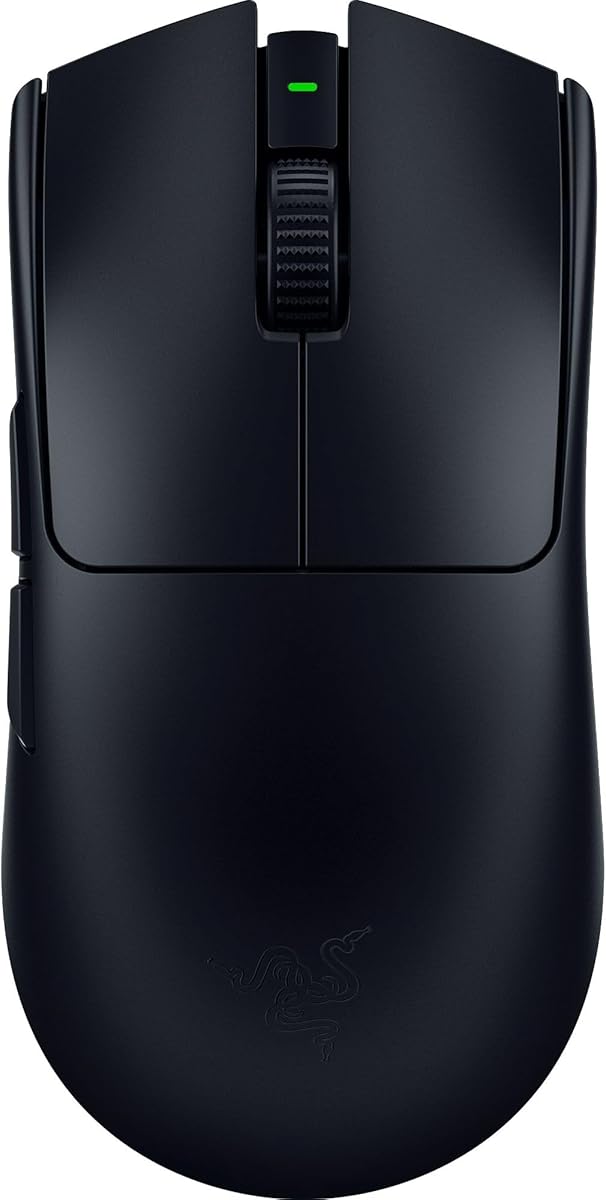
The Razer Viper V3 Pro is the pack’s 54-gram argument for balanced ultra-light play. Designed with world-class esports pros, it aims for a perfectly balanced shell that makes swift, precise flicks match intention—marketing language that actually maps to how weight distribution feels when you stop a swipe on a head-level target. At 54g it is lighter than Superlight 2’s 60g and the SUPERSTRIKE’s 61g, yet not as extreme as the V4 Pro’s 49g, which makes it a useful middle rung if you are stepping down from heavier mice.
Sensor duty falls to the Focus Pro 35K Optical Sensor Gen-2, with intelligent functions, glass-inclusive surface versatility, and 1-DPI step adjustments for granular aim control. That last detail matters more than the 35K headline: being able to nudge sensitivity one DPI at a time helps you match eDPI across games without coarse jumps. Zero-compromise tracking claims only matter if your pad and Windows settings cooperate—disable enhance pointer precision and calibrate in Synapse for best results.
Shape is classic Viper: symmetrical, low, and built for claw and fingertip first, with palm users of smaller hands sometimes finding a fit and larger palm grippers often wanting more hump. The point of this shape is freedom of angle and easy repositioning, not guided ergonomics. Eight programmable controls keep the top simple so the shell can stay light; if you need a dozen macros under the thumb, this is the wrong family.
HyperSpeed wireless plus HyperPolling up to 8000 Hz is the latency story, with an optimized dongle design aimed at noisy tournament RF environments. Optical Switches Gen-3 advertise a 90-million click lifecycle, 0.2 ms actuation, and no debounce delay—important when weight is low and click timing becomes part of your aim rhythm. Battery life up to 95 hours supports long practice blocks without babysitting a cable every evening.
Consider the Viper V3 Pro if you want a proven ultra-light symmetrical shell with a flagship-tier 35K sensor and 8K polling, but do not need the absolute newest 50K/49g V4 Pro step. It remains one of the cleanest sensor-shape-weight triangles in the pack for competitive FPS players who have already decided against heavy ergonomic mice.
Coming from a 80–100g mouse, spend a week at your old eDPI before changing sensitivity. Ultra-light shells amplify both good and bad technique; give the 54g balance time before blaming the sensor.
V4 Pro improves on grams, sensor generation, and wireless efficiency. V3 Pro still makes sense when you find a deal, prefer its exact balance, or simply do not need the newest Focus Pro 50K stack.
We may earn a commission at no additional cost to you.

The Razer Viper V3 HyperSpeed proves that “lightweight” is relative and that sensor placement plus mass centralization can matter as much as the raw number on the scale. At 82 grams with a single AA cell, it will not win a weigh-off against the Viper V3 Pro or V4 Pro, but Razer’s mass-centralized design targets seamless, consistent swipes so you are not fighting a battery brick in the stern. For players who hate charging cables yet still want a modern Focus Pro optic, that trade is intentional.
The Focus Pro 30K optical sensor uses forward sensor placement and intelligent functions for finer accuracy and broader surface support, including glass. Forward placement can change how the cursor maps to your hand’s pivot—some aimers prefer it for tracking-heavy titles because the optic sits closer to where fingertips steer. As always, DPI extremes are headroom; competitive users should tune 1:1 feel in Synapse and lock Windows pointer precision off.
Shape follows the Viper symmetrical language: low sides, ambidextrous-friendly top, and a shell that rewards claw and fingertip more than deep palm rest seekers. Six programmable buttons keep the layout simple. The on-mouse DPI control on top is a practical touch for shared PCs or genre hopping between a low-sens tactical shooter and a higher-sens arena title without opening software mid-match.
Battery life up to 280 hours on HyperSpeed is the headline practical advantage. Swapping an AA cell can be faster than hunting a USB-C cable under a desk, and multi-device HyperSpeed support helps streamline dual-device setups. Mechanical Switches Gen-2 with gold-plated contacts and a 60-million click rating prioritize crisp execution and durability, even if optical switch fans will prefer the Pro line’s Gen-3/Gen-4 optics.
Buy the Viper V3 HyperSpeed when weight priorities are “light enough and balanced” rather than “lightest possible,” and when sensor quality plus months-long battery endurance outrank rechargeable ecosystems. It is one of the smarter value-oriented wireless options in the pack for players graduating from heavy office mice without jumping straight to 49g flagships.
Ideal for students, LAN travelers, and anyone who wants HyperSpeed performance without managing lithium recharge rituals. Also sensible as a backup tournament mouse that lives on spare AAs in a backpack.
Treat 82g as a modern mid-light, not an ultra-light. If your goal is specifically sub-55g flick speed, step to Viper V3 Pro, V4 Pro, or Superlight 2 instead.
We may earn a commission at no additional cost to you.

Razer Basilisk V3 X HyperSpeed
The Basilisk V3 X HyperSpeed is the wireless ergonomic pick for players who care more about shape comfort and endurance than winning a sensor DPI war. It preserves the signature Basilisk form that supports different grips while putting numerous easy-access buttons under the thumb—nine programmable controls in this cut. If the wired Basilisk V3’s guided right-hand geometry is what you love, but you refuse another cable on the desk, this is the pack’s natural bridge.
Sensor specification steps down to Razer’s 5G Advanced 18K optical sensor. That is not the Focus Pro flagship stack, yet for the vast majority of players running 400–1600 DPI it remains responsive and pixel-precise with zero spinout tracking claims. Obsessing over 26K versus 18K on a marketing sheet matters less than whether the shell keeps your hand relaxed enough to aim. Here, shape leads and sensor follows at a still-competent ceiling.
Weight and wireless behavior prioritize longevity. Up to 285 hours on HyperSpeed and up to 535 hours on Bluetooth (usage dependent) means the mouse is built to play the long game. HyperSpeed covers competitive latency needs; Bluetooth covers classwork or travel when you want multi-device convenience. That flexibility is rare among pure esports feathers that only speak 2.4 GHz dongle.
Mechanical Switches Gen-2 with gold-plated contacts target a 60-million click lifespan and crisp execution. Chroma RGB adds identity and game-reactive flair without changing how the sensor tracks. Synapse remains the place to map the nine controls, tune DPI stages, and keep Windows pointer acceleration off so the optic’s raw output stays clean.
This mouse will not dethrone the Viper V4 Pro for ultra-light sensor supremacy, and it should not try to. It exists for right-handed players who want ergonomic shape, solid wireless manners, and enough sensor fidelity for confident aim—without paying the complexity tax of the most extreme pro shells. As a shape-first wireless daily driver, it earns its spot.
Choose wired V3 for Focus+ 26K, optical switches, and HyperScroll theatrics. Choose V3 X HyperSpeed for dual wireless modes, extreme battery life, and similar ergonomic guidance with a slightly simpler control story.
If you demand glass tracking tricks, 1-DPI pro tuning, or 8K polling flagships, look at Focus Pro Vipers or HERO 2 Logitechs. If you want comfort and battery first, 18K is not the bottleneck you think it is.
We may earn a commission at no additional cost to you.
The Razer Viper V4 Pro is our best overall lightweight pick because it tightens the sensor-shape-weight triangle further than anything else in the pack. At 49 grams—about nine percent lighter than the prior generation—it is built with competitive pro input for faster, more agile control. That mass is not a party trick; it changes how quickly you can reverse a flick and how little fatigue accumulates across a long scrim block, provided the symmetrical shell matches your grip.
The Focus Pro 50K DPI Optical Sensor Gen-3 is the clearest sensor headline here, with tracking up to 930 IPS and 90G acceleration plus Frame Sync that aligns sensor data with the PC to reduce latency. In practical terms, you get a high ceiling for speed and a software stack (Synapse 4) that still lets you work in 1-DPI steps and adjust mouse rotation. Competitive players should ignore vanity DPI and instead use that granularity to match cross-game eDPI with forensic care.
Shape stays true to Viper esports DNA: low, symmetrical, and unapologetically built for claw and fingertip agility rather than palm-filling comfort. Included grip tape in the box acknowledges that ultra-light shells need surface friction control as much as raw grams. The optical scroll wheel swaps mechanical uncertainty for more consistent actuation and durability—a small detail that matters when scroll is bound to weapons or abilities in tactical titles.
HyperSpeed Wireless Gen-2 underpins the connection story with true 8000 Hz polling and a claimed substantial latency reduction versus prior gear, alongside better power efficiency. Battery life up to 180 hours at 1000 Hz or up to 45 hours at 8000 Hz lets you choose endurance versus minimum latency. Optical Switches Gen-4 aim for industry-leading responsiveness with a true tactile click feel and a 100-million-click lifespan. USB-C charging and a HyperSpeed dongle ship in the box so you can play wireless or wired immediately.
If your priorities are the best sensor class in the pack, a pro symmetrical shape, and the lowest flagship weight available here, the Viper V4 Pro is the blunt recommendation. Players who need thumb rests, eleven-plus macros, or a heavier planted feel should look at Basilisk or G502 options instead. For aim-centric FPS and esports titles in 2026, this is the sharpest expression of light, precise, and shape-honest design in the roundup.
Right- or left-friendly symmetrical grippers who play low to mid eDPI competitive shooters, already like Viper or Superlight shapes, and want maximum sensor headroom with sub-50g mass. Not ideal as a first mouse for someone who loved a heavy office ergonomic and refuses to relearn control.
Install Synapse 4, set polling based on whether you value battery or minimum latency, apply grip tape if needed, and spend real aim-trainer time before changing sensitivity. The sensor is ready; your mechanics need a week to trust 49 grams.
Superlight 2 offers HERO 2, 60g familiarity, and POWERPLAY ease in a championship-proven Logitech shell. Viper V4 Pro answers with lower weight, Focus Pro 50K Gen-3, and Razer’s latest optical click/scroll stack. Choose based on ecosystem and which shape your hand prefers in a blind grip test.
We may earn a commission at no additional cost to you.

The Razer DeathAdder Essential exists to remind buyers that shape can matter more than a 50K DPI sticker—especially when you are entering gaming mice or replacing a painful office puck. The classic DeathAdder right-hand curve supports the palm, angles the side grips naturally, and has taught millions of players what a “gaming shape” feels like. Rubberized flanks add friction so the shell does not twist during aggressive turns, which is a practical weight-and-control feature even though Razer does not market this model as an ultra-light.
The 6,400 DPI optical sensor is the most modest optic in the pack, with on-the-fly sensitivity buttons for gaming and creative work. That ceiling is not a joke for real use: many professionals still compete at four-digit DPI or lower. What you give up versus Focus Pro or HERO 2 is high-IPS headroom, advanced intelligent functions, and the confidence flagship sensors advertise on odd surfaces. On a standard cloth pad at sane sensitivities, the Essential still tracks well enough to learn aim fundamentals.
Weight is simply “normal wired mouse” territory—heavier than the Viper Pro line, generally easier for newcomers than a 49g feather that punishes poor finger tension. The ridged rubberized scroll wheel prioritizes controlled scrolling in high-stakes moments rather than free-spin spectacle. Five programmable buttons via Synapse cover the essentials: left, right, wheel, and two thumb inputs for melee, push-to-talk, or abilities.
Mechanical switches rated up to 10 million clicks are serviceable rather than class-leading. This is not the mouse you buy to win a switch durability contest against Gen-4 optical flagships; it is the mouse you buy to get a trustworthy ergonomic shape and a workable sensor without complexity. As a wired device it also removes battery anxiety entirely—plug in, disable enhance pointer precision, and play.
Recommend the DeathAdder Essential when budget and comfort lead, and when you want to discover whether an ergonomic right-hand shape fits before investing in Basilisk or G502 feature stacks. If you already know you need flagship sensors, 8K polling, or sub-60g mass, skip ahead to the Vipers or Logitech pro shells. As a shape school and honest entry point, it still belongs in a 2026 best list.
Use the Essential to lock grip style and a single DPI. When you outgrow the sensor or want wireless lightness, migrate within the same ergonomic family (Basilisk) or jump to symmetrical pro mice if your grip evolved toward claw/fingertip.
Basilisk V3 is the grown-up ergonomic: better sensor, more buttons, optical switches, HyperScroll. DeathAdder Essential is the affordable on-ramp with a related comfort philosophy and far fewer extras.
We may earn a commission at no additional cost to you.
The Logitech G PRO X Superlight 2 is the control group for modern pro mice: a 60g symmetrical shell, HERO 2 sensing, and a design brief written with championship players. If you care about sensor honesty, a neutral shape that does not force a thumb rest, and a weight that is light without being the most extreme number on the shelf, this is still one of the safest recommendations in gaming. It is the mouse many people already know how to aim with—and that familiarity is a performance feature.
HERO 2 headlines the sensor story with tracking over 888 IPS, up to 44,000 DPI, and precise calibration with zero smoothing, acceleration, or filtering. That combination is why Superlight-class mice dominate serious aim discourse: the optic does not invent motion, and it keeps up when your hand does something violent on a large pad. Pair that with 8 kHz polling and you get a wireless link tuned for competitive refresh cadences rather than casual 125 Hz office leftovers.
Shape is symmetrical and low, with a top profile that suits claw and fingertip grips exceptionally well and palm grips of certain hand sizes adequately. There is no Basilisk-style guided shelf; your hand chooses its angle. Five buttons keep the chassis simple and light. Zero-additive PTFE feet are a quiet hero of the weight conversation—glide quality changes how heavy a 60g mouse feels in motion, and good feet make starts and stops more predictable.
LIGHTFORCE hybrid switches provide the click side of pro precision, aiming for reliable actuation with a tactile sense that pure optical clicks sometimes lack. USB-C charging, roughly 95-hour battery life, and POWERPLAY support mean you can treat the mouse as infrastructure: play, dock on a charging pad, repeat. That ecosystem maturity is part of why the Superlight 2 remains compelling even as lighter Vipers arrive.
Pick Superlight 2 when you want the proven Logitech pro sensor-and-shape formula at 60 grams with software and charging ecosystems that just work. Choose Viper V4 Pro if you specifically want 49g and Focus Pro 50K. Choose SUPERSTRIKE if customizable magnetic clicks matter more than minimalism. As a sensor-first classic with a balanced lightweight shell, Superlight 2 still defines the center of the market.
Competitive and aspiring competitive FPS players who want a known symmetrical shape, flagship HERO 2 tracking, and POWERPLAY optionality. Also excellent for right or left-handed users who need ambidextrous button basics.
You cannot add slugs, so tune feel with pad friction, grip tape, and skates if needed. If 60g still feels fast, raise eDPI slightly less often than you think—stabilize technique first.
We may earn a commission at no additional cost to you.
DPI marketing is the loudest part of any gaming mouse listing and the least useful decision tool once you pass a few thousand DPI. What matters is whether the sensor tracks without smoothing, acceleration, or filtering; how it behaves at high IPS when you flick; and whether it stays locked on your preferred pad surface. In this pack, HERO and HERO 2 (Logitech) and Focus+/Focus Pro generations (Razer) are the serious options, while the DeathAdder Essential’s 6400 DPI optic is a competent entry sensor rather than a flagship.
Treat maximum DPI as headroom. Most aim-focused players should pick a single native-feeling sensitivity, disable Windows enhance pointer precision, and use manufacturer software only for step tuning, angle snapping off, and polling rate. If you play on glass or unusual surfaces, prioritize Focus Pro models that explicitly call out wider surface support. If you play on a standard cloth pad, every flagship sensor here is more than enough—choose based on shape and weight fit next.
Shape is the comfort and control foundation. Ergonomic right-hand shells—G502 Hero, G502 X Plus, Basilisk V3, Basilisk V3 X HyperSpeed, DeathAdder Essential—fill the palm, often add a thumb rest or deep shelf, and reduce grip tension for long sessions. Symmetrical pro shells—Viper V3 Pro, Viper V3 HyperSpeed, Viper V4 Pro, Superlight 2, SUPERSTRIKE—stay lower and more neutral, rewarding claw and fingertip grips and enabling left-handed button layouts on true ambidextrous designs.
Do a simple test: rest your hand on the mouse without clutching. If your palm has gaps that force your fingers to pinch, try a taller ergonomic. If your palm feels trapped and you cannot micro-adjust with fingertips, try a lower symmetrical shell. Hand size matters, but grip style matters more—small hands can palm a Viper, and large hands can fingertip a Basilisk poorly. Borrow or use generous return windows when possible; shape mismatch is the most common reason a “great sensor” mouse feels terrible.
Weight changes the physics of your aim. Sub-55g mice (Viper V3 Pro at 54g, Viper V4 Pro at 49g) accelerate and decelerate with less force, which helps low-sensitivity arm aimers and players who fight fatigue in long tournaments. The 60–61g Logitech pro shells (Superlight 2, SUPERSTRIKE) sit in a widely loved middle ground. Mid-light AA wireless like the Viper V3 HyperSpeed at 82g can still feel agile if mass is centralized. Heavier ergonomics like G502-class mice prioritize stability and intentional tracking, especially when tunable weights are available.
Heavier is not “worse.” If ultra-lights make you overflick, you are not failing—you may simply prefer more inertia. The G502 Hero’s weight system exists exactly for that discovery process. Change one variable at a time: keep DPI constant for a week when you drop twenty grams, then reassess. Pair weight choices with pad friction; a fast pad plus a 49g mouse is a different instrument than a control pad plus the same shell.
A great wired sensor can still beat a mediocre wireless setup, but modern LIGHTSPEED and HyperSpeed implementations in this pack are competitive enough that cable preference is mostly lifestyle. Choose wired (G502 Hero, Basilisk V3, DeathAdder Essential) for simplicity and zero battery planning. Choose wireless for desk clarity and bag life. Polling rates up to 8 kHz appear on several flagships; they matter most on high-refresh monitors and when your system can sustain the interrupt load—otherwise 1000 Hz remains a stable default.
Shape first for comfort and control consistency, weight second for how your aim accelerates and stops, sensor third among modern flagships because HERO 2 and Focus Pro optics are all excellent on normal pads. A perfect sensor in a painful shell loses to a slightly older optic in a shape your hand trusts. Use sensor tier to break ties once shape and weight class are settled.
No. Accuracy comes from tracking fidelity without smoothing or acceleration, stable polling, and your ability to repeat motions—not from setting 20,000 DPI. Higher maximum DPI is headroom for high-resolution displays or tiny pads, but most players perform best at lower, controlled sensitivities. Prefer sensors that advertise zero smoothing and strong IPS performance, then tune DPI to your arm and pad size.
There is no universal number, but many competitive players now prefer roughly 49–65 grams for wireless pro shells. The Viper V4 Pro at 49g and Viper V3 Pro at 54g serve the ultra-light end; Superlight 2 at 60g and SUPERSTRIKE at 61g serve the classic pro middle. If you overshoot constantly after switching lighter, try a control pad or a slightly heavier shell before blaming talent.
Choose ergonomic (G502, Basilisk, DeathAdder) if you palm grip, want a thumb rest, or play long RPG/MMO sessions. Choose symmetrical (Viper line, Superlight 2, SUPERSTRIKE) if you claw or fingertip, want left-hand flexibility, or prefer minimal bulk for flick-heavy shooters. When unsure, prioritize the shape that lets your hand rest without tension during a five-minute idle hover over the pad.
Only if you have a high-refresh monitor, a system that handles high interrupt rates cleanly, and a desire to minimize click-to-photon latency in competitive play. Several mice here support up to 8000 Hz, but 1000 Hz remains entirely viable and often more battery-friendly. Get shape, weight, and sensor quality right before treating 8K as mandatory.
Yes, if you value tunable weight, eleven-button control, and a supportive ergonomic shape more than tournament grams. The G502 Hero’s HERO sensor remains precise for real gameplay, and the weight tray is still unique in this pack. It is the wrong buy only if you have already committed to sub-60g symmetrical shells for competitive FPS.
Both are flagship-class optical sensors aimed at high IPS, high DPI ceilings, and clean tracking without smoothing. HERO 2 appears in Logitech pro wireless mice here with strong IPS and DPI ratings; Focus Pro generations in Razer Vipers emphasize intelligent functions, fine DPI steps, and broad surface performance including glass on newer units. In practice, pick the sensor attached to the shape you prefer—the software ecosystems and shell designs differ more than raw aim capability for most players.
Absolutely. Extra mass can reduce micro-tremor and overflick for players who aim with deliberate tracking, especially in tactical shooters. Tunable weights on the G502 Hero exist because planted control is a legitimate preference. Ultra-light mice shine for rapid direction changes and low fatigue, but they are not automatically more accurate.
Start with the Logitech G502 Hero, Logitech G502 X Plus, or Razer Basilisk V3 for maximum programmable density and ergonomic thumb access. The Basilisk V3 X HyperSpeed is the wireless ergonomic alternative with nine controls. Pure five-button pro mice like Superlight 2 and the Viper Pros are poorer fits when your rotation depends on many remaps.
Disable enhance pointer precision in Windows, install G HUB or Razer Synapse as appropriate, set a single DPI stage, turn off angle snapping if present, choose 1000 Hz unless you know you want higher polling, and play familiar aim routines before changing sensitivity. Give yourself several sessions before judging weight—muscle gain and tension adapt slower than marketing cycles.
The best gaming mouse for 2026 is the one whose sensor you can trust, whose shape your hand stops fighting, and whose weight matches the way you start and stop a swipe. In this pack, the Razer Viper V4 Pro leads for ultra-light competitive play with a Focus Pro 50K Gen-3 sensor and 49g shell; the Logitech G PRO X Superlight 2 remains the pro-classic HERO 2 pick at a balanced 60g; and the Logitech G502 Hero still owns adjustable weight and ergonomic control for players who want mass they can tune.
Everyone else fills a clear lane: SUPERSTRIKE for customizable click feel on a 61g HERO 2 body, Basilisk V3 for wired thumb-rest comfort, G502 X Plus for wireless G502 evolution, Viper V3 Pro for 54g Focus Pro speed, Viper V3 HyperSpeed for AA endurance with a 30K sensor, Basilisk V3 X HyperSpeed for wireless ergonomic value, and DeathAdder Essential for budget shape education. Match grip first, weight class second, sensor tier third.
Ignore vanity DPI wars long enough to do a real grip test. When sensor, shape, and weight finally agree with how you already aim, the mouse disappears—and that is the actual upgrade.