Best Overall
Razer Basilisk V3 Customizable RGB Wired Ergonomic Gaming Mouse
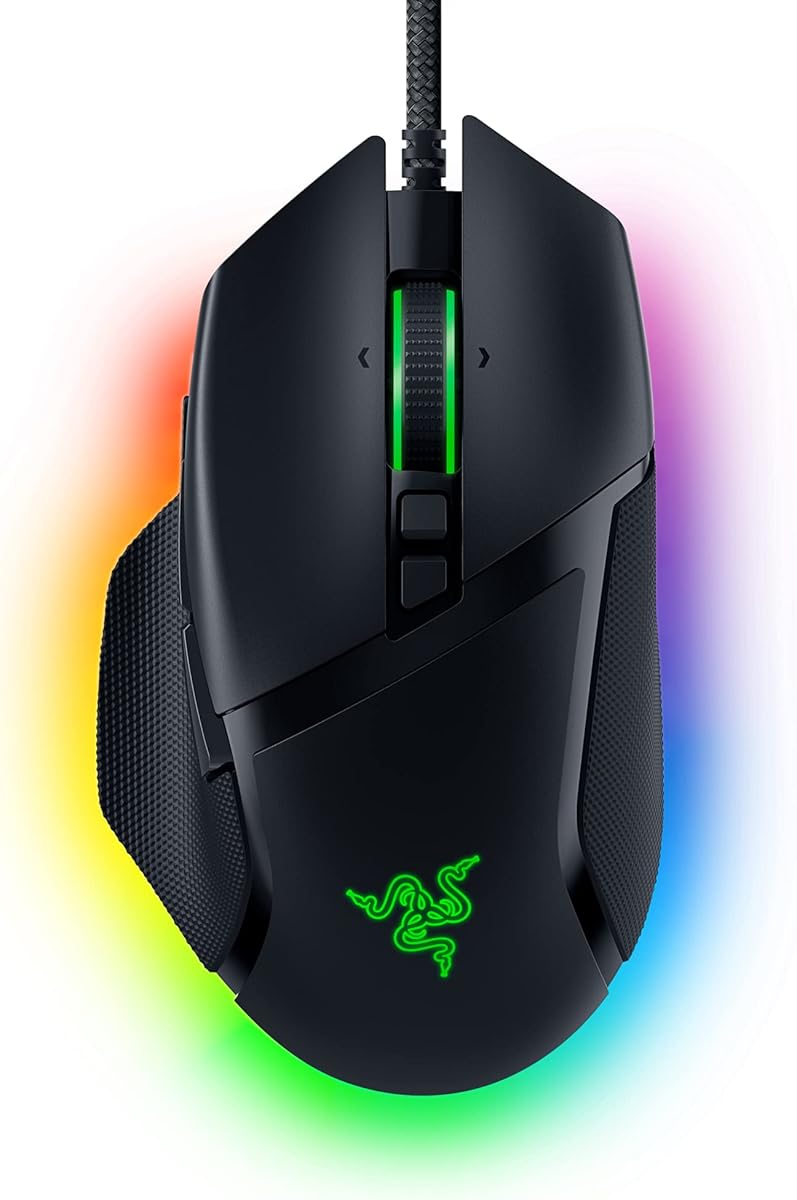
- Focus+ 26K sensor with crisp optical Gen-2 switches
- Eleven programmable buttons plus HyperScroll tilt wheel
- Full Chroma zones on a proven right-hand ergonomic shell
Expert Review & Guide
Finding a gaming mouse that actually feels competitive without stretching a budget is harder than the marketing blurbs suggest. Sensor specs climb into the tens of thousands of DPI, RGB lighting zones multiply, and wireless claims promise week-long battery life—yet the mouse that wins on paper often loses on the pad once your hand shape, grip style, and favorite genres enter the picture. This roundup focuses on models that routinely land in a realistic under-fifty shopping lane while still delivering tracking you can trust in ranked shooters, MMO ability spam, and long creative sessions that blur into late-night raids.
We pulled every product from a fixed pack spanning brand-name staples and lighter value wireless options. That means you will see heavyweights like the Razer Basilisk V3 and Logitech G502 HERO next to honeycomb ultralights and tri-mode rechargeable mice that trade polish for flexibility. The goal is not to crown a single universal winner for every desk. It is to map each mouse to the player who will actually enjoy it: claw-grip flick aimers, palm-grip MMO grinders, laptop travelers who need Bluetooth and a dongle in the same shell, and first-time upgraders leaving a stock office mouse behind.
Below you will find three spotlight top picks, a full comparison table for every pack product, deep individual reviews with honest tradeoffs, and a buying guide that walks through DPI, polling rate, switch types, weight, and software without the usual fluff. Read the shortlist if you want a fast answer. Dig into the reviews if your hand size or genre demands a more careful match.


As an Amazon Associate we earn from qualifying purchases. We may earn a commission at no additional cost to you.
Use this table as a scouting pass before the long reviews. Specs emphasize sensor capability, control layout, and build character rather than marketing slogans. Ratings reflect aggregated shopper feedback at the time of packaging. Match shape and connectivity first, then fine-tune DPI and button maps once the mouse is on your pad.
The Razer Basilisk V3 earns the overall pick because it packs the features people actually use every session into a shape that already has a massive install base. The iconic ergonomic shell with a dedicated thumb rest supports the hand instead of forcing a claw you never asked for. Buttons sit where muscle memory expects them, which matters more after hour three of a raid or ranked night than any peak DPI number printed on a box. If you are graduating from a plain office mouse and want one upgrade that covers competitive aiming and productivity scrolling, this is the safest full-featured wired bet in the pack.
Sensor performance is the other half of the story. The Focus+ optical sensor tops out at twenty-six thousand DPI and is marketed with intelligent tracking that avoids smoothing and acceleration tricks. In practice, most players will live between eight hundred and sixteen hundred DPI for shooters and a bit higher for desktop work, and that is fine—headroom is insurance against future sensitivity experiments, not a mandate to crank the slider. Pair the sensor with optical mouse switches Gen-2 rated for crisp actuation around a fifth of a millisecond and up to seventy million clicks, and you get primary clicks that feel decisive without the double-click failure mode that haunted older mechanical designs.
The HyperScroll tilt wheel is a sleeper advantage for anyone who browses long documents, scrolls chat logs, or cycles inventories. Free-spin mode rips through content until you stop it; tactile mode returns satisfying notches for weapon or ability swaps. That dual personality is rare at this shopping tier and is one reason the Basilisk V3 still feels modern years after launch. Eleven programmable buttons further separate it from six-button minimalists: side clusters, sniper-style modifiers, and remaps through Synapse turn one mouse into a genre-specific control surface.
Chroma lighting spans eleven zones with millions of colors and dynamic reactions in supported titles. Lighting will never win a clutch round, yet it is part of why this mouse feels like a complete product rather than a stripped sensor sled. If RGB is not your thing, effects can be toned down or disabled in software—just know the visual identity is a core part of the Basilisk pitch. Razer also notes U.S. retail leadership in gaming peripherals across a multi-year Circana window, which does not make the mouse better by itself but does explain the mature ecosystem of guides, grip tapes, and community configs around this shape.
Tradeoffs exist. The shell is firmly right-handed. Lefties and true ambidextrous claw users should look at the Viper V3 HyperSpeed or simpler ambidextrous options elsewhere in this list. Being wired keeps latency and battery anxiety off the table, but you will want a bungee or thoughtful cable path if your flick aim is aggressive. Synapse is powerful and sometimes heavy; install it, create profiles, then leave it running in the background rather than fighting it every launch. Disable Windows enhance pointer precision as Razer suggests, then set a stable DPI and eDPI that matches your old muscle memory before chasing novelty sensitivities.
Who should buy it: MMO and MOBA players who live on side buttons, FPS players who prefer a rested palm with a thumb shelf, and anyone who wants one mouse that does not feel compromised the week after unboxing. Who should skip it: ultralight meta chasers under sixty grams, left-handed gamers, and travelers who refuse to plug in. Within an under-fifty budget mindset, the Basilisk V3 still reads like a flagship feature set that just happens to show up in value pricing windows often enough to belong in this guide.
If your week mixes twelve-button ability bars with spreadsheet scrolling, the Basilisk V3 is unusually balanced. Map push-to-talk, inventory, and ping to the thumb cluster, keep DPI clutch on a dedicated button if you snipe, and leave HyperScroll in free-spin for browsers. The rubberized contact points and thumb rest reduce the micro-adjust fatigue that lighter shells can create during long strategy sessions.
Install Synapse, update firmware if prompted, and create separate profiles for your main shooter and your everyday Windows layout. Turn off enhance pointer precision, set a single DPI stage you will not fidget with mid-match, and calibrate lift-off distance if your pad texture is unusual. A medium cloth pad pairs well with the PTFE feet; glass needs more care and may favor other sensors in this guide.
Both mice offer eleven buttons and elite sensors. Choose Basilisk V3 if you want optical switches, richer lighting zones, and Razer’s HyperScroll personality. Choose the G502 HERO if adjustable weights and Logitech’s ecosystem matter more than Chroma density. Shape preference is personal—try to visualize thumb rest height versus the G502’s bulkier silhouette before ordering.
We may earn a commission at no additional cost to you.
The Logitech G502 HERO remains a classic for a reason: it refuses to specialize itself into obsolescence. While the industry chased honeycomb shells and sub-sixty-gram weights, the G502 kept a dense button deck, a dual-mode scroll wheel, and a weight system that lets you decide how the mouse should feel. That flexibility is why it still belongs near the top of value shopping lists in 2026. If you liked older high-button mice and want a modern sensor without abandoning that control philosophy, start here.
HERO tracking up to twenty-five thousand six hundred DPI with claims of zero smoothing, filtering, or acceleration is the technical backbone. Sub-micron movement detection sounds like brochure language until you notice micro-corrections on a big mousepad feel consistent across speeds. Again, you will probably play far below the ceiling. The win is that Logitech’s sensor stack has years of community tuning guides, so finding a stable sensitivity for Valorant, Fortnite, or desktop design work is straightforward.
Adjustable weights—up to five pieces around three point six grams each—are the G502’s signature differentiator in this pack. Prefer a planted feel for tracking heavy spray patterns? Load the rear. Want snappier direction changes? Run lighter. Few budget-friendly mice still invite that kind of mechanical personalization. Combined with eleven programmable buttons and a scroll wheel that can scream through pages or click with tactile precision, the G502 behaves like a Swiss army knife rather than a single-purpose aimer.
LIGHTSYNC RGB and G HUB software round out the experience. Lighting can sync with other Logitech G gear or react to in-game cues when configured. Mechanical primary buttons use a metal spring tensioning system and metal pivot hinges aimed at crisp feedback. Onboard memory matters if you bootcamp, LAN, or share a machine: store a profile and take your binds with you without reinstalling software on every PC.
The honest critique is weight and bulk. Competitive players who train exclusively on sixty-gram shells may find the G502 tiring during wide arm aiming. Small hands can struggle to reach the forward side buttons without shifting grip. The cable is fine for a wired mouse but not as limp as newer paracord-style leads. None of those issues invalidate the product; they simply define the audience. This is a feature mouse for people who want controls and customization density, not a featherweight for pure claw flick culture.
Buy the G502 HERO if you play MMOs, MOBAs, survival crafters, or hybrid FPS titles where extra binds reduce keyboard gymnastics. Skip it if you already know you hate heavy right-hand ergonomic bricks. Between this and the Basilisk V3, pick based on ecosystem loyalty and whether adjustable weights excite you more than HyperScroll and optical switches. Both are excellent; neither is subtle.
Medium to large right hands with palm or relaxed claw grips usually settle fastest. If your fingers overhang tiny ambidextrous mice, the G502’s length and height will feel like coming home. Fingertip-only players with short fingers should demo carefully or consider the Cobra or G203 instead.
Begin with two weights installed toward the center-rear, play three sessions, then remove one if flicks feel sluggish. Avoid maxing every slot on day one; you will misattribute aim issues to the sensor when the real variable is inertia. Keep a note of your final configuration so you can restore it after cleaning.
Create a competitive profile with muted lighting and essential binds, then a desktop profile with hyper-fast scroll and browser shortcuts. Save the competitive set to onboard memory before traveling. That habit alone makes the G502 more practical than many lighter mice that forget settings the moment software is missing.
We may earn a commission at no additional cost to you.

Razer Basilisk V3 X HyperSpeed
The Basilisk V3 X HyperSpeed is the wireless path for players who already like the Basilisk silhouette but refuse to fight a cable. It keeps the signature ergonomic form and stacks nine customizable controls so macros and secondary actions remain within thumb reach. Compared with the wired Basilisk V3, you trade some peak button count and the Focus+ twenty-six thousand DPI stack for freedom of movement and dual wireless modes. For many desks, that trade is the entire point of upgrading.
Razer HyperSpeed wireless targets low-latency play, while Bluetooth extends battery life and multi-device convenience. Official figures cite up to two hundred eighty-five hours on HyperSpeed and even longer on Bluetooth, with the usual caveat that real results vary with lighting and usage. That kind of endurance changes behavior: you stop hovering over charge rituals and start treating the mouse like a permanently ready tool. Multi-device support further helps if your setup includes a laptop and a desktop sharing the same peripheral ecosystem.
The five-G advanced eighteen thousand DPI optical sensor is tuned for responsive, pixel-precise aim with resistance to spinouts. It is not the absolute top sensor in Razer’s catalog, yet it is more than enough for high-rank play when your eDPI and raw input settings are sane. Mechanical mouse switches Gen-2 with gold-plated contacts target up to sixty million clicks and a crisp execution feel. Chroma RGB remains available for immersion in supported titles, though power users may dim effects to stretch battery further.
Where this model can frustrate is expectation management. If you assumed wireless Basilisk meant full feature parity with the wired V3, the missing HyperScroll personality and reduced button count will stand out. Some players also prefer optical switches over mechanical ones for double-click resilience; here you get mechanical Gen-2 instead of the wired V3’s optical Gen-2. None of that makes the X HyperSpeed a weak mouse—it makes it a different product aimed at cord-cutters who still want an ergonomic thumb rest.
Living with it day to day is pleasant when you park the USB receiver in a front port or a short extension to keep line of sight clean. Bluetooth mode is ideal for travel days and tablet-adjacent work, while HyperSpeed should be your default for ranked matches. Synapse still unlocks the deepest remaps, so budget a few minutes after unboxing to build a wireless profile that mirrors your old wired binds. That continuity matters more than chasing a brand-new sensitivity.
Choose the Basilisk V3 X HyperSpeed if wireless comfort and long battery life outrank having every last button from the wired flagship. Stick with the wired Basilisk V3 if you want maximum controls and do not mind a cable. Between this and the Viper V3 HyperSpeed, pick Basilisk for palm support and button density; pick Viper for lighter ambidextrous speed.
Run HyperSpeed for gaming and switch to Bluetooth when the mouse becomes a couch or lecture-hall companion. Dim Chroma when you travel. Keep a spare set of batteries if your unit is battery-powered rather than expecting infinite charge cycles from wishful thinking. Check the product packaging for the exact power method included in your bundle.
Palm and relaxed claw grips in RPGs, tactical shooters, and strategy games fit best. Pure fingertip flick players may prefer the Viper V3 HyperSpeed’s lighter, flatter orientation. If your thumb constantly rests on a shelf, staying in the Basilisk family preserves that comfort while cutting the cord.
We may earn a commission at no additional cost to you.
The Razer Cobra is the clearest answer in this pack for players who want modern lightweight handling without jumping to wireless complexity. At roughly fifty-eight grams, it sits in the weight class that competitive aim trainers keep recommending, yet it still includes Chroma underglow, optical switches, and a flexible Speedflex cable so the mouse does not feel like a bare esports prototype. If your current mouse feels like a brick during one-eighties, the Cobra is the corrective experience.
Gen-3 optical mouse switches are a highlight. Razer rates them for an extended ninety-million click lifecycle and advertises about zero point two milliseconds actuation without debounce delay, while also addressing double-click issues that plagued older designs. That combination of speed and durability is exactly what you want on primary buttons you hammer in twitch shooters. The sensor tops out at eight thousand five hundred DPI with fifty DPI adjustment steps—less headline theater than thirty thousand DPI flags, but entirely practical for nearly every sensitivity culture.
Build details reinforce the lightweight mission. One hundred percent PTFE feet on the front, rear, and sensor ring help the shell glide instead of stutter. The Speedflex cable is designed for minimal drag so wired play can approach wireless feel when routed well. Chroma lighting with gradient underglow keeps the aesthetic fun for stream overlays and RGB desks without forcing a heavy top shell. Synapse remains the customization hub for lighting and DPI stages.
The Cobra is not trying to be an MMO macro deck. Button count is intentionally modest compared with Basilisk models, which is a feature if you hate accidental side clicks and a limitation if you bind twelve abilities to the mouse. Palm grippers who like to lean their full hand weight into a tall hump may find the Cobra less reassuring than the DeathAdder Essential or Basilisk shapes. That is the lightweight trade: agility over anchorage.
In aim-heavy games—tactical shooters, arena titles, and fast battle royales—the Cobra’s low inertia helps micro-corrections and flick recovery. Pair it with a large cloth pad and a sensitivity that lets you turn with your arm rather than only your wrist. Disable enhance pointer precision, set a modest DPI, and resist the urge to max polling gimmicks before your fundamentals are solid. The mouse will not invent crosshair placement for you, but it will stop fighting your hand.
Buy the Cobra if you want a light wired Razer with modern optical switches and clean glide. Choose Basilisk V3 if you need more buttons and a thumb rest. Choose the TMKB Falcon if you want honeycomb aesthetics and a similar weight philosophy from a different brand. For many FPS players reading this guide, the Cobra is the most future-proof feel in the wired lightweight lane.
Claw and fingertip grips benefit most. Hybrid palm users with medium hands can adapt quickly. Very large palms that swallow small mice should measure hand length and consider taller ergonomic options before committing.
Use a mouse bungee or route the Speedflex cable with a gentle arc from the top of the pad. Avoid letting the cable catch on monitor stands mid-flick. A clean cable path is the cheapest performance upgrade you can give any wired lightweight mouse.
We may earn a commission at no additional cost to you.

The Razer Viper V3 HyperSpeed targets players who want wireless competitive DNA without the recharge anxiety of sealed battery packs. An included AA battery and claims of up to roughly two hundred eighty hours of high-performance use mean you can swap cells instead of waiting on USB-C when a tournament night runs long. The eighty-two gram mass-centralized design tries to keep swipes consistent so the battery does not turn the mouse into a rear-heavy pendulum—a common complaint with cheaper wireless shells.
Focus Pro thirty thousand DPI optical sensing is the headline hardware, with forward sensor placement and intelligent functions aimed at finer accuracy across more surfaces, including some glass scenarios where lesser sensors hitch. Competitive players still should not confuse DPI ceiling with aim skill, but having a flagship-class tracker in a value-accessible wireless body is meaningful. HyperSpeed wireless adds low-latency connectivity with multi-device support for cleaner esports-style setups.
Mechanical mouse switches Gen-2 bring gold-plated contacts and a sixty-million click lifespan rating. Six programmable buttons keep the top shell uncluttered—enough for DPI stage, forward/back navigation, and a couple of game binds without the accidental presses that haunt dense side clusters. On-mouse DPI control on the top shell lets you cycle stages quickly or remap the button to something more essential if you never touch DPI mid-match.
Compared with the Basilisk V3 X HyperSpeed, the Viper is the faster, flatter, more symmetrically minded option. You lose some ergonomic thumb architecture and button count; you gain a shape that many claw and fingertip players already trust from earlier Viper generations. Compared with the wired Cobra, you gain wireless freedom and a higher sensor ceiling while accepting a higher weight than the fifty-eight gram Cobra shell.
Practical ownership notes: keep spare AA batteries in the desk drawer, park the receiver thoughtfully, and use Synapse to lock a competitive lighting-off profile that maximizes focus. Disable enhance pointer precision and validate tracking on your actual pad rather than assuming glass compatibility means every glossy table is fair game. If you play on a laptop at a coffee shop, Bluetooth-capable alternatives in this guide may be more socially convenient than a dongle—but for a dedicated gaming PC, HyperSpeed is the mode you want.
Pick the Viper V3 HyperSpeed if ranked aiming and wireless consistency are the priority. Pick Basilisk wireless if comfort and macros matter more. Pick Cobra if you want even lighter weight and do not need wireless at all. Among pack options, this is the clearest competitive wireless specialist.
Swappable cells eliminate the dead-lithium surprise before a match. Travelers can buy batteries almost anywhere. The tradeoff is environmental waste if you use disposables carelessly—rechargeable AA cells are the responsible middle path for frequent players.
The TMKB Falcon and Cobra are lighter in wired form factors. The Viper V3 HyperSpeed answers with wireless stability and a higher-end sensor brief. If cutting every gram is your only metric, wired lightweights still win; if cutting the cord matters, Viper is the stronger competitive brief.
Set two or three DPI stages maximum, assign the top button to DPI cycle or a mute bind, and spend a week in aim trainers before changing shape again. Constant mouse hopping resets your muscle memory and hides whether the Viper actually fits your hand.
We may earn a commission at no additional cost to you.

The TMKB Falcon M1SE is the pack’s honeycomb statement piece: a medium-size ergonomic shell advertised around seventy-five grams with an open-dot structure meant to cut weight while keeping air moving under the palm. It is a different aesthetic and tactile philosophy from sealed Razer and Logitech bodies. If you have been curious about ultralight culture but do not want a tiny ambidextrous pill, the Falcon’s medium ergonomic approach is a friendlier on-ramp.
Sensor range spans roughly two hundred to twelve thousand eight hundred DPI with polling rate options from one hundred twenty-five to one thousand hertz. That is a flexible envelope for both office precision and gaming flicks. Six height-customizable programmable buttons support remapping, rapid fire style behaviors, macro recording, and layered configurations through TMKB’s driver. You will not get an eleven-button MMO deck, but you get enough controls for FPS utility binds and everyday navigation.
The cable and skates package is a major part of the appeal. A lightweight paracord-like lead reduces the tug that stiff OEM cables introduce, and smooth PTFE feet help the shell break out cleanly on cloth pads. RGB arrives as a ribbon-style lighting element with millions of colors and sound-reactive personality if you enjoy that flair. In a sea of black mice, the white Falcon also photographs well and brightens a setup without buying a separate cosmetic edition.
Caveats are predictable for honeycomb designs. Dust and desk debris can enter the holes, so a soft brush becomes part of monthly maintenance. Some players dislike the textured feel of open shells against skin during sweaty sessions—grip tape or a different mouse is the fix. Brand software is functional but will not match the tutorial density of Synapse or G HUB communities. If you rely on cloud profiles and deep ecosystem syncing, a mainstream brand mouse may frustrate you less.
Performance-wise, treat the Falcon as a value ultralight wired tool rather than a sensor flex contest versus Focus Pro flagships. For the majority of players under a twenty-four inch and thirty-six inch pad lifestyle, the limiting factor remains technique. Where the Falcon shines is making aggressive aim styles feel less fatiguing than a heavy G502 while costing less mental overhead than configuring wireless power modes.
Buy it if you want a light, distinctive wired mouse with solid customization and a white honeycomb look. Skip it if open shells annoy you or if you need wireless. Between Falcon and Cobra, choose Cobra for optical Gen-3 switches and Razer ecosystem; choose Falcon for honeycomb character, white aesthetics, and a slightly different ergonomic medium shell.
Power down the PC side, flip the mouse, and brush debris out of the holes every few weeks. Avoid soaking the shell. If you eat at your desk, a sealed mouse may simply be more hygienic—acknowledge that before falling in love with the look.
Remap side buttons first, set a single main DPI, then play with RGB last. Layers are powerful for shared household PCs: keep a family member’s binds on a secondary layer instead of overwriting your competitive layout.
We may earn a commission at no additional cost to you.

The Razer DeathAdder Essential exists for a specific job: take someone off a generic office mouse and put them on a real gaming shape without overwhelming them with eleven macros and five software panes. The ergonomic right-hand form is a dynasty for a reason—millions of players learned aim on some DeathAdder variant. This Essential trim keeps the spirit with a high-precision six thousand four hundred DPI optical sensor, five programmable buttons, and rubberized side grips that stay reassuring when sessions get long.
Durable mechanical switches rated around ten million clicks will not match the longevity marketing of newer optical switches, yet they are adequate for many years of mixed use if you are not a click-spam endurance athlete. The ridged rubberized scroll wheel prioritizes control over free-spin theatrics, which is ideal when you need predictable weapon swaps rather than document sprinting. Synapse remapping covers the basics: DPI stages, side navigation, and a couple of game actions.
You should not buy the DeathAdder Essential expecting Basilisk-level customization or Cobra-level weight. You buy it because the shape fits, the grips feel secure, and the learning curve is almost zero. Students, parents building a first gaming PC, and anyone replacing a failing cheap mouse will appreciate that the Essential does not demand a research project before it feels good.
In shooters, the sensor is competent when you stay in sensible DPI ranges and disable Windows pointer acceleration. In broader gaming, five buttons are enough for melee, ping, push-to-talk, and DPI clutch without turning the mouse into a second keyboard. Creative apps benefit from the comfortable palm support during long timeline scrubbing days, even if the scroll wheel is not a HyperScroll free-spinner.
The main risk is outgrowing it. If you already know you want wireless, honeycomb weight, or dense macros, skip ahead to other picks and do not treat the Essential as a temporary stepping stone you will resent in three months. If you truly want simple and proven, it is one of the least regrettable starter gaming mice in the pack.
Choose DeathAdder Essential for comfort-first simplicity. Choose Basilisk V3 when you are ready for more buttons and a higher sensor ceiling. Choose G203 if you want a smaller Logitech alternative with brighter RGB personality. All three can be first gaming mice; only the Essential leans hardest into classic ergonomic familiarity.
Turn off enhance pointer precision, set DPI to a middle stage, and remap the browser-forward button to something useful in your main game. That ten-minute ritual already separates this mouse from untouched defaults.
Left-handed players, ultralight seekers, and MMO veterans who need more than five binds should look elsewhere in this roundup. The Essential is proudly simple; do not punish it for refusing to be a Basilisk.
We may earn a commission at no additional cost to you.
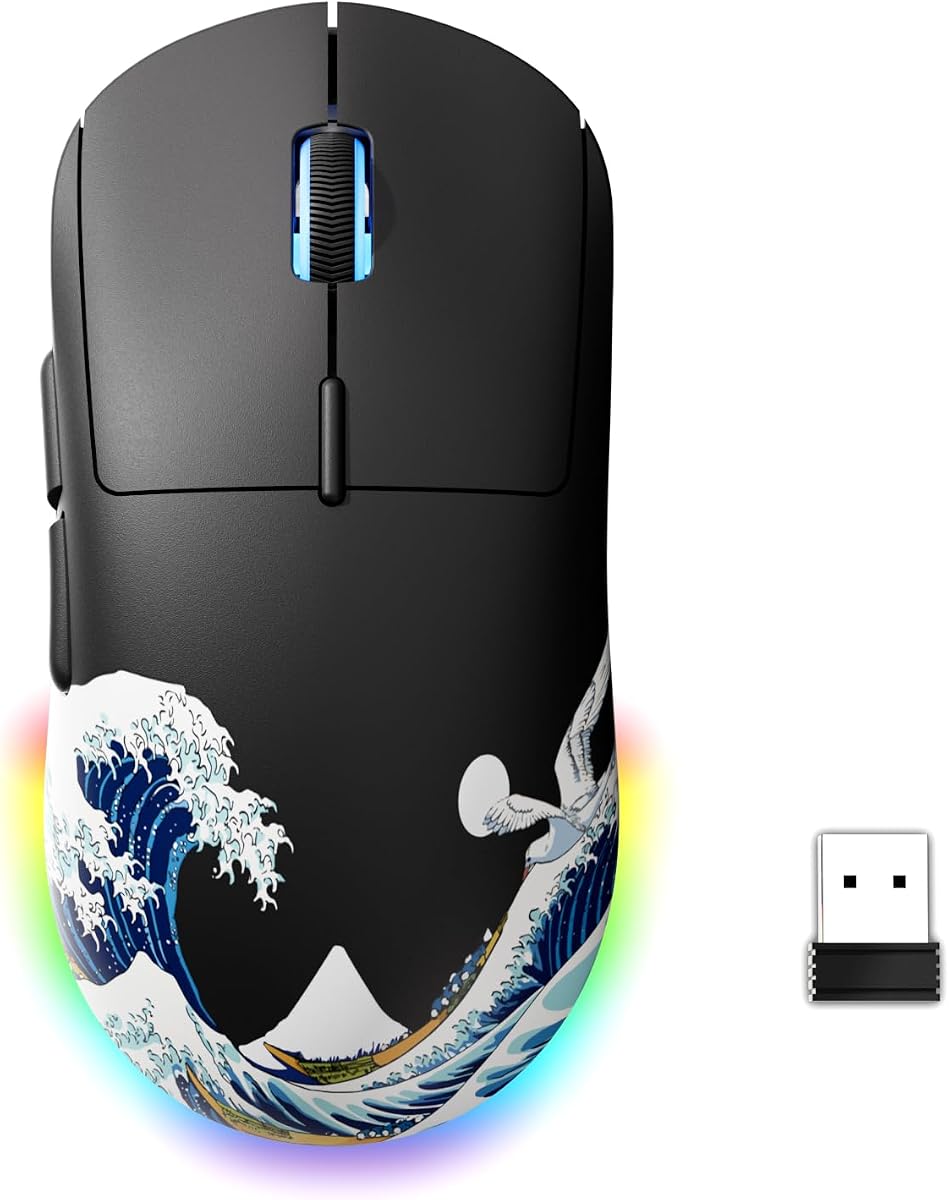
The G57 Wireless Gaming Mouse is built for people whose life is not a single dedicated gaming PC. Tri-mode connectivity switches among two point four gigahertz wireless, Bluetooth, and wired USB-C so the same mouse can follow you from a dorm desk to a living-room laptop. That flexibility is the product. Competitive purists chasing absolute minimum latency still have Razer HyperSpeed options in this guide; the G57 instead optimizes for adaptable daily use with gaming-capable specs.
Six DPI levels from eight hundred to eight thousand include unique color indicators so you can see which stage you are on without opening software mid-match. Five programmable buttons cover the standard modern layout. An eighty gram shell keeps the mouse in a midweight band that feels familiar to users coming from office peripherals while still being lighter than classic bricks like a fully weighted G502.
Power management is thoughtfully marketed: light sleep after short inactivity, deeper sleep after longer idle time, and instant wake on click or movement. USB-C charging with visual prompts reduces the mystery of whether you will survive a weekend session. Wired mode advertises a one thousand hertz polling rate for moments when you want maximum responsiveness or need to play through a charge.
Bluetooth pairing aims to be simple with a long-press mode button and support for switching between Bluetooth channels. That matters in multi-device reality—phone companion tasks, tablet browsing, and PC gaming can share one mouse if you accept a moment to switch modes. Compatibility notes spanning older Windows versions through modern macOS make the G57 a pragmatic household peripheral rather than a single-ecosystem trophy.
Where you should temper expectations is polish. Packaging claims and driver experiences from newer value brands can vary, and you will not get the same depth of community configs that surround Logitech and Razer shapes. Sensor performance is best judged as solid for casual and intermediate play rather than as a Focus Pro rival. If you win your games through smart positioning and moderate aim, you will be fine. If you grind aim trainers for hours, test tracking carefully on your preferred pad.
Buy the G57 when tri-mode convenience and rechargeable simplicity outweigh brand prestige. Choose FFJ in this same value wireless lane if you want higher advertised DPI ceilings and more RGB theatrics. Choose Razer wireless when low-latency marketing and ecosystem software are non-negotiable.
Use two point four gigahertz for primary PC gaming, Bluetooth for class notes on a laptop, and wired mode whenever the battery warning blinks before a long session. Label the dongle immediately; value wireless accessories are easy to lose in backpack pockets.
The G57 suits medium hands in claw or palm hybrids. It is not trying to recreate a DeathAdder hump or a Basilisk thumb shelf. Spend one evening in your main game before judging—wireless value mice often feel strange for an hour and normal by hour three.
We may earn a commission at no additional cost to you.

The FFJ wireless gaming mouse crowds the checklist: six programmable buttons, driver-side macro editing, DPI adjustable from fifty to twenty-four thousand, polling rate steps through one thousand hertz, and tri-mode connectivity with two point four gigahertz, USB-C wired, and Bluetooth five point three. On paper it looks like a feature vacuum aimed at shoppers who want everything listed in the bullet cluster. In practice it is a strong value wireless candidate when you care more about flexibility than owning a culturally famous shell.
Sensor marketing cites high speed and acceleration figures alongside low-latency wireless claims. Treat those as performance envelopes rather than magic. What matters is whether tracking feels linear on your pad at your sensitivity. The seven default DPI levels with deep driver customization make experimentation easy—just avoid changing three variables at once or you will never know what helped. Polling rate adjustments let you balance responsiveness and system overhead on older machines.
Battery life is a selling point, with claims spanning lengthy sessions when RGB is disabled and still generous runtimes when lighting stays on. Fast full-charge estimates and the ability to play wired while charging reduce downtime. Dual-stage sleep behavior conserves power during alt-tab life. For students and shift workers who game in bursts, that rechargeable convenience beats hunting AA cells.
RGB options include multiple dynamic and static modes with brightness and speed controls plus a huge color space. It is playful rather than synchronized to a premium ecosystem, which is fine if this mouse is your only lighted peripheral. Comfort claims focus on skin-friendly materials and micro switches designed for longevity. As always with value brands, individual unit quality can vary—inspect clicks and scroll feel early while return windows are open.
Compared with the G57, FFJ pushes harder on DPI headroom, RGB modes, and macro talk. Compared with Razer HyperSpeed models, it offers similar tri-mode convenience narratives but less established competitive validation. If your play is mostly casual multiplayer, live service grinders, and campus portability, FFJ is easy to recommend inside this pack. If you are buying a mouse specifically to climb the hardest aim-centric ranks, prioritize Viper V3 HyperSpeed or a wired Cobra instead.
Get the FFJ when you want a rechargeable, software-customizable wireless mouse with a loud feature list and flexible device switching. Skip it when you already know you prefer a Basilisk or DeathAdder shape you can recognize by touch in the dark. Feature count is not the same as shape fit—hand feel still wins.
Very few players need five-figure DPI. Use the headroom to create fine stages around your real sensitivity, not to max the slider for marketing screenshots. Stable cm/360 muscle memory beats inflated DPI every time.
Bluetooth five point three mode is ideal for tablets and secondary laptops, while two point four gigahertz remains the better default for the main gaming PC. Teach housemates which mode button state keeps the dongle pair active so nobody “fixes” the mouse into the wrong connection mid-lobby.
Lean FFJ for higher DPI customization, more RGB personality, and macro-focused drivers. Lean G57 if you want a slightly simpler story and similar tri-mode habits. Try to decide based on software comfort and button layout photos rather than DPI alone.
We may earn a commission at no additional cost to you.

The Logitech G203 is the compact wired on-ramp inside Logitech’s gaming lineup, and it still makes enormous sense for smaller hands, shared family PCs, and anyone who wants LIGHTSYNC flair without G502 bulk. An eight thousand DPI optical sensor with claims of zero filtering and smoothing already outperforms typical consumer mice for gaming control. Six programmable buttons hit the sweet spot between too few and overwhelming, and G HUB makes remaps and DPI stages understandable for first-time tuners.
Primary buttons use mechanical designs tensioned with durable metal springs for crisp clicks and precise feedback—one of those feel details you notice when returning to a mushy office mouse. The middle DPI cycle button can hop among up to five sensitivity settings once configured, which is useful when one PC serves both spreadsheet work and evening shooters. Onboard memory means your core setup can travel even when G HUB is not installed on a LAN machine.
LIGHTSYNC RGB is a bigger part of the G203 identity than on some utilitarian mice. You can set static colors, presets, reactive effects, or sync with other Logitech G gear. If you are building a first RGB desk, the G203 plays nicely without forcing a heavier, more expensive shape. If you hate lighting, turn it down and enjoy the sensor and clicks anyway.
Physically, expect a smaller footprint than Basilisk or G502. That is perfect for many teens, smaller adult hands, and claw grippers who felt lost on tall ergonomic humps. It is less ideal if you have large palms that hang off compact mice awkwardly. The cable length is generous for tower placements under a desk, though aggressive aimers may still want a bungee to tame drag.
In genre terms, the G203 thrives in FPS, platform fighters, indie titles, and general browsing. It is less optimal for MMO players who wanted ten binds under the thumb—that is G502 or Basilisk territory. As a student mouse that can game seriously on weekends, it remains one of the most sensible wired recommendations Logitech offers in this price reality.
Choose the G203 for compact comfort, Logitech software, and straightforward six-button gaming. Choose the DeathAdder Essential if you prefer Razer’s classic tall ergonomic palm shape instead. Choose the Cobra if lightweight speed is the priority and you are fine switching ecosystems. For many people shopping this guide, the G203 is the least intimidating way to stop using a freebie office mouse.
If your fingers barely wrap larger mice, start with the G203 before forcing a G502. A mouse that fits will beat a heavier feature king you cannot control. Measure from wrist crease to middle fingertip if you are between sizes and unsure.
Create one profile named after your main game, assign side buttons to melee and ping equivalents, set three DPI stages max, and save to onboard memory. Resist installing ten overlays on day one; clarity beats complexity for a starter mouse.
We may earn a commission at no additional cost to you.

The fastest way to waste money in this category is to buy the highest DPI number while ignoring whether the shell matches your grip. Palm grippers usually prefer taller ergonomic mice like Basilisk and DeathAdder shapes. Claw and fingertip players often prefer lower humps and lighter bodies such as Cobra, Viper, or compact G203-class mice. Trace your hand on paper, note length and width, and compare those notes to product photos instead of trusting a single viral ranking video.
Wired mice convert more of your budget into switches, sensors, and build because they skip batteries and radios. Wireless mice buy freedom and desk cleanliness but ask you to manage receivers, charging, or AA spares. If your pad technique involves huge arm swipes, wireless feels transformative. If you sit on a stable desktop and already use a bungee, a wired Basilisk V3 or Cobra can outperform cheaper wireless options where it counts.
Modern optical sensors in this pack are broadly competent. Your job is to disable Windows enhance pointer precision, use raw input in games that support it, and find a cm/360 that lets you track and flick without angle-snapping confusion. High maximum DPI is headroom. Polling rate at one thousand hertz is a sensible default on modern PCs. If aim feels off, change one variable at a time for a full session before blaming the hardware.
MMO, MOBA, and survival players should prioritize button count and comfort—Basilisk and G502 styles excel. Tactical shooter players can live with six buttons if the shape and weight support aim. Scroll wheel personality matters more than people admit: free-spin helps productivity and inventory doomscrolling, while tactile notches help weapon discipline. Match the wheel to your weekly hours, not to a single launch-week impression.
Razer Synapse and Logitech G HUB are mature, occasionally heavy, and full of guides. Value-brand drivers can be lighter but less consistent across operating system updates. Optical switches generally advertise better resistance to double-click failure than older mechanical designs. PTFE feet wear over time; rough pads accelerate that wear. Plan for a mouse as a consumable sports tool, not a forever heirloom, especially if you play daily.
Yes—especially in this pack. Sensors on models like the Basilisk V3, G502 HERO, Cobra, and Viper V3 HyperSpeed are far beyond what skill development requires. Competitive readiness depends more on shape fit, consistent sensitivity, a quality pad, and practice than on owning the newest flagship released last month. Buy for comfort and tracking consistency, then train.
Almost certainly not for gameplay itself. High DPI ceilings let software offer fine stage increments and future-proof marketing, but most FPS players live at modest DPI with higher in-game sensitivity math expressed as eDPI. Use elevated maxima as tuning flexibility. If a mouse only reaches eight thousand DPI, that is still plenty for serious play when the sensor tracks cleanly.
If this is your first real gaming mouse and you want maximum features with minimal variables, start wired with the Basilisk V3, G502 HERO, Cobra, or G203. If cable drag already annoys you or your desk setup makes routing ugly, a HyperSpeed Basilisk or Viper, or a tri-mode rechargeable option, is worth it. Neither category is universally better; match it to irritation points you already feel.
Honeycomb designs like the TMKB Falcon M1SE can be very comfortable and light, but they collect dust and crumbs more readily than sealed shells. If you eat over your mousepad, budget cleaning time or choose a sealed body. Durability of the plastic lattice is generally fine for normal use; the bigger issue is preference and maintenance, not instant structural failure.
Software matters if you remap buttons, sync lighting, or store multiple profiles. Synapse and G HUB are the most documented options in this roundup. Value-brand drivers can still remap and macro well but may receive fewer tutorials and slower updates. If you are software-averse, pick a mouse whose default button layout already makes sense and use onboard DPI buttons sparingly.
One thousand hertz is the standard recommendation for modern gaming PCs and is available across most of these mice in their respective software or wired modes. Lower polling can help on very old machines or stubborn wireless edge cases. Higher-than-thousand rates are not a focus of every model here and will not substitute for fundamentals. Stability beats chasing novelty rates.
Many pack models list PC and Mac compatibility for basic pointing, especially Logitech options and several tri-mode wireless mice. Deep RGB and macro features may be richer on Windows depending on vendor support. If Mac customization is mandatory, verify current software support for your OS version before relying on advanced remaps. Bluetooth-capable mice are often the least painful on mixed Apple-and-Windows desks.
Both are high-button ergonomic wired icons with excellent sensors. Basilisk V3 leans into optical switches, HyperScroll modes, and dense Chroma zones. G502 HERO leans into adjustable weights, dual-mode scroll tradition, and Logitech’s ecosystem with onboard memory workflows. Shape preference is personal—if possible, compare silhouettes and button reach photos side by side before ordering.
Not automatically. A lighter mouse reduces fatigue and can make large flicks easier, which helps some players. Others lose control and overflick when they abandon a weight they trained on for years. If you switch from a heavy G502 to a fifty-eight gram Cobra, give yourself a dedicated adaptation period and consider slightly adjusting sensitivity rather than expecting instant rank gains.
Mousepad surface, desk height, chair posture, raw input settings, frame rate stability, and even humidity that changes cloth pad friction all matter. Swap one variable at a time. A great mouse on a warped tiny pad will still feel terrible. Budget a decent cloth pad and a stable sensitivity before endlessly rotating through shells from this list.
If you want one clear recommendation from this pack, take the Razer Basilisk V3 for feature depth and everyday comfort, the Logitech G502 HERO if adjustable weight tuning is part of your identity, and the Razer Cobra when lightweight wired speed should lead the decision. Wireless shoppers should split between Basilisk V3 X HyperSpeed for ergonomic familiarity and Viper V3 HyperSpeed for competitive ambidextrous energy, with G57 and FFJ covering tri-mode rechargeable flexibility on mixed device desks.
The best gaming mouse under fifty is the one your hand trusts after a week of real matches, not the one with the loudest DPI print. Use the checklist, resist constant swapping, and spend your practice time in-game instead of in shopping tabs. When your shape, grip, and genre line up, even a value-tier mouse from this list can feel like a genuine upgrade over whatever came free in the monitor box.
Revisit your choice only when comfort or hardware failure demands it. Consistency compounds. Pick well once, configure calmly, and let the wins come from decisions you make on screen rather than from the next impulse click on a new peripheral listing.