Expert Review & Guide

Best Gaming Mouse Under 20 for 2026 Budget Builds

Shopping for the best gaming mouse under 20 in 2026 is less about chasing the loudest DPI number on a marketplace tile and more about matching grip, buttons, and connection type to how you actually play. A dorm FPS player who claw-grips an ultralight honeycomb shell wants a different tool than a palm-grip MOBA regular who needs a tall ergonomic curve, and both differ from the student who needs tri-mode wireless for a laptop, tablet, and borrowed lab PC. This roundup stays inside one product pack—ten real Amazon listings spanning plug-and-play RGB starters, brand-name sensors from Logitech and Razer, Redragon macro and ultralight options, and rechargeable wireless mice—so every recommendation maps to a concrete ASIN, image, and URL.

We ranked with everyday constraints in mind: driverless setups for locked school images, onboard memory when software is optional, PTFE and paracord cues for aim feel, and honest limits on Bluetooth for competitive queues. Ratings reflect listing scores at research time. We never print dollar prices because budget-peripheral deals move constantly; judge each mouse on shape, sensor story, button count, and whether you want a cable or a charger in your bag.

Start with the three top picks if you want a safe overall wired choice, a feature-max G502-style cockpit, or a forty-one gram ultralight. Use the comparison table to scan DPI, weight cues, and connectivity at a glance, then read each review for grip fit, software expectations, and who should skip the model.

Top Budget Gaming Mouse Picks for Aim, Buttons, and Value

As an Amazon Associate we earn from qualifying purchases. We may earn a commission at no additional cost to you.

Budget Gaming Mouse Comparison: DPI, Buttons, and Connection

Scan sensor range and button count first, then decide whether you need a cable, a two-point-four gigahertz dongle, or Bluetooth for tablets. Specs omit prices so you can compare feel and features before you open a listing.

#ProductSpecificationsScore
1
  • 4 DPI steps up to 3600, no driver required
  • 6 buttons with forward/back + DPI switch
  • Multi-color RGB, ergonomic right-hand shell
9.2
2
  • 75g honeycomb shell with PTFE skates
  • 200–12800 DPI, 125–1000 Hz polling
  • 6 programmable buttons + TMKB driver RGB
9
3
  • 6400 DPI optical with on-the-fly DPI buttons
  • 5 programmable buttons via Razer Synapse
  • Rubber side grips, mechanical switches to 10M clicks
9
4
  • 2.4 GHz, Bluetooth 5.4, and USB-C wired modes
  • 800–6400 DPI, 1000 Hz polling, ~71g shell
  • Rechargeable battery up to ~120 hours claimed
8
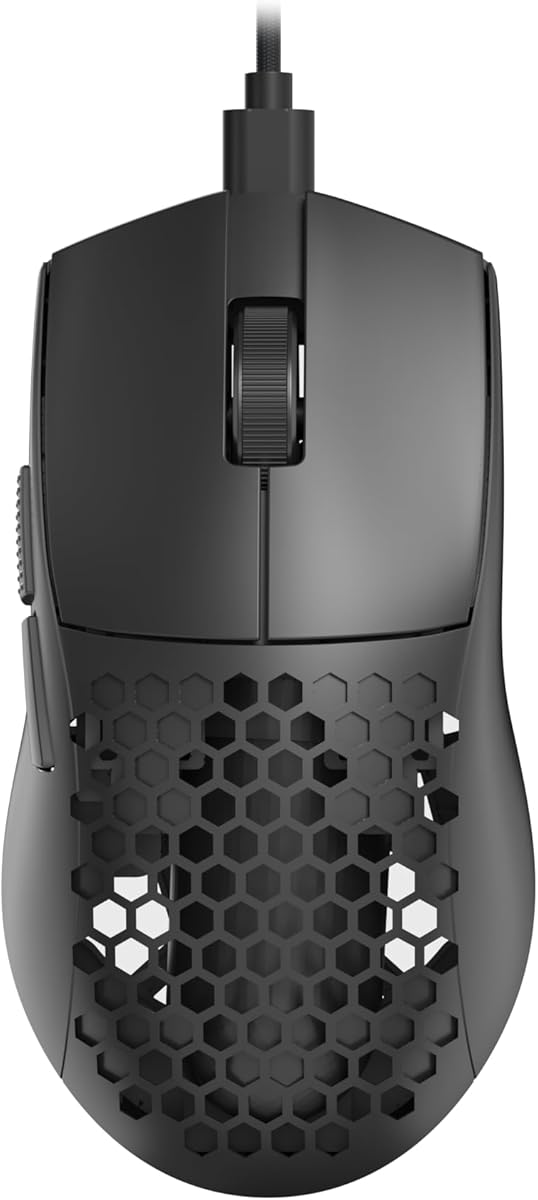
5
  • Only 41g honeycomb shell for rapid flicks
  • Up to 10,000 DPI with 5 default steps
  • Paracord cable, Type-C, Redragon software macros
9
6
  • 8000 DPI optical sensor, zero filtering claimed
  • 6 buttons, on-board memory, LIGHTSYNC RGB
  • G HUB remaps, metal-spring primary clicks
9.2
7
  • HERO sensor up to 25,600 DPI
  • 11 programmable buttons + hyper-fast scroll
  • Adjustable weights and LIGHTSYNC RGB
9.2
8
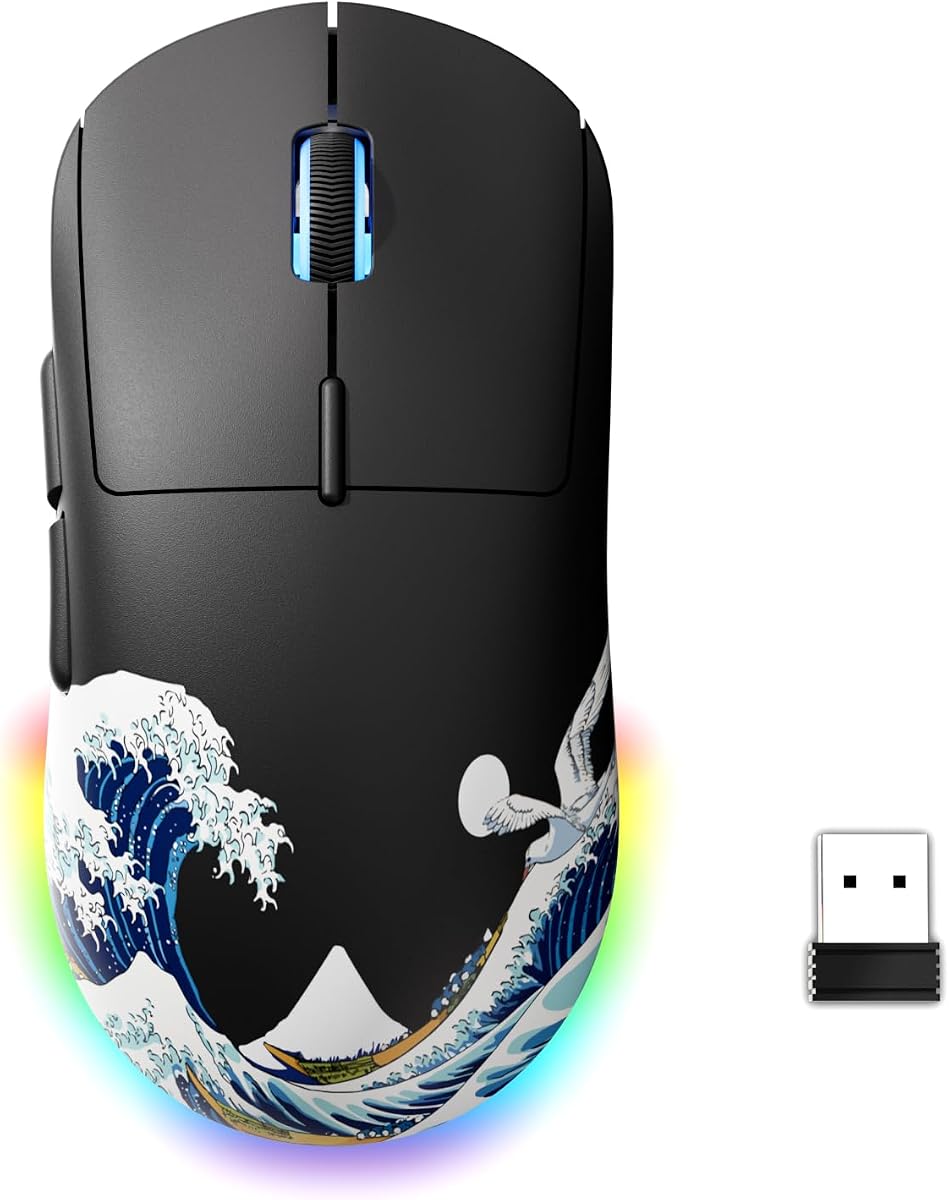
  • Tri-mode 2.4G / Bluetooth / USB-C wired
  • 800–8000 DPI with color DPI indicators
  • ~80g rechargeable shell with sleep modes
8.8
9
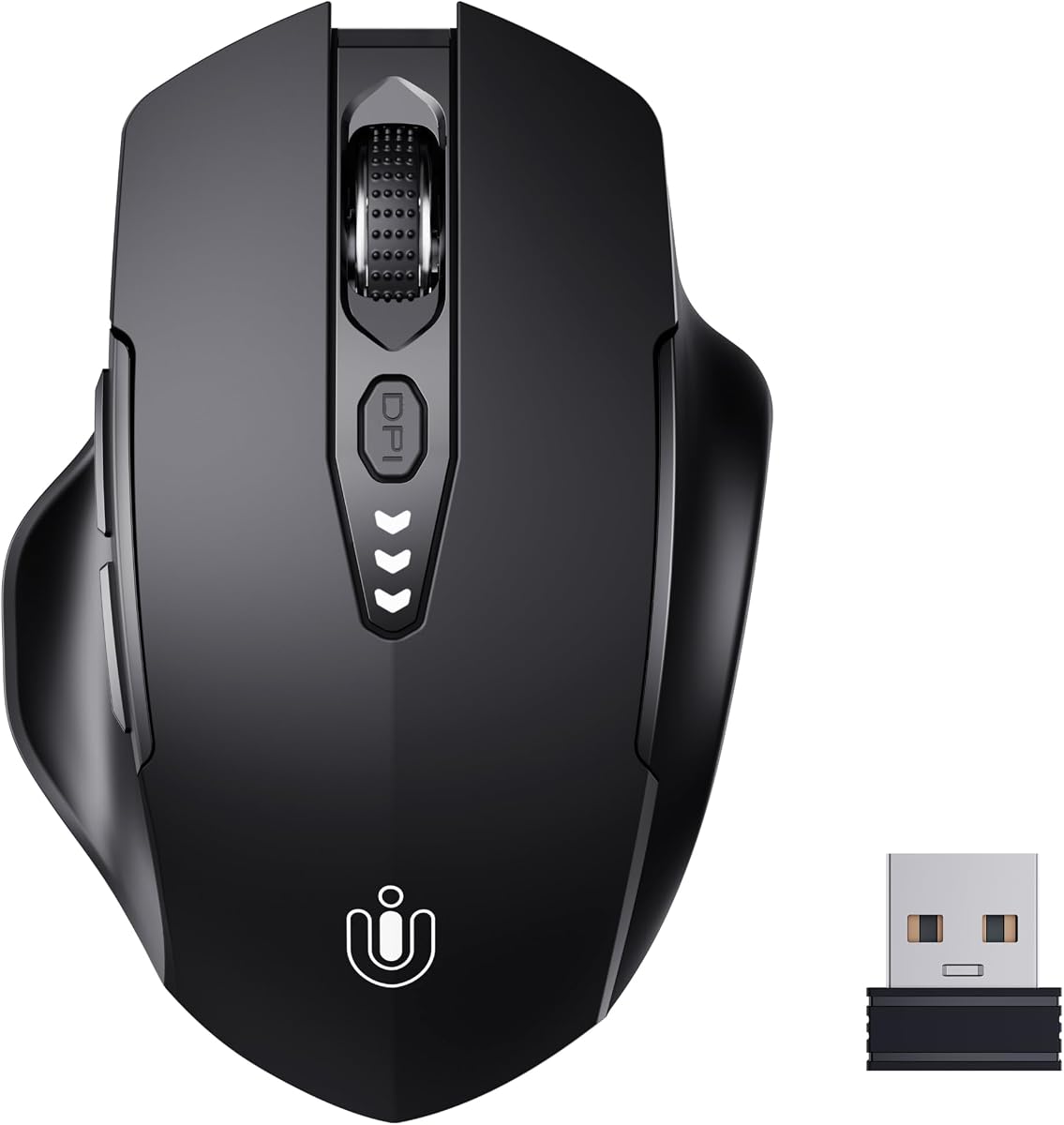
  • 2.4 GHz USB receiver, plug-and-play
  • 4 DPI levels: 800 / 1200 / 1600 / 2400
  • Rechargeable with visual battery display
9.2
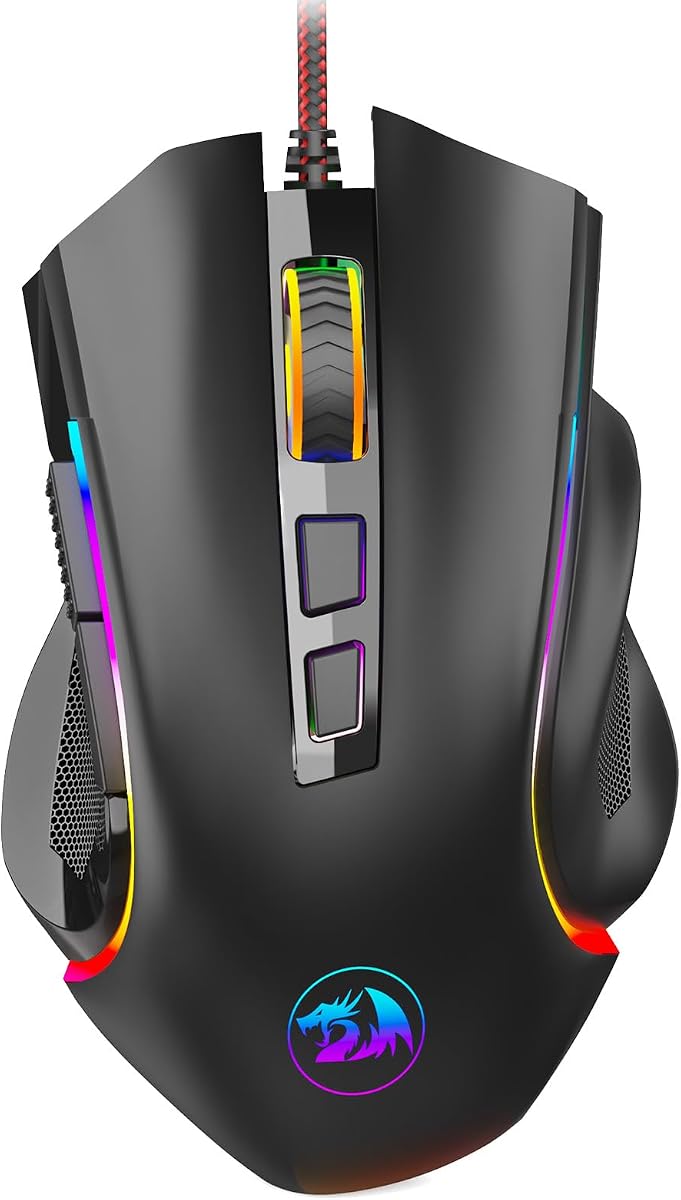
10
  • Up to 7200 DPI with high-precision tracking
  • 9 programmable buttons and macro software
  • 7 RGB modes, ergonomic right-hand shape
9.2

1. BENGOO Wired - Best Plug-and-Play RGB Starter

BENGOO Gaming Mouse Wired

BENGOO Gaming Mouse Wired

9.2/10★★★★★

The BENGOO wired gaming mouse is the honest starter pick when you want RGB, a DPI button, and forward/back side keys without installing a control panel on a shared family PC. Plug it into USB, wait for the OS to treat it like any HID mouse, and you are already in a match. That simplicity matters more than another thousand DPI on paper when the computer is a school Chromebook dock, a library laptop, or a living-room tower that forbids unknown installers.

  • 4 DPI steps up to 3600, no driver required
  • 6 buttons with forward/back + DPI switch
  • Multi-color RGB, ergonomic right-hand shell
Check Price →
✓ Pros
  • True plug-and-play on Windows and many Linux setups with zero software install
  • Four DPI steps cover school work, browsing, and casual FPS without hunting menus
  • RGB lighting and six buttons feel like a “real” gaming mouse for first builds
  • Lightweight enough for long sessions on a laptop desk or dorm table
  • Wide OS claims including older Windows and basic MacBook USB use
✕ Cons
  • Max 3600 DPI and no advanced sensor tuning for high-sensitivity competitive players
  • Buttons are not deeply remappable without third-party tools
  • RGB is atmospheric rather than fully software-synced to games

Detailed review

Four DPI stages from 1200 through 3600 cover the real range most under-budget buyers use. Drop to the lower steps for spreadsheet work and browser research, then bump sensitivity for arena shooters and battle royales where camera sweeps matter. The dedicated DPI button means you never alt-tab into a utility mid-fight. Tracking is optical and stable on cloth pads and many hard pads; glossy glass desks still want a proper mousepad, as with any optical sensor in this class.

Six buttons sound modest next to eleven-button flagships, yet the layout is what most people actually bind: primary click, secondary click, scroll click, DPI, browser forward, and browser back. In MOBAs and live-service shooters those side buttons become ability cancels, push-to-talk, or inventory shortcuts. You will not build a forty-key MMO bar here, and that is fine—this mouse is about removing friction, not becoming a programmable keypad.

RGB on the BENGOO is atmospheric rather than studio-grade. Multi-color lighting fills the shell and matches entry RGB keyboards without demanding LIGHTSYNC or Chroma ecosystems. If you hate light bleed in a dark dorm, many similar mice let you ignore the glow and keep playing; treat lighting as optional personality, not a performance feature. The black shell hides scuffs from backpacks better than white honeycomb models.

Ergonomics lean right-hand friendly with a palm-supporting hump that reduces claw tension during longer sessions. Skin-friendly plastics feel less chalky than the cheapest no-name mice, though you should still take stretch breaks during marathon raids. Cable length is typical USB wired fare—route it with a cheap bungee or binder clip if your desk edge snags the jacket.

Compatibility claims stretch across older Windows generations, Linux, notebooks, and MacBooks with USB-A or a simple adapter. Always confirm your port type before you buy a cable-only mouse for a USB-C-only ultraportable. For LAN parties and club esports nights, the BENGOO’s driverless nature is a quiet superpower: borrow a PC, plug in, and your binds are whatever the game offers natively.

Choose the BENGOO when your priority is a complete-looking gaming mouse that just works. Skip it if you need onboard profiles, honeycomb weight under fifty grams, or Synapse/G HUB-level macro trees. As an under-budget wired entry, it still earns a top-tier rating for delivering the checklist most first-time buyers actually open the box for.

Who should buy the BENGOO

First PC builders, dorm gamers, and anyone who cannot install mouse software on a shared machine. It is also a sensible backup mouse in a backpack because it fails soft: even without RGB appreciation, the DPI button and side keys still work.

Skip it if you already know you want PTFE ultralight skates, Synapse macros, or rechargeable wireless. Those needs map cleaner to the Falcon, DeathAdder Essential, or MELOGAGA sections below.

Setup tips without drivers

Set Windows pointer speed to the middle mark, disable enhance pointer precision for clearer aim in many games, then adjust only in-game sensitivity. Use the DPI button to create two mental modes: homework low and game high.

Add a medium cloth pad even if the mouse tracks on the desk—consistency beats chasing max DPI. Route the cable so it never hooks a cup or textbook edge mid-flick.

Check Price on Amazon →

We may earn a commission at no additional cost to you.

2. TMKB Falcon M1SE - Best Honeycomb Spec Sheet

TMKB Falcon M1SE White Gaming Mouse

TMKB Falcon M1SE White Gaming Mouse

9/10★★★★★

The TMKB Falcon M1SE White targets players who want the modern ultralight look—honeycomb vents, PTFE skates, and a soft paracord—without stepping into premium wireless pricing tiers. At roughly seventy-five grams it sits in the sweet zone where flicks feel quick but the shell still has enough mass to track straight lines in tactical shooters. The white finish photographs well on content desks and makes RGB ribbon lighting pop.

  • 75g honeycomb shell with PTFE skates
  • 200–12800 DPI, 125–1000 Hz polling
  • 6 programmable buttons + TMKB driver RGB
Check Price →
✓ Pros
  • Ultralight 75g honeycomb body suits claw and fingertip flick aiming
  • Wide DPI range and 1000 Hz polling punch above typical bargain mice
  • Paracord-style cable and PTFE feet reduce drag on cloth pads
  • Driver layers for macros, rapid fire, and 16.8M ribbon RGB
  • White shell stands out on RGB desks without looking toy-like
✕ Cons
  • Honeycomb holes collect dust and need occasional cleaning
  • Software quality can vary by OS version and update cadence
  • Medium shell may feel small for very large palm grips

Detailed review

Sensor marketing lists two hundred to twelve thousand eight hundred DPI with polling from one hundred twenty-five to one thousand hertz. In practice, set a comfortable in-game sensitivity and use the DPI ladder for coarse jumps between desktop precision and fast 180s. High maximum DPI numbers are headroom, not a mandate to play at five-digit counts; most aiming coaches still prefer moderate eDPI with a solid pad.

Six programmable buttons become interesting once you install TMKB’s driver. Layers, rapid-fire toggles, and macro recording turn the side keys into utility tools for survival games, creative suites, or ability-heavy ARPGs. If you refuse software, the mouse still functions as a standard multi-button HID, but you leave performance features on the table. Keep the installer from the official source and avoid random “driver pack” sites.

Paracord-style cabling and PTFE feet are the tactile upgrades that separate this Falcon from rubber-brick office mice. Drag across a quality cloth pad feels closer to wireless glide, especially if you tape or route the cable so it never yanks the rear of the shell. Skates wear eventually; that is normal, and replacement dots are inexpensive when the glide dulls after months of abrasive pads.

Honeycomb shells breathe and shed grams, yet they also invite dust, snack crumbs, and pet hair. A soft brush every few weeks keeps the voids from looking grimy. Some competitive players dislike holes for sweat or aesthetics; if that is you, consider a solid-shell ultralight like other Redragon or Logitech options in this guide instead of forcing the honeycomb aesthetic.

Who should buy the M1SE: claw and fingertip users who want white RGB presence, software remaps, and a light wired cable. Who should pass: palm grippers with very large hands who need a taller DeathAdder-style hump, or anyone who wants true wireless with a dongle in the box. As a spec-sheet winner in the under-budget wired lane, the Falcon is one of the more “2026 shaped” mice in the pack.

Honeycomb care and glide

Brush the vents monthly and wipe PTFE feet when dust builds a gray film. If glide turns scratchy, inspect for a chip in the skate before assuming the sensor failed.

A control-oriented cloth pad pairs well with high DPI headroom; you can aim with smaller wrist motions without the shell feeling nervous.

Software expectations

Install TMKB’s utility only from the manufacturer’s instructions. Create one clean profile for your main shooter and one for desktop macros so you are not debugging binds during a ranked queue.

If software misbehaves after an OS update, the mouse should still click as a standard device—use that fallback while you reinstall.

Versus other ultralights in this guide

Choose Falcon for white RGB flair and a seventy-five gram middle weight. Choose Redragon M617 when you want to push closer to forty-one grams in black. Choose G203 when you prefer solid-shell brand software over honeycomb aesthetics.

Check Price on Amazon →

We may earn a commission at no additional cost to you.

3. Razer DeathAdder Essential - Best Classic Palm Shape

Razer DeathAdder Essential Ergonomic Wired Gaming Mouse

Razer DeathAdder Essential Ergonomic Wired Gaming Mouse

9/10★★★★★

Razer’s DeathAdder Essential is the shape classic: a right-hand ergonomic curve that has trained a generation of FPS and MOBA palms. The Essential trim keeps the silhouette and rubberized side grips while pairing a six thousand four hundred DPI optical sensor and five programmable buttons. If you have ever borrowed a friend’s DeathAdder and felt instantly accurate, this is that familiarity at an accessible listing.

  • 6400 DPI optical with on-the-fly DPI buttons
  • 5 programmable buttons via Razer Synapse
  • Rubber side grips, mechanical switches to 10M clicks
Check Price →
✓ Pros
  • Iconic DeathAdder right-hand curve remains one of the easiest palm grips to live with
  • Synapse remapping and macros without learning a no-name utility
  • Rubberized sides stay planted during sweaty ranked sessions
  • Ridged scroll wheel is precise for inventory and weapon wheels
  • Brand parts ecosystem if you already use Razer keyboards or headsets
✕ Cons
  • Only five buttons versus eleven on feature-max mice like the G502
  • Heavier and less “esports ultralight” than honeycomb options
  • Synapse install is optional for basic use but required for deep remaps

Detailed review

Mechanical switches rated toward ten million clicks matter less as a lab number and more as day-to-day click consistency. Primary buttons should feel crisp without double-clicking early; Razer’s tensioning on this lineage has a long reputation for that tactile certainty. The ridged scroll wheel is a small but real advantage when you need controlled weapon or inventory scrolling instead of free-spin chaos.

Five buttons keep the mental load low. DPI buttons handle sensitivity on the fly, and Synapse unlocks remaps plus macros when you want push-to-talk or ability sequences. You give up the G502’s sniper button forest, and that is intentional—Essential is about comfort and aiming confidence, not becoming a keypad. Left-handed players should look elsewhere; the sculpt is firmly right-hand.

Weight and solid shell construction make the DeathAdder Essential feel planted compared with forty-one gram honeycomb racers. That stability helps palm grippers micro-adjust crosshairs in tactical shooters and MOBAs. Pure flick specialists who live on fingertip grips may prefer the Redragon M617 or TMKB Falcon instead. Match the mouse to your grip before you chase brand loyalty.

Synapse is polished relative to generic utilities, yet it is still another background app. For LAN machines or locked school images, the mouse works for basic clicking without the suite; install Synapse at home when you want lighting-adjacent features and deeper binds. Pairing with other Razer gear is a lifestyle choice, not a requirement for the sensor to track.

Rubber side grips improve control when hands get warm, which is exactly when cheap glossy plastics become slippery. Wipe them occasionally so dust does not turn into a grimy film. The black Essential aesthetic is understated—good for offices where RGB rainbows are socially expensive even if the mouse is technically a gamer model.

Pick the DeathAdder Essential when shape comfort is the entire product for you. Skip it when you need nine-plus buttons, honeycomb weight, or tri-mode wireless. In a field full of spec inflation, this Razer remains the palm-grip recommendation we trust for people who play several hours at a stretch.

Grip fit check

If your palm fully contacts the rear hump and your fingers reach the primary buttons without stretching, the Essential shape is doing its job. If only your fingertips touch and your palm floats uncomfortably, try a smaller symmetric shell like the G203 or M617.

Synapse or not

Play a week with default DPI buttons before diving into macros. Many players only need a lower desktop step and a higher game step. Add Synapse remaps once you know which two side-button actions you always reach for.

Check Price on Amazon →

We may earn a commission at no additional cost to you.

4. MELOGAGA Wireless - Best Tri-Mode Value Wireless

MELOGAGA Wireless Gaming Mouse

MELOGAGA Wireless Gaming Mouse

8/10★★★★☆

MELOGAGA’s tri-mode wireless mouse is the cord-cutting pick when your desk rotates between a Windows tower, a MacBook, and a tablet. Two-point-four gigahertz with a USB receiver handles lower-latency play, Bluetooth five-point-four covers devices that hate dongles, and USB-C wired mode both charges and plays so a low battery never ends the night. That flexibility is the product’s real feature, more than any single DPI number.

  • 2.4 GHz, Bluetooth 5.4, and USB-C wired modes
  • 800–6400 DPI, 1000 Hz polling, ~71g shell
  • Rechargeable battery up to ~120 hours claimed
Check Price →
✓ Pros
  • Three connection modes cover PC dongle, tablet Bluetooth, and wired backup
  • 71g weight keeps wireless aiming closer to wired ultralights
  • Eight DPI steps and 1000 Hz polling for responsive casual competitive play
  • Play-while-charging over USB-C avoids mid-raid dead batteries
  • Cross-device claims for Windows, macOS, iPadOS, Android, and console-adjacent setups
✕ Cons
  • Lower aggregate rating than the big-name wired options in this roundup
  • Bluetooth latency is fine for work, not always ideal for ranked FPS
  • Fewer programmable side buttons than dedicated MMO-style mice

Detailed review

Eight DPI levels from eight hundred to six thousand four hundred plus a claimed one thousand hertz polling rate put this white shell in legitimate casual-competitive territory. Keep wireless polling expectations honest: place the receiver on a short extension if your USB ports sit behind a metal PC case. Bluetooth is perfect for note-taking and media; for ranked aim trainers, prefer the two-point-four gigahertz link or cable.

At about seventy-one grams the MELOGAGA stays agile. Ergonomics claim support for claw, palm, and fingertip styles—medium shells usually please the middle of that spectrum best. Large-handed palm users should try to visualize height and length against a DeathAdder; small-handed fingertip players will likely feel at home immediately.

Battery life up to roughly one hundred twenty hours is a headline for travelers and students who forget chargers. Treat manufacturer hour claims as best-case with lighting moderated and sleep enabled. The important workflow is play-while-charging: when the icon fades, plug USB-C and continue instead of swapping AA cells at midnight.

Durability ratings around five million clicks are typical for this tier. The listing note about recharging when the cursor gets sluggish is worth remembering—wireless mice sometimes mimic sensor failure when voltage sags. Before you return a “broken” unit, top off the battery and retest on a known-good pad.

The aggregate rating sits lower than several wired legends in this roundup, so buy with eyes open: wireless convenience and multi-device life are the win, not a decade of brand heritage. If you want Logitech’s G HUB ecosystem or Razer’s shape library, spend attention there. If you want one white mouse that follows you from dorm to café table, MELOGAGA’s mode switch earns its slot.

Ideal buyer: multi-device students and hybrid workers who also queue casual shooters. Poor fit: tournament players who demand proven wireless flagships, or users who refuse to manage a rechargeable battery at all. For under-budget wireless gaming with modern ports, it is the pack’s clearest cord-optional tool.

Picking the right mode

Use two-point-four gigahertz for PC gaming, Bluetooth for tablets and clean laptop sides, and USB-C when the battery is low or you want the most stable tether. Label the dongle with tape so it does not vanish into a cable drawer.

Battery habits that prevent ‘broken mouse’ returns

When tracking stutters, charge fully before troubleshooting sensors. Keep a short USB-C cable in the same pouch as the mouse so play-while-charge is always an option on trip days.

Versus G57 wireless

MELOGAGA leans lighter and whiter with a broader DPI ladder story; G57 emphasizes dual Bluetooth channels and color DPI cues in a black shell. Pick based on devices you own and which aesthetic matches your desk.

Check Price on Amazon →

We may earn a commission at no additional cost to you.

5. Redragon M617 - Best Ultralight Wired

Redragon M617 Ultralight Honeycomb Shell Wired Gaming Mouse

Redragon M617 Ultralight Honeycomb Shell Wired Gaming Mouse

9/10★★★★★

The Redragon M617 exists to answer one question: how light can a wired gaming mouse feel while staying in reach for budget builds? Forty-one grams is the headline, and it is not marketing fluff—you notice the missing mass the first time you snap a ninety-degree turn in an arena shooter. Honeycomb cutouts, a paracord-like cable, and Type-C connectivity complete the modern ultralight checklist.

  • Only 41g honeycomb shell for rapid flicks
  • Up to 10,000 DPI with 5 default steps
  • Paracord cable, Type-C, Redragon software macros
Check Price →
✓ Pros
  • 41g is genuinely featherweight for budget wired gaming
  • Symmetric shape works for many claw and fingertip users
  • Paracord and Type-C feel modern compared with thick rubber cables
  • Five DPI presets cover aim trainers through strategy maps
  • Software layers for hotkeys and multi-profile switching
✕ Cons
  • Ultra-light shells can feel tippy if you palm-grip with heavy hands
  • Honeycomb vents need desk-dust awareness
  • Not a right-hand sculpted rest like DeathAdder shapes

Detailed review

Five DPI defaults including a ten thousand DPI top step give you coarse control without forcing a driver. Still, Redragon’s software is where programmable buttons and multi-configuration modes become useful for binding grenades, melee, or editor shortcuts. Symmetric shaping means either hand can attempt a grip, though most marketing and button layouts still assume right-hand side-key use.

Ultralight mice change technique. If you grew up on a heavy office mouse, you may overflick for a day or two until muscle memory recalibrates. A quality cloth pad with consistent weave helps the PTFE feet sing; rough cardboard desks will feel scratchy and inconsistent. Consider a cheap control pad before blaming the sensor.

Honeycomb maintenance is the recurring tax. Dust loves hexagonal voids. A can of air or a soft makeup brush keeps the shell presentable. Some players also dislike the visual of their desk showing through the mouse—if aesthetics bother you, the solid G203 or DeathAdder Essential will feel calmer even if they weigh more.

Compared with the TMKB Falcon, the M617 pushes further into featherweight territory. Compared with the Redragon M602, it trades button count and palm humps for raw agility. That makes the M617 a specialist: aim-trainer enthusiasts, low-sens arm aimers who still want a light shell, and anyone building a minimal black RGB battlestation.

Type-C on the mouse body is future-friendly if you already live in a USB-C cable drawer, though you will still need a host port that accepts the other end. Cable drag is minimal when the paracord is routed well; a simple binder-clip bungee remains one of the highest value tweaks in PC gaming.

Buy the M617 when weight is your primary stat. Skip it when you need nine macros, wireless modes, or a tall ergonomic rest for large palms. Among under-budget wired options, it is the clearest ultralight athlete in the pack.

Adapting to 41 grams

Lower your in-game sensitivity slightly for the first sessions if you overshoot targets. Ultralights amplify old high-sens habits. Give your arm a day to recalibrate before you declare the sensor “too fast.”

Who should avoid honeycomb ultralights

Palm grippers with large hands, players who hate dusting vents, and anyone who wants a soft rubberized side panel like the DeathAdder Essential. Comfort beats trend weight if you play four-hour MMO nights.

Check Price on Amazon →

We may earn a commission at no additional cost to you.

6. Logitech G203 - Best Overall Under Budget

Logitech G203 Wired Gaming Mouse - Black | LIGHTSYNC RGB

Logitech G203 Wired Gaming Mouse - Black | LIGHTSYNC RGB

9.2/10★★★★★

The Logitech G203 is our best overall pick for most people shopping the best gaming mouse under twenty class because it balances sensor credibility, click feel, software maturity, and a size that fits real backpacks. Eight thousand DPI with Logitech’s zero-filtering claim is more meaningful than inflated twelve-thousand numbers on unknown sensors when what you want is predictable tracking on cloth and hard pads alike.

  • 8000 DPI optical sensor, zero filtering claimed
  • 6 buttons, on-board memory, LIGHTSYNC RGB
  • G HUB remaps, metal-spring primary clicks
Check Price →
✓ Pros
  • Trusted sensor tuning and click feel from a major gaming brand
  • G HUB lighting and DPI profiles with onboard memory for school PCs
  • Compact ambidextrous-leaning shape fits many desk and laptop bags
  • Six buttons cover DPI cycle plus side navigation without clutter
  • Long USB cable and consistent build for daily class and ranked nights
✕ Cons
  • Not as light as 41g honeycomb racers
  • Fewer buttons than G502-class power-user mice
  • RGB and remaps shine brightest if you install G HUB

Detailed review

LIGHTSYNC RGB through G HUB lets you sync with other Logitech G gear, react to screen colors, or pulse to audio if you enjoy that theater. Onboard memory matters on campus: configure DPI steps and button binds at home, then carry the mouse to a lab PC that will never allow G HUB. Few bargain no-names nail that workflow as cleanly.

Six programmable buttons hit the practical ceiling for many genres. Side buttons for melee and push-to-talk, DPI clutch for sniping modes, and a responsive scroll wheel cover shooters, MOBAs, and creative timelines. Mechanical primary buttons with metal spring tensioning deliver the crisp Logitech click that makes spam feels intentional rather than mushy.

Shape-wise the G203 is compact and relatively neutral. Medium hands in claw or relaxed palm usually adapt in an evening. Very large palms that want a high rear hump may prefer the DeathAdder Essential or G502. Very aggressive fingertip ultralight fans may still chase the forty-one gram M617. The G203’s gift is being “good enough for everyone” without feeling like a compromise blob.

Cable length around two meters suits floor PCs and deep desks. It is not a paracord, so a bungee helps perfectionists, but everyday drag is acceptable for wired play. Build quality and QC consistency are why G203 units remain staples in starter PC lists year after year even as newer honeycomb shapes trend on social feeds.

Install G HUB when you want lighting scenes and five DPI stages under a cycle button; skip it when you only need a reliable optical mouse for class notes and casual queues. Either path works, which is rare praise in a category flooded with mandatory obscure executables.

Choose the G203 as the default recommendation when a friend asks for one link. Choose something else only when you have a specific need: maximum buttons, maximum lightness, or mandatory wireless. That is what “best overall” should mean in a crowded under-budget roundup.

Why it is the default pick

Trusted clicks, mature G HUB support, onboard memory, and a size that suits shared households. When someone wants a single recommendation without a twenty-question grip interview, the G203 is the responsible answer in this pack.

Travel and campus use

Save a profile with moderate DPI and side buttons bound to forward/back for browsers. On lab PCs without admin rights, onboard memory keeps those binds alive while LIGHTSYNC simply stays dark.

G203 versus G502 Hero

Take the G203 for simplicity and lighter daily carry. Take the G502 when you will bind more than six controls or you want adjustable weights and a hyper-fast scroll wheel for creative work.

Check Price on Amazon →

We may earn a commission at no additional cost to you.

7. Logitech G502 Hero - Best Feature-Packed Pick

Logitech G502 Hero Wired Gaming Mouse - Black | High performance

Logitech G502 Hero Wired Gaming Mouse - Black | High performance

9.2/10★★★★★

The Logitech G502 Hero is the power-user gravitational center of this pack. Eleven programmable buttons, a HERO sensor reaching twenty-five thousand six hundred DPI, adjustable weights, and a dual-mode hyper-fast scroll wheel turn the mouse into a command surface for MMOs, survival crafters, strategy hotkeys, and video editors who scrub timelines all day. When listings dip into the under-budget conversation, it becomes the feature-per-gram champion—even if the shell itself is not light.

  • HERO sensor up to 25,600 DPI
  • 11 programmable buttons + hyper-fast scroll
  • Adjustable weights and LIGHTSYNC RGB
Check Price →
✓ Pros
  • Button count and dual-mode scroll wheel dominate MMO, survival, and creator workflows
  • HERO sensor tracking is a clear step above bargain optical chips
  • Weight tuning lets you bias for palm control or lighter flicks
  • Onboard memory and G HUB profiles travel between machines
  • Mechanical spring tensioning gives crisp primary clicks under spam
✕ Cons
  • Heavier and bulkier than ultralight honeycomb mice for pure FPS
  • Learning eleven buttons takes a week of intentional binding
  • Right-hand sculpted shape is not for lefties

Detailed review

HERO tracking with claims of zero smoothing, filtering, or acceleration is the confidence layer under all those buttons. You can bind boldly because the cursor still goes where your hand sends it. Sub-micron marketing language aside, real-world use shows stable lifts and consistent paths on quality pads—exactly what you want when a misclick costs a raid wipe.

Adjustable weights are a teaching tool. Start with a middle configuration, then remove weight if your arm aim feels sluggish, or add mass if micro-corrections feel floaty. Few mice in this price conversation still ship tunable inertia, and it is a genuine reason enthusiasts keep recommending the G502 lineage.

The scroll wheel’s dual personality—precision ratchet versus free spin—matters in different apps. Games that need single-step weapon selection love the ratchet; document jumping and editing love free spin. Learning the mode switch is a five-minute investment that pays for years.

Eleven buttons demand a binding plan. Dumping random macros on day one creates misclicks. Map the most reachable side buttons first—melee, inventory, push-to-talk—then grow into sniper DPI shifts and horizontal scroll binds. G HUB profiles per game keep a chaotic MMO layout from polluting your tactical shooter.

Ergonomics are right-hand heavy and sculpted. Long sessions reward palm grippers who like a filled palm. Pure fingertip ultralight players often bounce off the mass and height; they should look at the M617 or Falcon instead. Left-handed users need a different product entirely.

Buy the G502 Hero when you will actually use extra buttons and weight tuning. Skip it when you want a feather for flick-only aim training. As the feature-packed pick, it stretches what “under budget gaming mouse” can mean without leaving the official pack list.

Button binding starter plan

Week one: melee, push-to-talk, inventory, and DPI clutch only. Week two: add craft or ability macros once the thumb knows the neighborhood. Resist filling every button on day one—misclicks train bad muscle memory.

Weight tuning notes

Change one weight at a time and play a full warm-up map before judging. Sudden empty shells can feel toy-like until your aim adapts; sudden max weight can fatigue wrists on low desks.

Check Price on Amazon →

We may earn a commission at no additional cost to you.

8. G57 Wireless - Best Multi-Device Wireless Switcher

G57 Wireless Gaming Mouse

G57 Wireless Gaming Mouse

8.8/10★★★★☆

The G57 wireless gaming mouse focuses on mode switching as a lifestyle feature: two-point-four gigahertz for the main PC, Bluetooth channels for a laptop or secondary machine, and USB-C wired mode when you want one thousand hertz polling or a charging cable that doubles as a tether. Students who hot-desk between dorm and library will understand the appeal immediately.

  • Tri-mode 2.4G / Bluetooth / USB-C wired
  • 800–8000 DPI with color DPI indicators
  • ~80g rechargeable shell with sleep modes
Check Price →
✓ Pros
  • Easy hopping between two Bluetooth channels plus a 2.4 GHz dongle
  • Wired 1000 Hz mode for when latency matters most
  • DPI color cues help you know sensitivity without opening software
  • Auto sleep and USB-C charging suit dorm and travel kits
  • Works across common Windows and macOS versions
✕ Cons
  • Five buttons limit deep MMO binding compared with G502 or M602
  • Eighty grams is light but not ultralight-race territory
  • Software polish trails Logitech and Razer ecosystems

Detailed review

Six DPI levels from eight hundred to eight thousand with color indicators sound gimmicky until you actually use them in a dark room. A glance at the LED tells you whether you are on desktop precision or flick sensitivity without opening an overlay. That reduces the “why is my cursor insane” moments after a sibling mashed the DPI button.

Eighty grams is respectable for rechargeable wireless. It will not dethrone a forty-one gram wired honeycomb in raw agility, yet it stays comfortable for mixed work and play. Five programmable buttons cover the essentials; they will not satisfy MMO veterans who live on twelve-key grids.

Smart power saving with light sleep and deep sleep is how budget wireless mice survive a semester. Instant wake on movement matters so the cursor is ready when a lecture slide changes. Track battery indicators in software when available, and treat USB-C top-ups as weekly hygiene like charging earbuds.

Bluetooth pairing with a long-press mode button is straightforward, and dual Bluetooth channels are the sleeper feature for people who own both a Windows desktop and a MacBook. Remember which channel is which, or you will connect to the wrong machine and blame the mouse.

Software support exists but sits behind Logitech and Razer in polish. Prioritize solid two-point-four gigahertz placement and a good pad before chasing exotic macros. Cross-platform claims spanning older Windows and macOS versions make the G57 a pragmatic accessory more than a cult esports icon.

Pick the G57 when multi-device wireless is the job. Pass if you need eleven buttons, ultralight honeycomb airiness, or a famous ergonomic sculpture. In this roundup it is the black tri-mode counterpart to the white MELOGAGA, with a slightly different DPI story and rating profile.

Multi-device checklist

Pair Bluetooth channel one to your laptop, channel two to a tablet, and keep the two-point-four gigahertz dongle in the desktop. Practice the mode button sequence once so switching mid-day does not become a support ticket to yourself.

Latency expectations

Competitive queues should prefer two-point-four gigahertz or wired USB-C. Bluetooth is the convenience lane for slides and chat, not your best aim trainer link.

Check Price on Amazon →

We may earn a commission at no additional cost to you.

9. Uineer Wireless - Best Everyday Desk Companion

Uineer Wireless Mouse

Uineer Wireless Mouse

9.2/10★★★★★

The Uineer wireless mouse is the sober adult in a gaming roundup—and that is why it belongs. Not every under-twenty shopping cart is for ranked Valorant; many buyers need a reliable rechargeable two-point-four gigahertz mouse for lectures, Netflix, and the occasional indie game. Uineer’s battery display and simple DPI ladder serve that majority without pretending to be a tournament sensor story.

  • 2.4 GHz USB receiver, plug-and-play
  • 4 DPI levels: 800 / 1200 / 1600 / 2400
  • Rechargeable with visual battery display
Check Price →
✓ Pros
  • Battery display removes the guesswork that kills cheap wireless mice mid-essay
  • Ergonomic shell is comfortable for long study and light entertainment sessions
  • Driver-free 2.4 GHz pairing is ideal for locked-down school laptops
  • Four DPI steps are enough for documents, browsers, and casual games
  • Strong rating for simple reliability rather than esports marketing
✕ Cons
  • Not a high-polling competitive gaming mouse by design
  • Max 2400 DPI and fewer side buttons than dedicated gamer models
  • No honeycomb ultralight chassis or advanced macro suite

Detailed review

Plug-and-play USB receivers remain the least painful wireless experience on locked-down school images. No Bluetooth menus, no PIN dances, no admin rights. Park the nano receiver in a laptop USB-A port or a small hub, and the pairing just works across Windows, Mac, and Linux in typical HID fashion.

Four DPI steps from eight hundred to two thousand four hundred are deliberately modest. That range is perfect for documents and browsers; it is less ideal for wide-swipe low-sensitivity aim training on large pads. If competitive FPS is your primary identity, choose the G203, M617, or DeathAdder Essential instead and keep the Uineer as a backpack spare.

Visual battery display is the quality-of-life feature that prevents the classic wireless failure mode: cursor death during a timed exam upload. Recharge on a schedule, watch the indicator, and you avoid disposable AA waste. Ergonomic shaping aims at comfort for work blocks rather than honeycomb aggression.

Think of the Uineer as “best everyday desk companion” within a gaming-keyword article: it raises the floor for non-enthusiast buyers who landed here from a search, and it sets contrast against true gamer shells. Honesty builds trust—readers who need RGB macros will self-select into Redragon and Logitech sections.

After-sales framing in the listing (refund window and replacement language) matters for no-name wireless categories where QC can vary. Keep packaging until you verify tracking on your main surfaces. As always, optical sensors want a pad on glass tables.

Buy Uineer for dependable wireless productivity with light entertainment. Skip it for esports ambition. Including it keeps this guide useful for the full search intent behind best gaming mouse under twenty, not only for people who live on aim trainers.

When a ‘gaming’ search still wants this mouse

If your cart is really for homework with weekend Stardew Valley, the Uineer’s battery display and ergonomic shell will make you happier than an uncomfortable honeycomb you bought for the aesthetic. Be honest about your genre mix.

Simple optimization

Set DPI to one thousand six hundred for general use, reserve two thousand four hundred for bigger monitors, and keep a cloth pad in the laptop sleeve. That trio outperforms chasing esports DPI myths on a bare cafeteria table.

Check Price on Amazon →

We may earn a commission at no additional cost to you.

10. Redragon M602 - Best Budget Macro Mouse

Redragon M602 Gaming Mouse

Redragon M602 Gaming Mouse

9.2/10★★★★★

The Redragon M602 is a longevity story: a 2015-era design that still earns strong ratings because the fundamentals—ergonomic right-hand shape, adjustable DPI up to seven thousand two hundred, nine programmable buttons, and RGB—match what budget gamers ask for year after year. When a product survives this long in a trend-chasing category, it usually means returns stayed low and comfort stayed high.

  • Up to 7200 DPI with high-precision tracking
  • 9 programmable buttons and macro software
  • 7 RGB modes, ergonomic right-hand shape
Check Price →
✓ Pros
  • Nine buttons give real macro room without jumping to a full MMO brick
  • Long-running M602 reputation with high positive share among budget buyers
  • Ergonomic finger rests reduce pinky fatigue on palm grips
  • RGB modes and software DPI tuning without needing a premium brand tax
  • Works for gaming and office hotkeys on the same profile set
✕ Cons
  • Wired only—no Bluetooth or 2.4 GHz freedom
  • Heavier feel than Redragon’s newer honeycomb ultralights
  • Software download lives on the Redragon site, not always auto-prompted

Detailed review

Nine buttons place the M602 between simple six-button mice and the G502’s eleven-button cockpit. That middle ground is perfect for ARPGs, survival crafters, and MOBAs that want a few extra binds without overwhelming your thumb. Redragon’s software on the official site handles macros, lighting modes, and DPI tuning; bookmark the real download page and ignore bundled adware lookalikes.

Ergonomic finger positioning is the M602’s comfort thesis. Dedicated rests and a filled palm shape reduce the pinky drag some flat mice cause. If you know you are a palm gripper who hates honeycomb holes, this solid shell will feel like a relief next to the M617.

Seven RGB modes cover single colors, cycling effects, and off. Lighting will not sync to Logitech LIGHTSYNC or Razer Chroma ecosystems, and that is acceptable at this tier—pick a static color that matches your keyboard and move on. Performance comes from the sensor and your pad, not from rainbow periodicity.

Wired-only operation means zero battery anxiety and consistent latency, with the usual cable-management homework. Compared with the G203, you gain buttons and a deeper ergonomic cast; you lose some brand-software ubiquity and onboard-memory prestige. Compared with the G502, you usually give up weight tuning and hyper-fast scroll tricks while keeping a friendlier learning curve.

Office crossover is real: remap buttons to copy, paste, or forward/back and the M602 becomes a workhorse until evening games. That dual life is how many under-budget buyers justify a “gaming” peripheral on a shared household desk.

Choose the M602 as the best budget macro mouse when you want binds and comfort without G502 bulk. Skip it when you need wireless freedom or an ultralight competitive shell. It remains one of the safest recommendations in Redragon’s catalog for players who value proven shapes over novelty vents.

Macro ideas that stay useful

Bind quality-of-life actions you repeat constantly—inventory sort, mount, push-to-talk, or editor cut—rather than risky combat macros that might violate game policies. Read each game’s automation rules before scripting combat.

M602 versus M617

M602 is the comfort and button-count sibling; M617 is the weight-obsessed sibling. Same brand family, opposite priorities. Pick based on whether your thumb or your aim trainer complains louder.

Software install reminder

Download from Redragon’s official support pages tied to the M602. Create a restore point on Windows if you are cautious, then map lighting to a single static color so RGB toggles do not distract during exams.

Check Price on Amazon →

We may earn a commission at no additional cost to you.

Best Gaming Mouse Under 20 for 2026 Budget Builds

How to Choose a Gaming Mouse on a Tight Budget

Grip style before brand logos

Palm grippers usually prefer filled rear humps like the Razer DeathAdder Essential or Redragon M602. Claw and fingertip players often feel faster on symmetric ultralights such as the Redragon M617 or TMKB Falcon M1SE. The Logitech G203 sits in a friendly middle that forgives uncertainty. If you can, trace your hand on paper and compare length to product photos—size mismatch causes more returns than missing RGB modes.

Right-hand ergonomic sculptures punish lefties. If you are left-handed, prioritize symmetric shells and confirm side-button reach before you commit to a DeathAdder-shaped listing.

DPI, polling, and what numbers actually change

DPI is cursor distance per inch of hand movement; it is not a damage stat. Most players are happier finding a stable eDPI with a mousepad than maxing a twelve-thousand DPI slider. Polling rate near one thousand hertz reduces update delay on capable PCs, especially in wired or good two-point-four gigahertz modes. Bluetooth remains the convenience lane.

Onboard DPI buttons matter when you share machines. Being able to drop sensitivity for a spreadsheet and raise it for a shooter without admin rights is a budget-gaming superpower the BENGOO and Uineer styles understand well.

Buttons, macros, and software trust

Wired versus wireless under budget constraints

Wired still wins for set-and-forget latency and zero charging chores. Paracord-style cables on the Falcon and M617 narrow the feel gap to wireless. Tri-mode mice like MELOGAGA and G57 earn their keep when you hop devices; just budget mental space for dongle loss and battery top-ups.

If your primary complaint with old mice was cable snag—not latency—try a bungee with a solid wired pick before assuming you must go wireless.

Pads, surfaces, and durability tells

Optical sensors want a consistent surface. Glass desks and glossy wood create stutter that gets blamed on “bad DPI.” A simple medium cloth pad improves every mouse in this article. Watch for early double-clicking on worn switches, frayed cable exits, and wireless units that only fail when the battery is low.

Honeycomb shells need occasional dusting. Rubberized grips need a wipe-down. PTFE skates eventually shine through—replacement dots are normal maintenance, not a defect.

Frequently Asked Questions

01

Is a gaming mouse under this budget actually worth it versus a basic office mouse?

Yes, if you play anything that rewards consistent tracking, extra side buttons, or quicker clicks. Even entry gaming mice usually offer higher-quality sensors, firmer switches, and DPI buttons that office mice skip. If you only browse and type, a simple wireless office mouse can be enough—but if your search started with gaming intent, the G203, DeathAdder Essential, or M602 will feel like a clear upgrade in control.

02

How much DPI do I need for 1080p or 1440p gaming?

Far less than the maximum printed on the box for most people. Many FPS players live between a few hundred and a few thousand eDPI depending on centimeters per 360. Use the mouse’s DPI steps to jump between desktop and game modes, then fine-tune inside each game. Chasing ten-thousand-plus DPI without a pad plan usually creates twitchy desktop use more than better aim.

03

Should I buy wired or wireless for competitive play on a budget?

Wired remains the lowest-maintenance path for competitive consistency in this tier. If you need wireless, prefer two-point-four gigahertz with the receiver near the mouse, and keep USB-C wired mode as backup. Bluetooth is excellent for tablets and lecture notes, not your first choice for ranked aim duels.

04

Are honeycomb ultralight mice durable enough for daily backpack carry?

They can be, if you use a small pouch so keys and chargers do not grind the shell. The vents are structural features, not defects, but they collect dust and can crack if crushed under heavy textbooks. For rough commute life, a solid shell like the G203 or DeathAdder Essential often survives chaos with fewer cosmetic scars.

05

Do I need Logitech G HUB or Razer Synapse for these mice to work?

No for basic clicking and movement. Yes for deep remaps, lighting scenes, macros, and some DPI stage customization. The G203’s onboard memory is especially helpful when you configure once with G HUB and then use lab PCs that block installers. Generic brands may require their own official utilities for similar features.

06

What mouse in this guide is best for large hands?

Start with the Razer DeathAdder Essential or Redragon M602 for taller palm support, and consider the G502 Hero if you also want many buttons. Ultralight medium shells like the M617 and Falcon can feel short if your palm hangs off the rear. When possible, compare product dimensions in the listing photos against a mouse you already own.

07

Can these mice work on MacBooks and shared school Chromebooks?

Most wired USB mice work for core pointer functions on MacBooks with the right port or adapter. Advanced software suites are Windows-first more often than not. Chromebooks and locked images usually accept standard HID mice—another reason plug-and-play options like BENGOO and Uineer remain valuable even when they are not the flashiest.

08

Why is the Uineer included if it is not a pure esports mouse?

Because search intent for best gaming mouse under twenty includes students and casual players who still want a dependable peripheral for light games plus long study days. The Uineer’s battery display and ergonomic wireless basics raise the quality floor. Enthusiasts can skip to the G203, G502, or M617 sections without apology.

09

How should I clean RGB and honeycomb gaming mice?

Power down wireless units and unplug wired ones. Use a slightly damp cloth on solid plastics, a dry soft brush for honeycomb voids, and avoid soaking skates or sensor lenses. Keep liquids away from RGB apertures. Cleanliness preserves glide and keeps white shells from yellow-gray grime that photographs badly on streaming desks.

10

Will a heavier mouse like the G502 hurt my aim compared with a 41g mouse?

Not automatically. Some players aim more steadily with a bit of mass; others feel faster when the shell disappears under the hand. Use the G502’s weights to experiment before you conclude heavier is worse. If you exclusively play flick-heavy arena shooters and already love ultralights, the M617 is the more natural match.

Conclusion

For most buyers hunting the best gaming mouse under 20, the Logitech G203 remains the clearest all-around answer: credible sensor behavior, useful LIGHTSYNC and onboard memory, and a shape that rarely fights your hand. When your games and apps demand a cockpit of buttons, the Logitech G502 Hero stretches the budget tier with HERO tracking, adjustable weights, and eleven binds. When weight is the only stat that matters, the Redragon M617’s forty-one gram honeycomb shell is the specialist to beat.

The rest of the pack fills real niches rather than duplicating the same mouse in different plastic: BENGOO for driverless RGB starters, TMKB Falcon for white ultralight flair, DeathAdder Essential for classic palm comfort, MELOGAGA and G57 for tri-mode device hoppers, Uineer for battery-visible everyday wireless, and Redragon M602 for nine-button ergonomic macros. Match grip and connection first, treat maximum DPI as headroom, and put a proper pad under whatever you choose.

Re-check listing photos and current ratings before you check out, confirm your port adapters, and ignore price panic in favor of fit. A mouse that matches your hand and machines will outperform a louder spec sheet that spends the semester in a returns portal.