Best Gaming Keyboards in 2026
We may earn a commission from links on this page, at no extra cost to you. Learn more.
Whether you're chasing a competitive edge or just want a keyboard that feels great for years, 2026 has never offered more. We've tested boards from $40 to $200 across competitive shooters, RPGs and full work days. These are the ten best gaming keyboards you can buy right now, each ranked for a different player and budget.
Quick comparison
| Keyboard | Best for | Rating | Price | |
|---|---|---|---|---|
| 1Keychron Q1Keychron | Best Overall | 4.8 | $$$ | Check Price |
| 2SteelSeries Apex Pro TKL Gen 3SteelSeries | Best for Competitive FPS | 4.7 | $$$ | Check Price |
| 3Logitech G915 TKL LightspeedLogitech | Best Wireless | 4.6 | $$$ | Check Price |
| 4Corsair K70 RGB PROCorsair | Best Full-Size | 4.6 | $$$ | Check Price |
| 5Razer Huntsman V2 TKLRazer | Best Optical | 4.7 | $$$ | Check Price |
| 6Ducky One 3 TKLDucky | Best for Enthusiasts | 4.6 | $$$ | Check Price |
| 7Corsair K70 PRO TKLCorsair | Best Magnetic-Switch Value | 4.5 | $$$ | Check Price |
| 8Keychron V3Keychron | Best Mid-Range Value | 4.7 | $$$ | Check Price |
| 9Royal Kludge RK84Royal Kludge | Best Budget Wireless | 4.4 | $$$ | Check Price |
| 10AULA F75 ProAULA | Best Budget Feel | 4.5 | $$$ | Check Price |
Our top 10 picks, reviewed
Keychron Q1
The Q1 is the best all-round keyboard you can game and type on. Its aluminum case and double-gasket mount feel boutique, while hot-swap sockets and QMK/VIA make it endlessly tweakable. Unless you need competitive Hall-effect switches, nothing else here is this satisfying day to day.
- Layout
- 75% (82-key)
- Build
- CNC aluminum
- Mount
- Double gasket
- Software
- QMK / VIA
What we liked
- Premium full-metal body
- Exceptional typing feel
- Hot-swap + QMK/VIA
- Doubleshot PBT keycaps
Worth noting
- Heavy, wired only
- Not tuned for rapid trigger
SteelSeries Apex Pro TKL Gen 3
If ranked shooters are your priority, the Apex Pro TKL Gen 3 is the pick. Per-key actuation as shallow as 0.1mm plus rapid trigger and SOCD give a real competitive edge, and the OLED screen and PBT keycaps round out a board built to win.
- Layout
- TKL
- Switches
- OmniPoint 3.0 magnetic
- Actuation
- 0.1–4.0mm
- Extras
- Rapid trigger, OLED
What we liked
- Best-in-class adjustable actuation
- Excellent rapid trigger + SOCD
- Handy OLED display
- Doubleshot PBT keycaps
Worth noting
- Heavy software
- Premium price
Logitech G915 TKL Lightspeed
The G915 TKL is the wireless board to beat. Lightspeed wireless is genuinely lag-free, the low-profile switches feel fast, and the slim aluminum chassis looks superb. Add Bluetooth and dependable battery life and it's the obvious cable-free choice.
- Layout
- TKL
- Connection
- Lightspeed / BT
- Profile
- Low-profile
- Battery
- Up to 40h
What we liked
- Lag-free Lightspeed wireless
- Sleek low-profile aluminum
- Bluetooth for second device
- Reliable battery
Worth noting
- Low-profile isn't for everyone
- Not hot-swappable
Corsair K70 RGB PRO
Want the full layout with a number pad? The K70 RGB PRO is the standout. Real Cherry MX switches, 8,000Hz polling and a rugged frame make it fast and durable, with a wrist rest and tournament switch for competitive play.
- Layout
- Full-size
- Switches
- Cherry MX Red
- Polling
- 8,000Hz
- Keycaps
- PBT doubleshot
What we liked
- Genuine Cherry MX switches
- 8,000Hz polling
- Sturdy aluminum + wrist rest
- Tournament switch
Worth noting
- iCUE software is heavy
- No hot-swap
Razer Huntsman V2 TKL
The fastest-feeling board here. Razer's gen-2 linear optical switches register near-instantly, the 8,000Hz polling keeps latency minimal, and sound dampeners make it quieter than expected. Often sells below $150.
- Layout
- TKL
- Switches
- Gen-2 linear optical
- Polling
- 8,000Hz
- Extras
- Sound dampeners
What we liked
- Blazing-fast optical actuation
- 8,000Hz polling
- Sound dampeners reduce ping
- PBT keycaps + wrist rest
Worth noting
- Optical isn't MX-compatible
- Synapse needed for full control
Ducky One 3 TKL
The enthusiast's value pick. QUACK Mechanics dampening and tuned stabilizers give it a refined sound straight from the box, the PBT keycaps are excellent, and hot-swap sockets invite experimentation.
- Layout
- TKL
- Switches
- Hot-swap Cherry MX
- Keycaps
- Doubleshot PBT
- Extras
- QUACK foam
What we liked
- Refined out-of-box sound
- Hot-swap sockets
- Top-tier PBT keycaps
- Multiple foam layers
Worth noting
- No wireless
- On-board only, no software
Corsair K70 PRO TKL
Hall-effect performance at a slightly friendlier price. The MGX magnetic switches bring adjustable actuation and rapid trigger to Corsair's ecosystem, pre-lubed for a smooth feel. A strong alternative to the Apex Pro.
- Layout
- TKL
- Switches
- MGX magnetic
- Features
- Rapid trigger, SOCD
- Keycaps
- Doubleshot
What we liked
- Adjustable magnetic switches
- Rapid trigger + SOCD
- Pre-lubed smooth feel
- Solid gaming build
Worth noting
- iCUE needed for tuning
- Competes with the Apex Pro
Keychron V3
The smart-money pick. For around eighty dollars the V3 gives you a hot-swappable, QMK/VIA-programmable TKL that types like boards costing twice as much. The best bridge between budget and premium.
- Layout
- TKL
- Switches
- Hot-swap K Pro
- Connection
- USB-C wired
- Software
- QMK / VIA
What we liked
- Hot-swap + QMK/VIA under $90
- Dense, satisfying feel
- Doubleshot keycaps
- Great value
Worth noting
- Wired only
- Heavier than budget boards
Royal Kludge RK84
Cable-free gaming without the premium price. The RK84's 2.4GHz dongle is plenty fast, hot-swap sockets let you tinker, and the 75% layout frees desk space. An absurd amount of keyboard for the money.
- Layout
- 75% (84-key)
- Connection
- BT / 2.4GHz / USB-C
- Switches
- Hot-swap
- Battery
- Up to 200h
What we liked
- Triple-mode wireless
- Hot-swap sockets
- Compact 75%
- Excellent value
Worth noting
- Stabilizers need a tune
- Basic software
AULA F75 Pro
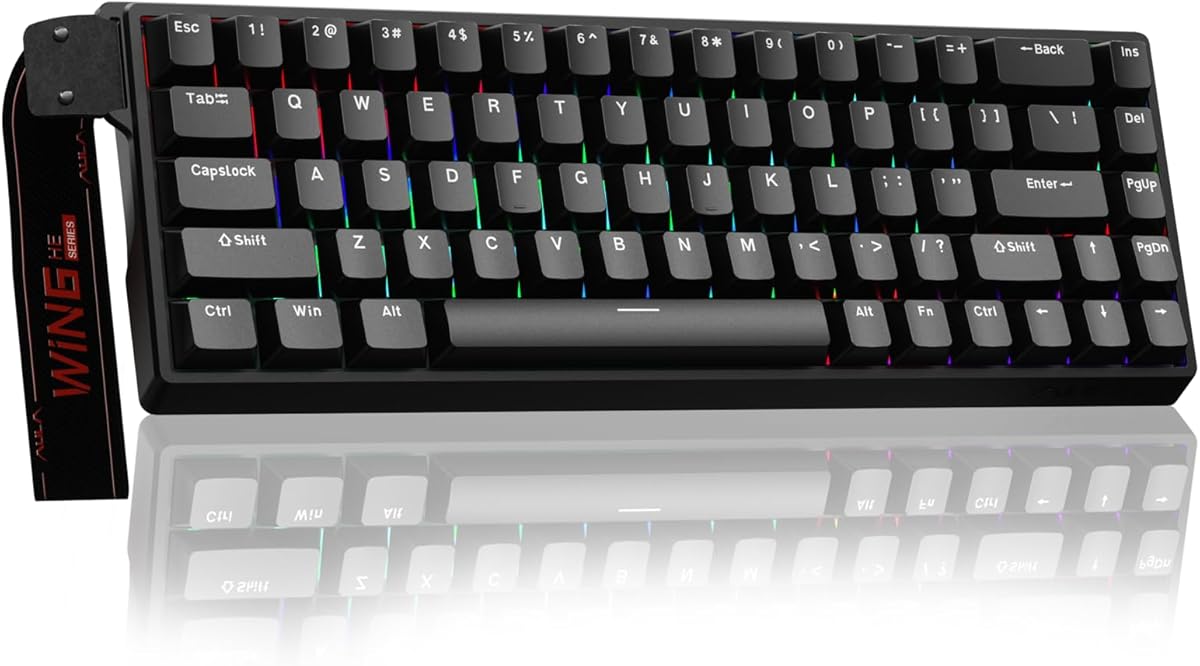
Boutique feel on a budget. The F75 Pro's gasket mount and lubed switches deliver a deep, creamy sound usually reserved for pricier boards, plus a knob, hot-swap and triple-mode wireless. Remarkable value.
- Layout
- 75% (81-key)
- Mount
- Gasket
- Switches
- Pre-lubed hot-swap
- Extras
- Volume knob
What we liked
- Creamy pre-lubed feel
- Gasket mount + knob
- Triple-mode wireless
- Side-printed PBT keycaps
Worth noting
- Smaller brand support
- RGB software is rough
How to choose a gaming keyboard in 2026
The right keyboard depends on how you play, not on whichever board has the longest spec sheet. Here's what actually matters.
Switch technology. Three families dominate. Traditional mechanical switches (Cherry MX, hot-swap MX in the Keychron and Ducky) give the classic feel and the most customization. Optical switches (Razer Huntsman) use light for very fast, consistent actuation. Magnetic Hall-effect switches (SteelSeries Apex Pro, Corsair K70 PRO TKL) add adjustable actuation depth and rapid trigger — the biggest competitive advantage available today.
Do you need rapid trigger? If you play ranked shooters like Valorant or CS2, an adjustable Hall-effect board genuinely helps; rapid trigger resets keys the instant you lift, sharpening counter-strafing. If you mostly play single-player games or also type all day, a premium mechanical board will feel better for less.
Size and layout. TKL and 75% boards drop the number pad, freeing mouse space for low-sensitivity players. Choose full-size only if you regularly need the numpad.
Wired vs wireless. Modern 2.4GHz wireless is effectively lag-free, so don't fear it. Decide whether a cable-free desk is worth giving up hot-swap or analog switches, which most wireless boards omit.
Build and keycaps. At any price, look for PBT keycaps (they resist shine) and, higher up, aluminum frames, gasket mounts and foam dampening for a better sound and feel.
Budget. Under $90 gets you a genuinely great board; up to $200 buys premium build, wireless and Hall-effect switches.
Decide your switch type first — it narrows the field fast — then let our ranked picks above point you to the right board for your budget.
Switch actuation: what the numbers actually mean
Every switch spec sheet lists actuation force in grams and actuation point in millimeters. These numbers matter for gaming, but not in the way most people expect.
Actuation force (35g–67g on most gaming switches) tells you how hard you need to press before the keypress registers. Lighter switches like Gateron Yellow (35g) or Cherry MX Red (45g) register with almost no effort. This makes rapid key taps easier in fast-paced games, but it also means accidental keypresses happen more often if your fingers rest on the keys.
Actuation point is where most competitive players focus. Standard mechanical switches actuate at 2.0mm into a 4.0mm total travel. Hall-effect switches let you set this anywhere from 0.1mm to 4.0mm. Setting actuation to 0.3mm means the key fires almost instantly after your finger starts moving — a real advantage in shooters where milliseconds separate a clean kill from a missed shot.
For casual or single-player gaming, actuation spec differences are unnoticeable. For competitive multiplayer, especially in ranked lobbies, they start to matter.
Polling rate: 1000Hz vs 8000Hz
Polling rate tells you how often the keyboard reports its state to the computer, measured in Hz. Standard keyboards run at 1000Hz (reporting 1,000 times per second). High-end gaming keyboards now hit 8,000Hz.
At 8,000Hz, the keyboard reports its state every 0.125 milliseconds instead of every 1 millisecond. In theory, this reduces input lag by up to 0.875ms. In practice, the difference is imperceptible to the human nervous system — even professional esports players cannot detect 1ms differences in controlled tests.
Don't pay a significant premium for 8,000Hz polling alone. It's a feature worth having if it comes standard, not worth chasing.
Hot-swap vs soldered: which to choose for gaming
Hot-swap PCBs let you pull switches out and press new ones in without soldering. This matters for gaming for one reason: you can try different switch weights and types without buying a new keyboard.
Many gamers start with Cherry MX Red (45g linear) and later discover they prefer the heavier Gateron Black (60g) for reducing accidental keypresses, or switch to Hall-effect for adjustable actuation. Hot-swap makes this a $25–40 switch purchase instead of a $150+ keyboard purchase.
If you're buying your first gaming keyboard, hot-swap is one of the most valuable features to look for. The Keychron Q1, Ducky One 3 TKL, and Corsair K70 PRO TKL all offer it at their respective price points.
Gaming keyboards vs typing keyboards: do you need both?
Many people assume gaming keyboards are bad for typing and vice versa. This is largely a myth.
Heavy tactile switches (Boba U4, Holy Pandas) are more typing-optimized and less ideal for fast gaming due to the strong bump. Light linears (Cherry MX Red, Gateron Yellow) are gaming-optimized but perfectly usable for typing.
The boards that genuinely serve both purposes best are hot-swap keyboards in the $80–180 range: Keychron Q1, Keychron V3, Ducky One 3. You start with a gaming-friendly linear switch, then swap to a typing-optimized tactile later if your needs shift.
What to avoid when buying a gaming keyboard
Brand RGB markup. RGB lighting is cheap to manufacture and expensive to market. Many keyboards charge a $20–40 premium purely for animated lighting effects. If RGB matters to you, fine — but don't let it substitute for evaluating switch quality and build.
Proprietary switches without hot-swap. Some gaming brands use proprietary switches that only work in their own ecosystem. If the board isn't hot-swap, you're locked into that switch type indefinitely.
Wrist rests that raise the back of your hands. Many gaming keyboard bundles include rigid plastic wrist rests that push your wrists into extension (bending back). This position increases carpal tunnel pressure. A flat, soft wrist rest that keeps wrists neutral is better for long sessions.
The gaming keyboard market has excellent options at every budget from $35 to $200. The picks above cover all the major use cases — use this guide to narrow down which matters most to you, then let the rankings do the rest.
Gaming keyboard recommendations by genre
Not all games make the same demands on a keyboard. The right board for a competitive shooter looks very different from the right board for a strategy game or an MMO.
Competitive FPS (Valorant, CS2, Apex Legends): This is where Hall-effect switches with rapid trigger provide a measurable advantage. Adjustable actuation at 0.1–0.3mm and instant reset let you counter-strafe and re-press keys faster than traditional mechanical switches allow. The SteelSeries Apex Pro TKL and Corsair K70 PRO TKL are built precisely for this use case. Layout-wise, TKL or 65% gives your mouse room to move.
Battle royale (Fortnite, PUBG, Warzone): Building mechanics in Fortnite and fast looting in battle royale games favor a light, fast linear. Cherry MX Red or Gateron Yellow suits the quick, repeated keypresses these games demand. Full-size or TKL works depending on whether you use the numpad for macros.
RPG and open-world games: The keyboard demands are lower for these genres — you're pressing fewer keys, less frantically. A medium-weight tactile switch (Cherry MX Brown, Gateron Brown) makes extended play sessions more comfortable by reducing the effort per keypress. Nearly any keyboard in our list works here.
MMOs and strategy games: These genres use many keys simultaneously. A full-size keyboard with a numpad helps MMO players who bind abilities across the full keyboard. QMK/VIA programmability to create macro layers is particularly valuable for strategy players managing complex key binding schemes.
Platformers and indie games: Virtually any mechanical keyboard works. Personal switch preference matters more than gaming-specific features. This is a good genre to use as a "daily driver" keyboard without overthinking specifications.
The long-term cost of getting your first gaming keyboard right
Most people buy their first gaming keyboard at the cheapest price point that sounds mechanical, discover something they dislike — wrong switches, wrong layout, no hot-swap — and buy again within a year. Over three years this approach often costs more than buying a mid-range keyboard correctly the first time.
A $45 keyboard bought twice costs $90. A $75 keyboard with hot-swap bought once costs $75 and lets you swap switches twice instead of replacing the board.
The sweet spot for a first gaming keyboard is $60–90: hot-swap PCB, 2.4GHz wireless or wired, PBT keycaps, and a layout you've confirmed matches your gaming and typing habits. Spend 20 minutes choosing before buying and you'll likely never need to replace it until you actively want to upgrade.
Beyond budget, the most durable choice is a board whose switches you can change. Mechanical switch preferences evolve as you develop typing habits and try different options. A hot-swap board accommodates that evolution without requiring a new purchase every time your preference shifts.
The gaming keyboards in our list are all chosen with long-term ownership in mind. Every recommendation includes its strongest use case — match that use case to yours, and the keyboard you pick will earn its cost many times over.
Latency, polling and what actually affects your game
For gaming keyboards, responsiveness gets a lot of marketing attention, but it helps to know what truly matters. A high polling rate and low input latency ensure your keypresses register instantly, and the boards here are all fast enough that the keyboard is never the bottleneck. Wired connections and quality wireless both deliver gaming-grade response now, so you can choose by feel and features rather than chasing numbers. What you will actually notice day to day is switch feel, build quality and how comfortable the board stays over a long session, so weigh those above headline latency specs.
Analog and rapid-trigger switches explained
The newest gaming keyboards use magnetic (Hall effect) switches that enable features competitive players value. Adjustable actuation lets you set how far a key travels before it registers, and rapid trigger resets the key the instant you lift, allowing faster repeated inputs for movement and counter-strafing. Analog input can even read how far you press, mimicking a controller stick. These features genuinely help in fast shooters, but they are not essential for everyone. If you play competitively, a magnetic-switch board is worth considering; if you play casually, a great traditional mechanical board feels just as good.
Getting the most from your gaming keyboard
A little setup unlocks a gaming keyboard's potential. Use the software to set per-game profiles, map macros to spare keys, and tune actuation or rapid trigger if your board supports it. Keep the firmware updated for the latest features and stability, and disable any lighting effects that distract you mid-match. Pair the board with a comfortable wrist rest for long sessions, and keep it clean so every key stays crisp. Configured well, a quality gaming keyboard fades into the background and lets your skill, not your gear, decide the match.
How we picked
We use each keyboard for at least a week across fast shooters, slower strategy and RPG sessions, and a full day of typing. We score switch feel and consistency, build quality, latency (wired and wireless), keycap material, software, and features like rapid trigger and adjustable actuation — then weigh it all against price. Marketing specs never earn a spot; real-world performance does.
Frequently asked questions
What's the best gaming keyboard overall in 2026?
For most players, the Keychron Q1 — it offers the best blend of premium build, typing feel and customization. If you specifically play competitive shooters, the SteelSeries Apex Pro TKL Gen 3 with adjustable Hall-effect switches is the better choice.
Are magnetic (Hall-effect) keyboards worth it for gaming?
For competitive players, yes. Adjustable actuation and rapid trigger (on the Apex Pro and K70 PRO TKL) give a measurable edge in fast shooters. For everything else, a great mechanical board like the Q1 or Keychron V3 is plenty.
Is wireless good enough for serious gaming?
Modern 2.4GHz wireless, like Logitech Lightspeed on the G915 TKL or the dongle on the RK84, is effectively lag-free for the vast majority of players. Only elite esports pros benefit from going wired.
How much should I spend on a gaming keyboard?
You can get an excellent board for under $90 (Keychron V3, RK84). Spending up to $200 buys premium materials, wireless, and analog Hall-effect switches. Beyond feature needs, more money mainly buys better build and feel.