Skip to content

Best Ergonomic Keyboards in 2026

4.5 average · hands-on tested
By Dylan AidenUpdated June 27, 20265 picks tested

We may earn a commission from links on this page, at no extra cost to you. Learn more.

If wrist or forearm strain is creeping into your workday, the right ergonomic keyboard can make a real difference. From gentle curved boards to fully split mechanical keyboards, we tested the best options for comfort and typing. These five are our top picks for 2026, whatever your budget and however much change you're ready for.

Quick comparison

KeyboardBest forRatingPrice
1Logitech Ergo K860LogitechBest Overall4.6$$$Check Price
2Kinesis Freestyle Edge RGBKinesisBest for Gaming4.5$$$Check Price
3Keychron Q11KeychronBest Custom Split4.6$$$Check Price
4Logitech Wave KeysLogitechBest Compact / Budget4.4$$$Check Price
5Microsoft Ergonomic KeyboardMicrosoftBest Value Split4.2$$$Check Price

Our top 5 picks, reviewed

1Best Overall

Logitech Ergo K860

The best ergonomic keyboard for most people. The K860's curved, split key layout and pillowed wrist rest noticeably reduce wrist bending without the steep learning curve of a fully split board. It's the easiest big comfort upgrade you can make.

Type
Curved split (one-piece)
Connection
BT / USB receiver
Wrist rest
Integrated pillowed
Layout
Full-size

What we liked

  • Comfortable curved split layout
  • Excellent cushioned wrist rest
  • Easy multi-device wireless
  • Two-year battery life

Worth noting

  • Membrane, not mechanical
  • Bulky footprint
2Best for Gaming

Kinesis Freestyle Edge RGB

The ergonomic pick for gamers and mechanical fans. The Freestyle Edge fully separates into two halves you can set at shoulder width, with real Cherry MX switches, RGB and full programmability. The best split board that still feels like a gaming keyboard.

Type
Fully split mechanical
Switches
Cherry MX
Layout
TKL
Extras
RGB, palm supports

What we liked

  • True split for shoulder-width typing
  • Genuine Cherry MX switches
  • Fully programmable
  • Cushioned palm supports

Worth noting

  • Takes time to adapt
  • Tenting kit sold separately
3Best Custom Split

Keychron Q11

For enthusiasts who want ergonomics without sacrificing build, the Q11 is a fully split, aluminum, hot-swappable QMK/VIA board. You get a custom-grade typing experience and the posture benefits of a split layout in one premium package.

Type
Split 75% mechanical
Build
Full aluminum
Software
QMK / VIA
Switches
Hot-swap

What we liked

  • Premium full-metal split
  • Hot-swap + QMK/VIA
  • Dual knobs
  • Excellent typing feel

Worth noting

  • Heavy and wired
  • Premium price
4Best Compact / Budget

Logitech Wave Keys

A gentle, affordable step into ergonomics. The Wave Keys' curved 'wave' layout and memory-foam rest feel instantly familiar, and the compact body lets you keep your mouse closer. The easiest budget pick for anyone easing into ergonomic typing.

Type
Curved wave (one-piece)
Connection
BT / Logi Bolt
Wrist rest
Memory-foam
Layout
Compact full-size

What we liked

  • Affordable comfort upgrade
  • Memory-foam palm rest
  • Compact, brings mouse closer
  • Up to 3-year battery

Worth noting

  • Membrane keys
  • Less aggressive ergonomics than a split
5Best Value Split

Microsoft Ergonomic Keyboard

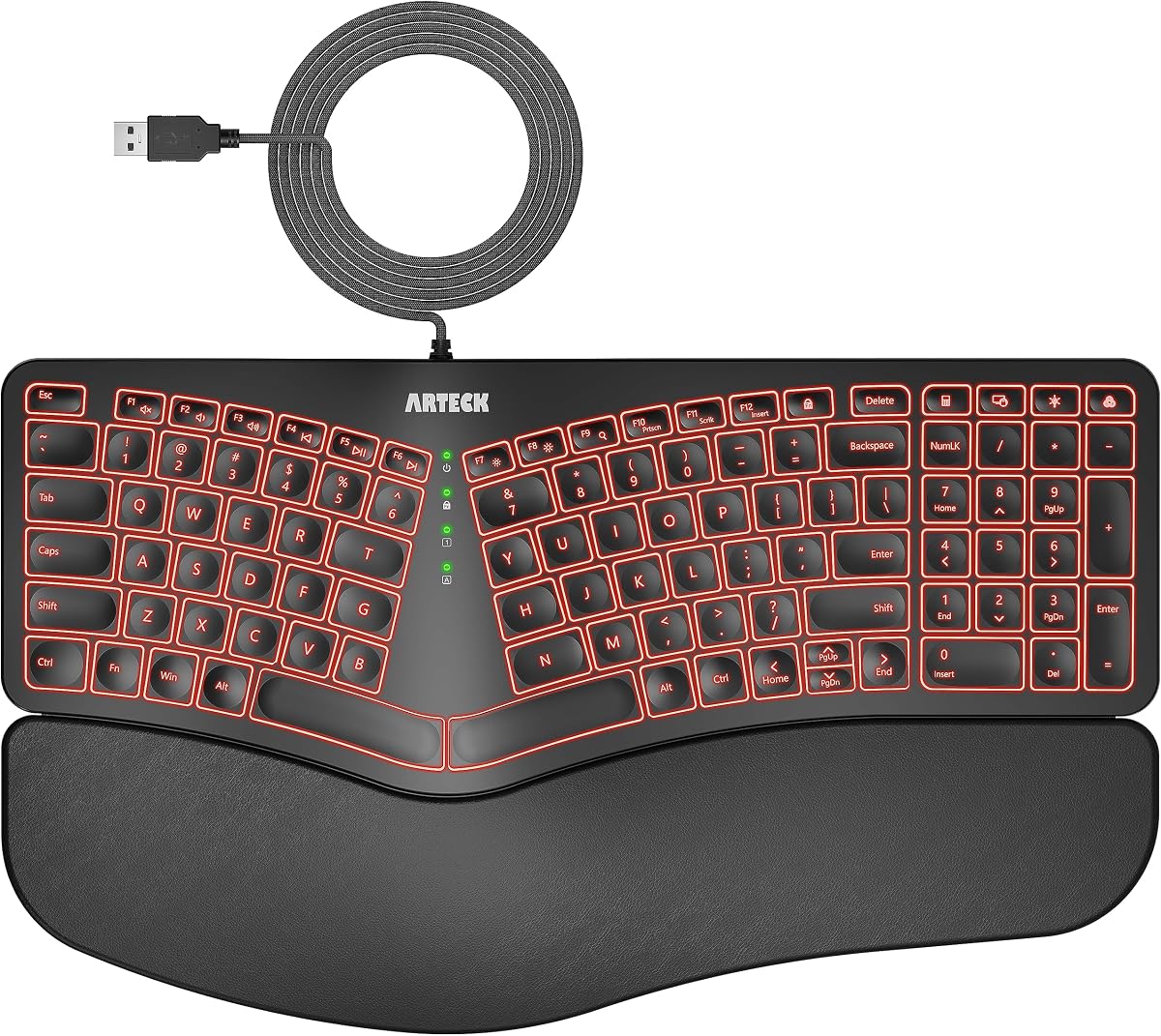
A long-standing comfort favorite at a low price. The split-curve layout and cushioned palm rest promote a more natural hand position, and the dedicated shortcut keys are handy. Wired and membrane, but unbeatable value for ergonomic relief.

Type
Curved split (one-piece)
Connection
USB wired
Wrist rest
Cushioned palm rest
Layout
Full-size

What we liked

  • Proven split-curve comfort
  • Cushioned palm rest
  • Dedicated shortcut keys
  • Very affordable

Worth noting

  • Wired only
  • Membrane keys, plasticky build

How to choose an ergonomic keyboard in 2026

The best ergonomic keyboard is the one whose layout you'll actually stick with. Here's how to match one to your needs and tolerance for change.

Decide how big a change you want. Curved one-piece boards (Logitech K860, Wave Keys, Microsoft Ergonomic) tilt and split the keys slightly but stay familiar — you'll adapt in a day or two. Fully split boards (Kinesis Freestyle Edge, Keychron Q11) separate into two halves for the most natural shoulder-width posture, but expect one to two weeks to rebuild muscle memory.

Wrist rest matters. A good cushioned or memory-foam palm rest supports your wrists and discourages the upward bend that causes strain. The K860 and Wave Keys are standouts here; most split boards include cushioned palm supports too.

Mechanical vs membrane. Membrane boards (K860, Wave Keys, Microsoft) are quieter, cheaper and lighter. If you want the durability and feel of mechanical switches, the Kinesis Freestyle Edge (Cherry MX) and Keychron Q11 (hot-swap) deliver — the Q11 even lets you change switches and remap every key.

Tenting. Raising the middle of the keyboard (tenting) further reduces forearm rotation. Split boards often support it; the Kinesis offers an optional lift kit, so factor that in if you want maximum adjustability.

Connectivity and layout. Wireless multi-device boards (K860, Wave Keys) keep a tidy desk and pair with laptops and tablets. Decide whether you need a full-size layout with numpad or prefer a more compact board that brings your mouse closer.

Pick the layout you'll commit to, prioritize a comfortable wrist rest, and let our picks above guide you to the right ergonomic board.

What actually causes typing-related wrist pain

The pain most office workers feel comes from three postural problems — and different ergonomic keyboards address different ones.

Ulnar deviation is the most common. Standard keyboards force your hands to angle outward from your wrists while your forearms point straight ahead. Curved and split keyboards correct this by angling the key groups to match the natural direction of your fingers.

Pronation is the forearm rotation that keeps your palms facing the desk. Your forearms are most relaxed in a loose handshake position. Tented keyboards (those with a raised center edge) rotate your hands inward, moving toward that neutral position.

Wrist extension happens when the back of the keyboard sits higher than the front, pushing your wrists upward and backward. Most boards ship with the rear feet extended — which actually increases extension. Fold the feet flat, or look for a keyboard with negative tilt support, to keep wrists neutral.

Knowing which problem affects you most helps you choose the right type of ergonomic board.

Curved one-piece keyboards: low friction, real benefit

Curved one-piece keyboards are the easiest entry into ergonomic typing. They look more traditional and use a familiar key layout — you adapt within a day, not a week. The Logitech Wave Keys and K860 both land here.

The ergonomic benefit is moderate but genuine. The key split and gentle curve reduce ulnar deviation compared to a flat standard keyboard. The built-in palm rests keep wrists flatter during typing. For most users experiencing mild wrist discomfort after long work sessions, this level of change is often enough.

These boards suit people who switch between multiple computers or regularly use standard keyboards at other desks. Because the layout stays familiar, you won't feel disoriented moving between setups.

Split keyboards: the bigger investment, bigger payoff

Fully split keyboards separate into two independent halves you position at shoulder width. This is the most structurally significant change — your arms hang straight from your shoulders instead of crossing inward, reducing shoulder and upper arm tension noticeably.

The Keychron Q11 and Kinesis Freestyle Edge are the split options in our list. Both require a period of adjustment. Touch typists with correct finger-column assignments adapt in one to two weeks. Typists who hunt-and-peck visually take longer because they rely on key positions rather than muscle memory.

The payoff for people who type 6–8 hours a day is significant. Shoulder tension drops, posture often improves naturally, and many users report less neck stiffness after switching to a split layout.

What tenting adds to the ergonomic equation

Tenting props up the inner edge of each keyboard half so your hands angle inward rather than lying fully flat. This reduces pronation — the forearm rotation that all flat keyboards require.

The right tenting angle is personal. Most people find somewhere between 5 and 15 degrees reduces forearm fatigue without feeling unnatural. The Kinesis Freestyle Edge supports an adjustable tent kit accessory with multiple angle options, which is worth the additional cost if forearm tension is a specific complaint.

Fixed tenting (built into some boards at a set angle) is better than no tenting, but adjustable tenting is better than fixed. Consider your own anatomy when evaluating this — what relieves tension for one person may feel awkward for another.

When to consult a professional instead

An ergonomic keyboard reduces strain but doesn't treat existing injuries. If you have diagnosed carpal tunnel syndrome, tendinitis, or repetitive strain injury, a keyboard upgrade is a supportive measure, not a treatment.

Occupational therapists who specialize in repetitive strain assess your specific setup, typing habits, and posture. They often identify the root cause faster than iterating through keyboard purchases. Monitor height, chair height, and arm position frequently contribute as much to wrist pain as the keyboard itself.

If pain is persistent or worsening, a consultation with a specialist is more valuable than any keyboard on this list.

Setting up an ergonomic keyboard for maximum benefit

Buying an ergonomic keyboard is step one. Setting it up correctly is step two — and it makes a larger difference than most people expect.

Height and angle. The keyboard surface should sit at or slightly below elbow height, allowing your forearms to rest parallel to the floor with elbows bent at roughly 90 degrees. A keyboard that sits too high forces the shoulders to rise, creating tension that no keyboard design can counteract.

Distance. Place the keyboard close enough that your elbows rest at your sides, not extended forward. Many users push keyboards too far away from their body, forcing the arms to reach forward and placing strain on the forearms and shoulders.

Wrist rest usage. Wrist rests are correctly used during pauses between typing — not while actively typing. Resting your wrists on a palm support while typing increases compression at the carpal tunnel. During active typing, wrists should float slightly above the surface, with the wrist rest providing support only when you stop.

Monitor alignment. Ergonomic keyboards rarely fix wrist pain that originates from poor monitor placement. A monitor too low causes you to hunch forward and round your shoulders. The center of the monitor should be roughly at eye level, with the screen tilted slightly backward. Fixing monitor position often reduces upper body tension more effectively than switching keyboards.

Give it time. Any new ergonomic layout takes 2–4 weeks to feel natural. Most people underestimate the adaptation period and abandon the switch too soon. The first week on a split keyboard always feels slow and frustrating — this is normal. Commit to 3–4 weeks before deciding whether the layout works for you.

Why programmers benefit most from ergonomic keyboards

Programmers interact with keyboards differently from most office workers. A programmer types code for hours with frequent modifier key use — Ctrl, Alt, Cmd, Shift — plus constant switching between mouse and keyboard. This usage pattern creates specific strain patterns that ergonomic keyboards address directly.

The most common complaint from programmers is pinky finger fatigue from overuse of modifier keys. On standard keyboards, both Ctrl and Shift live at the far-left and far-right edges, requiring the weakest finger on each hand to handle some of the most frequent key combinations in programming (Ctrl+C, Ctrl+V, Ctrl+Z, Shift for capitalization).

Split ergonomic keyboards let you position each half independently, reducing the reach to modifiers. QMK/VIA programmability on the Keychron Q11 lets you move those modifiers closer to the home row entirely — placing Ctrl and Shift on home row keys held down (home row mods), eliminating the pinky reach altogether.

Programmers who spend 6–8 hours at a keyboard daily see the strongest return on investment from a split ergonomic board. The learning curve is real but the long-term reduction in hand and wrist fatigue is equally real.

How ergonomic keyboards reduce strain

Ergonomic keyboards are designed to keep your hands, wrists and forearms in a more natural position, reducing the strain that builds from hours at a standard flat board. Split designs let each hand sit shoulder-width apart so your wrists stay straight instead of angling inward, while tenting raises the centre so your palms face slightly inward in a more natural handshake position. Many also add negative tilt and palm support to keep wrists neutral. Together these features can relieve the discomfort that flat keyboards cause, which is why people with wrist pain or RSI concerns often find them transformative.

Split, tented and contoured designs

Ergonomic keyboards come in several forms, and the right one depends on how much adjustment you want. A gentle one-piece ergonomic board with a slight curve and built-in palm rest offers an easy step up from a flat keyboard with little learning curve. A fully split board separates into two halves you can position independently for maximum comfort, and adding tenting raises the inner edges. Contoured boards take it furthest with sculpted key wells. The more aggressive the design, the bigger the comfort payoff but the longer the adjustment period, so match the design to your needs and patience.

The adjustment period is real

Switching to an ergonomic keyboard, especially a split or contoured one, takes adjustment, and it helps to expect that. Your typing speed will dip for the first days or weeks as your hands learn the new positions, particularly on split boards where keys like B, Y and N may move to the other half than you are used to. Most people adapt within one to three weeks and then type as fast as before, with far less strain. Stick with it through the early awkwardness, since the long-term comfort benefit is well worth the temporary slowdown.

Who should switch to ergonomic

Ergonomic keyboards suit anyone who types for long hours and feels wrist, hand or forearm discomfort, as well as those who want to prevent strain before it starts. Developers, writers, customer support staff and heavy office users benefit most. If you already type comfortably for hours with no discomfort, a standard board may be fine, though many people find ergonomic designs more comfortable even without prior pain. If you have existing wrist issues or RSI, an ergonomic keyboard is one of the most worthwhile upgrades you can make to your setup.

Getting the most from an ergonomic board

To get the full benefit, set the keyboard up properly. Position the halves of a split board shoulder-width apart with your wrists straight, adjust the tenting until your palms feel relaxed, and use any palm support to keep wrists neutral rather than bent. Combine the keyboard with a good chair and monitor height for whole-desk ergonomics, since the keyboard is one part of a comfortable setup. Remap keys in software if needed, give yourself time to adapt, and an ergonomic keyboard can make long days at the desk markedly more comfortable.

Ergonomics are a system, not just a keyboard

It is worth remembering that an ergonomic keyboard works best as part of a properly set-up workspace. Even the best split board cannot fully offset a chair that is too low, a monitor that forces you to look down, or a desk that makes you hunch. Aim for your elbows at roughly ninety degrees, your wrists straight and your screen at eye level, then let the ergonomic keyboard keep your hands neutral within that posture. Combined with regular short breaks and the occasional stretch, an ergonomic keyboard becomes one valuable piece of a comfortable, strain-reducing setup rather than a cure on its own.

An investment in long-term comfort

For anyone who types for a living, an ergonomic keyboard is less a luxury than a long-term investment in comfort and health. Spread over years of daily use, the cost works out to very little, and the payoff is real: less wrist and forearm fatigue, and for many people relief from nagging discomfort that flat boards cause. If you have ever finished a long day with aching wrists, the switch is well worth making. Choose the design that matches how much adjustment you want, give yourself time to adapt, and your hands will thank you across the years ahead.

How we picked

We typed on each keyboard for at least a week of real work, assessing wrist and forearm posture, the comfort of the palm rest, how quickly we adapted to the layout, and overall build and connectivity. Ergonomics is personal, so we note who each board suits — from people wanting a small change to those ready for a fully split layout.

Frequently asked questions

Do ergonomic keyboards actually reduce wrist pain?

For many people, yes. Split and curved layouts encourage a more natural wrist and forearm position, reducing the bending and pronation that cause strain. They're not a medical cure — if you have persistent pain, see a professional — but they can meaningfully improve comfort for everyday typing.

What's the difference between split and curved ergonomic keyboards?

Curved (one-piece) boards like the K860 and Wave Keys angle the keys in a gentle wave but stay a single unit — easy to adapt to. Fully split boards like the Kinesis Freestyle Edge and Keychron Q11 separate into two halves you can place at shoulder width for the most aggressive ergonomic benefit, with a steeper learning curve.

How long does it take to get used to an ergonomic keyboard?

Curved boards feel familiar within a day or two. Fully split keyboards take longer — usually one to two weeks — to rebuild muscle memory, after which most people type as fast as before with far less strain.

Are there mechanical ergonomic keyboards?

Yes. The Kinesis Freestyle Edge RGB uses Cherry MX switches, and the Keychron Q11 is a hot-swappable, QMK/VIA mechanical split board. The Logitech and Microsoft picks are membrane, which keeps them quieter and cheaper.