Skip to content

Best Encrypted Flash Drives in 2026

By Priya NairUpdated July 5, 2026

We may earn a commission from links on this page, at no extra cost to you. Learn more.

An encrypted flash drive is the simplest way to make sure that if a USB stick is lost or stolen, the data on it stays unreadable. The best of them lock everything behind AES 256-bit encryption handled in hardware, so a password or PIN, not luck, stands between a thief and your files. Some go further with government certifications, physical keypads and automatic data wipes after too many wrong tries. What you need depends on your threat level, from a student protecting coursework to a professional carrying regulated records. This guide ranks nine of the best encrypted flash drives you can buy in 2026, spanning affordable software-secured sticks and serious FIPS-certified hardware, so there is a right pick for every level of security.

Top 9 Best Encrypted Flash Drives

Best Hardware Encryption4.5
Best High Capacity4.5
Best Value Encryption4.5
Best Keypad USB-C Compact4.4
Best Military-Grade4.3

Our top 9 picks, reviewed

1Best Overall

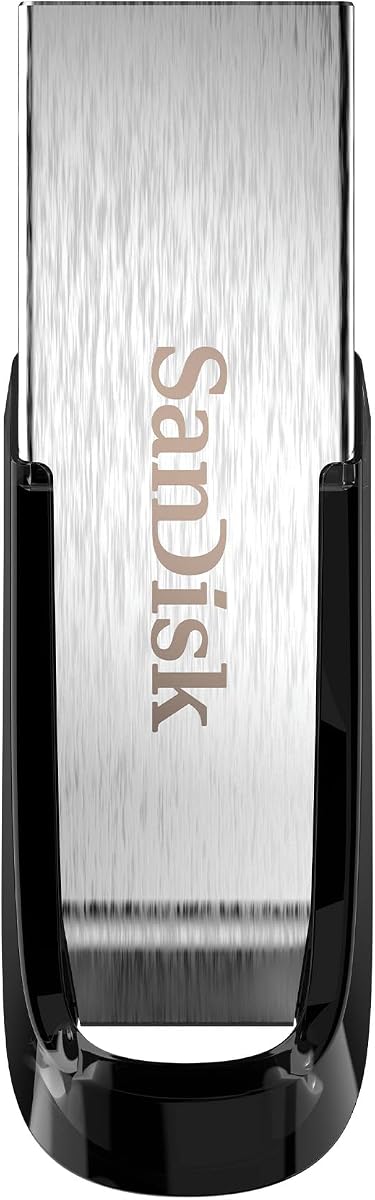
SanDisk 256GB Ultra Flair USB 3.0 Flash Drive

The SanDisk Ultra Flair is the best all-round pick for most people who simply want a fast, roomy drive with optional protection for private files. Its SecureAccess software creates a password-locked vault using 128-bit AES, while the rest of the 256GB stays freely accessible. Reads hit 150MB/s and the metal body is tough. It is software-secured rather than hardware-encrypted, so choose a keypad model below if you handle regulated or highly sensitive data.

Capacity
256GB
Speed
Up to 150MB/s read
Encryption
128-bit AES password
Feature
Metal casing

What we liked

  • Large 256GB capacity for the price
  • Fast 150MB/s USB 3.0 reads
  • Simple SecureAccess password protection
  • Durable metal casing

Worth noting

  • Software-based, not hardware encryption
  • 128-bit rather than 256-bit AES
2Best Hardware Encryption

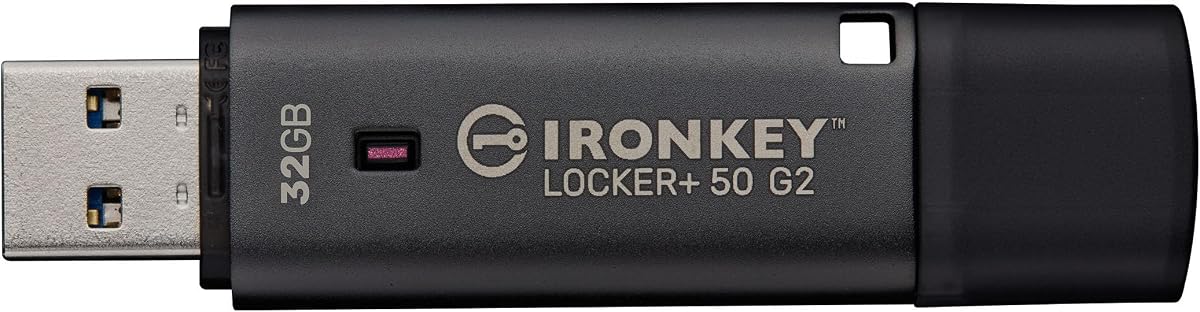
Kingston IronKey Locker+ 50 G2 32GB

The IronKey Locker+ 50 G2 is our pick for genuine hardware encryption without a steep price. Every file is locked with XTS-AES 256-bit encryption handled on the drive itself, it carries FIPS 197 certification, and it offers separate admin and user passwords with complex or passphrase modes. Reads reach 145MB/s. At 32GB it is best for documents rather than media libraries, but it delivers real, certified security that software vaults cannot match.

Capacity
32GB
Encryption
XTS-AES 256-bit hardware
Certification
FIPS 197
Speed
145MB/s read, 115MB/s write

What we liked

  • True hardware AES 256-bit encryption
  • FIPS 197 certified
  • Multi-password admin and user modes
  • Affordable entry to IronKey security

Worth noting

  • Modest 32GB capacity
  • Slower writes than premium drives
3Best High Capacity

Kingston IronKey Locker+ 50 128GB

When you need real encryption and space, the IronKey Locker+ 50 in 128GB is the answer. It uses the same hardware XTS-AES encryption as its smaller siblings, adds brute-force and BadUSB attack protection, and includes an automatic personal cloud backup so an encrypted copy of your files lives off the drive too. A virtual keyboard shields your password from keyloggers. It is the practical choice for carrying larger encrypted document sets securely.

Capacity
128GB
Encryption
XTS-AES 256-bit hardware
Feature
Cloud backup + virtual keyboard
Speed
145MB/s read, 115MB/s write

What we liked

  • Roomy 128GB encrypted capacity
  • Hardware XTS-AES encryption
  • Brute-force and BadUSB protection
  • Automatic cloud backup option

Worth noting

  • Costs more than smaller IronKeys
  • Software-managed password entry
4Best Value Encryption

Kingston IronKey Locker+ 50 G2 64GB

The 64GB IronKey Locker+ 50 G2 sits in the sweet spot between the 32GB entry model and pricier keypad drives. You get the same certified FIPS 197 hardware encryption and XTS-AES 256-bit protection, plus admin and user password modes, but with double the room for files. Read speeds hit 145MB/s. For a professional who wants dependable, certified hardware security at a fair price and a usable capacity, this is the smart middle choice.

Capacity
64GB
Encryption
XTS-AES 256-bit hardware
Certification
FIPS 197
Speed
145MB/s read, 115MB/s write

What we liked

  • Hardware AES 256-bit encryption
  • FIPS 197 certified
  • Sensible 64GB capacity
  • Multi-password admin and user option

Worth noting

  • Not keypad-based
  • Writes slower than reads
5Best Keypad USB-C

Kingston IronKey Keypad 200 USB-C 64GB

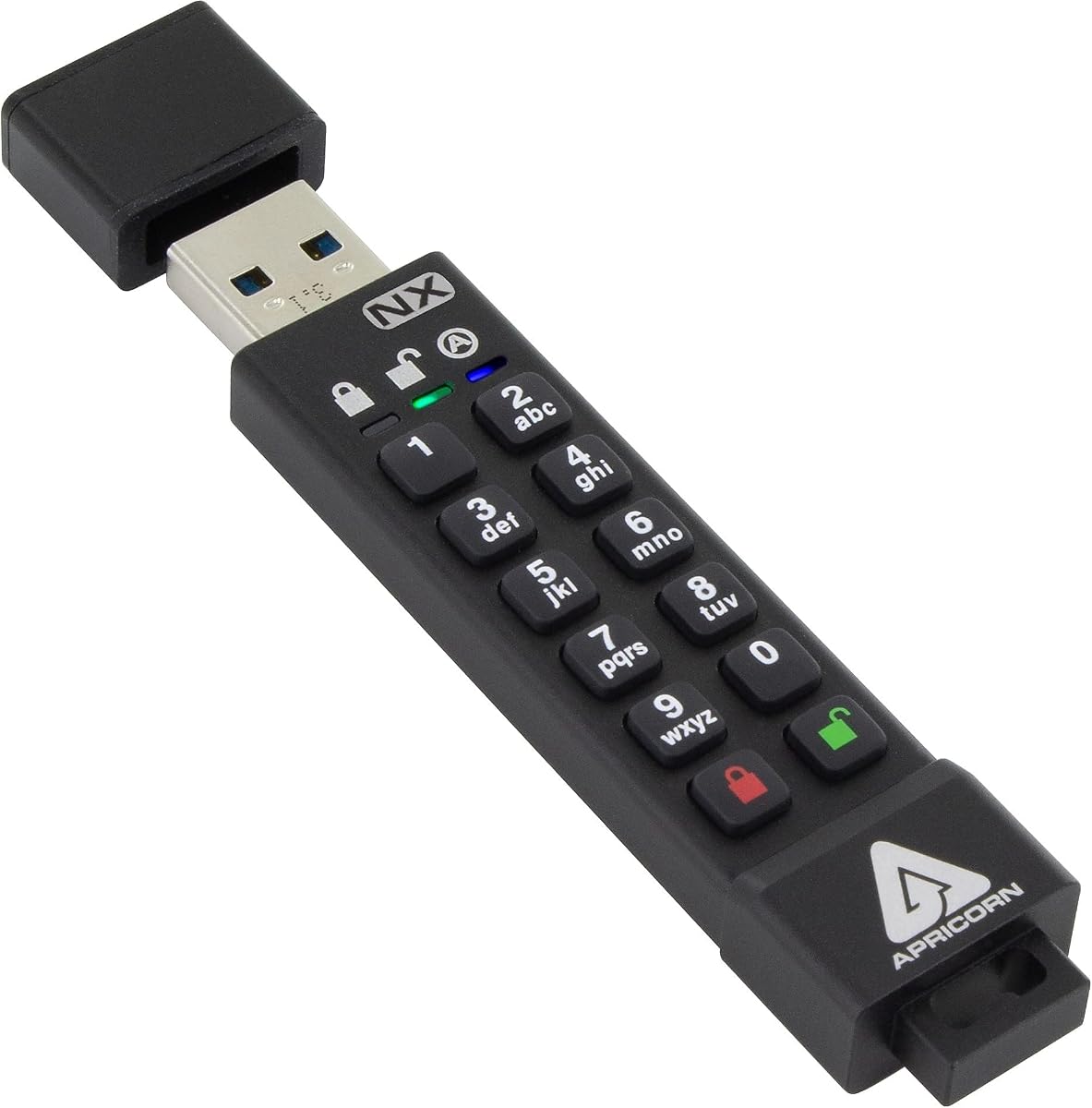
The IronKey Keypad 200 USB-C is the pick for the highest everyday security on modern hardware. Its onboard keypad means you unlock it by PIN before it ever touches a computer, so it works on any OS with no software at all. It is pending FIPS 140-3 Level 3 certification, uses XTS-AES 256-bit encryption, and resists brute-force and BadUSB attacks. The USB-C connector suits current laptops and phones, though the keypad adds a little bulk.

Capacity
64GB
Encryption
XTS-AES 256-bit
Certification
FIPS 140-3 Level 3
Feature
USB-C, OS independent

What we liked

  • Physical PIN keypad, no software
  • FIPS 140-3 Level 3 certification
  • Works on any OS or device
  • Brute-force and BadUSB protection

Worth noting

  • Premium price
  • Keypad adds bulk
6Best Keypad USB-C Compact

Kingston IronKey Keypad 200 USB-C 32GB

This is the 32GB version of the USB-C Keypad 200, ideal if you carry sensitive documents rather than large files and want the strongest practical security in a smaller package. You get the same physical PIN keypad, pending FIPS 140-3 Level 3 certification and XTS-AES 256-bit encryption, plus a handy read-only mode for sharing files without risking changes. The smaller capacity keeps things portable while keeping the top-tier protection intact.

Capacity
32GB
Encryption
XTS-AES 256-bit
Certification
FIPS 140-3 Level 3
Feature
USB-C, OS independent

What we liked

  • Onboard PIN keypad unlocking
  • FIPS 140-3 Level 3 certified
  • USB-C for modern devices
  • Global or session read-only mode

Worth noting

  • Only 32GB of storage
  • Higher cost per gigabyte
7Best Military-Grade

Kingston IronKey Keypad 200 32GB

The USB-A IronKey Keypad 200 is the go-to for military-grade security on traditional ports. Its alphanumeric keypad enforces strong PINs and unlocks the drive independently of any computer, so it works OS-free across desktops and laptops. Pending FIPS 140-3 Level 3 certification, XTS-AES hardware encryption and multi-PIN admin and user modes make it a serious tool. At 32GB it is aimed squarely at protecting critical documents rather than bulk storage.

Capacity
32GB
Encryption
XTS-AES 256-bit
Certification
FIPS 140-3 Level 3
Feature
Alphanumeric keypad

What we liked

  • Alphanumeric PIN keypad
  • FIPS 140-3 Level 3 certification
  • Multi-PIN admin and user access
  • Brute-force and BadUSB protection

Worth noting

  • USB-A only connector
  • Premium price for 32GB
8Best Budget Certified

Integral 4GB Crypto-197 256-Bit USB 3.0 Drive

The Integral Crypto-197 is the cheapest way to get government-approved encryption, pairing FIPS 197 certification and 256-bit AES with a tough waterproof, dual-layer body. It auto-erases its data after six failed password attempts and auto-locks when removed. The catch is the 4GB capacity, which only suits a handful of critical documents or credentials, not media. As a small, hardened carrier for your most sensitive files, though, it punches above its price.

Capacity
4GB
Encryption
256-bit AES
Certification
FIPS 197
Feature
Waterproof dual-layer

What we liked

  • FIPS 197 certified encryption
  • 256-bit AES protection
  • Rugged waterproof dual-layer body
  • Auto data wipe after 6 tries

Worth noting

  • Tiny 4GB capacity
  • Only enough for a few documents
9Best Dual-Partition

Integral 32GB Secure 360 Encrypted USB 3.0 Drive

The Integral Secure 360 offers a flexible dual-partition approach, letting you keep everyday files in an open area and lock your sensitive data in a separate 256-bit AES encrypted partition, up to the full 32GB if you wish. It wipes its data after ten failed attempts and needs no software install or subscription. It is software-secured rather than hardware-encrypted, and carries the lowest rating here, so it suits budget-minded users with moderate needs.

Capacity
32GB
Encryption
256-bit AES software
Speed
USB 3.0 up to 5Gbps
Feature
Dual encrypted partition

What we liked

  • Split encrypted and open partitions
  • 256-bit AES software encryption
  • Auto data wipe after 10 tries
  • No install or subscription fees

Worth noting

  • Software-based encryption only
  • Lowest rating on the list

How We Chose the Best Encrypted Flash Drives

Best Encrypted Flash Drives in 2026

Choosing an encrypted flash drive is really about matching a level of security to a level of risk, and that is harder than it sounds because the marketing on every drive promises to keep your files safe. Our starting point was to draw a firm line between the two fundamentally different approaches on the market: software encryption, where a program on your computer locks a vault, and hardware encryption, where a dedicated chip inside the drive does the work and the keys never leave the device. That distinction shapes everything else, because a hardware-encrypted drive is far harder to attack and works on any machine, while a software-secured one is cheaper and often friendlier for casual use.

From there we weighed the features that turn a claim into real protection. Independent certification came first, since a FIPS 197 or FIPS 140-3 badge means an outside body has verified the encryption rather than the maker simply asserting it. We then looked at defences against brute-force guessing and BadUSB attacks, at whether a drive wipes itself after too many wrong tries, and at whether it uses a physical keypad or a software password. Finally we kept capacity, speed and price in view, because the most secure drive in the world is useless if it is too small, too slow or too expensive for the job you actually have.

Hardware Versus Software Encryption

This is the single most important decision when buying an encrypted drive, so it is worth understanding clearly. Software encryption, used by the SanDisk Ultra Flair and the Integral Secure 360, creates a locked container that a program on your PC opens with a password. It is inexpensive, flexible and fine for personal files, but the encryption depends on the host computer, which means a compromised machine can potentially capture your password, and the drive itself is not tamper-resistant. For a student protecting coursework or a home user hiding tax records, it is often good enough.

Hardware encryption, which powers every Kingston IronKey drive on this list, is a different tier. A dedicated controller inside the drive performs the XTS-AES 256-bit encryption, the keys are generated and stored on the device and never touch the host, and the electronics are physically hardened against tampering. Because the security lives on the drive, it works identically on any operating system with no software to install. If you carry regulated data, client records, medical information or anything that would cause real damage if exposed, hardware encryption is the responsible choice, and the price premium buys genuine peace of mind.

Understanding FIPS Certification

Certifications separate drives whose security has been independently verified from those that merely claim it, and two levels matter here. FIPS 197 confirms that a drive implements the AES encryption standard correctly, and it appears on the IronKey Locker+ 50 G2 models and the tiny Integral Crypto-197. It is a solid baseline that tells you the cryptography itself is sound and government-approved, which for most professional and personal use is entirely sufficient.

FIPS 140-3 Level 3 is a significant step up, and it is what the IronKey Keypad 200 family carries. Beyond verifying the encryption, it demands proven physical tamper resistance, so the drive is built to detect and respond to attempts to pry into its hardware. This is the standard you reach for when data must be protected against determined, hands-on attackers, or when compliance rules require it. If your work does not demand that level, a FIPS 197 drive is lighter on the wallet and still strongly secure; the certification you need should follow the sensitivity of your data, not the biggest number on the box.

Keypad Drives Versus Password Drives

How you unlock a drive affects both security and convenience, and the two styles here suit different users. Password-based drives, including the IronKey Locker+ 50 range, prompt you for a password through a small application when you plug them in. They are simpler and cheaper, and Kingston shields the entry with a virtual on-screen keyboard to defeat keyloggers. The unlock still happens on the host computer, though, which is a slightly larger attack surface than the alternative.

Keypad drives such as the IronKey Keypad 200 put a physical set of buttons on the drive itself. You enter a PIN directly on the device before it ever connects, so the drive presents itself to the computer already unlocked and needs no software whatsoever. That makes them immune to host-based keyloggers and lets them work on anything with a USB port, from a locked-down work laptop to a photocopier. The trade-offs are a higher price and a bulkier body to accommodate the keys. For the most sensitive, OS-agnostic use, the keypad approach is the stronger one; for everyday personal security, a password drive is perfectly reasonable.

Self-Destruct and Brute-Force Protection

A password is only as good as the drive's resistance to guessing, which is why the best encrypted drives fight back against repeated wrong attempts. The Integral Crypto-197 automatically erases its data after six failed entries, the Integral Secure 360 after ten, and the IronKey drives include brute-force protection that similarly locks or wipes the device once an attacker exhausts a set number of tries. This turns a stolen drive from a puzzle to be cracked into a brick, because there is simply no way to try enough passwords before the data destroys itself.

The IronKey models add BadUSB attack protection, which guards against malicious firmware being loaded onto the drive to compromise a computer, a subtler threat that plain storage devices ignore entirely. The important thing to understand as a user is that these defences are unforgiving by design: if you forget your own password, you will trigger the same wipe an attacker would. There is no recovery service and no backdoor, which is precisely why the encryption is trustworthy. Store your password securely and separately from the drive, and treat the self-wipe as the safety feature it is rather than a hazard.

Capacity and Everyday Practicality

Security is the point, but a drive still has to be usable, and capacity is where secure drives force the sharpest trade-offs. Hardware-encrypted drives cost more per gigabyte than ordinary sticks, so many are sold in modest sizes: the IronKey Locker+ 50 G2 and Keypad 200 models range from 32GB to 64GB, which is generous for documents, credentials and spreadsheets but tight for media. The 128GB IronKey Locker+ 50 is the roomiest hardware option here for anyone who needs to carry larger encrypted file sets. At the extreme end, the Integral Crypto-197's 4GB is meant purely for a handful of critical files, not photos or video.

Speed matters too, and the IronKey drives read at up to 145MB/s and write at around 115MB/s, which is comfortably quick for opening and saving documents even though writes trail reads. The software-secured SanDisk Ultra Flair is the fastest and largest here at 256GB and 150MB/s, but remember its protection is a software vault rather than full-drive hardware encryption. The practical lesson is to size a secure drive to the specific data you protect, not to your entire file collection; a right-sized encrypted drive for your sensitive material, paired with an ordinary drive for everything else, is often the most sensible setup.

A Closer Look at the Top Picks

The SanDisk Ultra Flair takes the overall top spot for the broadest audience because it balances speed, capacity, durability and optional protection at a low price. Most people do not need certified hardware encryption; they need a fast, roomy, reliable drive that can lock away a folder of private files when required, and the Ultra Flair does exactly that with its SecureAccess vault and 256GB of space. It is the drive we would hand to a typical user who wants security as an option rather than a mandate.

For anyone whose data genuinely demands more, the Kingston IronKey line is the heart of this list. The Locker+ 50 G2 models bring certified hardware encryption at accessible prices, the 128GB Locker+ 50 adds capacity and cloud backup, and the Keypad 200 drives sit at the top with physical PIN entry and FIPS 140-3 Level 3 certification for the most demanding, OS-independent use. The Integral Crypto-197 and Secure 360 round out the budget end, the former for a tiny certified carrier of critical files and the latter for flexible dual-partition storage. Match the tier to your risk and there is a clear pick for everyone.

Final Recommendation

For most buyers, the SanDisk Ultra Flair is the best encrypted flash drive in 2026, offering a fast, durable 256GB drive with easy password protection for the files that need it, all at a modest price. If you handle sensitive or regulated data, step up to genuine hardware encryption: the Kingston IronKey Locker+ 50 G2 is the value pick for certified security, the 128GB Locker+ 50 adds room and cloud backup, and the IronKey Keypad 200 delivers the strongest protection with a physical PIN and FIPS 140-3 Level 3 certification. Budget-minded users can turn to the Integral Crypto-197 for a certified pocket carrier or the Secure 360 for dual-partition flexibility. Match the level of security to the true sensitivity of your data, and any drive here will keep your files locked down.

How we picked

We judged each encrypted flash drive on the strength and type of encryption, independent certifications such as FIPS 197 and FIPS 140-3, protection against brute-force and BadUSB attacks, ease of setup and unlocking, and value for the security delivered. We favoured hardware encryption over software-only schemes, rewarded verified certification and self-wipe features, and considered capacity and transfer speed so a secure drive is still practical to use every day.

Frequently asked questions

What is the difference between hardware and software encryption on a flash drive?

Hardware encryption, as on the Kingston IronKey drives, is performed by a dedicated chip on the drive, so keys never touch the host computer and the drive resists tampering. Software encryption, like the SanDisk Ultra Flair's SecureAccess or the Integral Secure 360, relies on a program running on your PC. Hardware encryption is more secure and OS-independent; software is cheaper and often more convenient.

What does FIPS certification mean and do I need it?

FIPS is a US government standard for cryptographic security. FIPS 197 confirms the drive uses approved AES encryption, while FIPS 140-3 Level 3, as on the IronKey Keypad 200, adds verified physical tamper resistance. You need it if you handle regulated or government data. For personal files, a FIPS 197 drive like the IronKey Locker+ 50 G2 is already very strong.

What happens if I forget the password on an encrypted flash drive?

On hardware-encrypted drives there is deliberately no backdoor, which is the point: without the password or PIN the data is unrecoverable. Worse, drives like the Integral Crypto-197 and IronKey Keypad 200 permanently wipe their data after a set number of wrong attempts, six or ten depending on the model, to defeat guessing. Record your password somewhere safe and separate from the drive.

Are keypad flash drives more secure than password ones?

Often yes, because keypad drives like the IronKey Keypad 200 unlock with a physical PIN before connecting, so they need no software and cannot be captured by keyloggers on the host computer. They also work on any operating system. Password-based drives are simpler and cheaper, but the unlock happens on the computer, which is a slightly larger attack surface.

How much capacity should an encrypted flash drive have?

For carrying sensitive documents, credentials and spreadsheets, 32GB to 64GB like the IronKey Locker+ 50 G2 is usually ample. If you also move larger encrypted files, the 128GB IronKey Locker+ 50 gives more headroom. Very small drives such as the 4GB Integral Crypto-197 are meant purely for a few critical files, not media libraries, so match size to what you actually protect.