Skip to content

Best Dual-Chamber PC Cases in 2026

By Priya NairUpdated July 5, 2026

We may earn a commission from links on this page, at no extra cost to you. Learn more.

The dual-chamber layout has quietly become the enthusiast's favourite. By splitting the case into two compartments, one for the motherboard and graphics card, another hidden behind for the power supply, drives and cable mess, these designs deliver two things builders love: cooler components and a spotlessly clean showcase behind panoramic glass. The main chamber stays uncluttered so air moves freely around your hottest parts, while the ugly, hot power supply and its cabling live out of sight in the rear. This guide ranks nine of the best dual-chamber cases you can buy in 2026, from a bargain compact model to luxury full-towers with vertical GPU mounts, so there is a right pick whether you want maximum cooling, a stunning display build or simply the cleanest cable management of your life.

Top 9 Best Dual-Chamber PC Cases

Best for Custom Cooling4.8
Best Value4.7
Best Airflow4.7
Best Hidden-Connector Support4.6
Best for Big Radiators4.5
Best RGB Showcase4.3
Best Compact Dual-Chamber4.3
Best Budget Airflow4.2

Our top 9 picks, reviewed

1Best Overall

Hyte Y70 Panoramic Gaming Case

The Hyte Y70 is the dual-chamber case to beat. Its three-piece panoramic glass wraps around a showcase main chamber while the PSU and cabling hide in the rear, and it bundles a luxury PCIe 4.0 riser so you can vertically mount a four-slot GPU for maximum visual impact. Cooling capacity is enormous at up to ten fans plus side and floor radiators, and the whole build experience feels premium from the tool-less panels down.

Chamber
Dual-chamber ATX mid-tower
Glass
3-piece panoramic
Cooling
360mm side + top, 10 fans
Extras
Included PCIe 4.0 riser

What we liked

  • Stunning 3-piece panoramic glass
  • Included luxury PCIe 4.0 riser cable
  • Massive 10-fan cooling capacity
  • Premium tool-less build experience

Worth noting

  • Premium price point
  • Fans not included despite the cost
2Best for Custom Cooling

Antec C8 Full-Tower E-ATX Case

The Antec C8 is the pick for ambitious custom-cooling builds. This dual-chamber full-tower accepts thick 360mm radiators on the top, bottom and side at the same time, giving liquid-cooling enthusiasts room others cannot match. Seamless-edge glass on the front and side shows off the main chamber beautifully, and interchangeable fan brackets add flexibility. Fans are not included, but for a maximal E-ATX water-cooled rig the C8 is a spacious, well-thought-out canvas.

Chamber
Dual-chamber full-tower E-ATX
Glass
Seamless front + side
Cooling
Triple 360mm radiators
Extras
RTX 40 compatible

What we liked

  • Three 360mm radiators simultaneously
  • Seamless-edge tempered glass
  • Roomy full-tower E-ATX support
  • Interchangeable 120/140mm fan brackets

Worth noting

  • Fans not included
  • Full-tower size needs desk space
3Best Value

Lian Li O11D Mini V2 Flow

The Lian Li O11D Mini V2 Flow proves a clean chambered look need not cost a fortune. Five reverse-blade fans come pre-installed, a ten-degree slanted bottom pushes cool air into the GPU, and both horizontal and vertical anti-sag brackets ship in the box. The pillar-less glass front and side give a panoramic view of the main compartment while cables tuck away neatly. It is the best value on this list by a wide margin.

Form
Compact ATX mid-tower
Fans
5x 120mm reverse blade
Cooling
10 slanted bottom intake
Extras
Dual GPU anti-sag brackets

What we liked

  • Five reverse-blade fans included
  • Slanted bottom boosts GPU cooling
  • Horizontal and vertical GPU brackets
  • Outstanding price for the airflow

Worth noting

  • Compact interior takes planning
  • Glass shows fingerprints readily
4Best Airflow

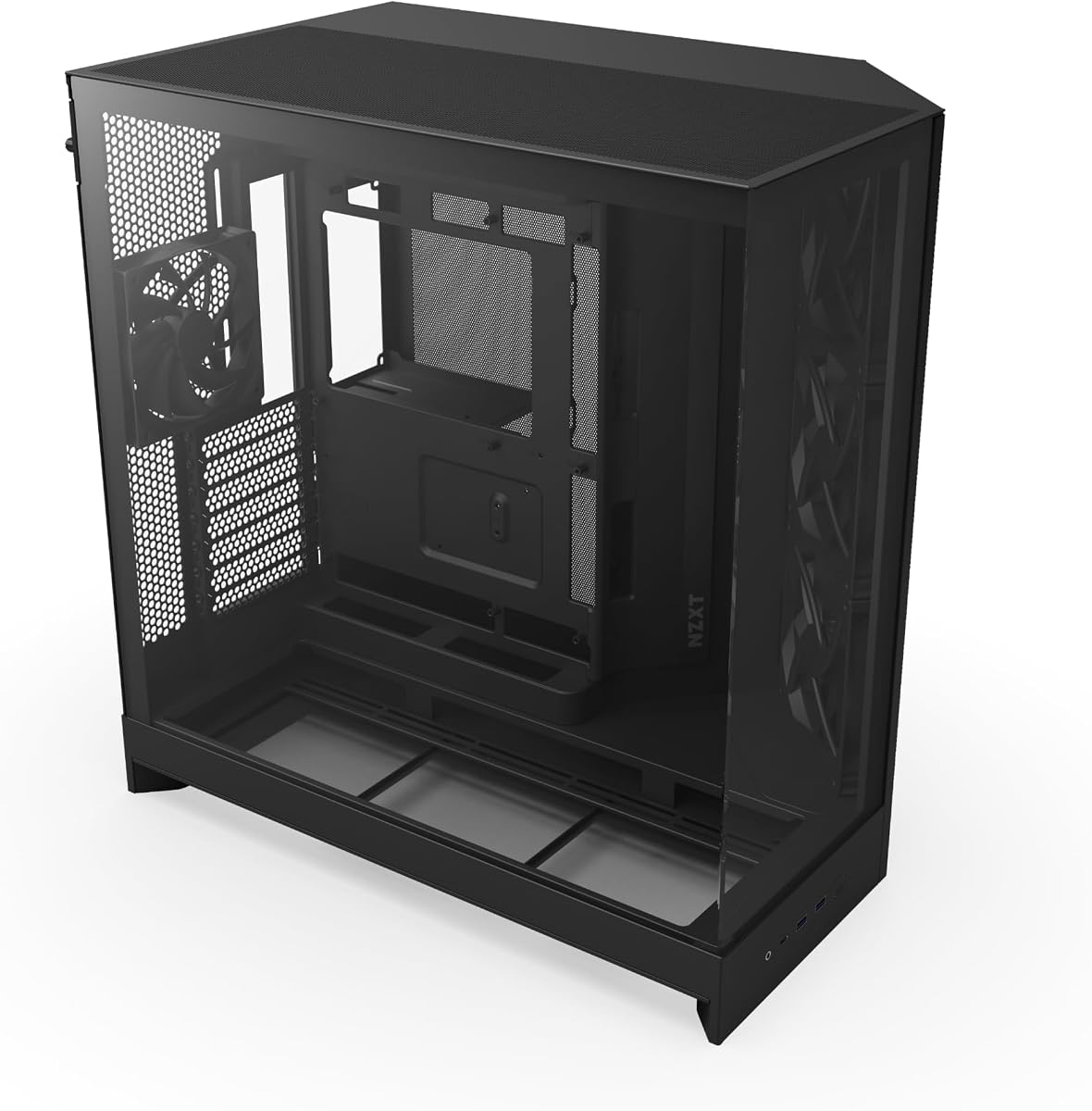
NZXT H9 Flow (2025)

The NZXT H9 Flow builds its dual-chamber layout around airflow, angling the front-right fans to drive cool air efficiently across high-performance components while the PSU and drives sit hidden behind. It includes four fans, supports up to a 420mm radiator and scales to a ten-fan capacity for serious cooling. Wraparound tempered glass shows every detail, and back-connect readiness keeps the showcase chamber free of visible cabling.

Chamber
Dual-chamber ATX mid-tower
Fans
3x 140mm + 1x 120mm
Cooling
420mm radiator support
Extras
Back-connect ready

What we liked

  • Angled front-right fans aid airflow
  • Four fans included out of the box
  • Supports up to 420mm radiators
  • Wraparound panoramic glass view

Worth noting

  • Premium pricing
  • Large footprint for a mid-tower
5Best Hidden-Connector Support

Thermaltake View 380 TG ARGB

The Thermaltake View 380 TG pairs its dual-chamber design with full support for hidden-connector motherboards, so cables vanish for a truly clean main chamber. Four ARGB fans come pre-installed, the pillar-less front and side glass offer an unbroken panoramic view, and clearance stretches to a huge 415mm GPU and 360mm radiator. A three-year warranty and USB-C front port round out a well-equipped showcase case at a fair price.

Chamber
Dual-chamber ATX
Glass
Front + side pillarless
Fans
4x 120mm ARGB
Extras
415mm GPU, 360mm rad

What we liked

  • Four ARGB fans pre-installed
  • Hidden-connector motherboard support
  • Pillar-less front and side glass
  • Generous 415mm GPU clearance

Worth noting

  • No USB-C on every unit
  • Fans are entry-level ARGB Lite
6Best for Big Radiators

HYXN H1 Dual-Cavity Case

The HYXN H1 offers a lot of dual-chamber case for the money, arriving with seven ARGB PWM fans and room for two 360mm radiators at once. Its vertical airflow design draws in from the bottom and sides while exhausting through the top and rear, and a 270-degree panoramic glass wrap shows off the main cavity. The brand is less familiar, but for a cooling-heavy showcase build it delivers strong value.

Chamber
Dual-cavity mid-tower
Fans
7x 120mm ARGB PWM
Cooling
2x 360mm radiators
Extras
Vertical airflow, Type-C

What we liked

  • Seven ARGB PWM fans included
  • Two 360mm radiators supported
  • 270-degree panoramic glass view
  • Vertical dual-intake airflow design

Worth noting

  • Lesser-known brand
  • GPU limit of 400mm
7Best RGB Showcase

ANSAITE C9 ATX PC Case (White)

The ANSAITE C9 leans hard into visual drama with seven prismatic ARGB fans generating continuous rainbow light bands behind a 270-degree panoramic glass panel. Its dual-channel airflow cools the CPU horizontally and the GPU vertically, magnetic dust filters keep it clean, and back-connect support hides cabling for a tidy front. It is unabashedly RGB-forward, so it suits builders who want a light show, and the price makes that easy to justify.

Chamber
Dual-channel airflow ATX
Fans
7x prismatic ARGB
Glass
270 panoramic
Extras
Back-connect, Type-C Gen2

What we liked

  • Seven prismatic ARGB fans included
  • 270-degree panoramic glass panel
  • Dual-channel horizontal/vertical airflow
  • Back-connect ready front stays clean

Worth noting

  • Lesser-known brand
  • RGB-heavy look is not for everyone
8Best Compact Dual-Chamber

FOIFKIN F100 Micro-ATX Case

The FOIFKIN F100 brings the dual-chamber concept to a compact micro-ATX footprint, separating hardware from the PSU and drives for cleaner thermals in a small box. Three ARGB fans come installed, it fits two 240mm radiators, and 270-degree glass showcases the build. GPU clearance tops out at 320mm and it is micro-ATX only, but for a tidy, cool small-form showcase at a low price it is a smart choice.

Chamber
Dual-chamber micro-ATX
Fans
3x 120mm ARGB
Cooling
2x 240mm radiators
Extras
270 glass, USB 3.0

What we liked

  • Dual-chamber layout in a small case
  • Three ARGB fans pre-installed
  • Fits two 240mm radiators
  • 270-degree panoramic glass

Worth noting

  • Micro-ATX only, no full ATX
  • 320mm GPU clearance limit
9Best Budget Airflow

HYXN H2 (2026) Dual-Chamber Case

The HYXN H2 is a lot of dual-chamber case for the outlay, shipping with eight fans and supporting either two 420mm or three 360mm radiators for aggressive cooling. Its dual-chamber layout separates the PSU and drives from the main compartment, and GPU clearance is a generous 455mm. The brand is less established and the chassis is big, but for maximum airflow and clearance on a mid-range budget it delivers plenty.

Chamber
Dual-chamber ATX mid-tower
Fans
8x (6x140mm, 2x120mm)
Cooling
420mm radiator support
Extras
455mm GPU, Type-C 3.2

What we liked

  • Eight fans included out of the box
  • Huge 455mm GPU clearance
  • Supports 420mm radiators
  • Dual-chamber layout aids cooling

Worth noting

  • Lesser-known brand
  • Physically large chassis

How We Chose the Best Dual-Chamber Cases

Best Dual-Chamber PC Cases in 2026

A dual-chamber case succeeds or fails on how well it delivers the two promises baked into the design: better thermals and a cleaner build. So our evaluation began with the chamber separation itself. A well-executed layout moves the power supply, drives and the tangle of cabling completely out of the main compartment, leaving your motherboard, cooler and graphics card in an open, airy space. A poorly executed one merely relocates the mess a few centimetres and calls it dual-chamber. We looked for genuine separation that pays off in both cooling and appearance.

From there we assessed airflow and the fans included in the box, since an open main chamber only helps if air is actually moving through it. Radiator support mattered for the water-cooling crowd, and here the extra internal volume of these designs really shows, with several models accepting multiple large radiators. We weighed the quality and coverage of the panoramic glass that defines the category's showcase appeal, back-connect readiness for hiding cables, and the room and thoughtfulness of the rear chamber. Finally we spread the list across price points, from a compact bargain to a luxury full-tower, so the right pick exists for every budget.

Why the Dual-Chamber Layout Wins

For years the standard case put everything in one box: motherboard, GPU, power supply, drive cages and a snarl of cables all sharing the same space and the same air. The dual-chamber approach breaks that compromise. By walling off the power supply and drives into a second compartment, usually behind the motherboard tray, it frees the main chamber to do one job well, which is to keep your hottest and most visible components cool and on display. The immediate benefit is thermal: heat from the PSU no longer soaks into the main airflow, and there are no drive cages blocking intake fans.

The second benefit is aesthetic, and it is why the layout has captured enthusiast attention. With the ugly parts hidden, the main chamber becomes a stage. Panoramic glass, as on the Hyte Y70's three-piece wrap or the ANSAITE C9's 270-degree panel, turns a functional box into a display piece. Add a vertically mounted graphics card, which several cases here enable with an included riser, and the result is a build that looks as considered as it performs. The dual-chamber layout is popular not because of marketing but because it genuinely delivers cooler, tidier, better-looking machines.

Matching the Case to Your Build

For the Ultimate Showcase

If the build is meant to be seen, the Hyte Y70 is the standout, with its three-piece panoramic glass and an included PCIe 4.0 riser for mounting a four-slot GPU vertically front and centre. The Thermaltake View 380 TG is a more affordable route to the same clean look, supporting hidden-connector motherboards so no cables interrupt the view. Both turn the main chamber into a genuine centrepiece.

For Serious Water Cooling

Custom-loop and multi-radiator builders want volume, and the Antec C8 leads with support for three 360mm radiators simultaneously in a roomy full-tower. The NZXT H9 Flow handles up to 420mm and scales to ten fans, while the HYXN H1 fits two 360mm radiators at once. These cases exploit the space the dual-chamber layout frees up to accommodate cooling that simply would not fit in a conventional box.

For Value and Compact Builds

Not everyone needs a full-tower or a luxury price. The Lian Li O11D Mini V2 Flow is the value champion, delivering five fans and clean thermals for a fraction of the top picks, while the FOIFKIN F100 brings the dual-chamber concept to a compact micro-ATX footprint. The ANSAITE C9 and HYXN H2 add lots of fans and glass at mid-range prices for builders who want maximum spectacle per dollar.

Airflow, Radiators and Cooling Capacity

The open main chamber is only half the cooling story; the fans and radiators you can fit are the other half, and this is where dual-chamber cases pull ahead. Because the power supply and drives are elsewhere, the main compartment and the case's outer surfaces are free for cooling. The NZXT H9 Flow angles its front-right fans to drive air efficiently across the GPU and CPU, and includes four fans to start. The HYXN H1 and H2 arrive nearly loaded, with seven and eight fans respectively, so they need little extra to get moving.

Radiator support is where these cases genuinely differentiate themselves from conventional designs. The Antec C8's ability to mount three 360mm radiators at once is exceptional, the sort of capacity that opens the door to cooling a heavily overclocked CPU and GPU in the same loop. The Hyte Y70 spreads its cooling across side and floor mounts, and even the compact FOIFKIN F100 fits two 240mm radiators. When planning, remember that some cases, notably the Antec C8, ship without fans despite their high capacity, so factor that into the budget alongside the radiator itself.

A subtle advantage of mounting radiators in a dual-chamber case is fresh-air intake. Because the power supply no longer occupies the floor or the front of the main chamber, a side or top radiator can pull cool ambient air straight from outside the case rather than recycling warm air already heated by the GPU. That translates directly into lower coolant and component temperatures. It is why builders chasing the quietest, coolest systems gravitate to these layouts: the same fans spin slower for the same result when they are fed cool air. Pay attention to which surfaces each case designates for intake versus exhaust, since the HYXN H1 and NZXT H9 Flow both publish deliberate airflow paths that reward following the manufacturer's plan rather than improvising.

Cable Management and the Rear Chamber

The rear chamber is the unsung hero of these cases and the reason cable management becomes almost effortless. Everything that used to clutter a build, the power supply, the drives, the thick main power cables, lives back here, hidden from the glass. The best implementations pair this with back-connect readiness, which routes the motherboard's power and data cables through the tray so they never appear on the showcase side. The NZXT H9 Flow and ANSAITE C9 are both back-connect ready, and the Thermaltake View 380 TG supports hidden-connector boards for the same wire-free result.

Even without a back-connect motherboard, the rear chamber makes tidiness achievable for anyone. There is simply room to route, coil and secure cables where they will never be seen, using the straps and channels these cases provide. For first-time builders this is a genuine relief, since the intimidating part of a build, making it look clean, is largely solved by the layout itself. The main chamber ends up presentable almost by default, which is a large part of why these cases have become so popular with people building a machine they intend to keep on the desk rather than under it.

A Closer Look at the Top Picks

The Hyte Y70 takes the top spot by delivering the complete dual-chamber experience at a premium level: three-piece panoramic glass, an included luxury riser for a vertical four-slot GPU, ten-fan cooling capacity and a tool-less premium build. It is the case for someone who wants their machine to be the focal point of the room. The Antec C8 follows as the water-cooling specialist, its full-tower dual-chamber body swallowing three 360mm radiators for the most ambitious loops.

Below them, the Lian Li O11D Mini V2 Flow is the value hero with five included fans and clever GPU cooling, while the NZXT H9 Flow is the airflow-focused all-rounder. The Thermaltake View 380 TG excels at hidden-connector cleanliness, the HYXN H1 and H2 pack in fans and radiator support at fair prices, and the ANSAITE C9 and FOIFKIN F100 cover the RGB-showcase and compact niches respectively. Every one of them uses the dual-chamber layout to run cooler and look cleaner than a conventional case at the same price.

Final Recommendation

For most enthusiasts, the Hyte Y70 is the best dual-chamber PC case in 2026, marrying stunning panoramic glass and a vertical-GPU riser to serious cooling capacity in a genuinely premium package. If your priority is custom water cooling, the Antec C8 and its triple 360mm radiator support is unmatched here. Budget-minded builders should look to the Lian Li O11D Mini V2 Flow for outstanding value, airflow-focused buyers to the NZXT H9 Flow, and compact builders to the FOIFKIN F100. Whichever you choose, the dual-chamber layout will reward you with cooler components, effortless cable management and a build worth showing off.

How we picked

We judged each case on how effectively its two chambers separate hot, cluttered components from the showcase side, then weighed airflow and included fans, radiator support for high-end cooling, the quality of the panoramic glass and back-connect motherboard readiness, and cable-management room in the rear chamber. We prioritised designs that genuinely improve thermals and tidiness rather than simply borrowing the dual-chamber name, and we spread the list across budgets.

Frequently asked questions

What is a dual-chamber PC case and why does it matter?

A dual-chamber case splits the interior into two compartments: a main showcase side for the motherboard and GPU, and a hidden rear side for the power supply, drives and cables. This keeps hot, cluttered components out of the main airflow path and out of view, improving both thermals and looks. Cases like the Hyte Y70 and NZXT H9 Flow show the design at its best.

Do dual-chamber cases actually run cooler?

Generally yes. By removing the power supply and drive cages from the main compartment, the design gives your GPU and CPU cooler an unobstructed path for air. Models like the NZXT H9 Flow angle their intake fans to exploit this, and the extra room lets you mount larger radiators, such as the triple 360mm setup the Antec C8 supports.

Is cable management easier in a dual-chamber case?

Much easier. The rear chamber is designed to hide cabling entirely, and many of these cases, including the ANSAITE C9 and NZXT H9 Flow, are back-connect ready to route power behind the motherboard. The result is a main chamber that stays clean behind the glass with almost no visible wiring.

Are dual-chamber cases good for water cooling?

They are among the best for it. The extra volume created by separating components makes room for multiple large radiators. The Antec C8 supports three 360mm radiators at once, the HYXN H1 fits two 360mm radiators, and the Hyte Y70 accommodates side and floor radiators alongside up to ten fans.

Do I need a special motherboard for these cases?

No, standard boards work fine, but several models reward back-connect or hidden-connector motherboards with an even cleaner look. The Thermaltake View 380 TG supports hidden-connector boards, and the NZXT H9 Flow and ANSAITE C9 are back-connect ready, routing all cables into the rear chamber for a wire-free showcase.