Skip to content

Best Custom Mechanical Keyboards in 2026

By Ethan BrooksUpdated July 5, 2026

We may earn a commission from links on this page, at no extra cost to you. Learn more.

Custom mechanical keyboards used to mean soldering irons and long group buys, but in 2026 the hobby starts far closer to home. A modern hot-swappable board lets you pull switches by hand, drop in a new set in minutes and tune the sound with foam and lubed stabilisers, all without touching a soldering station. That has turned customisation into something anyone can enjoy on a first purchase. This guide ranks nine of the best custom mechanical keyboards you can buy right now, from affordable tri-mode boards with pre-lubed switches to CNC aluminium builds with gasket mounts, so you can find the right base for the exact typing feel and sound you are chasing.

Top 9 Best Custom Mechanical Keyboards

Best Overall4.8
2$$$
Best Value4.7
Best Creamy Sound4.7
Best Tri-Mode Wireless4.7
Best Premium Build4.6
Best 96% Layout4.5
Best Full-Size Custom4.5
Best Ergonomic Layout4.2

Our top 9 picks, reviewed

1Best Overall

GravaStar Mercury K1 75%

The GravaStar Mercury K1 earns the top spot by pairing genuine enthusiast engineering with a striking aluminium body. A gasket-mounted structure, flexible polycarbonate plate and five layers of dampening foam give it a refined, cushioned feel, while the hot-swap socket and custom GravaStar x Kailh linear switches make future tuning easy. Add tri-mode connectivity and dual RGB systems and it is the most complete board here.

Layout
75% compact
Mount
Gasket-mounted
Switches
GravaStar x Kailh linear
Build
Aluminium alloy

What we liked

  • Premium aluminium alloy exoskeleton
  • Gasket mount with 5-layer foam
  • Custom lubed Kailh linear switches
  • Tri-mode wireless and USB-C

Worth noting

  • Sits at the top of the price range
  • 75% layout drops the numpad
2Best Value

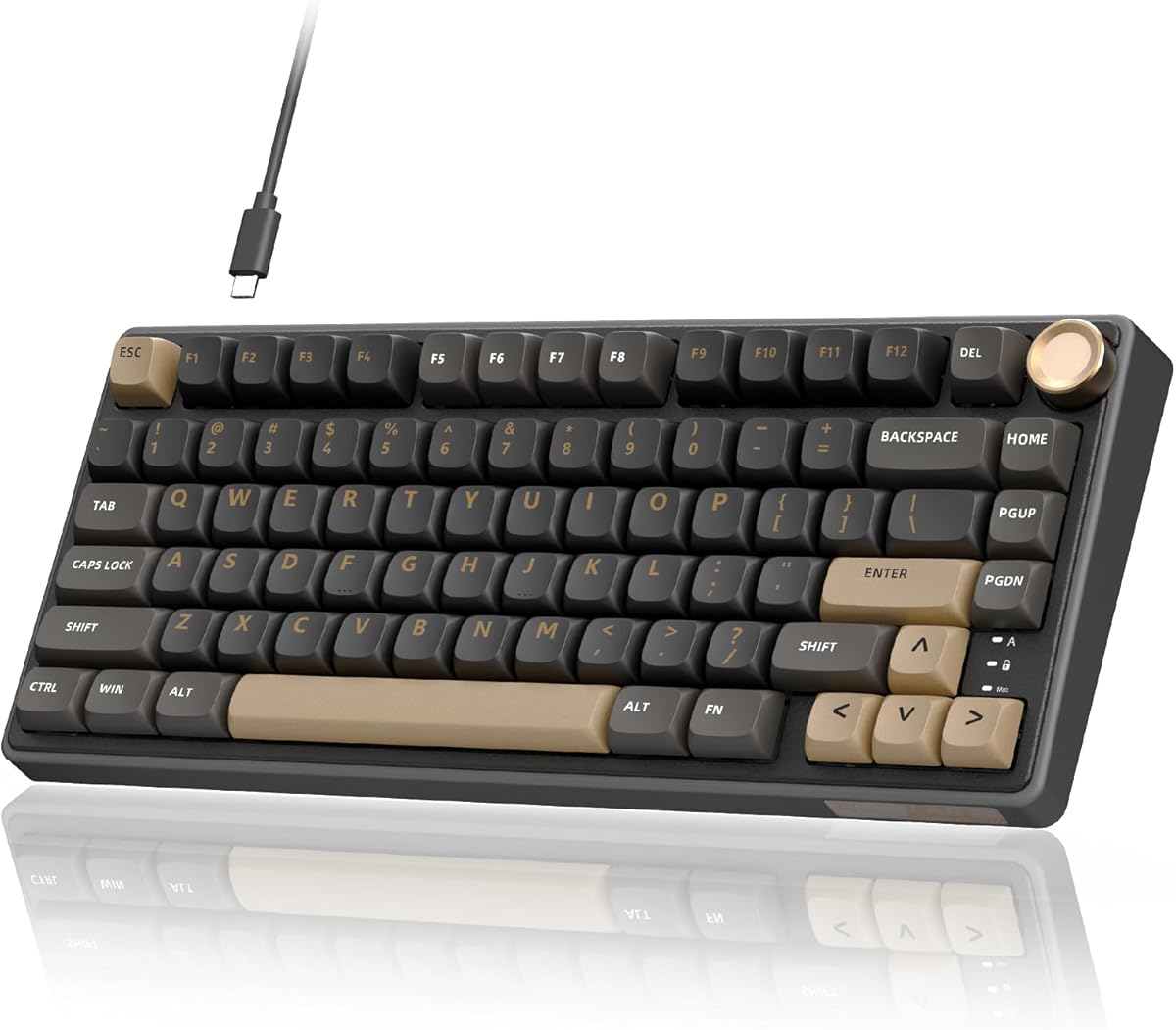
Womier SK80 75%

The Womier SK80 delivers a remarkable amount of custom keyboard for the money. Its gasket mount, EVA plate and bottom filling give a soft, responsive feel that punches above its price, and the little color screen showing caps lock, RGB mode and volume is a genuinely useful touch. Pre-lubed linear switches sit in a proper 3-pin and 5-pin hot-swap PCB, so it is an easy first custom board.

Layout
75%
Mount
Gasket-mounted
Display
Color multimedia screen
Switches
Pre-lubed linear

What we liked

  • Gasket mount at a low price
  • Handy color multimedia display
  • Pre-lubed hot-swap linear switches
  • Mac and Windows compatible

Worth noting

  • Wired connection only
  • Software is Windows-only
3Best Creamy Sound

AULA F75 75% Wireless

The AULA F75 chases that sought-after creamy thock and largely nails it. Pre-lubed LEOBOG reaper switches sit above five layers of silicone and foam filling, and pre-lubed stabilisers keep the bigger keys clean. Tri-mode wireless, a multifunction knob and a compact 75% layout round out a board that feels far more expensive than it is, with a hot-swap base ready for your own switch experiments.

Layout
75% (81 keys)
Switches
LEOBOG reaper
Connection
2.4GHz/BT5.0/USB-C
Battery
4000mAh

What we liked

  • Pre-lubed reaper switches sound creamy
  • Tri-mode wireless with a knob
  • Hot-swap 3-pin and 5-pin PCB
  • Five-layer silencing structure

Worth noting

  • No numpad on 75% layout
  • Battery is modest at 4000mAh
4Best Tri-Mode Wireless

AULA F75 Pro Wireless (Line White)

The AULA F75 Pro refines the formula with pre-lubed LEOBOG star vector switches and durable side-printed PBT keycaps that resist shine and fade. Tri-mode connectivity handles up to five devices, the knob manages backlight and media, and the gasket structure with single-key PCB slotting keeps typing soft and stable. If you want the F75 experience with a slightly more premium switch and keycap set, this is the pick.

Layout
75% (81 keys)
Switches
LEOBOG star vector
Keycaps
Side-printed PBT
Connection
BT5.0/2.4GHz/USB-C

What we liked

  • Upgraded LEOBOG star vector switches
  • Side-printed PBT keycaps
  • Connects up to five devices
  • Knob controls light and media

Worth noting

  • Pricier than the standard F75
  • 75% layout omits the numpad
5Best Feature Set

AULA F75 Pro Wireless (with Knob)

This AULA F75 Pro variant leans hard into features, layering 16.8 million RGB colors, 16 preset effects and music-reactive lighting over the same well-damped 75% chassis. Pre-lubed reaper switches and a hot-swap PCB keep it firmly in custom territory, while full macro programming and a Win-key lock make it gaming-friendly. It is a versatile all-rounder for anyone who wants tuning options and flashy lighting in one board.

Layout
75% (81 keys)
Switches
LEOBOG reaper
RGB
16.8M color, 16 effects
Battery
4000mAh

What we liked

  • Rich RGB with music sync modes
  • Programmable macros via driver
  • Hot-swap for 3-pin and 5-pin
  • Win-key lock for gaming

Worth noting

  • Only 4000mAh battery
  • Driver software adds a learning curve
6Best Premium Build

WOBKEY Rainy 75 (Lite Silver)

The WOBKEY Rainy 75 is the enthusiast's choice, trading flashy lighting for a serious CNC aluminium build and carefully lubricated HMX and JWK switches. The dense alloy case and glass-steel detailing deliver the deep, controlled acoustics that hobbyists prize, and triple-mode connectivity keeps it practical. There is no RGB here, but for a board built around pure typing feel and sound, the Rainy 75 is hard to beat.

Layout
75%
Build
6063 CNC aluminium
Switches
HMX/JWK/Cocoa
Battery
3500mAh

What we liked

  • Sturdy 6063 aluminium alloy body
  • Custom-lubricated HMX and JWK switches
  • Superior sound feedback
  • Triple-mode connectivity

Worth noting

  • No RGB backlighting
  • Among the most expensive here
7Best 96% Layout

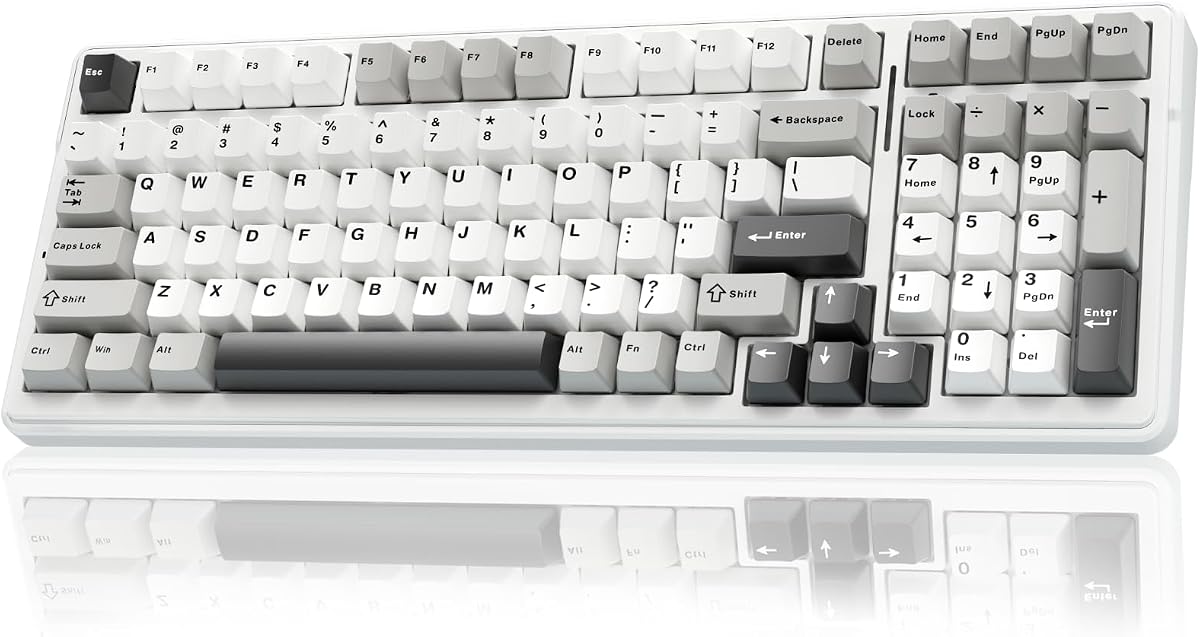
AULA F99 Wireless

The AULA F99 is the pick for anyone who wants custom keyboard feel without losing the number pad. Its 96% layout squeezes in a numpad and arrows while staying compact, and the huge 8000mAh battery means fewer charges. Pre-lubed linear switches, double-shot PBT keycaps and a gasket structure with five-layer filling give it a satisfying, well-damped sound, all on a hot-swap PCB ready for tinkering.

Layout
96% (99 keys)
Switches
Pre-lubed linear
Keycaps
Double-shot PBT
Battery
8000mAh

What we liked

  • Keeps arrows and a numpad
  • Large 8000mAh battery
  • Double-shot PBT keycaps
  • Gasket structure with silencing

Worth noting

  • Denser 96% layout takes adjusting
  • Heavier on the desk
8Best Full-Size Custom

AULA F108 PRO Full Size

The AULA F108 Pro brings custom-keyboard sound and hot-swap flexibility to a full 104-key layout, so power users who need a numpad are not left out. Its standout is a built-in TFT color screen for GIFs, battery status and connection mode, controlled by a multifunction knob. Pre-lubed switches, side-printed PBT keycaps, tri-mode wireless and an 8000mAh battery make it a genuinely capable everyday productivity board.

Layout
104 keys full-size
Display
TFT color screen
Keycaps
Side-printed PBT
Battery
8000mAh

What we liked

  • Full 104-key layout with numpad
  • Customisable TFT color screen
  • Pre-lubed hot-swap switches
  • Large 8000mAh battery

Worth noting

  • Screen setup needs Windows software
  • Full-size takes more desk space
9Best Ergonomic Layout

Feker Alice98 Ergonomic

The MechLands Feker Alice98 is the enthusiast pick for typing comfort, combining the angled ergonomic Alice layout with a full numpad and split spacebar so your hands rest naturally. VIA support means deep, standards-based remapping and macros, while a gasket mount, PC plate and multi-layer foam deliver a rich sound. The Alice arrangement takes practice, but for long typing sessions it is genuinely comfortable.

Layout
Ergo Alice, 98 keys
Software
VIA programmable
Mount
Gasket, PC plate
Keycaps
Dye-sub PBT

What we liked

  • Ergonomic Alice layout with numpad
  • Full VIA remapping and macros
  • Rich sound-dampening foam stack
  • South-facing RGB and NKRO

Worth noting

  • Alice layout has a learning curve
  • Wired-only connection

How We Chose the Best Custom Mechanical Keyboards

Best Custom Mechanical Keyboards in 2026

Custom mechanical keyboards live and die by their flexibility, so our ranking started with the hardware that makes tuning possible. The single most important requirement was a genuine hot-swap PCB with support for both 3-pin and 5-pin switches, because that is what lets you change the entire feel and sound of a board without ever picking up a soldering iron. Every keyboard on this list meets that bar, from the budget-friendly Womier SK80 to the premium GravaStar Mercury K1.

From there we weighed the components that shape the out-of-the-box experience. Pre-lubed switches and pre-lubed stabilisers matter enormously, because a fresh, well-lubricated board sounds and feels dramatically better than a dry one. We looked closely at acoustic engineering too: gasket mounts, flexible plates and multi-layer foam stacks are what separate a hollow, rattly typing experience from the deep, cushioned thock enthusiasts chase. Finally, we considered build materials, connectivity, layout variety and price, keeping the list broad enough that a first-time buyer and a seasoned hobbyist can both find something worth owning.

What Makes a Keyboard Truly Customisable

The word custom gets stretched thin in product listings, so it helps to know what actually counts. The foundation is the hot-swap socket. On the AULA F75, Womier SK80 and every other board here, each switch sits in a small receptacle that grips its pins, letting you remove and replace switches by hand with the included puller. That one feature transforms a keyboard from a fixed appliance into a platform you can keep evolving, swapping linear switches for tactiles, or heavier springs for lighter ones, as your preferences change.

Beyond swapping switches, real customisation extends to feel, sound and function. Gasket mounting, as used on the GravaStar Mercury K1 and Feker Alice98, suspends the plate on soft gaskets so keystrokes flex slightly and land softly. Layered foam and silicone padding, the "five layers of filling" language you will see repeated across the AULA range, deaden case resonance for a cleaner sound. On the software side, boards like the VIA-compatible Feker Alice98 let you remap every key and record macros, while driver-based boards such as the AULA models offer their own programming and RGB tools. Together these layers of adjustment are what make a keyboard genuinely yours rather than merely mechanical.

Understanding Switches and the Hot-Swap Advantage

Switches are the heart of the typing experience, and the hot-swap advantage is that you are never locked into the ones a board ships with. Most keyboards here arrive with pre-lubed linear switches, which move smoothly from top to bottom with no bump, ideal for fast typing and gaming. The AULA F75 uses LEOBOG reaper switches tuned for a creamy sound, while its F75 Pro sibling upgrades to star vector switches, and the WOBKEY Rainy 75 offers custom-lubricated HMX and JWK options prized by enthusiasts.

Because these boards are hot-swappable, none of that is permanent. If you decide you prefer a tactile bump for typing or a heavier switch for a firmer feel, you can buy a set of 3-pin or 5-pin switches and install them in a few minutes. That freedom is the whole appeal: you can start with the friendly pre-lubed linears that come in the box, then explore tactiles, clickies or boutique switches later without buying a new keyboard. It turns a single purchase into a long-term hobby, and it means the board you buy today can keep pace with your evolving taste for years.

Layout and Size: 75%, 96% and Full-Size

Layout is one of the first decisions to make, because it determines both your desk footprint and which keys you keep. The most popular custom size is 75%, seen here on the GravaStar Mercury K1, the AULA F75 family and the Womier SK80. These 81-key boards keep the function row and dedicated arrow keys while dropping the number pad, striking a balance between compactness and usability that suits most typists and gamers who want more mouse room.

If you regularly enter numbers, a larger layout makes sense. The AULA F99 uses a 96% arrangement, cramming a numpad and arrows into a body barely wider than a 75%, while the AULA F108 Pro goes all the way to a traditional full-size 104-key layout with a proper numeric zone. Ergonomic buyers have an option too: the Feker Alice98 splits the alphas into two angled halves with a divided spacebar, aligning the keys with the natural angle of your wrists. There is no single correct choice here; it comes down to whether you value a small footprint, a full numpad, or ergonomic comfort above all.

Sound and Feel: Gaskets, Foam and Lubrication

The reason enthusiasts obsess over sound is that a well-built custom keyboard simply feels better to type on, and the acoustics are a big part of that. Three factors do most of the work. Gasket mounting, found on the GravaStar Mercury K1, Womier SK80 and Feker Alice98, suspends the switch plate on soft strips so each keystroke has a gentle, cushioned bottom-out instead of a hard, jarring stop. It softens both the feel and the noise.

Foam and lubrication handle the rest. The multi-layer silicone and foam stacks that the AULA boards advertise fill the empty space inside the case, killing the hollow ping and echo that make cheap keyboards sound rattly. Pre-lubricated stabilisers stop the larger keys, such as the spacebar and enter, from clattering. And pre-lubed switches glide instead of scratching, producing that smooth, marbly thock. On aluminium boards like the WOBKEY Rainy 75, the dense metal case adds a deeper, more controlled tone still. If sound and feel are your priority, look for boards that combine as many of these elements as possible.

Wireless Connectivity and Battery Life

Custom keyboards are no longer tethered to a cable, and most boards here offer flexible tri-mode connectivity. That means three ways to connect: low-latency 2.4GHz wireless via a dongle, Bluetooth 5.0 for tablets and phones, and wired USB-C for the lowest latency and simultaneous charging. The AULA F75 Pro, AULA F99 and GravaStar Mercury K1 all support this, and several can pair with up to five devices at once, letting you switch between a work laptop, a gaming PC and a tablet with a shortcut or a knob turn.

Battery life varies with the board. The compact 75% AULA F75 models carry a 4000mAh cell, adequate for daily use though you will recharge periodically, while the larger AULA F99 and F108 Pro pack big 8000mAh batteries that go far longer between top-ups. RGB backlighting is the biggest drain, so if you want maximum runtime, dim or disable the lighting, which every board here allows. For gamers chasing the absolute lowest latency, wired mode is always available; for everyone else, 2.4GHz is fast and reliable enough that going cable-free costs you nothing noticeable.

RGB, Screens and Software Extras

Beyond the fundamentals, custom keyboards increasingly compete on extras, and there is real variety here. RGB lighting is near-universal, with 16.8 million colors and a stack of preset effects on the AULA range, plus music-reactive modes that pulse to your audio. The GravaStar Mercury K1 goes further with dual independent RGB systems and 13 backlight modes. If you love a colourful desk, almost any board here will oblige, and all of them let you dim or switch the lighting off entirely.

The more novel extras are screens and software. The Womier SK80 tucks a small color multimedia display into its corner to show caps lock, connection mode and volume at a glance, while the AULA F108 Pro adds a larger TFT screen you can load with custom GIFs and status readouts. On the software side, the Feker Alice98's VIA compatibility is a standout, offering open, standards-based remapping and macro editing that works across platforms. The AULA boards rely on their own Windows drivers for macros and lighting, which are capable but less universal. These flourishes will not make or break a keyboard, but they add personality and, in the case of VIA, real functional depth.

Final Recommendation

For most buyers, the GravaStar Mercury K1 is the best custom mechanical keyboard in 2026, combining a premium aluminium build, a refined gasket mount and smooth custom Kailh switches into a board that feels genuinely high-end while staying easy to tune. If you want the same customisation for far less, the Womier SK80 is the value champion, delivering a gasket mount and a clever color screen at a budget price. The AULA F75 is the creamy-sound specialist, the WOBKEY Rainy 75 the enthusiast's aluminium choice, and the AULA F99 and F108 Pro the answers for anyone who needs a numpad. Whichever you choose, remember that a hot-swap board is a starting point: pick the layout and build you love, then keep tuning the switches and sound until it feels perfectly your own.

How we picked

We ranked each keyboard on its hot-swap flexibility, out-of-the-box switch and stabiliser quality, acoustic and gasket engineering, build materials, connectivity and overall value. Because customisation is the whole point here, we favoured boards with genuine 3-pin and 5-pin hot-swap sockets, pre-lubed components and layered foam over marketing gloss, and we kept the list varied across price and layout so there is a sensible entry point for every kind of builder.

Frequently asked questions

What makes a keyboard a custom mechanical keyboard?

The defining feature is hot-swappability: a PCB with sockets that let you pull switches by hand and drop in replacements without soldering. Most boards here, like the AULA F75 and Womier SK80, accept 3-pin and 5-pin switches, so you can change the entire typing feel and sound in minutes. Pre-lubed switches, gasket mounts and layered foam round out the custom experience.

Do I need soldering skills to build a custom keyboard?

Not with any board on this list. Every pick uses a hot-swap PCB, so you simply use the included switch puller to remove a switch and press a new one into place. That makes boards like the AULA F75 Pro and Womier SK80 approachable first builds. Soldering only becomes relevant on non-hot-swap enthusiast kits, which none of these are.

What is the difference between 75%, 96% and full-size layouts?

A 75% board like the GravaStar Mercury K1 keeps the function row and arrows but drops the numpad for a compact footprint. A 96% board such as the AULA F99 squeezes a numpad and arrows into a tight layout, while a full-size like the AULA F108 Pro keeps the traditional 104-key arrangement. Choose based on whether you need a numpad and how much desk space you have.

Why do custom keyboards sound different from regular ones?

Sound comes from construction. Gasket mounting, pre-lubed switches, lubed stabilisers and multiple layers of silicone and foam, as found in the AULA and GravaStar boards, absorb hollow case echo and produce the deep creamy thock enthusiasts love. Aluminium boards like the WOBKEY Rainy 75 add dense, controlled acoustics. Cheaper stock keyboards skip these layers, so they sound thinner and rattlier.

Are wireless custom mechanical keyboards good for gaming?

Yes. Most tri-mode boards here, including the AULA F75 Pro and GravaStar Mercury K1, offer a low-latency 2.4GHz mode alongside Bluetooth and wired USB-C, plus N-key rollover and Win-key lock for competitive play. Wired mode gives the lowest latency if you want it, while 2.4GHz is fast enough for the vast majority of gamers and keeps your desk cable-free.