Best Compact Tower for SFF
Noctua NH-U9S
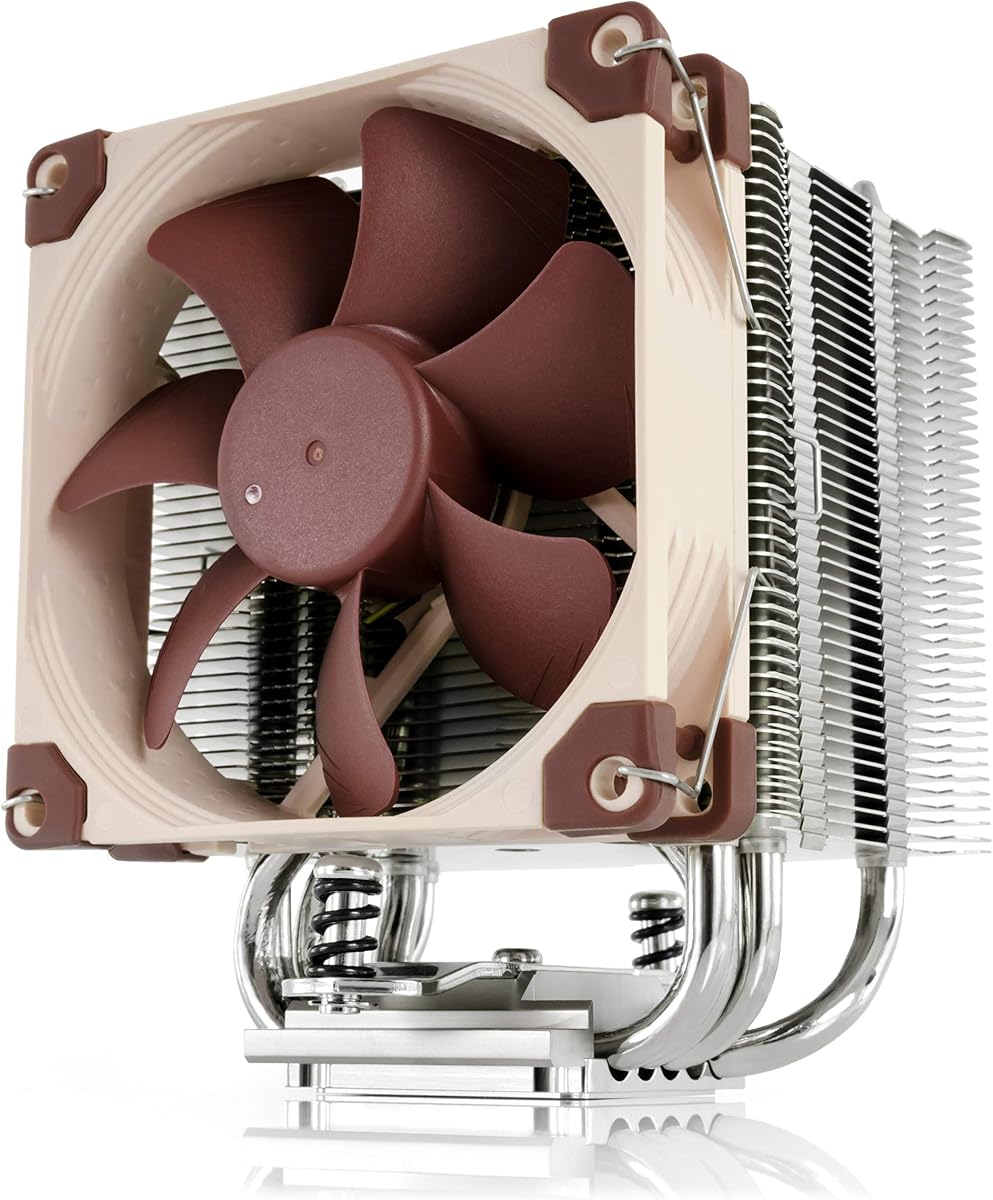
- Only 125 mm tall for HTPC, ITX, and other true small form factor cases
- NF-A9 92 mm PWM fan with Low-Noise Adaptor for quiet desk-side use
- SecuFirm2 mounts for AM5/AM4 and Intel LGA 1851/1700/1200/115x
Expert Review & Guide
Small PC cases punish cooler choice harder than almost any other component. A dual-tower that looks like a bargain on a shopping tab can leave a side panel hanging open by three millimeters, while a low-profile cooler that fits perfectly may throttle a hot gaming chip inside a sealed aluminum shell. In 2026, the winning approach is clearance-first: read your case’s maximum CPU cooler height, measure again if the manufacturer is vague, then match heat-pipe count and fan size to the CPU’s sustained power—not to internet myths that every build needs a 360 mm AIO.
This guide uses one fixed product pack so every recommendation is a real listing with its Amazon rating, image, and link intact. You will find premium compact Noctua towers for HTPC and sandwich ITX, slim Thermalright single towers for tight mid-towers, a Peerless Assassin dual tower for compact cases that still clear 155 mm, LCD and ARGB showpiece options for windowed cubes, a three-pack of case fans that improve small-chassis airflow, and two niche low-profile or legacy coolers for older Intel and AMD machines. We do not print dollar prices because cooler deals move constantly.
Start with the three top picks if you already know your height class. Use the comparison table to filter by dimensions and features, then read each review for fit notes, noise behavior, socket coverage, and honest tradeoffs—including when a product is a fan kit rather than a full cooler, or when socket support is legacy-only.


As an Amazon Associate we earn from qualifying purchases. We may earn a commission at no additional cost to you.
Sort mentally by height first, then by whether you need a full cooler or supporting fans. Specs intentionally omit prices so you can compare clearance and cooling hardware cleanly.
Small-case cooling starts with height, not heat-pipe marketing. The Noctua NH-U9S is only 125 mm tall, which is the difference between a closed side panel and a forced return on a sandwich ITX or HTPC chassis. In this pack it is the clearest premium single-tower answer when you need real cooling without the 150–164 mm towers that dominate value charts. The compact U-type fin stack is designed to stay clear of DIMM slots and PCIe devices on current motherboards, so dense mini-ITX layouts with a long GPU or dual M.2 heatsinks remain buildable.
Cooling performance comes from a highly optimized NF-A9 92 mm PWM fan rather than raw fan count. Automatic motherboard speed control keeps idle nearly silent, while the included Low-Noise Adaptor lets you cap acoustic peaks for living-room PCs. That matters in small cases where the cooler sits centimeters from your ears and case panels amplify turbulence. For Ryzen and Core Ultra chips in the moderate-to-upper mid-range, the NH-U9S regularly holds healthier sustained clocks than undersized stock coolers without sounding like a hair dryer.
Mounting is a major reason builders stay with Noctua in cramped chassis. SecuFirm2 covers Intel LGA 1851, 1700, 1200, and 115x plus AMD AM5 and AM4, with an offset mounting option on AMD for better hotspot alignment. NT-H1 thermal paste is in the box, so you are not hunting a third-party tube while a mini-ITX board is hanging mid-air on a standoff. The six-year manufacturer warranty is unusually confidence-inspiring for a component that is awkward to replace after cable management is finished.
Fitment notes for small cases are straightforward: measure cooler height against the case specification and leave a few millimeters for manufacturing tolerance and any dust-filter foam. Confirm RAM height if you insist on the tallest RGB sticks; the NH-U9S is friendlier than dual towers, but extreme DIMM heat spreaders can still interfere depending on fan placement. PCIe clearance is typically excellent, which helps when a dual-slot GPU sits close to the socket on ITX boards.
Who should buy it: anyone building or refreshing an HTPC, console-replacement ITX gaming PC, or office mini desktop that must stay quiet and closed. Who should skip it: builders chasing maximum overclock thermals in a mid-tower that can take a Peerless Assassin dual tower, or aesthetic-first builds that refuse brown Noctua colors. In those cases, look at the black NH-L9x65 for lower height or Thermalright slim towers for value.
In the context of this small-case roundup, the NH-U9S earns the top compact-tower badge because it solves the real constraint—clearance—without collapsing into a low-profile cooler that throttles modern chips. It is not the cheapest path, and it will not beat a properly cleared dual 120 mm tower on a 250 W gaming CPU, but inside true SFF limits it is the most complete, low-risk package in the pack.
Pick the NH-U9S for HTPC and ITX builds with cooler limits around 125–135 mm, especially when silence and RAM/PCIe clearance matter as much as raw thermals. It is ideal for console-replacement PCs placed next to a TV and for compact office towers that stay powered all day.
Mount with the motherboard outside the case when the CPU cutout is small. Use the Low-Noise Adaptor if the PC sits within arm’s reach. Confirm fan exhaust direction toward a rear or top vent so heat does not stagnate over the GPU.
Choose NH-U9S over NH-L9x65 when you have the extra height and want stronger cooling. Choose it over Thermalright 148–155 mm towers when those towers simply will not clear the panel, even if the Thermalrights cost less.
We may earn a commission at no additional cost to you.
When a case quotes 70 mm or less of CPU cooler clearance, most towers in this list are immediately disqualified. The Noctua NH-L9x65 chromax.Black answers that niche with a 65 mm total height and a black finish that fits stealth SFF and HTPC themes. It is a low-profile design, not a dual-tower substitute, and Noctua is explicit that it suits CPUs with low to moderate heat dissipation. That honesty is useful: you pick this cooler when geometry forces the choice, then you choose a CPU that respects the cooler.
The 95×95 mm footprint is as important as the height. On crowded mini-ITX boards, near-socket power connectors, fan headers, and tall VRM sinks leave little room for oversized heatsinks. The L9x65 stays out of RAM and PCIe lanes on current platforms, which simplifies cable work and GPU seating. The slim NF-A9x14 92 mm PWM fan includes a Low-Noise Adaptor, so you can prioritize silence when the case has almost no acoustic damping.
SecuFirm2 mounting again covers LGA 1851/1700/1200/115x and AM5/AM4 with an AMD offset option. NT-H1 paste ships in the kit. That matters more in sandwich cases where re-seating a cooler after a bad mount can mean partially dismantling the motherboard tray. Chromax blacking of the heatsink and fan removes the classic brown/beige look that clashes with all-black ITX interiors.
Thermally, expect competent cooling on efficiency-focused Ryzen and Intel chips, including many X3D and non-X parts when power limits are sane. Do not expect it to tame a fully unlocked high-core chip at stock power in a sealed aluminum shell without fan curve discipline and good case airflow. Pair it with positive intake, undervolt where appropriate, and a realistic performance target.
In this pack the L9x65 is the ultra low-profile pick. If your case can take 125 mm, the NH-U9S usually cools better. If you have 148–152 mm, Thermalright slim towers and the Hyper 212 become better value. Choose the L9x65 when the panel literally will not close on anything taller—and size the CPU accordingly.
Installation tip: apply a modest paste amount, torque SecuFirm2 evenly, route the slim fan cable away from the GPU backplate, and verify fan spin before sealing a sandwich case. Once closed, these builds are tedious to reopen, so five extra minutes of cable dressing pays off.
Sandwich ITX, ultra-slim consoles, and low-profile HTPC shells that publish sub-70 mm CPU clearance are the NH-L9x65’s home turf. Pair it with efficient CPUs and sensible power limits.
Expect excellent manners on moderate TDP chips and potential turbo limitations on high-power parts in sealed cases. Case intake upgrades and undervolting are fair game companions.
The all-black chromax version exists so stealth builds do not flash brown. Functionally it mirrors the low-profile NH-L9x65 recipe with the aesthetic update.
We may earn a commission at no additional cost to you.
Thermalright Assassin X120 Refined SE CPU Air Cooler
The Thermalright Assassin X120 Refined SE is the value slim tower for builders who have roughly 150 mm of clearance but not the width for a dual-tower Peerless Assassin. At 125×71×148 mm and about 1.42 lb, it is easier to fit beside tall RAM and in cases with narrow CPU cutouts. Four 6 mm AGHP heat pipes and a copper-contact approach give it a clear edge over many stock coolers while staying quieter than aggressive high-RPM budget towers.
The included TL-C12C 120 mm PWM fan targets about 1550 RPM with roughly 66 CFM and a claimed noise ceiling near 25.6 dB(A). In a small case that already hosts a GPU blower or dual-slot card exhaust, that calm acoustic profile keeps the whole system civilized. You can still raise a steeper PWM curve in BIOS if summer ambient temperatures climb, but the stock personality favors living-room and desk-side PCs.
Socket support spans Intel 1150 through 1851 families and AMD AM4/AM5 with metal fasteners. That coverage means the cooler can move from a previous-gen mATX board to a new AM5 ITX upgrade without buying a new heatsink. Always verify the case cooler-height rating and any front radiator or top fan that might steal clearance above the socket.
Compared with the Hyper 212 Black, the Assassin X120 Refined SE is slightly shorter and much slimmer, which helps when a glass side panel sits close to the motherboard. Compared with the NH-U9S, it is taller and usually cheaper, trading Noctua’s ultra-compact pedigree for more conventional 120 mm fan airflow when the case allows the extra height.
This is our best slim value tower in the pack: enough cooler for mainstream gaming CPUs in compact mid-towers and many mATX cases, without pretending to fit sandwich shells that need 65–125 mm solutions. If your case manual lists 155 mm or more and you run a hot chip, step up to the Peerless Assassin 120 SE instead.
Build note: seat the fan to exhaust toward the rear case fan when possible so you are not dumping CPU heat into the GPU intake. In SFF layouts with unconventional airflow, prioritize a clear path out of the case over textbook ATX diagrams.
Many compact mid-towers list 150–155 mm cooler clearance. The Assassin X120 Refined SE uses that window without the width penalty of a dual tower, making cable routing and tall RAM easier.
Leave PWM enabled. The TL-C12C is happiest with a gradual ramp; small cases get loud fast if you lock fans to full speed for no reason.
We may earn a commission at no additional cost to you.

Cooler Master Hyper 212 Black CPU Air Cooler
The Cooler Master Hyper 212 Black remains a familiar mid-height single tower, and at 152 mm it still fits a surprising number of compact mid-towers and roomy mATX cases that cannot swallow 160 mm dual towers. Four heat pipes and a copper base target AMD Ryzen 7 and Intel Core i7 class loads, which covers most small gaming PCs that are not chasing extreme all-core overclocks. The blacked-out tower blends into dark chassis better than older silver Hyper 212 generations.
SickleFlow 120 Edge PWM control from roughly 690 to 2500 RPM gives a wider speed band than many value fans locked near 1500 RPM. Idle can stay gentle; load can push harder when a compact case traps heat. That flexibility is useful in small volumes where ambient inside the chassis rises quickly during long renders or shader compilation.
Cooler Master’s redesigned brackets aim to simplify AM5 and LGA 1851/1700 installs—exactly the platforms most upgrade builders care about in 2026. Included thermal paste reduces shopping friction. Installation is still a tower cooler job: remove the motherboard if the case has a cramped CPU cutout, apply paste carefully, and confirm fan cable reach to a CPU_FAN header.
Where the Hyper 212 struggles in a small-case shortlist is competition from slimmer 148 mm Thermalright singles and shorter Noctua U9/L9 designs. If your panel clearance is 150 mm exactly, measure twice—152 mm plus paste and mounting tolerance can kiss the glass. If you have 160 mm+, a Peerless Assassin dual tower usually cools better for similar money.
Choose the Hyper 212 Black when you want a proven, widely documented cooler for a compact but not extreme case, mainstream CPU, and no RGB requirements. Skip it for sandwich ITX, sub-140 mm limits, or high-TDP chips that deserve six heat pipes and two fans.
Practical tip: after mounting, check RAM latch access and GPU seating. Single towers are friendlier than dual towers, but a front-mounted fan can still crowd the first DIMM slot on some ITX boards—flip the fan or use lower-profile memory if needed.
Builders who know the name, want straightforward AM5/LGA 1700/1851 support, and have about 155 mm of clearance will find the Black edition a safe, documented choice.
Measure glass-to-motherboard distance, account for rubber gaskets, and check the first DIMM slot after the fan is mounted. If anything rubs, consider the slimmer Assassin X120 Refined SE.
If you later move into a roomier case, keep the Hyper 212 for a secondary PC and step to a Peerless Assassin dual tower for the hot primary CPU.
We may earn a commission at no additional cost to you.

Thermalright Peerless Assassin 120 SE CPU Cooler
The Thermalright Peerless Assassin 120 SE is the performance bargain of the pack when—and only when—your small case actually clears a 155 mm dual-tower cooler. Many ‘compact’ mid-towers and larger mATX cubes do; most sandwich ITX and slim consoles do not. Respect that gate first. If you clear it, six AGHP 6 mm heat pipes, a pure copper base, and twin TL-C12C PWM fans deliver cooling that embarrasses stock coolers and challenges pricier towers.
Dimensions are listed at 125×135×155 mm. The dual fans claim about 66 CFM each with noise at or under 25.6 dB(A) at the rated 1550 RPM. In practice that means strong thermals without the scream of 2000-plus RPM showpiece fans. Memory clearance is thoughtfully addressed so tall kits are less likely to block the front fan—still verify your specific DIMM height.
Compatibility covers AMD AM4/AM5 and Intel 115x/1200/1700/1851 with metal kits. Critical AMD note from the manufacturer: use the motherboard’s original backplate; it is not included. That is normal for many Thermalright coolers but surprises first-time AM5 builders who expect an all-in-one backplate in the box.
In a small-case guide this cooler ranks as the best dual-tower option conditional on clearance. It is not a default SFF pick. Pair it with cases that publish a CPU cooler height of 160 mm or higher and preferably have a rear exhaust fan to evacuate the twin-tower heat. If your case is sealed aluminum with weak ventilation, even excellent coolers will throttle—airflow is a system property.
Versus the Assassin X120 Refined SE, you gain a second tower and second fan at the cost of width and a bit of height. Versus Vision MAX models, you lose the LCD and ARGB drama but keep a simpler cable load—often preferable in cramped interiors. Versus Noctua compact coolers, you win thermals when height allows and lose the ultra-short fitment advantage.
Buy it for hot mid-range and upper mid-range CPUs in compact towers that fit 155 mm. Skip it for true SFF, low-profile consoles, and any case where the glass already rubs a 150 mm Hyper 212.
Do not buy the Peerless Assassin 120 SE for a case rated under 155 mm. Dual towers also need horizontal room near tall RAM and chunky M.2 shields—dry-fit when unsure.
Compact mid-tower gamers on Ryzen 5/7 or Intel i5/i7 class chips who want near-AIO thermals without liquid maintenance.
Reuse the stock motherboard backplate on AM4/AM5. Missing that plate is a common reason installs feel ‘incomplete’ out of the box.
We may earn a commission at no additional cost to you.

Thermalright TL-C12C-S X3 CPU Fan 120mm ARGB Case Cooler Fan
Not every product in a small-case cooling pack is a heatsink. The Thermalright TL-C12C-S X3 trio is a three-pack of 120 mm ARGB PWM fans meant for case intake/exhaust or as cooler fan upgrades. Small chassis often fail thermally because stagnant air surrounds an otherwise decent CPU cooler. Adding matched, quiet fans can drop CPU and GPU temperatures without changing the heatsink at all.
Each fan is 120×120×25 mm with 4-pin PWM up to about 1550 RPM, roughly 66 CFM, 1.53 mm H2O static pressure, and a noise claim near 25.6 dBA. S-FDB bearings aim to reduce shake and extend life. Soft atomized ARGB blades sync through motherboard 5V ARGB headers across up to numerous lighting modes, which helps mini PCs that still want a clean glow without rainbow chaos.
Use cases in small builds: replace loud stock case fans, add a bottom or side intake on mATX cubes, or create a push-pull pair on a single-tower cooler that supports a second fan. The long PWM cable helps daisy-chain in tight cable channels. Confirm your case takes 120 mm mounts—many sandwich ITX cases use 92 mm or custom brackets instead.
These fans will not fix a cooler that physically does not fit, and they are not a substitute for a low-profile heatsink when clearance is the blocker. They also need header availability; ITX boards with two fan headers may require a splitter or hub. Treat them as the airflow multiplier after you pick a clearance-correct cooler from this list.
We include them because ReviewConsensus packs sometimes mix complementary cooling parts, and ignoring case airflow would mislead SFF builders. Rank reflects accessory status relative to complete coolers, not poor quality.
Setup tip: set a gentle PWM curve starting around 30–40% at idle and ramping with CPU or system temperature sensors. In small cases, synchronized curves for CPU and case fans prevent the cooler from fighting a hot internal ambient.
Install as case intake/exhaust first. If your CPU cooler supports a second fan, use one unit for push-pull only after case airflow is sorted.
Diffuse lighting looks better than maximum brightness in tiny volumes. Sync to a single motherboard effect to avoid visual noise next to a short desk.
We may earn a commission at no additional cost to you.

Thermalright Assassin X 120R Digital ARGB Black CPU Cooler
The Thermalright Assassin X 120R Digital ARGB Black targets builders who want slim-tower clearance with a digital temperature screen on top. At 120×71×151 mm it sits near the Hyper 212 and Assassin X120 Refined SE in height, so it is a compact mid-tower / larger SFF candidate rather than a sandwich ITX cooler. Four heat pipes plus a high-speed TL-P12-S PWM fan (around 2000 RPM class with roughly 70 CFM and under 30 dB(A) claimed) give it more aggressive cooling headroom than quieter 1550 RPM value fans.
The digital top cover, managed through TRCC software, can show CPU temperature, CPU usage, GPU temperature, and related stats. That is genuinely handy on a desk-side mini PC where you do not want overlay software while gaming. The tradeoff is extra cabling and a USB 9-pin style connection path that must be planned before you bury the board in a compact case.
ARGB on the fan syncs via 5V 3-pin headers. In small glass cases the effect is visible; in solid HTPC shells it matters less. Socket support includes AM4/AM5 and Intel LGA 1851/1700/115x/1200. As with other Thermalright AMD mounts, expect to reuse the motherboard backplate.
Choose this when you have about 155 mm of clearance, want a black slim tower, and like at-a-glance temps without buying a dual-tower Vision MAX that needs 164 mm. Skip it if you need sub-130 mm height, refuse extra USB cabling, or prefer a no-RGB stealth build—the Assassin X120 Refined SE or Noctua options are cleaner.
Noise-wise, the higher RPM ceiling means you should not leave the fan on a 100% DC mode in a bedroom PC. Use PWM curves. Performance-wise, it is a strong single tower for mainstream gaming chips but will not match Peerless Assassin dual towers on hotter CPUs when those fit.
Install advice: connect and test the screen cables on the bench before final motherboard insertion. Nothing is more frustrating than discovering a missed USB header after cable management in a 10-liter case.
Install TRCC after Windows is up, confirm the USB connection, then customize readouts. Keep a backup stealth wallpaper if you ever move the PC to a shared living room.
At 151 mm this slim digital tower fits more cases than the 164 mm Vision MAX while still offering on-heatsink monitoring.
Because the fan can approach 2000 RPM, build a PWM curve that only spikes under sustained load. Small rooms amplify coil whine and airflow noise together.
We may earn a commission at no additional cost to you.

Thermalright Peerless Assassin 120 Vision MAX ARGB White CPU Air Cooler
The Peerless Assassin 120 Vision MAX ARGB White is the showpiece dual tower of the pack: six copper heat pipes, dual fans up to 2150 RPM, a magnetic 5-inch IPS LCD top at 480×854, and a white aesthetic. Overall height is 164 mm. That single number removes it from most true small form factor cases. It remains relevant for ‘small’ as in compact mid-towers and white mATX cubes that still publish 170 mm cooler clearance.
Cooling capability is serious. Dual towers with faster fans and a nickel-plated copper base can handle higher sustained loads than the slim singles here, provided case airflow keeps up. The LCD and TRCC software add monitoring and custom themes or video backgrounds—fun in a showcase window, optional elsewhere. Power/data for the screen use a motherboard USB connection, so plan header usage beside RGB and fan cables.
If your definition of a small case is a 15–25 liter tower with a window, this cooler can be a centerpiece. If your definition is an ITX sandwich or console-like HTPC, pick the NH-U9S or NH-L9x65 instead. Do not rely on hope measurements; 164 mm is unforgiving.
We rank it as the best showpiece dual tower in the pack, not as a default small-case recommendation. The white finish pairs with snow-theme builds; black cases may prefer non-white variants outside this pack. Fans can be audible at the top of the 2150 RPM range, so tune curves.
Versus the non-LCD Peerless Assassin 120 SE, you pay in height, complexity, and usually cost for the screen and ARGB. Versus the Assassin X Digital slim tower, you gain dual-tower thermals and a larger display at the expense of fitment. Match the cooler to the case first, cosmetics second.
Cable-management reminder: magnetic LCD tops are delightful until a USB cable tugs sideways. Strain-relief routing along the motherboard edge keeps the top seated and the image stable.
Treat 164 mm as a hard filter. Compact ATX/mATX windowed towers may work; liter-class SFF almost certainly will not.
The 5-inch IPS panel is excellent for temps and themes, but it needs USB power/data and software. Plan headers before you fill an ITX board with hubs.
Match cables, fans, and GPU support brackets so the white cooler does not sit in a sea of black clutter—the screen draws the eye to any mess.
We may earn a commission at no additional cost to you.

Thermaltake Gravity i2 95W Intel LGA 1200/1156/1155/1150/1151 92mm CPU Cooler CL
The Thermaltake Gravity i2 is a low-profile 92 mm Intel cooler aimed at roughly 95 W class processors on LGA 1200 and LGA 115x sockets. In a 2026 small-case roundup it serves a narrow but real job: refreshing slim Intel office HTPCs and mini desktops that still use those sockets and cannot accept a tower. Quick clip installation and a quiet seven-blade fan (about 31.3 CFM and 21.3 dB claimed) fit that brief.
It is not a modern platform cooler. There is no AM5, AM4, LGA 1700, or LGA 1851 support in the listed compatibility. If you are building new, look at the Noctua NH-L9x65 or NH-U9S instead. If you are repairing a slim Intel SFF PC from the LGA 1151/1200 era, the Gravity i2 remains a practical spare.
Performance expectations should stay modest. Low-profile coolers with limited fin mass keep low-power chips stable and quiet; they are the wrong tool for unlocked gaming CPUs. Thermaltake’s positioning toward optimized low-power CPUs is the correct framing.
Pros for the niche include simplicity, low noise, and a form factor that respects optical-drive-era slim shells. Cons for everyone else are obvious: outdated socket list and limited thermal headroom versus every tower cooler above it in this guide.
We keep it in the comparison because the pack includes it and some readers still maintain aging small Intel boxes. Ranking reflects limited forward compatibility, not disdain for honest low-profile design.
Before buying, open your case and confirm the socket stamp on the motherboard. LGA 1700 boards will need a different cooler even if the chassis looks identical to an older OptiPlex-style shell.
Ideal for maintaining LGA 115x/1200 small form factor office machines that overheat on dried stock paste and failing original fans.
Do not expect AM5 readiness, gaming headroom, or parity with Noctua low-profile coolers on modern platforms.
We may earn a commission at no additional cost to you.

The generic AMD CPU Cooler listing (aluminum extruded heatsink with a 7015-class 12V hydraulic bearing fan up to 2200 RPM) targets older AMD sockets: AM2, AM3, AM3+, FM1, FM2, and FM2+. It is a budget replacement for legacy machines, not a recommendation for new AM4/AM5 small-form-factor gaming builds. The compact extruded design can physically fit constrained older desktops where a modern dual tower would be absurd.
Claimed noise around 23.5 dBA at speed and a simple install process suit hobbyists reviving an older media PC. Cooling performance will not approach AGHP dual-tower or Noctua compact designs on modern CPUs—and those modern CPUs will not mount anyway without the correct socket kit.
We include it for pack completeness and for readers who specifically need a tiny AMD legacy cooler. The lower rating relative to branded options reflects mixed expectations and narrower documentation. Contact the seller for fitment questions if your tray or retention bracket differs from common AM3 boards.
Do not buy this for Ryzen 5000/7000/9000 or Intel builds. Do buy a careful inspection of socket compatibility if you are tempted by the small size alone. Small is useless on the wrong platform.
For contemporary small cases, redirect to the NH-L9x65, NH-U9S, Assassin X120 Refined SE, or Hyper 212 depending on height. Treat this AMD unit as a legacy spare-parts option at the bottom of the shortlist.
If you do install it, clean old thermal paste thoroughly, confirm the fan connector matches your board’s headers (some older boards are picky), and monitor temperatures on the first extended load. Legacy pastes and dust-clogged heatsinks are common failure points on decade-old machines.
Confirm AM2/AM3/FM2-era sockets before ordering. This is not an AM4/AM5 cooler regardless of the small size.
Use it to keep an older family PC alive for browsing and media. For any new small gaming build, spend your attention on the Noctua and Thermalright options above.
We may earn a commission at no additional cost to you.

Case product pages list maximum CPU cooler height for a reason. Treat that number as a ceiling, not a suggestion. Subtract a few millimeters for dust filters, cable ridges, and tempered-glass rubber, especially on budget cases with optimistic marketing. If you are building a sandwich ITX layout, also check cooler width and fin stack depth against GPU backplates and riser cables.
In this pack, height roughly groups as: 65 mm NH-L9x65 for ultra-slim; 125 mm NH-U9S for compact towers; 148–152 mm Assassin X120 Refined SE and Hyper 212 for tight mid-towers; 151 mm Assassin X Digital; 155 mm Peerless Assassin 120 SE; 164 mm Vision MAX. Pick the group that fits, then optimize within it.
A low-profile cooler in a sealed shell needs an efficient CPU. A dual tower in a well-ventilated compact mid-tower can handle hotter chips. Small cases raise internal ambient temperatures, so the same cooler performs worse than it would in a mesh ATX tower. Plan intake and exhaust—sometimes the TL-C12C-S fan pack helps more than stepping up one heatsink tier.
Heat-pipe count and tower count still matter: four-pipe slim singles suit mainstream chips; six-pipe dual towers reward clearance with lower sustained temperatures. LCD and ARGB extras never add thermal capacity by themselves.
Confirm AM5, AM4, LGA 1851, 1700, 1200, or 115x support before checkout. Thermalright AMD mounts often require the motherboard’s original backplate. Noctua SecuFirm2 kits are complete and include NT-H1 paste. Legacy coolers in this pack (Gravity i2, generic AMD) are socket-limited—useful for repairs, wrong for new platforms.
Apply a rice-grain or small-line paste amount, tighten in a cross pattern, and verify cooler stability before flipping an ITX board into a sandwich case.
Small cases sit closer to people. Prefer PWM fans with sane stock curves (Noctua LNA options, Thermalright ~1550 RPM value fans) over locking high-RPM LCD coolers at full speed. Tune curves so fans rise with temperature rather than humming at 40% forever.
Windowed compact towers can justify Assassin X Digital or Vision MAX screens. HTPC cabinets and office mini PCs usually look and cable-manage better with NH-U9S, NH-L9x65, Assassin X120 Refined SE, or Hyper 212 Black. Lighting needs headers; ITX boards run out of them quickly.
There is no single ITX number—sandwich consoles may allow only 45–70 mm, while larger ITX cubes accept 130–160 mm+ towers. Read your exact case specification. In this pack, the NH-L9x65 (65 mm) and NH-U9S (125 mm) are the purpose-built compact options; 148–155 mm towers need explicit clearance confirmation; 164 mm Vision MAX is rarely an SFF fit.
Sometimes, if you choose an efficient CPU, set reasonable power limits, and give the case real intake and exhaust. Low-profile coolers like the NH-L9x65 are engineered for low-to-moderate heat dissipation. High-core, high-power chips in tiny sealed cases are a mismatch—either enlarge the cooler clearance with a different case or pick a cooler CPU.
Yes, if that ‘small’ case still lists at least about 155–160 mm of CPU cooler height and has room for dual-tower width near the RAM. No, if you mean sandwich ITX or slim HTPC shells. Always prioritize the published clearance over the word ‘compact’ in marketing.
Air coolers avoid pumps, tubes, and radiator thickness that can steal GPU or cable space in SFF layouts. A short AIO can work in cases designed for it, but many small builds are simpler and more reliable on compact air—especially Noctua U9/L9 class or slim single towers. This roundup focuses on air and supporting fans from the pack.
Not always. Add case fans when your chassis has empty mounts and high internal temperatures despite a decent CPU cooler. Small cases often run hot because air never moves, not because the heatsink is tiny. The TL-C12C-S X3 pack is an airflow upgrade path, not a mandatory accessory for every build.
The Noctua NH-U9S and NH-L9x65 chromax.Black, Cooler Master Hyper 212 Black, Thermalright Assassin X120 Refined SE, Peerless Assassin 120 SE, Assassin X 120R Digital, and Peerless Assassin 120 Vision MAX list current AMD and/or Intel mainstream sockets including AM5 and/or LGA 1851/1700 families as applicable. The Thermaltake Gravity i2 is older Intel 115x/1200 only. The generic AMD cooler is legacy AM2/AM3/FM2-era only. Always double-check the listing for your exact socket.
Many Thermalright coolers reuse the stock AMD backplate instead of shipping a replacement. That is normal. Do not discard the plate when swapping from a stock cooler, and do not assume a missing plate means your kit is defective until you read the manual.
They are worth it if you have the height, a free USB header, and a window facing you. They are questionable in sealed HTPCs where you never see the screen but still fight the cables. The Assassin X Digital (151 mm) is easier to fit than the Vision MAX (164 mm).
Use PWM mode, keep fans low below roughly 60–70°C CPU package temperature depending on your chip, then ramp smoothly. Enable Noctua Low-Noise Adaptors when you prioritize silence. Avoid 100% fixed speeds unless you are stress-testing. Coordinate case fan curves so the cooler is not inhaling already hot exhaust.
Buying on thermal charts alone without checking height, width, and RAM clearance. The second biggest is pairing a low-profile cooler with a power-hungry CPU in a sealed box and blaming the cooler brand. Geometry and power budget decide outcomes as much as heat-pipe count.
For most true small form factor and HTPC builds in this pack, start with the Noctua NH-U9S when you can spare 125 mm, or the NH-L9x65 chromax.Black when you cannot. Both respect the clearance reality that defines SFF success and bring mature mounting kits, quiet fans, and long-term support.
If your compact mid-tower clears roughly 150 mm, the Thermalright Assassin X120 Refined SE is the value slim tower to beat, with the Cooler Master Hyper 212 Black as a familiar alternative and the Assassin X Digital if you want a temperature screen. When clearance reaches 155 mm and your CPU runs hot, the Peerless Assassin 120 SE earns its dual-tower keep. Leave the 164 mm Vision MAX for roomier showcase cubes, use the TL-C12C-S fans to fix stagnant airflow, and reserve Gravity i2 or the generic AMD unit for the legacy machines they actually fit.
Measure twice, match socket and TDP honestly, and your small case can stay closed, quiet, and cool—without forcing an AIO into a chassis that never wanted one.